



Key takeaways
- Best free plan for small businesses and online stores: Tidio. Ten seats, live chat plus email, WhatsApp, Instagram and Messenger in one inbox, and a first batch of AI conversations, at $0.
- Most generous free plan: tawk.to. Unlimited agents and no published chat cap, with paid add-ons such as branding removal and AI.
- Best free chat for a CRM: HubSpot, free for up to two users, with chats logged in HubSpot’s free CRM.
- Every free plan has a ceiling, most often seats or monthly conversations.
- Paid plans start between $7 and $45 a month across this list, and AI is usually billed on top.
Most “free” live chat is free until it isn’t. One plan caps you at 25 conversations a month, another deletes chats after 30 days, and a third puts its logo on your widget and charges to remove it.
We read the pricing pages of 18 live chat tools in September 2026 and kept the 10 forever-free plans that hold up for a real website. Each entry shows what the free plan includes, the limit you’ll hit first, and what the cheapest upgrade costs.
The best free live chat software at a glance
For one free tool for a small team or an online store, start with Tidio. If you need unlimited agents at no cost and can do without AI, pick tawk.to. If your sales team already works in HubSpot, use its free chat so conversations land in the same CRM.
| Tool | Free seats | Free chat limit | Channels on the free plan | AI on the free plan | Cheapest upgrade |
|---|---|---|---|---|---|
| Tidio | 10 | 50 billable conversations/mo | Chat, email, WhatsApp, Instagram, Messenger | First 50 Lyro conversations, AI reply assistant | $24.17/mo, billed annually |
| tawk.to | Unlimited | None stated | Chat, ticketing, knowledge base | AI Assist free for limited volume | Add-ons from $29/mo |
| HubSpot | 2 users | None stated | Chat, 1-to-1 email, Messenger | Basic chatbot builder | $7/seat/mo, billed annually |
| Crisp | 2 | Unlimited | Chat widget, contact form | No | $45/mo per workspace |
| Zoho SalesIQ | 3 operators | 100 operator chats/mo | Website chat, mobile SDK | No | $7/operator/mo, billed annually |
| Freshchat | Up to 10 agents | None stated | Web and in-app chat, email | No | $19/agent/mo, billed annually |
| Smartsupp | 1 | 25 conversations/mo | Chat, WhatsApp, Messenger | AI add-on, 10 free trial conversations | $17/mo, billed annually |
| JivoChat | 2 or 5 (page differs) | Unlimited | Chat, email, Telegram, Facebook, Instagram, Viber | Paid add-on only | $28/agent/mo, billed annually |
| Chatwoot | 2 (cloud) | 500 conversations/mo | Website chat | No | $19/agent/mo |
| MyLiveChat | 1 | Unlimited | Website chat | Paid add-on only | $15/mo |
The 10 best free live chat software in 2026
1. Tidio
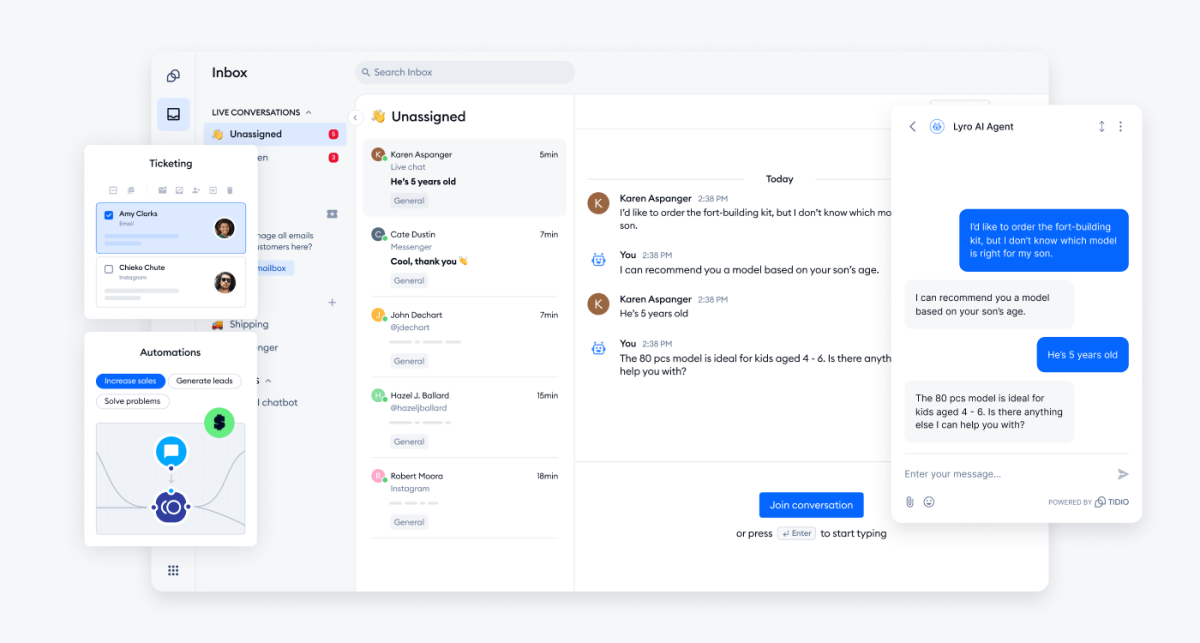
Best for: small businesses and online stores that want chat and AI in one inbox
Tidio gives you a website chat widget and a shared inbox for chat, email and social messages. It adds an AI agent called Lyro and no-code automations called Flows. The free plan runs all of it at a small scale, which makes it the most complete free setup on this list for a store that sells online.
Only conversations a person answers or starts count toward the free limit. Replies from Lyro and Flows don’t, and neither do messages you ignore, such as spam.
What you get for free: 50 billable conversations a month, 10 seats, live chat and ticketing, email and social channels, live video calls, the visual Flows builder with your first 100 visitors reached, your first 50 Lyro AI conversations, the AI reply assistant, basic analytics, multilanguage support, and desktop and mobile apps.
When you’ll have to pay: past 50 answered conversations a month, for the live visitors list and operating hours (Starter), or to keep Lyro answering after its first 50 conversations.
Tidio fits these teams best:
- E-commerce businesses, especially Shopify stores, thanks to native features such as live cart preview and order history next to the chat.
- Small and medium-sized businesses that want to streamline support without a large team, through automation and AI.
- Businesses with high support volume that want to automate repetitive questions. Tidio says Lyro can solve up to 67% of customer problems.
- Companies across industries (retail, SaaS, services) that talk to website visitors and want faster replies and more conversions.
- Teams that manage several channels: live chat, email, Messenger, Instagram and WhatsApp in one place.
Skip Tidio if you need free chat for a large team and don’t need AI or social channels; tawk.to has no seat limit.
Key features:
- One inbox for every channel: website chat, email tickets, WhatsApp, Instagram and Messenger, on web, desktop and mobile.
- Lyro AI agent: answers from your FAQ and website content, and hands the chat to your team when a person is needed.
- Flows: no-code automations that greet visitors and collect leads, or answer common questions when nobody is online.
- Shopify actions: see a shopper’s cart and order history; cancel orders, issue refunds and change shipping addresses from the inbox (order actions on Growth).
- Quick install: plugins for Shopify, WordPress and Wix, or a code snippet for any site.
Pros
- Ten free seats.
- Email and social channels are free on top of the website widget.
- AI and automations are included to try, and their replies don’t use up your conversation limit.
- The 7-day trial unlocks every paid feature with no card, then drops back to the free plan.
Cons
- The free plan counts 50 answered conversations a month, so a busy store will move to a paid plan fairly soon; you pay for the volume you actually handle.
Pricing: Tidio’s pricing page lists (billed annually, monthly in brackets):
- Free: $0, 50 billable conversations a month, 10 seats.
- Starter: $24.17 a month ($29), 100 conversations, live visitors list, operating hours.
- Growth: from $49.17 a month ($59), 250 to 2,000 conversations, Shopify actions, macros, automatic assignment.
- Plus: from $300 a month plus usage, with departments, custom seats and a dedicated success manager.
- Premium: custom pricing, from 3,000 Lyro conversations and a guaranteed 50% Lyro resolution rate.
- Lyro AI Agent: from $32.50 a month ($39) for 50 conversations. Flows: from $24.17 a month ($29) for 2,000 visitors reached.
Rating: G2 4.6/5 (1,962 reviews)
Compare Tidio plans and add Lyro to your live chat
2. tawk.to
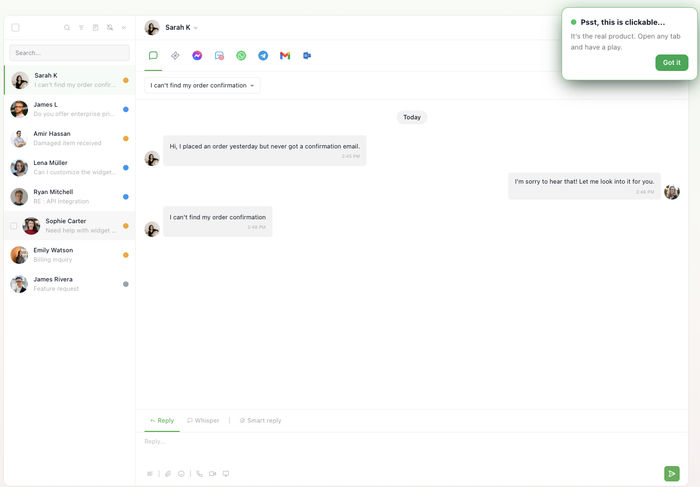
Best for: free chat for a whole team on a zero budget
tawk.to has no cap on agents and no published chat cap. The company earns from add-ons and hired agents instead of seats. The ceiling is automation: AI Assist is free only for limited volume, and the badge stays unless you pay.
What you get for free: unlimited team members, the widget, ticketing, a knowledge base, a CRM, apps for iOS, Android, macOS and Windows, and one-click installers for Shopify, WordPress and Wix.
When you’ll have to pay: to remove the “Powered by tawk.to” badge, or when AI Assist outgrows its free volume.
Key features:
- Unlimited agents: add your whole team at no cost.
- Ticketing and knowledge base: turn chats into tickets and publish help articles.
- Hired agents: pay per hour for tawk.to agents to cover your chat.
Pros
- No seat limit and no published chat cap on the free plan.
- Add-ons are priced per property, not per seat.
Cons
- The branding stays unless you pay $29 a month per property.
- The free AI tier’s volume isn’t published, so AI costs are hard to plan.
Pricing: free. Paid add-ons: remove branding $29 a month, AI Assist from $29 a month, hired chat agents $1 an hour, from tawk.to’s add-ons and “Why free” pages.
Rating: G2 4.5/5 (203 reviews)
Read more: tawk.to review
3. HubSpot
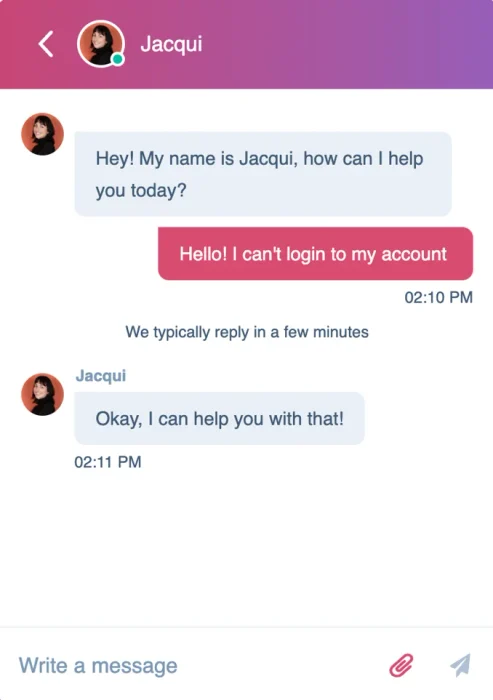
Best for: sales teams that want free chat tied to a CRM
HubSpot’s free tools pair live chat with a CRM that logs the chats, which makes it strong for lead capture on a B2B site. The limits show up on the support side, starting with three canned snippets and HubSpot branding on the widget.
What you get for free: up to two users, live chat, a chatbot builder with limited features, 1-to-1 email, simple Messenger replies, and the HubSpot mobile app.
When you’ll have to pay: for a third user, to remove HubSpot branding, or for AI agents (Service Hub Professional).
Key features:
- CRM logging: chats are logged in HubSpot’s free CRM.
- Chatbot builder: qualify leads and book meetings without code.
- Mobile app: answer chats from HubSpot’s mobile app.
Pros
- A full CRM comes with the chat at no cost.
- Paid seats on the same platform start at $7 a month, billed annually.
Cons
- Free is capped at two users.
- The AI agent starts on Professional, which adds a $1,500 onboarding fee.
Pricing: free for up to two users. Service Hub Starter is $7 per seat a month billed annually (HubSpot shows it against a $20 list price), and Professional is $90 per seat a month billed annually, plus onboarding.
Rating: G2 4.4/5 (3,017 reviews, Service Hub)
Read more: HubSpot alternatives
4. Crisp
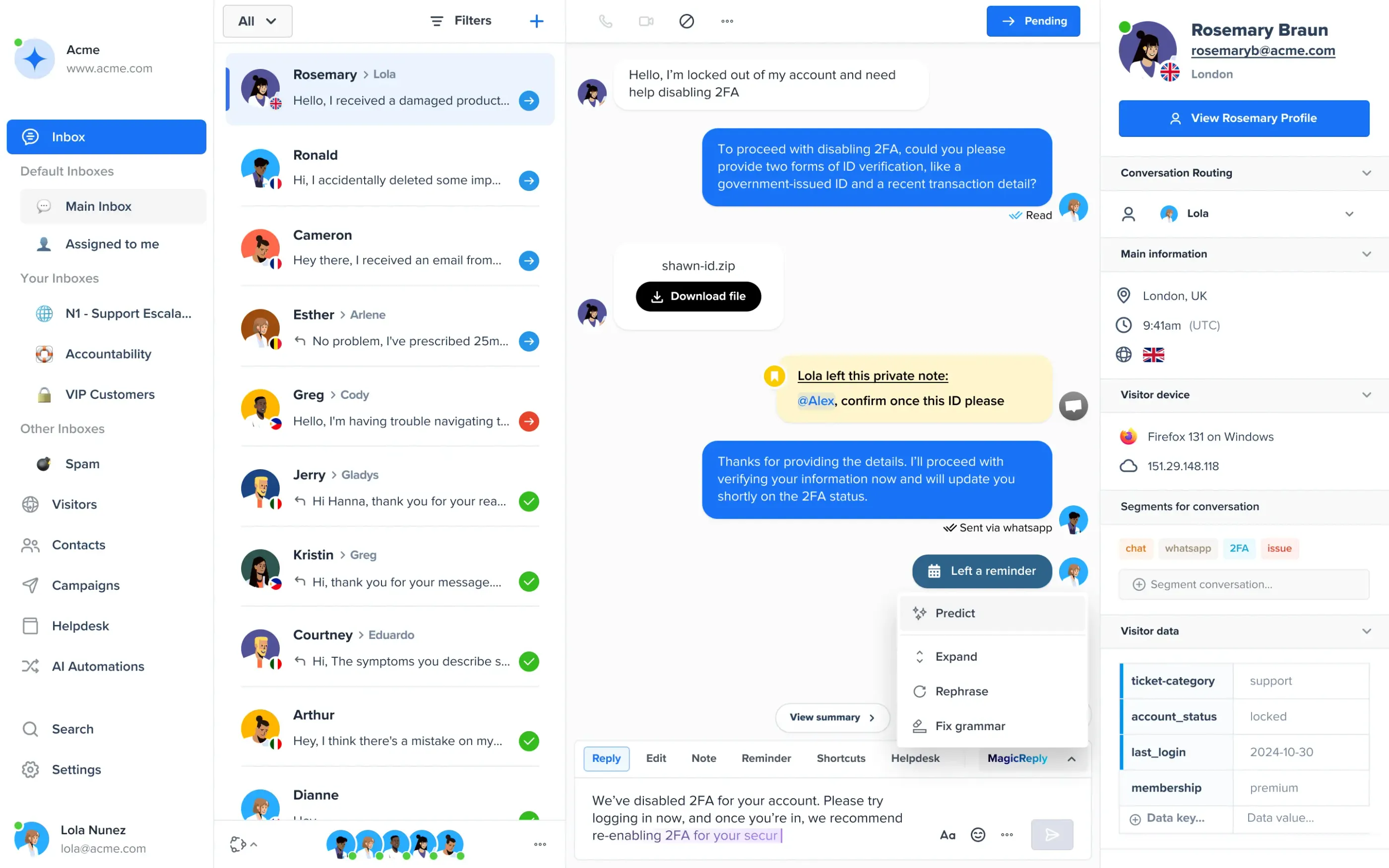
Best for: a two-person team that wants a widget with no chat cap
Crisp’s free plan is website chat only. Email, social channels, canned responses and AI start on paid plans, priced per workspace rather than per seat.
What you get for free: two seats, unlimited conversations, the chat widget and a contact form, 100 customer profiles, mobile and desktop apps, and plugins for WordPress, Shopify and WooCommerce.
When you’ll have to pay: for email or Messenger (Mini), Instagram and WhatsApp (Essentials), canned responses, full conversation history or AI.
Key features:
- Unlimited conversations: no monthly chat cap on the free plan.
- Workspace pricing: paid plans include a set number of seats instead of charging each one.
- AI agent: available from the Mini plan, with AI credits included.
Pros
- No chat cap, even on the free plan.
- Flat workspace pricing is easy to budget for a small team.
Cons
- No canned responses or full history on the free plan.
- The first paid plan costs $45 a month.
Pricing: free for two seats. Mini $45 a month per workspace (4 seats), Essentials $95 (10 seats), Plus $295 (20 seats). 14-day trial, from Crisp’s pricing page.
Rating: G2 4.5/5 (204 reviews)
Read more: Crisp review
5. Zoho SalesIQ
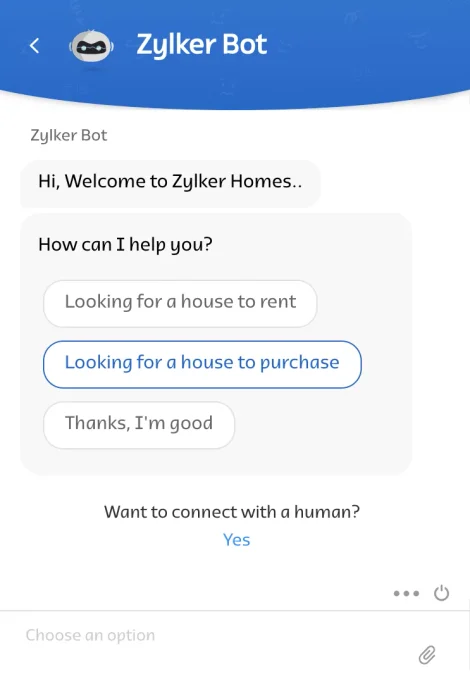
Best for: tracking and chatting with visitors on a tight budget
Zoho SalesIQ puts visitor tracking at the center, so you can see who is on the site before you start a chat. The free plan has no chatbot and no messaging channels.
What you get for free: three operators, 100 operator chat sessions a month, tracking for 10,000 visitors, canned replies, file sharing and apps for mobile and desktop.
When you’ll have to pay: after 100 chats a month, or for a chatbot and WhatsApp, Instagram or Messenger (Basic).
Key features:
- Visitor tracking: see who is browsing and which pages they visit.
- Canned replies and file sharing: both included free.
- Apps everywhere: Android, iOS, Mac, Windows and Ubuntu, on the free plan.
Pros
- Three free operators and visitor tracking.
- Cheap per-operator upgrade.
Cons
- 100 chats a month runs out fast on a busy site.
- No chatbot until the paid plans.
Pricing: free for three operators. Basic $7 per operator a month billed annually ($10 monthly), Professional $12.75 ($17), Enterprise $20 ($25). 15-day trial, from Zoho’s pricing page.
Rating: G2 4.4/5 (256 reviews)
6. Freshchat
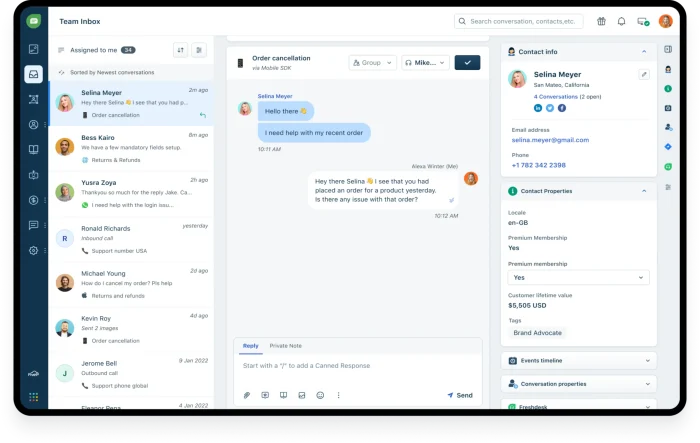
Best for: larger free teams that answer web and in-app chat
Freshchat, the messaging product from Freshworks, suits a team that plans to grow into the Freshworks suite. Social channels and WhatsApp start on Growth, as does the Freddy AI Agent. Freshdesk, the help desk, has no free plan.
What you get for free: up to 10 agents, a chat widget for web and mobile apps, a team inbox, email, and roles and permissions.
When you’ll have to pay: for Facebook, Instagram, WhatsApp or SMS, and for AI.
Key features:
- Team inbox: assign conversations across agents.
- In-app chat: the same widget works inside your mobile app.
- Freddy AI: an AI agent and copilot on paid plans.
Pros
- Ten free agents.
- A direct upgrade path into the Freshworks help desk.
Cons
- No social channels or WhatsApp on the free plan.
- AI Agent sessions cost $49 per 100 after the first 500.
Pricing: free for up to 10 agents. Growth $19 per agent a month billed annually, Pro $49, Enterprise $79. Freddy AI Agent: 500 sessions free once, then $49 per 100 sessions, from Freshworks’ pricing page.
Rating: G2’s Freshchat page didn’t load for us on 30 September 2026, so we show no rating.
Read more: Freshchat review
7. Smartsupp

Best for: a solo store owner who wants chat plus WhatsApp for free
Smartsupp suits small online shops, with integrations for WordPress, WooCommerce and PrestaShop. Its free plan has the lowest conversation cap on this list.
What you get for free: one operator, 25 conversations a month, 14-day history, live chat, WhatsApp and Messenger, and mobile and desktop apps.
When you’ll have to pay: after 25 conversations, for longer history, email, office hours or chat assignment (Solo and up), and for the Mira AI agent.
Key features:
- WhatsApp and Messenger: included free.
- E-commerce integrations: WordPress, WooCommerce and PrestaShop.
- Mira AI agent: a paid add-on for any plan.
Pros
- Social channels on the free plan.
- Plans priced per account, not per seat.
Cons
- 25 conversations a month is the lowest cap here.
- Chat history lasts 14 days on the free plan.
Pricing: free for one operator. Solo $17 a month billed annually, Plus $25 (3 operators), Expert $83 (5 operators), excluding VAT. Mira AI from $16 a month for 100 conversations, billed annually. 14-day trial, from Smartsupp’s pricing page.
Rating: G2 4.7/5 (1,077 reviews)
Read more: Smartsupp review
8. JivoChat
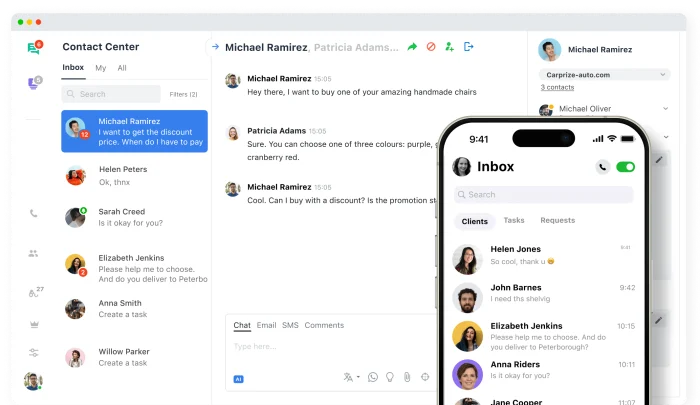
Best for: multichannel chat without a conversation cap
JivoChat’s free plan has unlimited conversations and more free social channels than most tools here. Its own pricing page is unclear on seats: the plan card says the free plan includes 5 agents, and the comparison table says up to 2, so check the count when you sign up. Canned answers and visitor monitoring are paid, as are proactive invitations.
What you get for free: unlimited conversations and sites, two months of history, website chat, email, Telegram, Facebook, Instagram and Viber, and desktop and mobile apps.
When you’ll have to pay: for canned answers and visitor monitoring (Basic), a direct WhatsApp connection, and AI.
Key features:
- Many channels free: social messengers and email in one app.
- Callback and offline forms: capture requests when nobody is online.
- Add-on pricing: WhatsApp and AI bought separately.
Pros
- No conversation cap.
- More free social channels than most tools here.
Cons
- No canned answers on the free plan.
- A direct WhatsApp connection is a $27 monthly add-on on every plan.
Pricing: free. Basic $28 per agent a month and Professional $42, billed annually, from JivoChat’s pricing page. Add-ons: WhatsApp $27 a month, AI assistant $13 a month.
Rating: G2 4.6/5 (51 reviews)
9. Chatwoot
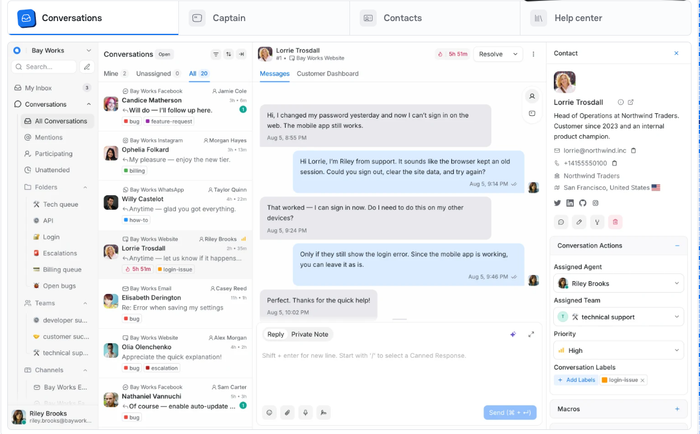
Best for: technical teams that want open-source chat they can host
Chatwoot is open source. The cloud free plan (Hacker) covers website chat only and keeps data for 30 days. The self-hosted Community Edition is free forever, if you can run a Linux server with PostgreSQL and Redis.
What you get for free: two agents and 500 conversations a month in the cloud, canned responses, private notes, labels and auto-assignment; or the self-hosted Community Edition on your own server.
When you’ll have to pay: for email and social channels, AI, retention beyond 30 days, or removing branding (cloud Enterprise).
Key features:
- Self-hosting: keep chat data on your own infrastructure.
- Canned responses and notes: included in the free cloud plan.
- Captain AI: an AI agent on paid plans.
Pros
- A free self-hosted edition, so chat data stays on your servers.
- Canned responses on the free plan.
Cons
- Self-hosting needs a server and someone to maintain it.
- Only 16 reviews on G2 so far.
Pricing: cloud Hacker free (2 agents, 500 conversations). Startups $19 per agent a month, Business $39, Enterprise $99. 15-day trial, from Chatwoot’s pricing page.
Rating: G2 4.5/5 (16 reviews)
10. MyLiveChat
Best for: one person who needs unlimited chats and long history
MyLiveChat has been around since 2003, and its free plan works across as many websites as you like. Its limit is the single seat, and AI is priced separately.
What you get for free: one agent, unlimited chats and websites, three years of history, and 100+ widget themes.
When you’ll have to pay: to remove the MyLiveChat badge, for a second agent, or for AI.
Key features:
- Unlimited websites: one account for several sites.
- Long history: three years on the free plan.
- AI options: managed AI, or your own OpenAI key.
Pros
- Unlimited chats for free.
- The longest published free history on this list.
Cons
- One agent only.
- No G2 listing we could validate.
Pricing: free for one agent. Starter $15 a month (removes the badge), Basic $29 (2 to 4 seats), Corporate $59. AI from $29 a site a month, or $15 per AI agent with your own OpenAI key, from MyLiveChat’s pricing page.
Rating: no validated G2 listing.
What free live chat plans usually limit
Every free plan here stops somewhere. These are the limits that decide when you’ll upgrade:
| Limit | Where it bites on this list |
|---|---|
| Seats | Smartsupp and MyLiveChat allow one person; HubSpot, Crisp and Chatwoot two; JivoChat two or five (its page differs) |
| Conversations a month | Smartsupp 25, Tidio 50 answered, Zoho SalesIQ 100, Chatwoot 500 |
| Chat history | Smartsupp 14 days, Chatwoot 30 days, JivoChat two months; Crisp keeps full history for paid plans only |
| Channels | Crisp, Zoho SalesIQ, Chatwoot and MyLiveChat cover website chat only (plus a contact form on Crisp and in-app chat on Zoho) |
| AI | Crisp, Zoho SalesIQ, Freshchat and Chatwoot include none; the rest offer a small free sample or sell AI as an add-on or higher plan |
| Branding | The vendor’s name stays on the free widget on tawk.to, HubSpot, Crisp, Chatwoot, MyLiveChat and Tidio |
How a vendor counts conversations changes the real price too. Tidio counts only chats a person answers or starts, while most others don’t publish what counts. AI is billed on top of seats almost everywhere, per conversation, session or resolution. List price is never total cost.
Free trials worth knowing
Several well-known live chat tools have no free plan, only a trial. They’re worth a look if you have a budget:
- LiveChat: 14-day trial, no card. Starter is $19 per seat a month billed annually ($25 monthly), with 60 days of chat history. See our LiveChat alternatives.
- Intercom: 14-day trial with Fin, no card. Essential is $29 per seat a month billed annually, plus $0.99 per Fin outcome. See Intercom alternatives.
- Zendesk: 14-day trial. Live chat starts on Suite Team at $55 per agent a month billed annually (US price checked 25 September 2026). See Zendesk alternatives.
- LiveAgent: 30-day trial, no card. Small is $15 per agent a month billed annually. See our LiveAgent review.
To compare paid and free options side by side, see our roundup of the best live chat apps for websites.
How to choose free live chat software
Count the conversations you answer now
Look at a normal month of emails and calls, plus the contact-form messages from your website. Under 25, any tool here works. In the hundreds, treat the free tiers of Smartsupp, Tidio and Zoho SalesIQ as a starting point and plan for the upgrade price.
Decide who answers, and from where
Count everyone who will reply, including the owner on a phone at night. Free seat counts range from one to unlimited, and for a small team a mobile app matters more than most features. Before you commit, send a test chat from your own phone and answer it from the agent app.
Check which channels come free
If customers already message you on WhatsApp or Instagram, pick a tool that puts them in the same inbox for free, such as Tidio (both), Smartsupp (WhatsApp) or JivoChat (Instagram). Otherwise you’ll answer in two places. If you sell abroad, multilingual live chat is part of the same question.
Test the AI on your top 20 questions
Free AI is a sample. Load your FAQ, ask the bot your 20 most common questions, and count how many it answers correctly and how many it hands to a person. Then price the AI at your real volume. Our guide to chatbot vs live chat explains when each one fits.
Install it on your real site
Most tools install from a Shopify, WordPress or Wix plugin, or a snippet pasted before the closing body tag. Follow our step-by-step guide to add live chat to your website. Before you go live, set up chat triggers and a few canned responses.
Which free live chat software should you pick?
- You run a Shopify store and want chat to drive sales: Tidio. Start on the free plan, then move to Growth with Lyro when chats pick up: agents see carts and order history, and edit orders from the chat. Gorgias is the alternative for a full e-commerce help desk, though it has no free plan. See our guide to Shopify live chat.
- You’re a small business with a growing chat volume: Tidio Growth with Lyro, so AI answers the repetitive questions and your team handles the rest from one inbox. Larger teams that need departments and custom seats fit Plus.
- You need free chat for a big team and can do without AI: tawk.to, with unlimited agents.
- You’re a B2B company collecting leads: HubSpot, so chats land in its free CRM.
- You’re a two-person team that wants no chat cap: Crisp.
- You want to host chat on your own server: Chatwoot Community Edition.
See Tidio's Shopify live chat features
Frequently asked questions
For small businesses and online stores, Tidio’s free plan is the most complete. It has 10 seats, puts social channels and email in one inbox, and lets you try AI. For unlimited agents at no cost, tawk.to is the most generous. For free chat tied to a CRM, choose HubSpot.
Yes. tawk.to has no paid plan at all: unlimited agents are free, with no published chat cap, and it charges only for add-ons such as branding removal and AI. MyLiveChat, Crisp and JivoChat also offer unlimited chats on their free plans, with one, two, and two to five seats.
Yes. Most tools on this list offer a plugin for platforms such as Shopify, WordPress or Wix, or a code snippet you paste once. Tidio, for example, installs from a Shopify or WordPress plugin in a few minutes.
Sometimes, in a limited form. Tidio includes the first 50 Lyro AI conversations and a free Flows builder, HubSpot has a basic chatbot builder, and tawk.to offers AI Assist for limited volume. Crisp, Zoho SalesIQ, Freshchat and Chatwoot include no AI on their free plans.
The first paid plans on this list start at $7 a month per seat, billed annually (HubSpot, Zoho SalesIQ), and go up to $45 a month per workspace (Crisp). AI usually costs extra, per conversation, session or resolution, so price it at your real chat volume.
A free plan never expires but limits seats, chats, history or features. A free trial unlocks paid features for a set time, often 7 to 30 days; then you pay, or drop to a free plan if one exists. LiveChat, Intercom and Zendesk offer trials only.
Start with Tidio live chat for your website
