



Key takeaways
- HappyFox Help Desk starts at $24 per agent per month, billed annually. That is $29 on monthly billing. Basic is capped at 5 agents, and higher plans have no agent cap.
- AI, chat, workflows, and analytics are separate products. HappyFox AI adds $14 to $39 per agent per month on top of the help desk, so budget for the stack, not the headline price.
- There is no free plan, only a 14-day trial. No credit card is needed to start it.
- Users rate it well. G2 shows 4.5 out of 5 from 138 reviews, and Capterra shows 4.6 from 93. The complaints are reporting, routing flexibility, and tier-locked features.
- It fits teams that want ticketing depth, SLAs, and multi-brand support. It does not fit small teams that mainly need live chat and an AI agent.
HappyFox is a ticketing help desk with strong automation and SLA tools, now sold as a family of separately priced products that includes live chat, AI, and a contact center suite. Teams that want structure and control praise its setup and support, while reviewers also flag reporting, routing limits, and the way the bill grows once you add AI. We reviewed it from HappyFox’s public pricing and product pages and from G2, Capterra, and Software Advice, without running a trial.
HappyFox at a glance
Here is the whole review in one table, before the detail.
| HappyFox | |
|---|---|
| What it is | Ticketing help desk with automation, SLAs, a knowledge base, and add-on AI, chat, and workflow products |
| Best for | Support and IT teams that want ticketing depth, SLAs, and multi-brand desks |
| Not ideal for | Small teams that mainly need live chat and an AI agent, or that want a free plan |
| Free plan or trial | 14-day free trial, no credit card; no free plan |
| Starting price | Help Desk from $24 per agent per month, billed annually ($29 monthly) |
| AI | Separate products: HappyFox AI from $14 per agent per month, Chatbot at $0.33 per resolution |
| G2 / Capterra rating | 4.5 out of 5 (138 reviews) / 4.6 (93 reviews), observed October 2026 |
| Our verdict | A capable, configurable help desk whose real cost depends on the add-ons you pick |
What HappyFox is and who it is built for
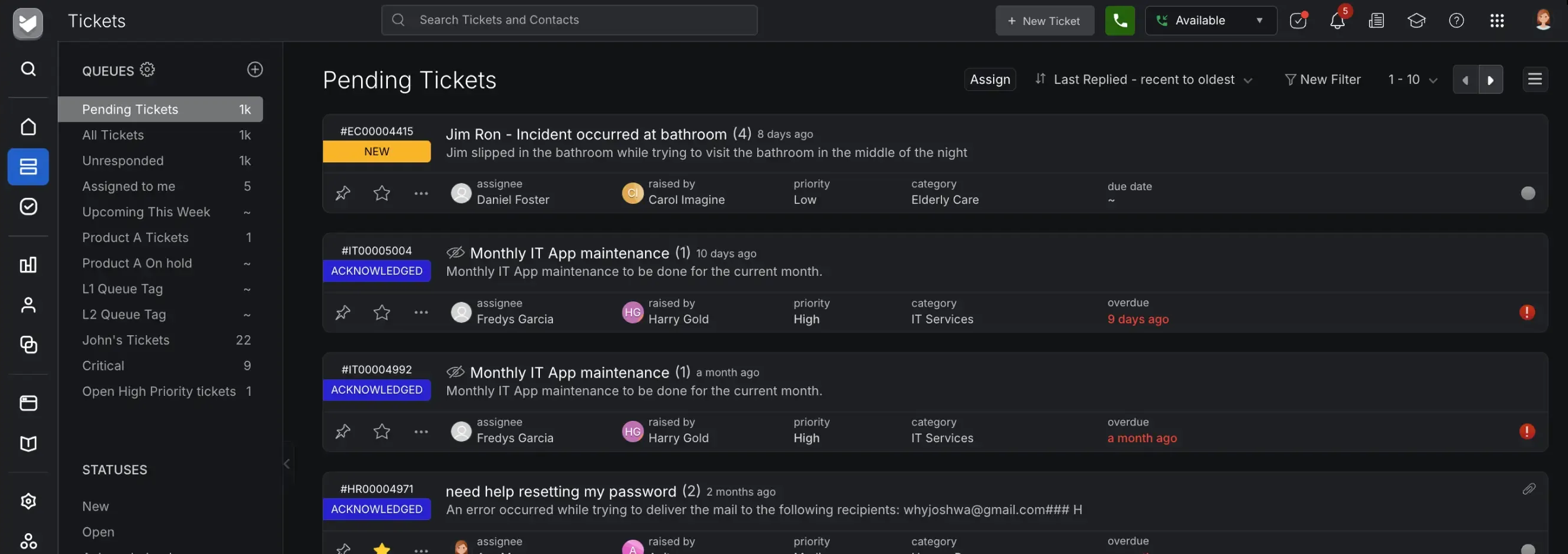
HappyFox is a cloud help desk that turns email, web forms, chat, social messages, and phone requests into tickets, then routes them with rules and tracks them against SLAs. HappyFox’s homepage says it serves 2,200+ organizations and 50,000+ agents. Its pages lean toward customer support, IT, and HR teams, and it lists solutions for education, healthcare, government, and e-commerce.
The product has widened since the older reviews you will find online. As of October 2026, HappyFox’s pricing page lists Help Desk, a Contact Center Suite with voice, a Service Desk for IT, a CRM on a waitlist, and several AI and workflow products. Each has its own price, so “what does HappyFox cost” now has more than one answer. The sections below keep the help desk and its add-ons apart.
HappyFox features, capability by capability
These are the capabilities that HappyFox’s own pages and its reviewers describe most. The screenshots come from HappyFox’s public product pages and are credited under each image.
Omnichannel ticketing and unified inbox
HappyFox converts email, phone, chat, social, and web requests into tickets in one queue. Every plan includes unlimited tickets, unlimited mailboxes, and an embeddable widget. Social channels scale with the plan: Basic has no Instagram or WhatsApp, and the number of Facebook pages and X accounts grows by tier.
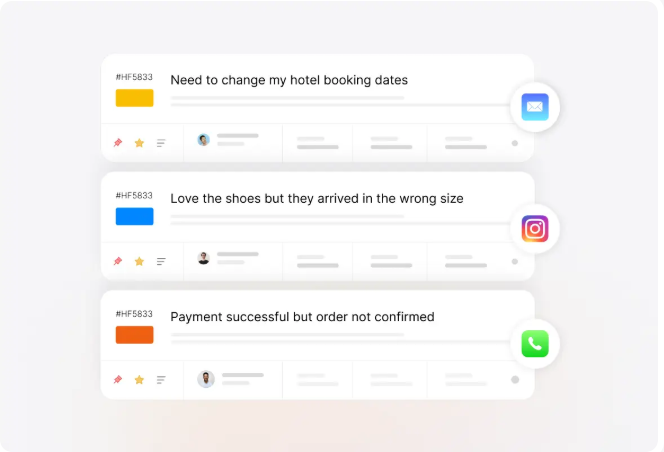
The limit: native phone is part of the separate Contact Center Suite. On Help Desk plans, calls come in through integrations such as Aircall, Dialpad, RingCentral, or JustCall.
Automation, routing, and SLAs
Smart Rules are available on every plan. They set status changes, assignments, reminders, and escalations from conditions you define, and canned actions and ticket templates sit alongside them. SLA management is also on every plan, which is generous for the entry tier. Team adds round-robin assignment, and Pro adds load-balanced assignment, proactive agent collision detection, and a live SLA timer.
The limit: a Capterra reviewer in the retail sector wrote in July 2026 that automated ticket routing is “very limiting and time consuming to set up”. A G2 reviewer in 2023 said inputs were less customizable than they wanted. Test your most complex routing rule in the trial before you commit.
Knowledge base and self-service
Every plan includes a self-service knowledge base and an internal one, with SEO settings and export. Multilingual knowledge bases and multi-brand desks start on Team, with 5, 15, or 25 brands depending on the plan.
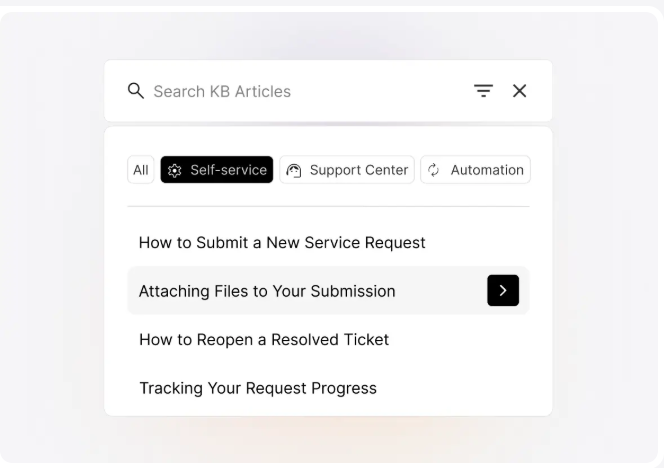
The limit: a G2 reviewer in a hospital setting asked for improvements to the knowledge base, so check that its editor and search meet your needs.
HappyFox AI and the chatbot
AI is sold as separate products. HappyFox AI is the agent-facing layer: a Copilot that summarizes tickets and drafts replies, plus Answers, Resolve, Urgency, and Knowledge features. It costs $14, $29, or $39 per agent per month depending on the tier, with monthly usage allowances. Assist AI is a different product. It answers employee IT and HR questions in Slack and Microsoft Teams, and it is priced per user.
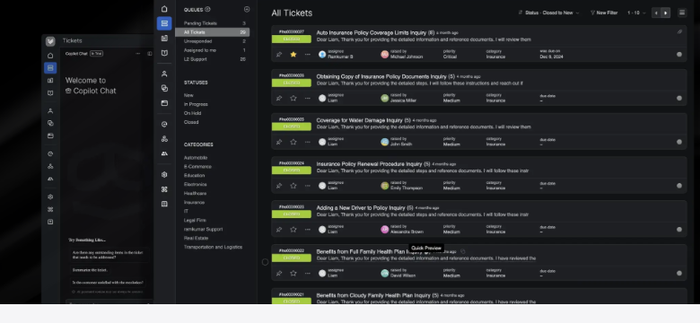
The limit: one Capterra reviewer wrote in July 2026 that the AI “does not provide reliable information so we don’t use it at all”. That is a single review, so judge it on your own knowledge base in a trial.
Live chat and chatbot
HappyFox Chat is a separate live chat product, not part of the help desk plan. Its Starter plan includes unlimited agents and 500 chats a month from $29 per month, per HappyFox’s chat page. The HappyFox Chatbot resolves questions from your knowledge base and hands off to an agent with context. HappyFox’s own pages price it two ways, $0.33 per resolution on the pricing page and “from $9 per agent per month” on the chatbot page, so ask which applies to you.
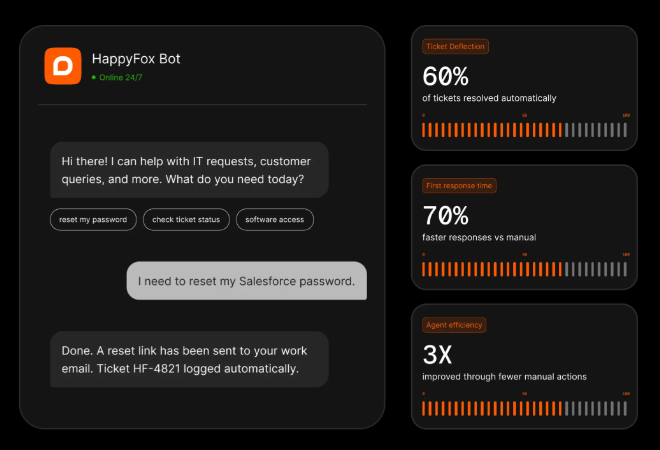
The limit: chat, chatbot, and help desk are billed separately, so three line items replace one. That suits a team that wants control, and adds overhead if you only want chat.
Reporting and integrations
Dashboards, reports, and CSV or Excel exports are on every plan, with reporting history of one year on Basic and longer on higher plans. HappyFox lists 103 third-party integrations on its plan matrix, plus Zapier, webhooks, and a REST API on all plans. Its Business Intelligence product is separate.
The limit: G2’s summary of reviews says some users want more flexible reporting, and a G2 reviewer called the reports confusing. Decide which reports you need before you pick a tier.
HappyFox pricing in 2026
HappyFox publishes its prices. The Help Desk page defaults to annual billing, which saves 20% against monthly, and a 2-year option lowers the price again. The table shows per-agent prices; Basic is capped at 5 agents.
| Plan | Annual billing | Monthly billing | What the tier adds |
|---|---|---|---|
| Basic | $24 per agent | $29 per agent | Unlimited tickets, SLAs, knowledge base, SSO; up to 5 agents |
| Team | $49 per agent | $69 per agent | Multi-brand, custom domain, custom roles, custom queues, 24/5 email support |
| Pro | $99 per agent | $119 per agent | Load-balanced assignment, task and asset management, scheduled tickets, uptime SLA, 24/7 email support |
| Enterprise Pro | Custom | Custom | Agent scripting, 2 TB attachments, advanced audit logs, 24/7 phone support, customer success manager |
Large teams can drop per-agent pricing for a flat monthly fee with unlimited agents and a yearly ticket allowance:
| Flat-fee plan | Annual billing | Tickets per year | Overage |
|---|---|---|---|
| Growth | $1,999 per month | 20,000 | $0.03 per ticket |
| Scale | $3,999 per month | 150,000 | $0.02 per ticket |
| Scale Plus | $5,999 per month | 300,000 | $0.01 per ticket |
| Ultimate | Custom | 1,000,000 | $0.01 per ticket |
Source: HappyFox’s Help Desk pricing page, flat-fee section, checked October 2026.
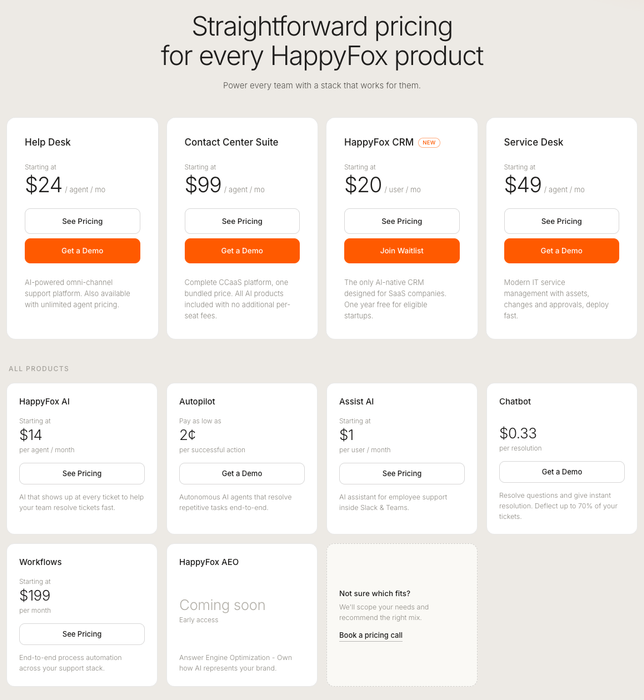
What the add-ons cost
HappyFox says its web messaging, AI, workflows, and BI are “separate products with their own pricing, so you only pay for what you use”. The table lists the ones reviewers ask about most.
| Product | Price | What triggers the charge |
|---|---|---|
| HappyFox AI | $14, $29, or $39 per agent per month | Per agent, with monthly Copilot, Knowledge, and Resolve allowances |
| Assist AI | $1, $2, or $4 per user per month | Per employee, for IT and HR support in Slack and Teams |
| Chatbot | $0.33 per resolution, or from $9 per agent per month | Per resolution on the pricing page; per agent on the chatbot page |
| Autopilot | From $0.02 per action | Per successful automated action |
| Workflows | $199 to $1,999 per month | Flat monthly, with an action allowance |
| Contact Center Suite | $99 per agent per month, billed annually | Voice, Chatbot, and Autopilot usage billed separately |
What you will actually pay
These examples use annual billing and list prices, and they leave out voice and usage fees.
- 5 agents on Basic: 5 × $24 = $120 per month.
- 10 agents on Team: 10 × $49 = $490 per month. Add HappyFox AI Standard at $14 per agent and it is 10 × $14 = $140 more, or $630 per month.
- 10 agents on Pro: 10 × $99 = $990 per month.
- 25 agents on Pro: 25 × $99 = $2,475 per month. Growth is $1,999 per month flat, so it is cheaper if you stay under 20,000 tickets a year.
Three footnotes matter more than the table:
- The tier unlocks features you may assume are included. Custom domains, custom roles, and multi-brand start on Team, and load balancing and the uptime SLA start on Pro.
- Basic caps at 5 agents. A sixth agent means moving to Team, and every agent then pays the higher rate.
- There is no free plan. The 14-day trial needs no card, and downgrades take effect at the end of your billing cycle, per HappyFox’s pricing page.
A reviewer on Capterra in July 2026 called HappyFox “overpriced, even at it’s lowest tier”. Other reviewers call it good value, so the answer depends on how much of the stack you use.
What real users say about HappyFox
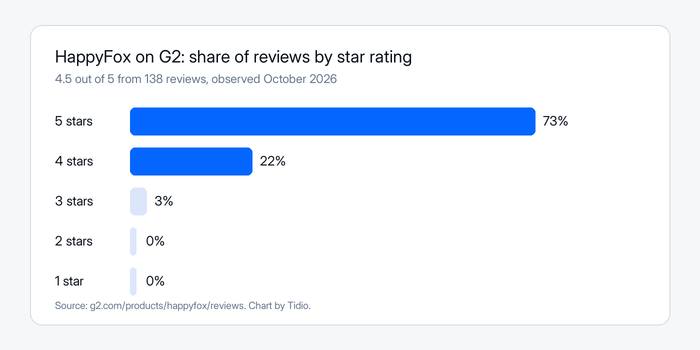
HappyFox holds 4.5 out of 5 on G2 from 138 reviews and 4.6 on Capterra from 93 reviews, both observed October 2026. On G2, 73% of reviews are five-star, 22% are four-star, and 3% are three-star.
What reviewers praise
Reviewers return to a clean interface, quick setup, and a responsive support team. A G2 reviewer who directs IT at a mid-market company wrote that the UI is clean and easy to navigate. Another, a support team lead, said you can start a help desk with minimal configuration. A web consultant praised customer service as friendly and responsive. Capterra shows ease of use at 4.4 and customer service at 4.6.
What reviewers criticize
The complaints are more specific. A G2 reviewer noted that HappyFox did not yet have a Microsoft Outlook calendar integration. Others found the reports confusing, said some features need a higher tier, or called the email notifications unclear. The sharpest review is a 1 out of 5 on Capterra from July 2026 by a head of support in retail, who criticized ticket search, routing, AI reliability, and price while praising the support team and the API.
Mind the sample. Most Capterra and Software Advice reviews we read date from 2013 to 2022, G2’s are more recent, and one review is not a trend. We could not retrieve TrustRadius or Trustpilot ratings.
HappyFox pros and cons
Pros
- Ticketing depth on every plan. Unlimited tickets, Smart Rules, and SLA management are in the $24 tier.
- Published prices. Help Desk, flat-fee, and add-on prices are on HappyFox’s own pages.
- Multi-brand desks. Team and above can run 5, 15, or 25 brands with custom domains.
- Easy setup and friendly support. G2 and Capterra reviewers mention both.
- Strong ratings. 4.5 out of 5 on G2 and 4.6 on Capterra.
Cons
- The bill grows with the stack. AI, chat, chatbot, workflows, and BI are priced separately from the help desk.
- No free plan. There is a 14-day trial and nothing after it.
- Tier-locked features. Multi-brand starts on Team, load balancing and the uptime SLA on Pro, and 24/7 phone on Enterprise.
- Routing and reporting limits. Reviewers describe limited routing and confusing reports.
- Overlapping AI products. Copilot, Assist AI, Chatbot, and Autopilot have different units, so the buying decision takes work.
Who should choose HappyFox, and who should not
Choose HappyFox if:
- You run a support or IT team that wants tickets, SLAs, and Smart Rules from the first plan.
- You manage several brands or departments and want one help desk with separate portals.
- You are comfortable pricing a stack and your team has 10 or more agents, where per-agent and flat-fee pricing can be compared.
Do not choose HappyFox if:
- You mainly want live chat and an AI agent for a small team or online store. A tool such as Tidio, with its free plan, Shopify features, and Lyro AI agent, is a closer fit.
- You want one price that covers help desk, AI, and chat.
- You need a permanent free plan.
See Tidio plans and Lyro pricing
HappyFox alternatives, briefly
If HappyFox looks like more desk than you need, or less chat than you want, these are the tools we cover on the blog.
| Tool | Best for | Read our take |
|---|---|---|
| Tidio | Small and mid-sized teams that want live chat, email, and an AI agent in one inbox, with a free plan | Tidio help desk |
| Zoho Desk | Teams that already run on Zoho | Zoho Desk review |
| Help Scout | Small teams that want a shared inbox | Help Scout review |
| Freshdesk | A full ticketing desk with a broad feature set | Freshdesk review |
Tidio’s Free plan includes 50 billable conversations a month for up to 10 seats, and Starter is $24.17 per month on annual billing (checked October 2026). Lyro is billed separately, so you only pay for what you use, with a few quotas to watch. G2 shows Tidio at 4.6 out of 5 from 1,962 reviews. Tidio says Lyro can resolve up to 75% of support requests. It suits small and mid-sized teams, not a large IT service desk. For more options, see our help desk software guide.
Bottom line
HappyFox is a configurable, well-rated help desk with published prices and a lot of ticketing on its entry plan. It is also a stack: AI, chat, workflows, and analytics each add a line to the bill. Price your real team size and the add-ons you need, then run the 14-day trial on your hardest routing rule. If you mostly need chat and an AI agent, try a tool built for that.
Try Tidio free for your website chat
Related guides
Frequently asked questions
HappyFox is a cloud help desk that turns email, chat, social, web, and phone requests into tickets, with automation, SLAs, and a knowledge base. It is sold alongside separately priced AI, chat, workflow, and analytics products. It suits support and IT teams that want ticketing depth.
It is worth it for teams that need SLAs, multi-brand desks, and rules from the entry plan, and that accept paying for AI and chat separately. Users rate it 4.5 out of 5 on G2 and 4.6 on Capterra. It is harder to justify for a small team that mainly needs live chat.
Help Desk starts at $24 per agent per month on annual billing, or $29 monthly. Team is $49 and Pro is $99 per agent on annual billing. Flat-fee plans start at $1,999 per month. AI add-ons cost extra, starting at $14 per agent per month for HappyFox AI.
No. HappyFox offers a 14-day free trial with no credit card, and no permanent free plan. To start on a free plan instead, Tidio and HubSpot both offer one, with limits.
Yes, as separate products. HappyFox Chat starts at $29 per month with unlimited agents and 500 chats, and HappyFox AI starts at $14 per agent per month. Neither is included in Help Desk plans, so price them as add-ons.
HappyFox is best for support, IT, and HR teams that want structured ticketing, SLAs, and automation, and for companies that run several brands from one desk. It is less suited to small online stores that want a chat widget and an AI agent.
Yes. Every plan can export tickets to CSV or Excel and export the knowledge base. HappyFox lists migration assistance on all plans, and it describes implementation specialists rather than a one-click self-serve move.
Use live chat to support your customers in real-time
