



Key takeaways
- Zoho Desk has a free plan for 3 users, then paid plans from $7 per agent per month. Express is $7, Standard $14, Professional $23, and Enterprise $40, all billed annually. Monthly billing is $9, $20, $35, and $50.
- The tier decides what you get. Answer Bot and WhatsApp start on Standard, Blueprints, Zia AI, and phone on Professional, and multi-brand help centers on Enterprise.
- Support is extra. Zoho’s Premium support costs 20% of your subscription, and Enterprise support costs 25% with a minimum of 25 licenses.
- Users rate it well. G2 shows 4.4 out of 5 from 8,007 reviews, Capterra shows 4.5 from 2,216, and TrustRadius shows 8.3 out of 10 from 145.
- The recurring complaint is the learning curve. G2 reviewers tag it as a con more than 500 times, ahead of limited customization and complexity.
- It fits teams that live in Zoho and want control. It is a heavier choice for a small team that mainly wants live chat and an AI agent.
Zoho Desk is a cloud help desk that turns email, social, chat, and phone requests into tickets, with automation, SLAs, a knowledge base, and AI. It is sold as part of the wider Zoho family, so it works best next to Zoho CRM. Reviewers praise its depth and price, and the same reviewers say the setup is hard and the interface is busy. We reviewed it from Zoho’s public pricing and product pages and from G2, Capterra, and TrustRadius, without running a trial. Tidio appears only as one alternative near the end.
Zoho Desk at a glance
| Zoho Desk | |
|---|---|
| What it is | Cloud help desk with ticketing, automation, SLAs, a help center, and AI, sold alongside Zoho CRM |
| Best for | Teams that already run on Zoho and want configurable workflows and a low per-agent price |
| Not ideal for | Small teams that want a quick chat-first setup, or that need every channel on a low tier |
| Free plan or trial | Free plan for 3 users; 15-day trial of any plan, no credit card |
| Starting price | Express from $7 per agent per month, billed annually ($9 monthly) |
| AI | Zia AI from Professional, Answer Bot from Standard, AI Agents with up to 30 million free tokens a month |
| G2 / Capterra rating | 4.4 out of 5 (8,007 reviews) / 4.5 (2,216 reviews), observed October 2026 |
| Our verdict | A deep, good-value help desk that rewards a patient admin, and gates its best features by tier |
What Zoho Desk is and who it is built for
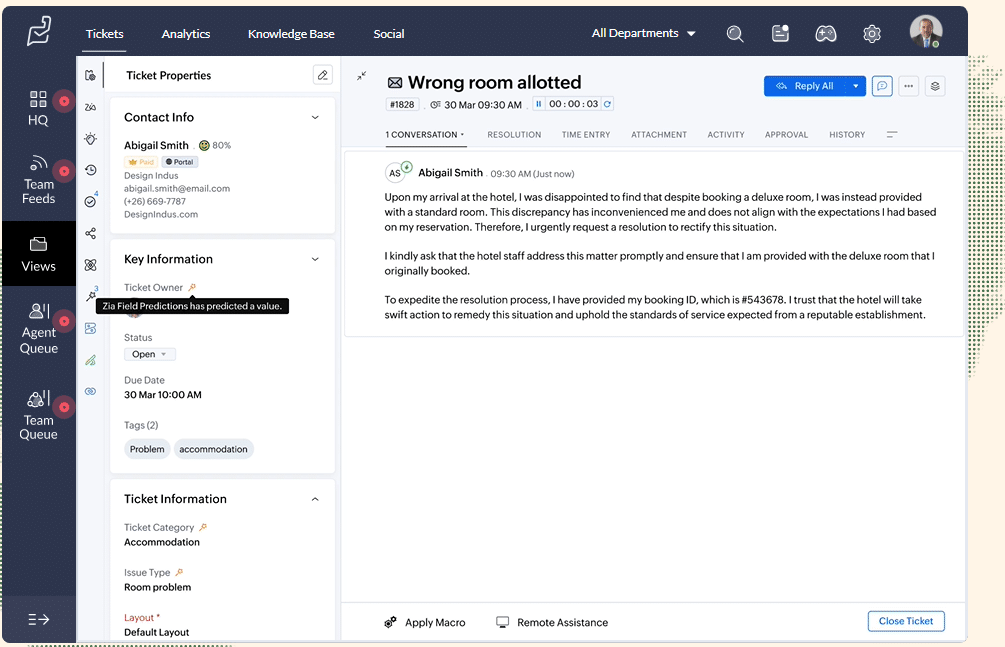
Zoho Desk is customer service ticketing software. It collects customer requests from email, social media, web forms, chat, and phone, turns each one into a ticket, and lets you route, prioritize, and track those tickets against SLAs. Zoho’s homepage calls it “AI customer service software for every business” and says more than 125,000 businesses use it.
It is one product in a large suite. Zoho Desk integrates with Zoho CRM, and Zoho lists more than 360 integrations and 2,900 Marketplace extensions. G2’s reviewer mix leans small: 5,877 of the reviews come from small businesses, 1,846 from mid-market companies, and 271 from enterprises. That fits what the product is. Small teams can afford it, and larger teams keep it because they can configure it.
Zoho Desk features, capability by capability
These are the capabilities that Zoho’s own pages and its reviewers describe most.
Omnichannel ticketing
At its core Zoho Desk is a ticketing system. Email, Instagram, Facebook, X, and web forms are on Express, the cheapest paid plan. Standard adds Business Messaging, a live chat widget for logged-in customers, and instant messaging on WhatsApp, Instagram, Facebook Messenger, Telegram, WeChat, and Line. Professional adds telephony with a toll-free number.
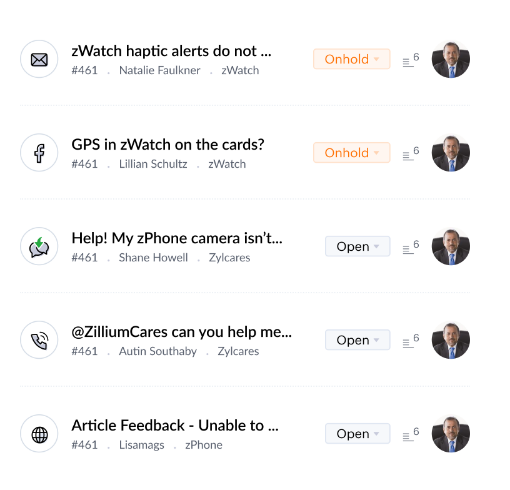
The limit: channels are tiered. Standard includes 1 WhatsApp channel, Professional 10, and Enterprise 50, and WhatsApp adds its own usage-based charges on top. Live chat through Zoho SalesIQ is listed under Enterprise.
Automation and assignment
Every paid plan has workflow rules and direct assignment, which routes a ticket to a department or agent when criteria such as keywords in the subject or description match. Rule limits grow by tier: 1 per module on Express, 5 on Standard, 15 per department on Professional, and 30 per department on Enterprise. Round-robin assignment starts on Professional, and skill-based assignment is Enterprise only.
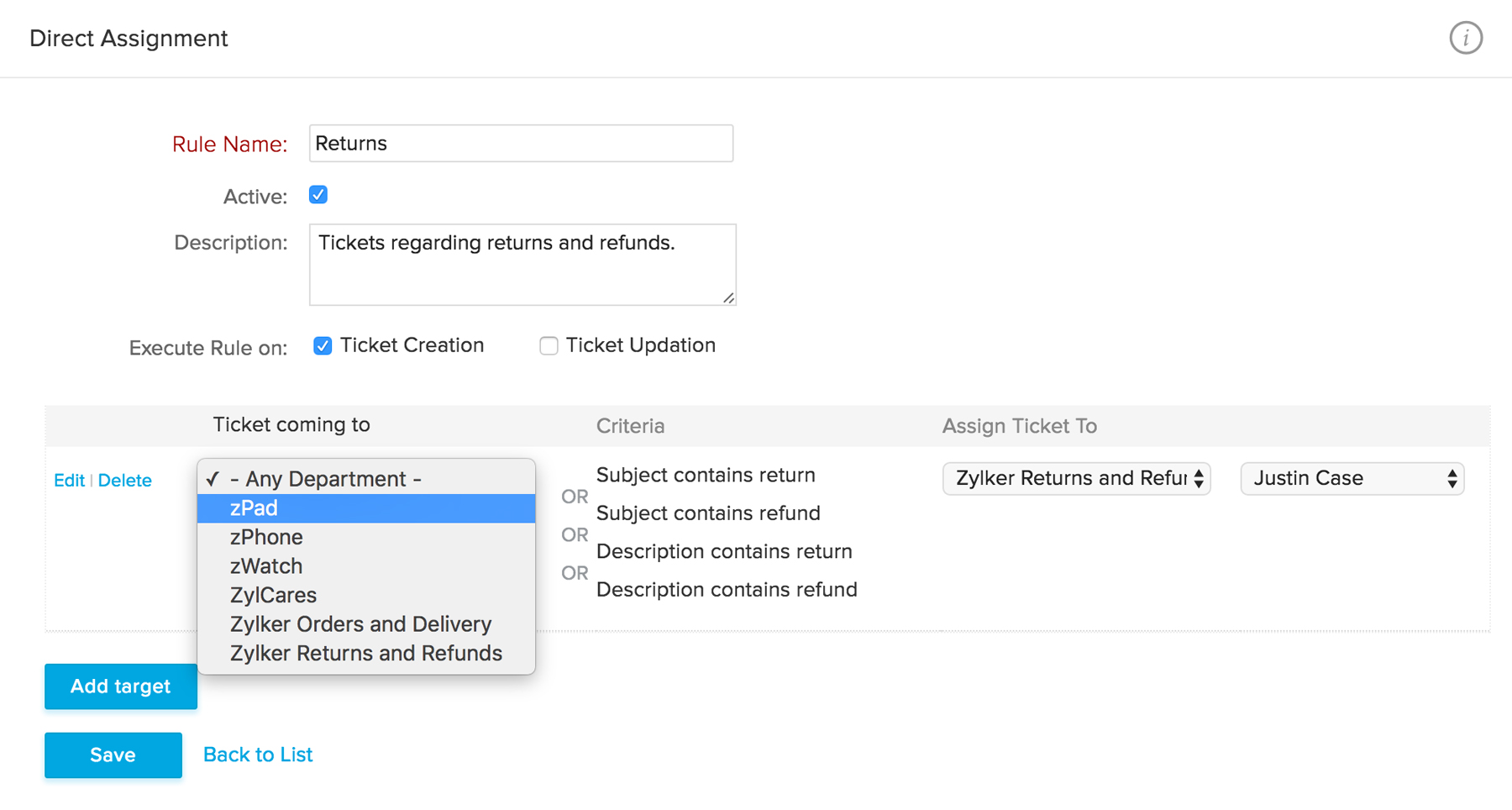
The limit: a G2 reviewer who manages IT at a small business wrote in October 2026 that “setting up automations for certain events can be a bit complicated.” Build your most complex routing rule during the trial before you commit.
Blueprints
Blueprint is Zoho Desk’s process designer. You draw the states a ticket moves through, such as a refund request, and agents see only the actions that apply at each step. It starts on Professional, with 1 active Blueprint per department, and Enterprise allows 20 per department. State-level SLAs and escalations start on Professional too.
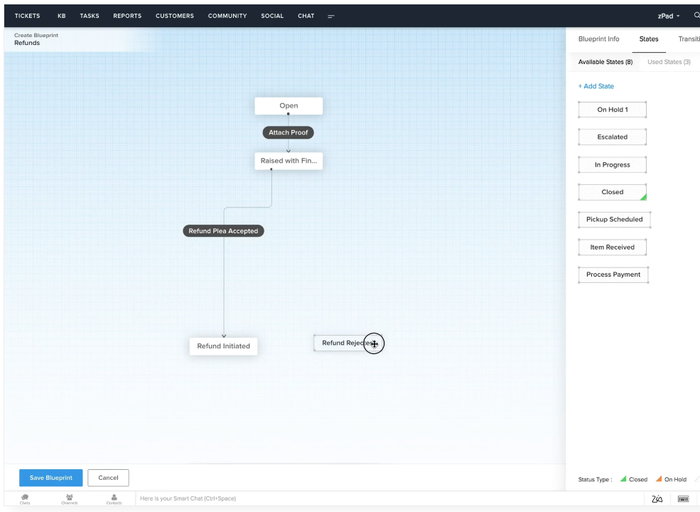
The limit: Blueprints are the feature that makes the platform feel heavy. A Capterra reviewer in March 2026 said heavy customization “can come with a steep learning curve or require external development input.”
Zia AI, Answer Bot, and AI agents
Zoho splits its AI across tiers. Sentiment analysis and Answer Bot, which answers customers from your knowledge base, are on Standard. Zia AI, with generative, predictive, and analytical features, starts on Professional. Express and Standard connect your own AI key, and Professional and above can use Zoho’s own model as well. The Agent Studio lets you build AI agents, with named templates such as Support Specialist and Resolution Expert, and Zoho lists up to 30 million free tokens a month.
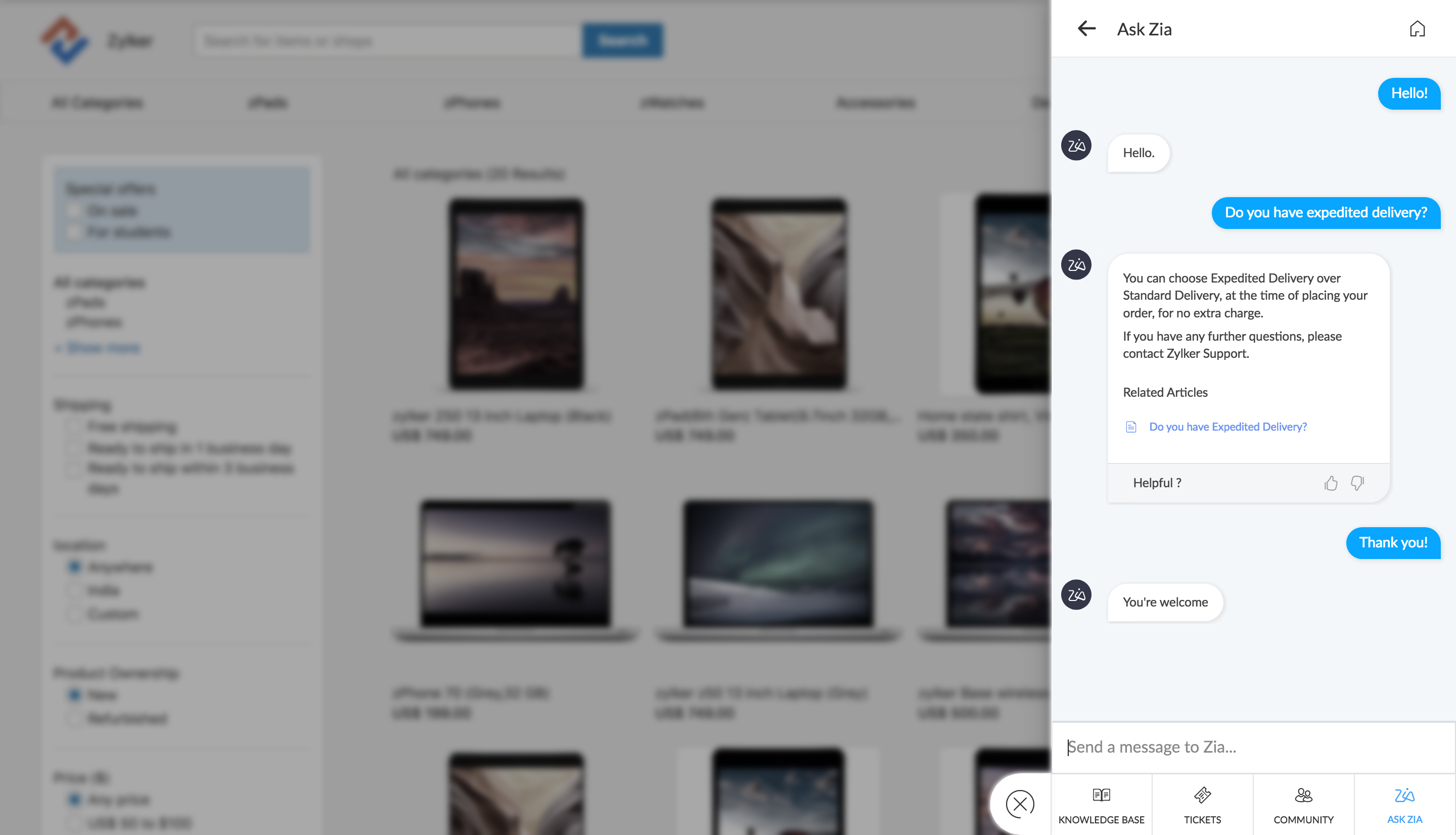
The limit: Zoho’s pricing page lists AI Agents from Express, while its edition table ticks pre-built Zoho Desk AI agents for Enterprise only. Ask which agents your plan includes. We found no published resolution rate and no per-resolution price for Zoho’s agents.
Help center, knowledge base, and community
Standard adds a knowledge base, a community forum, the ASAP self-service widget, and customer happiness ratings. Professional adds a multilingual help center and community gamification, with points and badges. A multi-brand help center, for running portals for several brands in one account, is Enterprise only.
The limit: if you run several brands, the price tier that unlocks separate portals is the top one. Check this before you plan a multi-brand setup on a lower plan.
Reporting, SLAs, and mobile
Custom reports and dashboards start on Standard, and the Radar mobile app for service metrics is on every plan, including Free. SLAs scale too: Free and Express have a default SLA, Standard has 4, Professional 10 per department, and Enterprise 20 per department. Customer-based SLAs start on Professional.
The limit: reviewers want more from reporting. A G2 reviewer who works as a software engineer wrote in September 2026 that “the reporting capabilities feel somewhat limited compared to some competitors.” A TrustRadius reviewer said the analytics section lacks the ability to focus on working hours.
Integrations and the Zoho ecosystem
Zoho Desk integrates with Zoho CRM, and Zoho describes working with tickets from inside CRM. Public Marketplace extensions are listed from Standard, and Zoho says it integrates with 360 apps in all, including Zoho’s own.
The limit: a Capterra reviewer in the security sector said some features, such as deep analytics and Microsoft Teams integration, are only available on higher-tier plans. The ecosystem is the main reason to pick Zoho Desk, and it matters less if you do not use other Zoho products.
Zoho Desk pricing in 2026
Zoho publishes its prices. The pricing page defaults to annual billing, which Zoho says saves up to 34%. All prices are per agent per month, and local taxes are extra.
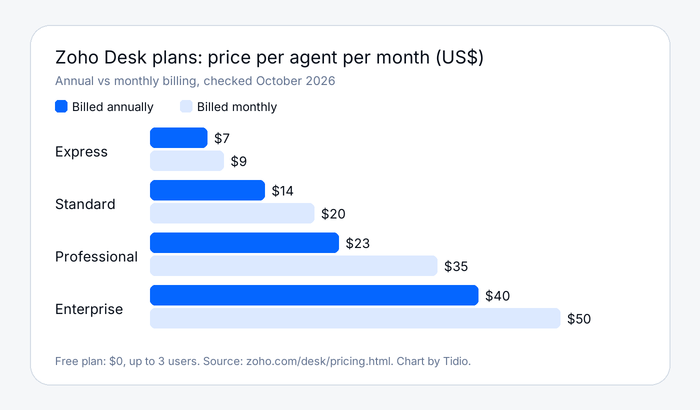
| Plan | Annual billing | Monthly billing | What the tier adds |
|---|---|---|---|
| Free | $0 | $0 | 3 users, default SLA, Radar mobile app |
| Express | $7 per agent | $9 per agent | Email, social, web forms, workflows, direct assignment, custom domain, multi-level escalations |
| Standard | $14 per agent | $20 per agent | Business Messaging chat, WhatsApp and other instant messaging, Answer Bot, community forum, knowledge base, custom reports |
| Professional | $23 per agent | $35 per agent | Zia AI, Blueprints, telephony, round-robin assignment, multilingual help center, customer-based SLAs |
| Enterprise | $40 per agent | $50 per agent | SalesIQ live chat, skill-based assignment, multi-level IVR, multi-brand help center, custom modules, sandbox |
Zoho also sells light agents at $6 per light agent per month, and Enterprise includes 50. Each paid plan has a 15-day trial with no card, and after it your account drops to the Free plan.
What you will actually pay
These examples use annual billing and list prices, and they leave out WhatsApp usage charges and taxes.
- 5 agents on Standard: 5 × $14 = $70 per month. On monthly billing it is 5 × $20 = $100.
- 10 agents on Professional: 10 × $23 = $230 per month. With Premium support at 20%, it is $276.
- 25 agents on Enterprise: 25 × $40 = $1,000 per month. With Enterprise support at 25%, it is $1,250.
These footnotes matter more than the table:
- The tier unlocks features you may assume are included. Answer Bot and WhatsApp start on Standard, Blueprints and phone on Professional, and multi-brand help centers on Enterprise.
- Support is a separate line. Classic support comes with paid plans. Premium costs 20% of your subscription and adds 24/7 email, with chat, calls, and remote sessions on weekdays. Enterprise support costs 25% and needs at least 25 licenses.
- Zoho’s pages disagree in places. The pricing page lists AI Agents under Express, and the edition table ticks pre-built agents for Enterprise only. Confirm the details with Zoho before you buy.
Value is where reviewers are kind. Capterra shows value for money at 4.5. One Software Advice reviewer in September 2026 disagreed: “The price is a little steep there are similar products that cost less or even free that can do the exact same thing.”
What real users say about Zoho Desk
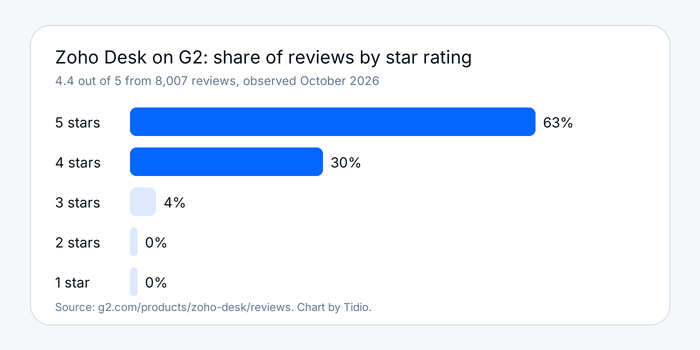
Zoho Desk holds 4.4 out of 5 on G2 from 8,007 reviews and 4.5 on Capterra from 2,216 reviews, both observed October 2026. TrustRadius shows 8.3 out of 10 from 145 reviews. On G2, 63% of reviews are five-star, 30% are four-star, and 4% are three-star. Trustpilot has a page for Zoho as a company but none for Zoho Desk, so we left it out.
What reviewers praise
Ease of use, features, ticket management, and integrations are the top praise tags on G2, with 622, 462, 337, and 317 mentions. A G2 technology director wrote in October 2026: “What I like most about Zoho Desk is how easy it is to set up, along with its clean, intuitive interface.” Another reviewer called it “an outstanding product that delivers incredible value for money.” On Capterra, ease of use scores 4.4 and customer service 4.3.
What reviewers criticize
The complaints repeat. On G2, “learning curve” is tagged 297 times and “steep learning curve” 211 times, followed by limited customization (183), complexity (166), and “not intuitive” (159). A G2 compliance manager wrote that setup “can feel a little overwhelming because there are many configuration options for roles, permissions, departments, workflows, and automation.” Reviewers disagree about density: one found the layout too spacious, with extra scrolling and clicks, and a Capterra reviewer found it text-heavy.
Support is mixed. One Capterra reviewer in August 2026 wrote that “direct customer support can often be slow to respond,” while the platform’s overall customer service score is 4.3.
Mind the sample. Several reviews on these sites are incentivized or from free trial users, and one review is not a trend. The tag counts are the better signal.
Zoho Desk pros and cons
Pros
- Low entry price with a free plan. $0 for 3 users, then $7 per agent on annual billing.
- Deep configuration. Workflows, Blueprints, SLAs, and custom modules let you model a process closely.
- Zoho ecosystem fit. CRM, Marketplace extensions, and 360 integrations sit close by.
- Strong ratings at scale. 4.4 on G2 from more than 8,000 reviews, 4.5 on Capterra from more than 2,000.
- Published prices. Every plan and the support surcharge are on Zoho’s own pages.
Cons
- A steep learning curve. It is the top complaint on G2 and the one every reviewer group repeats.
- Features are gated by tier. Blueprints, phone, and Zia AI start on Professional, and multi-brand help centers on Enterprise.
- Support costs extra. Premium is 20% of your subscription, and Enterprise support is 25%.
- A busy interface. Reviewers describe cluttered settings and hard-to-find options.
- Unclear AI packaging. Zoho’s pricing page and edition table do not agree on which plans include pre-built agents.
Who should choose Zoho Desk, and who should not
Choose Zoho Desk if:
- You already use Zoho CRM or other Zoho apps and want support tickets in the same ecosystem.
- You have an admin who will build workflows and Blueprints, and you want a process designer rather than a simple inbox.
- You need a low per-agent price and can live with tiered features.
Do not choose Zoho Desk if:
- You want to be live in an afternoon with live chat and an AI agent, with no admin to maintain rules. Tidio, which pairs live chat with the Lyro AI agent and a free plan, is built for that.
- You need WhatsApp, phone, chat, and multi-brand portals on a low tier.
- You want one price that includes support.
See Tidio plans and Lyro pricing
Zoho Desk alternatives, briefly
Teams usually leave Zoho Desk because the setup takes work, the interface is dense, or the best features sit on a higher tier. These are the tools we cover on the blog.
| Tool | Best for | Read our take |
|---|---|---|
| Tidio | Small and mid-sized teams that want live chat, email, and an AI agent in one inbox, with a free plan | Tidio help desk |
| Freshdesk | A full ticketing desk with a broad feature set | Freshdesk review |
| Zendesk | Larger teams that want a deep ecosystem | Zendesk review |
| Help Scout | Small teams that want a shared inbox | Help Scout review |
| Intercom | Teams that want a chat-first, AI-first messenger | Intercom review |
Tidio starts free: the Free plan covers up to 10 seats and 50 billable conversations a month, and Starter is $24.17 per month billed annually (checked October 2026). Lyro, the AI agent, is billed separately, so you only pay for what you use, with a few quotas to watch. Tidio says Lyro can resolve up to 75% of support requests. On G2 it holds 4.6 out of 5 from 1,962 reviews. Shopify stores get live cart preview and order history inside the inbox. It is a fit for small and mid-sized teams rather than a large IT service desk. If you want to keep Zoho Desk and add a chat layer, Tidio also has a Zoho Desk integration. For a wider comparison, see our Zoho Desk alternatives guide.
Bottom line
Zoho Desk is a configurable, well-rated help desk with a free plan and clear prices, and its price rises with the features you need. It rewards teams with an admin, a process to model, and other Zoho products nearby. Price the tier you need plus support, then run the 15-day trial on your hardest workflow. If you mostly want chat and an AI agent, try a tool built for that.
Try Tidio free for your website chat
Related guides
Frequently asked questions
Zoho Desk is a cloud help desk that turns email, social, chat, and phone requests into tickets, with automation, SLAs, a knowledge base, and AI. It is part of the Zoho suite and integrates with Zoho CRM. It suits support teams that want a configurable ticketing system.
Partly. Zoho Desk has a free plan for 3 users, and every paid plan has a 15-day free trial with no credit card. After the trial your account drops to the Free plan. Paid plans start at $7 per agent per month on annual billing.
On annual billing, Express is $7, Standard $14, Professional $23, and Enterprise $40 per agent per month. Monthly billing is $9, $20, $35, and $50. Premium support adds 20% of your subscription, and Enterprise support adds 25%.
It is worth it for teams that want a deep, configurable help desk at a low per-agent price and already use Zoho. Users rate it 4.4 on G2 and 4.5 on Capterra. It is harder to justify for a small team that wants a fast, chat-first setup.
Zoho Desk is best for support teams that want structured ticketing, workflow automation, and SLAs, especially teams on Zoho CRM. Its Blueprints suit process-heavy support. It is less suited to teams that want live chat and an AI agent running within a day.
Yes, on higher tiers. Business Messaging chat and Answer Bot start on Standard at $14 per agent per month, and Zia AI starts on Professional at $23. Live chat through Zoho SalesIQ is listed under Enterprise.
Freshdesk, Zendesk, Help Scout, Intercom, and Tidio are the ones we compare most. Freshdesk is a full ticketing desk, Zendesk suits larger teams, Help Scout suits small shared inboxes, and Tidio suits small and mid-sized teams that want chat and an AI agent.
Tidio is AI customer service software that combines live chat, a shared inbox, the Lyro AI agent, and automation flows, with free and paid plans for small and mid-sized businesses.
Use live chat to support your customers in real-time
