



Key takeaways
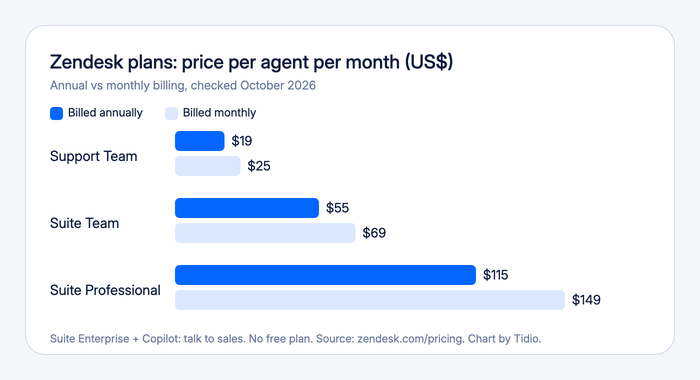
- Zendesk has no free plan, and paid plans start at $19 per agent per month. Support Team is $19, Suite Team $55, and Suite Professional $115, all billed annually. Monthly billing is $25, $69, and $149. Suite Enterprise is quote only.
- Live chat starts on Suite Team. The cheapest plan is email and ticketing only. SLAs, skills-based routing, and side conversations start on Suite Professional.
- The bill grows past the seat price. Copilot is $50 per agent per month, and AI agents are billed per resolution, at $1.50 committed or $2.00 pay-as-you-go beyond a small monthly allowance.
- Users rate it well. G2 shows 4.3 out of 5, Capterra shows 4.4, and TrustRadius shows 8.5 out of 10.
- The recurring complaint is setup. G2 reviewers name missing features, a learning curve, and complexity among the top cons, and Capterra reviewers describe add-ons that push the bill up.
- It fits teams that need depth and can staff an admin. It is a heavy choice for a small team that mainly wants live chat and an AI agent.
Zendesk is a customer support platform that pulls email, chat, social, and phone requests into one ticketing workspace, with automation, a help center, and AI agents. Reviewers praise how much it does in one place, and the same reviewers say it is complex to set up and gets expensive as you add seats and add-ons. We reviewed it from Zendesk’s public pricing, product, and help center pages and from G2 and Capterra, without running a trial. Tidio appears only as one alternative near the end.
Zendesk at a glance
| Zendesk | |
|---|---|
| What it is | Customer support platform with ticketing, omnichannel messaging, a help center, automation, and AI agents |
| Best for | Mid-sized and larger teams with several channels, complex routing, and an admin who maintains the setup |
| Not ideal for | Small teams that want a quick chat-first setup, a free plan, or one predictable price |
| Free plan or trial | No free plan; 14-day trial on Suite Professional with Copilot, no credit card |
| Starting price | Support Team from $19 per agent per month, billed annually ($25 monthly) |
| AI | AI agents on every plan, billed per resolution; Copilot is a $50 add-on |
| G2 / Capterra rating | 4.3 out of 5 / 4.4, observed October 2026 |
| Our verdict | A deep, established support platform that rewards a patient admin and gets expensive as you grow |
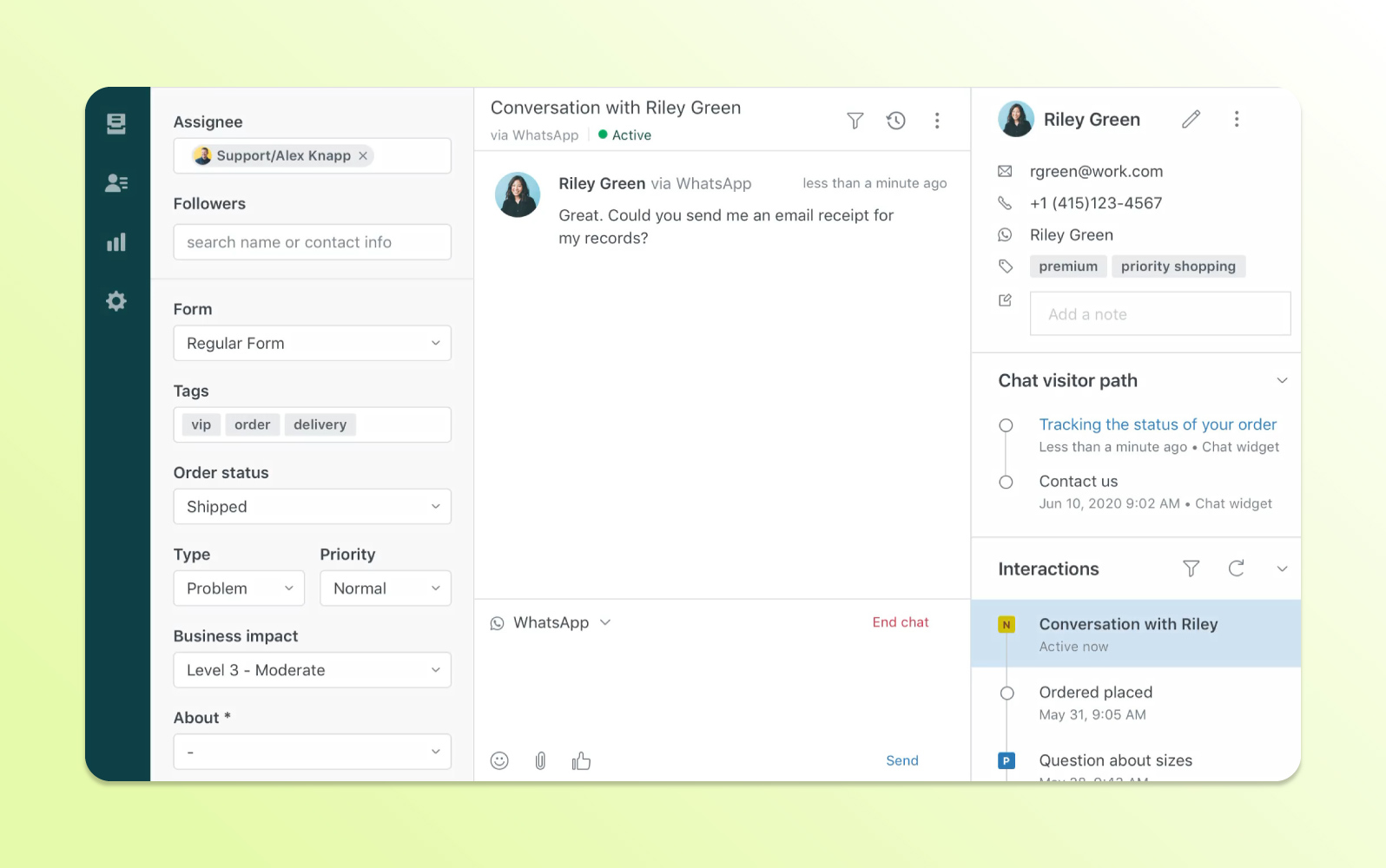
What Zendesk is and who it is built for
Zendesk is customer service ticketing software. It collects requests from email, messaging, phone, and social media, turns each into a ticket, and lets you route, prioritize, and track them against SLAs. Zendesk’s own pages describe it as bringing “email, messaging, phone, social, and more into a single place,” and the site claims more than 80,000 companies use it (another page says 100,000).
Its users span company sizes. That fits the product: small teams start on Support Team, and larger teams stay because of routing depth, compliance, and a marketplace Zendesk puts at more than 1,800 apps (its free trial page says more than 1,200).
What changed in 2026
Zendesk’s press releases show a lot of movement on AI. It completed the Forethought acquisition on March 26, 2026, and on May 18 it introduced resolution tiers for AI agents, which change how automated resolutions are counted. At its Relate event on May 19 it announced a new Agent Builder and AI agents that work inside ChatGPT and Gemini, and on September 14 it introduced Specialized AI Agents, with commerce first. Pricing on the public page did not change between our two checks in October 2026.
Zendesk features, capability by capability
Omnichannel ticketing
At its core Zendesk is a ticketing system. Support Team is email and ticketing, with ticket routing, prebuilt dashboards, macros, and triggers. Suite Team adds messaging and live chat, social and business channels, telephony, a knowledge base, and AI agents. Suite includes five WhatsApp numbers, and more cost extra. SMS, phone numbers, and call minutes are add-ons.
The limit: channels are tiered. Live chat and social channels are not on the cheapest plan, and Zendesk’s own comparison grid shows unlimited concurrent chats on Suite plans only.
Routing, automation, and collaboration
Triggers run business rules when a ticket is created or updated, and agents apply macros, which are prepared responses and actions, by hand. Every plan routes by agent status and capacity, and skills-based routing starts on Suite Professional, with up to 10 skill types of up to 30 skills each.
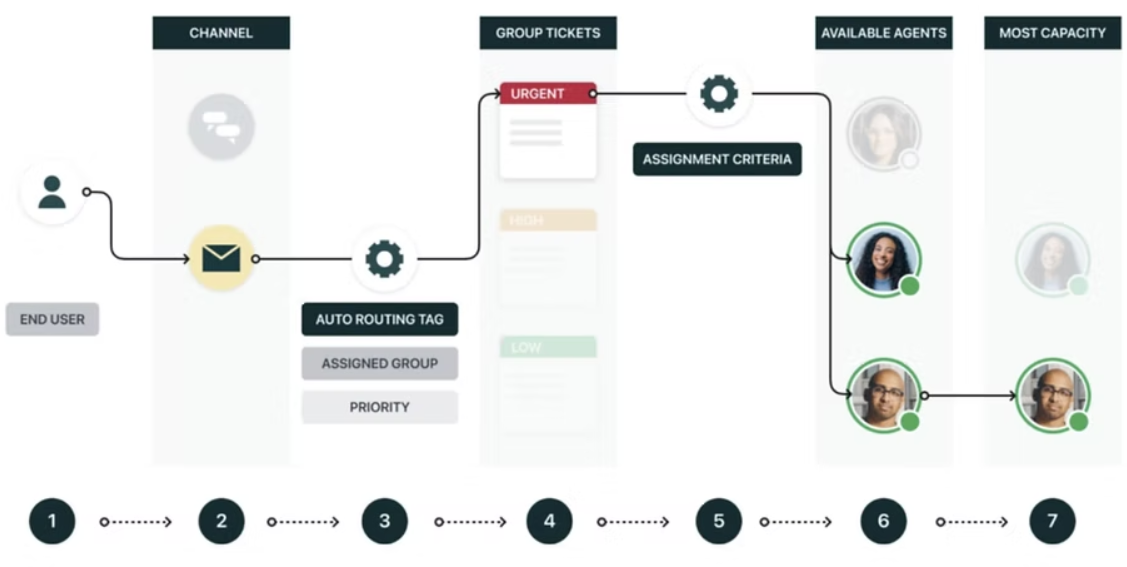
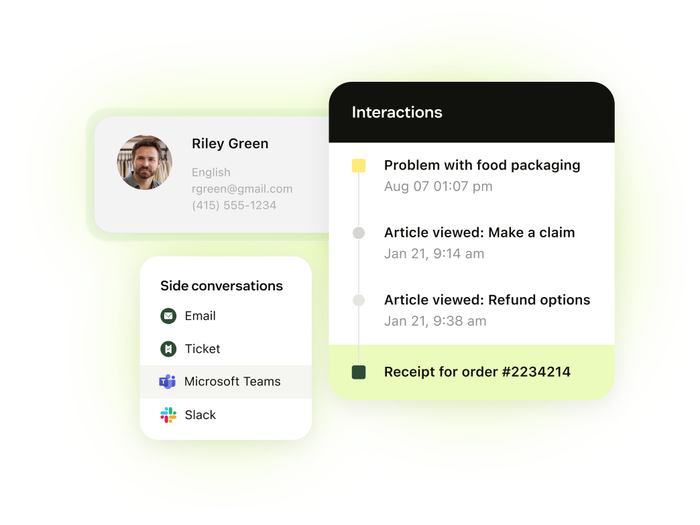
Suite Professional also adds SLAs, side conversations by email, Slack, Microsoft Teams, or child tickets, CSAT surveys, and up to 100 light agents.
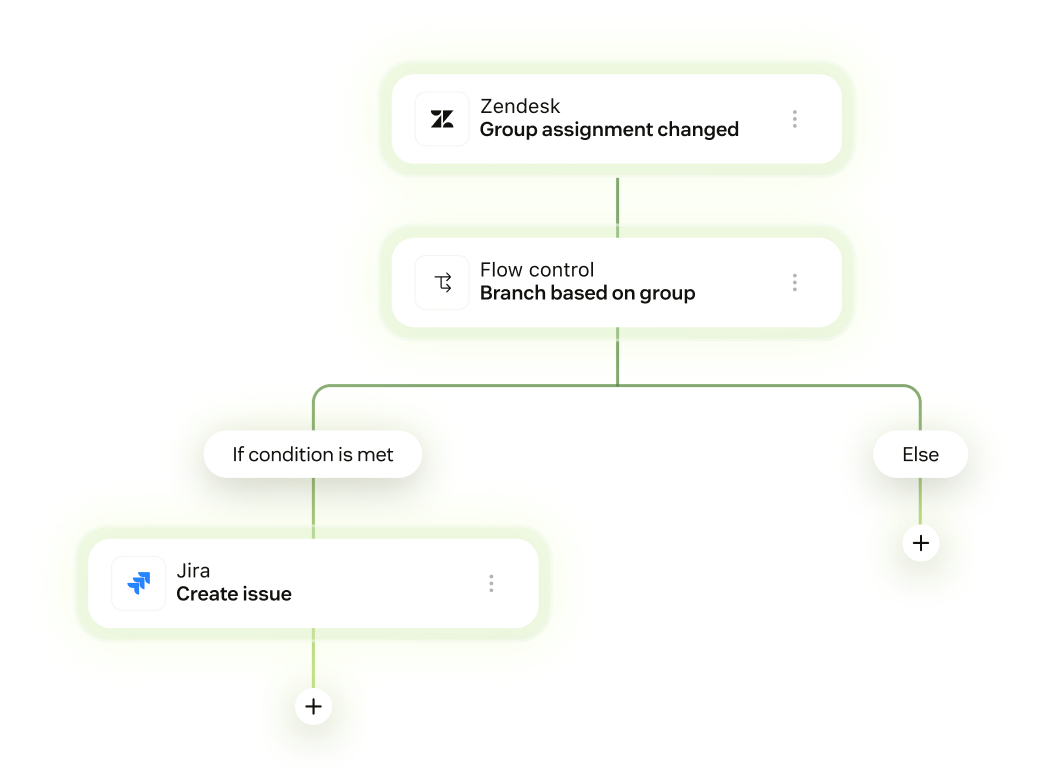
Custom workflows come from Action Builder, a visual workflow builder that connects Zendesk with outside systems, with 40,000 actions a month on Team plans and 100,000 on Suite Professional. Extra actions are $200 per 100,000.
The limit: this is the depth reviewers love, and the setup they dread. One Capterra reviewer wrote that “setting up add ons can add more to it and could feel like a full time job in the backend.”
AI agents
AI agents come with every plan, and Zendesk bills for the outcome. Each Support Team and Suite Team agent seat includes 5 automated resolutions a month, Suite Professional includes 10, and extra resolutions cost $1.50 if you commit ahead (at least 100) or $2.00 pay-as-you-go. Zendesk says its agents work on messaging, email, and voice in more than 80 languages, and markets resolution of “up to 80%+” of service issues, which is Zendesk’s claim, not a measured average.
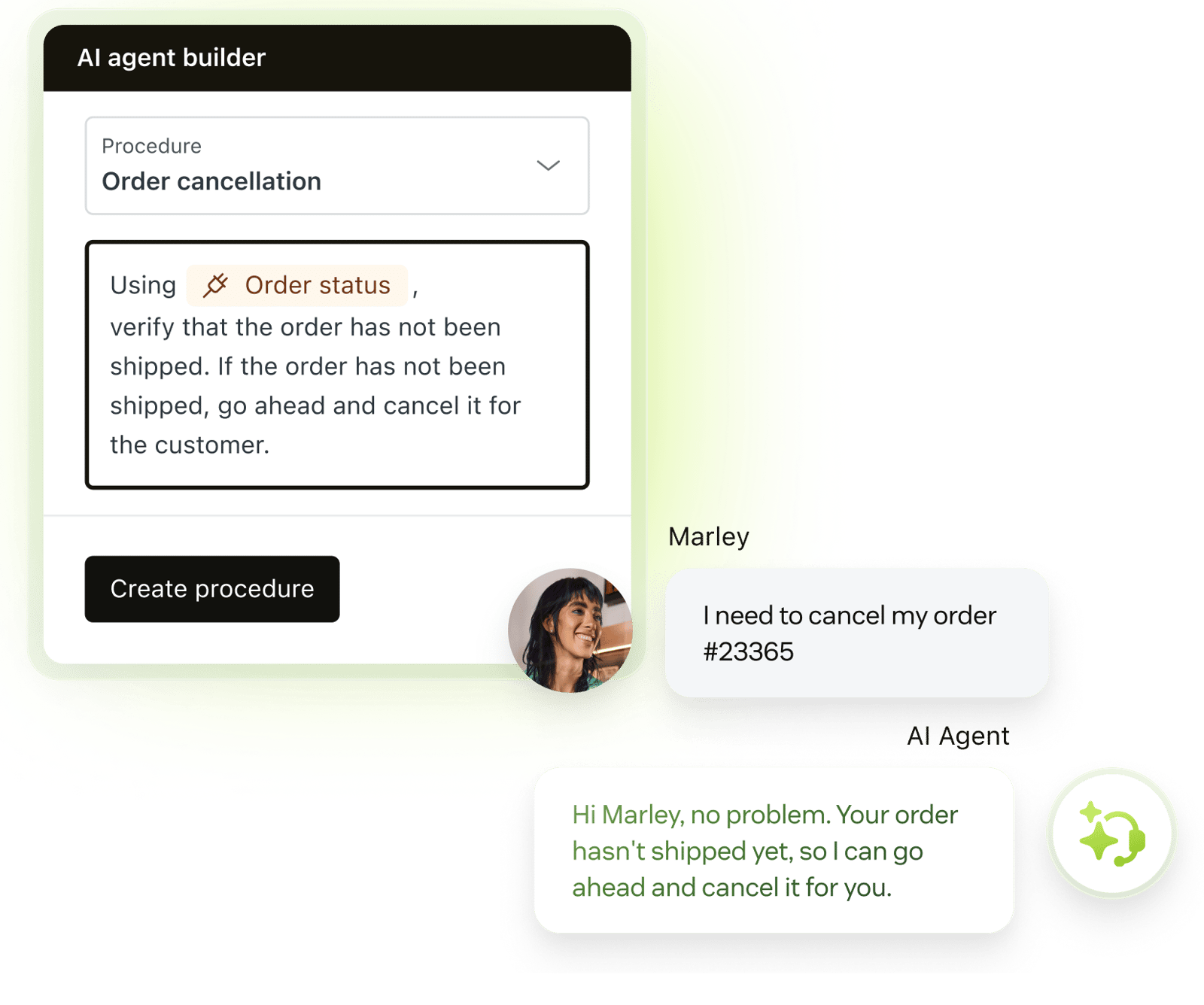
Since May 18, 2026, resolutions come in tiers. Assisted escalation, where the AI helped and a human finished, and Contained resolution, where the AI finished without verification, do not count against your allowance. A Verified resolution, checked by a language model that reads the conversation, is the tier that does. Zendesk’s help center says accounts on the older platform stay on it until they move.
The limit: we found no price per tier, only the two published rates. Ask which platform version your account is on before you forecast AI cost.
Copilot
Copilot is the assistant for agents and admins. Zendesk says it can suggest next steps, draft responses, and run approved actions based on your knowledge and procedures. It is a separate $50 per agent per month, and it is available from Suite Professional up. Suite Professional includes 5 uses of Copilot writing tools, ticket summaries, and similar-ticket suggestions per agent each month without it.
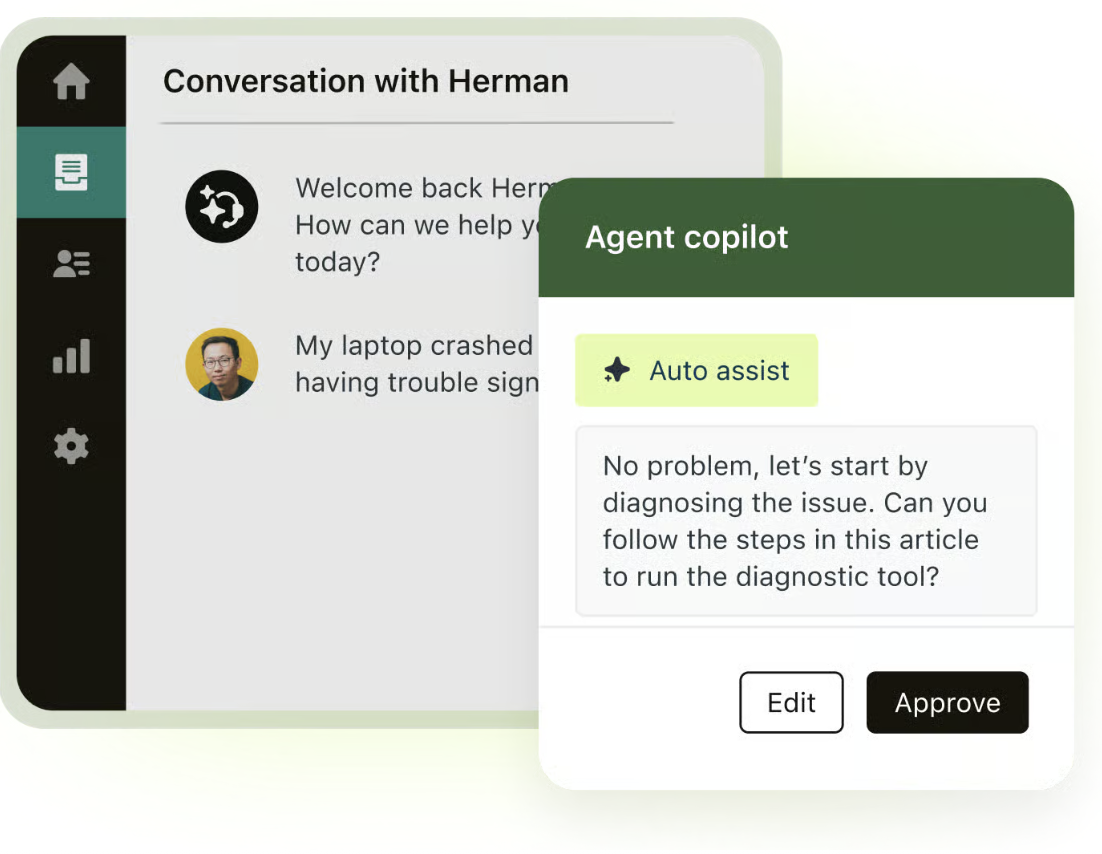
The limit: Zendesk’s pricing FAQ answers plainly that AI agents come with the plan and Copilot is an extra. Price both before you compare totals.
Help Center and knowledge base
Suite Team includes one help center in one default language, and Suite Professional allows up to five in 40-plus languages, with community moderation. Suite and Knowledge plans include 100,000 generative searches a month by default.
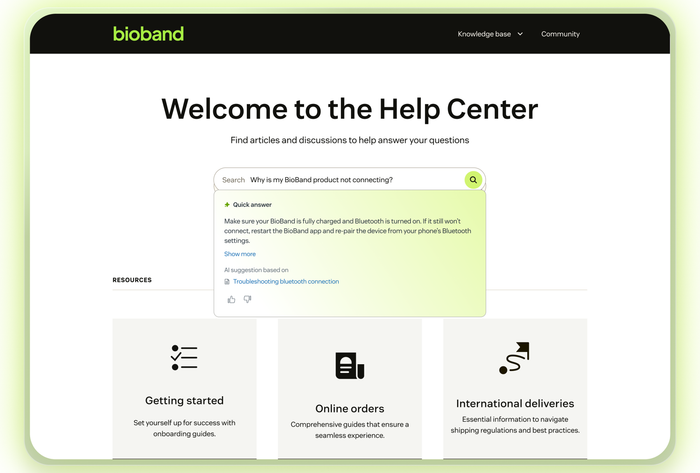
The limit: if you run several brands, the multiple help centers are a Suite Professional feature, so the plan decides how many portals you get.
Analytics and reporting
Every Suite plan includes prebuilt dashboards, and Explore comes in tiers: Lite on Suite Team and the Support plans, Professional on Suite Professional, and Enterprise on Suite Enterprise. Data refreshes every 24 hours on Team plans and every hour on Suite Professional, and custom data exploration is a Suite Professional feature.
The limit: reviewers want more from reporting. One Capterra reviewer wrote that the analytics tool “is complex and requires a deep understanding of Zendesk architecture to use successfully.” Quality assurance needs a paid add-on on every plan.
Integrations, security, and API limits
Zendesk lists more than 1,800 apps in its marketplace. The official Shopify for Zendesk app shows customer and order details in the support sidebar and lets agents process refunds and cancellations, with more than 16,500 installs. On security, Zendesk reports SOC 2 Type II audits, ISO 27001 and related certifications, and FedRAMP authorization at the Low Impact SaaS level. HIPAA is configurable and starts on Suite Professional, and data center location options are free on Suite Professional and above.
The limit: API limits apply per minute, not per month: 200 requests a minute on Team, 400 on Professional, and 700 on Enterprise for the Support API, and a High Volume add-on takes it to 2,500 for teams with at least 10 seats.
Zendesk pricing in 2026
Zendesk publishes its prices for three plans and asks you to talk to sales for the fourth. The cards show annual billing (“paid yearly”), which is the lower price, and the comparison grid shows monthly prices as well. All prices are per agent per month in US dollars.
| Plan | Annual billing | Monthly billing | What the tier adds |
|---|---|---|---|
| Support Team | $19 per agent | $25 per agent | Email and ticketing, routing, prebuilt dashboards, macros, triggers |
| Suite Team | $55 per agent | $69 per agent | Messaging and live chat, social channels, telephony, AI agents, knowledge base, Action Builder, 1 help center |
| Suite Professional | $115 per agent | $149 per agent | SLAs, skills-based routing, side conversations, CSAT, IVR, up to 5 help centers, HIPAA enabled, custom data exploration |
| Suite Enterprise + Copilot | Talk to sales | Talk to sales | Intelligent triage, auto assist, approval workflows, sandbox, custom agent roles |
Zendesk’s help center still names other plans, such as Suite Growth and Enterprise Plus, that have no public price on the pricing page, and some third-party sites list old prices for them. Use the pricing page, not those listings.
The add-ons, all billed yearly, are Copilot at $50, the Workforce Engagement Bundle (workforce management plus quality assurance) at $50, and Contact Center at $83 per agent per month on top of a Suite plan, with telephony and cloud usage billed on consumption. Premier support, the 24/7 option, is a paid add-on on every plan.
What you will actually pay
These examples use annual billing and list prices. They leave out taxes, phone and SMS usage, and WhatsApp fees.
- 3 agents on Support Team: 3 × $19 = $57 per month. On monthly billing it is 3 × $25 = $75.
- 5 agents on Suite Team: 5 × $55 = $275 per month. On monthly billing it is 5 × $69 = $345.
- 10 agents on Suite Professional with Copilot and 500 AI resolutions a month: 10 × $115 = $1,150, plus 10 × $50 = $500 for Copilot. The plan includes 10 × 10 = 100 resolutions, so 400 are extra: $600 at $1.50 committed or $800 at $2.00 pay-as-you-go. The total is $2,250 to $2,450 a month.
Four details change the total more than the table does:
- The cheapest plan has no chat. Live chat, social channels, and AI agents for messaging start on Suite Team, at $55.
- AI is a second meter. Seats are one line, and AI resolutions beyond the allowance are another. Zendesk’s own pricing FAQ tells buyers to factor in expected resolutions above the allowance.
- Enterprise is a sales call. Zendesk says Enterprise plans “generally require sales engagement,” so you cannot price them from the page.
- A trial is the only free option. The 14-day trial gives you Suite Professional with Copilot and up to 5 team members, with no card. When it ends you choose a paid plan. Zendesk for Startups gives qualified startups a free Suite Professional and Copilot, for 6 months as the baseline and up to 2 years through partner programs, for up to 50 agents.
On value, the Software Advice listing, which shares Capterra’s reviews, shows value for money at 4.2 out of 5. Reviewers are less kind in text. One Capterra reviewer wrote: “Pricing can creep up if you want a lot of add-ons, but the core tools are solid.”
What real users say about Zendesk
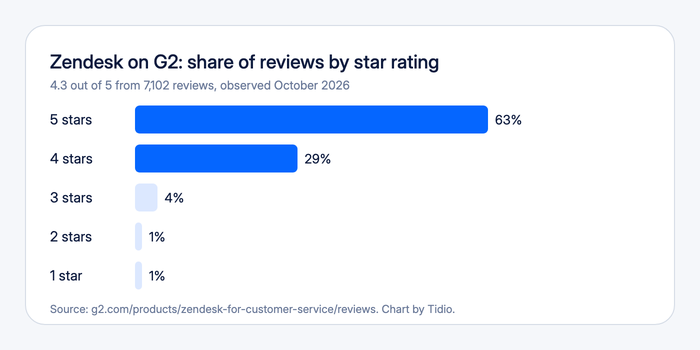
Zendesk holds 4.3 out of 5 on G2 and 4.4 on Capterra, both observed October 2026. TrustRadius shows 8.5 out of 10. Trustpilot shows 1.8, but that page covers the company as a whole, not the help desk product, so we did not use it as a product rating.
What reviewers praise
Ease of use, features, and customer support are the top praise themes on G2. The most common one is having everything in one place. One G2 reviewer wrote that it “helps organize customer inquiries in one place, making it easier to track conversations, follow up on cases, and respond quickly.” Others praise customizable workflows and automated routing. On Capterra, ease of use scores 4.3 and customer service 4.3.
What reviewers criticize
The complaints repeat: missing features, a learning curve, limited customization, and complexity. One G2 reviewer wrote that “the initial setup and configuration can feel complex and take a significant amount of time.” Support gets mixed marks, and Capterra’s own summary lists frequent technical and performance problems and a high, complex pricing structure.
G2 and Capterra reviews come from invited users, so they lean positive, while Trustpilot skews to complaints.
Zendesk pros and cons
Pros
- Everything in one workspace. Email, messaging, phone, and social requests land in one ticket view with customer history.
- Deep routing and automation. Triggers, macros, skills-based routing, and Action Builder let you model a complex process.
- A large ecosystem. Zendesk lists more than 1,800 marketplace apps and an official Shopify app.
- Compliance options. SOC 2 Type II, ISO certifications, FedRAMP at Low Impact, HIPAA from Suite Professional, and data center location choices.
- Strong ratings at scale. 4.3 on G2 and 4.4 on Capterra.
Cons
- Complex setup and a learning curve. It is the most repeated criticism across the G2 tags and the Capterra reviews we read.
- Features are gated by plan. Live chat starts on Suite Team, and SLAs, skills-based routing, and side conversations on Suite Professional.
- The bill has several meters. Seats, Copilot at $50, AI resolutions beyond the allowance, and usage-based voice and WhatsApp add up.
- No free plan. You get a 14-day trial, then a paid plan.
- Enterprise is quote only. You cannot price the top tier without talking to sales.
Who should choose Zendesk, and who should not
Choose Zendesk if:
- You run several channels with complex routing, SLAs, or multiple brands and want a platform that has an answer for each.
- You have an admin or a partner who will build and maintain triggers, workflows, and reports.
- You need compliance options such as HIPAA, data residency, or FedRAMP, or a large marketplace.
Do not choose Zendesk if:
- You want to be live in an afternoon with chat and an AI agent, without an admin. Tidio is built around live chat and the Lyro AI agent, and starts on a free plan.
- You need one predictable monthly price. Seats, Copilot, and AI resolutions are separate lines.
- You want live chat and social channels on the lowest plan.
See Tidio plans and Lyro pricing
Zendesk alternatives, briefly
Teams usually leave Zendesk because the setup takes work, the bill grows with add-ons, or a small team needs a lighter tool. These are the tools we cover on the blog.
| Tool | Best for | Read our take |
|---|---|---|
| Tidio | Small and mid-sized teams that want live chat, email, and an AI agent in one inbox, with a free plan | Tidio help desk |
| Freshdesk | A full ticketing desk at a lower seat price | Freshdesk review |
| Zoho Desk | Teams that live in Zoho and want a low per-agent price | Zoho Desk review |
| Help Scout | Small teams that want a shared inbox | Help Scout review |
| Intercom | Teams that want a chat-first, AI-first messenger | Intercom review |
Tidio is the lightest option here. Paid plans start with Starter at $24.17 per month billed annually, and the Free plan covers up to 10 seats and 50 billable conversations a month (checked October 2026). Lyro, the AI agent, is sold separately with its own quota, and it can resolve up to 75% of support requests. Tidio holds 4.6 out of 5 on G2 from 1,962 reviews. Shopify stores get live cart preview and order history next to the conversation. The trade-off is scope: Tidio suits small and mid-sized teams, not a large multi-brand service desk. If you keep Zendesk and want a chat layer in front, Tidio has a Zendesk integration. For the full comparison, see our guides to Zendesk alternatives and Freshdesk vs Zendesk.
Bottom line
Zendesk is an established, well-rated support platform with deep routing, a big ecosystem, and published prices for three plans, and its cost climbs with seats, Copilot, and AI resolutions. It rewards teams that have an admin, several channels, and a process to model. Price the plan you need plus Copilot and expected AI resolutions, then run the 14-day trial on your hardest workflow. If chat and an AI agent are most of what you need, a lighter tool will get you live faster.
Try Tidio free for your website chat
Related guides
Frequently asked questions
Zendesk is a customer support platform that turns email, messaging, phone, and social requests into tickets, with automation, a help center, and AI agents. It runs as a cloud service, with plans from Support Team at $19 per agent per month on annual billing to a quote-only Enterprise suite.
No. Zendesk has no free plan. It offers a 14-day free trial of Suite Professional with Copilot and no credit card, and a startup program that gives qualified startups a free Suite Professional for 6 months, or up to 2 years through partners.
On annual billing, Support Team is $19, Suite Team $55, and Suite Professional $115 per agent per month. Monthly billing is $25, $69, and $149. Suite Enterprise is quote only. Copilot adds $50 per agent, and AI resolutions beyond the allowance cost $1.50 to $2.00 each.
It is worth it for teams that need deep routing, several channels, or compliance options and can staff an admin. Users rate it 4.3 on G2 and 4.4 on Capterra. It is harder to justify for a small team that wants a fast, chat-first setup at a predictable price.
The seat price is only one line. Live chat starts at $55 on Suite Team, SLAs and skills-based routing at $115, Copilot adds $50 per agent, and AI resolutions beyond the allowance are billed each. Reviewers on Capterra also say pricing creeps up as you add add-ons.
Yes. Messaging and live chat start on Suite Team at $55 per agent per month, and AI agents come with every plan, billed per resolution beyond a monthly allowance. Copilot, the assistant for agents, is a $50 add-on from Suite Professional.
Freshdesk, Zoho Desk, Help Scout, Intercom, and Tidio are the ones we compare most. Freshdesk and Zoho Desk are ticketing desks at lower seat prices, Help Scout suits small shared inboxes, Intercom is chat-first, and Tidio suits small and mid-sized teams that want chat and an AI agent.
Tidio is a support tool built for small and mid-sized businesses. It puts live chat, email, social channels, the Lyro AI agent, and automation flows in one inbox, and it has a free plan.
Use live chat to support your customers in real-time
