
Customers expect fast, accurate support, no matter the time of day or the size of your team. But as your business grows, answering the same questions over and over again quickly becomes unsustainable. This is where a customer support chatbot can make a real difference.
A well-built chatbot can handle repetitive questions and support your agents by resolving simple issues automatically. The key is building it the right way, so it’s helpful and knows when to involve a human.
In this tutorial, you’ll learn how to build a chatbot for customer support step by step using Lyro AI Agent. Whether you’re setting up your first chatbot or improving an existing one, this guide will help you do it with confidence.
Build your customer support chatbot with Lyro in minutes
Build a chatbot for customer support in 5 steps
Building a customer support chatbot is less about “training AI” and more about giving it the right knowledge, rules, and guardrails. With Lyro, the process breaks down into five practical steps: setting up the knowledge base, personalizing behavior, testing responses, configuring handoff to humans, and continuously improving answers based on real conversations.
Here’s how to do it in more detail:
1. Build the chatbot’s knowledge base
Every good support chatbot starts with a knowledge base.
In Lyro, this means adding data sources, the information your chatbot will use to answer customer questions, to the engine. You can do this by:
- Adding website URLs: paste links to your help center, FAQ pages, or product documentation. Lyro scans the content and turns it into usable Q&A knowledge.
- Uploading internal knowledge: add question-and-answer pairs manually or import them from files. This is especially useful for policies, edge cases, or information that isn’t public.
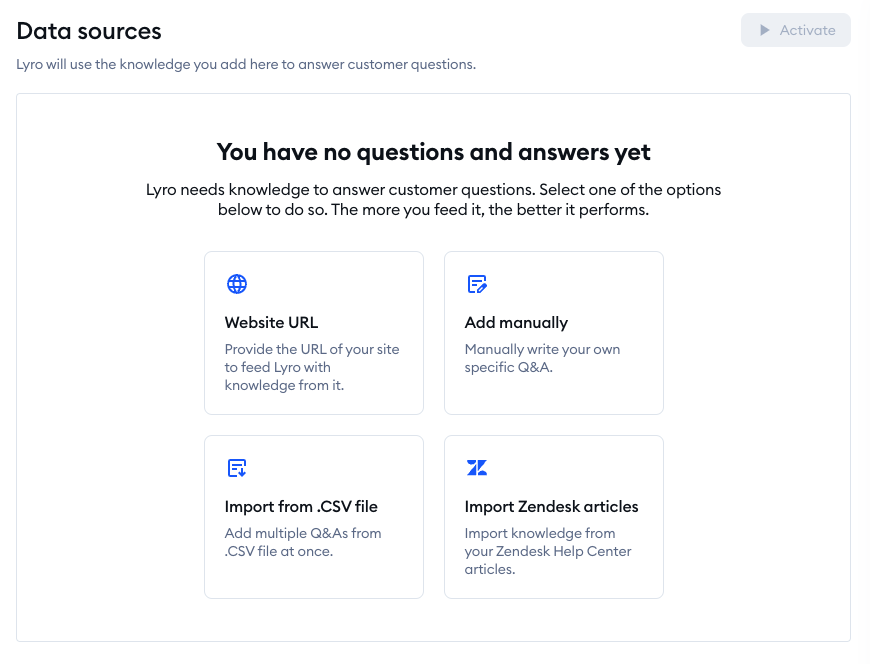
Once added, all knowledge lives in the Knowledge → Data sources section. Here you can edit or remove content anytime. The stronger and clearer your knowledge base, the more accurate your chatbot’s answers will be.
Tip: Start with your most common support questions about shipping, pricing, refunds, and account issues. And then expand from there.
Read more: Here are tips for building a solid knowledge base chatbot.
2. Personalize the chatbot
A chatbot should be accurate, and it should sound like your brand.
With Lyro Guidance, you can define how your chatbot communicates and behaves. This includes:
- Choosing a tone of voice (neutral, friendly, formal, or fully custom)
- Deciding whether Lyro should use emojis
- Giving instructions for specific situations (for example, how to respond when it’s unsure)
You can also review and edit your company description, which helps Lyro understand who you are and what you offer. Keeping this short and accurate improves answer quality across all conversations.
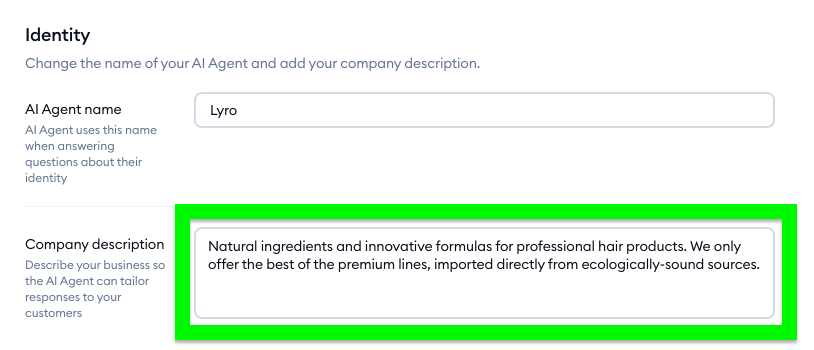
Personalization ensures your chatbot feels like a natural extension of your support team instead of being a generic AI.
Read more: Here’s the ultimate guide to creating a chatbot persona.
3. Use the Playground to test your AI agent
Before going live, testing is non-negotiable.
The Playground is Lyro’s built-in testing environment. It allows you to simulate real customer conversations without affecting live users. Here’s what to do.
Ask common as well as tricky support questions. When looking at the replies, check for missing, vague, or incorrect answers. Once you spot the missing parts, add new Q&A pairs directly from the test chat if something.
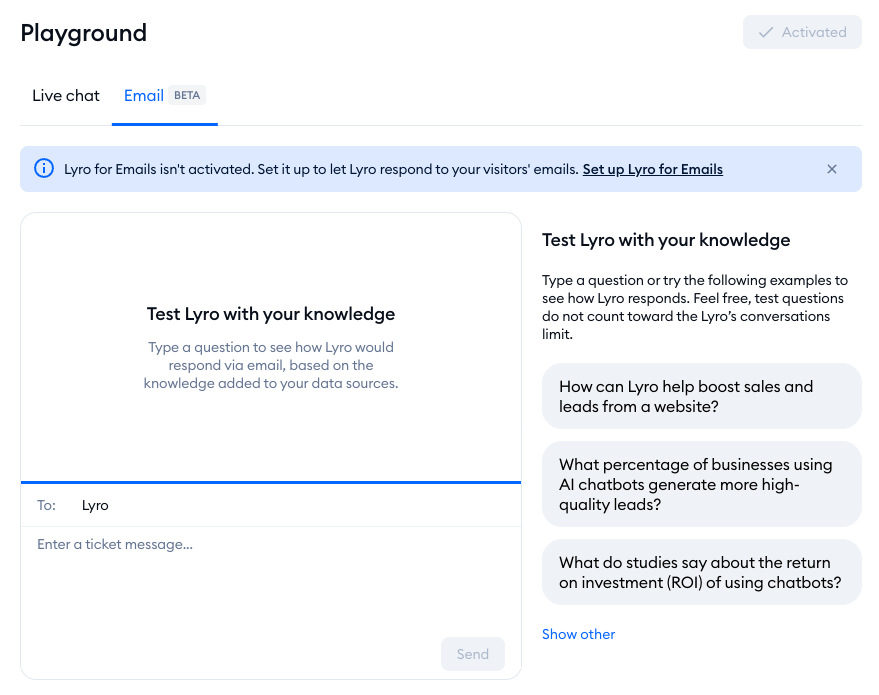
You can test both live chat responses and email replies, depending on where you plan to use your AI customer service agent. This step helps you catch gaps before customers do.
Think of the Playground as a rehearsal before your big opening night.
4. Configure handoff
A good support chatbot knows when to step aside.
Lyro lets you define handoff rules for situations when a customer asks to talk to a human, Lyro doesn’t know the answer, or you’re online vs. offline. And you can choose whether Lyro should transfer the conversation to a live agent, keep the conversation and ask for clarification, or create a ticket that includes the customer’s email.
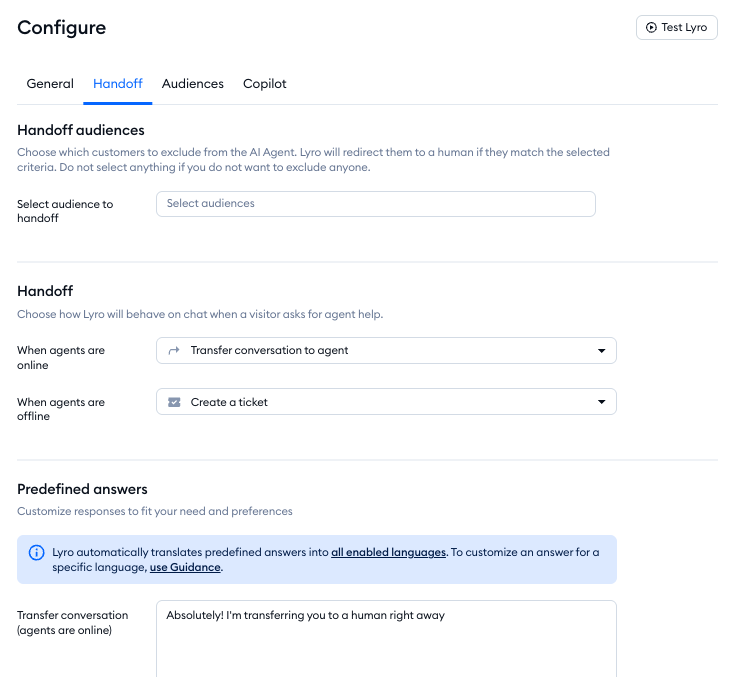
You can also set up handoff audiences, so specific users (like VIPs or high-intent leads) are routed directly to human agents.
Also, you should customize handoff messages. This makes the transition feel smooth and on-brand, rather than frustrating or abrupt.
5. Check the suggestions to improve your AI agent
Your chatbot improves the most after it starts talking to real customers.
The Suggestions section shows questions Lyro couldn’t answer during real conversations. Each suggestion is an opportunity to improve your knowledge base by reviewing unanswered questions and editing or accepting suggested answers. Then, you can save the new question-answer pairs for future use.
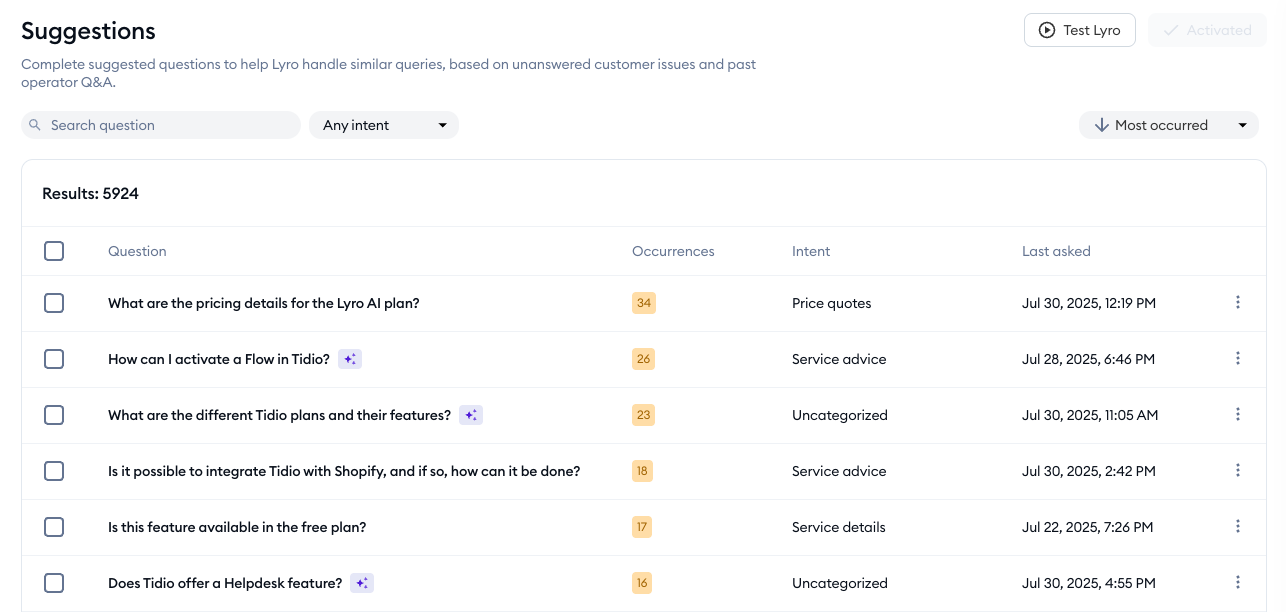
Over time, this feedback loop helps your chatbot handle more questions automatically and with higher accuracy.
Read more: Here’s a guide on how to scale customer support.
Create a customer service chatbot: key takeaway
A successful chatbot starts with a strong knowledge base that reflects real customer questions. From there, personalization ensures the chatbot communicates in a way that feels natural and on-brand. Thorough testing in a safe environment helps you catch gaps early, while well-configured handoff rules make sure customers can always reach a human when needed. Finally, reviewing suggestions from real conversations allows your chatbot to improve continuously, without guesswork.
When implemented well, a customer support chatbot works alongside your support team. It handles routine questions, helps reduce incoming tickets, and speeds up replies, so agents can spend more time on complex issues. For customers, this means quicker answers and a smoother experience that can grow with the business.
Lyro fits into this flow by resolving common questions automatically using your existing knowledge, without rigid scripts or complex setup, so support teams can see results without changing how they work.
Build your customer support chatbot with Lyro in minutes
FAQ
Tidio is a customer support platform that combines live chat, AI agents, and automation tools to help businesses manage customer conversations in one place. It’s commonly used to answer support questions, reduce ticket volume, and support teams as they scale.
Yes. Tidio includes Lyro, an AI agent designed specifically for customer support. Lyro uses your existing knowledge base to answer customer questions automatically, understands natural language, and hands conversations over to human agents when needed.
Most teams can set up a basic customer support chatbot with Tidio in minutes. Once you add your knowledge sources and test responses in the Playground, you can start resolving real customer questions the same day.
No. Tidio is designed for non-technical teams, so you don’t need coding or AI expertise. You can build, test, and adjust your chatbot using a visual interface and simple instructions.