


Key takeaways
- A knowledge base chatbot is only as good as the content behind it. Stale or conflicting articles produce confident wrong answers.
- It differs from a rule-based or FAQ bot because it matches meaning, not keywords, and writes the reply itself.
- Begin with the 20 questions customers ask most, connect a source or two, and run a test set before launch.
- Track the questions it cannot answer. That list is your to-do list for new articles.
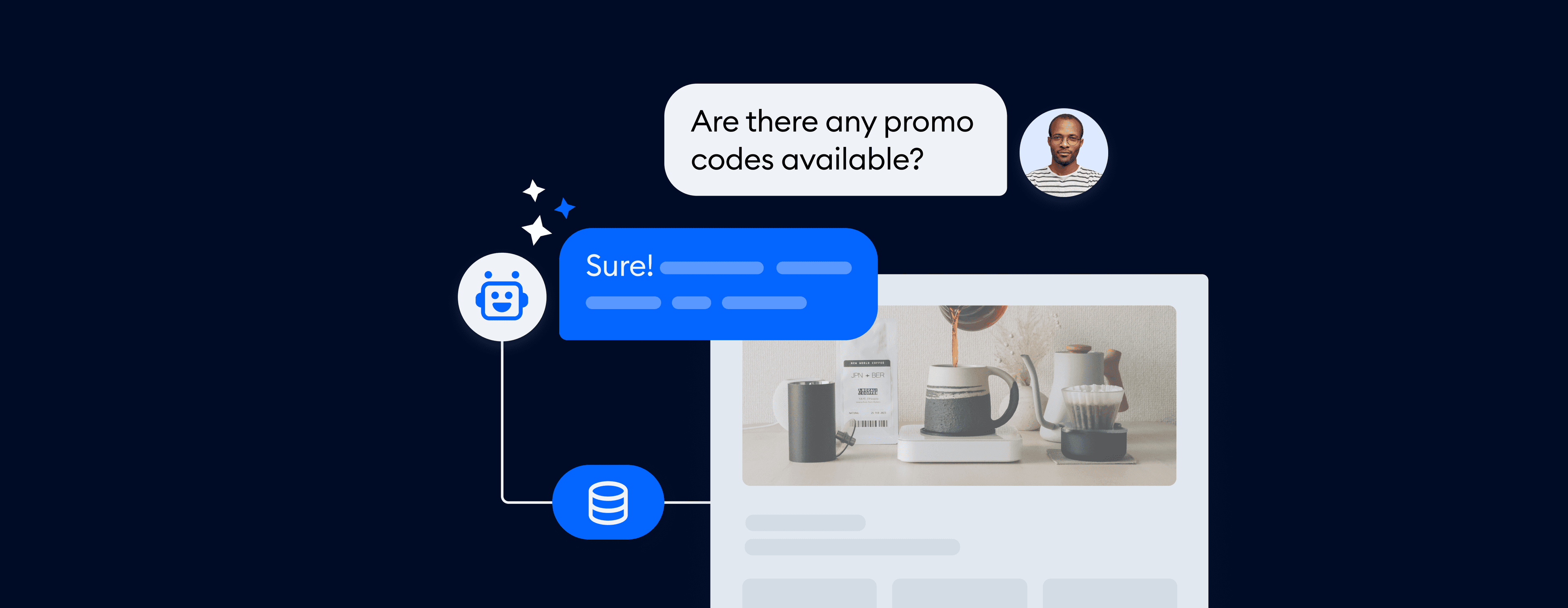
A knowledge base chatbot is a chatbot that answers customer questions from your own help content, such as help articles, FAQs, policies and product pages, instead of from a fixed script. It reads the question, finds the passages in your knowledge base that match, and replies in plain conversation, usually with a link to the source.
Gartner found that only 14% of customer service issues are fully resolved in self-service.[1] The articles exist, but customers cannot find the right one. A knowledge base chatbot closes that gap by finding it for them. This guide is for small support teams and online stores. It covers how these chatbots work, how they differ from other bots, where they fail, and how to build one.
Use live chat to support your customers in real-time
What is a knowledge base chatbot?
A knowledge base chatbot is an AI chatbot connected to a company’s knowledge base. When a customer asks a question, it does not follow a decision tree. It looks up the relevant articles, writes a short answer from them, and hands the chat to a person when it cannot find one.
You will also see it called a chatbot with a knowledge base or a chatbot knowledge base. The words change, but the idea stays the same: the knowledge base holds the facts, and the chatbot does the finding and the talking. If you are looking for the content side on its own, see our guide to the AI knowledge base.
A simple example: an online store customer asks, “Can I return a sale item after 30 days?” A search box would list five pages with “returns” in the title. A knowledge base chatbot reads your return policy and replies, “Sale items can be returned within 30 days of delivery. After that, you can request store credit.” It adds a link to the policy so the customer can check the details.

How does a knowledge base chatbot work?
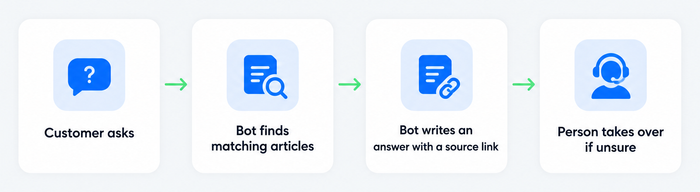
A knowledge base chatbot works in four steps: it reads your content, finds the passages that match a question, writes an answer from only those passages, and passes the chat to a person when the match is weak. This approach is called retrieval-augmented generation, or RAG.
1. It reads your content. You connect sources such as help center articles, website pages, PDFs, spreadsheets of question-and-answer pairs and, in some tools, product data. The system splits long documents into short passages so each one can be found on its own.
2. It finds the matching passages. Each passage is stored as a numeric fingerprint of its meaning, so “money back” and “refund” land close together. When a question arrives, the bot searches by meaning, not by exact words.
3. It writes an answer from those passages. A large language model receives the question and the matching passages, with an instruction to answer only from them. The reply is a conversational sentence or two, not a pasted article. Good tools show or link the source.
4. It checks and hands off. If nothing matches well, the bot should say so and pass the conversation to a person with the history attached. It should also log the question it could not answer.
Handoff and the no-answer log
The handoff and the “not found” log are what make a knowledge base chatbot safer than a general AI model. Every question it cannot answer shows where your content has a hole. Over a few months, filling those holes improves answers more than any change to the AI.
Knowledge base chatbot vs other chatbots
The difference is where the answers come from. A rule-based bot follows a script you wrote. A FAQ chatbot matches questions to a fixed list. A general AI chatbot answers from what it learned in training. A knowledge base chatbot answers from your own current content, and says so when that content has no answer.
| Rule-based chatbot | FAQ chatbot | Knowledge base chatbot | General AI chatbot | |
|---|---|---|---|---|
| Where answers come from | A script of buttons and branches | A fixed list of questions and answers | Your articles, files and product data | The model’s training data |
| Handles rephrased questions | Poorly | Moderately | Well | Well |
| Knows your policies and prices | Only if scripted | Only if listed | Yes, from your content | No |
| Writes new wording | No | No | Yes, grounded in sources | Yes, with no source |
| Main risk | Dead ends | Gaps in the list | Wrong answer from outdated content | Invented answers |
| Best for | Simple guided flows | A short, stable set of questions | Support teams with a help center | General questions |
Most small teams end up with both: a few scripted flows for tasks such as booking or order lookup, and a knowledge base chatbot for the open questions. For the broader picture, see our guides to what a chatbot is, the FAQ chatbot and chatbots vs conversational AI.
Why use a knowledge base chatbot
A knowledge base chatbot gives customers answers in seconds at any hour and takes repeated questions off your team. It works best where support questions repeat and the answers already exist in writing.
- Instant answers, around the clock. Customers get a reply on a Sunday night without you staffing a shift.
- Fewer repeated tickets. Shipping times, password resets and return rules stop reaching agents. This is the mechanism behind case deflection.
- One answer everywhere. The same source feeds chat, social channels and agent suggestions, so the website and the chat do not give two different policies.
- Better use of agents. People spend time on complex or sensitive cases, where they add the most.
- A live content to-do list. Unanswered questions show what to write next.
For a store, it also means shoppers get an answer while they are still deciding. Gartner expects this direction to continue and predicts that agentic AI will autonomously resolve 80% of common customer service issues by 2029.[2] That only works when the AI has accurate content to read from.
Use cases and examples
The first three uses face customers. The last two help your own team.
1. Answer support questions in chat
The classic use: a website chat widget that reads your help content and answers questions about shipping, returns, setup, billing and warranties. Anything uncertain goes to an agent. This is also what people mean by a customer service knowledge base chatbot. See our overview of the customer service chatbot.
2. Answer product questions in an online store
Policies come from articles, but shoppers also ask, “Does this come in medium?” and “Which of these is waterproof?” Connecting your product catalog lets the bot answer from product data. If you run a Shopify or WooCommerce store, product sync is worth turning on early. Our guide to the Shopify chatbot shows what a store setup looks like.
3. Support the same questions on social channels
Customers ask on Messenger, Instagram and WhatsApp as well as on your site. When the chatbot reads from one knowledge base, the answer is the same on each channel. See multichannel customer service for how to handle them together.
4. Suggest replies to agents
An agent opens a conversation and the sidebar offers a draft reply based on the matching article. The agent edits and sends. This is lower risk than a customer-facing bot, which makes it a sensible first project for a cautious team. See AI agent assist.
5. Answer internal questions
Some companies point the same technology at internal policies, IT how-tos and HR documents, so employees ask a bot instead of searching a shared drive. Permissions matter more here: sales should not see HR files. If your main need is internal, a team-wiki tool may suit you better than a customer support platform.
Example: Tidio’s own support team. Tidio says its support team reached 58% automation with Lyro, which it trained on company data such as knowledge base answers and previous conversations. The Lyro case study walks through the setup.
Challenges and how to handle them
A knowledge base chatbot fails in predictable ways, and each one has a fix you can put in place before launch.
- Outdated content gives confident wrong answers. The bot repeats whatever your articles say, including last year’s return window. Give every article an owner and a review date.
- Conflicting sources. If the pricing page and an old PDF disagree, the bot may use either. Remove or archive old versions instead of leaving them connected.
- Invented answers. Without a rule to stop, a language model may fill a gap with a plausible guess. Restrict the bot to your sources and make handoff the default when unsure. Our guide to AI hallucinations explains why this happens.
- Private data in the wrong place. Keep personal data, internal notes and draft policies out of any source a customer-facing bot can read.
- Content that is hard to retrieve. Long articles that bury the answer, or one page covering ten topics, retrieve badly. Short articles with one question each work better.
- No feedback loop. Without measurement, a bad answer stays bad. The measurement section below lists what to watch.
How to build a knowledge base chatbot
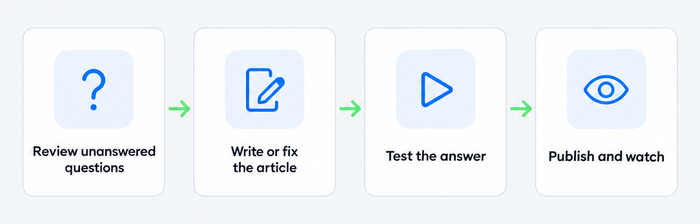
Keep the first version small and build it around the questions customers already ask. The six steps below use Tidio’s Lyro AI agent as the worked example, but the order applies to any platform.
1. Audit your questions and content
Pull your 20 most common questions from your inbox, chat transcripts and search logs. Check that each has one clear, current article. Mark each existing article as current, outdated or missing, and delete duplicates that contradict a live policy. A tight set of 20 good articles beats 200 mixed ones.
2. Write for retrieval
Use the customer’s wording in the title and answer in the first two sentences, then add detail. One question per article. Add the conditions that matter, such as region, plan or product version, since the bot cannot guess them. Write variations on purpose: a customer may say “cancel subscription” or “end membership”, so a good article uses both.
3. Connect your sources
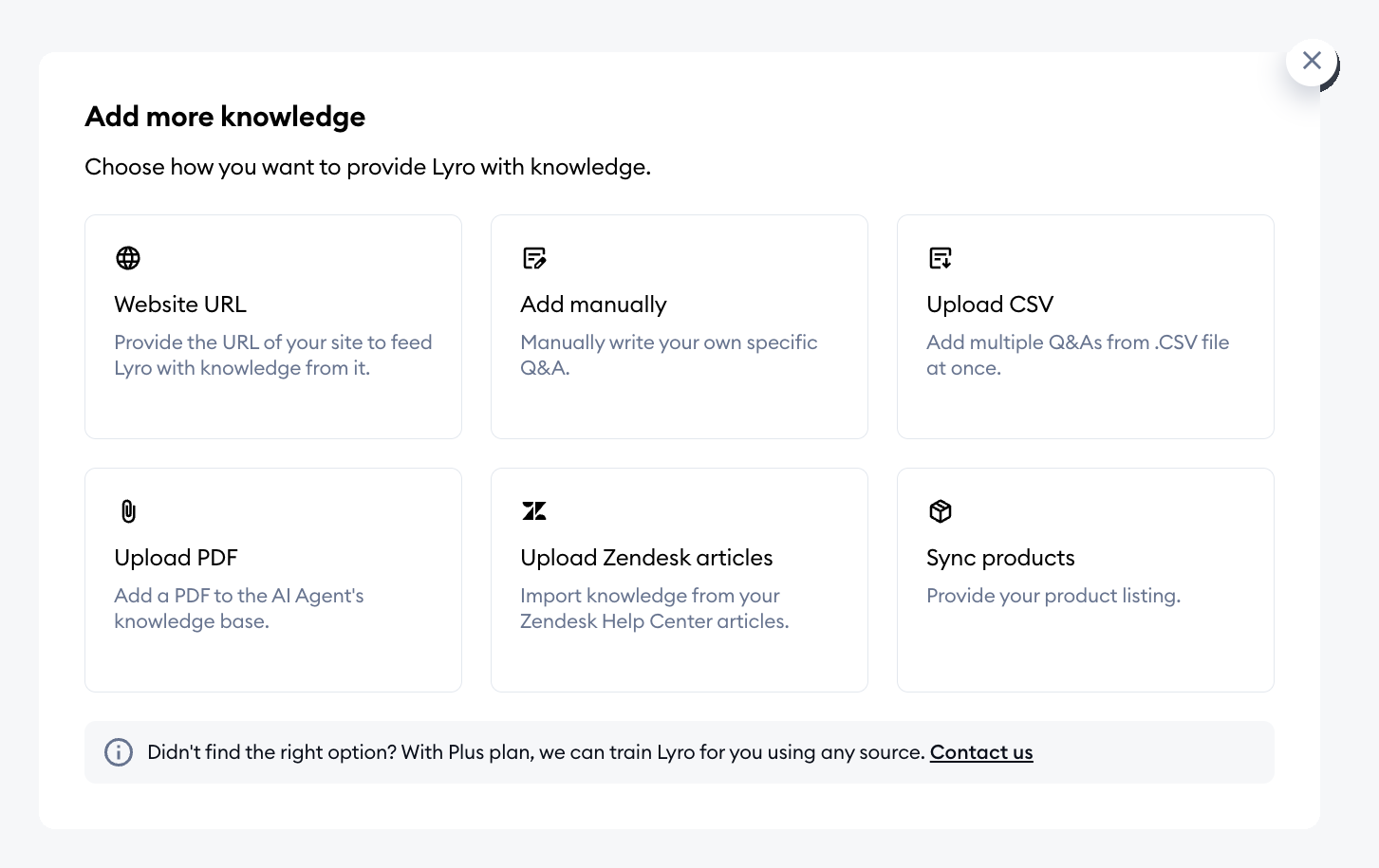
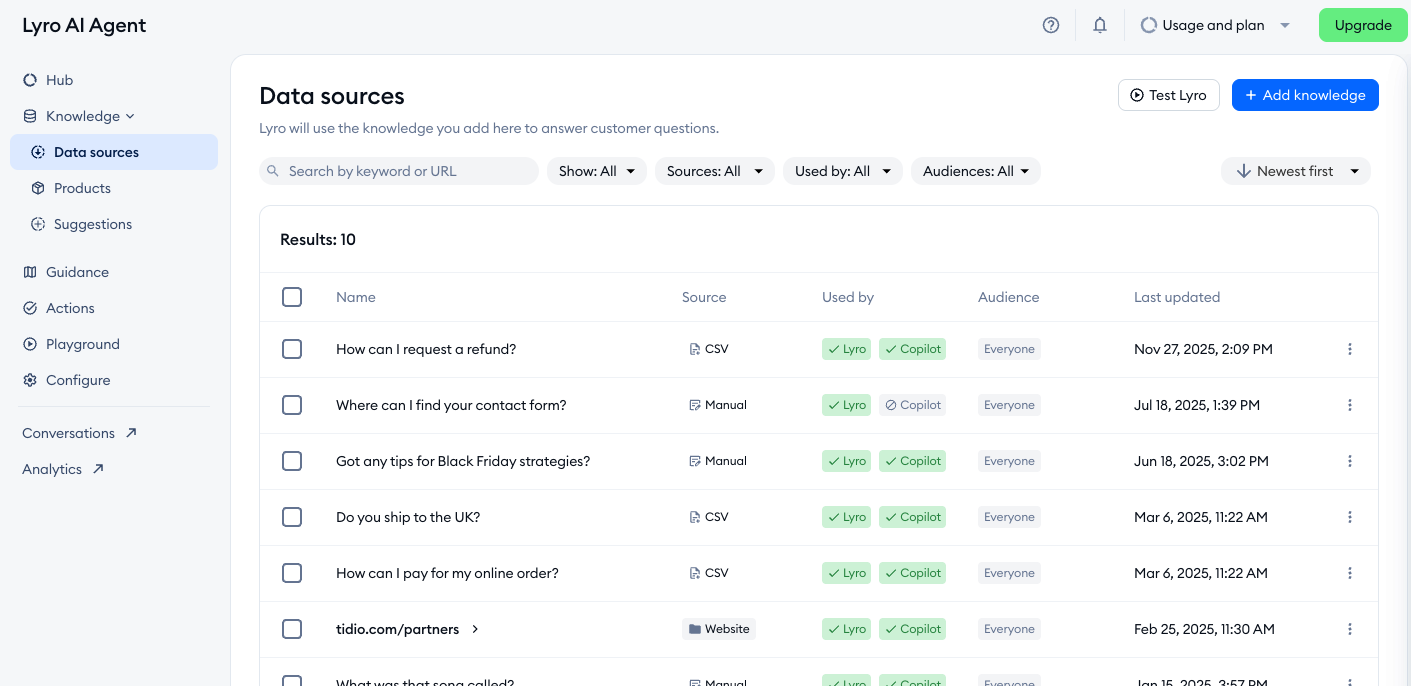
Choose a tool that reads from where your content already lives. In Lyro you can add knowledge from a website URL (scanning priority pages or a single page), write question-and-answer pairs by hand, upload a CSV or PDF, import articles from a Zendesk Help Center, or sync products from Shopify and WooCommerce. Lyro shows what it learned as a list you can browse, edit and delete, so nothing is a black box. Your first 50 Lyro conversations are free, so you can test on real questions before you pay.
4. Fill the gaps
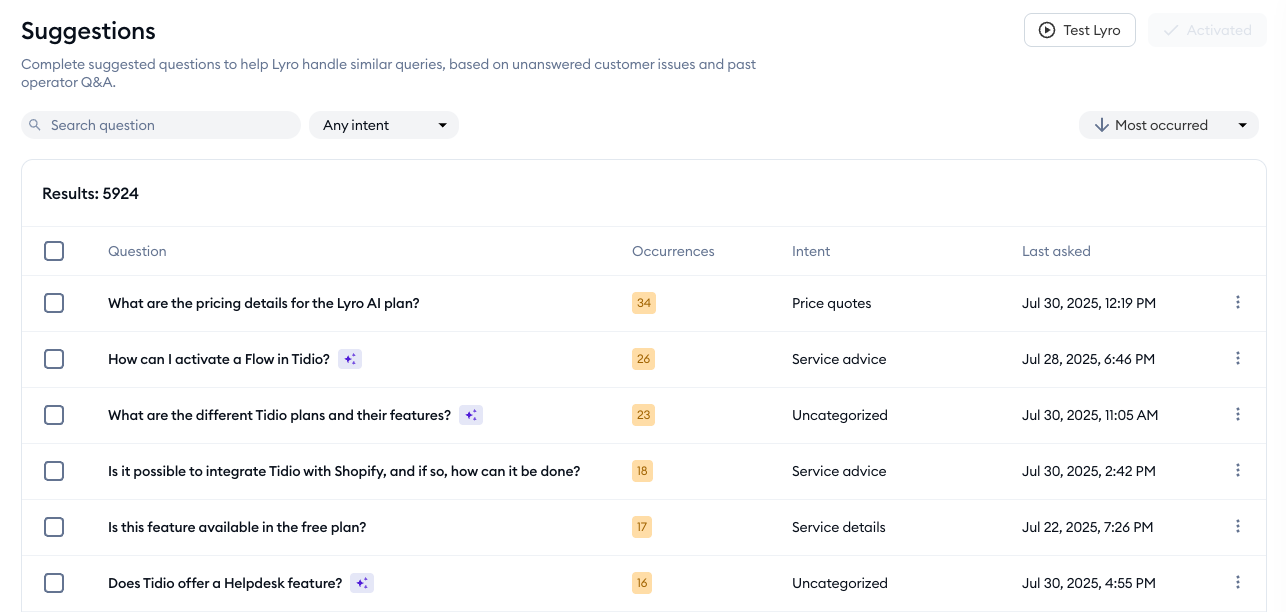
Check what the bot does not know yet. In Lyro, the Suggestions tab lists questions customers asked that it could not answer, based on unanswered issues and past agent answers, so you can add an answer from the list or ignore a suggestion that does not apply. Lyro can also pick up knowledge from live chats your agents mark as solved. You review those entries before they become part of the bot’s knowledge. When an answer looks wrong, the Review sources button shows exactly which page or answer it used.
5. Test before you go live
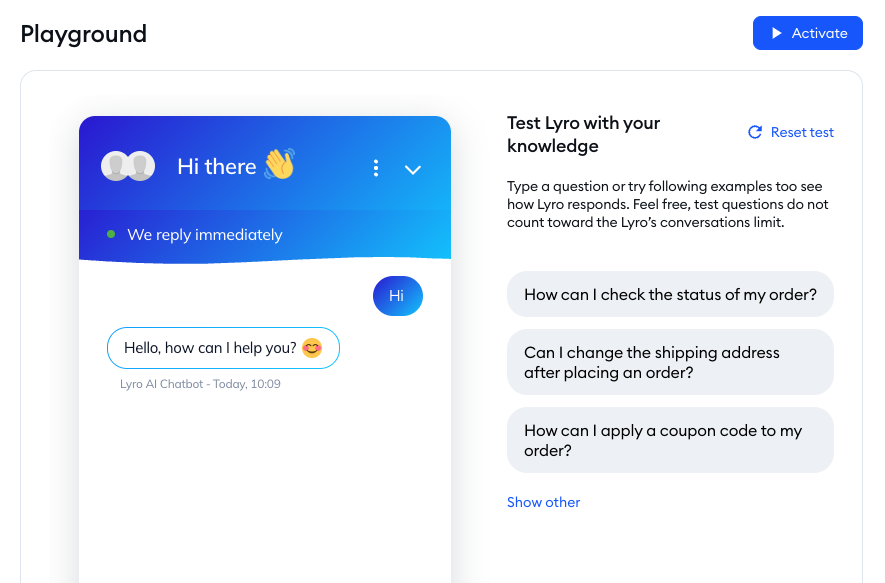
Write a test set of 20 real questions and include a few trick ones: a question your content does not cover, an out-of-date policy, an angry customer. Check each answer for accuracy and for a correct source. Fix the article first, not the bot. Lyro’s Playground lets you test in a sandbox, and test questions do not count toward your conversation limit. See our guide to testing your chatbot.
6. Launch small and review weekly
Switch the bot on for one channel or one audience first. Lyro runs on your website chat by default and can also answer on Messenger, Instagram and WhatsApp, so you can add channels later. Set clear handoff rules for high-value or sensitive conversations. Then, every week, read the chats where the bot handed off or the customer rated it poorly, and fix the article behind each one.
Try Lyro on your own help content in Tidio
Best practices for keeping answers accurate
These habits keep a knowledge base chatbot useful as your products and policies change.
- Update the moment something changes. If you change pricing or a return window, change the article the same day. Archive the old one so the bot cannot find it.
- Match the customer’s words. Add the phrases customers actually type, including synonyms and spelling variants, to your article titles and first lines.
- Show different knowledge to different audiences. A trial customer and a paying customer may need different answers. Lyro lets you create custom audiences that decide which knowledge each group sees.
- Set the tone once. Decide whether the bot is friendly, neutral or formal, and write your articles to match so replies feel consistent.
- Ask for feedback. A thumbs-up or thumbs-down on each answer, plus a short chat survey at the end of a conversation, shows which answers need work.
- Keep sources honest. Prefer approved help articles over old chat logs, and review anything the bot learns from conversations before it goes live.
For a deeper walkthrough of feeding an AI agent your content, see our guide to Lyro AI training and the general guide to training a chatbot.
How to measure a knowledge base chatbot
Track resolution rate, no-answer rate, handoff quality, answer feedback and ticket volume on the topics you covered. Together they show whether the bot answers correctly and whether missing content is the reason it does not.
- Resolution rate. The share of conversations the bot resolves without a person. Vendors publish their own averages, so measure yours. Tidio says Lyro can resolve up to 75% of support requests. Your own number depends on how much of your content the bot can use.
- No-answer rate. How often the bot finds nothing relevant. Each miss is an article to write, so the rate should fall as you fill them.
- Handoff quality. When the bot passes a chat to an agent, does the agent see the history, or does the customer repeat everything?
- Answer feedback. Thumbs-up rates on answers. A poorly rated answer that appears often is the first to fix.
- Ticket volume. Compare tickets on covered topics before and after launch.
Our guide to chatbot analytics covers the rest of the dashboard.
Knowledge base chatbot tools compared
Choose a tool by where your content lives and who asks the questions. A customer-facing help center needs search, a chat widget and handoff to your team. An internal wiki needs permissions and review dates. One tool rarely does both well.
Questions to ask any vendor: Which sources can the bot read? Does it show the source? What happens when it is unsure? Can I limit what it reads by audience? How is the AI billed, per seat or per resolution?
| Tool | Best fit | How the chatbot uses your content |
|---|---|---|
| Tidio | Small and mid-sized teams and online stores | Lyro answers in chat from website pages, files, question-and-answer pairs, a Help Center and product data |
| Zendesk | Larger teams that run tickets and a help center in one suite | AI agents on higher plans; AI helps draft and improve articles |
| Help Scout | Small teams that work mostly in email | AI Answers replies from your Docs and other sources |
| Freshdesk | Budget-minded teams that want a built-in portal | Freddy AI agent answers from articles and other sources |
Tidio sits first because this guide is aimed at small teams and online stores. Every row uses the same fields. Plans and pricing change often, so check each vendor’s page before you buy. For prices and reviews, see our guide to the best knowledge base software.
What is next for knowledge base chatbots
These shifts are already underway.
- From answering to acting. Newer AI agents can start the return as well as explain the policy, and the knowledge base remains the rulebook they follow. See our guide to the AI customer service agent.
- Self-maintaining content. Tools increasingly draft new articles from the questions the bot could not answer. A person still approves the change.
- Answers beyond your own site. AI assistants now answer product questions from the open web, so clear, question-based articles matter outside your own chat widget too.
Related guides
- AI knowledge base for how the content side works.
- Best knowledge base software for pricing and reviews.
- Customer self-service for the whole self-service stack.
- Web self-service for portals and help centers.
- Self-service statistics for the data behind it.
- Multilingual chatbot for serving customers in more than one language.
FAQ
ChatGPT’s knowledge comes from the large datasets it was trained on, including books, websites and other written content. It does not read your company’s help center unless you connect your content to it, and it has no built-in knowledge of your policies. A knowledge base chatbot is built to answer from your content instead.
In AI, a knowledge base is an organized collection of business information that the system uses to answer questions or carry out tasks. It usually holds articles, FAQs, policies and troubleshooting guides. The AI searches it by meaning and writes an answer from what it finds.
There is no model to train from scratch. You point the chatbot at your help articles, web pages, files and question-and-answer pairs, then test it with real customer questions. From there, quality improves as you correct articles and answer the questions it missed.
Around 20 accurate articles on the questions customers ask most are enough for a first launch on one channel. After that, add content from the no-answer list each week. Current, clear articles matter more than a large pile.
Yes. A small team often gains the most, because repeated questions take a large share of its time. Start with a free plan or trial of a support tool that includes an AI agent, connect your website and help articles, and run it beside your team before you switch it on for everyone.
No. It takes the routine questions your documentation already answers and passes everything else to a person. Your agents then spend their time on complex or sensitive conversations, and a smooth handoff is as important as the answers.
It is accurate when the sources are current and the bot is set to answer only from them. On security, exclude personal data and internal-only files from anything a customer-facing bot can read, and ask your vendor how it stores and uses your content.
Tidio is an AI customer service platform for small and mid-sized businesses. Live chat, a shared inbox, the Lyro AI agent and a Help Center share one dashboard, and online stores can connect Shopify or WooCommerce.
Build a chatbot that answers from your help content
