



Key takeaways:
- Multichannel customer service means being available on several support channels. Whether those channels share history is a separate question, and it is what separates multichannel from omnichannel.
- Start with the two or three channels your customers already use. Add a channel only when you can answer it within a stated time.
- Running every channel in a shared inbox is the practical middle step: it keeps the choice of channels and removes most of the lost context.
- A multichannel contact center adds phone, queues and call routing. Most small teams do not need one.
- Compare software on channels included per plan, shared customer history, routing, AI handoff and pricing basis.
Multichannel customer service (also written multi-channel customer service or multichannel customer support) means offering support on several channels, such as email, live chat, phone, messaging apps and social media, so customers can pick the one that suits them. Each channel usually has its own queue, and the team decides how far to connect them.
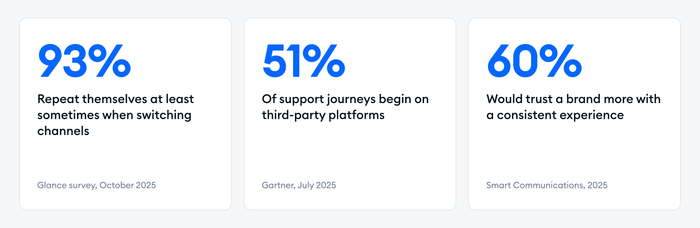
It matters because customers no longer pick one channel and stay there. In an October 2025 survey of 600 U.S. consumers by Glance, only 7% said they rarely or never have to repeat themselves when they switch channels.[1] A multichannel setup gives people the choice. Whether it also gives them continuity depends on how well the channels are connected.
This guide is written for small support teams and online stores. It covers what multichannel customer service is, how it works, which channels to offer, what a multichannel contact center adds, the challenges to expect, a six-step setup and the software to compare.
What is multichannel customer service?
Multichannel customer service is a support model in which a business answers customers on more than one channel, such as email, live chat, phone, messaging apps and social media. The customer chooses the channel. The business is responsible for answering on each one, not necessarily for connecting them.
Picture a store that sells running shoes. Customers ask about sizing in the website chat, send order questions to the support email address and message the Instagram account about delivery. All three channels get answers, and each one works. A shopper who asks about a late parcel on Instagram and then emails the same question, though, may meet two different agents who each start from zero.
You will also see the terms multichannel support, multichannel customer support and multichannel communication. They describe the same practice, sometimes with a slightly different emphasis: the service your team gives (support), the way your team communicates (communication) or the software that runs it (a multichannel communication platform). For a tour of the channels themselves, see our guide to customer service channels.
Why multichannel customer service matters
Multichannel customer service matters because customers decide where a conversation happens, and the first channel is rarely the last. Teams that cover only one channel lose the customers who would have reached out somewhere else.
The surveys point the same way:
- Support often starts outside your own channels. In its July 2025 survey, Gartner found that 51% of customer service journeys begin on third-party platforms such as search engines, YouTube and AI assistants. Only 22% of customers start, stay and resolve an issue entirely on a company’s own channels.[2]
- Customers notice the seams. In the Glance survey, 44% of consumers said they almost always repeat themselves when they switch channels, and another 49% said they sometimes do.[1] In a 2025 global survey of 3,000 consumers by Smart Communications, 60% said they would trust a company more if it offered a consistent experience across channels.[3]
For a small team, the stake is simple. A store with three people cannot staff each channel separately, so every channel you open has to earn its place and share its workload. Done well, multichannel support is a way to be present where your customer experience is decided, such as a delayed order or a failed payment, without hiring for each channel.
How multichannel customer service works
Multichannel customer service works by connecting each support channel to a team that answers it. How the channels are connected sets the quality of the experience, and teams usually move through these setups in order.
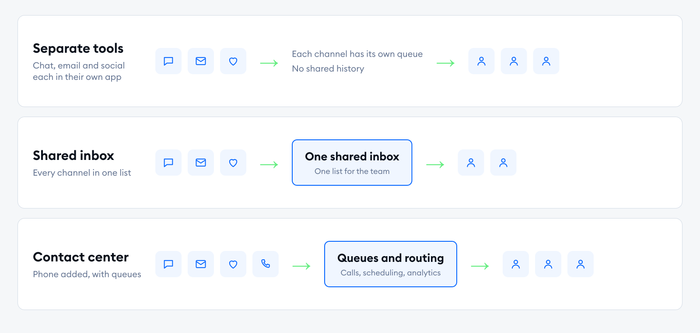
- Separate tools per channel. Chat runs in a chat tool, email in a mailbox and social messages in each app. It is fast to launch and gets slow as volume grows, because agents switch between tabs and no one sees the full picture of a customer.
- A shared inbox. Every channel feeds one inbox, so agents work from a single list. It is the usual first upgrade for a small team, and it moves the setup toward omnichannel customer service.
- A contact center. Phone joins the mix, with queues, call routing and agent scheduling on top. It suits teams that handle many calls, and it asks for more setup and budget.
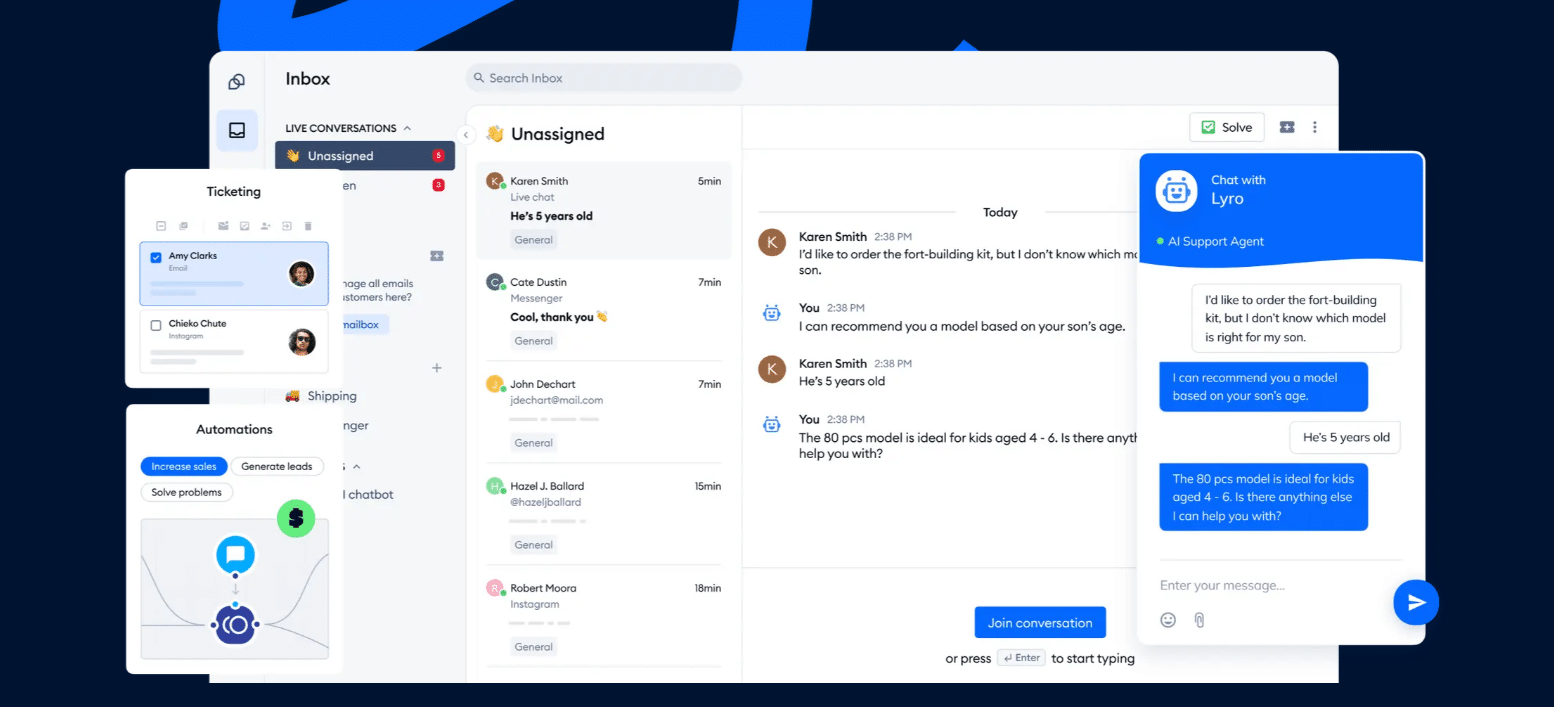
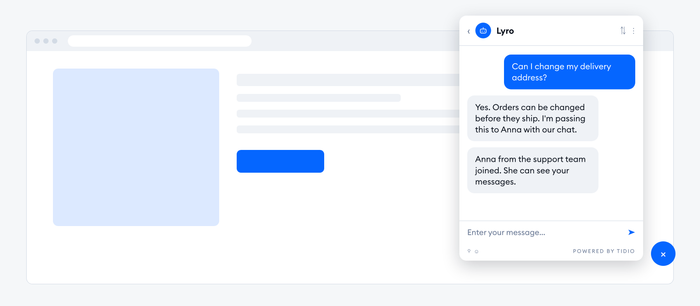
In Tidio, for example, the shared inbox holds email, live chat, Instagram, Messenger and WhatsApp conversations in one list, so a store with a small team can answer all of them from one screen. The Lyro AI Agent can take the repeat questions first and hand a conversation to a person when it needs one. Phone calls are not part of it.
Multichannel vs omnichannel customer service
Multichannel customer service offers several channels that run side by side. Omnichannel customer service connects them to one customer record, so history, routing and reporting are shared. The question is not how many channels you have but whether a conversation can move between them without starting over.
| Multichannel | Omnichannel | |
|---|---|---|
| Goal | Be available where customers are | Make every channel feel like one conversation |
| Customer history | Kept per channel, sometimes per tool | One record across channels |
| Channel switch | Customer repeats the issue | Customer continues where they stopped |
| Team view | Each channel owner sees their own queue | Any agent sees the whole thread |
| Reporting | Numbers per channel | One view of the journey |
| Good first step for | Teams adding their second or third channel | Teams that already see repeat contacts |
Most teams start as multichannel, and that is a reasonable place to be. The move to omnichannel is mostly a tooling step, from several tools to one inbox. Our full guide to omnichannel customer service walks through it. Gartner has argued the model itself is changing: its February 2025 analysis of customer service channels recommended that leaders move from convoluted omnichannel strategies to what it calls omni-modal ones, where a customer uses a single digital channel in the mode they prefer, such as text or voice.[4]
Which customer support channels should you offer?
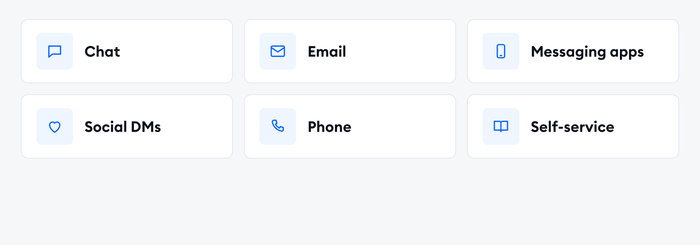
The channels to offer are the ones your customers already use and your team can answer on time. For most small teams that means website chat, email and one or two messaging channels. Add phone later and only if the volume justifies it.
| Channel | Best for | Watch out for |
|---|---|---|
| Live chat | Quick questions while browsing, pre-purchase help | Needs coverage during the hours the widget is visible, or an AI agent for the rest |
| Detailed or documented issues, attachments | Slow expectations; needs a shared address and clear ownership | |
| WhatsApp and Messenger | Order updates and follow-ups in apps customers already use | Messaging apps set their own opt-in and messaging rules |
| Instagram and social DMs | Shoppers who discover and ask in the same place | Public comments and private messages need one owner |
| Phone | Urgent or complex issues, older customers | Costly per contact; needs queues, hours and call notes |
| Self-service | Repeat questions at any hour | Needs a maintained help center and a way to reach a person |
Keep the list short. Count conversations per channel for the last 90 days before adding anything, and publish a response-time promise for each channel you keep. A channel you answer in two days looks worse than one you never opened. Messaging apps add one more rule: the WhatsApp Business Platform requires customers to opt in before a business can message them, so check the opt-in rules before you build proactive messages.
Benefits of multichannel customer service
The benefits of multichannel customer service come from meeting customers where they already are. It widens who can reach you, makes it easier to get help and gives you a clearer picture of what customers ask on each channel.
- Convenience for customers: People pick the channel that suits the moment, such as chat at a desk, WhatsApp on a commute or email for a long explanation. A choice of channels removes a reason to give up.
- Fewer missed conversations: A question asked on Instagram or in a chat widget gets answered instead of disappearing. That matters for stores, where a missed pre-purchase question is a lost order.
- Faster answers on simple questions: Chat and messaging suit short questions, so those leave the email queue and get a quick reply. Email stays for the issues that need detail.
- Better coverage with an AI agent: An AI agent can take the repeat questions on the channels you enable, around the clock. A person handles what it cannot.
- Channel data you can act on: Counting conversations and resolution time per channel shows where demand sits and which channel needs more coverage. That feeds your customer service metrics and your next staffing decision.
What is a multichannel contact center?
A multichannel contact center is a customer service operation that handles phone calls, email, chat and messaging from one team, usually with shared queues, call routing and agent scheduling. A traditional call center handles voice first. A contact center adds the digital channels beside it.
The distinction matters because searches for “multichannel call center” and “multichannel contact center software” describe a different buyer from a small store owner. These teams run dozens of agents, take many inbound calls and need tools such as an interactive voice response (IVR) menu, call recording and workforce management. Platforms in this space include Talkdesk and RingCentral, and they price per user. Talkdesk lists Digital Essentials (email, chat, SMS and social messaging) at $85 per user per month and Voice Essentials at $105, while RingCentral lists its RingCX contact center from $65 per user.
For most small and mid-sized teams, a shared inbox with chat, email and messaging channels does the job without a contact center. Consider a contact center when phone volume is high enough that you need queues, hold management and call analytics, or when regulation requires call recording.
Challenges of multichannel customer service
Adding channels one after another creates problems of its own. Most come from channels that grow apart, and each has a practical fix.
- Disconnected tools: Each channel in its own app means agents switch between screens and history stays split. Fix: move every channel into one shared inbox before you open another.
- Repeated questions: A customer who changes channel meets an agent who has not seen the first conversation. Fix: log the channel and a one-line summary on every conversation, and match customers by email address or phone number.
- Uneven response times: Chat gets answered in a minute and email in two days. Fix: set a response-time target per channel and report it weekly.
- Inconsistent answers: Two agents, or an agent and a bot, give different answers to the same question. Fix: keep one knowledge base and one set of saved replies for all channels.
- Too many channels for the team: Every channel needs coverage. Fix: start with the two or three customers use most, and close or redirect a channel that nobody answers.
- Phone as an island: Calls often run in a separate system with its own records. Fix: write call notes into the customer’s profile, or choose a platform that includes voice if calls are your main channel.
How to set up multichannel customer service
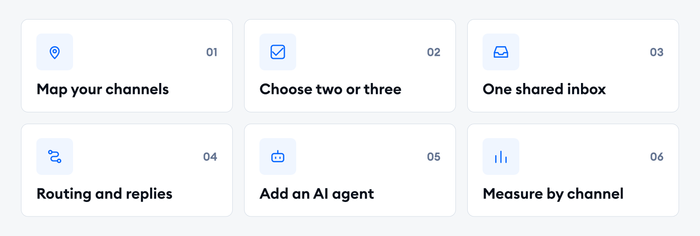
Setting up multichannel customer service takes six steps. A small team can have a first working version in days by connecting the channels it already has before opening new ones.
1. Map where customers contact you today
Pull the last 90 days of conversations from your inbox, chat tool and social accounts and tally them per channel. Note any channel customers have asked for. A store whose questions arrive on chat and Instagram does not need a phone line first.
2. Pick the channels you can answer well
Choose two or three channels to start with. Decide your opening hours, the response time you promise on each channel and who owns it.
3. Put every channel in one inbox
Connect chat, email and the messaging or social accounts to one shared inbox, then send a test message from each one. Confirm that it arrives with the right channel label. A shared inbox tool is the working surface for the whole team.
4. Write routing rules and saved replies
Assign conversations by topic, language or availability, so the right person sees each one. Write canned responses for the questions agents answer most, and keep one version for every channel.
5. Add an AI agent for repeat questions
Let an AI agent handle the questions that repeat, such as order status, shipping, returns and opening hours. Tidio says Lyro can resolve up to 75% of support requests. Set the handoff to carry the transcript, so a customer who reaches a person does not start over. Our guide to customer service automation covers what to automate first.
6. Measure each channel and adjust
Look at first response time, resolution time, satisfaction scores and how many customers write twice about one issue, split by channel. Review the numbers monthly. If one channel resolves slowly or one question keeps coming back, fix the routing, the answer or the help center article.
Bring chat, email and social messages into one inbox
Best multichannel customer service software
The best multichannel customer service software covers the channels you use, keeps one history per customer and fits your team size and budget. Most options are help desk platforms with a shared inbox, and the main differences are which channels each plan includes and how pricing scales.
| Platform | Best for | Starts at | Worth knowing |
|---|---|---|---|
| Tidio | Small teams and e-commerce stores that want chat, email, Messenger, Instagram and WhatsApp with an AI agent | Free plan; Starter $24.17 a month billed annually ($29 monthly) | Priced by conversations, not seats. Lyro is sold separately. No phone calls |
| Zendesk | Mid-size teams that want mature automation and many channels | Suite Team $55 per agent a month billed annually | Support Team ($19) covers email and ticketing only. Messaging and telephony start at Suite Team |
| Freshdesk | Teams that want a help desk with a low entry price and routing options | Growth $19 per agent a month billed annually; no free plan | Round-robin assignment starts at Pro, skill-based assignment at Enterprise |
| HubSpot Service Hub | Teams that already run HubSpot CRM | Free for up to two users; Professional from $90 per seat a month | Starter pricing is shown inconsistently on the page. Professional carries a $1,500 onboarding fee |
| Zoho Desk | Budget-conscious teams in the Zoho ecosystem | Free for three users; Standard $14 per user a month billed annually | Live chat through Zoho SalesIQ is on the Enterprise plan only |
| Help Scout | Small teams that want a simple shared inbox for email and chat | Free for five users; Standard $25 per user a month billed annually | Phone and voice work through integrations on every plan |
| Talkdesk | Larger teams with a phone-heavy contact center | Digital Essentials $85 per user a month; Voice Essentials $105 | Voice and digital channels are priced as separate editions |
| RingCentral | Voice-first teams that add digital channels | RingCX from $65 per user a month | Built around a phone system first |
Prices are US list prices for each vendor’s entry plans as of October 2026, in US dollars. Check each pricing page on the day you decide, because plans and add-ons change.
Ask these before you commit:
- Which channels are included on my plan, and which cost extra? Chat is often a separate product or a higher tier.
- Does the platform match a customer across channels? Matching by email address or phone number keeps one history.
- Can an AI agent answer on the channels I enable, and does the transcript go with the handoff?
- Is pricing per agent, per conversation or per resolution? The basis decides how the bill grows with volume.
| Your situation | Channels to start with | What to prioritize |
|---|---|---|
| A solo founder or a team of one to three, small online store | Website chat, email, Instagram or Messenger | A shared inbox, an AI agent for repeat questions, saved replies |
| A growing e-commerce team of four to ten | Chat, email, WhatsApp, Instagram, order data | Routing rules, store integration, reporting by channel |
| A team where phone is the main channel | Phone, email, chat | A contact center platform with queues and call recording |
Tidio fits the first two rows: email, live chat, Messenger, Instagram and WhatsApp in one inbox, with a Free plan to test the setup and a Shopify integration for order data. Teams in the third row should start from a voice platform. For a longer comparison, see our roundup of customer service software and the list of omnichannel support software.
See how Tidio runs every channel from one inbox
Where multichannel support is heading
Two shifts matter most: AI agents are becoming the first responder on each channel, and customers increasingly begin their support journey outside your own channels.
- AI agents answer first, people handle the rest. An AI customer service agent can answer on every channel you connect and pass the conversation to a person with context. The quality of the knowledge base, more than the number of channels, sets how much it resolves.
- Customers start elsewhere. The Gartner figures above show that most journeys now begin on third-party platforms. Gartner has predicted that by 2028, 70% of customer service journeys will begin and be resolved in conversational third-party assistants built into mobile devices.[4] A public, well-maintained help center is how your answers reach those assistants.
Tidio’s own case studies show what a small team can do with that setup. Suitor, a tuxedo rental company, reached up to 85% customer service automation with Lyro, cut its average response time from about 3 minutes to 6 seconds and passed only 24% of queries to a human representative, according to the Suitor case study.
Open the channels customers use, then connect them
Multichannel customer service starts with being reachable, and it works when the channels share a team and a workflow. Pick the two or three channels your customers already use, answer them from one inbox and let an AI agent take the repeat questions. Then check response times and repeat contacts by channel to see where to improve next.
FAQ
Multichannel customer support means helping customers on several channels, such as email, live chat, phone, messaging apps and social media. Customers pick the channel they prefer. Each channel may have its own queue, and the quality of the experience depends on how well the team connects them.
Multichannel service offers several channels that run side by side. Omnichannel service connects them to one customer record, so history, routing and reporting are shared. A customer can change channel in an omnichannel setup and continue the same conversation without repeating the issue.
A multichannel contact center handles phone calls and digital channels such as email, chat and messaging from one team, with shared queues, call routing and agent scheduling. A call center focuses on voice. A contact center adds the other channels beside it, and it is mostly useful for teams with high call volume.
A small business should start with the channels customers already use and the team can answer on time, usually website chat, email and one or two messaging channels. Phone and extra social channels come later, when conversation counts show enough demand to justify the coverage.
You need one as soon as agents switch between several tools to answer customers. A multichannel communication platform puts chat, email and messaging into one inbox, so agents work from a single list and customer history stays in one place. A free plan is enough to test the idea.
The best software depends on your channels, team size and budget. Small teams and e-commerce stores often start with a chat-first inbox such as Tidio, while teams with heavy phone volume look at contact center platforms such as Talkdesk or RingCentral. Compare channels per plan, handoff and pricing basis first.
Measure first response time, resolution time, satisfaction and repeat contacts for each channel and for the journey as a whole. Compare channels with each other to see where demand sits. A rising share of customers who contact you twice about the same issue shows that context is still getting lost between channels.
Use live chat to support your customers in real-time
