


Key takeaways
- Best for small e-commerce and SMB teams: Tidio. Chat, email tickets, and the Lyro AI agent sit in one inbox, and plans are priced by billable conversations rather than seats.
- Best for a public price per agent: Freshdesk and Zoho Desk. Freshdesk Growth is $19 per agent and Zoho Desk starts at $7, both with the numbers on the page.
- Best for an AI-first chat desk: Intercom. Live chat is on every plan, and Fin costs $0.99 per outcome against Kayako’s $1 per resolved ticket.
- Best for shared-inbox teams: Help Scout, Front, and Zendesk for the big ones. Help Scout includes live chat from its $25 Standard plan.
- Price the platform, not just the AI. Kayako’s $1 covers Kay’s resolutions only. Ask what the helpdesk underneath costs, and compare it with the plans below.
Kayako built its name as a ticketing help desk with live chat and a shared inbox, and it now sells that platform as Kayako One with an AI agent called Kay included. The pricing page leads with $1 per resolved ticket and no seat fees, but it shows no price for the platform itself, and the older self-hosted product lives on as Kayako Classic. Teams that want a price on the page or a free plan to test start comparing. We compared 10 tools that replace Kayako’s core job, tickets plus customer chat, and checked every pricing page and G2 profile in October 2026. Tidio is listed first for the teams it suits best, and its limits are stated: it isn’t made for enterprise queues with complex routing. Each entry also names where that tool falls short of Kayako.
Why teams look for a Kayako alternative
Kayako does several things well. Kayako One bundles a unified inbox, ticketing, a knowledge base, a live chat widget, automation rules, and reporting, and Kay can take actions such as refunds and account changes through connected systems. The pricing page also says Kayako is SOC 2 compliant. If you want a managed rollout with a vendor that sets you up, it is a reasonable fit, and you should probably stay.
Most teams leave for one of four reasons, all visible on Kayako’s own pages (checked October 2026):
- The platform price isn’t on the page. Kayako One is listed as a full helpdesk with Kay included, but the button says “Talk to an Expert” and no number is shown. You can’t compare it with a $19 or $25 per-agent plan without a call.
- The $1 covers the AI, not the desk. Kayako charges $1 per resolved ticket and nothing for escalations or partial resolutions. That is a clear unit, but your total still depends on the helpdesk price and on how many tickets Kay resolves.
- Two products share one name. Kayako Classic, the older self-hosted platform, still has its own page that explains the move to a cloud product. If you run Classic or find old guides, check which version a review is describing.
- A small review base. Kayako has a G2 score of 4.0 from 226 reviews. That is a real signal, but far fewer voices than the 3,000 to 8,000 reviews behind Freshdesk, Intercom, or Zoho Desk.
Your reason decides where to look. A public price points to Freshdesk or Zoho Desk, a busy store to Tidio or Gorgias, an email-first team to Help Scout or Front, and an AI-first desk to Intercom. If you want to read about the product first, our Kayako review covers it feature by feature.
Kayako alternatives at a glance
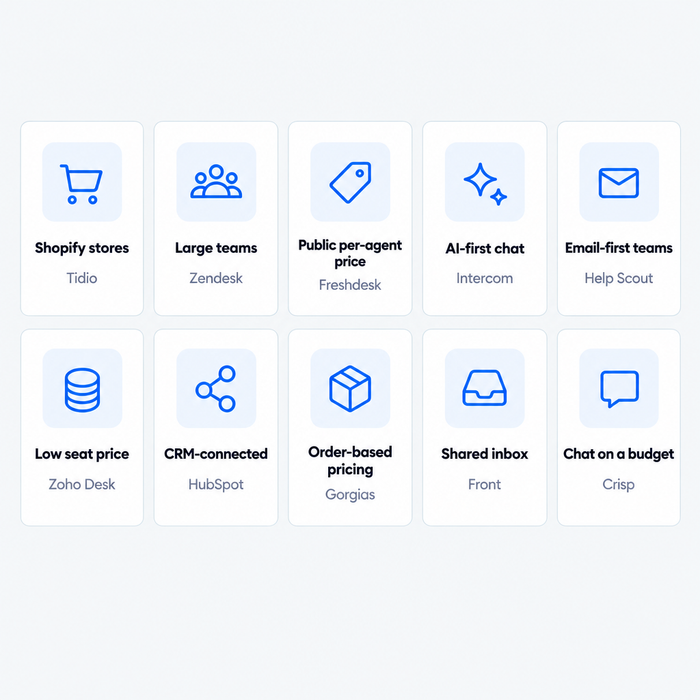
Short answer: Tidio for small e-commerce and SMB teams, Freshdesk or Zoho Desk for a help desk with a public per-agent price, Intercom for an AI-first chat desk, Help Scout or Front for shared-inbox work, Zendesk for large teams with strict SLAs, and Crisp for chat on a flat workspace price.
| Tool | Best for | Starting price (billing basis) | Free plan / trial | G2 rating |
|---|---|---|---|---|
| Tidio | Small e-commerce and SMB teams that want chat, tickets, and AI | $24.17/mo billed annually ($29 monthly), flat for up to 10 seats | Free plan · 7-day trial | 4.6 (1,962) |
| Zendesk | Large teams with SLAs, routing, and many channels | $19/agent/mo billed annually ($25 monthly), email and tickets only | 14-day trial | 4.3 (7,082) |
| Freshdesk | A help desk with public per-agent prices | $19/agent/mo billed annually ($23 monthly) | 14-day trial | 4.4 (3,773) |
| Intercom | AI-first chat and help desk | $29/seat/mo billed annually ($39 monthly) plus $0.99 per Fin outcome | 14-day trial | 4.5 (3,913) |
| Help Scout | Email-first teams that want a simple shared inbox | $25/user/mo billed annually ($30 monthly) | Free for 5 users · 15-day trial | 4.4 (431) |
| Zoho Desk | Lowest cost per seat | Free; paid from $7/user/mo billed annually ($9 monthly) | Free for 3 users · 15-day trial | 4.4 (7,954) |
| HubSpot Service Hub | Support tied to CRM records | Free; Professional from $90/seat/mo billed annually | Free for 2 users | 4.4 (3,017) |
| Gorgias | Shopify and e-commerce brands | $50/mo billed annually ($60 monthly) for 300 tickets, not per seat | Trial, no free plan | 4.6 (582) |
| Front | Shared inbox collaboration and routing | $25/seat/mo billed annually ($35 monthly) | 14-day trial | 4.7 (2,514) |
| Crisp | Live chat and a shared inbox on a flat workspace price | $45/workspace/mo, monthly billing, 4 seats | Free for 2 seats · 14-day trial | 4.5 (204) |
How we evaluated these alternatives
We started from the tools that rank for this search, the ones AI answers name for Kayako, and the previous edition of this article, then kept 10 that replace a help desk with tickets and customer chat. IT service management and large CRM suites are out. Five criteria map to why people leave Kayako:
- Price model. Per seat, per ticket, or per conversation, and what extra usage costs.
- Price on the page. Whether you can see the plan price without a sales call.
- AI. Whether an AI agent is included, and what triggers a charge.
- Channels. Email, live chat, social, and phone.
- Fit. Team size, store type, and how much setup help you get.
We read pricing pages, plan comparisons, and G2 listings, and we label vendor claims as claims. We didn’t trial every product ourselves, so screenshots come from vendors’ public product pages and Tidio’s media library. Tidio goes first as the pick for small e-commerce teams; the rest run roughly from closest to Kayako to furthest.
The 10 best Kayako alternatives in 2026
1. Tidio
Best for: small e-commerce and SMB teams that want live chat, email tickets, and an AI agent in one inbox.
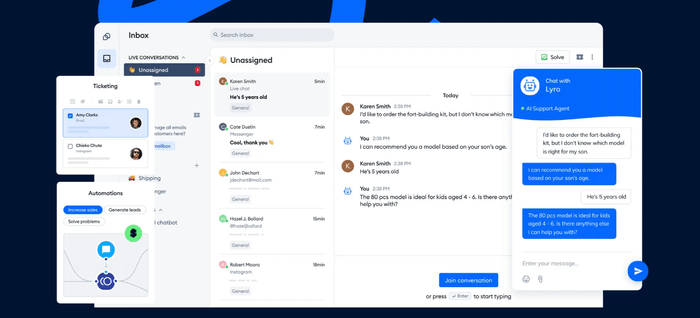
Tidio begins with the chats visitors start on your site and puts email tickets in the same inbox. A support email becomes a ticket with a status, a priority, and an assignee, next to live chat and the Lyro AI agent. An agent can open the chat behind a ticket, or turn part of a chat into a ticket.
On Shopify stores, tidio.com lists cart preview and order history in the inbox. The Lyro AI agent handles repeat questions, and Tidio says it can resolve up to 75% of support requests. Plans are priced by billable conversations, so a new teammate doesn’t add a seat fee. That is the nearest match here to Kayako’s no-seat-fee pitch, with a public plan price.
Pros
- One inbox for chat, email, social messages, and AI, so nobody repeats information.
- Flat plan prices for up to 10 seats instead of a fee per user.
Cons
- Ticketing automations start on the Plus plan, so smaller plans suit simpler workflows.
- Live conversations and tickets both count toward billable conversations, so a busy inbox may move you up a plan.
Pricing: from Tidio’s pricing page, billed annually (monthly in brackets): Free $0 (50 billable conversations a month, 10 seats); Starter $24.17 ($29), 100 conversations; Growth from $49.17 ($59), 250 to 2,000; Plus from $300 plus usage; Premium by quote. Lyro on its own starts at $32.50 ($39) for 50 conversations, and the first 50 are free.
Rating: G2 4.6/5 (1,962 reviews)
Versus Kayako: you gain a free plan, public prices, live chat, and Shopify context in the same inbox. You give up Kayako’s white-glove onboarding and the per-resolution AI price that carries no seat fee.
Explore Tidio's help desk
2. Zendesk
Best for: larger teams that need deep ticketing, SLAs, skills-based routing, and many channels.
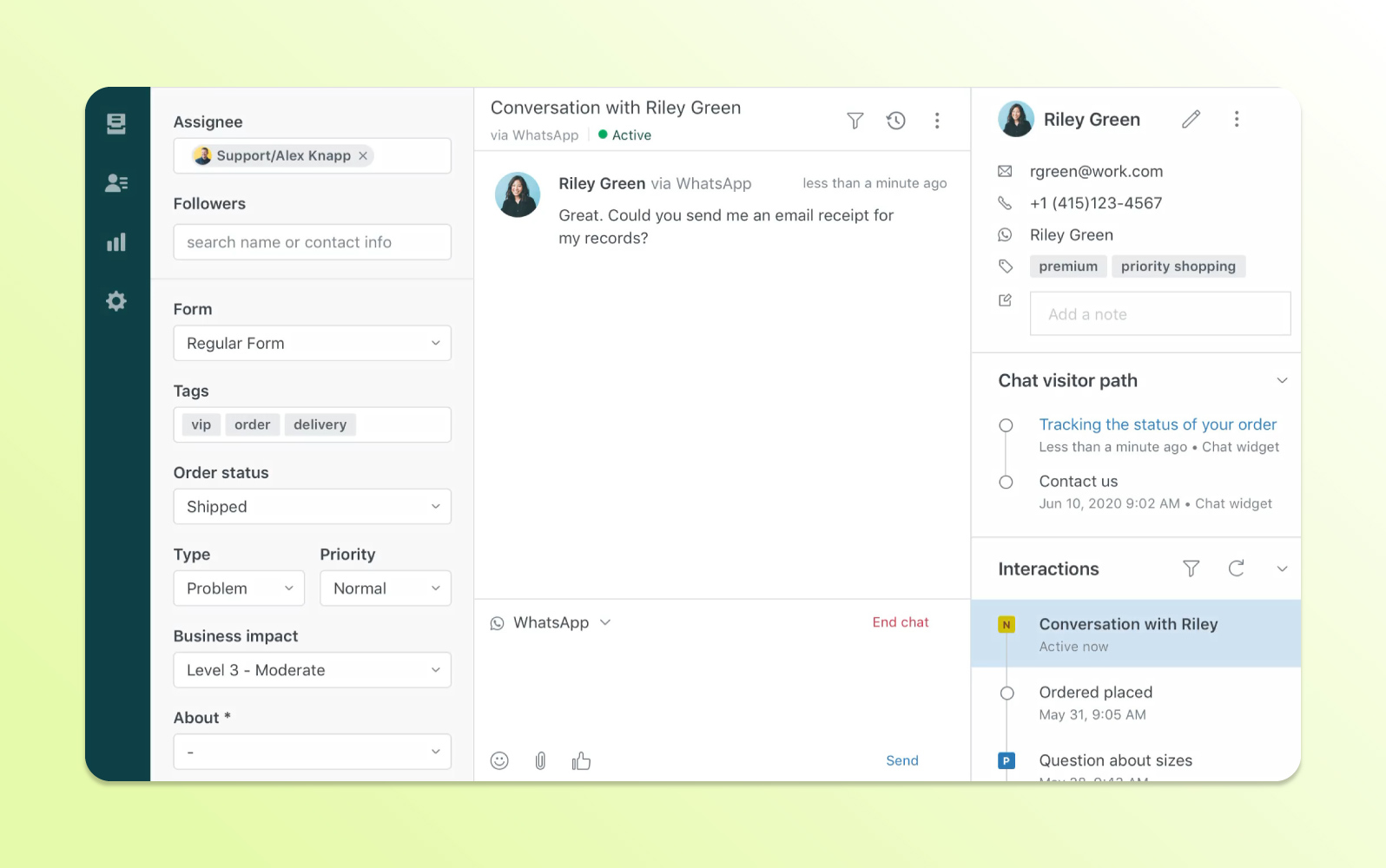
Zendesk is the benchmark most help desks get measured against. Support Team is $19 per agent a month billed annually ($25 monthly) for email and ticketing. Messaging and live chat start at Suite Team, $55 per agent billed annually, and SLAs at Suite Professional, $115. It is the safe pick when you outgrow a mid-size queue.
Pros
- Deep ticketing, SLA, and routing controls at the higher tiers.
- An official Shopify app for order details and refunds in the sidebar.
Cons
- Live chat is not in the entry plan.
- AI resolutions and add-ons stack on top of seat prices.
Pricing: per agent per month, billed annually (monthly in brackets): Support Team $19 ($25); Suite Team $55 ($69); Suite Professional $115 ($149); Suite Enterprise is “Talk to Sales”. 14-day trial; no free plan on the pricing page.
Rating: G2 4.3/5 (7,082 reviews)
Versus Kayako: you gain a public price ladder, skills-based routing, and an ecosystem that scales to large teams. You give up Kayako’s single pay-per-resolution AI unit, since Zendesk’s AI price comes on top of seats.
3. Freshdesk
Best for: teams that want a help desk with a public per-agent price and the usual ticketing tools.
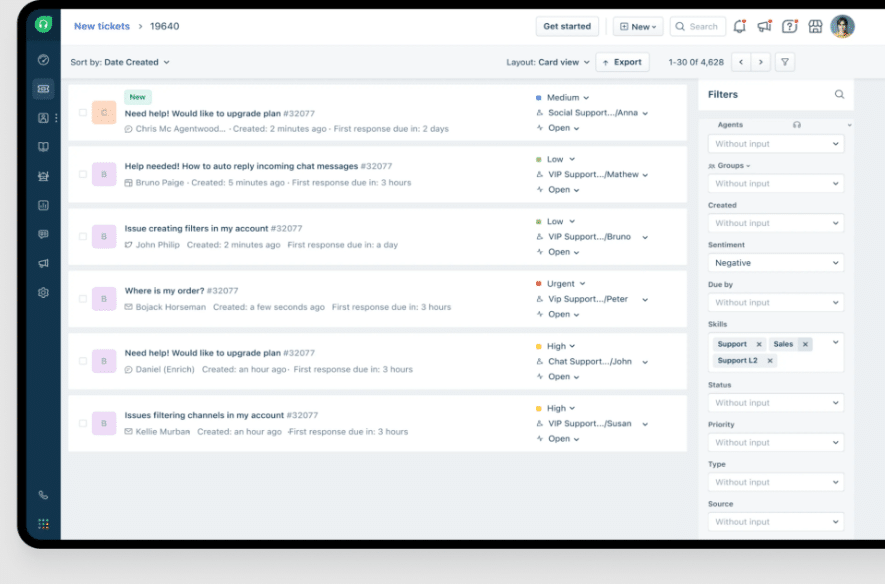
Freshdesk is the most direct swap for a ticketing desk, and its price is on the page. Growth is $19 per agent a month billed annually ($23 monthly). Multiple SLA policies and round-robin routing start at Pro at $55. Skill-based assignment is Enterprise only.
Pros
- A low entry price per agent, with SLAs and routing a tier earlier than Zendesk.
- Mature ticketing as you move up the plans.
Cons
- Growth has a single SLA policy and no custom dashboards.
- You can only downgrade or cancel at the end of your term.
Pricing: per agent per month, billed annually (monthly in brackets): Growth $19 ($23); Pro $55 ($66); Enterprise $89 ($107). No free plan on the pricing page; 14-day trial.
Rating: G2 4.4/5 (3,773 reviews)
Versus Kayako: you gain a price you can read and a long list of apps and integrations. You give up the done-for-you onboarding Kayako lists, and Freddy bills AI sessions on top of seats.
4. Intercom
Best for: teams that want an AI-first, chat-led help desk and accept usage billing.
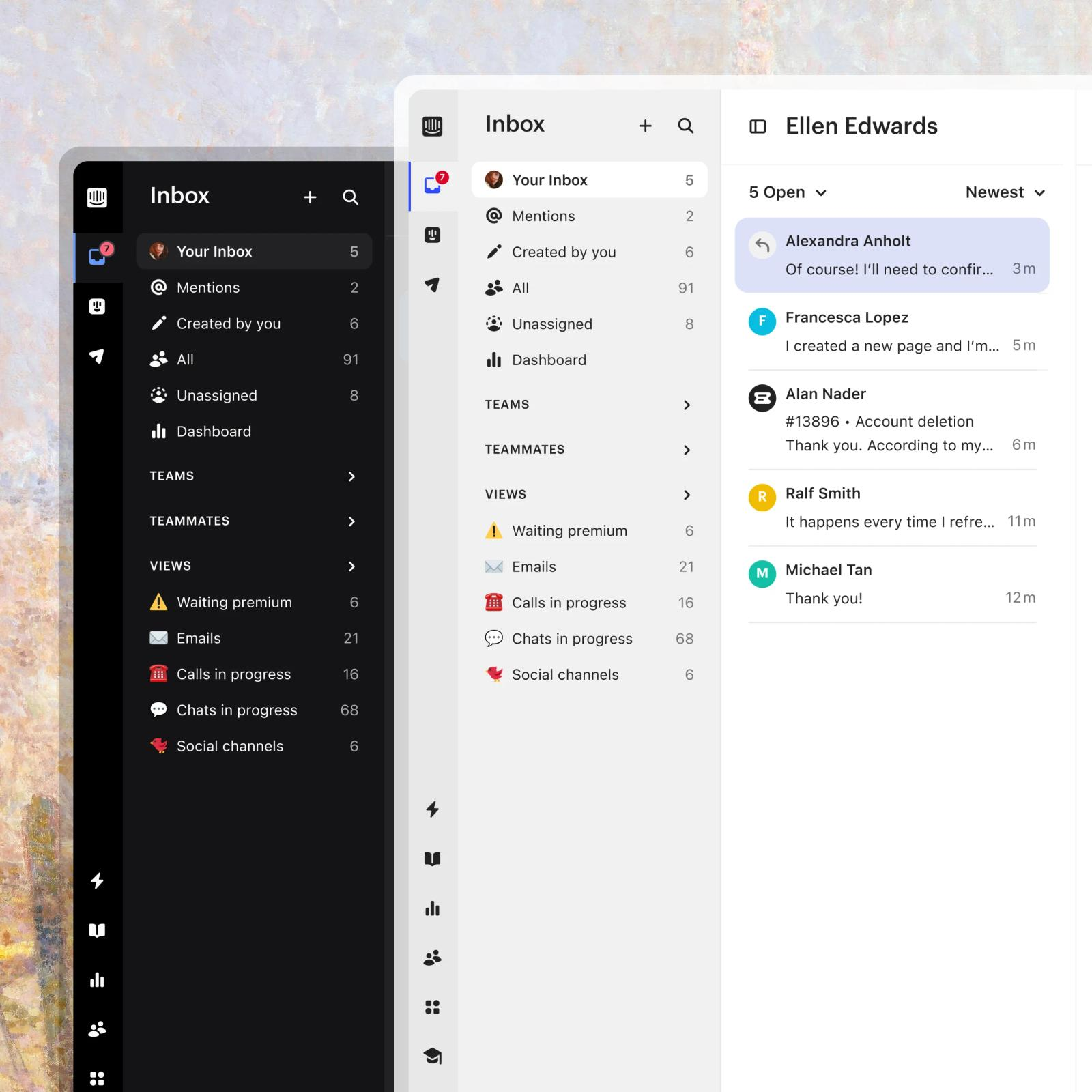
Intercom is the closest to Kayako’s new direction, a help desk built around an AI agent. Fin charges $0.99 per outcome on every plan, against Kayako’s $1 per resolved ticket. An outcome is a conversation the customer confirms resolved, one where they don’t ask for more help after Fin replies, or one where Fin completes a workflow. Live chat is included on every plan, and Essential is $29 per seat a month billed annually.
Pros
- A strong AI-first model for teams that want a bot to handle volume.
- Chat, email, and in-app messaging in one place.
Cons
- You get two bills, seats plus Fin outcomes, with no spending cap shown on the pricing page.
- Workflow builder, multiple team inboxes, and round robin start at Advanced.
Pricing: per seat per month, billed annually (monthly in brackets): Essential $29 ($39); Advanced $85 ($99); Expert $132 ($139). Fin is $0.99 per outcome. No free plan; 14-day trial.
Rating: G2 4.5/5 (3,913 reviews)
Versus Kayako: you gain a public seat price and a mature chat product. You give up Kayako’s no-seat-fee model, because Intercom charges for both seats and outcomes.
5. Help Scout
Best for: small, email-first teams that want a simple shared inbox with a free plan.
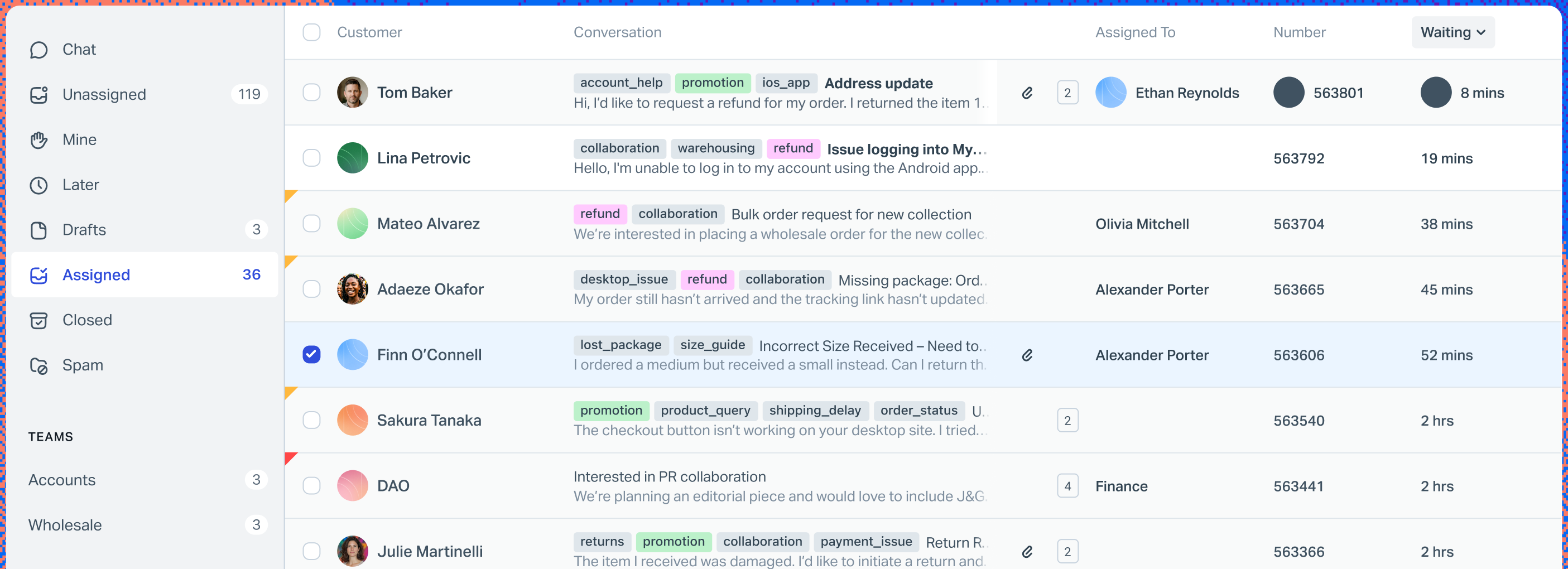
Help Scout feels like email with ownership added. The Free plan covers 5 users, 1 Inbox, and 1 Docs site, and the Beacon live chat widget comes with Standard at $25 per user a month billed annually ($30 monthly). The trade-off is scale: Standard stops at 25 users and Plus at 50.
Pros
- A real free plan for 5 users.
- Live chat and workflows start at $25 per user.
Cons
- Phone is an integration on every plan.
- Standard caps at 25 users and Plus at 50; Pro needs at least 10 users and a demo.
Pricing: per user per month, billed annually (monthly in brackets): Standard $25 ($30); Plus $45 ($54); Pro $75 ($90). Free for 5 users. 15-day trial.
Rating: G2 4.4/5 (431 reviews)
Versus Kayako: you gain a free plan, a published price, and a cheaper AI resolution ($0.75 against $1). You give up Kayako’s bundled AI agent and room for a very large team.
6. Zoho Desk
Best for: budget-conscious teams that start with email support and want inexpensive seats.
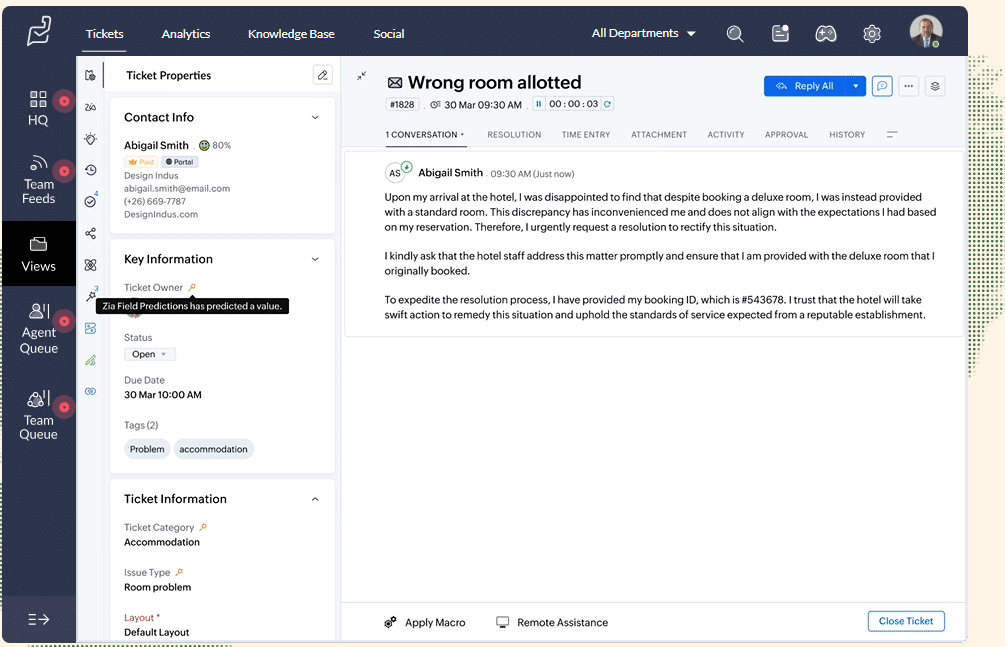
Zoho Desk has the lowest seat prices on this list. The free edition supports 3 users, and Express adds a cheap paid step at $7 per user a month billed annually. The picture changes with broader needs: telephony, Blueprints, multiple departments, and round-robin assignment start at Professional, and live chat through Zoho SalesIQ needs Enterprise.
Pros
- The free edition is a real entry point for 3 users.
- Express and Standard have low published seat prices.
Cons
- Free caps you at 3 users and Express at 5.
- Skill-based assignment and sandbox access need Enterprise.
Pricing: Free for 3 users and 1 email channel. Per user per month, billed annually (monthly in brackets): Express $7 ($9); Standard $14 ($20); Professional $23 ($35); Enterprise $40 ($50). 15-day trial without a card; the account then drops to Free.
Rating: G2 4.4/5 (7,954 reviews)
Versus Kayako: you gain the lowest per-seat price here and a free tier. You give up chat on the cheaper plans and a guided onboarding.
7. HubSpot Service Hub
Best for: HubSpot CRM teams that want tickets tied to customer records.
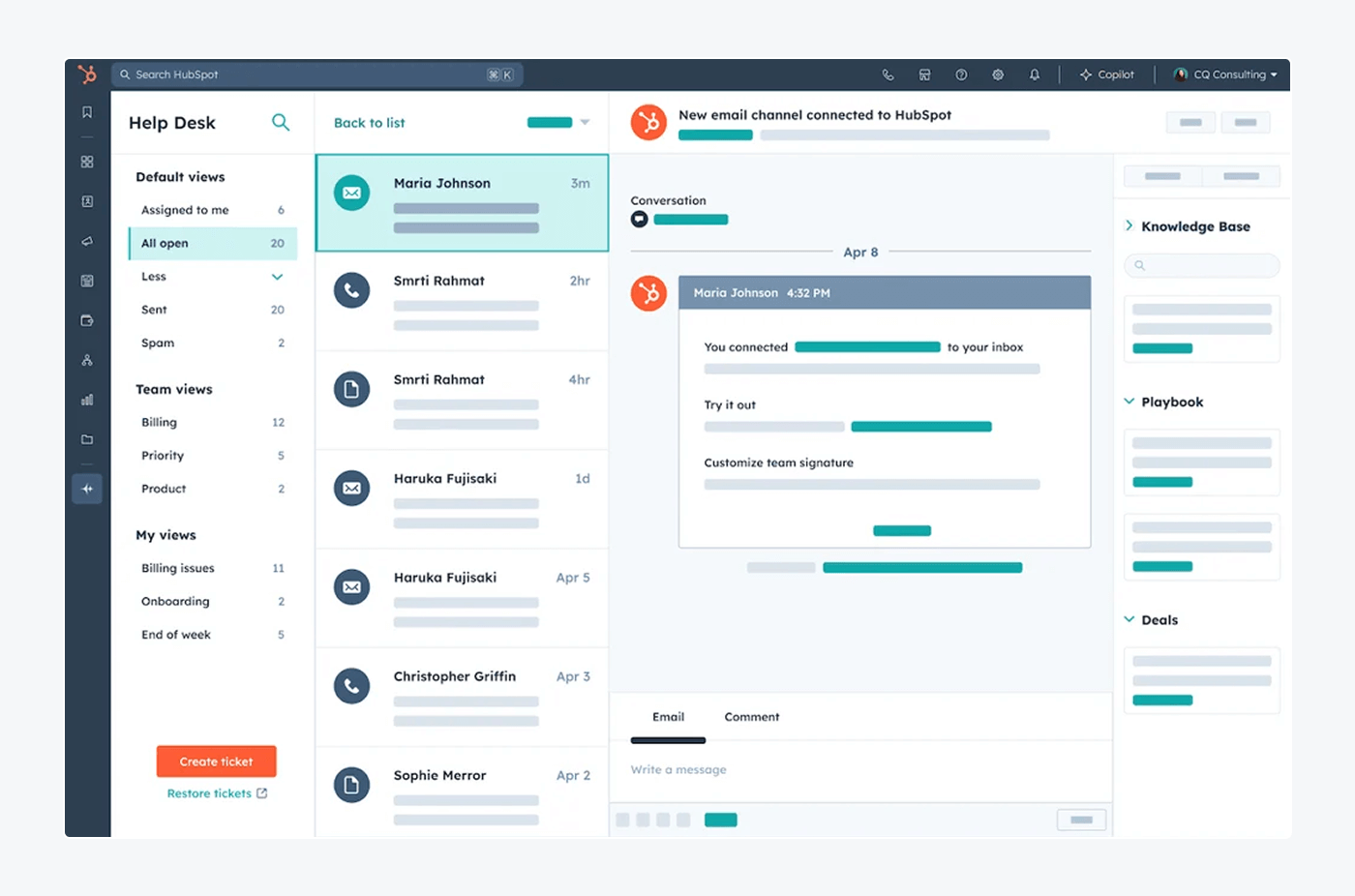
HubSpot Service Hub makes sense when your team already works in HubSpot CRM. The buying case is customer context across sales, marketing, and support, not the cheapest seat. The help desk workspace, knowledge base, and customer portal start at Professional, so the free tier tells you little about the paid product.
Pros
- Fits teams that already organize customer work around HubSpot.
- Free tools for up to 2 users let you test the basics.
Cons
- Core help desk features require Professional.
- Professional and Enterprise carry mandatory onboarding fees.
Pricing: Free for up to 2 users. Professional starts at $90 per seat a month billed annually ($100 monthly, still an annual commitment) plus $1,500 onboarding. Enterprise starts at $150 per seat, billed annually, plus $3,500 onboarding. Customer Agent uses 50 credits, or $0.50, per conversation it resolves.
Rating: G2 4.4/5 (3,017 reviews)
Versus Kayako: you gain CRM context on every ticket and a cheaper AI resolution ($0.50 against $1). You give up price at the entry, because Professional comes with a one-time onboarding fee.
8. Gorgias
Best for: e-commerce brands on Shopify that want tickets, orders, and AI in one help desk.
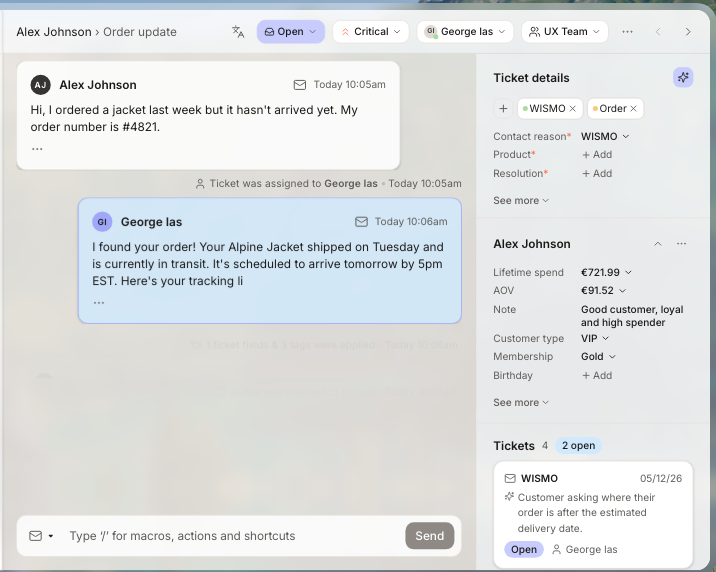
Gorgias prices by ticket volume, not by agent, which suits stores with a growing team and steady order flow. It says it’s built specifically for e-commerce and Shopify, and the customer panel puts order and spend data beside the conversation. Email, chat, social, and a help center come on every plan. Like Kayako, it bills its AI agent only when it resolves a conversation.
Pros
- No per-agent fee; seats go up to 500 on Basic and above.
- Built around e-commerce workflows and Shopify data.
Cons
- Ticket volume is capped by plan (50, 300, 2,000, or 5,000 a month), with paid overage.
- Each AI resolution is billed on top of the helpdesk price.
Pricing: helpdesk only, per month: Starter $10 (monthly only, 50 tickets, 3 seats); Basic $50 billed annually ($60 monthly, 300 tickets); Pro $300 ($360, 2,000 tickets); Advanced $750 ($900, 5,000 tickets). AI Agent: $1.00, $0.90, $0.90, or $0.85 per automated interaction depending on plan. No free plan; trial available.
Rating: G2 4.6/5 (582 reviews)
Versus Kayako: you gain order data on the ticket and a bill that follows tickets, not seats. You give up breadth outside e-commerce, and ticket caps mean a busy month moves you up a plan.
9. Front
Best for: teams that run support from shared email inboxes and need collaboration and routing.
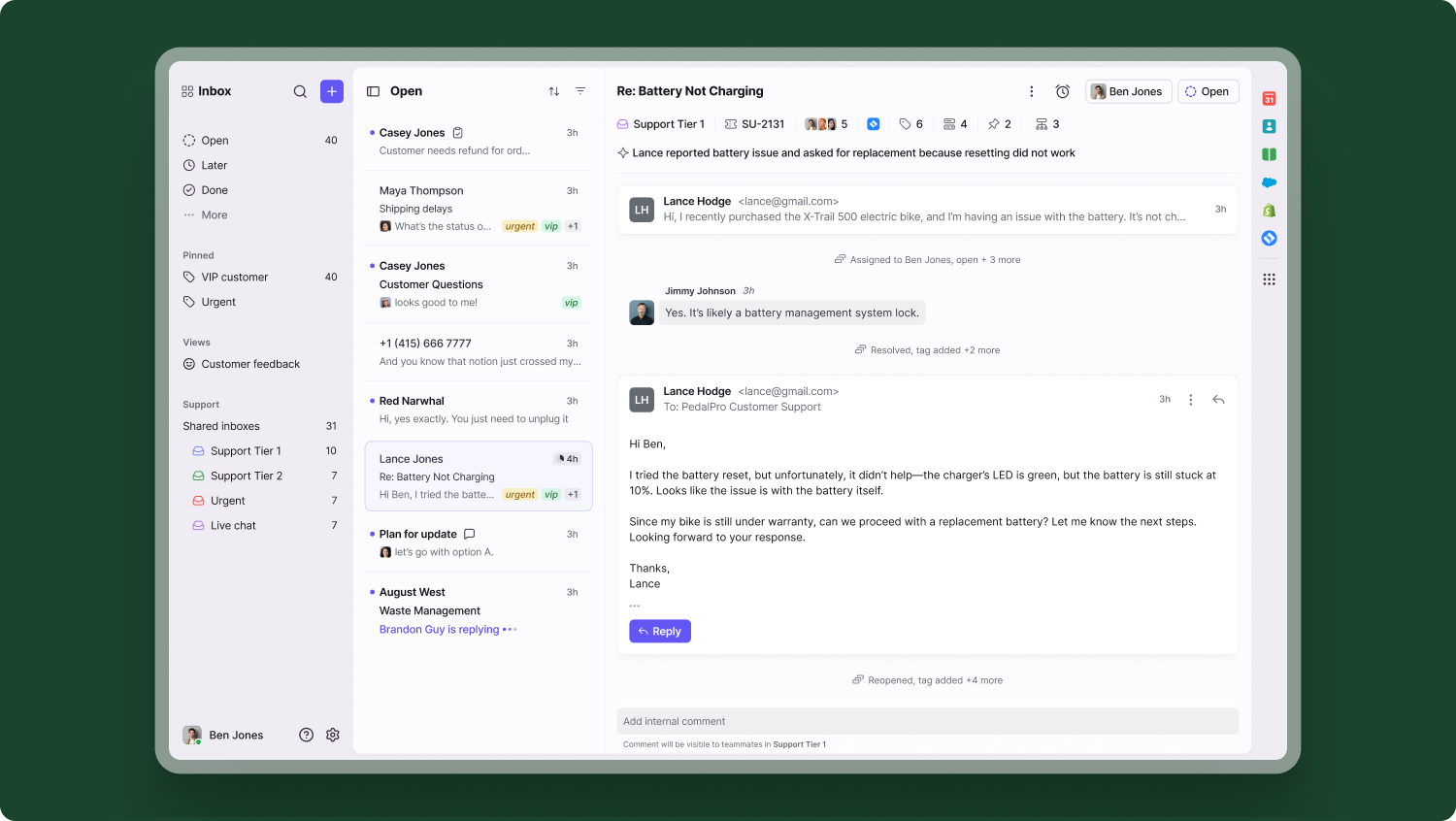
Front is a shared inbox where teammates can comment on a thread, assign it, and route it by rule. It adds ticketing on Starter and an AI agent called Autopilot, priced from $0.05 per conversation through sales. It’s also the best-rated tool on this list on G2.
Pros
- Collaboration features suit teams that work threads together.
- Annual and monthly seat prices are public.
Cons
- Starter supports one channel type (email, chat, or SMS) and up to 10 seats.
- Professional is capped at 50 seats and sold through a demo; Enterprise is annual only.
Pricing: per seat per month, billed annually (monthly in brackets): Starter $25 ($35); Professional $65 ($85); Enterprise $105, annual only. No free plan; 14-day trial.
Rating: G2 4.7/5 (2,514 reviews)
Versus Kayako: you gain stronger internal collaboration and the best G2 score on this list. You give up an all-in-one bundle, since Starter covers only one channel type.
10. Crisp
Best for: small teams that want live chat and a shared inbox on a flat workspace price.
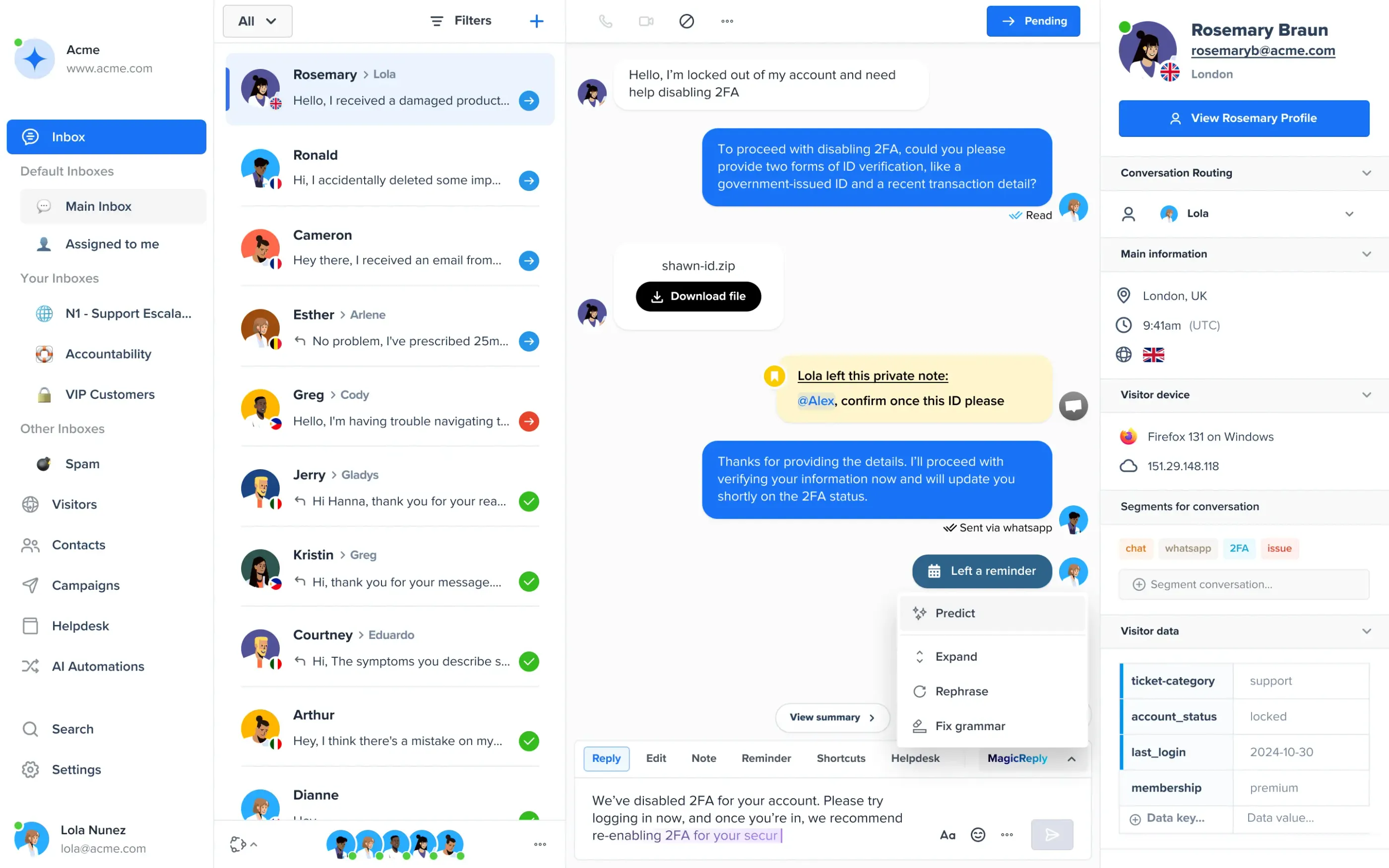
Crisp starts from live chat and prices per workspace, not per agent. Free covers 2 seats, Mini is $45 a month for 4 seats, and Essentials is $95 for 10 seats with an omnichannel inbox, a no-code AI chatbot, and a knowledge base. Extra agents cost $10 a month each. It lists integrations for Shopify, WooCommerce, and others on every plan.
Pros
- A free plan, and a workspace price that doesn’t climb with every agent.
- Chat is the core of the product, not a higher tier.
Cons
- AI runs on included credits ($5 on Mini, $25 on Essentials, $75 on Plus), so heavy AI use is the metered part.
- Ticketing and white label start on Plus at $295.
Pricing: per workspace per month on the monthly view: Free $0 (2 seats); Mini $45 (4 seats); Essentials $95 (10 seats); Plus $295 (20+ seats); Enterprise custom. Extra seats $10 a month. 14-day trial without a card. The pricing page shows no annual discount.
Rating: G2 4.5/5 (204 reviews)
Versus Kayako: you gain chat in the cheapest paid plan and a flat workspace price. You give up deep ticketing, which waits for Plus, and a vendor-led onboarding.
What 5 agents cost on each tool
Seat prices hide the real spread, so here is the same team on every tool: 5 agents, the cheapest paid plan that covers email tickets, billed annually, before AI usage. Prices are from the pages above. Kayako is not in the table because it shows no platform price.
| Tool | Plan | Math | Per month |
|---|---|---|---|
| Tidio | Starter | flat, up to 10 seats | $24.17 |
| Zoho Desk | Express | 5 × $7 | $35 |
| Gorgias | Basic | flat, 300 tickets | $50 |
| Freshdesk | Growth | 5 × $19 | $95 |
| Zendesk | Support Team (email and tickets) | 5 × $19 | $95 |
| Crisp | Essentials (monthly billing) | flat, 10 seats | $95 |
| Help Scout | Standard | 5 × $25 | $125 |
| Front | Starter | 5 × $25 | $125 |
| Intercom | Essential | 5 × $29 | $145 |
| Zendesk | Suite Team (adds live chat) | 5 × $55 | $275 |
| HubSpot | Professional | 5 × $90, plus $1,500 one-time | $450 |
The rows to compare against Kayako are the AI ones. A team that resolves 1,000 tickets a month with Kay pays $1,000 for the AI alone on Kayako’s stated price, before the platform. The same volume at Intercom’s $0.99 is $990, and at HubSpot’s $0.50 it is $500. Which model is cheaper depends on how many conversations the AI closes, so price your busiest month.
Tidio vs Kayako
| Tidio | Kayako | |
|---|---|---|
| Best for | Small e-commerce and SMB teams that want chat, tickets, and AI | Teams that want a managed rollout and an AI agent that acts inside their systems |
| Pricing unit | Billable conversations, flat per plan | $1 per resolved ticket for Kay; platform price on request |
| Price on the page | Free to Premium, with Plus from $300/mo and Premium by quote | AI price shown; Kayako One needs a call |
| Free plan | Yes: 50 billable conversations, 10 seats | None found on the pricing page |
| Live chat | Included, with Lyro in the same inbox | A live chat widget in Kayako One |
| AI agent | Lyro, from $32.50/mo billed annually for 50 conversations; says it can resolve up to 75% of requests | Kay, $1 per resolved ticket; says 68% AI resolution rate |
| Onboarding | Self-serve; Plus adds a dedicated success manager | White-glove onboarding and setup |
| Shopify | Cart preview and order history in the inbox, per tidio.com | Lists Shopify as a connection Kay can act through |
Kayako is stronger on a managed rollout, on a flat per-resolution AI price with no seat fees, and on Kay’s ability to take actions such as refunds in connected systems. If you want a vendor to set the whole desk up and your volume is high enough that a $1 resolution beats a seat, it is a fair choice. For the Tidio side, see its help desk page.
How to switch from Kayako
Plan for a week of parallel running, not a weekend:
- Check which Kayako you’re on. Kayako One and Kayako Classic export differently.
- Export what you need. Pull tickets, users, organizations, saved replies, and knowledge base articles before you cancel.
- List your automations. Check which plan of the new tool holds each rule and view you rely on.
- Check your contract dates. Line the cancellation up with your renewal, and ask whether any Kay resolution volume is committed.
- Run both for a week. Connect the support email, rebuild your four or five daily automations, route a share of conversations to the new tool, then swap the chat widget and help center link.
If your store runs on Shopify, add one check: confirm the new inbox shows the customer’s cart and orders next to the conversation.
How to choose
Match the tool to your bottleneck:
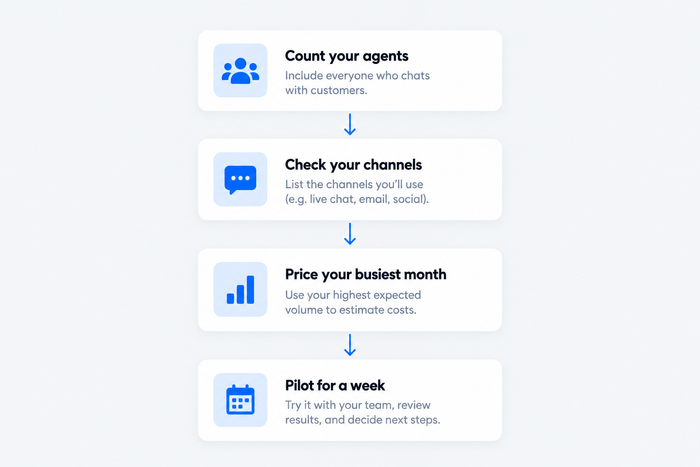
- You run a Shopify store and want chat, tickets, and AI in one inbox. Choose Tidio, or Gorgias if you want ticket-based pricing.
- You want a help desk with a price on the page. Choose Freshdesk, or Zoho Desk for the lowest seat price.
- You want an AI agent to take volume. Choose Intercom, and set a budget for Fin outcomes.
- Your team is small and works from email. Choose Help Scout, or Front for heavier collaboration.
- Your team already uses HubSpot CRM. Choose HubSpot Service Hub, and budget for onboarding.
- You want chat first at a flat price. Choose Crisp.
- You run a large team with strict SLAs. Choose Zendesk, and price Suite Professional with its add-ons.
Bottom line
Kayako stays a fair choice when you want a vendor-led rollout and an AI agent priced per resolved ticket. Move when you need a platform price you can read or a free plan to test. Small e-commerce and SMB teams that want chat, tickets, and AI without paying per agent should start with Tidio. For a help desk with a public per-agent price, look at Freshdesk or Zoho Desk; for an AI-first chat desk, Intercom.
Try Tidio free
Related guides
- Kayako review
- Zendesk alternatives
- Freshdesk alternatives
- Zoho Desk alternatives
- Help Scout alternatives
Frequently asked questions
It depends on why you’re leaving. Tidio fits small e-commerce and SMB teams, Freshdesk and Zoho Desk fit teams that want a help desk with a public per-agent price, Intercom fits an AI-first chat desk, and Help Scout and Front fit shared-inbox teams. Pick the bottleneck first, then compare plans on the same billing basis.
Zendesk, Freshdesk, Intercom, Help Scout, and Zoho Desk come up most. Tidio, HubSpot Service Hub, Gorgias, Front, and Crisp compete for smaller teams. They differ mostly in price model: per agent, per ticket, per workspace, or per conversation.
Yes. Zoho Desk is free for 3 users, Help Scout for 5, HubSpot Service Hub for 2, and Crisp for 2 seats. Tidio has a free plan with 50 billable conversations and 10 seats. We found no free plan on Kayako’s pricing page.
Kayako’s pricing page lists its AI agent, Kay, at $1 per resolved ticket with no seat fees. It shows no price for Kayako One, the full helpdesk, and points you to a sales conversation. Ask for the platform price and the AI volume terms in writing before you compare.
Tidio and Gorgias are the two built around online stores. Tidio puts cart preview and order history next to the chat and ticket, with an AI agent and flat plan pricing. Gorgias prices by ticket volume and puts order and spend data on each ticket. Both work with Shopify.
Kayako Classic is the older self-hosted version of the help desk. Kayako’s own page says the new Kayako moved the platform from on-premise to the cloud. If you’re comparing reviews, check which version they describe.
Export tickets, users, saved replies, and knowledge base articles before you cancel, check which import tools the new help desk offers, and plan to rebuild automations by hand.
Use live chat to support your customers in real-time
