



Key takeaways:
- Omnichannel customer service links every channel to one customer record, so context follows the customer instead of staying in a single inbox.
- Multichannel means you are present on several channels. Omnichannel means those channels share history, routing and reporting.
- The core of a working setup is a shared inbox, a unified customer profile, routing rules and an AI agent that hands over to people with the full conversation.
- Start with the two or three channels your customers already use, and connect those before adding more.
- Measure repeat contacts and resolution time per channel, not only overall volume.
Omnichannel customer service (also written omni-channel customer service or omnichannel customer support) is a way of supporting customers across chat, email, social media, messaging apps and phone as one connected conversation. Every channel shares the same customer history, so a shopper can switch channels without repeating a word and any agent can pick up where the last one stopped.
It matters because customers already move between channels. In an October 2025 survey of 600 U.S. consumers by Glance, 44% said they almost always have to repeat themselves when they switch channels, and another 49% said they sometimes do. Only 7% rarely or never do.
This guide is for small and mid-sized support teams and online stores. It explains how omnichannel support works, how it differs from multichannel, what it delivers, where it goes wrong, and how to set it up in six steps.
What is omnichannel customer service?
Omnichannel customer service connects every support channel to one customer record and one conversation history. A customer who asks about an order on Instagram, then emails a photo of the damaged item, then opens live chat on your website is treated as one person with one open request, not as three separate tickets.
Think of a shopper who messages your store on Messenger about a late parcel. The next morning, they open the chat widget on your site. In an omnichannel setup, the agent (or the AI agent) sees the Messenger thread, the order and the promised delivery date before saying hello. The shopper never has to start over.
The channels that usually sit under the omnichannel umbrella are:
- Live chat on your website or app.
- Email, including a shared support address.
- Messaging apps such as WhatsApp and Facebook Messenger.
- Social media direct messages, for example on Instagram.
- Phone and voicemail, where your plan or provider supports them.
- Self-service, such as a help center or FAQ, which feeds into the same record when a customer asks for a person.
You will also see the terms omnichannel support, omnichannel services and omnichannel solution. They describe the same idea from different angles: the practice (support), the work a team delivers (services) and the software that makes it possible (solution). For a full tour of the channels themselves, see customer service channels.
Why omnichannel customer service matters
Omnichannel customer service matters because customers choose the channel and expect the conversation to travel with them. When it does not, the cost shows up as repeated questions, longer handling time and customers who give up.
Recent surveys show the gap:
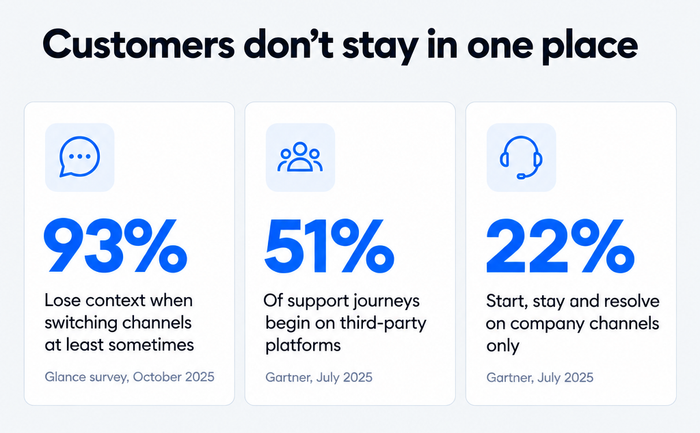
- Repetition is common, and consistency builds trust. The Glance survey above found that 93% of consumers lose context at least some of the time when they change channels. A 2025 global survey of 3,000 consumers by Smart Communications found that 60% would trust a company more if it offered a consistent omnichannel experience.
- Support rarely stays in one place. In its July 2025 survey, Gartner found that 51% of customer service journeys begin on third-party platforms such as search engines, YouTube and AI assistants, and only 22% of customers start, stay and resolve their issue entirely on a company’s own channels.
For a small team, the stake is practical. You have no spare agents to rebuild context by hand. If the history lives in the system, a single agent can handle chat, email and social messages from one screen, which is how a team of three answers like a team of ten. It also protects the customer experience at the moments when it is most fragile: a delayed order, a failed payment, a return.
How omnichannel customer service works
Omnichannel customer service works by sending every message, from any channel, into one system that matches it to a customer record, routes it to the right agent or AI agent, and keeps the full history attached to the conversation.
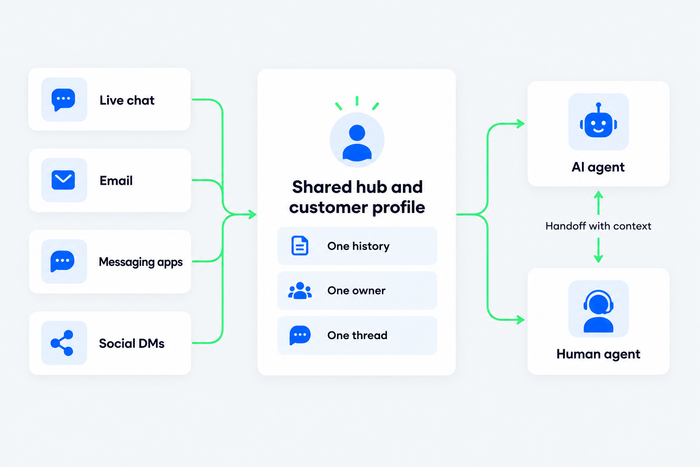
Several parts make that work:
- Channel connections. Each channel is connected to the same platform, so a message from Instagram, an email and a website chat all arrive in one place.
- A unified customer profile. The system matches the person across channels, usually by email address, phone number or login, and attaches past conversations, order data and tags to one profile.
- A shared inbox with routing. Conversations are assigned by rules (language, topic, VIP status, availability), so the right person gets the thread with its history. A shared inbox is the working surface for the whole team.
- An AI agent with handoff. The AI agent answers routine questions on every connected channel. When it cannot, it passes the conversation to a person with the transcript intact, so the customer does not repeat the question.
- Reporting across channels. You track first response time, resolution time and repeat contacts per channel and for the customer journey as a whole.
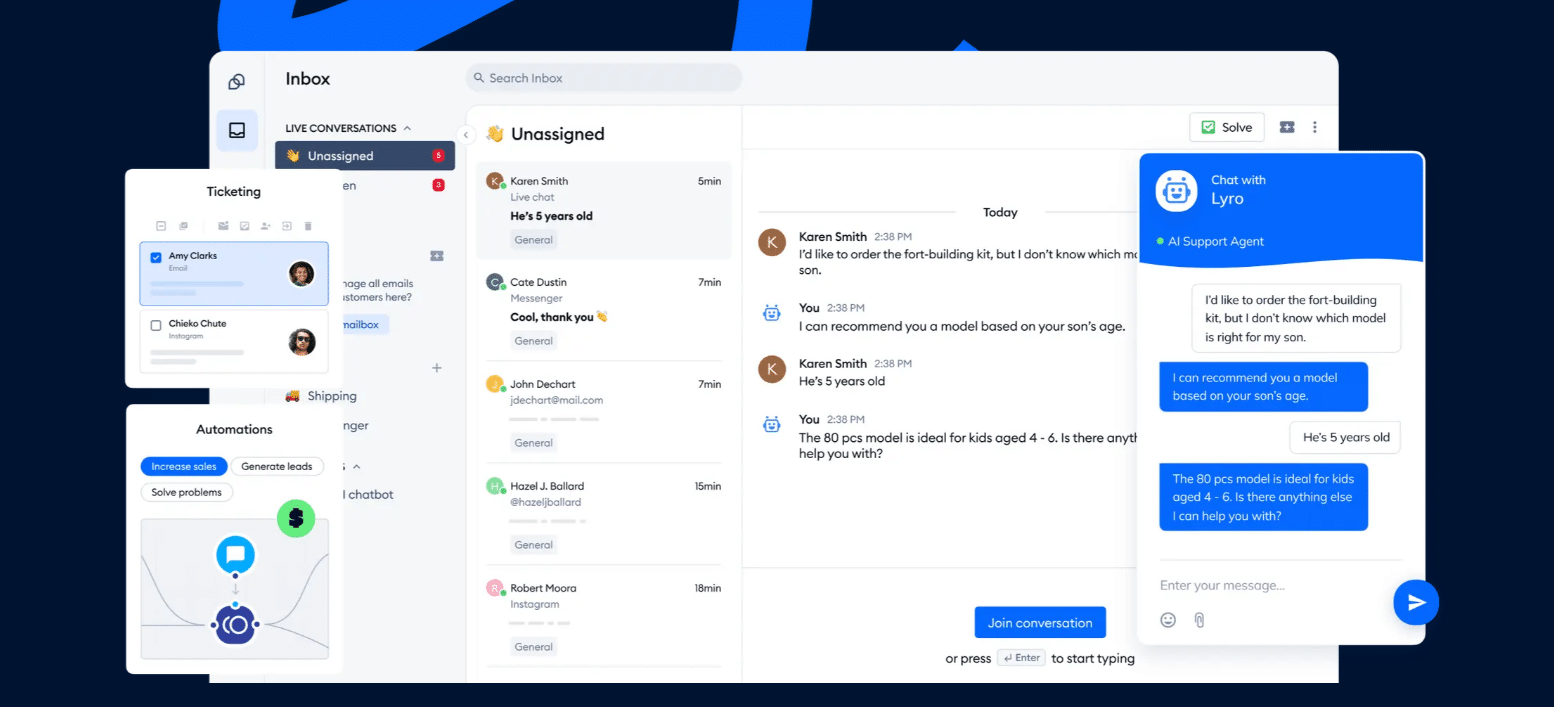
In Tidio, for example, email, live chat, Instagram, Messenger and WhatsApp arrive in one inbox. Next to every conversation sits a customer panel with contact details, conversation history, location and custom properties, plus a live preview of the shopper’s cart for stores. Agents reply with macros (saved replies), and the Lyro AI Agent can answer on live chat and, when you switch them on, on Messenger, Instagram, WhatsApp and email, then hand the thread to a person.
Omnichannel vs multichannel customer service
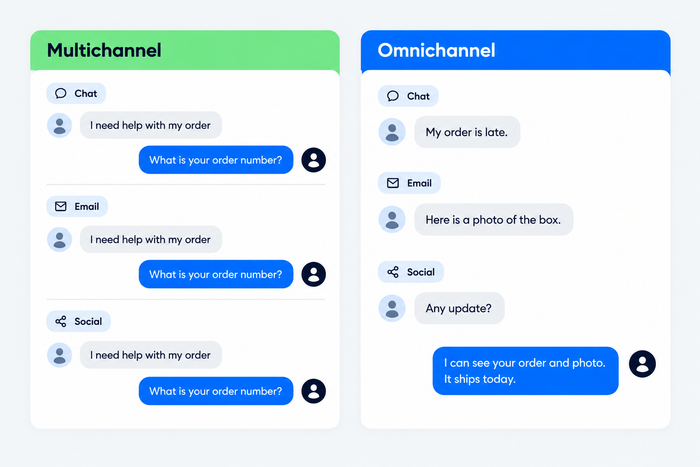
Multichannel customer service offers several channels that operate separately. Omnichannel customer service connects them, so history, routing and reporting are shared. The difference is not how many channels you have but whether a conversation can move between them without losing its context.
Here is how the two compare in everyday work:
| Multichannel | Omnichannel | |
|---|---|---|
| Channels | Several, run side by side | Several, connected to one system |
| Customer history | Kept per channel | One record across every channel |
| What the customer does | Repeats the issue on each new channel | Continues where they stopped |
| Who sees the thread | Whoever owns that channel | Any agent, from one inbox |
| Reporting | Separate numbers per channel | One view of the whole journey |
| Typical setup | Email tool plus chat tool plus social inbox | One platform with every channel connected |
| Typical cost to the team | Duplicate work and lost context | One-time setup and a shared workflow |
Most teams start as multichannel. A store opens an email address, adds a chat widget and starts answering Instagram messages in the app. Each channel works, but nothing connects them. Moving to omnichannel usually means consolidating those tools into one inbox rather than adding yet another one. Our guide to multichannel customer service covers the first stage in detail.
Benefits of omnichannel customer service
The benefits of omnichannel customer service come from one change: the customer’s context is stored once and reused everywhere. That shortens conversations, makes service consistent and gives your team a clearer picture of what customers need.
- Faster resolution: Agents see the full history on the first screen, so they skip the “can you tell me your order number again” step. Fewer clarifying questions mean shorter handling time on every channel.
- Less customer effort: Customers keep the conversation going on the channel that suits them in the moment, such as chat at their desk or WhatsApp on the train. Fewer repeated explanations are the clearest sign of lower effort.
- More consistent answers: A shared knowledge base and shared macros give the same answer on email, chat and social. A return policy stops changing depending on who is asked.
- Better personalization: With one profile, you can greet a returning customer by name and mention their open order. You can also recommend products based on what they browsed. Our guide to customer experience shows where personalization pays off.
- Higher efficiency for small teams: One inbox replaces three or four tabs. A team can cover more channels without hiring for each one, especially when an AI agent handles the repetitive questions.
- Cleaner data: Reporting by customer instead of by channel shows which topics generate repeat contacts, which channel resolves fastest and where customers drop off. That feeds your customer service metrics and your next hiring or tooling decision.
- Stronger retention: Customers who get a problem solved in one conversation are more likely to buy again. It follows from the other benefits rather than acting as a separate lever, so treat any single vendor percentage with care.
Omnichannel customer service examples
Examples of omnichannel customer service share a pattern: the customer starts in one place, moves to another and never has to explain themselves twice. The first four scenarios below are illustrations of the pattern in an online store; the fifth is a real Tidio customer.
1. Order status across Instagram and email
A shopper asks “Where is my order?” in an Instagram message and later emails the same question. When the system matches both messages to the same contact, they land in one thread. Whoever replies, a person or the AI agent working from your shipping policy, sees both messages, and the shopper gets one answer instead of two.
2. Website chat that continues on WhatsApp
A visitor starts a chat about shipping to Canada, then leaves the page. When they message the store on WhatsApp the next day, the earlier chat sits on the same contact once the system has matched the phone number or email address. The agent answers the question about customs fees without asking where the customer lives.
3. AI agent first, person second
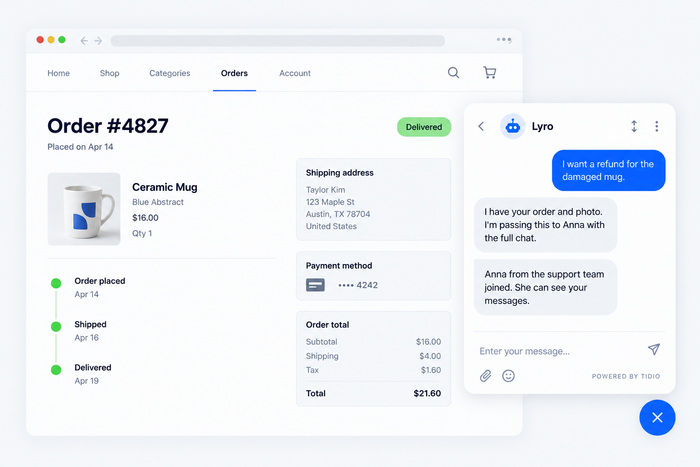
A customer asks for a refund on a damaged item. The AI agent collects the order number and a photo, finds the policy and tells the customer what happens next. If the case needs a decision, it hands over to an agent with the transcript. The customer reads one thread from start to finish.
4. Proactive message at checkout
A shopper lingers on the shipping step at checkout. A triggered message on live chat offers help with delivery times, and the answer is stored with the contact. If they email a follow-up question later, the agent sees what was already said. See how proactive customer service uses this kind of trigger.
5. A small team using one inbox: Suitor
Suitor, a tuxedo rental company, needed a platform that connects with WooCommerce, Facebook and its other channels. After moving to Tidio’s Lyro AI Agent, the company reached up to 85% customer service automation, cut its average response time from about 3 minutes to 6 seconds and passed only 24% of queries to a human representative, according to the Suitor case study. It shows how a small team can cover several channels without adding headcount.
Challenges of omnichannel customer service
Omnichannel customer service takes more care than it sounds. Most failures come from the setup, and each has a straightforward fix.
- Tool sprawl: Teams add a chat widget, an email tool and a social inbox over time, and they never connect. Fix: consolidate into one inbox before adding any new channel, and retire tools that duplicate its job.
- Broken identity matching: If the system cannot tell that the Instagram user and the email sender are the same person, the history splits. Fix: ask for an email address early in chat or messaging flows, and check how the tool merges contacts.
- Too many channels: Every channel needs coverage and a response-time promise. Fix: start with the two or three channels customers already use, and publish response times for each.
- Inconsistent answers: Agents and the AI agent answer the same question differently. Fix: keep one knowledge base and one set of macros, and review AI answers on a sample of conversations each week.
- Handoff gaps: An AI agent that escalates without the transcript brings back the repetition omnichannel was meant to remove. Fix: test the handoff yourself on every channel before launch.
- Phone is the odd one out: Voice calls often sit in a separate system with its own records. Fix: log call notes in the customer profile, or choose a platform that includes voice if calls are your main channel.
- Privacy and consent: More channels mean more personal data. Fix: collect only what you need, follow each messaging platform’s opt-in rules and apply the same retention policy across channels.
How to set up omnichannel customer service
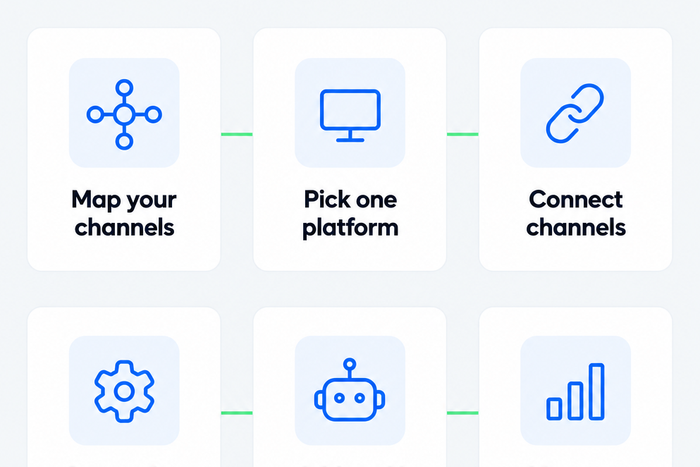
You can set up omnichannel customer service in six steps. For a small team, a first working version takes days, not months, if you connect existing channels before adding new ones.
1. Find out where your customers already contact you
Count conversations by channel for the last 90 days, from your inbox, chat tool and social accounts. Add the channels customers ask for. A store with most questions on website chat and Instagram does not need a phone line first.
2. Choose one platform that holds every conversation
Pick a system with a shared inbox, a customer profile and the channels you identified. Compare options with the checklist below, or start from our list of omnichannel support software.
3. Connect your channels
Connect website chat, your support email address and the messaging or social accounts you use. Send a test message from each one and confirm that it arrives in the inbox with the right channel label.
4. Build the customer profile and routing rules
Decide how the system matches customers (email, phone number, login) and which fields agents need to see: order data, plan, language, tags. Then write the routing rules: by topic, language, priority or availability.
5. Add an AI agent and automation
Let an AI agent handle the questions that repeat: order status, shipping, returns, opening hours. Tidio says Lyro can resolve up to 75% of support requests. Set the handoff to include the transcript and the data the customer already gave. Add macros for the answers agents send most. Our guide to customer service automation covers what to automate first.
6. Measure, then adjust
Track first response time, resolution time, customer satisfaction and the share of customers who contact you twice about the same issue, by channel. Review them every month. If one channel resolves slowly or one topic keeps coming back, fix the answer, the routing or the knowledge base article.
Bring chat, email and social into one inbox with Tidio
What to look for in omnichannel customer service software
The best omnichannel customer service software is the one that connects the channels you actually use, keeps one history per customer and fits your team size and budget. Features matter less than whether the conversation survives a channel change.
| What to check | Why it matters | Question to ask a vendor |
|---|---|---|
| Channels included | Missing channels become separate tools | Which channels are included on my plan, and which cost extra? |
| One customer profile | Stops history from splitting | How are contacts matched across email, chat and social? |
| Shared inbox and assignment | Gives one owner per conversation | Can I route by topic, language and availability? |
| AI agent and handoff | Handles repeat questions without losing context | Does the transcript go with the handoff on every channel? |
| Self-service and macros | Keeps answers consistent | Can the AI agent and agents use the same knowledge base? |
| Integrations | Brings order and customer data into the thread | Does it connect to my store platform or CRM? |
| Reporting | Shows the full journey | Can I see repeat contacts and resolution time per channel? |
| Pricing basis | Prevents surprise bills | Is pricing per agent, per conversation or per resolution? |
Plans and price models change often, so check the vendor’s pricing page on the day you decide. For a comparison of specific tools, see our roundup of customer service software.
Which omnichannel setup fits your team
The right omnichannel setup depends on team size, the channels your customers use and how much of your support is repetitive. These profiles cover most small and mid-sized teams.
| Your situation | Channels to connect first | What to prioritize |
|---|---|---|
| Solo founder or a team of one to three, small online store | Website chat, email, Instagram or Messenger | One inbox, an AI agent for repeat questions, macros |
| Growing e-commerce team of four to ten, high order volume | Chat, email, WhatsApp, Instagram, order-data integration | Routing rules, store integration, reporting by channel |
| Larger or regulated support team with phone and a CRM | Phone, email, chat, messaging, CRM | Voice, permissions, audit trail, SLA reporting |
Tidio fits the first two rows best: email, live chat, Instagram, Messenger and WhatsApp in one inbox, with the Lyro AI Agent answering on the channels you enable and a Free plan to test the setup. Teams where phone is the main channel should check voice support first. Our guide to e-commerce customer service covers the store-specific workflows.
See how Lyro answers and hands over across channels
Where omnichannel support is heading
Omnichannel support is shifting in two ways: AI agents are becoming the first responder on every channel, and customers increasingly begin their support journey outside your own channels.
- AI agents resolve first, people handle the rest. The pattern is an AI customer service agent that answers on every connected channel and escalates with context. The quality of the knowledge base, not the number of channels, decides how much it can resolve.
- Customers start elsewhere. Gartner’s 2025 survey above found that 51% of support journeys start on third-party platforms such as search engines and AI assistants. Your help center and product pages need to answer those first questions clearly, because customers arrive at your channels with a head start.
- Messaging apps keep gaining ground. WhatsApp, Messenger and Instagram increasingly work as support channels in their own right, which makes connecting them to the same inbox the practical priority for e-commerce teams.
Connect your channels before you add more
Omnichannel customer service comes down to one rule: a customer’s history belongs to the customer, not to the channel. Start with the two or three channels your customers already use, bring them into one inbox and let an AI agent take the repeat questions. Then watch repeat contacts and resolution time by channel to see whether context is traveling with the customer.
FAQ
Multichannel customer service offers several channels that work separately. Omnichannel connects them to one customer record, so history, routing and reporting are shared. The customer can switch from chat to email to WhatsApp and continue the same conversation without repeating anything.
Omnichannel customer service typically includes live chat, email, messaging apps such as WhatsApp and Messenger, social media direct messages, phone and self-service. The exact list depends on your customers. Start with the channels they already use and add others only when there is demand.
The main benefits are faster resolution, less repetition for customers, more consistent answers, better personalization and more efficient use of a small team. Reporting by customer rather than by channel also shows where issues repeat and which channel resolves fastest.
Yes, if customers contact you on more than one channel. A small store with website chat, email and Instagram already has an omnichannel problem. A shared inbox and a customer profile solve it without a large team, and a free plan is enough to test the idea.
No. You can run omnichannel support with a shared inbox and human agents alone. An AI agent helps because it answers repeat questions on every channel and hands over with context, but the core of omnichannel is the shared customer record, not the automation.
Track first response time, resolution time, customer satisfaction and repeat contacts, by channel and across the whole journey. The most telling signal is the share of customers who contact you twice about the same issue, because it shows where context is still getting lost.
Omnichannel customer service covers support conversations. Omnichannel customer experience is wider and includes marketing, purchase, delivery and loyalty touchpoints. Support is usually the first place to fix it, because lost context is most visible when a customer has a problem.
Use live chat to support your customers in real-time
