Key takeaways
- Customer support is the problem-solving part of customer service. It responds to a specific need: a question, a bug, a delayed order.
- Channels matter less than speed and context. Customers will use chat, email or phone, but 74% hate repeating their story to a second agent.[1]
- AI now handles the repeat questions, and people handle the rest. Service teams expect AI to resolve half of cases by 2027,[2] and 87% of customers want a human available when a company uses AI.[3]
- A small team needs four things to start: one shared inbox, a help center, a clear handoff rule and three metrics.
- Measure results, not activity. First response time, resolution time and customer satisfaction show whether support works.
Customer support is the help a company gives customers so they can use its product or service and get problems solved quickly. It covers answering questions, fixing issues, guiding setup and following up until the customer is satisfied, through channels such as live chat, email, phone, social media and self-service pages. Good support keeps customers coming back.
Customers expect more of it every year: 88% say they expect faster response times than they did a year ago.[1] This guide is for support leads, founders and store owners on small and mid-sized teams. It explains what customer support is, how it differs from customer service, which channels and tools to use, how AI fits in and how to start.
Use live chat to support your customers in real-time
What is customer support?
Customer support is the set of services a company provides to help customers get value from what they bought. It starts when a customer has a question or a problem and ends when it is resolved. Typical jobs include troubleshooting, setup and onboarding help, order and billing questions, returns and replacements, and answering “how do I” questions.
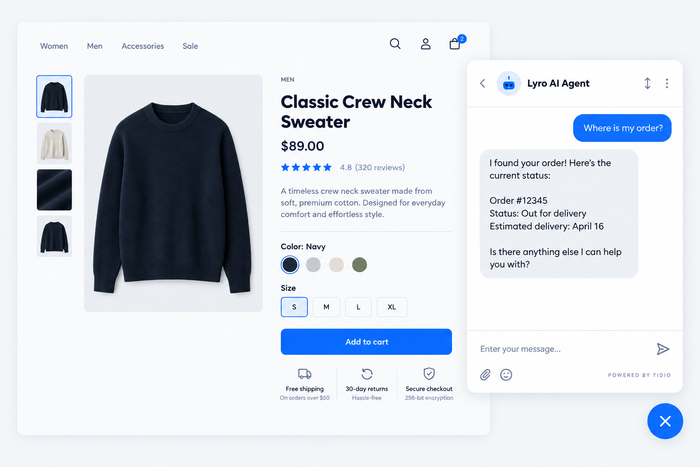
A simple example: a shopper opens the chat on your store and asks where their parcel is. A support agent, or an AI agent connected to your orders, finds the tracking status and replies in a minute. That exchange is customer support. So is the help article the shopper could have read, and the follow-up email after a delayed delivery.
Support is reactive by default, because the customer makes the first move. The best teams add a proactive layer, such as a message about a delay before the customer asks. You can read more in our guide to proactive customer service.
Why customer support matters
Support is where customers meet your company after they have paid. Three things are at stake.
Retention. A customer who gets a fast, correct answer comes back. One who waits two days for a reply to a billing question starts looking at alternatives. Support is the retention channel you control every day.
Expectations keep rising. In the Zendesk CX Trends 2026 report, 74% of consumers said that because of AI they now expect customer service to be available around the clock.[1] A shop with chat hours of nine to five now looks slow, even if its answers are good.
Reputation. Support conversations end up in reviews, social posts and word of mouth. One unresolved complaint can reach far more people than the customer who sent it. For more numbers, see our roundup of customer service statistics.
Customer support vs customer service
The two terms are used as synonyms, and most customers do not care which one you use. Inside a company the difference helps, because it decides who owns what.
Customer service is the whole experience of being helped: the friendly greeting, the clear return policy, the easy checkout, the thank-you. It starts before the sale and covers every interaction.
Customer support is the part that solves a specific problem or answers a specific question after the customer has hit a snag. It is usually more technical, more reactive and measured per ticket.
| Customer support | Customer service | |
|---|---|---|
| Focus | Solving a problem or question | The whole experience of being helped |
| Trigger | The customer asks for help | Any interaction, with or without a problem |
| When | Mostly after the purchase | Before, during and after the purchase |
| Typical tasks | Troubleshooting, order issues, how-to questions | Product advice, policies, complaints handling, follow-ups |
| Skills | Product knowledge, diagnosis, clear writing | Empathy, communication, sales awareness |
| Measured by | Resolution time, first contact resolution, tickets solved | CSAT, NPS, retention |
In a small company one person often does both, and that is fine. What matters is that every request has an owner and a clear path to resolution. For the broader picture, read our guides to customer service and customer care.
How customer support works
Every support request follows the same loop: the customer reaches out, the team understands the issue, solves it and learns from it.
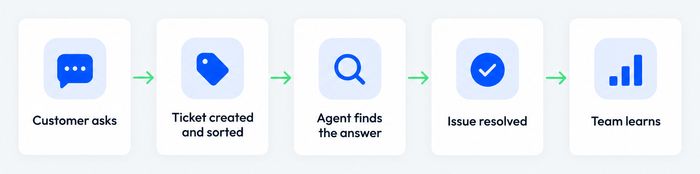
- The customer reaches out. Through chat, email, phone, social media or a help center search.
- The request is logged and sorted. A shared inbox or help desk turns the message into a ticket with an owner, a priority and tags. Our guide to ticket triage shows how.
- Someone finds the answer. The agent checks the knowledge base, the customer’s history and the order data. Simple questions can be answered by an AI agent or a canned reply.
- The issue is resolved or escalated. If the first agent cannot fix it, the ticket moves to a specialist along a defined escalation path.
- The team learns. Recurring questions become help articles, and recurring bugs go to the product team.
Small teams skip the last step most often. It is also the one that makes support pay back.
Customer support channels
Customers pick the channel that suits the moment, so most teams support several. The usual ones:
- Live chat: fast and conversational, and the best fit for questions that take one or two replies.
- Email: best for detailed or non-urgent requests, and for anything that needs attachments or a paper trail.
- Phone: still preferred for urgent or emotional issues. It is the most expensive channel per contact.
- Social media and messaging apps: Messenger, Instagram and WhatsApp let customers reach you where they already are.
- Self-service: a help center, FAQ or knowledge base that customers use on their own, at any hour.
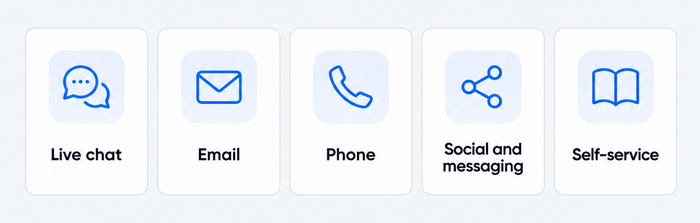
You do not need every channel on day one. Start with the two your customers already use, and make sure the history follows the customer from one to the other. That is the idea behind omnichannel customer service. For a fuller comparison, see our guides to customer service channels and the types of customer service.
Self-service and AI in customer support
The fastest way to answer a question is to let the customer find the answer. Self-service is also where support has changed most in the last two years.
Help center and knowledge base
A help center holds the answers to your top questions in articles, short guides and FAQs. It works around the clock and scales without extra staff. Start with the ten questions your team answers most, write each answer once, and link them from your chat and email replies. See customer self-service for the full playbook and AI knowledge bases for how to keep one current.
AI agents
An AI agent reads the customer’s message, finds the answer in your help content, and replies in plain language, in chat or email. Newer agents can also take actions, such as checking an order status. Salesforce’s 2025 State of Service report of 6,500 service professionals found that AI is expected to resolve 50% of service cases by 2027, up from 30% at the time of the survey.[2] Reps who use AI spend 20% less time on routine cases.[2]
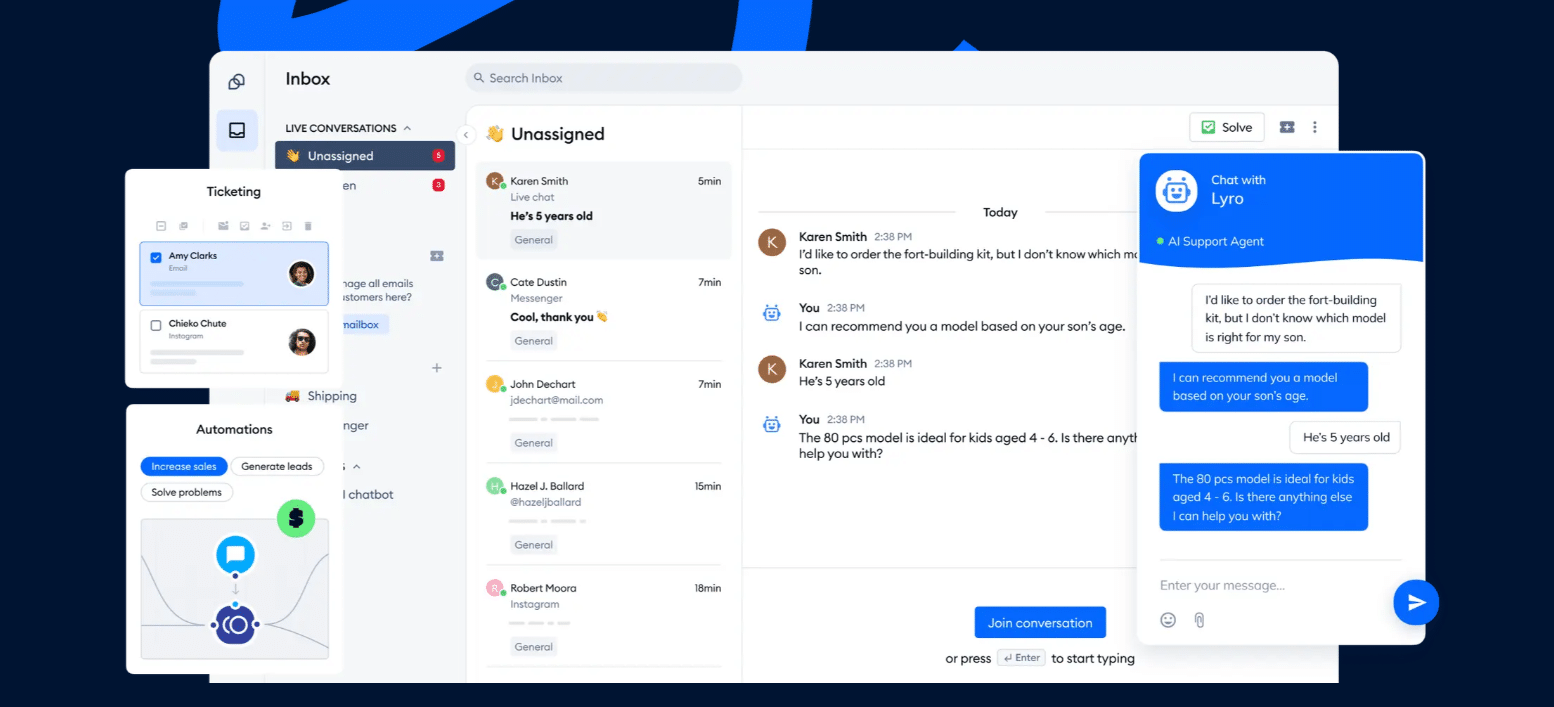
For example, Lyro, Tidio’s AI agent, answers from your help content and can resolve up to 75% of support requests. It hands the conversation to a person when it cannot help.
Keep a human in reach
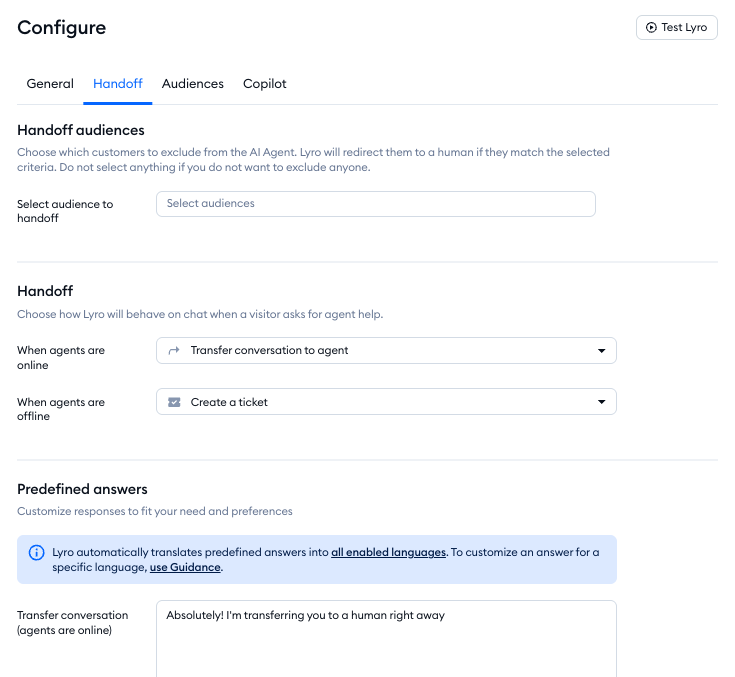
Automation works when customers can reach a person. In a 2026 Gartner survey, 87% of customers said companies that use generative AI for customer service must provide access to a human agent.[3] Set a handoff rule before you launch: billing disputes, upset customers and anything the AI fails to answer twice go to a person. Our guides to AI customer service and customer service chatbots cover the setup.
Customer support team roles and tiers
Most support teams are organized in tiers, so simple questions stay cheap and hard ones reach experts.
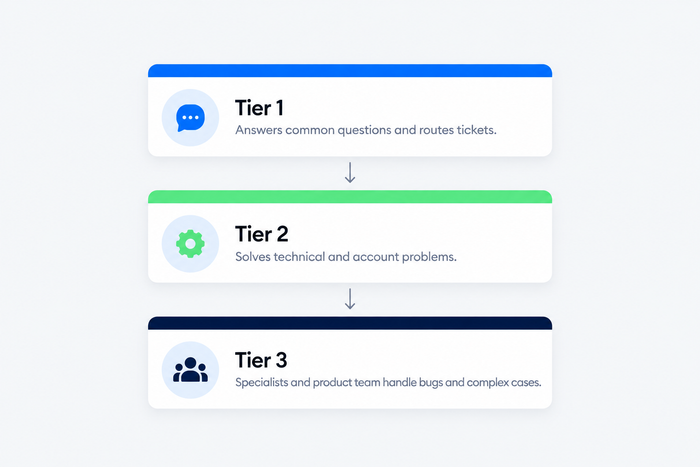
- Tier 1, front line: answers common questions, follows scripts and canned replies, and routes everything else. This is where AI agents and chatbots take the most volume.
- Tier 2, specialists: handles technical, billing or account problems that need investigation.
- Tier 3, experts: product or engineering staff who fix bugs and the hardest cases.
The tiers also create room for career development and advancement in a tech career.
A small team does not need three tiers of people. One or two agents can cover all three levels, as long as the escalation path is written down. As the team grows, add a team lead who owns quality and training. Our guide to customer service skills lists what to hire for, and the guide to customer service managers covers the lead role.
Benefits of good customer support
- Higher retention. Customers who get quick help with a problem tend to stay.
- Fewer repeat contacts. Resolving the cause, not just the symptom, cuts the same question coming back.
- Better products. Support sees what confuses people before analytics does.
- Sales support. Answering pre-purchase questions in chat removes the doubts that stop a checkout. See pre-sales support.
- Lower cost per contact. Self-service and AI take the repeat questions, so agents spend time on conversations that need judgment.
- Better reviews. Good support shows up in ratings and recommendations.
Challenges and how to handle them
- Volume spikes. Sales, launches and outages flood the inbox. Prepare canned replies and a banner or chat message for known issues, and let an AI agent take the repeat questions. See our guide to scaling customer support.
- Scattered channels. When chat, email and social live in separate tools, agents miss messages and customers repeat themselves. Use one inbox for all channels.
- Missing context. Agents who cannot see the order, the previous conversation or the plan waste time. Connect your store or CRM to the inbox.
- Inconsistent answers. Two agents give two different refund answers. Keep a single, current knowledge base and review it monthly.
- Burnout. Repetitive tickets wear a team down. Automating the repeat questions helps agent morale as much as cost.
- Over-automation. Bots that trap customers in loops damage trust. Always offer a way to reach a person.
Customer support software
Support tools fall into a few groups, and most teams need a mix: a shared inbox or help desk for tickets, live chat on the website, a knowledge base and an AI agent. Our guides to help desk software, customer service software and AI customer support software compare them in depth. When you shortlist, check six things: team size, budget, the channels you need, AI features, integrations with your CRM or store, and the knowledge base.
| Tool | Best for | Notes |
|---|---|---|
| Tidio | Small and mid-sized teams, online stores | Live chat, email, Messenger, Instagram and WhatsApp in one inbox, with the Lyro AI agent; free plan available |
| Zendesk | Larger teams with complex workflows | Full ticketing suite with many integrations |
| Freshdesk | Budget-conscious teams that want a classic help desk | Ticketing with automation and a knowledge base |
| Intercom | SaaS companies with in-app messaging | Messenger-first support with its own AI agent |
| Help Scout | Email-first teams that want a simple shared inbox | Shared inbox with a knowledge base |
| Gorgias | Shopify and other e-commerce stores | E-commerce help desk with order data in the ticket |
Tidio fits small teams and online stores that want live chat, email and an AI agent working together without a large setup. It has a free plan with 50 billable conversations a month, and paid plans start at $29 a month on monthly billing (as of October 2026). The Lyro AI agent is sold separately, so you only pay for the AI you use. Shopify stores get native order data in the inbox. A free plan lets you try it with your real traffic before paying.
Try Tidio free for 7 days
How to start customer support in five steps
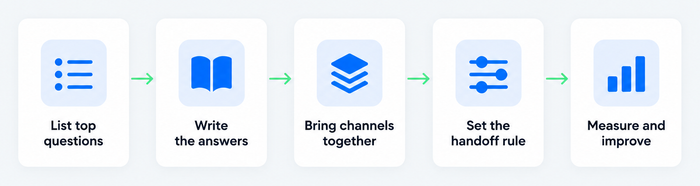
- List your top questions. Pull the last 50 to 100 customer messages and group them. The top ten usually cover more than half of the volume.
- Build a help center. Write one clear article per question, in the customer’s words, and link it from your site, chat and order emails.
- Set up one shared inbox. Bring chat, email and social into a single place, with an owner and a priority for each ticket. Add canned replies for the common cases.
- Add AI and write the handoff rule. Let an AI agent answer the repeat questions from your help content, and decide in writing which cases always go to a person.
- Measure and improve. Review the three metrics below every week and turn each recurring question into a new article.
Start small: ten questions answered well beat a hundred answered badly.
Customer support metrics
Pick a few numbers and review them on a schedule. These cover most small teams:
- First response time: how long a customer waits for the first reply. It shapes the first impression.
- Resolution time: how long it takes to close a ticket from the first message.
- First contact resolution: the share of issues solved in a single conversation.
- Customer satisfaction (CSAT): a one-question survey after the conversation.
- Ticket volume by topic: the questions that come back most, and so the next help article to write.
- AI resolution and handoff rate: how many conversations the AI closes alone, and how many it passes to a person.
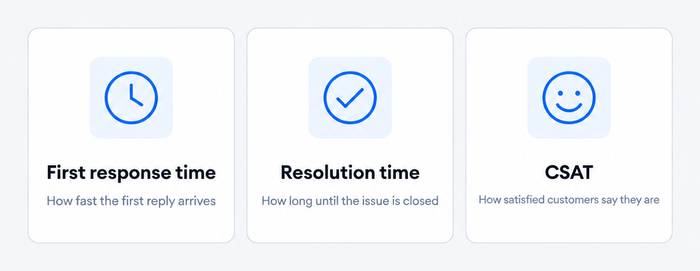
Set your own targets from your first month of data rather than copying another company’s benchmarks. Our guide to customer service metrics goes deeper on each one.
FAQ
Customer service covers the whole experience of being helped, before, during and after a purchase. Customer support is the part that solves a specific problem or answers a specific question, usually after the purchase. In small companies the same people do both.
By channel: live chat, email, phone, social media and messaging apps, and self-service. By approach: reactive support, where the customer asks first, and proactive support, where you reach out first. By level: tier 1 front line, tier 2 specialists and tier 3 product experts.
It answers questions, solves problems, handles returns and billing issues, guides new customers through setup, and passes recurring problems to the product team. Good teams also maintain the help center and track metrics.
Yes, without a night shift. A help center and an AI agent answer common questions at any hour, and the conversations that need a person become tickets for the next working day. Tell customers when to expect a reply.
Not entirely. AI takes the repeat questions, and people keep complaints, exceptions and sensitive cases. Read more in our guide on whether AI will replace customer service.
Track first response time, resolution time, first contact resolution and CSAT, and add the AI handoff rate if you use an AI agent. Review them weekly and compare them to your own past results.
Tidio is customer service software that brings live chat, email, social inbox and the Lyro AI agent into one place, built for small teams and online stores. A free plan lets you test it before you pay.
Use live chat to support your customers in real-time