Key takeaways:
- A customer service channel is any route a customer can use to reach you. The main ones are live chat, email, phone, messaging apps, social media, SMS, self-service, AI chatbots and video calls.
- Most small teams do best with three to five channels: one fast channel (chat or messaging), email for detailed issues, self-service for repeat questions and phone only when volume justifies it.
- Offer a channel only if you can answer on it within a stated time. A channel nobody answers does more harm than not offering it.
- Put every channel in one inbox, so a customer who switches channel does not start over.
- Check each channel monthly by response time, resolution time and satisfaction, then close or fix the weakest one.
Customer service channels (also called customer support channels or customer care channels) are the ways customers reach a business to ask a question or fix a problem, such as live chat, email, phone, messaging apps, social media and a help center. Each channel differs in speed, cost and how much human help it needs, so the right set depends on who your customers are and how big your team is.
Choosing matters because support rarely starts where you expect. In a July 2025 Gartner survey, 51% of customer service journeys began on a third-party platform such as a search engine, a video site or an AI assistant, and only 22% of customers started and finished on a company’s own channels.[1] Your channels have to be easy to find and quick to answer, or customers go elsewhere.
The guide is written for small support teams and online stores. It explains what customer service channels are, lists the nine main types with their strengths and limits, shows how to choose a mix for your business and how to measure it.
What are customer service channels?
A customer service channel is a specific route, such as a chat widget, a support email address or a WhatsApp number, that a customer uses to contact a business for help. A channel is not the same as a tool. The channel is where the customer shows up, and the tool is the software your team uses to answer there.
Think of a store that sells coffee equipment. A shopper asks about grinder compatibility in the website chat, emails a photo of a damaged filter and checks the help center for the return policy. That is three channels in one week, and each one needs an answer in its own time frame.
Channels are sometimes called touchpoints or contact channels. Teams also group them by who answers: assisted channels connect the customer to a person, automated channels use a bot or AI agent, and self-service channels let the customer find the answer alone. The types of customer service your team offers decide how you mix the three.
Why your channel mix matters
Your channel mix decides how easily customers get help, and it is one of the few support choices they see directly. Too few channels leave questions unanswered. Too many leave your team stretched across inboxes.
The data pulls in different directions:
- Support starts outside your channels. The Gartner survey above found that 51% of journeys begin on third-party platforms, so a public help center and a clear contact page matter as much as the channels themselves.[1]
- Leaders are betting on digital channels. In an April and May 2025 Gartner survey of 265 customer service leaders, live chat, self-service portals and knowledge management were expected to overtake phone and email as the most valuable support technologies within two years.[2]
- Phone is not going away. In Gartner’s 2025 survey of 5,801 customers, phone remained the dominant service channel, and only 35% of customers who last used it were willing to adopt a GenAI digital assistant.[3]
- Live chat earns good ratings. In our own data, 87% of live chat conversations get a positive satisfaction rating.
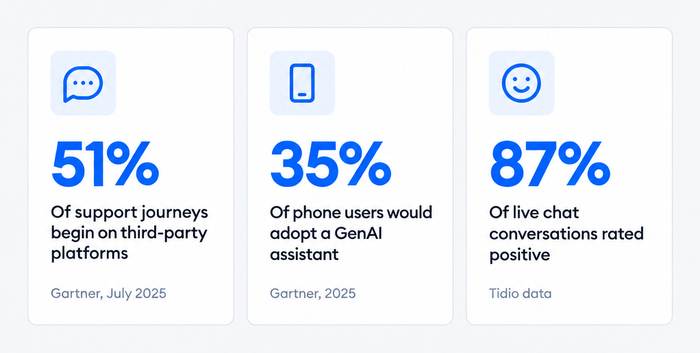
For a small team, that argues for matching channels to behavior, not to a trend. Offer the fast digital channels your customers use, keep a route to a person for complex issues and let automation cover the repeat questions.
Types of customer service channels
Customer service channels fall into three groups: assisted, automated and self-service. Most teams run a mix of all three, because each group handles a different kind of question.
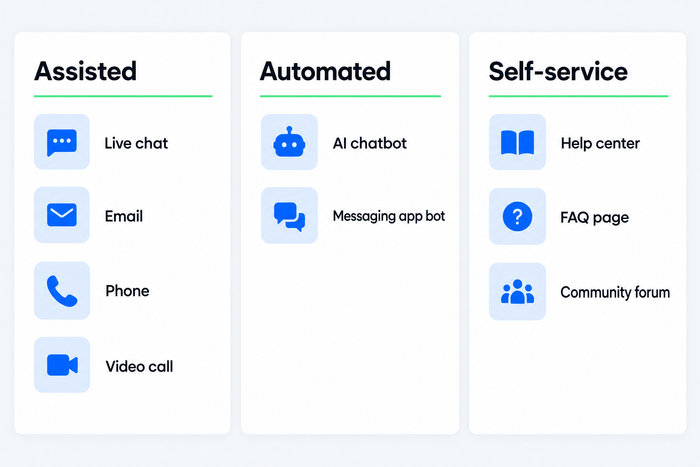
| Channel | Type | Best for | Watch out for |
|---|---|---|---|
| Live chat | Assisted | Quick questions while browsing, pre-purchase help | Needs coverage during the hours the widget is visible |
| Assisted | Detailed issues, attachments, a written record | Slower expectations; needs clear ownership | |
| Phone | Assisted | Urgent or complex issues, older customers | Costly per contact; needs hours and call notes |
| Messaging apps | Assisted or automated | Order updates and follow-ups in apps customers already use | Platform opt-in and messaging rules |
| Social media | Assisted | Shoppers who discover and ask in the same place | Public comments and private messages need one owner |
| SMS | Assisted or automated | Short alerts and quick replies | Consent rules; short messages only |
| AI chatbot or AI agent | Automated | Repeat questions at any hour | Needs a good knowledge base and a handoff to a person |
| Self-service | Self-service | Policies, how-tos, order tracking | Needs upkeep and a visible way to reach a person |
| Video calls | Assisted | Visual troubleshooting, demos | Scheduling and setup; fits a narrow set of products |
The nine main customer service channels
The nine main customer service channels are live chat, email, phone, messaging apps, social media, SMS, AI chatbots, self-service and video calls.
1. Live chat
Live chat is a text conversation between a visitor and an agent through a widget on your website or app. It suits quick questions, especially before a purchase, because the customer gets an answer without leaving the page. In our live chat statistics data, about 15% of visitors who see a chat widget join a conversation.
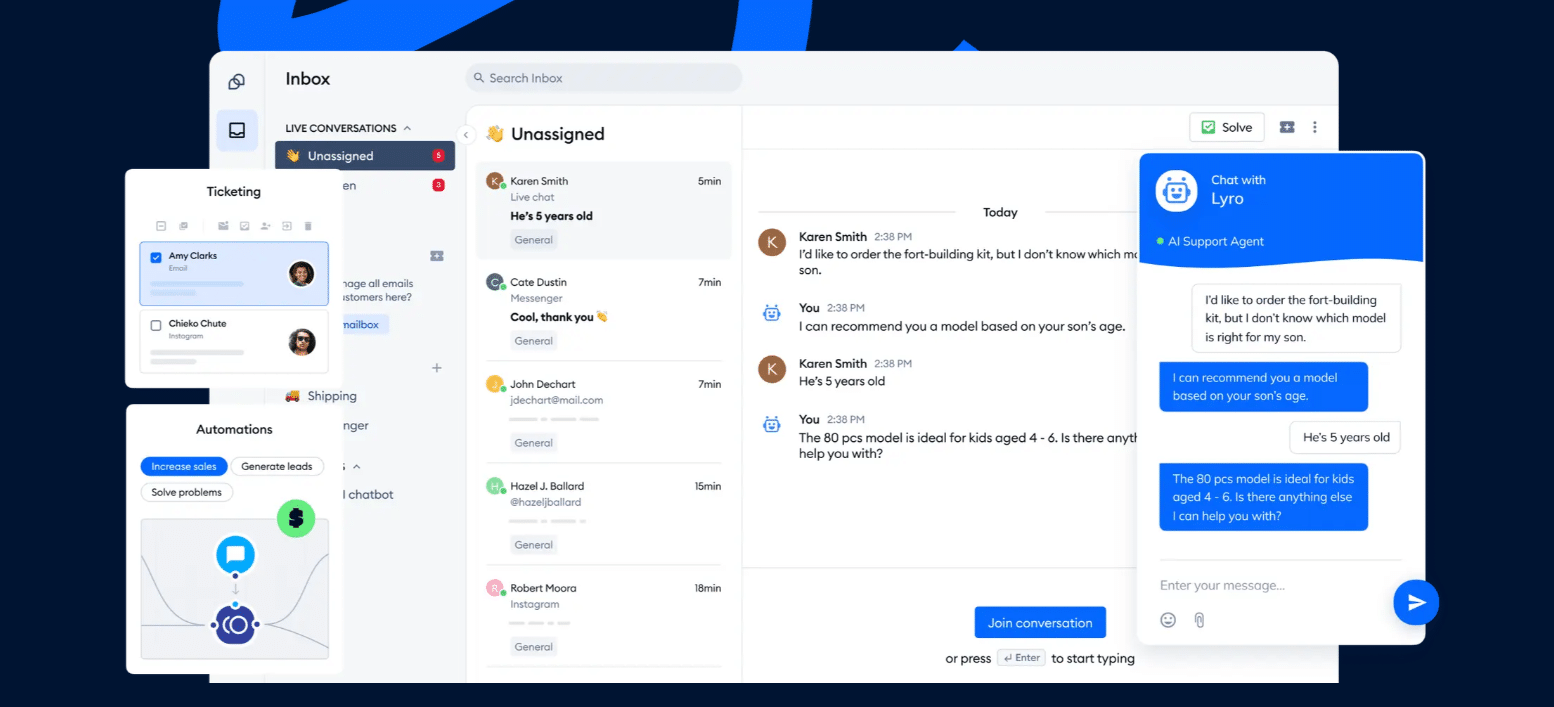
Live chat works best when someone is there to reply, or when an AI agent covers the gaps. In Tidio, for example, the chat widget sits in the same inbox as email and social messages, so an agent answers from one screen. Our guides to what live chat is and the benefits of live chat cover it in depth.
2. Email
Email is the channel for detailed issues and anything that needs a written record, such as refund requests, invoices and attachments. Customers expect a reply within hours, not minutes, which gives your team room to investigate. The risk is an unowned shared address that nobody checks. Use a shared inbox, assign each thread and keep customer service email templates for the questions you answer most.
3. Phone
Phone is the best channel for urgent, emotional or complicated problems, because the agent hears the customer and can resolve things in one call. It is also the most expensive channel per contact and the hardest to scale, since each call needs one agent for its full length. Many businesses offer it through a toll-free number. Offer it with set hours, a callback option and call notes saved to the customer record. If phone volume is low, a callback request form often replaces a full phone line.
4. Messaging apps
Messaging apps such as WhatsApp, Facebook Messenger and Instagram direct messages let customers write in an app they already use and return to the thread later. They suit order updates, delivery questions and follow-ups. Each platform sets its own rules: the WhatsApp Business Platform requires customers to opt in before a business can message them, so check the opt-in rules before you plan proactive messages. For setup, see our guide to WhatsApp chatbots.
5. Social media
Social media support means answering customers who write on public posts or in private messages on platforms such as Facebook, Instagram and X. Public comments are visible to everyone, so a quick, calm reply doubles as marketing. Decide who owns each account, move sensitive details to a private message and route every social conversation into your shared inbox. Our guide to social media chatbots covers automating the repeat questions.
6. SMS
SMS reaches customers on any phone without an app, which makes it useful for short alerts such as delivery updates and appointment reminders, and for quick replies. Texts are brief, so use SMS for simple exchanges and hand longer issues to chat or email. Customers must agree to receive texts, so collect consent first and follow the rules in your market.
7. AI chatbots and AI agents
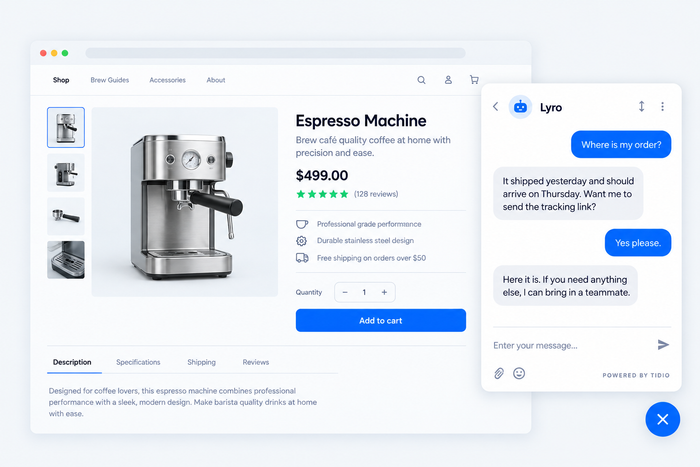
An AI chatbot or AI agent answers customer questions automatically, using your help center and other content as its source. It suits repeat questions such as order status, shipping and returns, at any hour. The practical rule is a clean handoff: when the AI cannot answer, it passes the conversation and its transcript to a person. Lyro, Tidio’s AI agent, can resolve up to 75% of support requests. Our guide to the AI customer service agent explains how these work, and chatbot vs live chat compares the two.
8. Self-service
Self-service gives customers the answer without contacting anyone: a help center, an FAQ page, order tracking or a community forum. It handles the repeat questions, so your agents spend time on the issues that need them. The same Gartner survey found that 60% of customer service agents fail to promote self-service options, so point to your help center in saved replies and auto-responses.[3] See our guides to customer self-service and AI knowledge bases.
9. Video calls
Video support lets an agent see the product or the problem, which helps with setup, repairs and demonstrations. It also takes scheduling and more preparation than chat. Most small teams add it last, and only if their product is hard to explain in text. Software and hardware companies, and teams selling high-value items, use it most.
Run chat, email and social messages from one inbox
Multichannel vs omnichannel support
Multichannel support offers several channels side by side. Omnichannel support connects them to one customer record, so a conversation can move from chat to email without the customer repeating the issue. The channels in this guide work in both setups, and the difference is whether they share history.
Most teams start multichannel, then connect their channels in one inbox as volume grows. Our guides to multichannel customer service and omnichannel customer service explain each setup and when to move from one to the other.
How to choose customer service channels
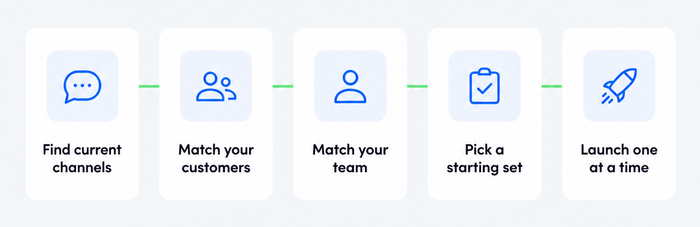
To choose customer service channels, start from where your customers already contact you, then keep only the channels your team can answer well.
1. Find out where customers already reach you
Count conversations by channel over the last 90 days across your inbox, chat tool, social accounts and phone log. Add the channels customers ask for in surveys or support replies. The channels with the most volume are your starting set.
2. Match channels to your customers
Different groups prefer different channels, so read your audience before you copy a competitor. Shoppers browsing on mobile lean toward chat and messaging apps. Customers with complex or high-value orders often want phone or email. Older customers tend to prefer phone. If your store sells in several countries, check which messaging apps are common in each market.
3. Match channels to your team
Count the hours and people you can commit. A three-person team can cover chat, email and one messaging app, with an AI agent handling the repeat questions overnight. It cannot also staff a phone line. Write down the opening hours and the response-time promise for every channel you keep.
4. Pick a starting set by business type
| Your situation | Start with | Add later |
|---|---|---|
| Small online store | Website chat, email, Instagram or Messenger, help center | WhatsApp, SMS for delivery alerts |
| Growing e-commerce team | Chat, email, WhatsApp, Instagram, order lookup | Phone callbacks, proactive messages |
| SaaS or software company | Chat, email, help center, in-app help | Video calls for onboarding |
| Service business with urgent requests | Phone, email, web form | Chat, messaging app |
| Team with no support staff yet | Email and a help center | Chat with an AI agent |
5. Launch one channel at a time
Open a new channel only after the previous one is answering inside its time promise. Announce it on your contact page and in your email signature. Then watch volume and satisfaction for a month before the next addition.
Challenges of managing several channels
Every channel you add brings coordination work. Most problems come from channels that grow apart, and each has a practical fix.
- Scattered inboxes: Each channel in its own app means agents switch screens and miss messages. Fix: bring every channel into one shared inbox before opening another.
- Repeat explanations: A customer who switches channel meets an agent who has not seen the first message. Fix: log the channel and a short summary on every conversation, and match customers by email address or phone number.
- Uneven response times: Chat gets a reply in a minute and email in two days. Fix: set a target per channel and report it weekly.
- Inconsistent answers: Two agents, or an agent and a bot, give different answers. Fix: write answers once in a shared knowledge base and reuse them on every channel.
- Channels nobody watches: A social account or form that sits unread looks worse than no channel. Fix: assign an owner to every channel, or close it and redirect customers.
- Automation without an exit: A bot that cannot hand off traps the customer. Fix: always offer a route to a person, with the transcript attached.
How to measure channel performance
Measure each channel on the same few numbers, so you can compare them and see where to put effort. Review them monthly, per channel and in total.
| Metric | What it tells you | Where it matters most |
|---|---|---|
| Volume | How many customers use the channel | Deciding what to add or close |
| First response time | How fast the first reply arrives | Chat, messaging, social |
| Resolution time | How long the issue takes to close | Email, phone |
| Customer satisfaction (CSAT) | How customers rate the interaction | Every channel |
| Repeat contacts | How often customers write twice about one issue | Channel switches, self-service gaps |
| Automation rate | Share of conversations solved without a person | AI chatbot or agent |
A channel with high volume and good satisfaction deserves more coverage. One with low volume and slow replies is a candidate to merge into another. Our guide to customer service metrics explains how to calculate each number.
Software to run your channels
Software for customer service channels should bring chat, email and messaging into one inbox, keep one history per customer and let an AI agent answer the repeat questions. Check which channels each plan includes, how handoff works and whether pricing is per agent, per conversation or per resolution.
Tidio fits small teams and e-commerce stores that run live chat, email, Messenger, Instagram and WhatsApp from one inbox, with Lyro answering first and a Shopify integration for order data. It has a Free plan to test the setup, and it does not include phone calls, so teams that depend on phone need a voice platform alongside it. For comparisons, see our roundups of customer service software and omnichannel support software.
Try Tidio's shared inbox and AI agent for free
Pick the channels you can answer well
Customer service channels work when they match where your customers already are and what your team can cover. Count your conversations, choose three to five channels, answer them from one inbox and let an AI agent take the repeat questions. Then review response times and satisfaction by channel each month, and adjust.
FAQ
Customer service channels are the ways customers contact a business for help, such as live chat, email, phone, messaging apps, social media, SMS and self-service. Each channel differs in speed, cost and how much human help it needs, so most businesses use a mix rather than one.
Email, live chat, phone and social media are the most widely used channels, with messaging apps and self-service growing. Gartner’s 2025 customer survey still found phone to be the dominant channel, even as leaders expect live chat and self-service to gain value.
Three to five is a workable range for a small business: a fast channel such as chat or messaging, email, a help center and, if volume justifies it, phone. Add a channel only when your team can answer it inside a stated time and the previous one is running well.
A touchpoint is any moment a customer interacts with your brand, including ads, product pages and invoices. A customer service channel is the subset where the customer asks for help. Every support channel is a touchpoint, but most touchpoints are not support channels.
No single channel is best for everyone. Live chat suits quick questions, email suits detailed issues, phone suits urgent ones and self-service suits repeat ones. The best channel is the one your customers already use and your team can answer quickly, so check your own conversation counts first.
Multichannel service offers several channels that run side by side. Omnichannel service connects them to one customer record, so history and routing are shared. A customer in an omnichannel setup can switch from chat to email and continue the same conversation.
Tidio is AI customer service software for small and mid-sized teams and online stores. It combines live chat, a shared inbox for email, Messenger, Instagram and WhatsApp, and the Lyro AI agent, which can resolve up to 75% of support requests. It has a Free plan and a Shopify integration.
Use live chat to support your customers in real-time