


Key takeaways
- A metric is a number you read; a KPI is a number you answer for. Track 15 if you like, but promote only five to seven to KPIs, each with a target and an owner.
- Start with five numbers. First response time, resolution time, first contact resolution, CSAT, and AI resolution rate cover speed, quality, sentiment, and automation.
- Benchmarks are thin. Reliable public figures exist for first contact resolution, NPS, and a national satisfaction score. For everything else, your own trend by channel beats any industry average.
- Pair every metric with its trap. Faster replies can lower quality, and a high resolution rate can hide reopened tickets.
- Add AI metrics now. If an AI agent answers part of your chats, resolution rate and handoff rate belong on the same dashboard as your human numbers.
Customer service metrics are the numbers that show how fast, how well, and how efficiently your support team answers customers, such as first response time, first contact resolution, and customer satisfaction (CSAT). They matter because patience is short: in Tidio’s customer experience study (2025), 44% of online shoppers said a reply should arrive in under 5 minutes. This guide covers 15 metrics in five families, each with a formula you can copy, a worked example, and a benchmark where a reliable one exists.
What are customer service metrics?
Customer service metrics are measurements of support performance, collected from your help desk, live chat, surveys, and AI agent reports. They answer three questions: how quickly customers get help, whether the help works, and how customers feel afterward.
They fall into five families, which this guide follows:
- Speed and workload: how much arrives and how fast you answer it.
- Resolution quality: whether problems stay solved.
- Customer sentiment: what customers say about the experience.
- AI and self-service: what automation handles without an agent.
- Business impact: what support does to retention and cost.
Metrics vs. KPIs
A metric is any number you track. A KPI (key performance indicator) is a metric you have tied to a goal, a target, and an owner. Average resolution time is a metric; “keep average resolution time under four hours this quarter” is a KPI.
| Metric | KPI | |
|---|---|---|
| Definition | Any measurable support number | A metric with a target and a deadline |
| Purpose | Describe what happened | Judge whether you are on track |
| Example | 240 tickets arrived this week | Keep first response time under 5 minutes |
| Review cadence | Whenever you look | Weekly, monthly, or quarterly, depending on the KPI |
Customer service metrics at a glance
Use this table to pick what to read first. Each metric name jumps to its section.
| Metric | Family | Formula | Benchmark |
|---|---|---|---|
| Ticket volume | Speed and workload | Tickets and chats received in a period | Your own trend |
| First response time | Speed and workload | Total first-reply wait ÷ conversations answered | 44% of shoppers expect under 5 minutes |
| Average resolution time | Speed and workload | Total time to solve ÷ tickets solved | Your own trend, by channel |
| Ticket backlog | Speed and workload | Open tickets ÷ tickets received × 100 | Your own trend |
| First contact resolution | Resolution quality | Solved on first contact ÷ total × 100 | 70% to 79% is good |
| Reopen rate | Resolution quality | Reopened ÷ solved × 100 | Your own trend |
| Escalation rate | Resolution quality | Escalated ÷ total × 100 | Your own trend |
| CSAT | Customer sentiment | Ratings of 4 and 5 ÷ responses × 100 | National score 77.9 |
| NPS | Customer sentiment | % promoters minus % detractors | 41 for B2B software, 61 for e-commerce |
| CES | Customer sentiment | Sum of scores ÷ responses | Your own trend |
| AI resolution rate | AI and self-service | AI-resolved ÷ AI-handled × 100 | Lyro can resolve up to 75% |
| Handoff rate | AI and self-service | Handed to a human ÷ AI-handled × 100 | Your own trend |
| Deflection rate | AI and self-service | Self-service visits with no ticket ÷ visits × 100 | Your own trend |
| Customer churn rate | Business impact | Customers lost ÷ customers at start × 100 | Varies by business model |
| Cost per ticket | Business impact | Support cost ÷ tickets solved | Your own trend |
15 customer service metrics to track
Each metric follows the same order: definition, why it matters, formula, example, benchmark, trap, and how to improve it. “Your own trend” means no reliable public benchmark exists.
Speed and workload
1. Ticket volume
Ticket volume is the number of requests that reach your team in a period, counted across chat, email, social, and forms.
Why it matters: volume decides staffing. A spike on Mondays or after a product launch tells you when to schedule more agents or turn on automation. Volume also points to product problems: if you sell software and many tickets are about installation, your setup process may be too complicated.
Formula:
Volume change (%) = ((This period − Last period) ÷ Last period) × 100
Example: 240 tickets this week against 200 last week gives (240 − 200) ÷ 200 × 100 = 20% growth.
Good looks like: no reliable industry benchmark. Track your own trend, per week and per channel.
Watch out: a falling volume is not always good news. It can mean customers gave up, or that a broken contact form hides requests.
Improve it: publish answers to your top five questions in a knowledge base, and review which topics repeat each month.
2. First response time (FRT)
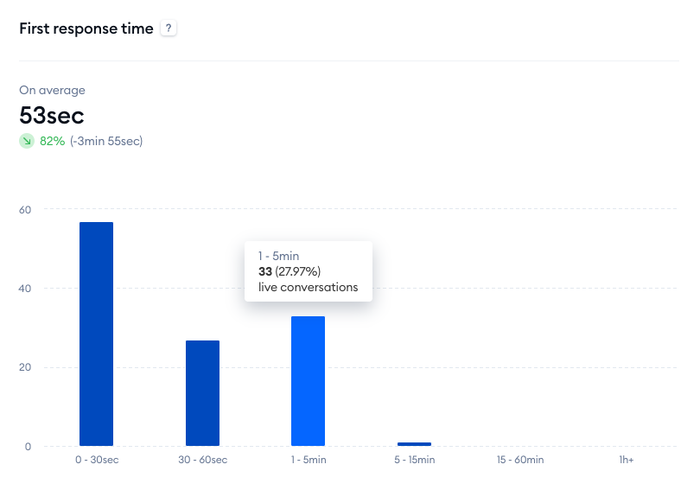
First response time is how long a customer waits for the first reply after contacting you. The clock starts when the message arrives and stops at the first human or AI reply. Auto-acknowledgments such as “We got your message” should not stop it.
Why it matters: it is the first thing customers feel, and it sets their patience for the rest of the conversation.
Formula:
FRT = Total first-reply wait time ÷ Number of conversations answered
Example: three chats waited 1, 2, and 6 minutes for a first reply: (1 + 2 + 6) ÷ 3 = 3 minutes.
Good looks like: there is no single public standard, so set targets per channel. For context, 44% of online shoppers say the average response time should be below 5 minutes, according to Tidio’s customer experience study (2025). Live chat targets sit in seconds or minutes; email targets sit in hours.
Watch out: averages hide the long tail. One ticket that waited 60 hours can sit behind a healthy 40-minute average, so also track the share answered within target.
Improve it:
- Route chats and email into one inbox so nothing waits in a second tool.
- Use canned responses for the greeting and the top ten questions.
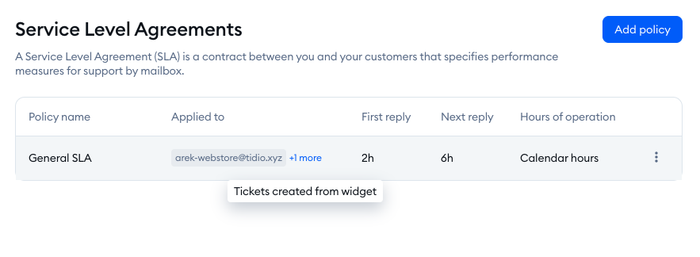
- Set a service level agreement (SLA) so urgent tickets surface first. In Tidio, SLA policies set a first-reply and next-reply target.
3. Average resolution time
Average resolution time is how long it takes to solve a ticket, from creation to the moment it is marked solved.
Why it matters: a customer with an open problem is a customer at risk. Long resolution times usually point to a handoff problem, a missing answer, or a ticket waiting on another team.
Formula:
Average resolution time = Total time to solve all tickets ÷ Number of tickets solved
Example: 24 tickets took 36 hours in total to solve: 36 ÷ 24 = 1.5 hours (1 hour 30 minutes).
Good looks like: no reliable industry benchmark, because a refund and a bug fix are different jobs. Compare like with like, by ticket category.
Watch out: closing tickets early to improve the number works for a week, then the reopen rate climbs.
Improve it: add escalation rules for tickets that wait more than a set time, and tag tickets by category so you can see which type drags the average.
4. Ticket backlog
Ticket backlog is the number of tickets still open at the end of a period. The backlog rate compares it with what arrived.
Why it matters: a growing backlog is an early warning that demand has outrun capacity, weeks before CSAT shows it.
Formula:
Backlog rate (%) = (Open tickets ÷ Tickets received in the period) × 100
Example: 45 tickets are still open from 300 received this month: 45 ÷ 300 × 100 = 15%.
Good looks like: no reliable industry benchmark. A flat or shrinking backlog matters more than the absolute number.
Watch out: count only tickets waiting on you. Tickets that wait for a customer’s reply will inflate the number and send you chasing the wrong problem.
Improve it: automate the single most repeated question first, and use automated ticket routing so new tickets reach the right agent without a manual sort.
Resolution quality
5. First contact resolution (FCR)
First contact resolution is the share of requests solved in the first interaction, with no follow-up from the customer. Tidio’s analytics call a close relative “One-touch tickets”: tickets solved with a single agent reply, excluding tickets solved by Lyro or automated workflows.
Why it matters: each extra contact costs agent time and customer patience. FCR shows whether agents have the knowledge and authority to finish the job.
Formula:
FCR (%) = (Requests solved on first contact ÷ Total requests) × 100
Example: 140 of 200 chats were solved in one conversation: 140 ÷ 200 × 100 = 70%.
Good looks like: SQM Group puts a good FCR at 70% to 79%, with 80% or higher as world-class.[1] Its figures come from call centers, so treat them as a ceiling check for chat and email, not a promise.
Watch out: pushing FCR up can push the reopen rate up too. Count a request as resolved only if the customer does not come back about the same problem within, say, seven days.
Improve it:
- Give agents a searchable knowledge base and permission to issue small refunds or replacements.
- Collect order number and account email up front, so agents do not need a second message.
- Review the follow-up contacts each month to find the missing answer.
6. Reopen rate
Reopen rate is the share of solved tickets that the customer reopens, or replies to, after you marked them solved.
Why it matters: it is the honesty check on FCR and resolution time. A team can look fast and still leave problems open.
Formula:
Reopen rate (%) = (Reopened tickets ÷ Solved tickets) × 100
Example: 12 of 300 solved tickets were reopened: 12 ÷ 300 × 100 = 4%.
Good looks like: no reliable industry benchmark. Track the trend, and read every reopened ticket for the first month.
Watch out: a very low rate can mean customers gave up. Compare it with CSAT before celebrating.
Improve it: end each answer with the next step and a clear “this is solved when…”, and avoid auto-closing tickets on a short timer.
7. Escalation rate
Escalation rate is the share of tickets passed to a senior agent, another team, or a manager because the first agent could not finish them.
Why it matters: escalations are expensive and slow. A high rate points to a training gap, a missing permission, or a product issue that support cannot fix alone.
Formula:
Escalation rate (%) = (Escalated tickets ÷ Total tickets) × 100
Example: 30 of 400 tickets were escalated: 30 ÷ 400 × 100 = 7.5%.
Good looks like: no reliable industry benchmark. Some escalation is healthy; a rate that climbs over three months is not.
Watch out: do not count transfers between agents on the same team as escalations, or the metric measures routing instead of capability.
Improve it: log the reason on every escalation, then train agents on the top three reasons and grant the permissions they keep asking for.
Customer sentiment
8. Customer satisfaction score (CSAT)
Customer satisfaction score is the percentage of customers who rate an interaction as satisfied, usually 4 or 5 on a 1-to-5 scale. In Tidio’s analytics this appears as “Satisfaction rate”, the average of the ratings customers leave.
Why it matters: it is the most direct read on how support feels to the people receiving it.
Formula:
CSAT (%) = (Ratings of 4 and 5 ÷ Total responses) × 100
Example: 144 of 180 responses rated 4 or 5: 144 ÷ 180 × 100 = 80%.
Good looks like: the American Customer Satisfaction Index stood at 77.9 out of 100 nationally in the third quarter of 2024.[2] It is a different survey from your CSAT, so use it as a yardstick, and trust your own trend over time more.
Watch out: response rates are low and skew toward angry or delighted customers. Report the number of responses next to the score, and send the survey right after the ticket is solved.
Improve it: read the lowest-rated conversations weekly, and send the survey automatically so every agent’s score comes from the same process. See our guide to the customer satisfaction survey for question wording.
9. Net Promoter Score (NPS)
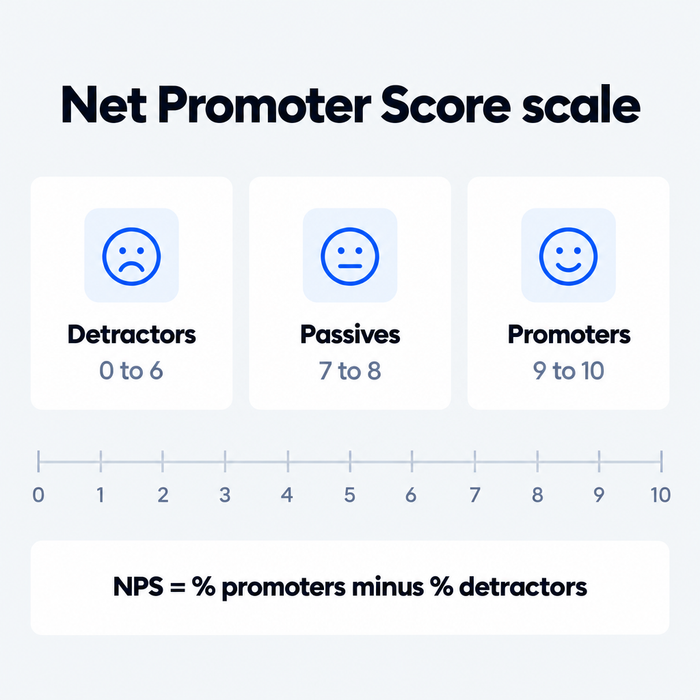
Net Promoter Score measures loyalty with one question: “How likely are you to recommend us to a friend or colleague?” Customers answer from 0 to 10. Scores of 9 and 10 are promoters, 7 and 8 are passives, and 0 to 6 are detractors.
Why it matters: CSAT scores one interaction; NPS scores the relationship. It is a read on loyalty and on who is likely to recommend you.
Formula:
NPS = % promoters minus % detractors
Passives count in the total number of responses but not in the formula. The result runs from -100 to +100.
Example: of 200 responses, 110 are promoters (55%), 60 are passives (30%), and 30 are detractors (15%): 55 − 15 = NPS 40. If only 20% were promoters and 35% were detractors, the NPS would be -15.
Good looks like: Retently’s 2026 benchmarks put the average at 41 for B2B software and SaaS and 61 for e-commerce.[3] Benchmark inside your industry, not across them.
Watch out: NPS asks about the brand, not the last ticket, so it moves slowly and mixes in price and product. Do not hold the support team alone to it.
Improve it: follow up with detractors within a day, and ask passives one open question: “What would make this a 10?”
10. Customer effort score (CES)
Customer effort score measures how easy it was to get a problem solved. After a conversation, you ask customers to rate a statement such as “The company made it easy to handle my issue” from 1 (strongly disagree) to 7 (strongly agree).
Why it matters: it shows friction that CSAT can miss. A customer can be satisfied with the answer and still be worn out by repeating the order number or chasing a reply.
Formula:
CES = Sum of all scores ÷ Number of responses
Example: five customers answer 6, 7, 5, 4, and 7: 29 ÷ 5 = 5.8 out of 7.
Good looks like: no reliable cross-industry benchmark, and the scale differs between companies. Fix your scale and compare against your own quarter-to-quarter trend.
Watch out: keep the scale and wording identical over time. Changing the question resets the trend.
Improve it: look for places where customers repeat themselves, such as asking for the order number twice or moving from chat to email.
AI and self-service
11. AI resolution rate
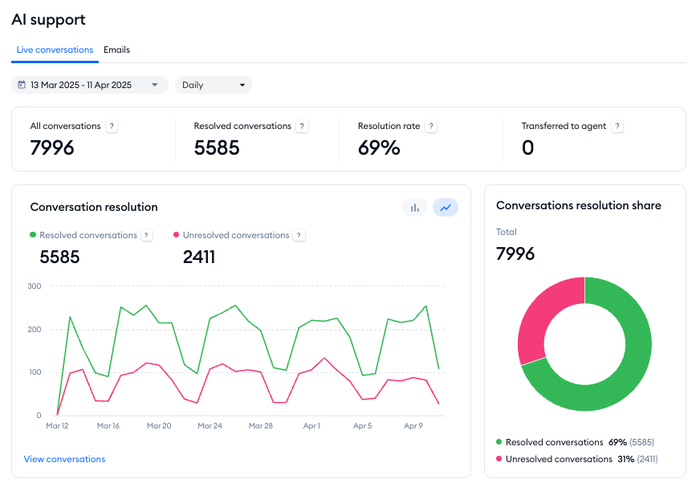
AI resolution rate is the share of conversations an AI agent solves without a human stepping in. In Tidio’s analytics, the AI support section reports it for Lyro as “Resolution rate”, next to “Resolved conversations” and “Transferred to agent”.
Why it matters: it shows how much of your volume automation actually removes, and it moves other numbers with it: backlog, first response time, and cost per ticket.
Formula:
AI resolution rate (%) = (Conversations resolved by AI ÷ Conversations handled by AI) × 100
Example: the AI agent handled 800 conversations and 480 ended without a human: 480 ÷ 800 × 100 = 60%.
Good looks like: Lyro can resolve up to 75% of support requests. Your own rate depends on how complete your knowledge base is, so read the trend, not the headline figure.
Watch out: a conversation where the visitor simply leaves counts as unresolved by some tools and resolved by others. Check how your tool defines it, and pair the rate with CSAT on AI conversations.
Improve it: review the questions the AI could not answer, add the missing answers to the knowledge base, and run the report again next week. Our AI knowledge base guide covers what to write.
12. AI handoff rate
AI handoff rate is the share of AI conversations that end up with a human agent. In Tidio’s AI support analytics it is “Transferred to agent”.
Why it matters: a handoff is where the AI passes on what it cannot answer. The question is whether the right conversations reach a human, and whether the agent gets the full context.
Formula:
Handoff rate (%) = (Conversations transferred to a human ÷ Conversations handled by AI) × 100
Example: 120 of 800 AI conversations were handed to an agent: 120 ÷ 800 × 100 = 15%.
Good looks like: no reliable industry benchmark. Read it together with the resolution rate and the CSAT of handed-off conversations.
Watch out: a handoff rate near zero can mean customers cannot find a way to reach a person. Make the “talk to a human” path obvious.
Improve it: hand off on clear triggers, such as a refund request or a second unanswered question, and pass the transcript so customers do not repeat themselves.
13. Self-service deflection rate
Self-service deflection rate is the share of customers who found an answer in your help center or FAQ and did not open a ticket afterward.
Why it matters: every deflected visit is a ticket you did not have to answer. It shows whether your help content works.
Formula:
Deflection rate (%) = (Self-service visits that end without a ticket ÷ Total self-service visits) × 100
Example: 900 help center sessions, 720 of which ended without a ticket: 720 ÷ 900 × 100 = 80%.
Good looks like: no reliable industry benchmark. Compare article by article, and look at the pages with the lowest deflection first.
Watch out: a visitor who left frustrated counts as deflected. Pair it with a “Did this answer your question?” rating on each article.
Improve it: write articles from the questions your tickets actually contain, and link to the matching article in your canned replies. See customer self-service for how to structure a help center.
Business impact
14. Customer churn rate
Customer churn rate is the share of customers who stop buying or cancel in a period. It is the business outcome that support quality feeds, even though support does not own it.
Why it matters: it translates support performance into revenue. A rising churn rate after a slow quarter of replies is the argument for hiring or automating.
Formula:
Churn rate (%) = (Customers lost during the period ÷ Customers at the start of the period) × 100
Example: you started the month with 300 customers and 15 left: 15 ÷ 300 × 100 = 5%. The matching retention rate is 95%.
Good looks like: it varies by business model, from monthly subscriptions to one-time e-commerce purchases, so compare against your own past months only.
Watch out: many things cause churn besides support, such as price, product, and competitors. Use it to spot patterns, not to grade agents. Tidio’s analytics do not report churn, so pull it from your billing, store, or CRM data. Our guide to customer retention covers the wider picture.
Improve it: contact customers who gave a low CSAT or NPS within a day, and look at churn by whether the customer had a support conversation in the last 30 days.
15. Cost per ticket
Cost per ticket is what it costs to handle one support request, including agent pay, software, and overhead.
Why it matters: finance asks for this number, and it shows what automation changes.
Formula:
Cost per ticket = Total support cost ÷ Number of tickets solved
Example: $6,000 of monthly support cost and 1,500 tickets solved: $6,000 ÷ 1,500 = $4 per ticket.
Good looks like: no reliable industry benchmark. Costs vary with wages, channel, and ticket complexity, so compare month to month in your own team.
Watch out: cutting cost per ticket by rushing agents lowers CSAT. Never read it alone.
Improve it: automate the repeat questions, keep agents for the conversations that need judgment, and watch the number again after every change.
How to choose which metrics become KPIs
You do not need 15 KPIs. Most teams do well with five to seven. To choose them:
- Start from a goal. “Answer faster” points to first response time and backlog. “Keep customers longer” points to CSAT, reopen rate, and churn.
- Set a baseline. Run each candidate metric for four weeks before you set a target.
- Set a target and an owner. A KPI with no target is still just a metric, and a KPI with no owner is a report nobody reads.
- Pick a review rhythm. Review speed metrics weekly, quality and sentiment monthly, and cost and churn quarterly.
Team size changes the right set:
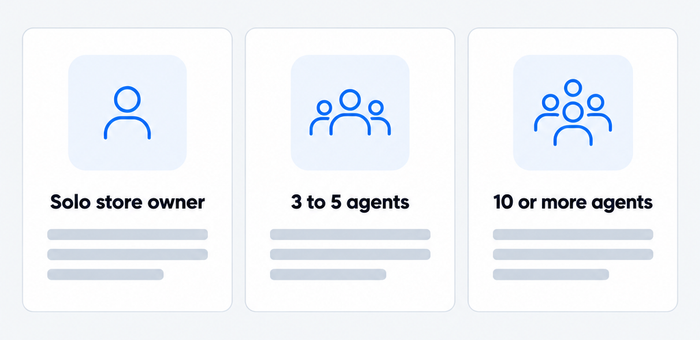
| Team | Start with these KPIs | Add later |
|---|---|---|
| Solo store owner | First response time, CSAT, AI resolution rate | Ticket volume |
| 3 to 5 agents | The three above, plus average resolution time, first contact resolution, and ticket backlog | Reopen rate |
| 10 or more agents | The six above, plus reopen rate and escalation rate | NPS, CES, cost per ticket |
How to track customer service metrics in Tidio
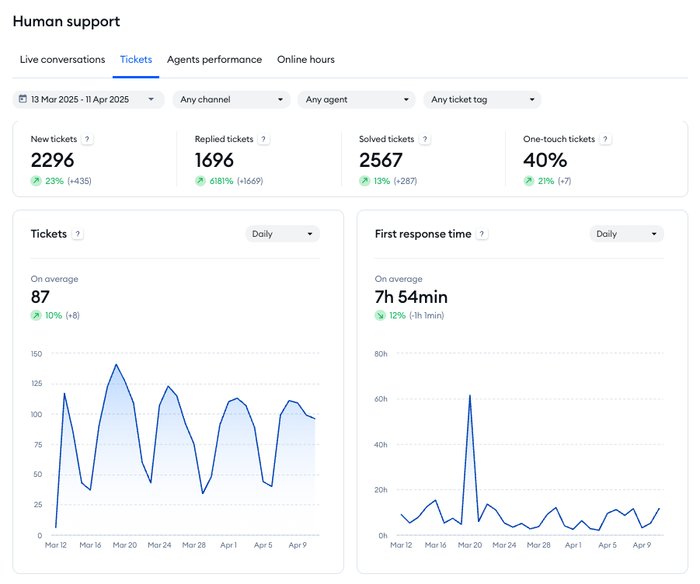
Most numbers in this guide come from your help desk, your surveys, and your AI agent reports. In Tidio they sit in one Analytics section, split into Overview, Human support, AI support, Sales, and Leads.
- Human support has tabs for Live conversations, Tickets, Agents performance, and Online hours. It reports first response time, resolution time, satisfaction rate, new, replied, and solved tickets, and one-touch tickets, per channel and per agent.
- AI support reports Lyro’s resolution rate, transferred-to-agent count, answer rate, and answers by intent, for chats and for email.
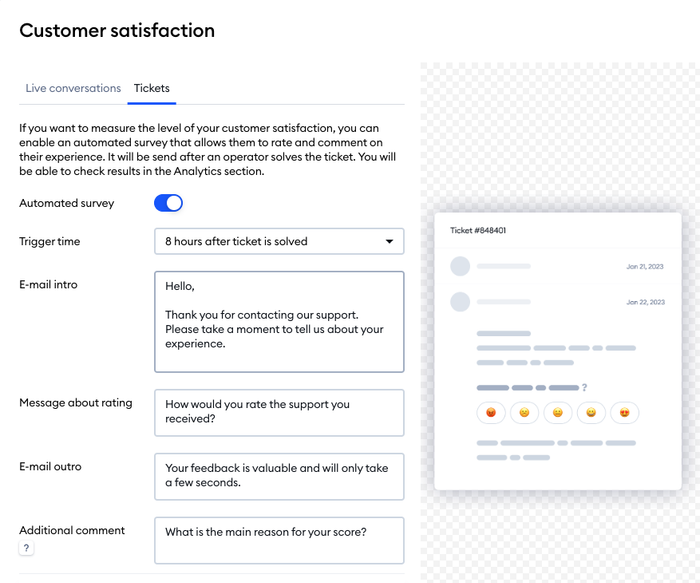
- Surveys are set in the customer satisfaction settings, where you choose the trigger time after a conversation or ticket is solved.
The AI support analytics are available without the Growth plan; most other tabs need Growth or higher. Tidio’s analytics do not report churn, NPS, or cost per ticket, so keep those in your billing, CRM, or survey tool.
See your support metrics in one dashboard
How to improve your customer service numbers
Reply faster without adding agents
Put every channel in one inbox, set SLA targets, and use canned responses for the greeting and common questions. Our list of canned responses is a good starting set. Together these cut first response time before you hire anyone.
Let an AI agent take the repeat questions
An AI agent answers the questions that have a written answer, at any hour, and hands over the rest. Lyro can resolve up to 75% of support requests, and the more complete your knowledge base is, the closer you get. See Lyro AI training for how to set it up.
Put Lyro on your repeat questions
Ask for feedback while the issue is fresh
Send the CSAT survey right after the conversation or ticket is solved, with one question. The longer you wait, the less customers remember, and a one-question survey is easier to answer than a long one.
Fix the cause, not the symptom
Every reopened ticket, escalation, and low CSAT score has a reason. Read ten of each per month and tag the cause. The same three causes usually explain most of the pain, and each one is a knowledge base article, a training session, or a product bug report.
Start with five numbers
Pick first response time, average resolution time, first contact resolution, CSAT, and AI resolution rate. Measure them for four weeks, set a target for each, and review them every week. Add the rest only when one of those five tells you where to look next.
Track every support metric from one inbox
FAQ
The most important metrics are first response time, average resolution time, first contact resolution, CSAT, and, if you use an AI agent, its resolution rate. Together they cover speed, quality, sentiment, and automation. Add NPS, CES, and cost per ticket as your team grows.
A metric is any number you track. A KPI is a metric tied to a target, a deadline, and an owner. Ticket volume is a metric; “keep first response time under 5 minutes this quarter” is a KPI. Most teams run five to seven KPIs.
Pull speed and quality numbers from your help desk, ask customers for CSAT or NPS ratings after interactions, and read AI agent reports for automation. Review speed weekly and sentiment monthly. Compare each number with your own baseline before you set a target.
There is no single standard, so set targets per channel: seconds or minutes for live chat, hours for email. For context, 44% of online shoppers say replies should arrive in under 5 minutes, according to Tidio’s customer experience study.
AI agents add new numbers: resolution rate, handoff rate, and CSAT on AI conversations. They also change human metrics, because the conversations that reach agents are harder, so average resolution time can rise even when the team is healthy. Report human and AI numbers side by side.
Use live chat to support your customers in real-time
