


Key takeaways
- Escalate on a rule, not on a feeling. Write down the triggers: a missing skill, a missing permission, a deadline about to break, a customer who is affected badly or has asked for a manager.
- There are two kinds. Functional escalation moves a ticket to a team with different skills. Hierarchical escalation brings in someone with more authority.
- The handoff note matters more than the speed. A ticket that arrives without the history makes the customer start again.
- Every escalated ticket needs one named owner and a time. A queue is not an owner.
- AI agents escalate too. Decide what makes your AI agent hand a conversation to a person, and what the person sees when it does.
Ticket escalation is the transfer of a support ticket to someone with more expertise, authority, or time to resolve it, such as a specialist, a team lead, or an engineer. A well-escalated ticket keeps its full history, gets a named owner, and comes with a deadline the customer knows about.
Escalation matters more now that AI often answers the first message. In a Gartner survey of 3,566 customers[1] run in February and March 2026, 87% said it is essential that companies using generative AI offer an option to reach a human agent. This guide is for support leads and small teams that need a clear escalation process: when to escalate, who takes over, what the handoff contains, and how to set it up in a help desk.
Use live chat to support your customers in real-time
What is ticket escalation?
Escalation happens when the person holding a ticket can’t, or shouldn’t, finish it alone. The ticket is passed to a specialist who has the skill, or to a manager who has the authority to approve something the agent can’t. It stays one ticket with one customer and one history. Only the owner changes.
A simple example: a shopper writes that a discount code didn’t apply and the order total is wrong. The first agent can explain how codes work. They can’t see why this one failed in the payment system, so they escalate the ticket to a billing specialist with the order number, the code, and a screenshot. The shopper hears the ticket has moved, who has it now, and when to expect an update.
You’ll see the same idea under other names: an escalated ticket, an escalation ticket, a tier 2 handoff, or “escalating an issue”. Two neighboring terms are easy to mix up:
- Ticket triage sorts new tickets by urgency and topic and sends them to the right place first. Escalation moves a ticket that has already been started. Our guide to ticket triage covers the first step.
- De-escalation is calming an upset customer inside a conversation. It often prevents an escalation, and our guide on how to deal with angry customers covers it.
An escalation isn’t a complaint, and it isn’t a failure. It’s the support process working: the problem reaches the person who can solve it.
Types of ticket escalation
Support teams use two classic types, plus a third that help desk software added.
| Type | What it means | Example | Who takes over |
|---|---|---|---|
| Functional | The ticket goes to a team or person with different skills | A refund dispute goes to billing; a bug goes to engineering | A specialist or a higher support tier |
| Hierarchical | A manager joins because the case needs authority or oversight | A refund above the agent’s limit; a customer asks for a manager | A team lead or manager |
| Automatic | A rule moves or flags the ticket when a condition is met | A ticket nears its SLA deadline and is flagged for a lead | The next owner defined in the rule |
Most real escalations are a mix. A refund request above an agent’s limit is hierarchical because it needs approval. A refund that fails in the payment system is functional because it needs a different skill. Naming the type in the handoff note tells the receiver what you need from them: a fix, or a decision.
When to escalate a ticket
Agents escalate too late when they’re afraid of looking unable, and too early when they’re afraid of a mistake. A short written list of triggers fixes both. The triggers below fall into five families.
| Trigger | What it looks like | Usual type |
|---|---|---|
| Skill gap | The fix needs access, tools, or knowledge the agent doesn’t have, such as a bug, an integration error, or a billing system problem | Functional |
| Authority gap | The answer needs approval: a refund over the limit, a policy exception, a contract question | Hierarchical |
| Time pressure | The ticket is about to breach its response or resolution target, or two attempts have not worked | Automatic or functional |
| Impact | Several customers are affected, money or personal data is involved, or the customer can’t run their business | Both, immediately |
| Customer signals | The customer asks for a manager, writes in again after a failed fix, mentions cancelling, a chargeback, or legal action | Hierarchical |
Two cautions apply to the list. First, don’t escalate to avoid a hard conversation. If the agent can solve it with the knowledge base or a canned response, they should. Second, treat security, safety, and legal topics as mandatory escalations, not judgment calls.
Agents often ask whether a customer’s tone is a reason to escalate. Anger alone is not. Anger plus a failed fix, a deadline, or a request for a manager is.
How the ticket escalation process works
The steps are the same in a shared inbox and in a full ticketing system. There are six.
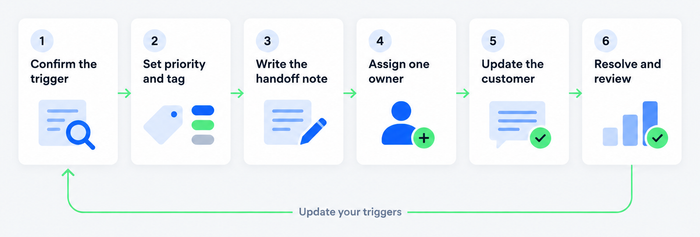
- Confirm the trigger. Check the ticket against your list. If it’s a skill gap, an authority gap, a deadline, or high impact, escalate. If not, keep working it.
- Set the priority and tag. Mark how urgent it is and why it’s moving, for example a “billing” or “bug” tag. The receiving team can then filter their queue. Our guide to ticket tagging shows how to keep tags consistent.
- Write the handoff note. State the problem in one line, what the customer wants, what you’ve tried, what you ruled out, and the exact thing you need: a fix or a decision. Keep it private from the customer.
- Assign one named owner. Pick a person, not a queue. If the right person is unknown, the lead of the receiving team owns it until they assign it.
- Update the customer. Say the ticket has moved, who has it, and when they’ll hear back. Don’t promise a fix; promise an update.
- Resolve, close the loop, and review. The owner solves it, the original agent checks that the customer is satisfied, and the team notes what caused the escalation. If the same cause appears again, fix the cause: a knowledge base article, a permission, or training.
Whether the first agent keeps the customer relationship while a specialist works in the background is a team decision. Most small teams keep the customer with the original agent, so the customer sees one voice and the specialist stays out of the conversation.
Escalation levels and a sample matrix
An escalation matrix is a table of who handles what and who is next. It answers the search for an “escalation list” in one page. For a small team two or three levels are enough.
The times below are an example, not a benchmark. Set yours from what your team can actually deliver, then check them against your service level agreements (SLAs).
| Level | Who | Handles | Escalate up when | Example time to respond after escalation |
|---|---|---|---|---|
| Level 1 | Frontline agents | Order status, how-to questions, password and account basics, known fixes | The agent lacks access, a fix failed twice, or the customer asks for a manager | n/a |
| Level 2 | Senior agents or specialists (billing, technical) | Bugs, billing errors, refunds above the agent limit, integration problems | The cause is in the product or a system the specialist can’t change, or a policy decision is needed | Within 4 working hours |
| Level 3 | Team lead, engineering, or product | Outages, data issues, policy exceptions, legal and security matters | n/a | Within 1 working hour for critical tickets |
Keep names beside every level and a deputy for each one, so the matrix still works on holidays. Put the matrix where agents already work, such as your internal wiki or pinned in the help desk. The same structure works for an internal IT help desk and for customer support; only the examples change. For wider workflow design, see our guide to the help desk workflow.
Why ticket escalations go wrong
Most failed escalations fail at the handoff. The decision to escalate is usually right.
- The context doesn’t travel. The specialist asks the customer to repeat everything. Few things annoy a customer more than explaining the same problem twice. Fix it with a handoff note template and with a help desk that keeps the whole thread on the ticket.
- Nobody owns the ticket. It lands in a queue everyone assumes someone else is watching. Fix it by assigning a person every time.
- Over-escalation. Level 2 fills with questions Level 1 could answer, and everything slows down. Fix it with training, a knowledge base, and a weekly look at which topics get escalated most.
- Under-escalation. Agents hold on to tickets past the point they can help, and the customer waits. Fix it with an “attempts or time” rule, such as escalate after two failed fixes or when half of the response target has passed.
- Ping-pong. The ticket bounces between teams that each say it’s the other’s. Fix it with the rule that the first team to receive a ticket owns it until another named owner accepts it.
- A silent customer. The ticket moves internally and the customer hears nothing. Fix it with a customer update at every change of owner and a fixed update interval.
Best practices for ticket escalation
- Write the criteria and share them. One page, with examples for each trigger. Review it every quarter with real tickets.
- Make the handoff note a form, not an essay. A fixed template with five fields (summary, customer goal, steps tried, what’s ruled out, what you need) is faster to write and to read.
- Name the owner and the next update time. “Maya owns this and will update the customer by 3pm tomorrow” ends most escalation arguments.
- Keep the customer informed in plain words. Say what happened, who has it, and when they will hear back. Don’t use internal terms like “tier 2”.
- Let the first agent follow the ticket to the end. The agent stays informed, learns from the fix, and closes the loop with the customer. That builds the skill to handle the next one without escalating.
- Automate the boring parts. Use rules to set priority, flag tickets near a deadline, and route known categories. Our guides on automated ticket routing and the ticketing system features worth having show what to look for.
- Review escalations as a team. Look at the last month’s escalated tickets. Group them by cause and fix the top two. Our overview of help desk best practices has more habits like this.
Ticket escalation templates
Copy these into saved replies or your wiki and replace the bracketed parts. Keep the escalation reason and the exact ask in every one.
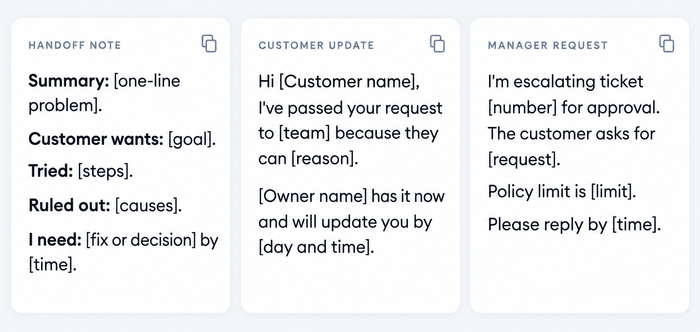
Internal handoff note
Subject: Escalation, ticket [number], [one-line issue]
Type: [functional or hierarchical] Customer: [name, plan or order number] Summary: [what happened, in one or two sentences] The customer wants: [the outcome they asked for] Steps tried: [list, with results] Ruled out: [causes already excluded] What I need from you: [a fix, a decision, or information] by [date and time] Attachments: [logs, screenshots, links to the ticket] I stay in touch with the customer and will update them at [time].
Customer update
Subject: Update on your request [ticket number]
Hi [Customer name],
I’ve passed your request to our [team] because they have the tools to look into [the issue] in detail. [Owner name] has the case now, with everything you told us, so you won’t need to repeat anything.
We’ll update you by [day and time], even if the answer is that we’re still working on it.
[Your name]
Manager request
Subject: Approval needed, ticket [number]
Hi [Manager name],
[Customer name] asks for [the request]. Our policy allows [limit], so I need your decision. The customer has contacted us [number] times about this, and the ticket’s response target is [time].
Can you reply by [time]? I’ll tell the customer once you’ve confirmed.
[Your name]
If you need to escalate an issue to a manager yourself, as an employee rather than a support agent, the manager request above works with small changes: state the issue, what you tried, the impact, and the decision you need. For more reply wording, see our help desk templates.
Escalation when an AI agent answers first
Customers often reach an AI agent first, and the AI agent is the first level of your escalation path. Three decisions follow.
What makes the AI agent hand over. Typical triggers are a customer who asks for a person, a question the AI agent has no answer for, and a topic you’ve listed as sensitive, such as billing disputes or cancellations. The Gartner survey above found customers want that option, and that customers pushed through several failed AI attempts before reaching a person are less likely to use the tool again.
What the person sees. The conversation should arrive complete, with the AI agent’s replies in the thread. An agent who starts with “Can you tell me about your issue?” after the customer explained it twice has failed the handoff, whoever the sender was.
What happens outside working hours. A customer asking for a person at 2am needs an honest promise: a ticket is created, and someone will reply by email at a set time.
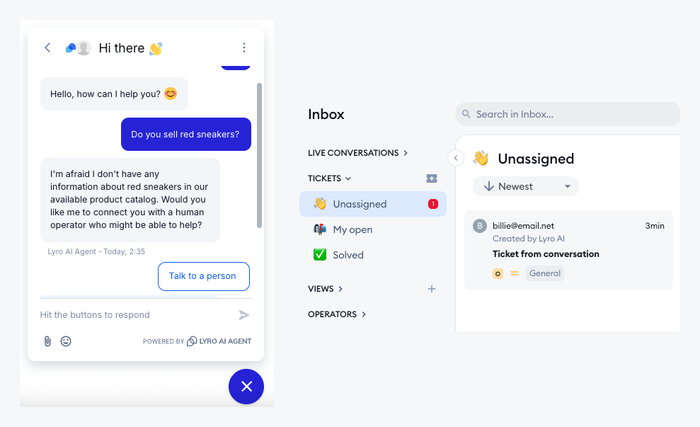
In Tidio, Lyro can offer a Talk to a person option that transfers the whole conversation to the live inbox, or create a ticket instead. A ticket created this way lands in the Unassigned folder of the Tickets inbox, is marked as created by Lyro, and includes the conversation transcript. You can also define handoff audiences, so Lyro transfers matching visitors to your agents right away instead of trying to answer. Our guide to the AI helpdesk explains how AI and human agents share the work.
How to set up escalation in Tidio Helpdesk
You can run the process above in Tidio’s ticketing without extra tools. The five steps below follow the Help Center articles on email tickets and service level agreements. Which features come with which plan is listed on the pricing page.
1. Bring tickets into one place
Connect your support mailbox so emails become tickets, kept in a tab separate from live chats. New tickets arrive as Open and sit in the Unassigned folder until someone takes them.
2. Set priority and an owner
Each ticket gets a priority of Low, Normal, or Urgent, and a status of Open, Pending, or Solved. Use Urgent only for tickets that meet your impact triggers. Choose the agent in the assignee field: once someone is assigned, the ticket appears in that agent’s My open folder, which gives an escalated ticket one named owner.
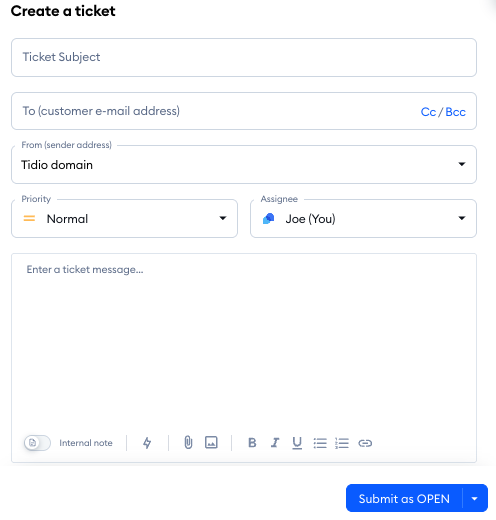
3. Hand over context in a private note
Switch to internal note mode and write the handoff note. Add an @mention to pull a specialist in without assigning the whole ticket to them; they see it in their Mentions folder and can join or add a note of their own.
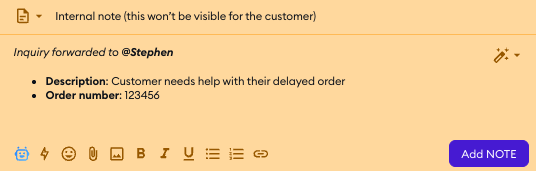
4. Set an SLA policy
In Settings, open Service Level Agreements and add a policy with a first-reply time and a time for later replies. A policy can apply to a connected mailbox, to tickets from the chat widget, or to tickets agents create in the panel. It is an internal target, so the customer never sees it. Tickets carry a tag that shows the time left, a paused SLA, or a breach, so a lead can spot a ticket that is close to needing escalation at a glance.
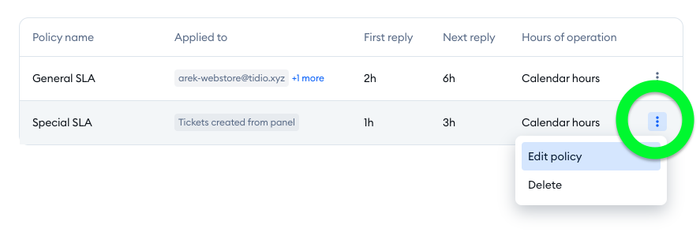
5. Build a view for the escalation queue
Create custom ticket views, for example Urgent tickets or tickets with a breached SLA, so a Level 2 or Level 3 agent opens one list. Tag the reason for escalation, such as billing or bug. Custom fields, such as order number, can be filled in from the customer’s message so the specialist has them at once.
Tidio also works as a chat-first tool, so a conversation can start in live chat and become a ticket when it needs a longer fix. The request keeps its history, which is the part of escalation that most often breaks. If you are comparing tools for this, our roundup of the best ticketing systems lists what to check.
Manage tickets, SLAs, and handoffs from AI in one inbox
Metrics to track
Track a handful of numbers, and compare them with your own past results, because there’s no universal benchmark.
- Escalation rate: escalated tickets divided by all tickets. A rising rate points to a training or knowledge gap; a very low one can mean agents hold on too long.
- Time to escalate: how long a ticket sits with Level 1 before it moves. Long times suggest unclear triggers.
- Time to resolve escalated tickets: shows whether Level 2 and Level 3 have the capacity.
- SLA breach rate on escalated tickets: the share of escalated tickets that miss their targets.
- Repeat contacts and reopened tickets: customers writing again after an escalation point to a weak handoff or fix.
- Customer satisfaction on escalated tickets: compare it with Level 1 tickets. If it’s lower, the customer’s experience of the handoff is the first thing to check.
Our guides to customer service metrics and help desk metrics explain how to calculate each one.
Make the next handoff smoother
Escalation works when the trigger is written down, the handoff note carries the history, and one person owns the ticket with a deadline. This week, write your triggers and a three-level matrix, then check last month’s escalated tickets against them.
- Escalate on written triggers for skills, authority, time, impact, and customer signals.
- Put the history, what you tried, and the exact ask in every handoff note.
- Name an owner and a next update time, and tell the customer both.
FAQ
An escalation ticket is a support ticket that has been moved from the person who first handled it to a specialist or manager. It can be the same ticket reassigned, or a linked second ticket for another team, such as engineering. Either way, the history stays with it.
Confirm that it meets your criteria, set its priority and tag, write a handoff note with what you tried and what you need, assign one named owner, and tell the customer who has it and when they’ll hear back. The six steps above cover each part.
It means the ticket needs more skill, authority, or attention than its current owner can give. For the customer, it should mean the request is getting priority and that someone with the right answer now has it. It does not mean the customer did something wrong.
No. A complaint is a customer saying they’re unhappy. Escalation is an internal step to reach the right person. A complaint can trigger an escalation, and an escalation can happen with no complaint at all.
Triage happens at the start: it sorts new tickets by urgency and topic and routes them. Escalation happens after the work has begun, when the current owner needs help. Good triage reduces the number of escalations.
Small teams do well with two or three: frontline, specialists, and a lead or engineering. More levels add handoffs, and each handoff is where context gets lost. Add a level only when a clear kind of work has no home.
Send a short message with the issue, the impact, what you have tried, and the decision you need by a certain time. Attach the ticket or evidence. The manager request template above follows this structure.
Yes. Customers expect a way to reach a person, and the AI agent should hand over when it can’t answer or when a topic is sensitive. Pass the full conversation to the person, and create a ticket when nobody is online.
Try Tidio Helpdesk with Lyro for free
