



Key takeaways
- A workflow answers five questions for every ticket: where did it come from, what is it, who owns it, how fast must it move, and when is it done.
- Seven stages cover almost every team: capture, sort, assign, respond, escalate, resolve, and review.
- Write the rules before you automate them. Automation copies whatever process you give it, good or bad.
- Keep a human exit. Any automated step, including an AI agent, needs a clear handoff to a person.
- Review the workflow with numbers. First reply time, time to resolution, and reopened tickets show where it leaks.
A help desk workflow is the set of steps a support request follows from the moment it arrives to the moment it is resolved and reviewed. It decides who sees the request first, how it is sorted, who answers it, when it moves to someone else, and how the team knows it is done. Teams also call it a help desk process, a ticket workflow, or a help desk process flow.
Customers still expect a person when automation cannot finish the job. In a Gartner survey of 3,566 customers run in early 2026, 87% said companies that use generative AI for service must give them access to a human agent[1]. A workflow is what decides when that handoff happens. This guide is for support leads, store owners, and small teams: it covers the stages of a ticket, five worked examples, the mistakes that break a workflow, and how to build and automate one.
What is a help desk workflow?
A help desk workflow is the route a ticket takes through your support team. A customer writes in by email, chat, or a form. The request becomes a ticket, gets a category and a priority, lands with an owner, and moves forward until the customer has an answer. Each step has a rule, such as “billing questions go to the billing queue” or “reassign any ticket that waits four hours without a reply.”
Three terms sit close to it, and they are easy to mix up:
- Workflow vs process: a process describes what the team does in general terms. A workflow is the same thing broken into ordered steps, with owners and rules, so it can be followed or automated.
- Workflow vs SOP: a standard operating procedure is a written instruction for one task, such as how to issue a refund. A workflow links many of those tasks in sequence.
- Help desk vs service desk workflow: a help desk mostly answers customer or employee requests and fixes problems. A service desk is the broader IT term that also covers change requests and incidents. The stages below fit both, and our guide to help desk vs service desk explains where they split.
A small example: a customer writes that a parcel never arrived. The workflow creates a ticket, tags it as a delivery problem, sets the priority to high, assigns it to the shipping specialist, sends an automatic acknowledgment, and starts a reply timer. Nobody had to decide any of that by hand.
Why a help desk workflow matters
Without a workflow, the order in which tickets get answered depends on who happens to look at the inbox. Urgent problems wait behind simple ones, two agents answer the same customer, and nobody can say why a ticket sat for two days. A defined workflow changes that:
- Faster first replies. Tickets reach the right person immediately, so nothing waits in a shared pile.
- Fewer dropped tickets. Every ticket has an owner and a timer, so unanswered ones show up before the customer complains.
- Less repetitive work. Rules can assign, tag, acknowledge, and close routine tickets, which leaves agents the cases that need judgment.
- Easier onboarding. A new agent follows the written steps instead of learning by watching others.
- Honest reporting. When every ticket passes the same stages, response and resolution times mean the same thing across the team.
Self-service rarely closes everything: a 2024 Gartner survey found that only 14% of customer service issues are fully resolved in self-service[2]. The rest still need a person, and a workflow that hands over the conversation with its history saves the customer from repeating themselves.
The seven stages of a help desk workflow
Most support teams follow the same seven stages, whatever software they use. The names differ, but the logic holds.
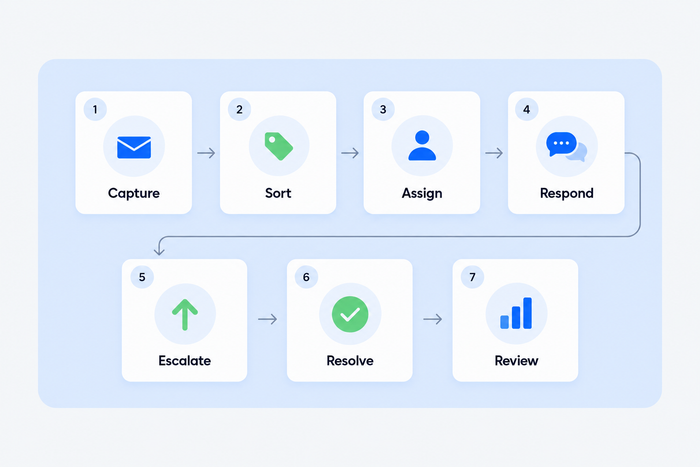
1. Capture
Every channel feeds one place. Email, live chat, social messages, and web forms all become tickets in the same queue, so nothing lives in a personal mailbox. A customer who starts in chat and continues by email stays in one conversation. Our guide to omnichannel customer service covers how to combine channels.
2. Sort
The ticket gets a category, a priority, and often a tag for the product or order it concerns. Priority comes from impact and urgency together: a bug that blocks one customer is not the same as one that blocks everyone. The sorting step has its own guides on ticket triage and ticket tagging.
3. Assign
Someone owns the ticket. Teams assign by topic, by skill, by language, or by load, and the rules can be manual or automatic. Common patterns are round robin, where tickets rotate among available agents, and load balancing, where each agent holds a maximum number of open tickets. See automated ticket routing for the rules in detail.
4. Respond
The owner works the ticket. Saved replies, internal notes, and a knowledge base help here: the agent replies, asks for missing information, or involves a colleague through a note. A set of canned responses keeps the wording consistent.
5. Escalate
Some tickets need a specialist, a manager, or a different team. The workflow defines when that happens: a ticket stuck past its target time, a refund above a set amount, a customer who writes a third time. Make escalation a rule rather than a favor between colleagues. Read our guide to ticket escalation for triggers and levels.
6. Resolve
The agent confirms that the problem is fixed, marks the ticket solved, and the customer gets a closing message. Many teams close a ticket automatically after a set time without a customer reply, and send a short survey at the same moment.
7. Review
The team looks at what happened. Which categories take longest? Which tickets bounce between agents? Which questions repeat enough to deserve a help article? The help desk metrics guide lists the numbers to watch.
| Stage | Question it answers | A typical rule |
|---|---|---|
| Capture | Where did it come from? | Email, chat, and forms all create tickets |
| Sort | What is it and how urgent? | Payment problems are high priority |
| Assign | Who owns it? | Delivery tickets go to the shipping agent |
| Respond | What does the customer hear, and when? | First reply within one hour on weekdays |
| Escalate | When does it move up? | No reply after four hours goes to the team lead |
| Resolve | When is it done? | Solve after three days without a customer reply |
| Review | What should change? | Monthly check of reopened tickets |
Customer-facing vs internal IT workflows
The seven stages stay the same, but the rules change with the audience. A customer service team answers people who can leave. An internal IT or HR help desk answers employees who cannot, and often needs approvals. Know which one you are building.
| Customer support workflow | Internal IT or HR workflow | |
|---|---|---|
| Who writes in | Customers, by chat, email, and social | Employees, by portal, email, or chat |
| Main goal | Fast, friendly answers and repeat purchases | Restore access and tools, keep work moving |
| Priority is based on | Customer impact, order value, channel | Number of people affected, business function |
| Typical extra step | Refund or exchange approval | Access, hardware, or change approval |
| Self-service looks like | Help center, AI agent, order status | Knowledge base, password reset, request catalog |
| Success measure | First reply time, CSAT, resolution time | Time to restore, SLA compliance, reopen rate |
Team size matters too. One to three people need a single shared queue, three priority levels, and an automatic acknowledgment. Ten or more add departments, escalation levels, and a lead who reviews the queue daily. Either way, avoid more rules than people can follow.
Help desk workflow examples
These five examples come from a typical online store. Each one shows the trigger, the steps, and what the customer sees.
1. A routine question answered before a person is needed
Trigger: a customer asks about shipping times or the return policy.
- The question arrives in chat or by email.
- An AI agent answers from the knowledge base.
- If the customer is satisfied, the conversation is solved without a ticket.
- If not, the customer picks “talk to a person” and the conversation moves to the queue with its history.
Most routine questions never reach an agent here. Tidio says its AI agent, Lyro, can resolve up to 75% of support requests, and your own share depends on how complete your knowledge base is.
2. A payment problem that needs a fast owner
Trigger: a customer reports a double charge.
- The ticket is tagged “billing” and set to high priority.
- A rule assigns it to the billing agent.
- An automatic message confirms receipt and gives a time frame.
- The agent checks the payment, replies, and solves the ticket.
Money drives the priority here.
3. A bug report that moves up a level
Trigger: several customers report that checkout fails on one browser.
- The first agent tags the ticket “bug” and adds an internal note with the steps to reproduce it.
- The ticket is escalated to the technical team.
- The agent tells the customer what is known and when to expect an update.
- When the fix ships, every linked customer is notified and the tickets are solved.
The person who finds the problem is rarely the one who fixes it, so this needs an escalation rule and a note.
4. A ticket that waits too long
Trigger: an assigned agent has not replied within four hours.
- A timer starts when the ticket is assigned.
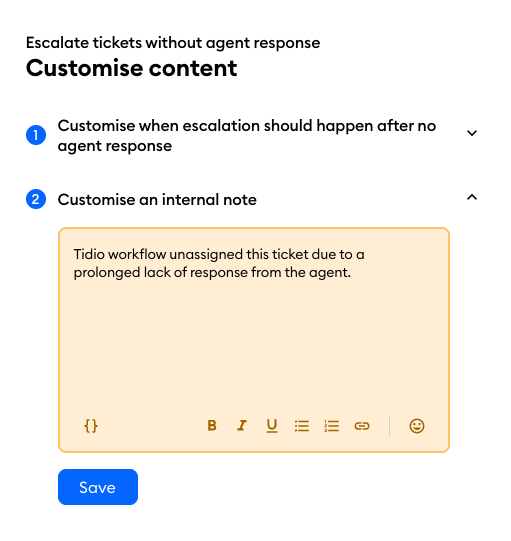
- When it runs out, the ticket is unassigned and returns to the shared queue, with a note explaining why.
- Another agent picks it up and replies.
Small teams gain the most from this rule, since it catches tickets lost to a busy or sick day.
5. A message after hours
Trigger: a customer writes at night, when nobody is online.
- An automatic reply says when the team is back.
- The AI agent handles what it can from the knowledge base.
- Anything else becomes a ticket in the unassigned queue with the right priority.
- The first agent of the morning starts with the oldest high-priority ticket.
| Example | Trigger | Key rule | Automated? |
|---|---|---|---|
| Routine question | Shipping or returns question | Answer from the knowledge base | Fully, with human exit |
| Payment problem | Double charge | Billing tag, high priority, assign to billing | Assignment and acknowledgment |
| Bug report | Checkout fails | Escalate to the technical team | Manual decision, automated note |
| Slow ticket | No reply in four hours | Unassign and return to the queue | Fully |
| After hours | Message at night | Auto reply, AI agent, ticket | Mostly |
Common workflow mistakes
A workflow can exist and still fail. These are the problems that show up most often, with the fix for each.
- Too many categories and priorities. If agents cannot tell “high” from “urgent,” they pick at random. Start with three priorities and five to eight categories, and add more only when a real case needs one.
- No owner. A ticket that sits in a shared pile is owned by nobody. Every ticket needs one named person or a team that is responsible for the next reply.
- No timers. Without a target for first and next replies, a ticket can wait for days unnoticed. Add a service level agreement (SLA), the response time your team commits to, and a way to see breaches.
- Automation without an exit. An automated step that cannot hand over to a person traps customers. Always offer a clear way to reach an agent, and pass the history along.
- Rules nobody wrote down. A workflow that lives in a lead’s head works until they are on vacation. Keep it in one document.
- Never reviewing it. Products, channels, and customers change. Look at the reopened and escalated tickets every month and adjust one rule at a time.
How to build a help desk workflow
Start on paper before you touch software. A small team can finish these six steps in about a week.
- List the request types. Read the last 100 to 200 tickets and group them: order status, returns, billing, bugs, account problems. Count each group. The biggest groups get the most attention.
- Define categories and priorities. Pick a short category list and three priority levels, each with a sentence that describes it. Our ticket triage guide has a priority matrix you can copy.
- Set assignment rules. Decide who owns each category, and what happens when that person is offline. Choose between round robin and load balancing for general queues.
- Set SLA targets. Give each priority a target for the first reply and for later replies. Choose targets your team can meet on a normal day, because a target that is always missed teaches people to ignore it.
- Add automation where the rule is clear. Automate the acknowledgment, assignment, closing of stale tickets, and the survey. Keep judgment calls, such as refund approval, with people. Our guide to help desk management and the help desk best practices cover the wider setup, and the help desk checklist helps you test it.
- Test it with real tickets, then review. Run ten past tickets through the workflow on paper, fix what breaks, switch it on, and check the numbers after two weeks.
For a small team, one more choice matters: how much to rely on AI at the start of the workflow. An AI agent can answer from a knowledge base, tag a ticket, or route it. Connect it to a knowledge base you trust first (our guide to customer self-service shows how), and read the conversations it handles for the first weeks. Our AI help desk guide covers that setup.
How to set up a help desk workflow in Tidio
Tidio Helpdesk puts email, live chat, Messenger, Instagram, and WhatsApp conversations in one shared inbox, so the capture, assignment, and review stages happen in one place. The steps below follow the Tidio Help Center. Check the pricing page for what each plan includes, because some features, such as departments, depend on the plan.
1. Capture: connect your mailbox
Go to Settings, then Email, and connect your support mailbox. Gmail, Microsoft Outlook, and other providers work, or you can create a new address on the Tidio domain. Every email that arrives becomes a ticket in the Unassigned folder under Tickets, with the original mailbox shown on each one.
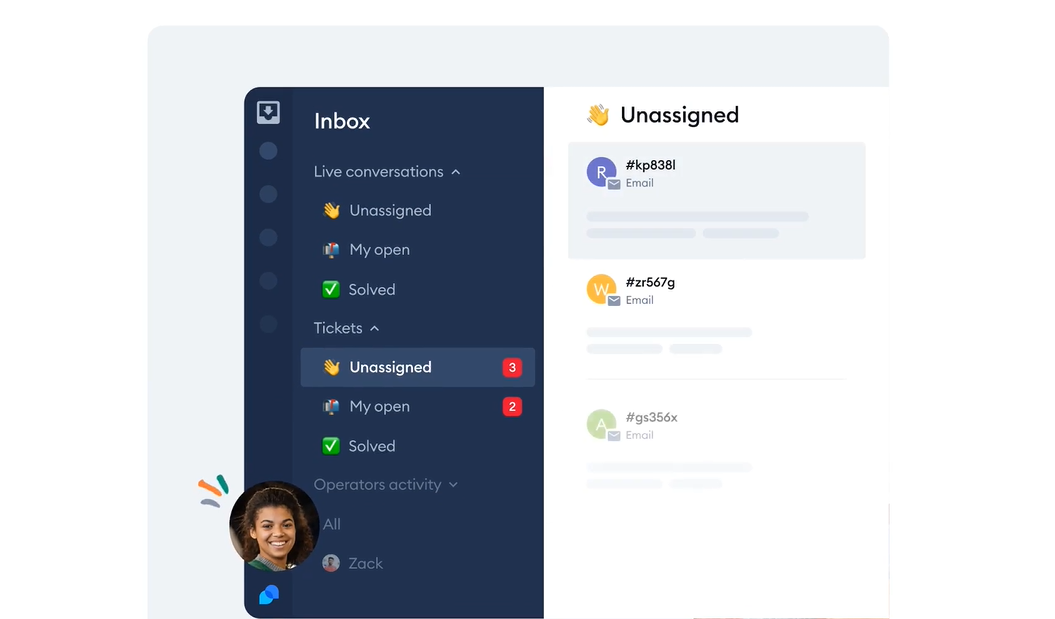
2. Sort: set a status, a priority, and tags
Each ticket has a status of Open, Pending, or Solved, and a priority of Low, Normal, or Urgent. You can also add tags, such as billing or bug, so anyone who opens the ticket sees the category. Agents can create a ticket by hand from a chat or from scratch, and choose the priority and the assignee in the same window.
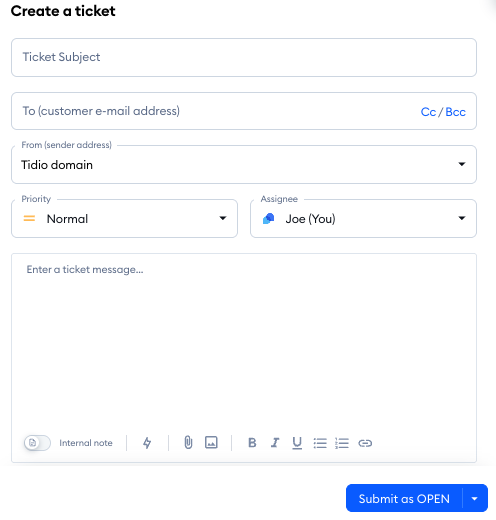
3. Assign: use automatic assignment
In Settings, then Workflows, the template Assign conversations automatically sends new live conversations to online agents. Pick Load balancing, which caps the number of open conversations per agent, or Round robin, which hands them out in order and skips agents who are offline. If your plan includes departments, you can also route conversations to the right team.
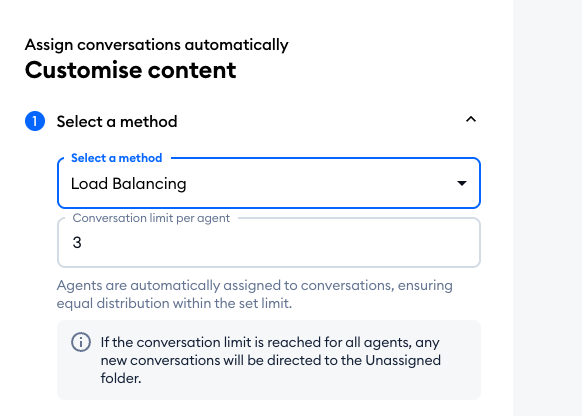
4. Respond and escalate: set SLAs and notes
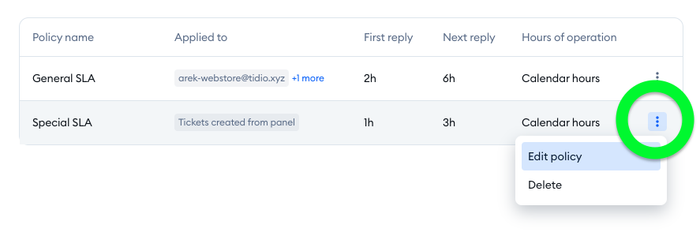
Add service level agreement policies in Settings, then Service Level Agreements. Each policy sets a target for the first reply and another for later replies, and you can set different policies for each connected mailbox, for the chat widget, and for tickets agents create. Tickets show whether the timer is running, paused, or breached. Agents can switch a reply to an internal note, visible only to the team, and use an @mention to bring in a colleague.
5. Automate the routine steps with workflow templates
Tidio ships workflow templates for the repetitive parts: automatic assignment and solving for live conversations, and for tickets, an automatic reply, solving tickets after a number of days without a reply, and escalating tickets without an agent response. Each template can be edited, or you can build a workflow from scratch. Workflows only act inside the team’s own queue. They do not talk to customers, apart from the automatic ticket reply and the closing message.
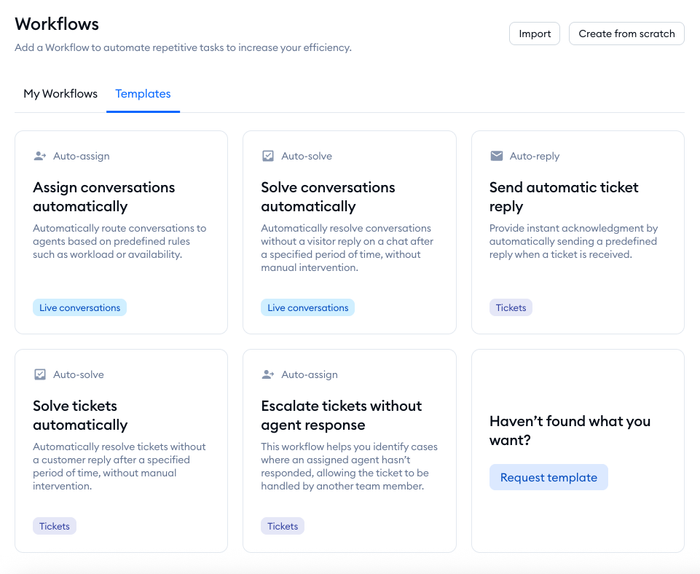
For the slow-ticket example above, the Escalate tickets without agent response template does the job: when an assigned agent has not replied within the hours you set, the agent is unassigned, the ticket returns to the shared view, and an internal note records why.
6. Resolve and review: close tickets and ask for feedback
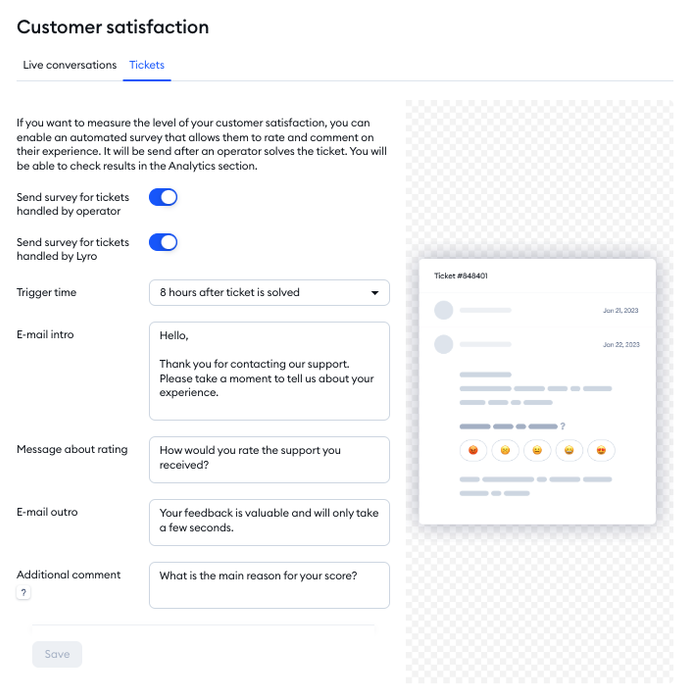
When a ticket is solved, Tidio can email a satisfaction survey with a five-step emoji rating. It is on by default and can be changed in Settings, then Customer Satisfaction, including how long after the ticket is solved it is sent. Ratings appear inside the ticket and in Analytics, so the review stage has data to read.
7. Let an AI agent take the first line
Lyro can answer from your knowledge base before a person is involved. When it cannot, it can offer a handoff to an agent or create a ticket with the conversation attached. For an e-commerce team, this keeps the most routine questions, such as shipping times and returns, out of the queue.
Build your help desk workflow in one inbox
Metrics to track
Pick a few numbers and compare them with your own history, since benchmarks vary widely by industry.
- First reply time, by priority: whether urgent tickets are really answered first.
- Time to resolution: how long tickets take from creation to solved, by category.
- SLA compliance: the share of tickets answered inside the target.
- Reopened tickets: a high share points to closing too early or unclear answers.
- Escalation rate: a rising rate means sorting or training is off, and a rate of zero may mean agents avoid escalating.
- Customer satisfaction (CSAT): the survey score after a ticket is solved. Our guide to customer satisfaction surveys has question ideas.
The full list, with formulas, is in help desk metrics and KPIs.
Put your help desk workflow to work
- A help desk workflow is the path from capture to review, with an owner and a rule at each stage.
- Build it on paper first: request types, categories, priorities, owners, and SLA targets.
- Automate only the steps with a clear rule, and keep a human exit from every automated step.
- Review the numbers monthly and change one rule at a time.
Ready to put a workflow in place? Try Tidio Helpdesk for assignment, SLAs, workflow templates, and an AI agent in one inbox.
Try Tidio Helpdesk with Lyro for free
Related guides
- Ticket triage
- Ticket escalation
- Automated ticketing system
- Help desk template
- Help desk best practices
FAQ
Most teams use five to seven: capture, sort, assign, respond, escalate, resolve, and review. Smaller teams often merge sort and assign, and larger teams add an approval or a customer-wait stage.
They are usually the same thing. “Ticket workflow” stresses the path of a single ticket, while “help desk workflow” covers the whole operation around it, including channels, teams, and reporting.
Yes, and small teams gain the most from it. Start with three rules: acknowledge every new ticket, assign tickets automatically, and return tickets that wait too long to the shared queue. Add AI answers once your knowledge base is in good shape.
A service desk workflow adds IT service management steps, such as change approval and incident management, to the same basic stages. A help desk workflow is closer to answering requests and fixing problems. See help desk vs service desk for the details.
A help desk tool that turns every channel into tickets and lets you set priorities, assignment rules, timers, and reports. Our roundup of help desk software compares the options, and help desk software for small business covers the budget end.
Compare first reply time, time to resolution, reopened tickets, and CSAT before and after you change a rule. Change one rule at a time.
No. An AI agent is one step in it, usually the first line. The workflow still decides what the agent may answer, when it hands over to a person, and what the person sees when they pick up the conversation.
Use live chat to support your customers in real-time
