



Key takeaways
- Best for online stores and small teams: Tidio. Chat, email, Messenger, Instagram, and WhatsApp share one inbox, Lyro can resolve up to 75% of support requests, and Shopify order tools sit beside the conversation.
- Best for large teams on many channels: Zendesk. It has the deepest routing, but skills-based routing starts on Suite Professional at $115 per agent.
- Best for email-first teams: Help Scout and Freshdesk. Help Scout is free for 5 users, and Freshdesk starts at $19 per agent.
- The AI is billed in different units: per outcome, resolution, session, interaction, or token. Compare the unit before the seat price.
- Four of the ten have a free plan: Tidio, Help Scout, HubSpot, and Zoho Desk.
Customers contact you via chat, email, Instagram, and WhatsApp, and replies end up in four different places. The fix is a customer communication tool that puts every conversation in one inbox. The hard part is the price: one tool charges per seat, another per ticket, and the AI is billed on top in a different unit each time. We read the pricing pages, product documentation, and G2 reviews of ten tools, and we checked every price in October 2026. You get what each tool does, what it costs, which plans are free, and who it suits. Tidio sits first because the list is ordered for small teams and online stores. Every tool gets the same checks, and every tool gets its drawbacks.
What are customer communication tools?
Customer communication tools are the software where your team talks to customers: live chat, email, social messages, and messaging apps in one shared inbox, with tickets, saved replies, and AI to handle the repeat questions. This list covers that support-and-sales inbox, plus one business phone system for the voice side. Tools that track brand mentions, known as social media monitoring, do a different job, and so does cold email software for outbound prospecting. For the wider category known as customer communication management, read our guide to customer communication management software.
The best customer communication tools at a glance
Our short list: Tidio for online stores and small teams, Zendesk for large teams on many channels, and Help Scout for email-first teams that want a free start.
| Tool | Best for | Starting price (paid) | Free plan / trial | G2 rating |
|---|---|---|---|---|
| Tidio | Online stores and small teams | $24.17/mo, billed annually | Free plan · 7-day trial | 4.6 |
| Gorgias | Shopify stores with high ticket volume | $10/mo for 50 tickets | Not listed | 4.6 |
| Intercom | Chat-first teams that pay per AI result | $29/seat/mo | No free plan · 14-day trial | 4.5 |
| Freshdesk | Email-led teams on a low seat price | $19/agent/mo, billed annually | No free plan · 14-day trial | 4.4 |
| Help Scout | Email-first small teams | $25/user/mo | Free for 5 users · 15-day trial | 4.4 |
| Zendesk | Large teams on many channels | $19/agent/mo, billed annually | No free plan · 14-day trial | 4.3 |
| HubSpot Service Hub | Teams already on HubSpot CRM | Starter $7 to $20/seat/mo | Free for 2 users | 4.4 |
| Front | Teams that share email and messaging | $25/seat/mo, billed annually | No free plan · 14-day trial | 4.7 |
| Zoho Desk | Tight seat budgets | $7/user/mo, billed annually | Free for 3 users · 15-day trial | 4.4 |
| Unitel Voice | Small businesses that take customer calls and texts | $9.99/mo, or $6.99 billed yearly | No free plan · 30-day money-back trial | 4.7 |
How we chose and tested these tools
We started from the 14 tools in the previous version of this list, the tools that recur in today’s top-ranking roundups, and the ones AI answers recommend. We kept the ten that handle customer conversations and publish enough to compare. Nine of them work in a shared inbox, and Unitel Voice is the one phone system, there for teams whose customers call and text. Survey tools and knowledge-base publishers do other jobs, so they are out. Each tool got the same checks:
- Channels: which conversations land in the inbox.
- Team tools: assignment, internal notes, saved replies, and routing rules.
- AI: what the AI agent does, and the unit it is billed in.
- Plan gating: which plan holds each feature.
- Fit and reviews: who it suits, plus the G2 rating, linked.
The order follows fit for small teams and online stores, not rating. We didn’t run all ten tools on the same conversations. Details about rivals come from their pricing pages and documentation, and we flag a limit when it is the vendor’s claim.
The 10 best customer communication tools in 2026
Tidio
Best for: online stores and small teams that answer customers on chat, email, and social from one inbox
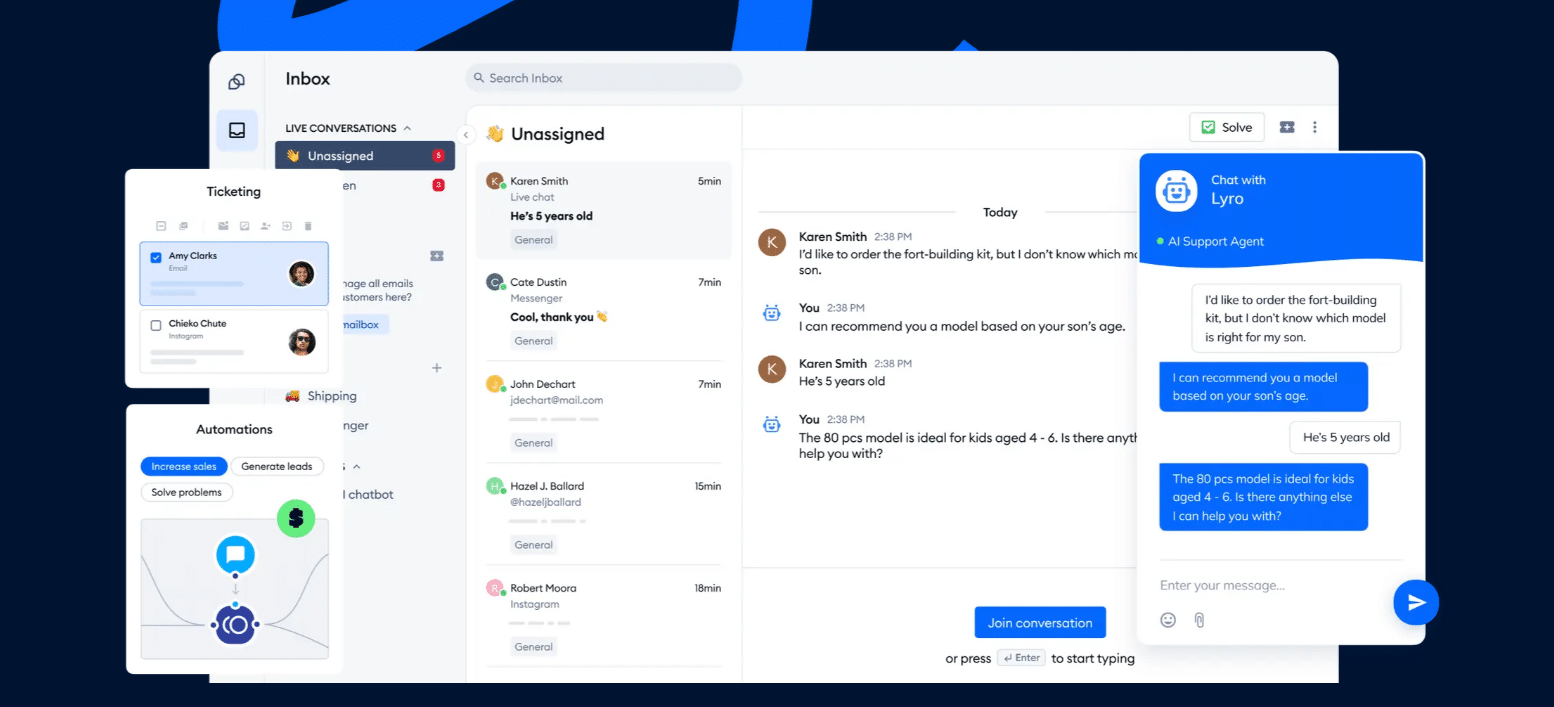
Tidio brings live chat, email, Instagram, Messenger, and WhatsApp into one dashboard, so a customer’s earlier messages sit in the sidebar whatever channel they write from. Agents tag conversations and, on Growth, reply with macros and see the pages a visitor viewed.
Lyro answers the repeat questions before they reach the queue. It can resolve up to 75% of support requests and hands the rest to your team with the conversation attached. Flows add rule-based automation for visitors on your site, such as a greeting or a question that qualifies leads.
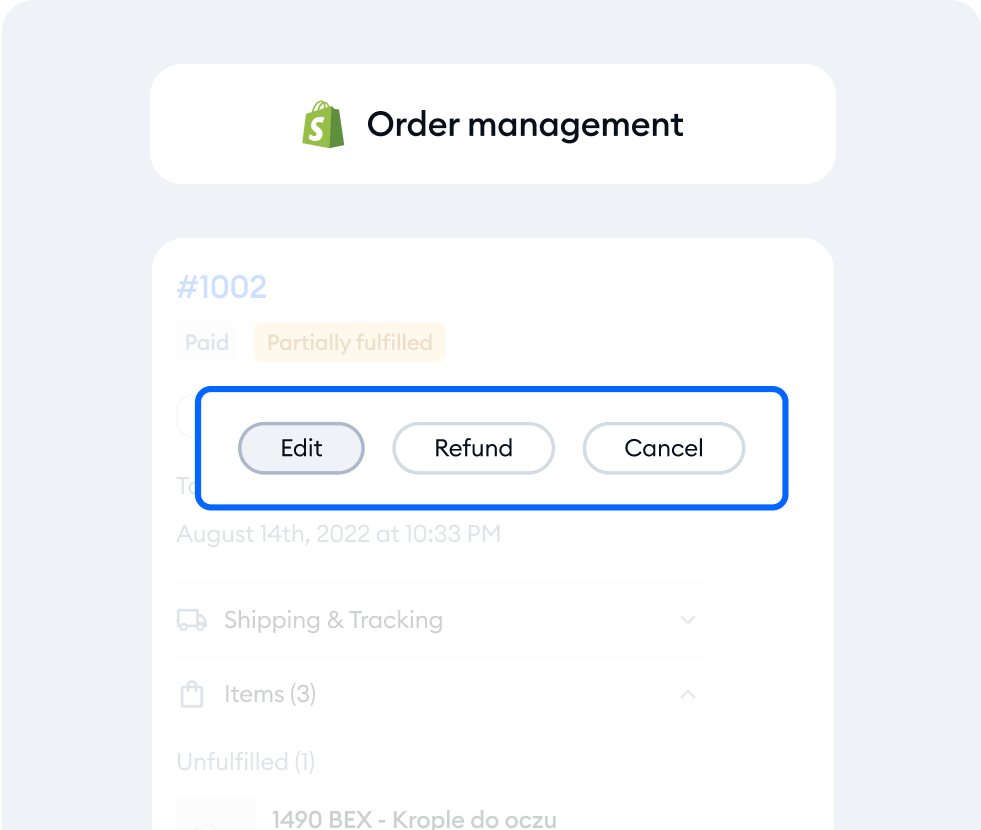
On Shopify, agents see the cart and the order history next to the chat. They can edit, refund, or cancel an order without leaving the inbox.
Tidio fits these teams best:
- Online stores, Shopify first, that want order details and actions inside the conversation.
- Small teams that want one inbox for chat, email, and social messages without an admin to run it.
- Busy inboxes where AI can clear the repeat questions and leave people the rest.
- Sites with traffic, where a faster reply on chat turns more visitors into buyers.
Skip Tidio if your support runs mainly on phone calls, or you need skill-based routing for a large agent pool. Zendesk goes further on both.
Key features:
- Shared inbox: live chat, email, Messenger, Instagram, and WhatsApp with a customer sidebar.
- Lyro: the AI agent, trained on your help content.
- Macros and tags: saved replies and labels for a team to sort the queue.
- Cart preview: the customer’s Shopify cart in the conversation.
Pros
- A free plan with 10 seats and 50 billable conversations a month, so you can try it on a live site.
- AI, live chat, and tickets share one inbox, so a handoff keeps its history.
- Native Shopify actions on Growth and up.
Cons
- Conversations, Lyro, and Flows each have their own quota and price, so you pay only for what you use, but you will want to watch the quotas as volume grows.
- Every account gets 50 Lyro conversations once, and more come with a paid Lyro plan.
- Self-serve plans include up to 10 seats, and larger teams get a quote from the sales team on Plus or Premium.
Pricing: the Tidio pricing page shows these plans, billed annually (monthly price in brackets):
- Free: $0 with 50 billable conversations a month.
- Starter: $24.17 a month ($29), 100 conversations.
- Growth: from $49.17 a month ($59), up to 2,000 conversations.
- Plus: from $300 a month plus usage. Premium: by quote.
- Lyro: from $32.50 a month ($39) for 50 AI conversations. Flows: from $24.17 a month ($29).
- 7-day free trial, no card.
Rating: G2 4.6/5
Compare Tidio plans for your team size
Gorgias
Best for: Shopify stores with a high ticket volume

Gorgias is a help desk built around online stores. Its plans are priced by tickets a month, not by agent, and agents can act on a Shopify order from the ticket. It supports Shopify, BigCommerce, Magento, and WooCommerce, with Magento on Pro and up.
The catch is how the AI counts. Each automated interaction also counts as a helpdesk ticket, so automation draws on the same allowance as people.
Key features:
- Order management: order lookups and automation inside the ticket.
- Actions: cancel, discount, and apply from Basic and up.
- AI Agent: on every plan, charged only when it resolves a conversation.
Pros
- Priced by tickets, with no per-agent fee.
- Order actions sit next to the conversation.
Cons
- Each AI resolution also uses a ticket, and tickets above the plan allowance cost $0.36 to $0.40 each.
- It is built for e-commerce, so teams outside online retail get less from it.
Pricing: Starter $10 a month for 50 tickets (monthly billing only), Basic $50 ($60 monthly) for 300 tickets, Pro $300 ($360) for 2,000, Advanced $750 ($900) for 5,000. AI interactions are $0.85 to $1.00 each. The page lists no free plan or trial. Read more: Gorgias review.
Rating: G2 4.6/5
Intercom
Best for: chat-first teams that want an AI agent on first-line conversations and pay per result
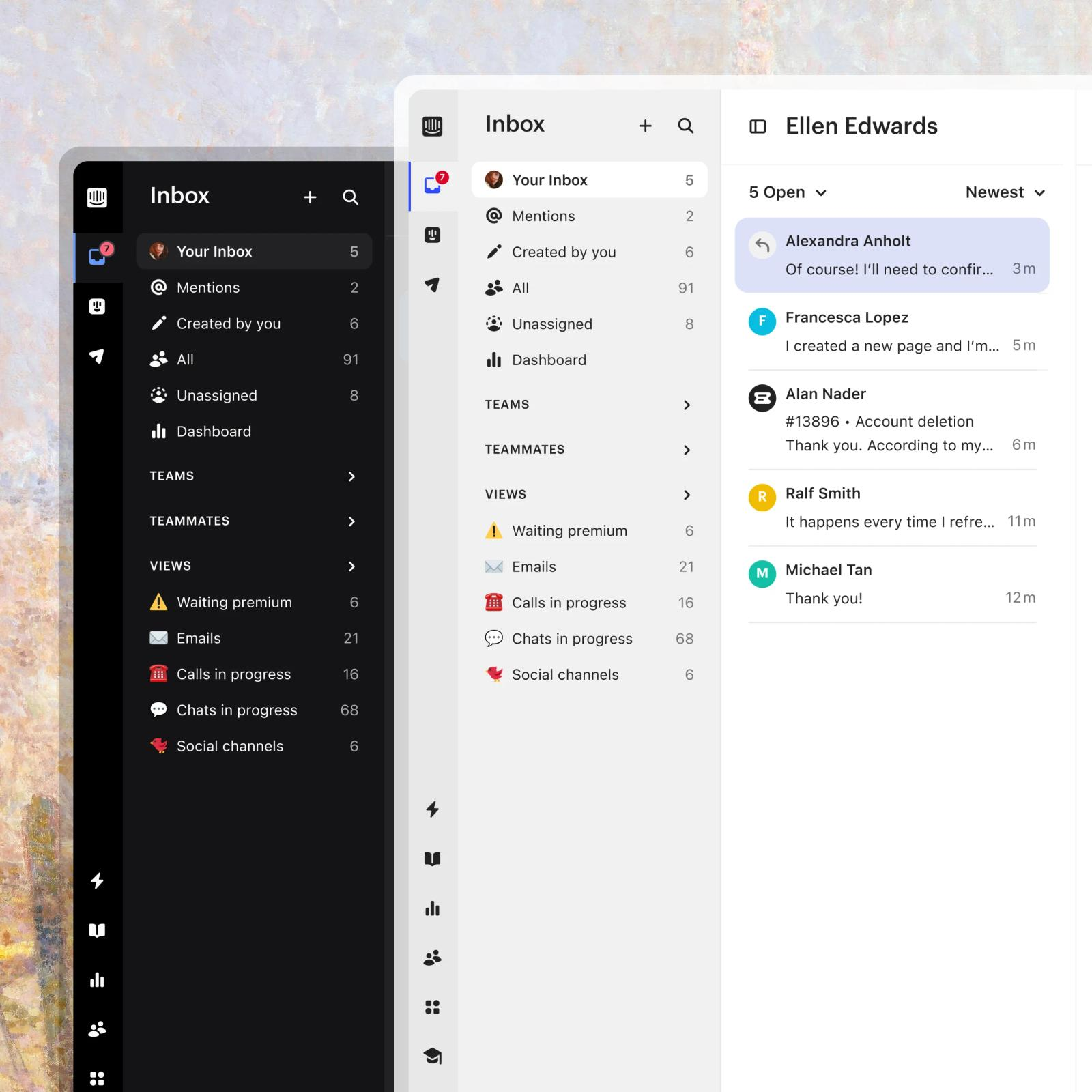
Intercom is built around the messenger. Its AI agent, Fin, answers from your support content and bills $0.99 per outcome on every plan. An outcome counts when a customer confirms the fix, stops asking after Fin replies, or Fin completes a workflow. If Fin can’t answer, or the customer asks for a human, there is no charge.
The total has two parts, seats and usage. WhatsApp is charged per conversation and SMS per message, on top of the seat price.
Key features:
- Inbox with views: mentions, teams, and saved views for the queue.
- Fin AI Agent: learns from your support content and hands off with context.
- Copilot: an agent add-on at $29 per agent a month.
Pros
- AI billing follows results, and a handoff to a person is free.
- Fin works on every plan, trial included.
Cons
- The workflow builder and round-robin assignment start on Advanced at $85 a seat, and SLAs on Expert.
- A customer who stops replying after Fin answers also counts as an outcome and is charged.
Pricing: Essential $29, Advanced $85, Expert $132 per seat a month (annual toggle shown); Fin $0.99 per outcome; Copilot $29 per agent a month. No free plan, 14-day trial. Read more: Intercom review.
Rating: G2 4.5/5
Freshdesk
Best for: email-led teams that want a full help desk at a low seat price
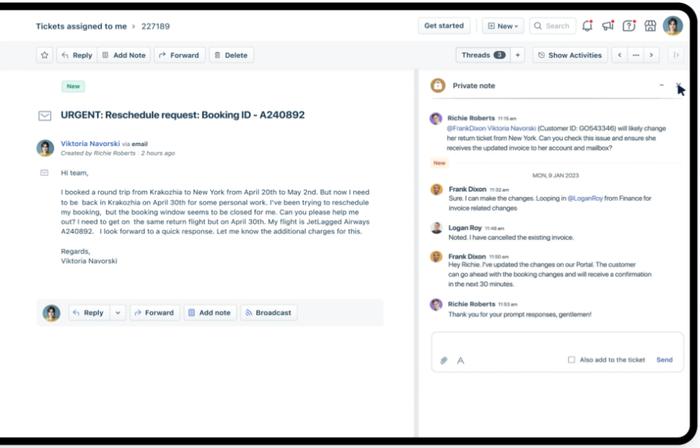
Freshdesk puts a shared inbox and automations on every plan. Agents work a ticket with private threads and tasks that stay out of the customer’s view. Round-robin routing starts on Pro, and skill-based routing on Enterprise.
Its AI agent, Freddy, includes 500 free sessions once per account, then $49 per 100 sessions.
Key features:
- Shared inbox: one queue for incoming email, on all plans.
- Threads and tasks: internal discussion kept apart from the customer thread.
- Freddy AI Agent: 500 sessions included.
Pros
- A $19-an-agent entry price, level with Zendesk’s lowest plan.
- Automations are on every plan.
Cons
- Round-robin routing and multiple SLA policies sit on Pro at $55 or above.
- Freddy Copilot is a $29-per-agent add-on, and only on Pro and Enterprise.
Pricing: Growth $19, Pro $55, Enterprise $89 per agent a month, billed annually. No free plan listed, 14-day trial on the Enterprise plan. Read more: Freshdesk review.
Rating: G2 4.4/5
Help Scout
Best for: email-first small teams that want a simple shared inbox
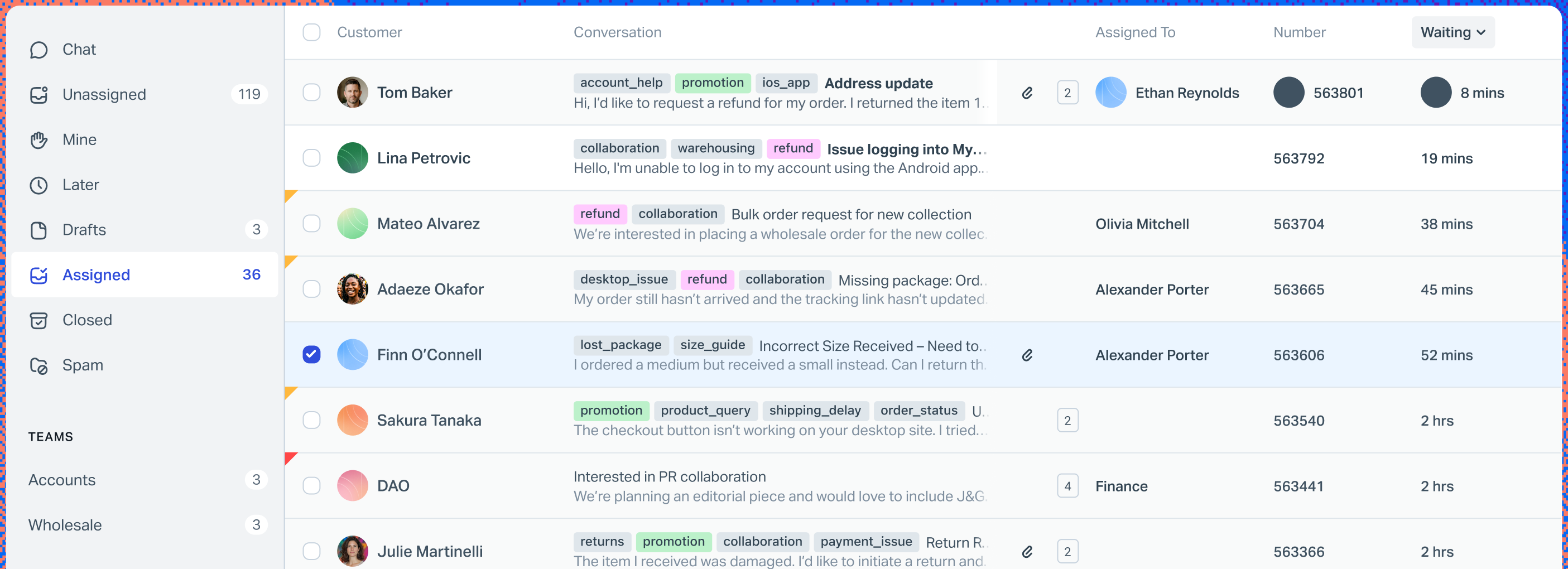
Help Scout keeps the inbox simple: assign a conversation, leave an internal note, mention a teammate, reply. Its pricing page lists live chat and SMS from Standard, and WhatsApp, Instagram, and Messenger as channels. Basic workflows start on Standard and advanced ones on Plus.
The free plan covers 5 users, one inbox, and one Docs site. Extra inboxes cost $10 a month on annual billing, or $12 monthly.
Key features:
- Shared inbox: assignment, notes, and mentions.
- Workflows: basic on Standard, advanced on Plus.
- AI Answers: an add-on that resolves conversations without an agent.
Pros
- A free plan for 5 users.
- Assignment, internal notes, and mentions cover the basics of team email.
Cons
- Standard is capped at 2 inboxes, and AI Answers costs $0.75 per resolution on top of seats.
- Unlimited SLA policies and advanced routing sit on Pro, which is sold by demo.
Pricing: Free for 5 users; Standard $25, Plus $45, Pro $75 per user a month (annual shown); AI Answers $0.75 per resolution with a 3-month trial. 15-day trial of paid plans, no card. Read more: Help Scout review.
Rating: G2 4.4/5
Zendesk
Best for: large teams on many channels that need deep routing rules
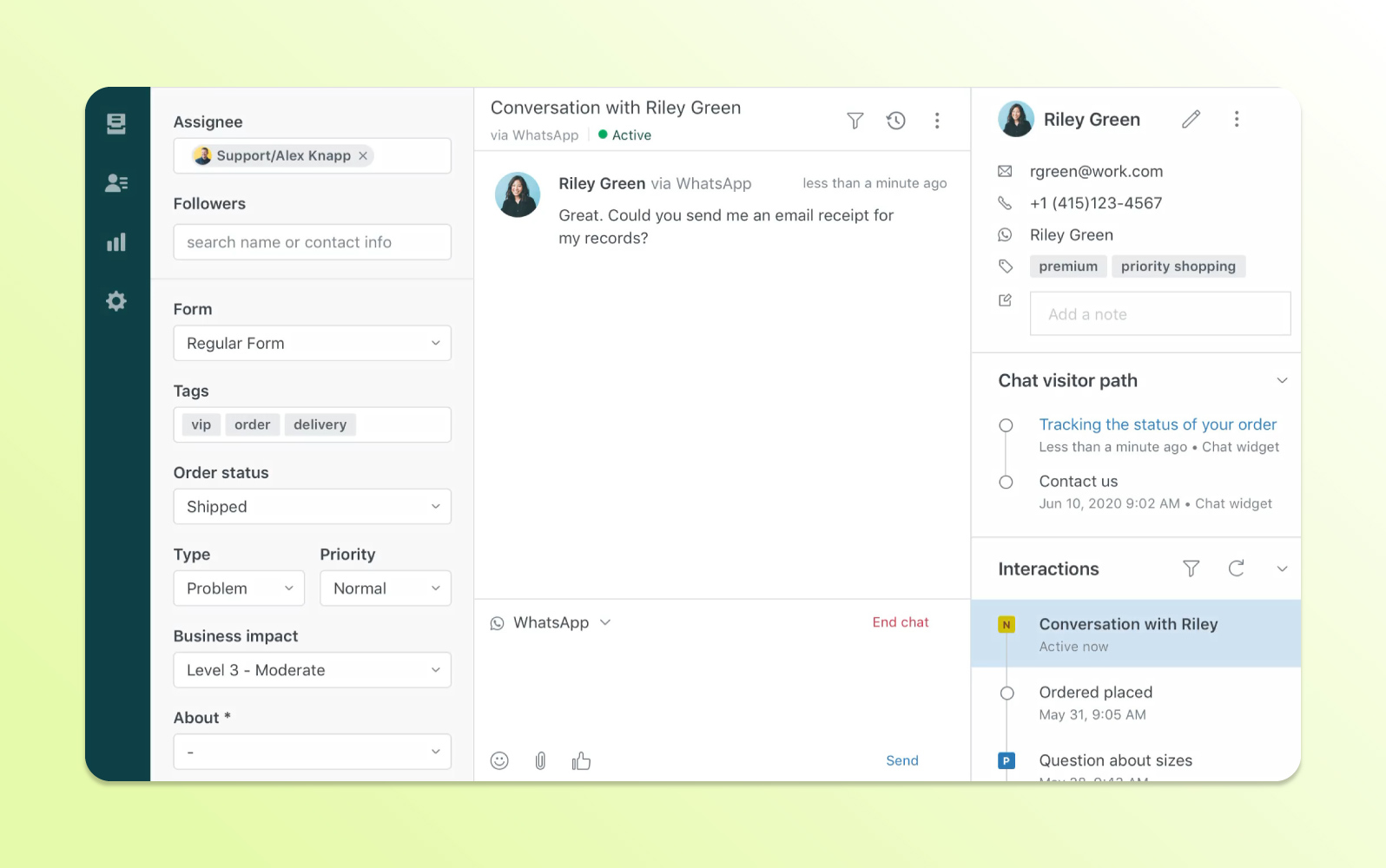
Zendesk is the deepest tool in this list for rules and routing. Triggers, automations, and macros are on the lowest plan, and skills-based routing arrives on Suite Professional. Its pricing page says AI agents come with every Suite and Support plan, billed per automated resolution.
The depth has a price. Copilot is a separate add-on, and some features, such as voice and the app builder, bill by usage.
Key features:
- Omnichannel routing: conversations from every channel into one queue.
- Automations and macros: business rules and saved replies.
- AI agents: included, billed per automated resolution.
Pros
- The deepest routing and rules in this list.
- AI agents included, billed only for resolutions.
Cons
- Copilot is a $50-per-agent add-on, and only on Professional and above.
- Each resolution beyond the included allowance costs $1.50 committed or $2.00 pay-as-you-go, and the allowance is small.
Pricing: Support Team $19, Suite Team $55, Suite Professional $115 per agent a month, billed annually ($25, $69, $149 monthly); Enterprise by quote. No free plan, 14-day trial. Read more: Zendesk review.
Rating: G2 4.3/5
HubSpot Service Hub
Best for: teams that already run their customer data in HubSpot CRM
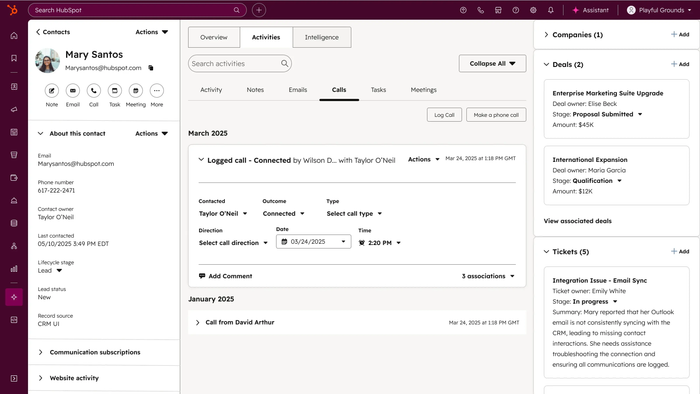
HubSpot Service Hub ties the inbox to the CRM, so a support conversation sits next to the contact’s deals and history. The free plan covers up to 2 users with a shared inbox, live chat, and ticketing, and paid plans add calling and WhatsApp, with up to 1,000 WhatsApp messages a month on Starter and Professional.
The step up is steep. Professional, which holds the Help Desk Workspace and the AI Customer Agent, starts at $90 a seat and requires a $1,500 one-time onboarding fee.
Key features:
- Shared inbox: conversations from connected channels in one place.
- Ticket automation: rules and routing, with skill-based routing on Enterprise.
- Customer Agent: AI resolution at $0.50 per resolution, on Professional and above.
Pros
- A free shared inbox for 2 users, linked to the CRM.
- Support conversations sit next to the CRM contact record.
Cons
- Seats jump from $7 to $20 on Starter to $90 to $100 on Professional, plus the onboarding fee.
- AI runs on HubSpot Credits shared across agents, with extra credits at $0.01 each.
Pricing: Free for 2 users; Starter $7 or $20 per seat a month; Professional $90 or $100; Enterprise from $150. The page doesn’t label which figure is monthly and which annual. One-time onboarding: $1,500 on Professional, $3,500 on Enterprise. Read more: HubSpot alternatives.
Rating: G2 4.4/5
Front
Best for: teams that handle email and messaging as shared work
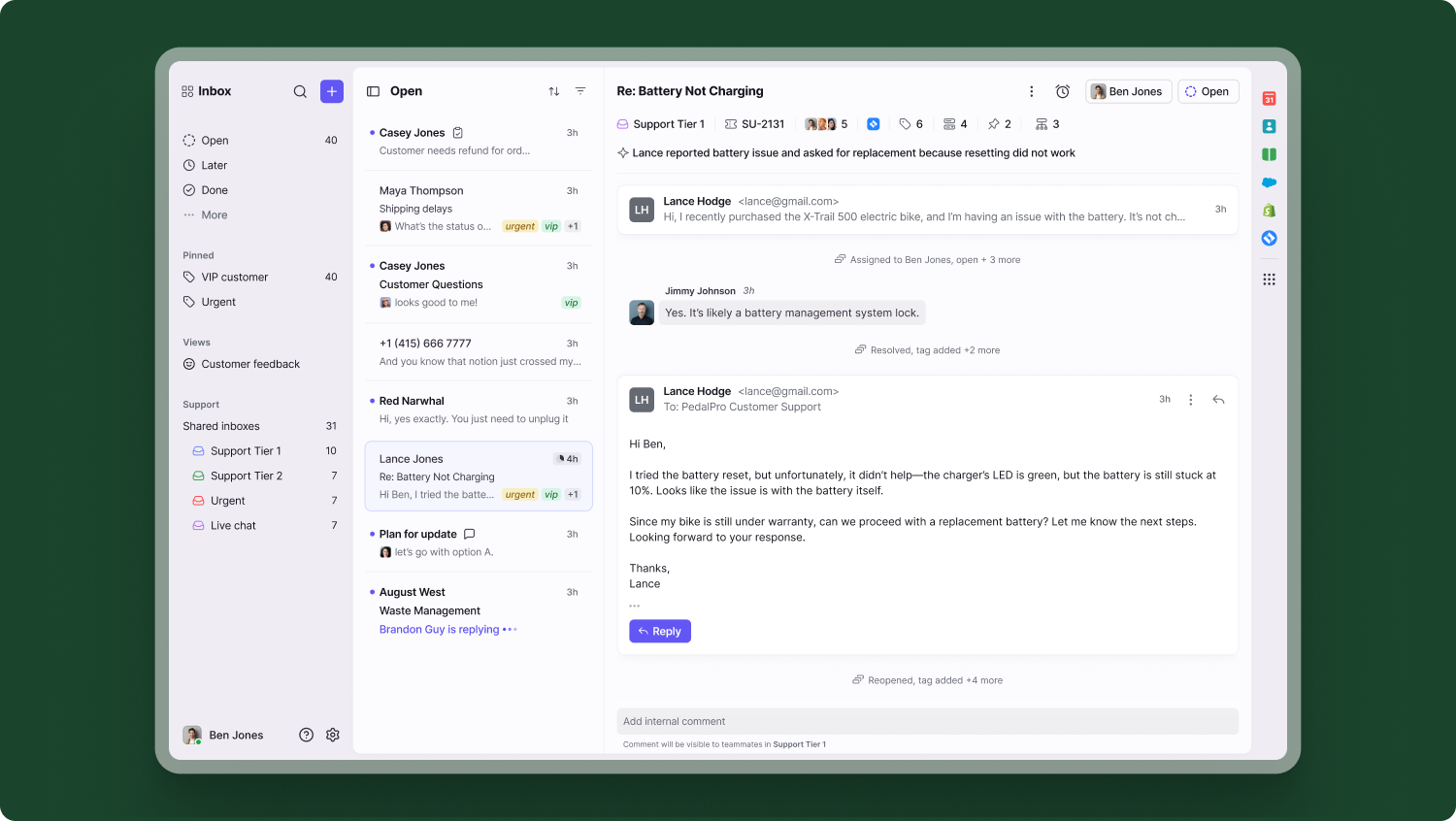
Front treats customer messages like team tasks. You assign a message to a teammate, discuss it in internal comments, and share drafts before sending. Professional adds omnichannel: email, SMS, social, and WhatsApp.
Starter is limited to a single channel type and 10 automation rules, and it caps at 10 seats.
Key features:
- Assignments: clear ownership of each message.
- Comments and shared drafts: teammates review replies before they go out.
- Rules and macros: up to 20 rules on Professional.
Pros
- Assignments, internal comments, and shared drafts are built in.
- The highest G2 rating here, at 4.7.
Cons
- Professional is $65 a seat, and Enterprise $105.
- Native WhatsApp costs Meta’s fees plus a 20% admin fee, and Copilot is $20 a seat extra.
Pricing: Starter $25 per seat a month (up to 10 seats), Professional $65 (up to 50 seats), Enterprise $105, billed annually. Autopilot AI from $0.05 per conversation. No free plan, 14-day trial. Read more: Front review.
Rating: G2 4.7/5
Zoho Desk
Best for: teams on a tight seat budget, or ones already in the Zoho suite
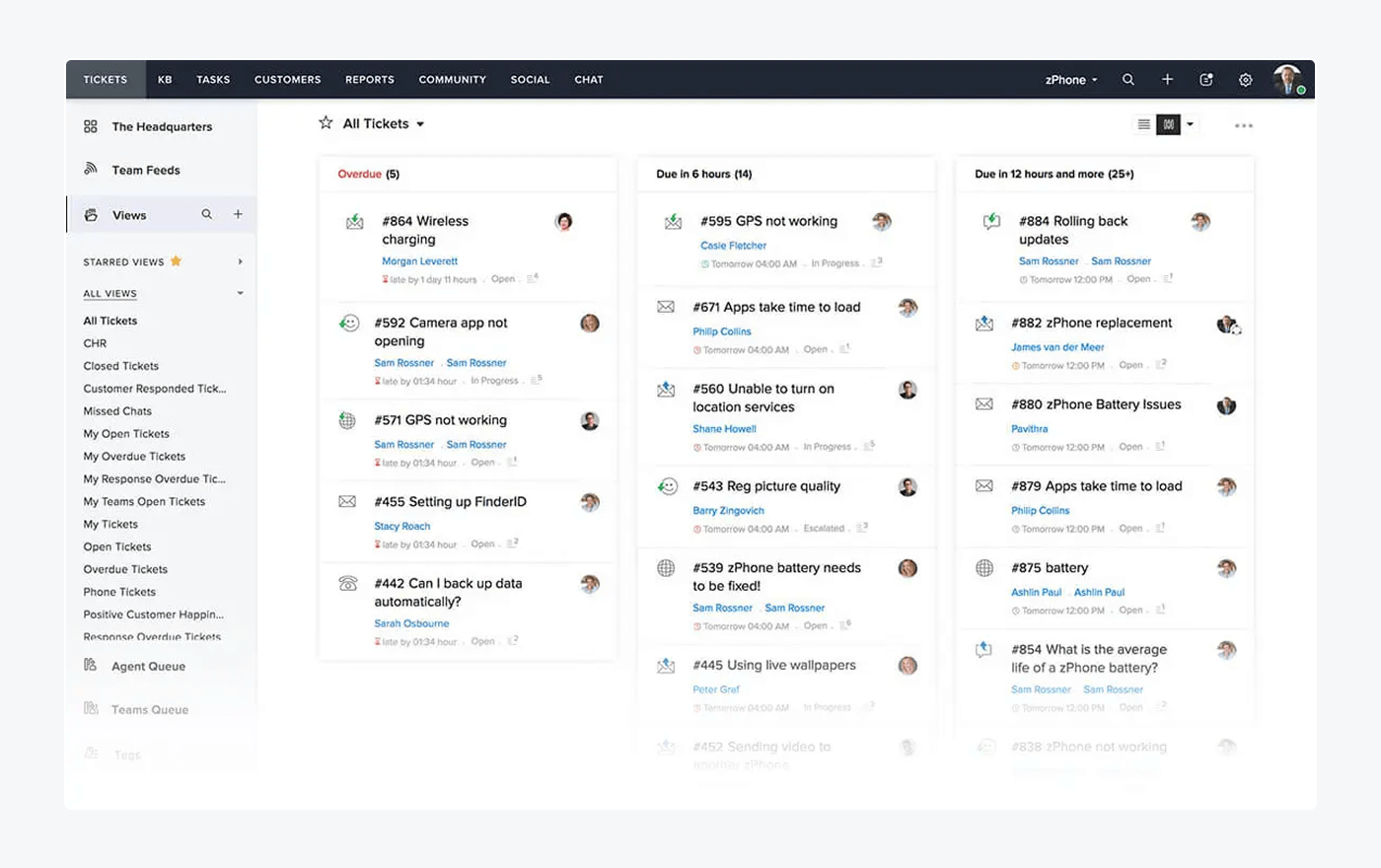
Zoho Desk’s paid plans start at $7 a user. Workflows and escalations start on Express, Blueprints (a drag-and-drop automation builder) on Professional, and skill-based assignment on Enterprise.
Live chat comes through Zoho SalesIQ, which its pricing page lists on the top tier.
Key features:
- Workflows and escalations: rules for follow-ups and overdue tickets.
- Blueprints: a drag-and-drop automation builder.
- Zia and Answer Bot: AI help for agents and customers.
Pros
- A free plan for 3 users and $7 paid seats.
- Light agents cost $6, and Enterprise includes 50 free light users.
Cons
- The free edition is limited, and automation, SLAs, and AI are paid.
- Zia and Blueprints start on Professional at $23.
Pricing: Free for 3 users; Express $7, Standard $14, Professional $23, Enterprise $40 per user a month, billed annually; light agents $6. 15-day trial. Read more: Zoho Desk review.
Rating: G2 4.4/5
Unitel Voice
Best for: small businesses and solo owners whose customers call and text a business number
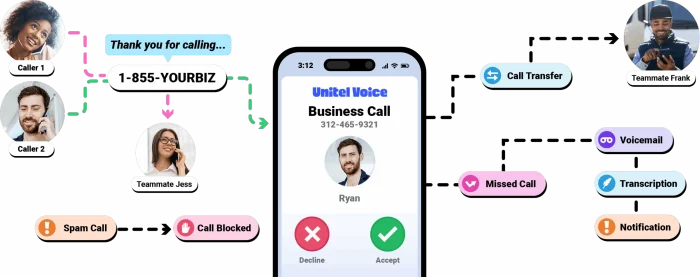
Unitel Voice is a cloud business phone system, so it covers the voice side of customer communication. Every plan includes a toll-free or local number (or your own, ported in), unlimited calling and texting, an auto attendant, and voicemail with transcription. Calls reach you through the mobile app or by forwarding.
It is not a shared inbox for chat, email, and social, and its pages list no AI agent. Team adds unlimited users, extensions, and ring groups, and Office adds desktop softphones, desk phones, and team messaging.
Key features:
- Auto attendant and ring groups: route calls to the right person or team.
- Business texting: unlimited texts on the business number.
- Apps and devices: a mobile app on every plan, softphones and desk phones on Office.
Pros
- Published plans from $9.99 a month, with a 30-day money-back guarantee.
- Unlimited calling and texting on every plan, and unlimited users on Team.
Cons
- Voice and text only: no live chat, email inbox, or social channels.
- Texting needs carrier registration, $19.50 once and $1.50 a month, and approval can take up to 10 business days.
- Call recording and conference calling are paid add-ons, and the pages list no API or CRM integration.
Pricing: Solo $9.99 a month (1 user), Team $19.99, Office $29.99 (3 users, extra users $9.99 each). Billed yearly they come to $6.99, $13.99, and $20.99 a month. 30-day money-back trial, no free plan.
Rating: G2 4.7/5
How to choose customer communication software
Choose by four checks: the channels that land in the inbox, the pricing model, what the AI costs, and which plan holds the features you need. Price a five-agent team and your monthly AI volume, then run the shortlist on two weeks of your own conversations before you buy.
Start with your channels
List where customers write to you today and where you want to be next: chat, email, Instagram, Messenger, WhatsApp. Then check that the channel lands in the inbox on the plan you can afford. Front’s single channel type on Starter and Help Scout’s channels on Standard show why: the same channel can sit on different plans. For more on picking channels, read our guide to customer service channels.
Compare the pricing model, not the seat price
Seat plans charge per person: Zendesk, Freshdesk, Intercom, Help Scout, HubSpot, Front, and Zoho Desk. Gorgias charges per ticket, and Tidio per billable conversation, so a growing team doesn’t pay more per head. Unitel Voice charges per plan, and Team covers unlimited users. For five agents on the lowest paid plan with annual billing, the seat prices alone come to this:
| Tool | Lowest paid plan | Five agents, per month |
|---|---|---|
| Zoho Desk | Express, $7 | $35 |
| Zendesk | Support Team, $19 | $95 |
| Freshdesk | Growth, $19 | $95 |
| Help Scout | Standard, $25 | $125 |
| Front | Starter, $25 | $125 |
| Intercom | Essential, $29 | $145 |
| HubSpot | Starter, $7 to $20 | $35 to $100 |
| Tidio | Starter, $24.17 | $24.17 for 100 billable conversations |
| Unitel Voice | Team, $13.99 (Solo is one user) | $13.99 for unlimited users |
| Gorgias | Basic, $50 | $50 for 300 tickets |
Check what the AI costs
Every tool here except Unitel Voice has an AI agent, and the bill differs. Intercom charges $0.99 per outcome, HubSpot $0.50 per resolution, Help Scout $0.75, Zendesk $1.50 to $2.00, Freshdesk $49 per 100 sessions after 500 free, and Gorgias $0.85 to $1.00 per interaction. Each defines “resolved” its own way. Intercom, for one, also counts a customer who stops replying. Multiply your monthly volume by the unit price before you compare plans. For a fuller breakdown of AI agents, read the best AI agents for customer service.
See which plan holds the features
A cheap seat price can hide gated features. Routing, SLAs, and the workflow builder often sit two plans up, as on Intercom, Freshdesk, and Help Scout. Before you buy, write down the three features you can’t work without and find the cheapest plan that has all three.
Test the handoff and the connections
Ask each vendor what happens when the AI can’t answer. The customer shouldn’t repeat themselves, and you shouldn’t pay for a conversation a person finished. Then check the connections you rely on: a Shopify store needs order actions, and a sales team needs the CRM. Run the shortlist on two weeks of your own conversations and count how many the AI resolves, how many it hands off cleanly, and what each costs once seats and add-ons are in. Our guide to shared inbox tools and the list of omnichannel support software cover the inbox side in more depth.
Which customer communication tool should you pick?
Match the tool to your situation:
- You run a Shopify store: Tidio on Growth with Lyro, because the cart, the order history, and order actions sit in the conversation. Gorgias is the alternative if your ticket volume is very high and you want ticket-based pricing.
- You are a small team that lives in email: Help Scout, free for 5 users, or Freshdesk if you want routing rules as you grow.
- You want AI to answer first and pay per result: Intercom.
- You are a large team on many channels with complex rules: Zendesk. A growing team that has outgrown 10 seats can also ask Tidio about its Plus plan.
- You already run your customer data in HubSpot: HubSpot Service Hub.
- Your team shares one inbox across email and messaging: Front.
- You have the tightest seat budget: Zoho Desk.
- Your customers mostly call and text: Unitel Voice, a business phone system with unlimited calling and texting.
Connect Tidio to your Shopify store
For the strategy behind the tools, read our guide to customer communication and how AI changes customer communication.
Frequently asked questions
Tidio is the best fit on this list for a small team or an online store, because live chat, email, and social messages share one inbox with an AI agent. Help Scout and Zoho Desk cost less per seat if email is your main channel and you do not need AI at first.
A customer communication platform is software that gathers your customer conversations from chat, email, social, and messaging apps into one inbox for your team. The ten tools above are all customer communication platforms, and they differ in channels, AI, and billing.
Nine of the ten do, under different names: Lyro, Fin, Freddy, Zendesk AI agents, the Gorgias AI Agent, HubSpot’s Customer Agent, AI Answers, Front’s Autopilot, and Zia. Unitel Voice is a phone system, and its pages list no AI agent. The nine differ in billing, from about $0.05 to $2.00 per conversation, resolution, or session, so compare the unit.
Paid seat plans start at $7 to $29 per user a month. AI is usually extra, at $0.50 to $2.00 per resolution on most tools. Tidio prices by billable conversations, from $24.17 a month, and Gorgias by tickets, from $10 a month.
Four tools have a free plan: Tidio (10 seats and 50 billable conversations a month), HubSpot (2 users), Help Scout (5 users), and Zoho Desk (3 users). Free plans limit automation and AI, so check which features are paid.
Client communication software is built for agencies and freelancers who manage projects and approvals with a few clients. Customer communication software answers support and sales conversations from many customers at volume. The tools above are customer tools, and a small agency can still run client email through the same inbox.
Put Lyro on your repeat questions
