


Key takeaways
- Best for creators and small brands that sell through Instagram DMs. Comment-to-DM, story replies, and a visual flow builder are the core of the product.
- Pricing changed on March 2, 2026. Plans are now Free, Essential, Pro, Business, and Advanced, priced by active contacts. Older reviews quote a different model.
- Free covers 25 active contacts. That is enough to test a flow, not to run one.
- The bill follows your list. Past the included contacts you pay per extra contact, and it is often cheaper to move up a plan than to pay the overage.
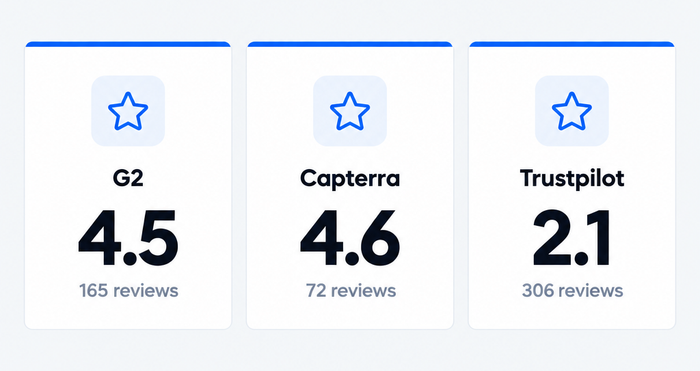
- Reviews split on support and billing. G2 and Capterra are positive (4.5 and 4.6); Trustpilot is not (2.1).
ManyChat’s core job is to turn Instagram comments and DMs into automated conversations that capture leads and sell. People leave it for two reasons. The price follows your audience, because ManyChat bills by active contacts, and it has no chat for your own website. This review covers features, the current pricing model, and what users report on G2, Capterra, and Trustpilot. It is based on ManyChat’s public pricing page, its help center, and the review sites, all checked in October 2026; we did not run a hands-on trial. Tidio, which publishes this page, makes a website chat and AI support tool. It appears once, in the alternatives section, and it is not a comment-to-DM tool.
ManyChat at a glance
| ManyChat | |
|---|---|
| What it is | Chat marketing and automation for Instagram, TikTok, Messenger, WhatsApp, Telegram, SMS, and email |
| Best for | Creators, coaches, and small brands that sell through DMs |
| Not ideal for | Website chat, support teams, and flat-rate budgets |
| Free plan | Yes, 25 active contacts, 2 channels |
| Free trial | 14 days on Essential and Pro |
| Starting paid price | $14/mo billed annually ($17/mo billed monthly), 250 active contacts |
| Pricing unit | Active contacts per month, plus per-message fees for WhatsApp |
| AI | Manychat AI on Pro and above |
| G2 | 4.5 from 165 reviews |
| Capterra | 4.6 from 72 reviews |
| Trustpilot | 2.1 from 306 reviews |
| In one line | Excellent at Instagram automation, but the bill grows with your audience |
Sources: ManyChat’s pricing page, G2, Capterra, and Trustpilot, checked October 12, 2026. Prices exclude tax.
What ManyChat is and who it’s built for
ManyChat lets you build automated conversations on social and messaging channels without code. A follower comments a keyword, ManyChat sends a DM with the link, and the conversation continues in a flow you drew on a canvas. It supports Instagram, TikTok, Facebook Messenger, Telegram, WhatsApp, SMS, and email. ManyChat says it is an official Meta Business Partner and a TikTok partner.
It is built for people whose audience lives in DMs: creators selling courses, coaches collecting leads, and small online brands running comment giveaways. Its own pricing page frames the plans for “creators and growing brands” at the low end and “teams and high-volume operators” at the top.
What changed in 2026
ManyChat’s help center says it introduced a new pricing model on March 2, 2026. The model applies by default to accounts created on or after that date, and older accounts are moving over country by country. Plans are priced by active contacts, and each one sets how many users and inbox seats you get. If you read a review that mentions a “Pro plan from $15” or a “Free plan with 1,000 contacts”, it describes the earlier model.
ManyChat features, capability by capability
Each section below ends with a limit, because that is what decides whether the feature fits you.
Comment-to-DM and growth automation
This is the core of ManyChat’s Instagram product. You set a trigger, such as a keyword in a comment or a reply to a story, and ManyChat sends a DM with a link, a lead magnet, or a menu. The free plan includes up to four live triggers, and Essential removes that cap. Sequences and broadcasts follow up later; broadcasts are on Pro and above.
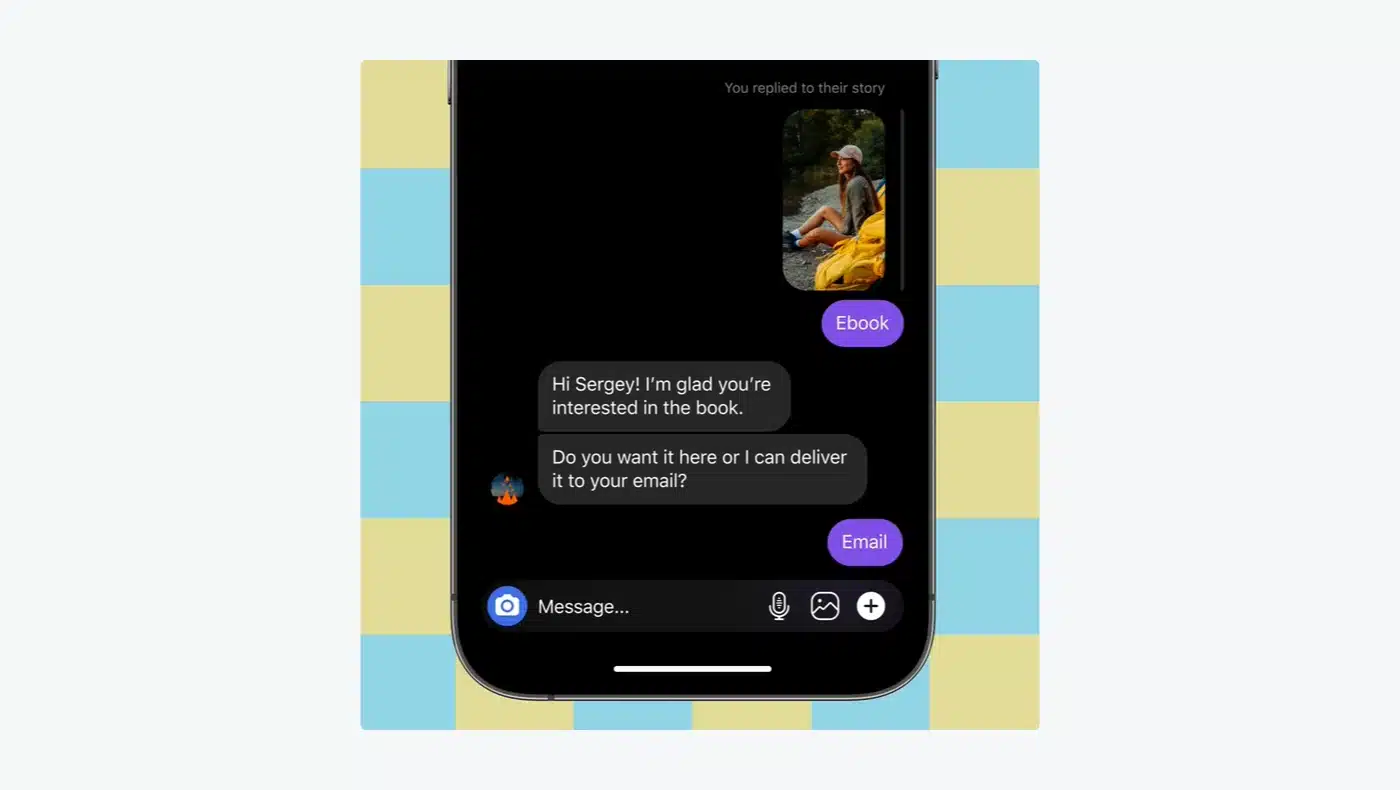
The limit: these flows depend on Meta’s rules for Instagram and Messenger. If Meta changes what automations may do, your flows change with it.
Flow builder
Flows are built on a visual canvas. You add a starting step with a trigger, then connect steps such as a message, a condition, or an action. The free plan caps you at four live automations. ManyChat offers ready-made templates, and its pricing page counts more than 60 of them for replying to comments, greeting new followers, and sharing links.
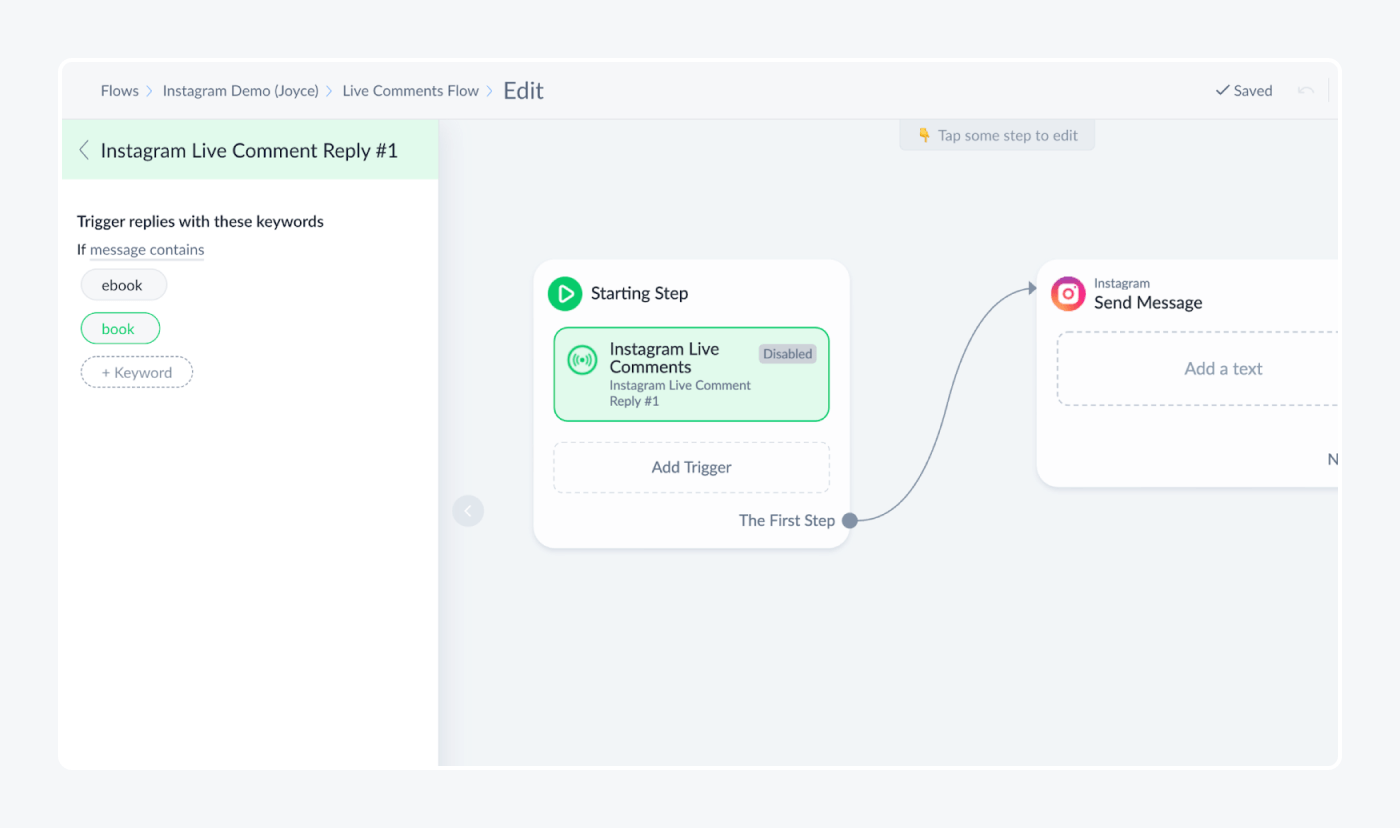
The limit: this captured screen is from an older interface, and the editor looks different today. The logic is the same, but you will see a newer layout.
Manychat AI
Manychat AI is on Pro and above. According to ManyChat, you teach it about your business and tone of voice, and it replies to DMs, answers FAQs, and answers positive comments. The pricing page also lists “AI-powered convos” and Inbox AI, which sorts conversations with custom labels and rules.
The limit: AI is a plan feature, not a standalone agent platform. If you need an AI agent that learns from a help center and hands off to a team, compare dedicated tools in the best chatbot platforms roundup.
Inbox for human replies
ManyChat has an inbox where people take over from the bot. Free plans get a basic inbox with one seat. Pro adds custom labels and rules, Business and Advanced add a shared team inbox with assignments and follow-ups.
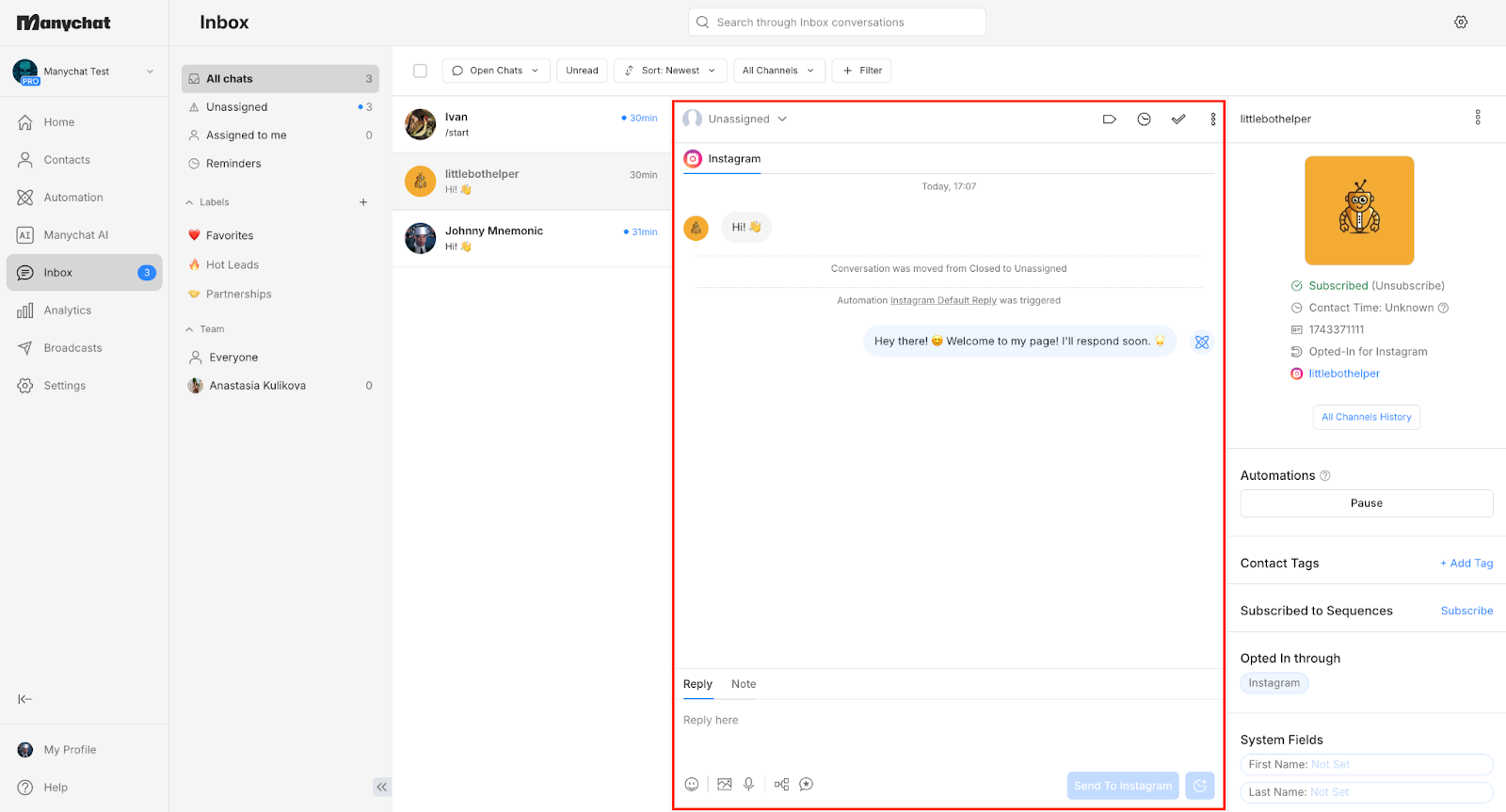
The limit: seats are capped per plan. Free and Essential include one seat, Pro two, Business three, and Advanced five. Pro lets you add an extra inbox seat for $25 a month, so a growing team feels the cost here too.
Channels
Free and Essential connect any two of Instagram, TikTok, Messenger, and Telegram. Pro connects three channels and adds WhatsApp, SMS, and email. Business and Advanced connect all of them. You can swap channels later as long as you stay within the plan’s channel count.
The limit: there is no chat for your own website. ManyChat’s pricing page lists social, messaging, SMS, and email channels, and no website chat. In December 2025, a user asked in ManyChat’s community for a web chat as a standalone channel. If your visitors ask questions on your site, you need another tool next to it.
Integrations
ManyChat’s integrations page lists Hotmart, Flodesk, Klaviyo, Mailchimp, ActiveCampaign, Kit, Google Sheets, and HubSpot. It connects to 7,000+ more apps through Zapier, plus Make and an API for custom work.
The limit: the page does not list store apps such as Shopify. Order data, carts, and refunds usually need Zapier, Make, or the API, so check your stack before you rely on it for an online shop.
ManyChat pricing in 2026
ManyChat pricing starts free and tops out at $139 a month billed annually. The price you pay depends less on the plan name than on how many people you message in a month, because ManyChat bills by active contacts.
How much does ManyChat cost?
ManyChat has five plans. Annual billing is cheaper, and the annual total is charged upfront.
| Plan | Annual billing | Monthly billing | Active contacts included | Users | Channels |
|---|---|---|---|---|---|
| Free | $0 | $0 | 25 | 1 | 2 |
| Essential | $14/mo ($168/yr) | $17/mo | 250 | 2 | 2 |
| Pro | $29/mo ($348/yr) | $39/mo | 2,500 | 3 | 3 |
| Business | $69/mo ($828/yr) | $99/mo | 7,500 | 5 | All |
| Advanced | $139/mo ($1,668/yr) | $199/mo | 25,000 | 10 | All |
Source: ManyChat’s pricing page, checked October 12, 2026. Prices exclude tax.
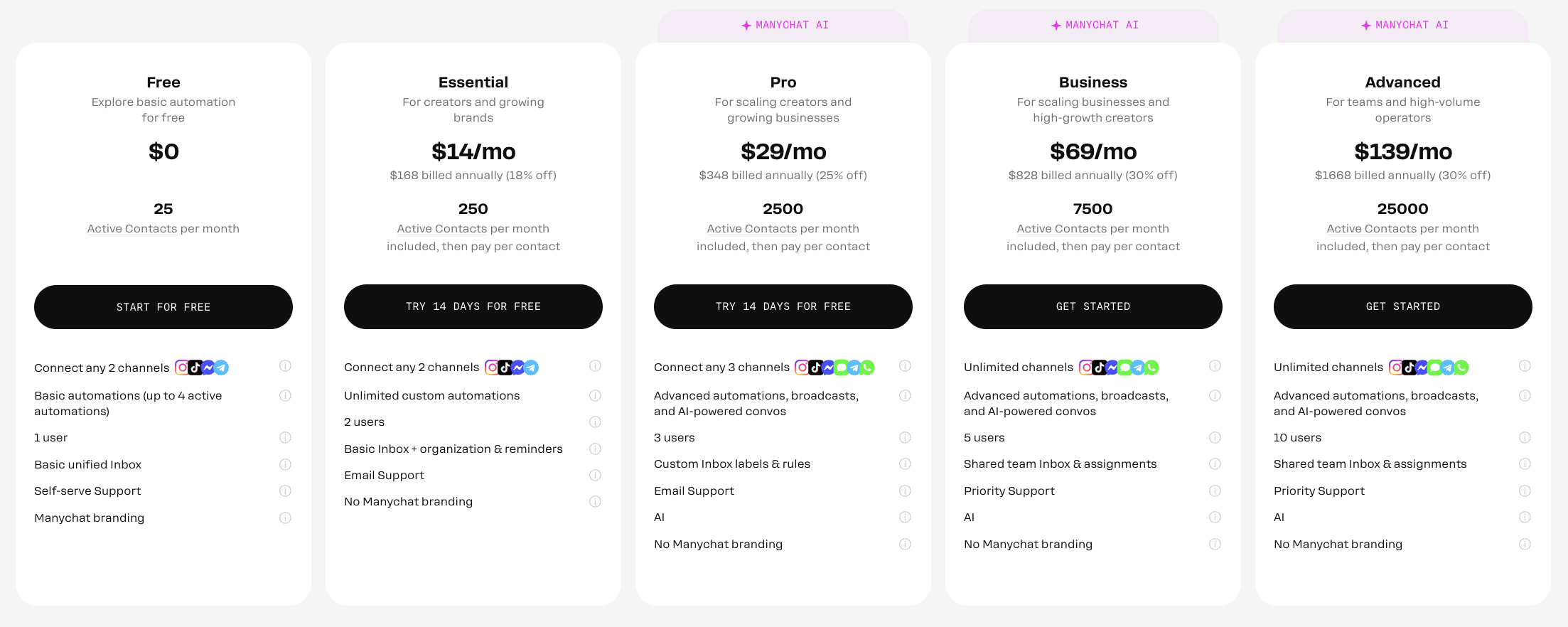
Each paid plan adds more than contacts. Essential removes the “Powered by Manychat” branding. Pro adds Manychat AI, broadcasts, WhatsApp, SMS, and email. Business and Advanced add a shared team inbox and priority support.
What is an active contact?
An active contact is a person you interact with during your monthly billing period, whether through messages, automations, AI, broadcasts, or the inbox. One person counts once, however many messages you exchange. ManyChat calculates this monthly even on annual plans, and bills any overage monthly too.
Active contacts also count people who message you first. One Trustpilot reviewer wrote that the contacts they were charged for were “any and every conversation” in their inbox, which matches how ManyChat defines the term.
What happens when you go over your contact limit?
Your automations do not stop. ManyChat charges a fee for each additional active contact that month:
| Plan | Overage, monthly billing | Overage, annual billing |
|---|---|---|
| Essential | $0.10 | $0.082 |
| Pro | $0.05 | $0.038 |
| Business | $0.025 | $0.018 |
| Advanced | $0.004 | $0.0028 |
Price per additional active contact beyond the plan’s included contacts. Source: ManyChat’s pricing page, checked October 12, 2026.
You can set an overage threshold in your subscription settings to cap how many extra contacts you are willing to pay for. If you exceed your limit and upgrade in the same billing cycle, ManyChat forgives the overage you have already incurred.
What you’ll actually pay at 1,000 to 25,000 contacts
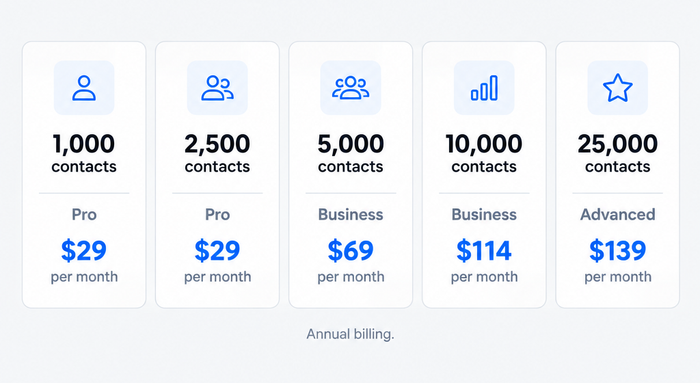
The cheapest option is not always the plan whose included contacts are closest to your list. At 1,000 contacts, Essential costs $14 plus 750 extra contacts at $0.082, which is $75.50 a month. Pro costs $29. Moving up is cheaper than paying overage.
| Active contacts per month | Cheapest plan | Cost per month, annual billing | Cost per month, monthly billing |
|---|---|---|---|
| 1,000 | Pro | $29 | $39 |
| 2,500 | Pro | $29 | $39 |
| 5,000 | Business | $69 | $99 |
| 10,000 | Business | $114 | $161.50 |
| 25,000 | Advanced | $139 | $199 |
Our calculation from ManyChat’s published plan prices and overage rates, October 2026. Assumes you pick the cheapest plan at each size, and excludes tax, WhatsApp message fees, and extra inbox seats. The 10,000 row is Business at $69 plus 2,500 extra contacts at $0.018 (annual) or $0.025 (monthly).
Costs outside the plan price
- WhatsApp messages. ManyChat charges for each template message it delivers, from a prepaid wallet. From October 1, 2026, it also charges for service messages after the first 1,000 free per WhatsApp number each month. Messages users send to you are free.
- Extra inbox seats. Pro adds a seat for $25 a month.
- Annual lock-in. An annual plan cannot be downgraded, or switched to monthly billing, until the term ends.
- Tax. Prices exclude tax and depend on your billing country.
Is there a free plan or trial?
Yes to both. The free plan includes 25 active contacts, two channels, one user, a basic inbox, and up to four live automations, and it needs no credit card. Free plans also show “Powered by Manychat” the first time a contact gets a message. Essential and Pro have a 14-day free trial, and paid plans need a card. ManyChat says you can cancel for a refund within 30 days of buying.
Is ManyChat worth the price?
For a creator with a few thousand followers, yes. Pro at $29 a month on annual billing covers 2,500 contacts, AI, and WhatsApp. The picture changes when your audience grows fast, because every new commenter can become an active contact. The best test is to run one campaign on a trial and look at how many contacts it creates.
What real users say in ManyChat reviews
ManyChat’s ratings depend on where you look. As of October 2026:
- G2: 4.5 from 165 reviews, with 130 five-star.
- Capterra: 4.6 from 72 reviews.
- Trustpilot: 2.1 from 306 reviews.
The gap is wide, so read the three together rather than averaging them. The sections below say what Trustpilot’s reviewers raise most.
What reviewers praise
Reviewers who like ManyChat are mostly positive about it once it is set up. Trustpilot’s summary of recent reviews notes that some users find it “reliable, intuitive, and extremely helpful for saving time”.
What reviewers criticize
Two themes dominate the Trustpilot reviews. The first is support: Trustpilot’s summary says many reviewers found it unresponsive when technical problems arose. The second is billing: reviewers describe unexpected charges and a subscription they found hard to manage.
ManyChat’s own help center confirms the structure behind this: Free users get self-serve support, Essential and Pro get email support, and priority support starts at Business.
ManyChat pros and cons
Pros
- Instagram automation. Comment-to-DM, story replies, and DM menus are what its Instagram product leads with.
- A visual builder. Flows and ready-made templates let you launch a first automation without code.
- Many channels. Instagram, TikTok, Messenger, Telegram, WhatsApp, SMS, and email, with business-grade channels on Pro and above.
- A free plan and a 14-day trial. You can test a real automation before paying.
- Good ratings on G2 and Capterra. 4.5 and 4.6.
Cons
- Contact-based pricing. The bill follows your audience, and overage rates apply when you go above the plan.
- No website chat. There is no channel for your own site.
- Free is tiny. 25 active contacts and four automations only cover a test.
- Support varies by plan. Free gets self-serve help, and priority support starts at Business.
- Dependence on Meta. Your flows depend on what Meta allows on Instagram, Messenger, and WhatsApp.
Who should choose ManyChat, and who shouldn’t
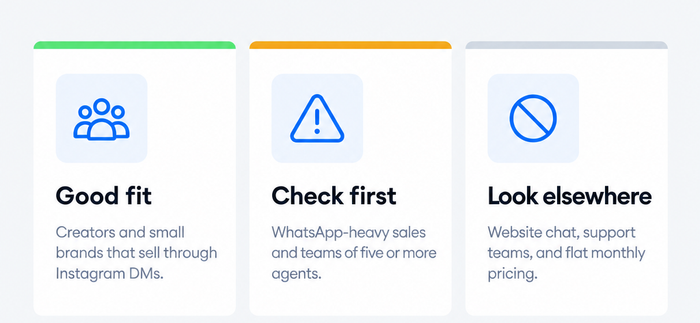
Choose ManyChat if:
- You sell through Instagram or TikTok and want comments and story replies to start DMs.
- Your audience is under about 7,500 active contacts, where Pro and Business keep the bill predictable.
- You want a visual builder and templates instead of writing logic.
Think twice if:
- You message tens of thousands of people a month and want a flat price.
- WhatsApp is your main channel; message fees come on top of the plan.
- You need several agents sharing an inbox on Free, Essential, or Pro, which limit seats.
Look elsewhere if:
- You need a chat on your website, or answers to support questions on a store. Tidio is one option for that; it is built for website chat and customer service rather than comment-to-DM growth.
Try Tidio free
ManyChat alternatives, briefly
The right alternative depends on what made you look. This is a short list; the full comparison is in ManyChat alternatives.
- Tidio: website live chat, the Lyro AI agent, and Instagram, Messenger, and WhatsApp conversations in one inbox, with a free plan. It suits online stores and small support teams, and it does not do comment-to-DM automation. Starter is $24.17/mo billed annually. See Tidio vs ManyChat and the Tidio pricing page.
- Chatfuel: Instagram, WhatsApp, and Messenger chatbots with AI replies, from $18/mo billed yearly. See the Chatfuel review.
- respond.io: a team inbox across many channels, from $79/mo billed yearly.
- CreatorFlow and InstantDM: flat-priced Instagram automation, from $12/mo (annual) and $9.99/mo (yearly).
- Wati: WhatsApp-first, from EUR 59/mo billed annually.
Bottom line
ManyChat is good for creators and small brands that sell through Instagram DMs and want a visual builder with a free start. It is a weaker fit if you need a chat on your own website, a shared support inbox on a small plan, or a bill that does not move with your audience. Before you commit, run one real campaign on the 14-day trial, count the active contacts it creates, and compare that with the plan table above.
See Tidio pricing
Frequently asked questions
For creators and small brands that sell through Instagram DMs, usually yes. Pro costs $29 a month billed annually for 2,500 active contacts, AI, and WhatsApp. It is a worse deal if your audience grows quickly or you need website chat.
ManyChat has a free plan and four paid plans: Essential $14, Pro $29, Business $69, and Advanced $139 a month, billed annually. Monthly billing costs $17, $39, $99, and $199. Prices checked October 2026.
Yes. The free plan includes 25 active contacts, two channels, one user, and up to four live automations, and needs no credit card. Essential and Pro also offer a 14-day free trial.
We did not find one on ManyChat’s pricing page or in its plan help article. Plans are monthly or annual subscriptions. Check ManyChat’s own site before paying anyone who sells a “lifetime” offer.
ManyChat says it is an official Meta Business Partner and a TikTok partner. As with any tool that connects to your Instagram account, review the permissions it asks for. User reviews on Trustpilot raise billing and support complaints rather than security ones.
Not as a chat for your site. ManyChat’s pricing page lists Instagram, TikTok, Messenger, Telegram, WhatsApp, SMS, and email, and no website chat. For site visitors, use a website chat tool next to it.
Pro includes 2,500 active contacts, three channels, three users, and two inbox seats. Business includes 7,500 contacts, all channels, five users, three inbox seats, a shared team inbox, and priority support.
Prices and ratings were checked on ManyChat’s pricing page, ManyChat’s help center, G2, Capterra, and Trustpilot on October 12, 2026, and Tidio’s figures on tidio.com the same day. Plans change, so confirm on the vendor’s site before you buy. Spot something outdated? Tell us at [corrections address to confirm].
Use live chat to support your customers in real-time
