



Key takeaways
- The core platform is free, with no seat limit. Live chat, the shared inbox, ticketing, the knowledge base, contacts, and a pipeline board cost $0, and tawk.to says there are no limits on agents, chat volume, or sites.
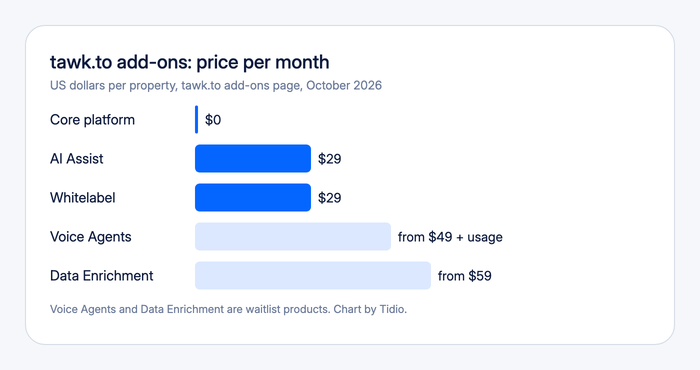
- The extras are the business model. tawk.to’s add-ons page lists four paid products: AI Assist at $29 a month, Whitelabel at $29, Voice Agents from $49 plus usage, and Data Enrichment from $59. Add-ons are billed per property, not per seat.
- The price of removing the badge depends on where you look. tawk.to’s add-ons page shows $29 a month, and the pricing tab on G2 shows “starting at $19”.
- Users rate it well. G2 shows 4.5 out of 5, and Capterra shows 4.6.[1][2]
- The recurring complaints are depth, not price. Reviewers mention limited features, basic reporting, a dated interface, and slow mobile notifications.
- It fits small teams that want free chat first. It is a thinner choice for a team that needs reporting, deep AI, or e-commerce data inside the chat.
Tawk.to is a free live chat and shared inbox platform with unlimited agents, a knowledge base, a built-in CRM, and an AI agent add-on. Users like how much the free plan includes and how fast the setup is. The same users say the reporting is basic and the paid extras add up fast. We reviewed it from tawk.to’s public product, add-on, FAQ, and security pages and from G2 and Capterra, without running a trial. Tidio appears only as one alternative near the end.
Tawk.to at a glance
| Tawk.to | |
|---|---|
| What it is | Free live chat and omnichannel inbox with ticketing, a knowledge base, contacts, a pipeline, and optional AI |
| Best for | Small teams and single-site businesses that want live chat with unlimited agents at no cost |
| Not ideal for | Teams that need detailed reporting, a deep AI agent, or customer order data inside the chat |
| Free plan or trial | Free core platform, no credit card; AI Assist has a free tier for limited volume |
| Starting price | $0; paid add-ons from $29 a month per property |
| AI | AI Assist add-on: agents trained on your knowledge base, with hand-off to a human |
| G2 / Capterra rating | 4.5 out of 5 / 4.6, observed October 2026 |
| Our verdict | Hard to beat for a free start, with a ceiling you reach once reporting, AI, or branding start to matter |
What tawk.to is and who it is built for
Tawk.to started in 2013 as a free chat widget, and its founder has said the company earns money from optional services rather than from locking features behind plans. On its Why Free page, tawk.to names three: removing its branding, the AI Assist chatbot, and hired chat agents at $1 an hour. A small number of users pay, and everyone else uses the product at no cost.
The product has grown past the widget. The current site lists an omnichannel inbox, ticketing, a knowledge base, contacts, a pipeline board, activities, feedback, and an automation area for AI agents. Every account gets the same core, so there is no plan ladder to climb.
That shape suits a clear group of buyers:
- One-site businesses and freelancers who want to talk to visitors without a monthly bill.
- Small teams with many agents, because tawk.to does not charge per seat.
- Agencies running several client sites, since each site is its own property with its own widget.
It suits fewer teams that have outgrown a shared inbox. The product pages don’t lead with complex routing, service-level rules, or detailed reports.
Tawk.to features, capability by capability
Live chat and visitor monitoring
Live chat is the original product. Agents see who is on the site and what page they are reading, and triggers can open a chat based on a page URL, visitor behavior, or referrer. Agents can whisper to a teammate inside a chat, use shortcuts for saved replies, and translate messages. The widget works on Shopify, WordPress, Wix, Squarespace, and other platforms through a one-click install or a code snippet.
Departments route chats to the right team, and tawk.to says there is no cap on concurrent chats. The limit is customization: matching the widget to your brand fully means paying for Whitelabel.
Omnichannel inbox
The inbox puts live chat, email, WhatsApp, Messenger, SMS, and Telegram in one list, with unlimited team members and the full history of each conversation. The product page says more channels are being added.
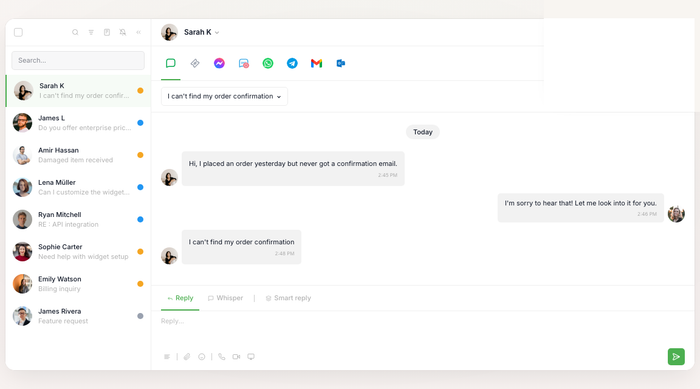
Ask which channels you need before you commit. A channel that is “coming” is not one you can plan around.
Ticketing and email
Tickets live in the same account, and agents can reply to them from the mobile apps. The ticketing emails come from a tawk.to address unless you buy Whitelabel, which lets you send them from your own. A Capterra reviewer says the ticketing helps their team answer customers more efficiently. We did not find advanced workflows such as service-level rules on tawk.to’s product pages as of October 2026.
Knowledge base
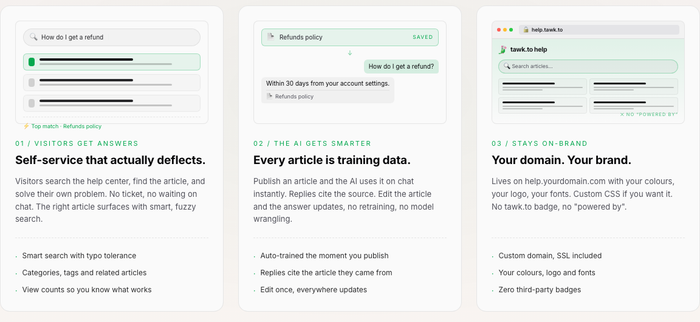
The knowledge base is a help center in 50+ languages with a block editor, categories, and tags. By default it sits on a tawk.to address, and a custom domain needs Whitelabel. Articles also train the AI agent, so a published article changes the answers it gives.
AI Assist
AI Assist is the paid automation product. You train an agent on a website, uploaded documents, FAQs, and your saved shortcuts, then choose which channels it answers on. It hands off to a human with the conversation attached. There is a free tier for limited volume, and paid plans start at $29 a month. The page does not state what a paid plan includes beyond that floor, so ask what your volume costs before you rely on it.
Contacts and pipeline
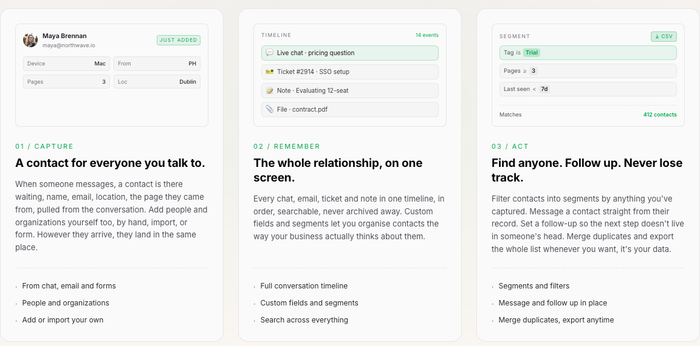
Everyone who messages becomes a contact, with a timeline of chats, tickets, and notes. A pipeline board tracks deals by stage with values. Both are free and unlimited. This is a light CRM: it keeps a record and a board, and it does not replace a sales tool with sequences and forecasting.
Reporting, apps, and data handling
Reviewers describe the reporting as basic, and one G2 reviewer says the page-view numbers differ from Google Analytics. The free iOS and Android apps put chats and tickets on a phone, though reviewers mention slow notifications. Another reviewer could not set chats to delete automatically and does it by hand each month.
On data, tawk.to’s security page says chats and tickets are encrypted in transit and at rest and that it does not sell personal data. It stores chats and tickets until the account owner deletes them. It does not offer a self-hosted version. If an account is compromised, deleted data stays in backups for 90 days.
Tawk.to pricing in 2026
The core platform has one price, and it is zero. Paid products are add-ons, billed per property, and you can switch them off.
| Product | Price | What it does |
|---|---|---|
| Core platform | $0 | Live chat, inbox, ticketing, knowledge base, contacts, pipeline, apps, unlimited agents |
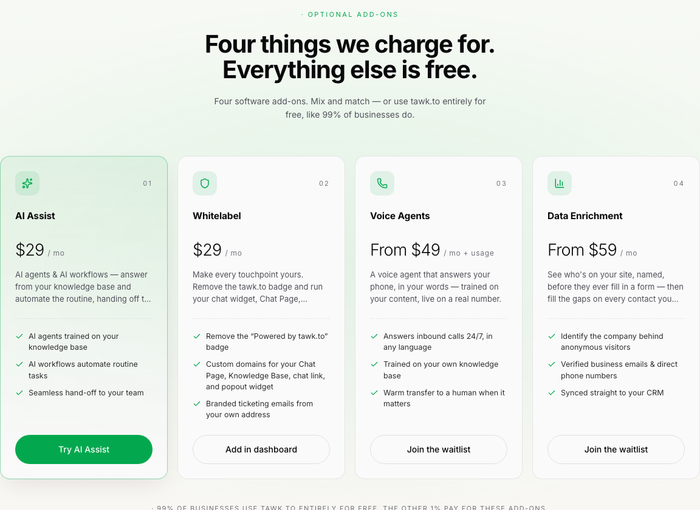
| AI Assist | $29 a month (free tier for limited volume) | AI agents trained on your knowledge base, with human hand-off |
| Whitelabel | $29 a month per property | Removes the “Powered by tawk.to” badge, adds custom domains and branded emails |
| Voice Agents | From $49 a month plus usage (waitlist) | AI agent that answers phone calls |
| Data Enrichment | From $59 a month (waitlist) | Identifies companies behind visitors and fills contact data |
| Hired chat agents | $1 an hour | Human agents who answer chats for you |
Read these notes before you budget:
- Two prices for the same add-on. tawk.to’s add-ons page shows Whitelabel at $29 a month. The pricing tab on G2, which tawk.to supplies, shows “Remove Branding” starting at $19 for one property. Check the dashboard before you buy.
- Per property. Each site you connect is a property, so add-ons multiply across sites.
- The AI price is a floor. AI Assist is $29 a month at its entry paid level, and the page does not publish the next tier.
What you will actually pay
| Setup | Monthly cost |
|---|---|
| One site, core platform only | $0 |
| One site with Whitelabel | $29 |
| One site with Whitelabel and AI Assist at the entry paid level | From $58 |
| Three sites, each with Whitelabel and AI Assist at the entry paid level | From $174 |
Assumptions: add-ons are billed per property as tawk.to’s add-ons page states, AI Assist is at its $29 entry paid level, and hired agents and waitlist products are excluded. For a deeper cost comparison, see our tawk.to alternatives guide.
What real users say about tawk.to
G2 shows 4.5 out of 5, and Capterra shows 4.6.[1][2] Capterra scores ease of use at 4.6 and customer service at 4.3.[2] G2 and Capterra reviews come from invited users, so they lean positive.
What reviewers praise
- Cost. A Capterra reviewer who runs the free version calls it “incredible value” and says it gives them live chat, visitor monitoring, canned responses, ticketing, and a chatbot at no cost.[2]
- Ease of use. G2’s AI summary of the reviews leads with ease of use and the free pricing model, and its most common praise tags are ease of use, easy setup, and simple.[1]
- Live monitoring. A Capterra reviewer likes that they can handle several chats at once and see what visitors type before they send.[2]
What reviewers criticize
- Depth of features. G2’s tags include limited features, limitations, and chatbot issues, and one reviewer calls the reporting and analytics fairly basic.[1]
- Interface and speed. A G2 reviewer says the interface needs a modern update and that the dashboard slows down over time.[1]
- Mobile and notifications. G2 reviewers and its summary mention an inconsistent mobile app and delayed notifications.[1]
Tawk.to pros and cons
Pros
- Free core, no seat fees. Live chat, ticketing, a knowledge base, and a CRM cost nothing, and you can add as many agents as you want.
- Quick setup. One-click installs for common platforms and a code snippet for the rest.
- One inbox for several channels. Chat, email, WhatsApp, Messenger, SMS, and Telegram sit together.
- Optional costs. You pay only for branding, AI, or hired agents, and you can turn each off.
- Round-the-clock help. tawk.to says its own support is available by chat and email 24/7.
Cons
- Branding stays until you pay. The badge is on the free widget, and a custom domain for the help center needs the same add-on.
- AI is separate and thin on detail. It is an add-on, and Workflows are still marked “coming soon”.
- Basic reporting. Reviewers describe it as limited and say page views can differ from other tools.
- Per-property costs. Add-ons multiply across sites.
- Hosted only. There is no self-hosted option, and data is kept until you delete it.
Who should choose tawk.to, and who should not
Choose tawk.to if:
- You run one site or a few and want live chat at no cost.
- You have several agents and do not want to pay per seat.
- Your chats are simple questions that a knowledge base and a basic AI agent can cover.
Think twice if:
- You need detailed reports, service-level targets, or advanced routing.
- You sell on Shopify and want order data and cart context inside the chat. Tidio is built for that case.
- You want one AI agent across chat, email, and social channels with a published per-conversation price.
See Tidio plans and Lyro pricing
Tawk.to alternatives, briefly
Teams usually look past tawk.to when the free plan stops covering reporting, branding, or AI depth. These are the tools we cover on the blog.
| Tool | Best for | Read our take |
|---|---|---|
| Tidio | Small and mid-sized teams, especially Shopify stores, that want live chat, email, and an AI agent in one inbox | Tidio vs tawk.to |
| Crisp | Small teams that want flat workspace pricing instead of per-seat fees | Crisp review |
| Zendesk | Larger teams with several channels and complex routing | Zendesk review |
| Free options | Teams comparing other free live chat tools | Free live chat software |
Tidio is the one on this list built around an AI agent and e-commerce data. Its Free plan includes up to 10 seats and 50 billable conversations a month, and Starter is $24.17 a month on annual billing (October 2026). Lyro, the AI agent, is a separate product with its own quota, and it can resolve up to 75% of support requests. G2 shows Tidio at 4.6 out of 5 from 1,962 reviews.[3] Shopify stores get live cart previews and order history inside the chat. The trade-off is quotas: conversations, Lyro, and Flows are priced separately, and larger deployments get a quote from the sales team. For the full list, see our tawk.to alternatives.
Bottom line
Tawk.to is a generous free start: unlimited agents, a shared inbox, a help center, and a light CRM at no cost, with optional extras you can turn on one site at a time. Its limits show up in reporting, branding, and AI depth. Run it free on your busiest site for a month, count the chats that need an AI agent or a branded widget, and price the add-ons before you scale. If your store needs order data and a stronger AI agent in the chat, compare it with Tidio.
Try Tidio free for your website chat
Related guides
Frequently asked questions
Tawk.to is a free live chat and shared inbox platform for websites. It includes ticketing, a knowledge base, contacts, a pipeline board, and mobile apps with unlimited agents. It earns money from paid add-ons such as AI Assist and Whitelabel, and from hired chat agents.
Yes, the core platform is free with no limit on agents, chats, or sites, according to tawk.to. The paid add-ons are optional: AI Assist from $29 a month, Whitelabel at $29, Voice Agents from $49 plus usage, and Data Enrichment from $59.
Tawk.to says it earns from branding removal, AI Assist, and hired chat agents at $1 an hour. Its add-ons page also lists Voice Agents and Data Enrichment as waitlist products.
Yes. AI Assist trains agents on your website, documents, FAQs, and shortcuts, and hands off to a human. It has a free tier for limited volume, and paid plans start at $29 a month. Workflows are listed as coming soon in October 2026.
tawk.to’s add-ons page lists Whitelabel at $29 a month per property. G2’s pricing tab, supplied by tawk.to, shows Remove Branding starting at $19, so check the dashboard.
It works for basic pre-sale and shipping questions, and it installs on platforms such as Shopify in one click. Its e-commerce page describes AI answers from your store pages and an order and chat history per contact, but we did not find live cart previews or order lookups from the store platform, so stores that need that data should compare alternatives.
tawk.to’s security page says chats and tickets are encrypted in transit and at rest, and that it does not sell personal data. It stores data until the account owner deletes it and offers no self-hosted version.
Tidio is AI customer service software with live chat, a shared inbox, and the Lyro AI agent. It starts with a Free plan and is built for small and mid-sized teams, especially e-commerce stores.
Use live chat to support your customers in real-time
