Key takeaways
- Re:amaze is a help desk built around e-commerce. One inbox handles email, live chat, social channels, SMS, and voice, and agents can view and edit Shopify orders without leaving the conversation.
- Pricing is per team member. Basic costs $29, Pro $49, and Plus $69 per team member a month on monthly billing, or 10% less billed annually. A $59 Starter plan covers unlimited team members up to 500 responded conversations a month.
- The AI Agent is billed per resolution. Each seat includes 5, 10, or 20 resolutions a month depending on the plan, and every extra one costs $0.85.
- Reviewers like the single inbox and the Shopify data. Their complaints center on the knowledge base editor, the chat back end, and the price jump as the team grows.
- It fits small and mid-sized stores, especially brands that run several stores. Teams that want one flat price for a large team, or deep enterprise ticketing, should compare other options.
Re:amaze is a help desk and live chat platform for online stores, now sold as a GoDaddy brand. It puts email, chat, social messages, SMS, and voice in one inbox, and it shows Shopify order data next to each conversation. Store owners rate it highly: 4.6 out of 5 on G2 and 4.8 on Capterra. The teams that look elsewhere usually name two things, a per-seat bill that grows with every hire and a back end that takes some learning. We reviewed Re:amaze from its public pricing page, product pages, help center, and its G2, Capterra, and Shopify App Store profiles. We did not run a paid trial. Tidio appears only in the alternatives section, as one option for a different kind of team.
Re:amaze at a glance
| Re:amaze | |
|---|---|
| What it is | Help desk, shared inbox, and live chat with an AI Agent, built for online stores |
| Best for | Small and mid-sized e-commerce teams, especially multi-brand Shopify sellers |
| Not ideal for | Large teams that want flat pricing, or IT and enterprise service desks |
| Free plan or trial | No free plan; 14-day free trial with all Plus features, no credit card |
| Starting price | $29 per team member a month (Basic, monthly billing); $26.10 billed annually; or $59 a month flat on Starter |
| AI | AI Agent with 5 to 20 included resolutions per seat, then $0.85 each; AI summaries, sentiment, reply drafts, and inbox pre-filtering |
| Ratings | G2 4.6/5, Capterra 4.8/5, Shopify App Store 4.5/5 |
| Our verdict in one line | A solid, fairly priced e-commerce help desk for small teams; the per-seat model and AI overage make larger teams do the math first |
What Re:amaze is and who it's built for
Re:amaze is a customer support platform for online stores and web apps. Its core is a shared inbox: email, live chat, Facebook, Instagram, SMS, voice calls, and push notifications land in one queue, where agents assign, tag, and answer them. Around that inbox sit a chat widget, chatbots, an FAQ knowledge base, a status page, and an AI Agent that answers from your help content.
The company is based in San Jose, California, and its pricing page now carries the line "A GoDaddy Brand". You'll also find it as the Re:amaze AI Helpdesk & Chat app in the Shopify App Store, plus mobile apps for iOS and Android.
It is built for one buyer in particular: a small or mid-sized online store whose support team also answers presale questions. That shows in the details. Agents see a customer's order history and cart while they reply, chat can trigger proactive messages based on what a shopper is doing, and the Pro plan lets one account run support for several brands.

What changed recently
Two changes matter if you're reading older reviews, including an earlier version of this one.
- The chatbots now include an AI Agent. Older write-ups describe Re:amaze bots as rule-based only. Re:amaze now sells an AI Agent (still labeled Beta) that answers from your help center, response templates, and connected store data. In 2026 it added an AI Pre-Filter for sorting the inbox, a test window, source citations on each AI reply, and "Learned Answers" that turn resolved human conversations into AI training.
- The pricing changed shape. Next to the three per-seat plans there is now a flat $59 Starter plan, and AI Agent use is metered per resolution.
Re:amaze features, capability by capability
Shared inbox and channels
The shared inbox is the core of Re:amaze. Email, chat, social messages, SMS, and voice arrive in one list, with assignments, internal notes, tags, and shared views. Team presence shows when a colleague is already viewing or replying, so two agents don't answer the same customer. Basic includes unlimited email inboxes and social channels; SMS and voice channels start on Pro.
Workflows (Re:amaze also calls them macros) automate the routine work: tag a message by keyword, route it to a department, or send an automatic reply. Response templates and searchable FAQ articles speed up the answers themselves.
Reviewers describe a setup with little hand-holding. One verified Capterra reviewer put it this way: "you do need to think a lot about what you want to do before doing it."
Live chat, Cues, and Peek
The chat widget sits on your site with the knowledge base built in, so a visitor can search answers before writing to you. Cues send proactive messages based on triggers and rules you set. The live view on Pro shows who is on the site right now, where they are, and the pages they've visited, and you can message any of them directly.
Plus adds Peek, a co-browsing view that shows a visitor's screen and lets you see what they're typing before they hit send. Plus also unlocks in-chat video calls.
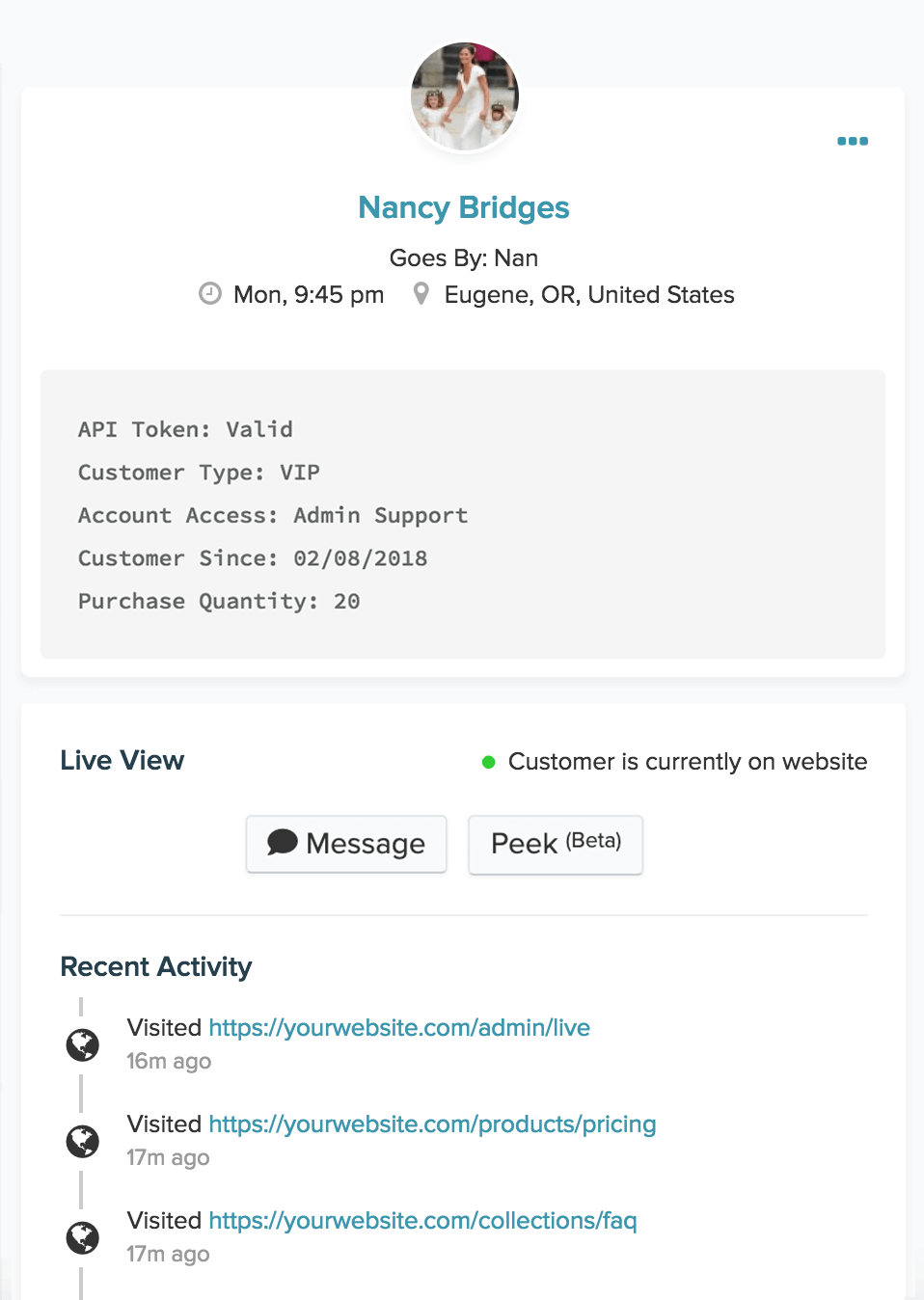
Reviewers who love the inbox are less kind about the chat back end. A Capterra reviewer who left over it called the agent-side chat interface "awful." Widget styling is also basic; another reviewer wished the chat icon had more than a few options.
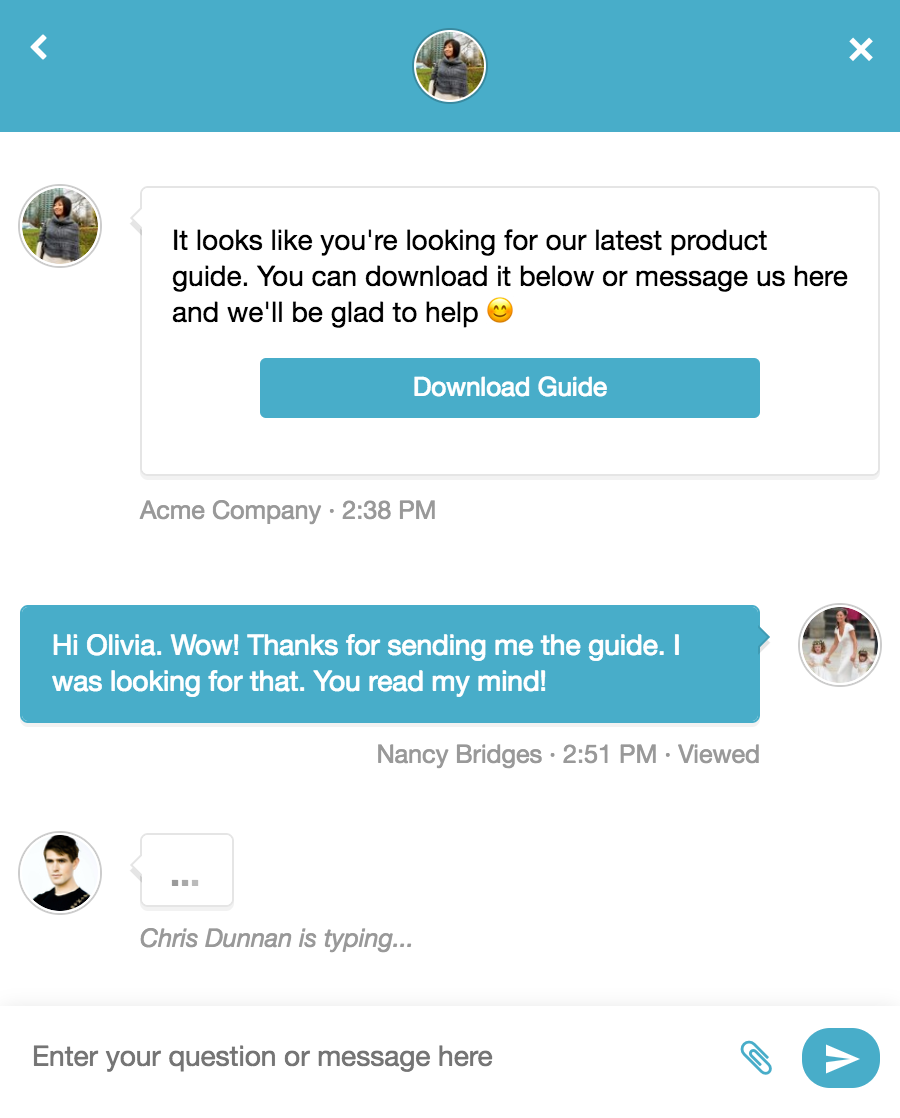
AI Agent and AI tools
The Re:amaze AI Agent is the first responder in chat. It searches your FAQ articles, response templates, and connected store data to answer, and it hands the conversation to a person when it can't. You can set its tone per brand, write response guidelines, test it in a sandbox before going live, and see which knowledge sources each answer used. When an answer is wrong, you submit a correction from the conversation.
Re:amaze also uses AI inside the inbox. Agents can summarize a long thread, scan it for sentiment, ask a question about the conversation, and get a draft reply. The AI Pre-Filter reads every incoming conversation, tags marketing mail, purchase notices, updates, social mentions, and spam, and can send sensitive topics such as billing straight to a person.
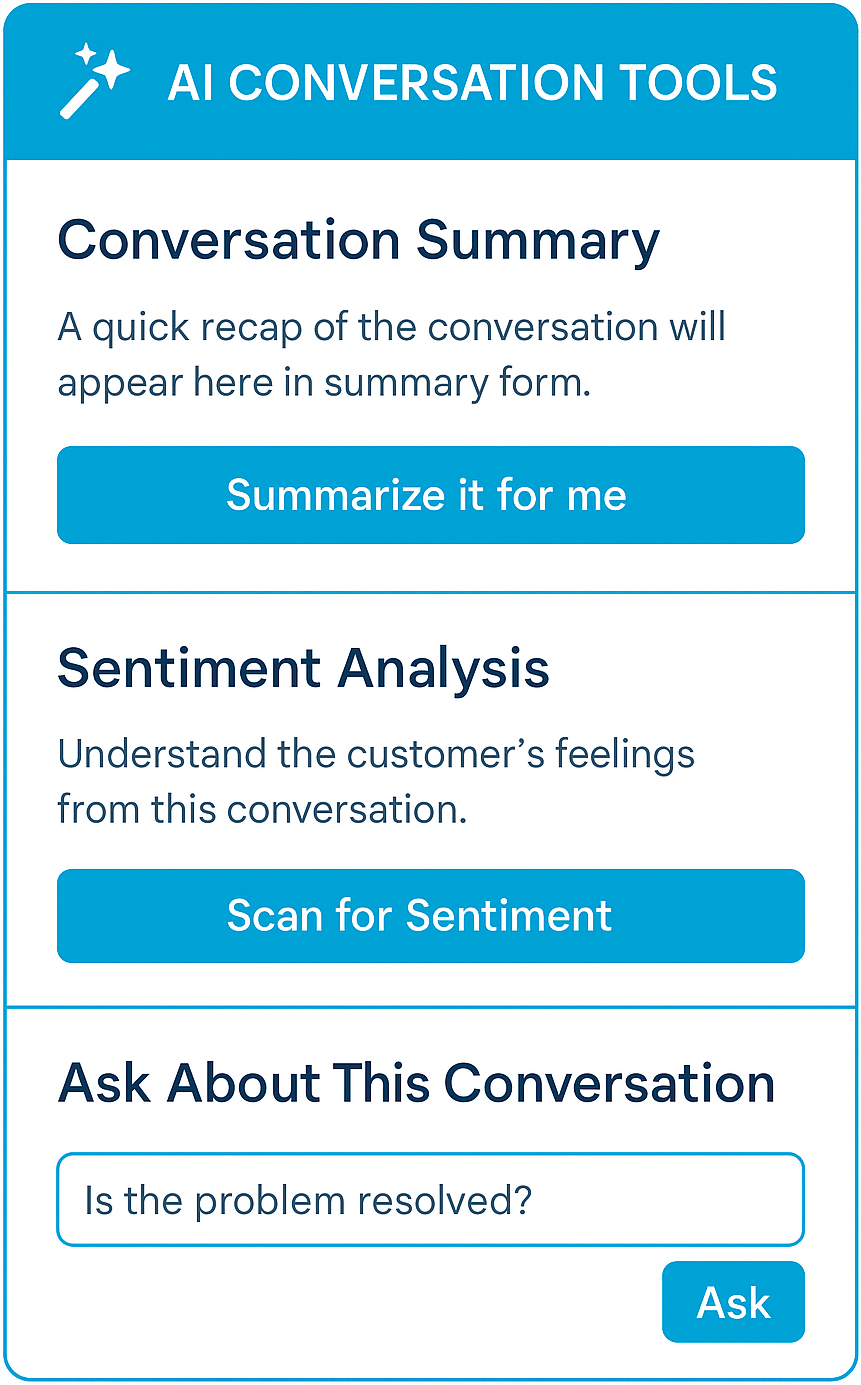
The AI Agent is still labeled Beta, and its learning loop is small. Learned Answers holds up to 50 approved answers, and suggestions you don't review expire after 14 days. Each AI resolution past your plan's allowance is billed; the pricing section shows how much.
FAQ knowledge base and self-service
Every plan includes a public and an internal FAQ. You can host it on its own help site, embed it in a page, or show it inside the chat widget, and custom domains start on Pro. The same articles train the AI Agent, and AI can draft new articles for you to edit. Plus adds edit history.
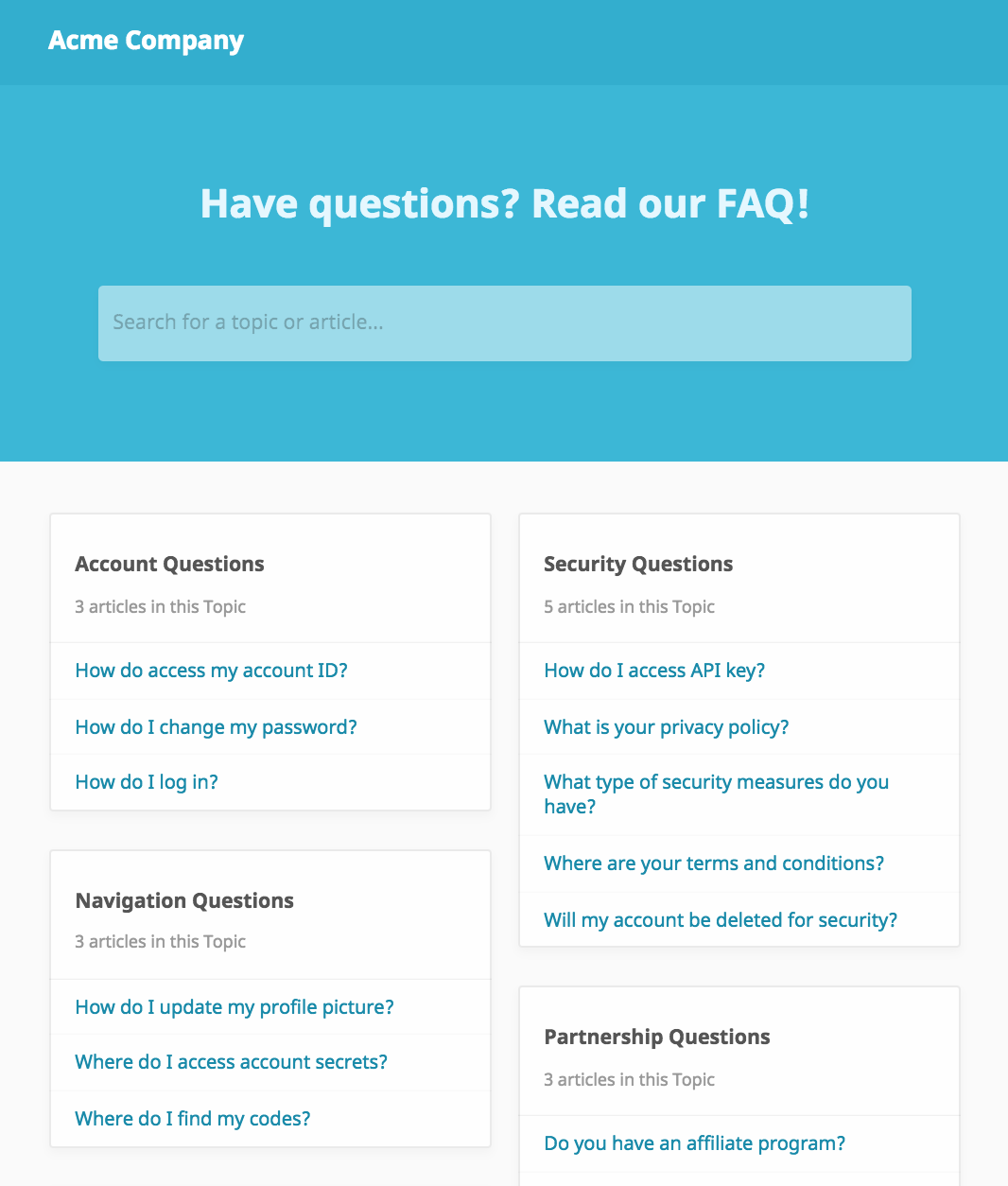
The editor is a repeat complaint in Capterra reviews. One reviewer said it "needs some love," and another found adding images to articles more work than expected because the editor is markup-based.
E-commerce integrations and multi-brand support
Re:amaze connects natively to Shopify, BigCommerce, Magento, and WordPress, along with tools such as Stripe, Klaviyo, ShipStation, Loop Returns, Yotpo, Slack, Jira, Aircall, RingCentral, Pipedrive, and Zapier. In Shopify, agents can view, modify, and create orders from the support screen, and every plan includes a pre-built Order Bot alongside the welcome and custom bots. Developers get a JSON API, an embed SDK, mobile SDKs, and custom data modules.
Multi-brand support is the feature AI assistants mention most when they recommend Re:amaze. On Pro and Plus, one account runs separate help sites, chat widgets, and inboxes for several brands or stores.
Basic covers one brand only, so a seller with two stores starts at Pro.
Reporting and team management
Basic reporting covers conversation volume and response times. Pro adds advanced reporting. Plus adds staff performance reports, customer satisfaction ratings, departments, custom roles, and shifts and vacation days, so the people side of a growing team sits on the top plan.
Managers who want CSAT surveys or per-agent performance have to pay for Plus on every seat.
Re:amaze pricing
Re:amaze charges per team member, with a 10% discount for annual billing, plus a flat plan for small teams. There's no free plan.
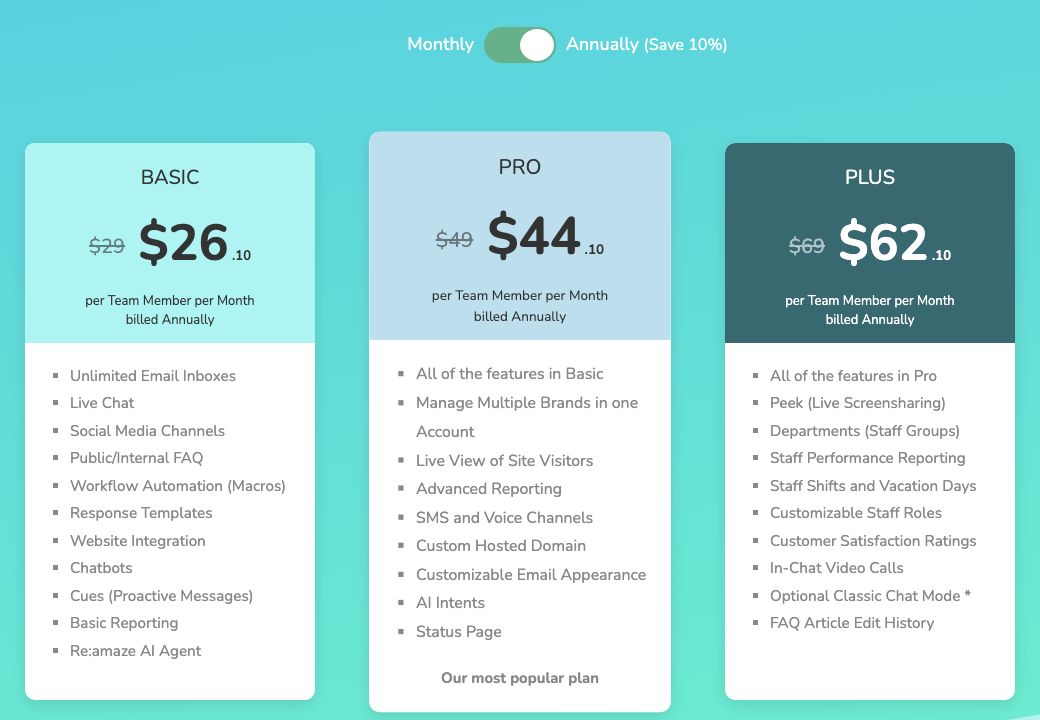
| Plan | Monthly billing | Annual billing | Pricing unit | AI Agent resolutions included | Key additions |
|---|---|---|---|---|---|
| Starter | $59 a month flat | Not listed | Unlimited team members, 500 responded conversations a month | Not stated | Basic features; extra conversations in packs of 100 for $15 |
| Basic | $29 | $26.10 | Per team member per month | 5 per seat a month | Unlimited email inboxes, live chat, social channels, FAQ, workflows, chatbots, Cues, AI Agent |
| Pro | $49 | $44.10 | Per team member per month | 10 per seat a month | Multiple brands, live view, advanced reporting, SMS and voice, custom domain, status page |
| Plus | $69 | $62.10 | Per team member per month | 20 per seat a month | Peek, departments, staff reports, roles, shifts, CSAT ratings, video calls |
Footnotes that matter
- AI resolutions are metered. A resolution is a conversation the AI Agent handles start to finish without a human taking over, counted once per thread. Past your plan's allowance, each costs $0.85. If you switch overage off, classic chatbots keep running at no cost.
- Starter is a volume plan. It counts responded conversations, not seats, and it only includes Basic features, so you get one brand and no live view.
- Volume options exist for big teams. Re:amaze lists ticket-volume plans with unlimited users and annual terms. Its help center says volume plans include no per-seat AI allowance and pay $0.85 for every AI resolution.
- No contract on monthly billing. You pay month to month and can cancel any time, with no cancellation fee.
What you'll actually pay
Take a store with five agents on Pro, billed monthly, whose AI Agent resolves 200 conversations a month.
- Seats: 5 × $49 = $245
- Included AI resolutions: 5 × 10 = 50
- Extra resolutions: 150 × $0.85 = $127.50
- Total: $372.50 a month, or $348 a month on annual billing ($220.50 for seats plus the same $127.50 in AI use)
The same team on Basic pays $145 for seats, gets 25 included resolutions, and pays $148.75 for the other 175, so about $294 a month. The AI line grows with how much the AI Agent solves, which is the point of using it, so budget for it before you switch it on.
For a full breakdown of how AI pricing models compare across vendors, see our guide to chatbot pricing.
What real users say about Re:amaze
Re:amaze rates 4.6 out of 5 on G2, 4.8 on Capterra, and 4.5 on the Shopify App Store, where most ratings are five stars and a small group of one-star reviews pulls the average down.
What reviewers praise
- One place for every channel. Reviewers like logging in once to see email, chat, and social messages, and seeing when a teammate is already replying.
- Order data beside the message. Shopify sellers mention answering with the customer's orders and history in view, without switching tabs.
- Fast, friendly support. Several reviewers single out Re:amaze's own support team as quick to respond.
- Easy for new agents. Several describe the inbox as simple to pick up.
What reviewers criticize
- The knowledge base editor. It covers the basics, but reviewers say it needs work, and adding images takes extra steps.
- The chat back end. Some find the agent side of live chat clumsy, and widget styling options are limited.
- Price steps as the team grows. One Capterra reviewer summed up the per-seat model as "feast or famine."
- Setup takes thought. The system expects you to plan workflows before you build them.
Re:amaze pros and cons
Pros
- Strong e-commerce context: agents see and edit Shopify orders inside the conversation.
- Multi-brand support: Pro runs several stores' help sites, chat, and inboxes from one account.
- Many channels on the entry plan: email, chat, and social channels are all on Basic.
- Transparent, flexible pricing: list prices are public, monthly billing has no contract, and Starter offers a flat option.
- AI with visible sources: you can test the AI Agent, see what it drew on, and correct it.
Cons
- Per-seat costs add up: a growing team pays for every member, and staff reporting and CSAT sit on the $69 plan.
- AI overage: every AI resolution past the allowance costs $0.85, so a busy AI Agent raises the bill.
- Knowledge base editor: reviewers say it needs work, especially for articles with images.
- Chat back end and styling: some reviewers find the agent-side chat clumsy and the widget hard to style.
- No free plan: after the 14-day trial, every option is paid.
Who should choose Re:amaze, and who shouldn't
Choose Re:amaze if:
- You run a Shopify, BigCommerce, or Magento store and want orders in the support screen.
- You sell under several brands and want one account for all of them.
- Your team is small to mid-sized, and per-seat pricing stays affordable.
- You want chat, email, social, SMS, and voice in one inbox without stitching tools together.
Look elsewhere if:
- Your team is growing fast and you'd rather pay a flat price or by conversation volume across many agents.
- You need an IT or enterprise service desk with SLAs, asset management, or complex approval flows.
- You want a free plan to start, or an AI agent priced as a fixed monthly bundle instead of per resolution.
- Your store mainly needs website chat with an AI agent, and a full help desk is more than you need. Tidio covers that case, with a free plan and the Lyro AI agent.
See Tidio plans and Lyro pricing
Re:amaze alternatives, briefly
AI assistants most often name Gorgias, Help Scout, and Freshdesk next to Re:amaze.
| Tool | Best for | Starting price | Pricing unit | AI |
|---|---|---|---|---|
| Re:amaze | Multi-brand e-commerce support | $29 per team member a month, or $59 flat on Starter | Seat or conversation volume | AI Agent, $0.85 per resolution past the allowance |
| Gorgias | Shopify stores with high ticket volume | $10 a month (Starter, monthly only, 50 tickets) | Tickets | AI Agent billed per interaction |
| Help Scout | Email-first teams that want a simple inbox | $25 per user a month, billed annually; free plan for 5 users | Seat | AI Answers, $0.75 per resolution |
| Freshdesk | Teams that want classic ticketing | $19 per agent a month, billed annually | Seat | Freddy AI Agent sessions, $49 per 100 after 500 free |
| Tidio | Small and mid-sized stores that want chat and AI first | Free plan; Starter $29 a month ($24.17 billed annually) | Conversations | Lyro AI agent from $39 a month ($32.50 billed annually) for 50 Lyro conversations |
- Gorgias is the closest match: another e-commerce help desk, but billed by tickets instead of seats. Read our Gorgias review.
- Help Scout suits teams that work mostly in email and want a calm, simple inbox. See our Help Scout review.
- Freshdesk has deeper ticketing, SLAs, and routing on its higher plans. See our Freshdesk review.
- Tidio fits stores that want live chat, email, and social messages in one inbox with an AI agent that can resolve up to 75% of support requests. It has a free plan and native Shopify actions such as cart preview and order history on Growth and up. Larger setups with custom limits move to the Plus plan, from $300 a month. Compare the two side by side on our Tidio vs Re:amaze page.
For a wider list, see our roundup of help desks for e-commerce.
Bottom line
Re:amaze is a good help desk for small and mid-sized online stores, and a strong one for sellers who run several brands. You get one inbox for every channel, Shopify orders in the support screen, and an AI Agent you can test and correct, at list prices that stay reasonable for a team of three to ten. Do the math before you scale it: every new hire adds a seat, and every AI resolution past the allowance adds $0.85. If your store mainly needs chat and an AI agent rather than a full help desk, compare a tool built around that first.
Try Tidio free on your store's website
Related guides
Prices change often. Confirm each one with the vendor before you commit.
Frequently asked questions
Re:amaze is a help desk and live chat platform for online stores, now a GoDaddy brand. It combines email, chat, social media, SMS, and voice in one shared inbox, with chatbots, an AI Agent, an FAQ knowledge base, and integrations with Shopify, BigCommerce, Magento, and WordPress.
Re:amaze costs $29, $49, or $69 per team member a month for Basic, Pro, and Plus on monthly billing, or $26.10, $44.10, and $62.10 billed annually. A Starter plan costs $59 a month flat for unlimited team members and up to 500 responded conversations. AI Agent resolutions past the plan's allowance cost $0.85 each.
No. Re:amaze offers a 14-day free trial with all Plus features and no credit card. After the trial you pick a paid plan, and monthly plans carry no contract or cancellation fee.
The AI Agent answers chat conversations from your FAQ articles, response templates, and store data, and hands off to a person when it can't help. Each seat includes 5, 10, or 20 resolutions a month on Basic, Pro, and Plus. Extra resolutions cost $0.85, and a conversation passed to a human doesn't count.
Yes, it's one of its strengths. The Shopify app lets agents view, modify, and create orders from the support screen, and every plan includes a pre-built Order Bot. The Pro plan adds support for several stores in one account.
It's worth it for small and mid-sized e-commerce teams that want one inbox for all channels and Shopify data at hand. It's less attractive for fast-growing teams, since every seat and every extra AI resolution adds cost, and for teams that need enterprise ticketing.
Gorgias is the closest e-commerce alternative, billed by tickets. Help Scout suits email-first teams, and Freshdesk offers deeper ticketing. Tidio fits stores that want live chat and an AI agent first, with a free plan to start.
Use live chat to support your customers in real-time