
Key takeaways:
- Set your AI agent’s escalation rules weeks before Black Friday. Changing them during the event is too late to test.
- Escalate on emotion, repeat contacts, “delivered but missing” orders and sensitive promotions, before the customer has to ask for a person.
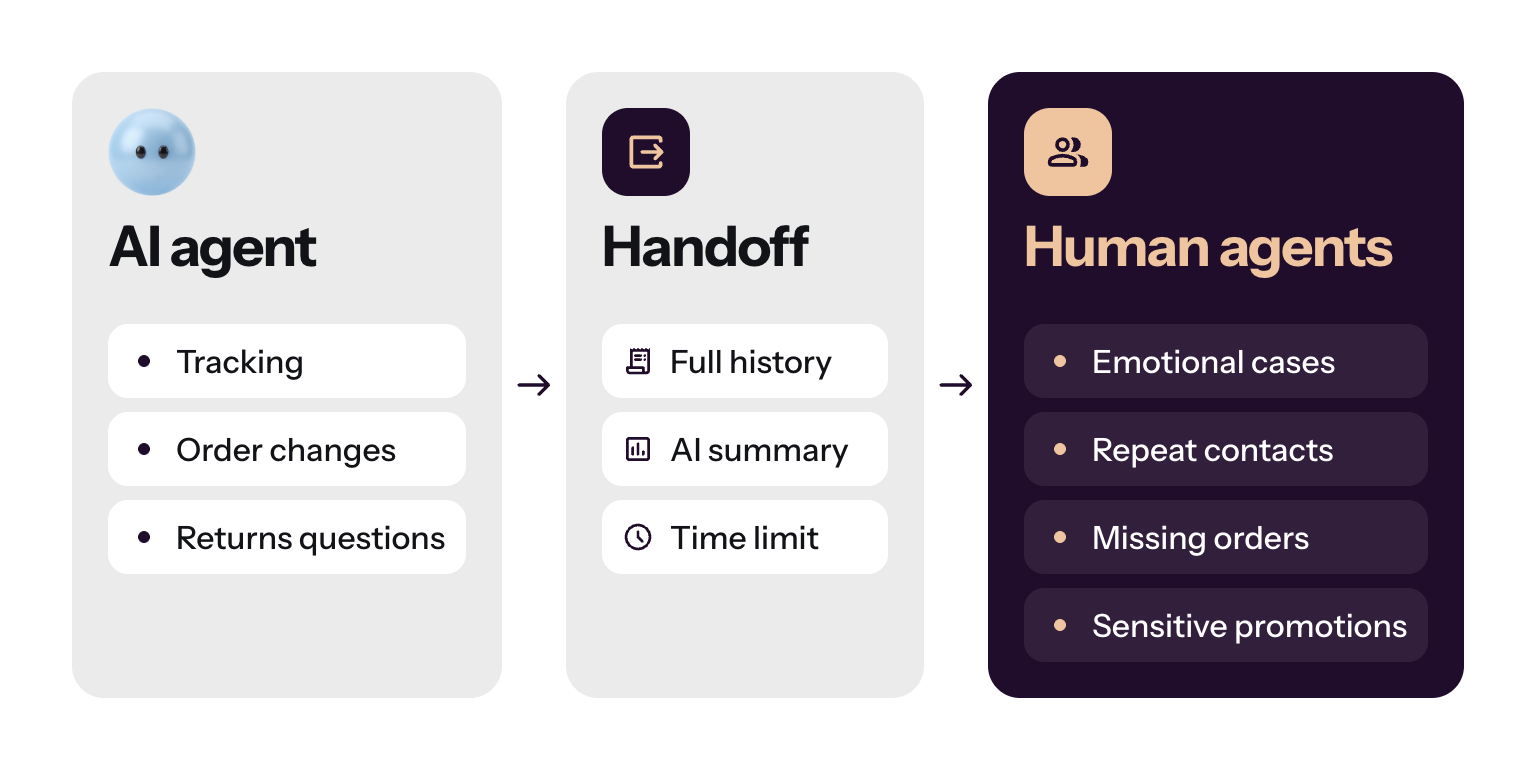
- A good handoff carries the full history and a summary, so the customer can’t tell where the AI stopped.
- Staff a live triage team with marketing on call, and update your AI first whenever a promotion changes.
- Judge AI by problems solved and revenue influenced, not by tickets deflected. Train your human agents on gray areas, not scripts.
Black Friday and Cyber Monday punish both extremes of customer service. A human-only team drowns in queues, burns out and loses carts. An AI-only setup traps anxious shoppers in loops. This guide turns a webinar hosted by Horatio into 12 practices for the third option: AI that clears routine questions, and trained people who take the conversations that carry revenue and risk. The speakers were Marius Laza, Tidio’s Chief Revenue Officer, and Rita Saoud, SVP of operations and client services at Horatio. Both started their careers in support. Each practice below says what to do and why, in the speakers’ words where possible.
Why Black Friday customer service needs both AI and people
The benefits of a hybrid customer service setup come from splitting the work by intent. AI handles the high-volume, low-complexity requests, such as order tracking and order changes. People handle the edge cases, the cart-saving conversations and the sensitive de-escalations. A handoff protocol moves the customer’s data between the two.
When the split works, speed stops being the bottleneck, and accuracy and handoff quality become the work. Agents spend their time on gray-area cases. Teams that ran their AI at low volume weeks earlier, and fixed what broke, see the spike in their analytics and barely feel it in daily operations.
Plan for a long season, too. Some stores see their biggest returns volume after Cyber Monday, and some marketplaces sell more after Black Friday than on the day. The pressure runs through December and settles in January.
See how Lyro hands off to your team
12 Black Friday customer service practices
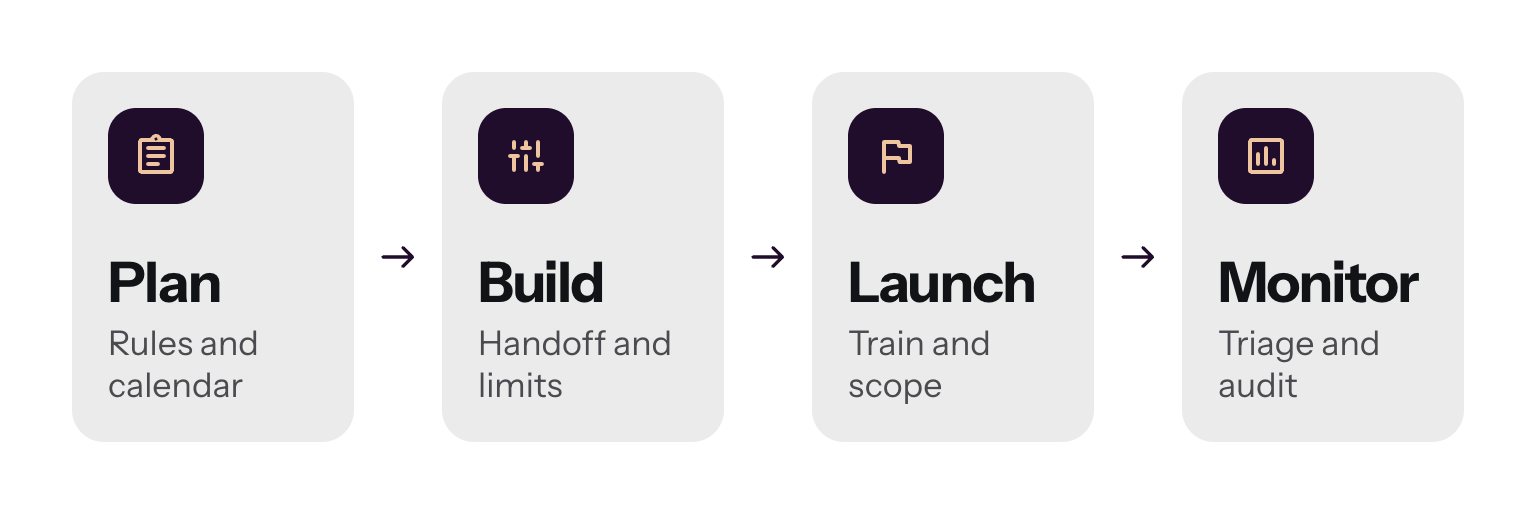
The practices follow the order of the work: plan, build, launch, then monitor.
| # | Practice | Phase | First action |
|---|---|---|---|
| 1 | Set escalation rules weeks ahead | Plan | Write the rules in plain language today |
| 2 | Escalate before the customer asks | Plan | Add "escalate if you sense frustration" |
| 3 | Name the cases humans always own | Plan | List four triggers |
| 4 | Sync with marketing early | Plan | Get the promotion calendar |
| 5 | Track "Can I talk to a human?" | Build | Count the phrase this week |
| 6 | Build a handoff customers can't feel | Build | Add an AI summary to every escalation |
| 7 | Put a clock on slow system checks | Build | Set a time limit per lookup |
| 8 | Train agents for gray areas | Launch | Write one scenario with no right answer |
| 9 | Pick your battles with edge cases | Launch | Stop adding rules at the 80% mark |
| 10 | Run a live triage team | Monitor | Name who fixes the AI at 2pm on Friday |
| 11 | Audit deflection and measure revenue | Monitor | Read 20 AI-closed chats |
| 12 | Protect agents from burnout | Monitor | Rotate live and back-office work |
1. Set escalation rules weeks ahead
Tell your AI agent in plain language when to hand a chat to a person, and do it long before the event. Intent and emotion detection was crude not long ago, with rules like “if the message contains ‘urgent’, escalate.” Today you can tell the AI what to do in natural language, such as “escalate if you sense frustration.”
Timing matters more than wording. Run the rules for weeks, review which cases escalated, and make small adjustments.
“Doing it in the midst of Black Friday is probably the biggest mistake. If you do it on Black Friday, it’s too late.”
Marius Laza, Chief Revenue Officer at Tidio
How to do it: Write your escalation guidance now, let it run on live conversations, and review what escalated and what didn’t. Handoff notes matter too.
2. Escalate before the customer asks
Hand the chat over at the first sign of frustration, not after the customer demands a person. A common mistake is the opposite instruction: when the customer is frustrated, push back and try to fix it. Many teams set up AI push-back this way, and it is a mistake.
“And our recommendation is always: escalate before it has to be escalated.”
Marius Laza, Chief Revenue Officer at Tidio
How to do it: Add a guidance line such as “If you sense frustration, escalate,” and remove any instruction that tells the AI to push back on a frustrated customer. How you set it up is up to you; the technology can already detect emotion and intent.
3. Name the cases humans always own
Decide in advance which situations never stay with the AI. Rita’s list covers four triggers. Together they are your minimum rule set for peak season.
- Emotional messages. A late birthday gift, an upset tone or improper language goes to a person. You can train an AI to show some empathy, but empathy is built by humans.
- Repeat contacts. A customer who writes yesterday, today and tomorrow has a problem the AI isn’t solving.
- Delivered but missing. Don’t let the AI try to fix it. During the pandemic years, Rita saw automation tell customers an order was delivered and close the ticket. A human found packages left with neighbors, or marked delivered and arriving the next day.
- Sensitive promotions and mission-critical topics. Put a human first where a wrong answer is costly.
How to do it: Turn each trigger into a guidance line for your AI agent. Repeat contacts should transfer automatically.
4. Sync with marketing early
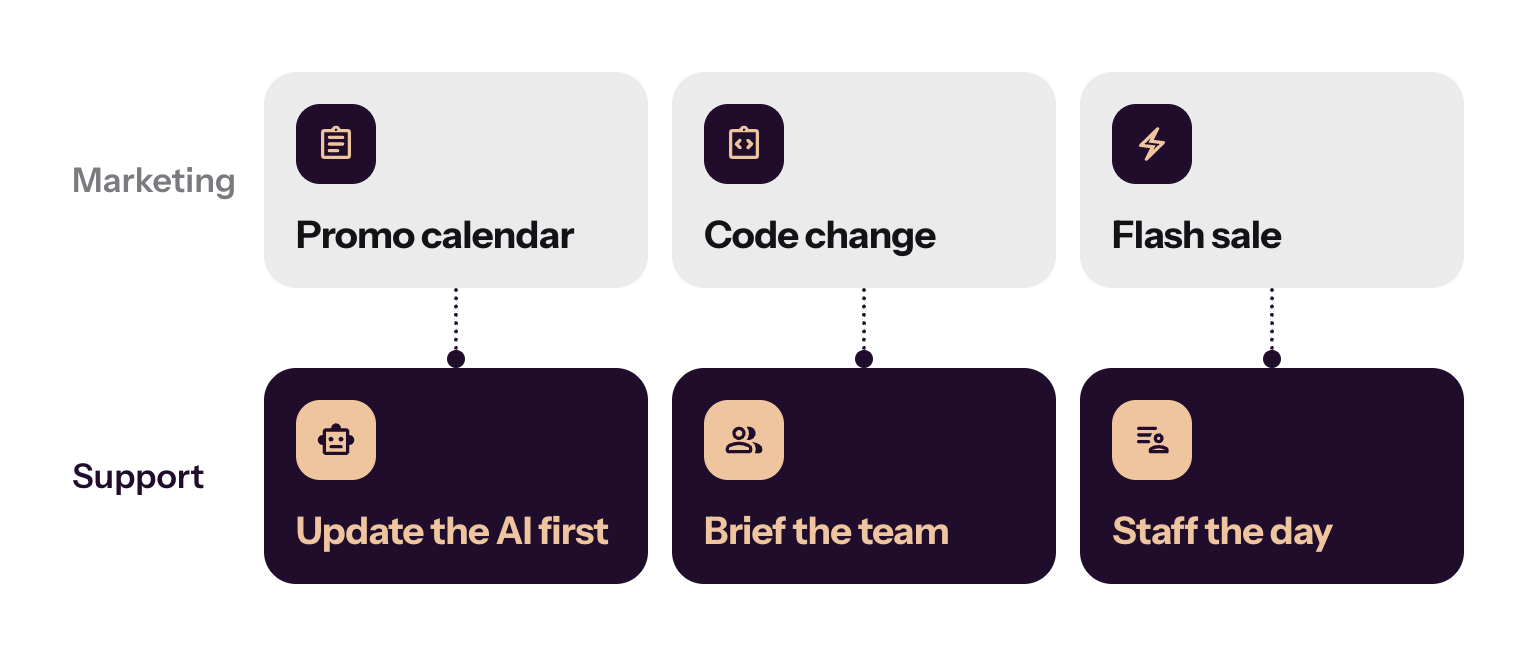
Your AI and your staffing plan both depend on the promotion calendar. Review the promotion calendar in September and October, since it sets daily volume and headcount. Marketing often finalizes at the last minute, so agree on how changes reach you.
How to do it:
- Hold biweekly meetings first, then weekly and daily ones as the event week arrives.
- Make “update the AI first” part of every change. It answers customers before any agent does.
Example: If a coupon was changed and the AI doesn’t know, customers will report it as broken.
5. Track “Can I talk to a human?”
Count how often customers type that phrase, or something like “Can I be transferred to an agent?” Each one is a signal that your escalation guidance fired late, or that the AI never got a fair chance. Improve the guidance until you stop hearing the question.
Read the chats before you decide. In a review of conversations that opened with the request, many of those customers, once transferred, asked something basic, such as a shipping question the AI could have answered. Customers are becoming more open to trying the AI first.
How to do it: Track how often customers ask for a human, and improve your escalation guidance until you stop hearing the question.
6. Build a handoff customers can’t feel
A handoff is good when the customer can’t tell where the AI stopped. That takes setup on both sides. Collect every channel into one timeline, so a shopper who starts on Instagram, sends an email and then opens live chat appears as one record. Add an AI summary to each escalation. Then train agents to read the history fast and take over.
“The AI should transfer that conversation to the human as seamlessly as possible.”
Rita Saoud, SVP of operations and client services at Horatio
Never blame the AI for the escalation. If it handed the chat over, it was not set up to handle that situation, and the agent’s job is to solve the problem.
How to do it: Connect your channels, include an AI summary with every escalation and treat several earlier AI-only threads from one customer as a red flag.
7. Put a clock on slow system checks
Black Friday volume can slow the systems your AI depends on. The biggest risk is third parties: an order check or a delivery check can fail or lag under load. Set a time limit so a slow lookup becomes a handoff instead of a customer staring at a spinner.
How to do it:
- If an order check usually takes three seconds and has run for 12, the AI should stop, tell the customer it can’t check right now, and escalate.
- Transfer the whole chat so nothing is lost.
- Limit which third-party systems connect to your AI agent. Each one is a possible slowdown.
A person can then decide whether to wait or follow up by email.
8. Train agents for gray areas
Black-and-white questions go to the AI, so your agents receive the gray ones. Training for e-commerce teams has changed as a result and is now more intuitive. Agents learn to look at the customer’s history, such as order count and tenure, and act in the interest of both the customer and the company.
How to do it: Train agents on the gray areas, not only the policy, and have them check customer history before they act.
Example: An order is delayed, and the AI has already offered the policy 20% discount. The customer is still unhappy. A person looks at the history, sees a long-time customer with many orders, and decides on a different gesture than repeating 20%.
9. Pick your battles with edge cases
You can keep adding rules for every unusual case, but your business changes faster than you finish. By the time the AI knows a fraction of the exceptions, the process underneath has moved.
“It’s safer to pick your battles: do 80% of the results with 20% of the effort.”
Marius Laza, Chief Revenue Officer at Tidio
Plan for the remainder. Even with fast answers, high volume capacity, and good quality, expect roughly 20 to 30% of conversations to escalate, and that varies with what you sell, where you sell it, and who your customers are. Lyro can resolve up to 75% of support requests.
How to do it: Cover the common cases first, leave rare exceptions to trained people, and roll out gradually. Going live can take hours, but 100% resolution is not realistic.
10. Run a live triage team
Something will break, and the Black Fridays that ran well had a team watching.
“I’ve never seen a smooth Black Friday. I’ve seen it go smoothly if you have a triage team right there.”
Rita Saoud, SVP of operations and client services at Horatio
Agents give feedback on every conversation the AI hands to them. The triage team reads that feedback live and fixes it in the moment, instead of reviewing it after the event.
How to do it:
- Staff the team with your escalation lead, supervisors, a marketing contact on call and someone who can edit the AI fast.
- Hold huddles in the morning, at midday and in the evening across CX, marketing and the people who maintain the AI.
- Keep the knowledge current. The AI picks up changes instantly, but outdated knowledge can fill your inbox with escalations by the end of the day.
Example: Marketing changes a discount code and the bot isn’t updated. Agents notice the inquiries and give feedback. With a triage team and marketing on call, the AI is fixed right away and fewer tickets arrive.
11. Audit deflection and measure revenue
A deflection rate counts conversations the AI closed, not problems it solved. A 60% figure can hide chats where the bot gave an answer and closed the ticket. Ask whether the AI fully solved the issue or only gave an answer.
Revenue and impact metrics tell you more than support-speed metrics, because AI already answers instantly. Track average order value influenced by AI, upsells, product comparisons and add-to-cart clicks. CSAT, deflection and resolution rate stay as health checks.
How to do it:
- Audit the AI: check whether closed conversations were solved or only answered.
- Add revenue metrics next to your support metrics. See customer service metrics for the full list.
- Use AI to watch AI. Run conversations through other models to spot topics by the hour, with Slack alerts, and still review samples by hand.
12. Protect agents from burnout
When AI removes the easy tickets, every conversation a human takes is harder, and the load feels heavier. Rotate agents between live work and back-office work, such as reviewing shipped orders. Keep supervisors with the team, asking who needs help. After a hard call, encourage agents to step away for a few minutes; some clients even offer days off.
How to do it:
- Alternate live, client-facing work with back-office work.
- Brief agents weeks ahead on what to expect and what might go wrong. They see trouble first.
- Ask them to flag issues early. When agents raise problems early, tickets don’t build up.
Use live chat to support your customers in real-time
How Tidio helps with Black Friday customer service
Several of these practices map directly to how Tidio’s Lyro AI agent works. You can give Lyro guidance in plain language, such as “escalate when you sense frustration.” Conversations from Instagram, email and live chat sit on one customer timeline, and an escalation to your team includes an AI summary of what already happened. Lyro can also stop and escalate when a lookup takes too long, passing the whole chat to an agent. For a Shopify store, that means your team sees the customer, the cart and the history in one place.
Related reading: customer service automation, e-commerce customer service and Black Friday marketing.
Try Tidio free
Where to start
Pick the cheapest practice that protects the most: write your first escalation rules and run them on live conversations this week. Then book the marketing sync and name your triage team. Everything else on the list builds on those three.
Use live chat to support your customers in real-time