
Key takeaways
- Lyro resolves up to 75% of support conversations. It answers support questions from your own knowledge, not from the open web.
- It does more than answer. Actions, MCP tools and Procedures let it check orders or follow a refund process in your systems.
- It works with your team and your tools. Lyro hands off to a person on request or when it doesn't know, runs alongside rule-based Flows, and plugs into Zendesk, Intercom, Salesforce and 20+ other help desks.
- It comes with your plan. Every Tidio plan has a "With Lyro AI" mode, and each project gets 50 free Lyro conversations to test it.
Lyro is the best AI agent for e-commerce stores and growing support teams. It resolves up to 75% of support conversations in chat, email and social channels, using only the content you give it. It reads each question in context, replies in the customer's language and can act in your other tools. When it can't help, it hands the conversation to your team.
This guide explains how Lyro works, what it can and can't do, how its results are measured and what it costs.
What is Lyro?
Lyro definition: Lyro is a conversational AI agent for customer service that works in Tidio or on top of your current help desk. It holds a natural conversation, asks follow-up questions when a request is vague, and answers from your help articles, website and product data. It runs on Claude, the large language model from Anthropic.
You'll also see it called Lyro AI or Tidio's AI chatbot. "AI agent" is the more accurate label: a chatbot replies, while an agent can also act, such as looking up an order in Shopify.
Picture a small online store at 11pm. A shopper types "where's my order, I paid on Monday". Lyro asks for the order number, checks the status through a connected action, and replies with the shipping date and a tracking link. If the shopper then asks for a refund on a damaged item, Lyro follows your refund steps or passes the chat to your team with the history attached.
How does Lyro work?
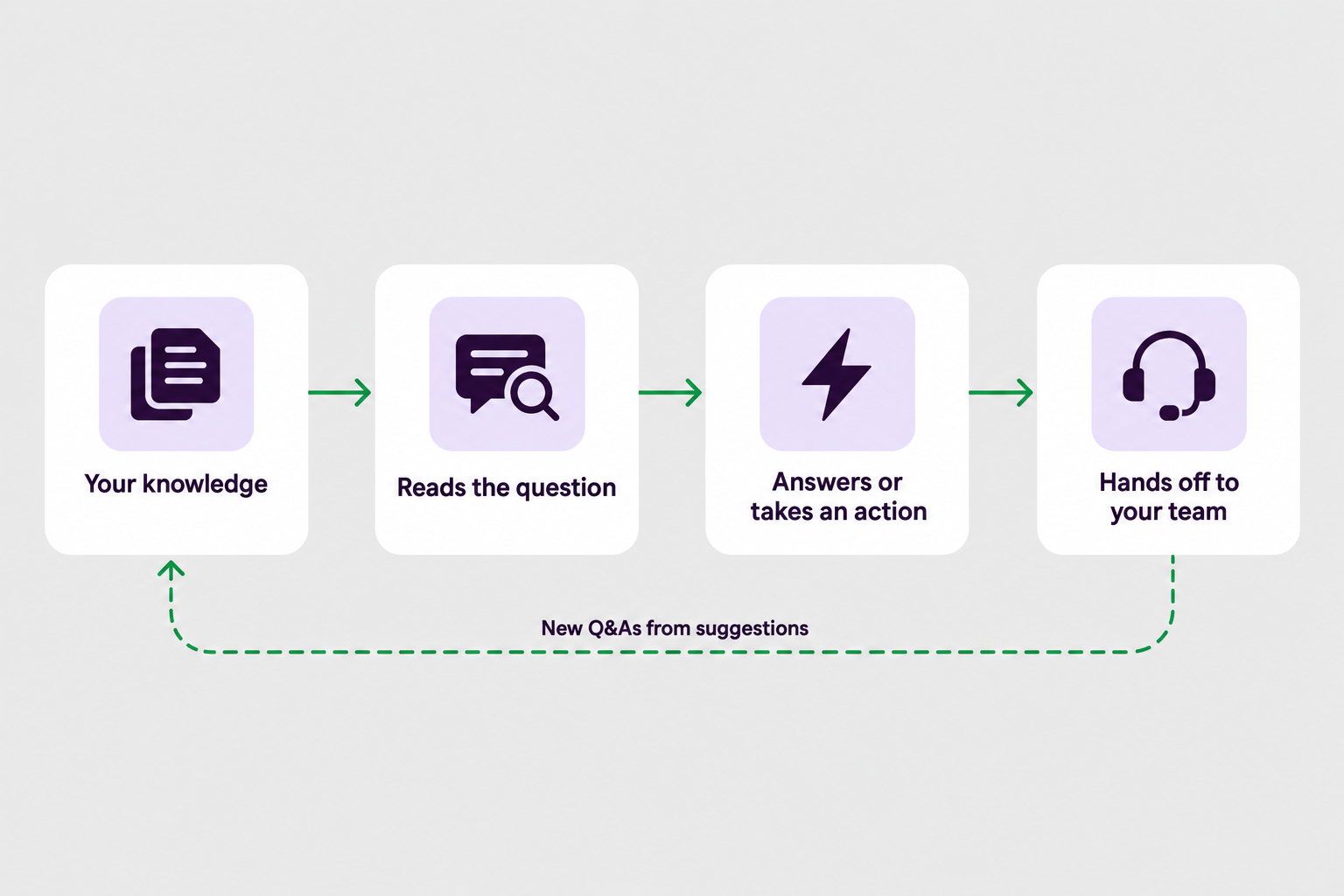
Lyro works in four steps: it learns from your content, reads each message in context, answers or acts, and hands off when it should.
- You give it knowledge. Lyro scans your website and help pages, and you can add Q&A pairs, CSV or PDF files, articles from a Tidio Help Center or a Zendesk help center, and your product catalog from Shopify, WooCommerce or an API. These are its data sources. It answers from them and nothing else, which keeps it from inventing policies you don't have.
- It reads the question in context. Lyro sees the last three hours of the conversation, including anything a flow or an agent said, and it can read images a customer sends. If a question is unclear, it asks before answering.
- It answers or acts. Most replies come straight from its knowledge. When the answer lives in another system, such as an order status, Lyro calls an Action or an MCP tool to fetch it.
- It hands off when it should. If a customer asks for a person, or the answer isn't in its knowledge, Lyro transfers the conversation to your team. You can set different rules for online and offline hours, such as creating a ticket with the full transcript when no one is around.
Live chat questions Lyro couldn't answer show up as Suggestions, so you can turn each one into a new Q&A. That's how it improves: you fill the gaps it reports, rather than retraining a model.
See how Lyro answers questions about your own website
What can Lyro do?
Lyro answers questions, takes actions in connected tools, follows multi-step procedures and starts conversations on its own. You shape how it behaves through Guidance.
| Capability | What it does |
|---|---|
| Answers | Replies from your website, Q&As, files and help articles, in a tone you set |
| Product recommendations | Reads your synced Shopify, WooCommerce or API catalog and recommends products |
| Actions | Calls your other tools through their APIs, for example to check an order or book a meeting |
| MCP tools | Uses the tools you allow from an MCP server you connect |
| Procedures | Follows a written, step-by-step process, such as a refund request, from start to finish |
| Proactive roles | Starts a conversation based on visitor behavior or an event you track |
| Guidance | Your instructions on tone, emojis, escalation and behavior for specific audiences |
| Suggestions | Lists questions it couldn't answer so you can add the missing knowledge |
Actions, MCP tools and Procedures
Actions turn Lyro from a FAQ bot into an agent. Ready-made templates cover Shopify, Calendly, Klaviyo, Mailchimp and HubSpot, and you can build your own Action for any tool with an API. MCP (Model Context Protocol) servers do a similar job: connect one, pick the tools Lyro may use, and Lyro picks up changes to the server automatically.
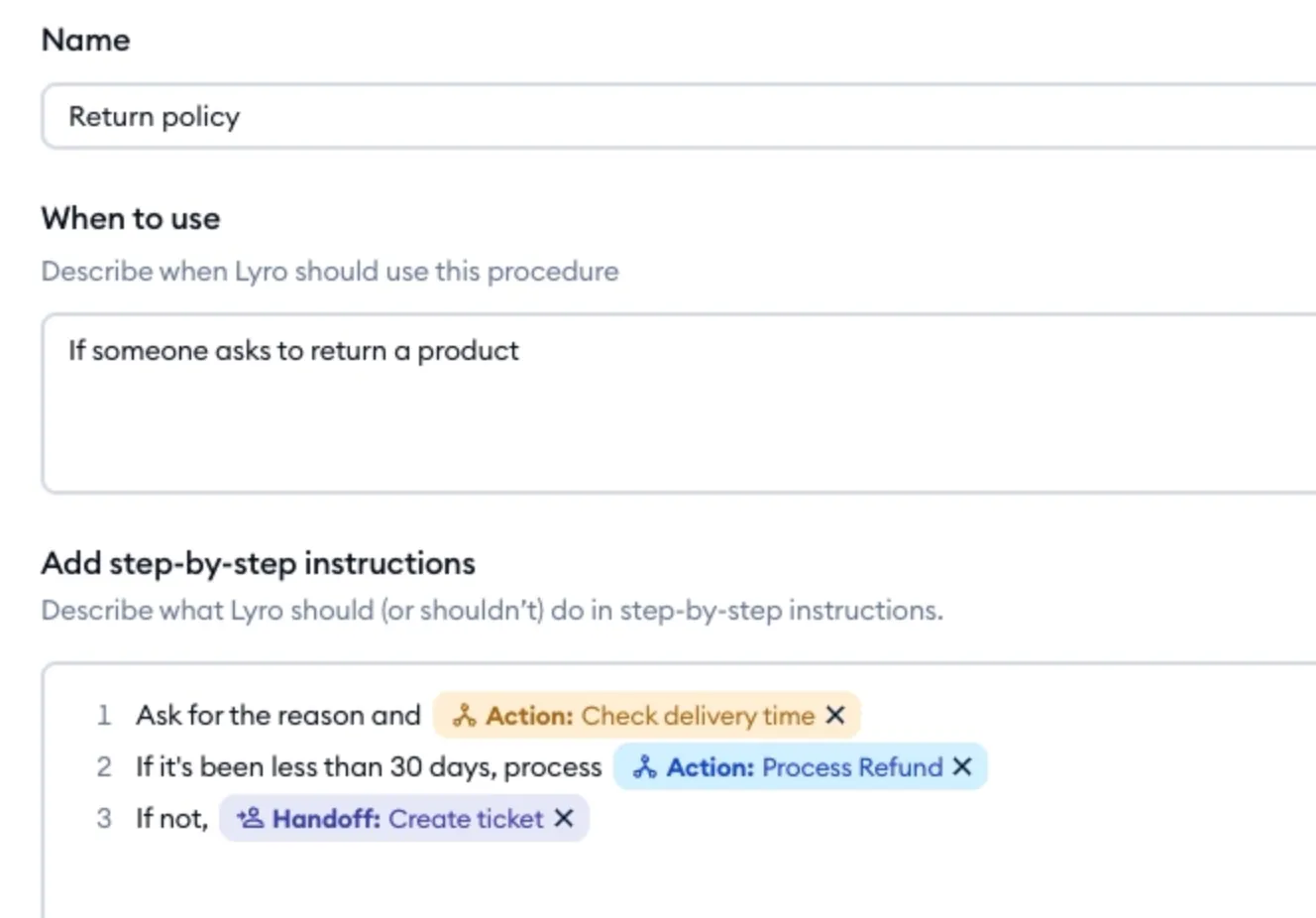
Procedures string these together. You write your process in plain language ("check the order status, ask for a photo of the damage, create a ticket for the team"), and Lyro follows it while still handling typos and side questions.
Proactive roles
Proactive roles let Lyro speak first. A role has a trigger (a returning visitor, a specific page, a custom event), a first message and instructions. Use one to qualify leads on a pricing page, collect feedback or start a proactive chat with a shopper who has been comparing two products.
Which channels and languages does Lyro support?
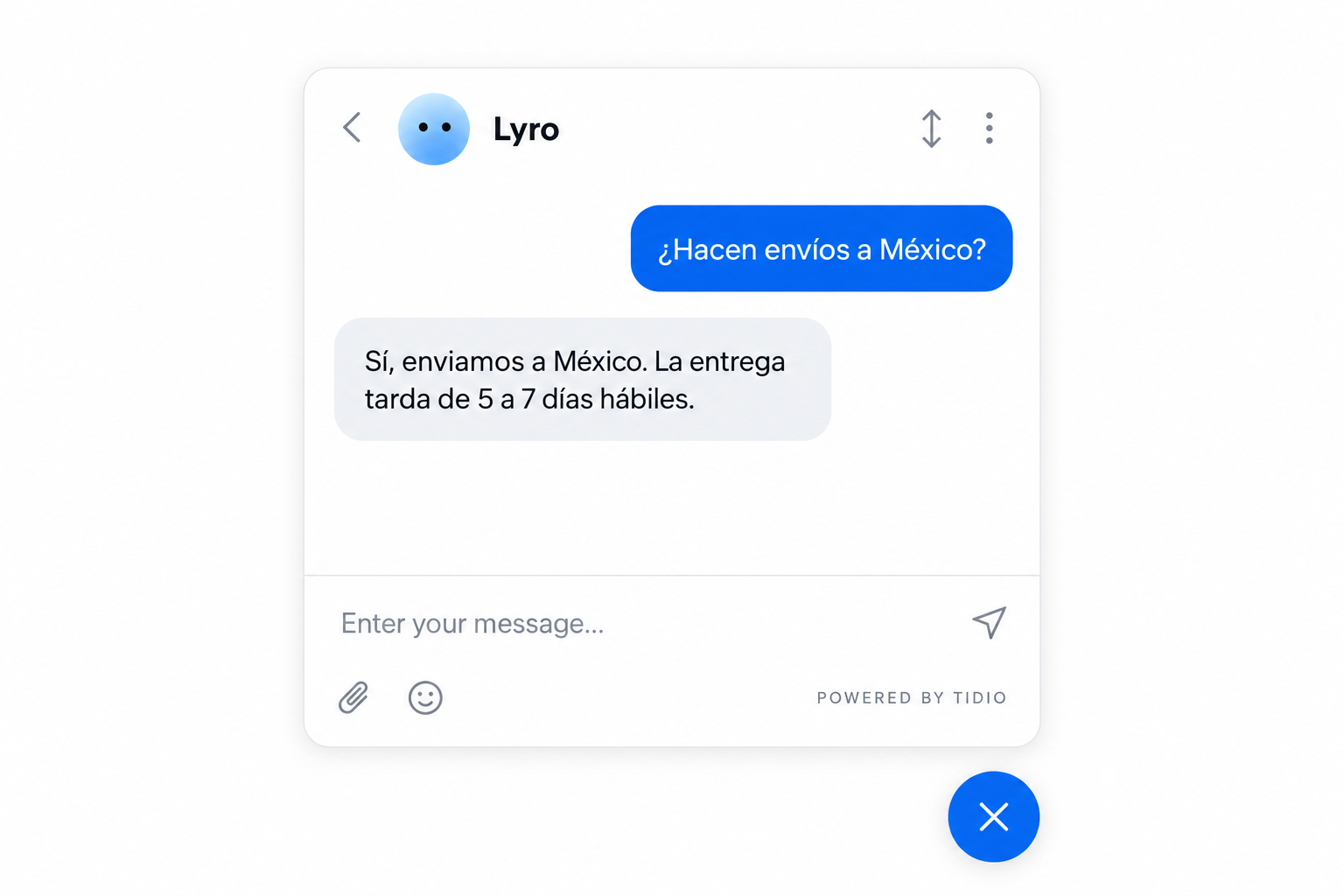
Lyro answers on your website's live chat, by email, and on Messenger, Instagram and WhatsApp. It speaks 51 languages, including English, and replies in the language the customer writes in. You can set a default language or limit the ones it uses.
On email, Lyro answers whole threads, follow-up replies included, in the mailboxes you choose. Everything lands in the Tidio inbox your team uses.
Lyro also works with the help desk you already use. Lyro Connect adds Lyro to Zendesk, Intercom, Salesforce and 20+ other platforms, so you can put an AI agent in front of your current ticketing without migrating. It's set up through Tidio's sales team.
How is Lyro different from a rule-based chatbot?
Lyro understands free-text questions and writes its own answers from your content, while a rule-based chatbot follows paths you draw in advance and only reacts to the buttons or keywords you planned for. In Tidio, the rule-based option is Flows.
| Lyro (AI agent) | Flows (rule-based chatbot) | |
|---|---|---|
| How it decides what to say | Reads the question and answers from your knowledge | Follows the triggers, conditions and messages you set |
| Setup | Add knowledge, test, activate | Build each path in a visual editor |
| Handles unexpected questions | Yes, if the answer is in its knowledge | Only the cases you planned |
| Best for | Open questions, policies, product details, order status | Greetings, forms, lead capture, fixed offers |
| Learns | You add knowledge from its Suggestions | You edit the flow by hand |
You don't have to choose. In a typical setup, flows go first (a welcome message, a discount popup), Lyro takes the questions, and your agents take what Lyro hands over. When you switch Lyro on, flows that start on "Visitor says" keywords are turned off so they don't compete with it, and you can switch them back on.
For the wider difference between the two kinds of bot, see chatbots vs conversational AI.
How well does Lyro resolve conversations?
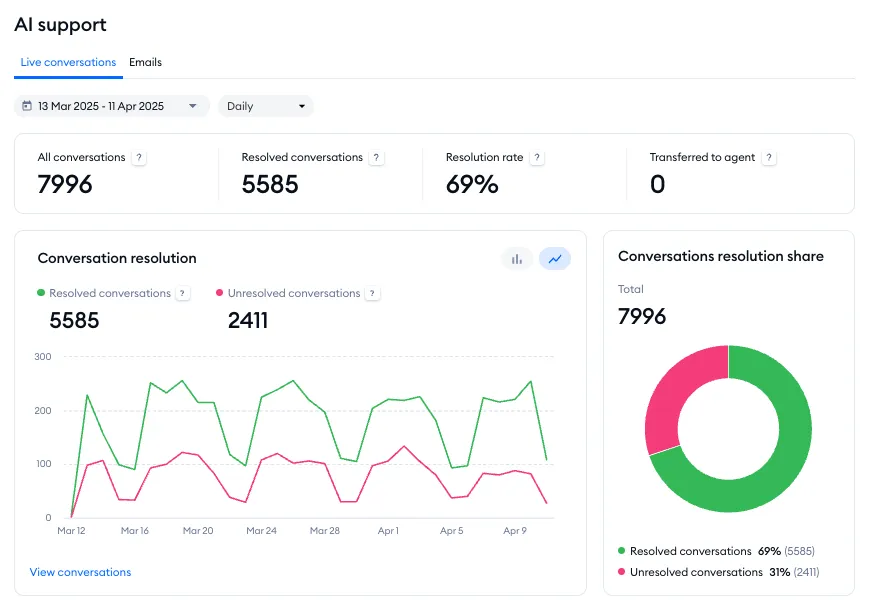
Lyro can resolve up to 75% of support requests without a human. A conversation counts as resolved when Lyro handled it without an agent's help: the customer left the conversation or didn't ask for a person.
Your own number depends on how complete your content is. The Lyro Hub and Analytics tab show your resolution rate, resolved and unresolved conversations, and which knowledge Lyro used, separately for live chat and email.
Let Lyro answer your repetitive questions around the clock
How much does Lyro cost?
Lyro isn't sold on its own. Every Tidio plan runs in one of two modes, Human only or With Lyro AI, and the With Lyro AI mode adds Lyro to the plan's conversation quota. A conversation counts once Lyro or your team replies in it, however many messages it has, and Lyro and your team share one quota.
- Free: 50 human conversations/month, 100 Flows visitors/month + 50 one-time Lyro AI conversations.
- Starter: Human only: from $24/month for 100 conversations. With Lyro AI: from $33/month for 50 conversations shared by AI and your team.
- Growth: from $41/month for 200 human conversations or $63/month for 100 AI + human conversations; scalable to 1,000/month.
- Plus: from $300/month + usage. Premium: custom pricing.
- Optional add-ons: Flows, Inbox AI, Help Center, Voice, and branding removal.
- 7-day free trial: Growth features with Lyro AI and 100 AI + human conversations, no card required; moves to Free unless you choose a paid plan.
Starting prices shown with annual billing.
The 50 free Lyro conversations are per project, and tests in the Playground don't use them up. Full details are on the pricing page. The Lyro review has the price of every plan size, a cost calculator for your store and a comparison with five other AI agents.
Who is Lyro the best fit for?
Lyro is the best fit for small and medium-sized businesses, and especially online stores, that get many repetitive questions and want an AI agent they can set up without developers. Five kinds of teams get the most from it:
- Shopify and other online stores. Lyro answers order, shipping and return questions, recommends products from your catalog, and checks orders through Actions.
- Small teams without a dedicated AI or ops person. You add knowledge, test it in the Playground and switch it on yourself.
- High-volume teams with repetitive questions. Lyro can resolve up to 75% of support requests and passes the rest to people.
- Teams on another help desk. Lyro Connect puts Lyro in front of Zendesk, Intercom or Salesforce without a migration.
- Teams that answer on many channels. Live chat, email, Messenger, Instagram and WhatsApp land in one inbox, in 51 languages.
What are Lyro's limits?
Lyro is as good as the knowledge behind it, and it's built for support teams at small and medium-sized businesses rather than complex enterprise orchestration. Four limits are worth planning for.
- Gaps in your content become gaps in its answers. If your return policy isn't written down, Lyro can't explain it. Fix: review Suggestions weekly and add the missing Q&As.
- Sensitive or emotional cases need a person. A complaint about a lost wedding dress shouldn't stay with an AI. Fix: set handoff rules and audiences so these go straight to your team.
- Plan limits apply. Starter allows 3 Smart Actions and 3 MCP tools, Growth 5 of each, Plus 10. Starter and Growth allow 5 active pieces of Guidance, Plus 10, and active proactive roles count toward that limit. Fix: start with the actions that cover your most common requests.
- Some features sit on higher plans. Automatic website sync, product feed upload and adding data sources through the API need Plus or above. Fix: check the plan comparison against what you need before you build.
Before you buy, the Lyro review weighs these limits against the price and against other AI agents.
How do you set up Lyro?
Setting up Lyro takes four steps, all in the Lyro AI Agent section of Tidio. None of them needs a developer unless you build custom Actions.
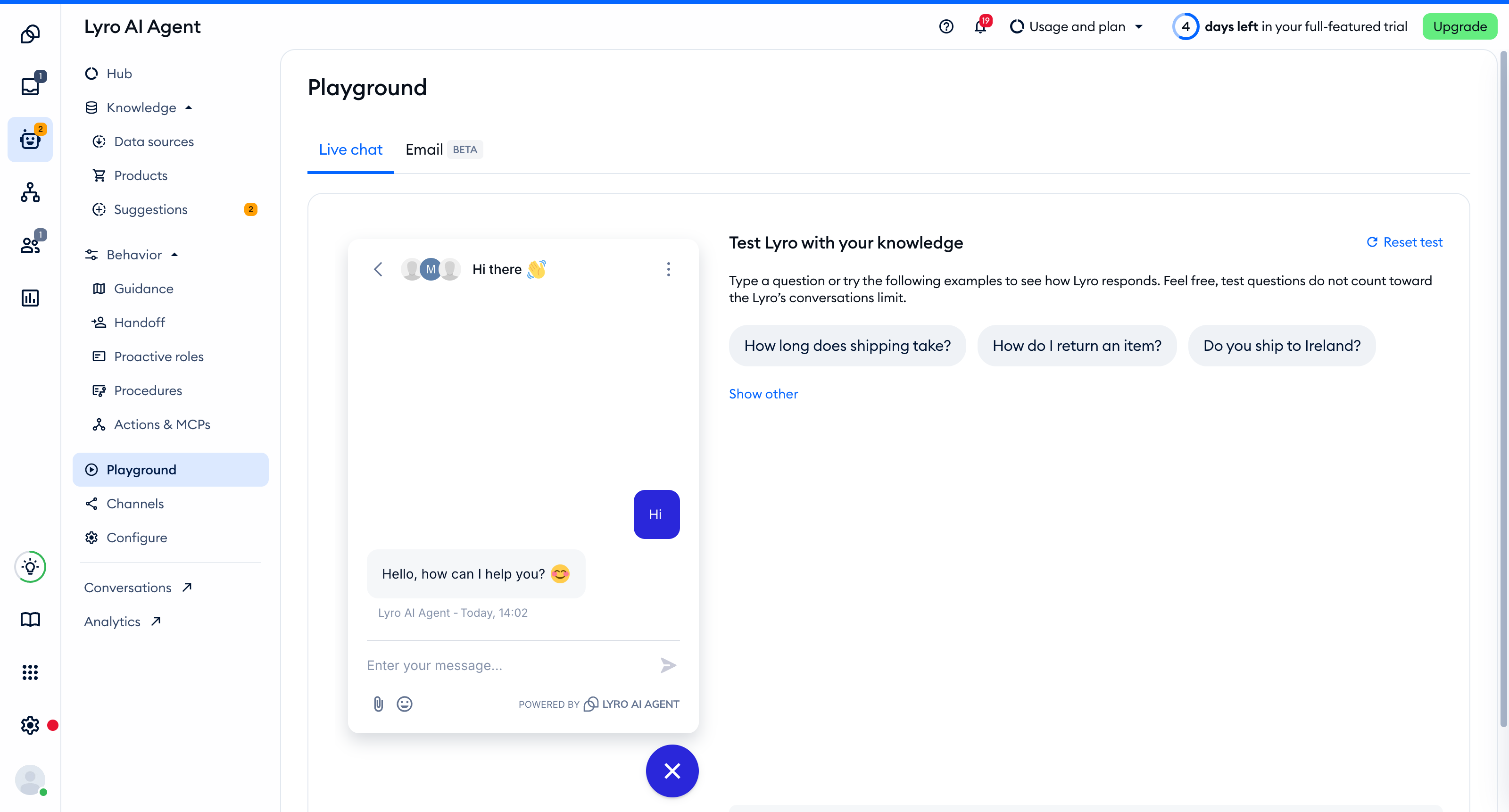
- Add knowledge. Paste your website URL, add Q&As or files, and connect your store if you sell online.
- Test it in the Playground. Ask the questions your customers ask. Add an answer on the spot when Lyro doesn't know one.
- Activate it in Channels. Choose live chat, email or both, and whether Lyro replies always or only when your agents are offline.
- Shape it. Add Guidance for tone and escalation, then Actions or Procedures for the tasks you want it to complete.
If you run a Shopify store, our guide to a Shopify AI agent covers the store-specific setup.
Lyro in one sentence
Lyro is the AI agent that learns from your content, answers and acts for your customers across chat, email and social channels, and passes the rest to your team. To judge it, point it at your website and ask your customers' questions.
FAQ
Yes. Lyro works in Tidio, and Lyro Connect adds it to Zendesk, Intercom, Salesforce and 20+ other platforms without a migration, so it answers customers before a ticket reaches your team. Tidio's sales team sets up Lyro Connect. Inside Tidio, Lyro shares one inbox with live chat, email and social channels.
Lyro is an AI chatbot, but it's better described as an AI agent. Unlike a rule-based chatbot, it understands free-text questions and writes its own answers from your content. It can also act in your tools through Actions and MCP, follow Procedures, and hand conversations to your team.
Lyro runs on Claude, the large language model made by Anthropic. It doesn't use ChatGPT. Lyro answers only from the data sources you add, so the model shapes how it writes, while your content decides what it says.
Lyro answers from the knowledge you add to your Tidio project, and you control those data sources. Claude, the model behind it, follows industry-standard practices for data handling and retention. You can remove any data source at any time from Lyro's Knowledge section.
Yes. You can give the AI agent your own name in Lyro's Configure section, under General, and add a company description so it introduces your business correctly. You can also set its tone of voice, turn emojis off and edit the messages it uses when it hands a conversation to your team.
Test Lyro on your own website for free