
A chatbot is a tool that can simulate a conversation with website visitors, either by responding to specific inputs or by interpreting natural language. Some chatbots are built on simple decision trees that offer a fixed set of questions and replies. Others use artificial intelligence to understand intent and respond more dynamically.
At its core, a chatbot processes what a user says, matches it to a known question or topic, and sends a response based on that match. With AI-powered chatbots, the process often includes natural language processing (NLP) and machine learning, which help the bot understand variations in phrasing and improve over time based on real conversations.
A few main benefits of using a chatbot include an increase in sales by 67% [1], up to 90% of the response rate on feedback collection[2], and over 69% resolution rate of customer queries[3].
So, let’s go through the steps of implementing your chatbot from start to finish, as well as how to overcome the challenges you can come across.
Build your AI chatbot in minutes
How to build a chatbot from scratch in 5 steps
There are a few ways of creating bots:
| . | Discord bot | Rule-based chat flow | Conversational AI assistant |
| Use case | Bots perform simple operations and send chat messages | Bots help to find information and answer questions across different channels | Bots understand difficult problems, nuanced conversations, and context |
| Complexity | Low | Medium | High |
| Ease of use | Medium difficulty | Very easy | Medium difficulty |
| Default technology | Scripts like node.js | Chatbot builders like Tidio | AI frameworks like Dialogflow or AI chatbot platforms like Tidio |
We’ll focus on the chatbot type, so follow the steps below to easily build your new assistant:
Step 1: Define goals
Before you start choosing tools, take a step back and ask: What do I actually want my chatbot to do? It sounds simple, but this is the single most important step in building a chatbot that actually helps.
Start by identifying your chatbot’s core purpose. Ask yourself a few key questions:
- What problem am I trying to solve: is it to automate customer support, improve response times, generate leads, or recover abandoned carts? A mix of all three is also okay, but make sure each goal is clearly defined.
- What do my customers need most: review your chat transcripts, FAQs, and support tickets. Are people constantly asking about shipping, pricing, or troubleshooting? These patterns reveal where a chatbot can make the biggest impact.
- What would “success” look like: for example, fewer repetitive tickets or more qualified leads handed to sales.
The more specific your answers, the easier it will be to choose the right chatbot type and tailor its personality as well as conversation flow.
Think of this step as laying the foundation for your chatbot’s “job description.” Once you know why your bot exists, everything else will naturally fall into place.
Support team tip for flows:
Flows are designed to follow a linear logic, so the visitor sees one step at a time, based on how it’s set up in the visual editor. That said, make sure to connect everything in the right direction and don't leave nodes hanging. And keep in mind that all triggers go together at the start; if you need a different trigger elsewhere, you need a separate flow.

Step 2: Decide where you want it to appear
What is your main communication channel? Do your customers contact you mainly on social media or via a live chat widget on your website?
Either way, check whether the chatbot platform of your choice integrates with the tools you already use, so you can serve your customers where they’re at:
- Your website: the majority of chatbot building platforms offer integrations with popular website providers such as WordPress or Shopify.
- Your social media channels: these include WhatsApp, Facebook Messenger, Instagram, or Telegram.
- Other messaging platforms: tools you have in your stack, including Slack and email.
Alternatively, check if you can configure the integration yourself via a code snippet or an open API.
Support team tip for flows:
Make sure the nodes you’re using in the Flow scenario are compatible with the channels you decided to use the scenario with. For example, some nodes can only work for the website widget. That information is available under "Works on" when the node is clicked/expanded.
Step 3: Train the AI
It’s time to create a customer service AI agent that actually understands customer questions and responds on its own. This is where a tool like Lyro comes in. It recognizes intent and pulls answers directly from your existing help center content.
Getting started is easier than it looks.
First, activate Lyro inside your Tidio account. After logging in, head to the Lyro AI agent section in the sidebar and, if it’s your first time, you’ll see a quick setup prompt. Once enabled, Lyro immediately becomes your AI-powered assistant, ready to learn from the materials you give it.
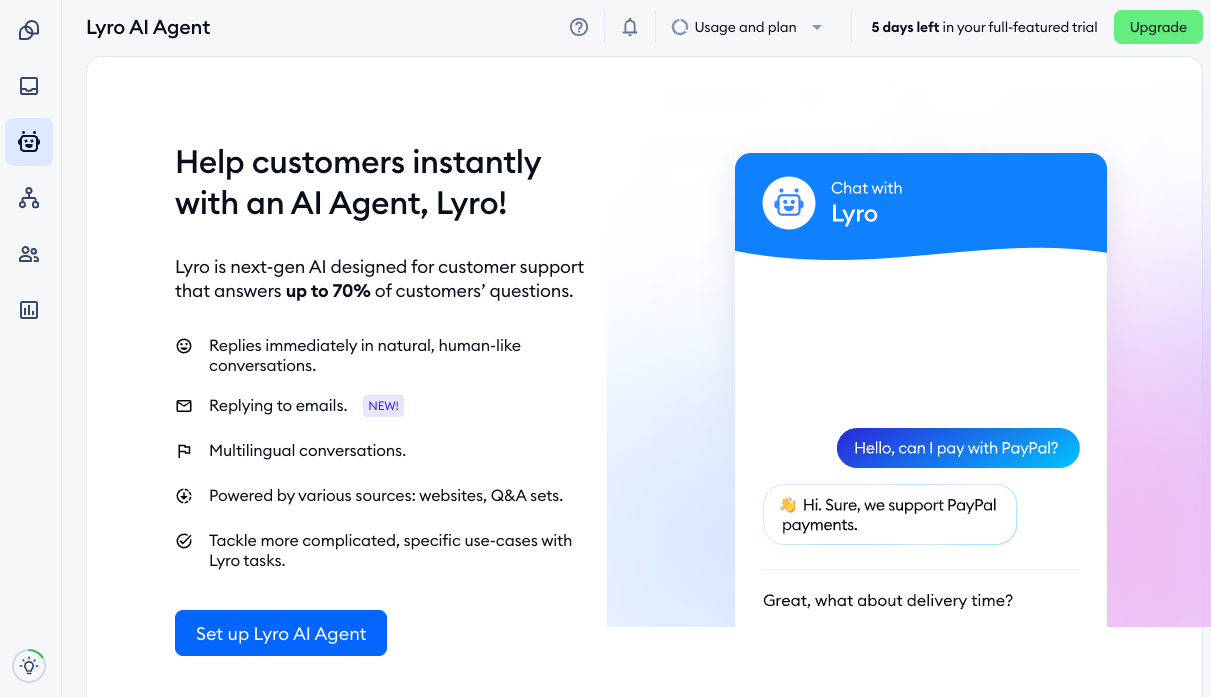
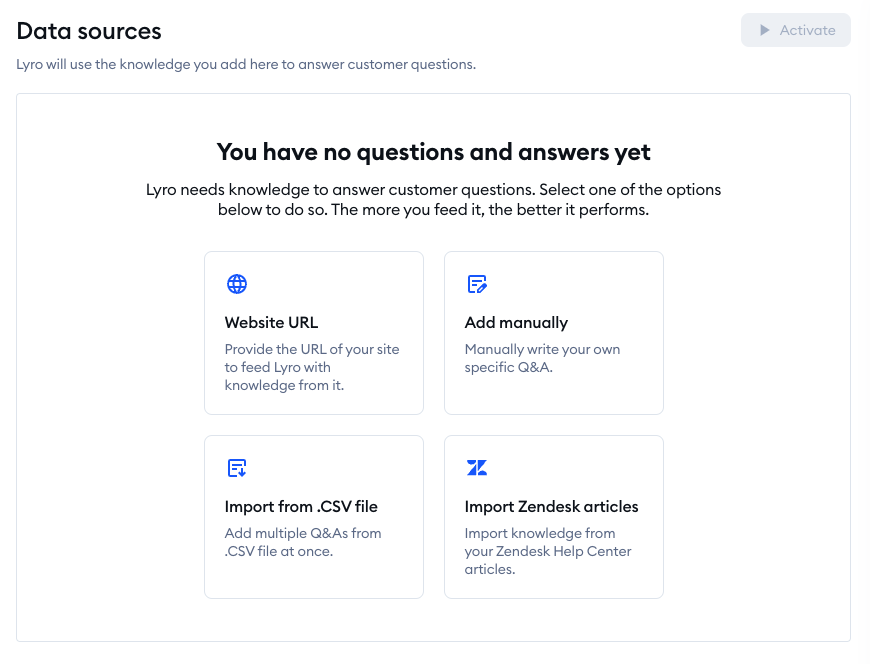
Next, import your help content. You can add a link to your FAQ or help center, or simply paste the text manually. Lyro will scan everything, organize the information, and prepare to answer real customer questions based on it. There’s no need to define every possible intent or guess at phrasing variations. Lyro does all that heavy lifting for you.
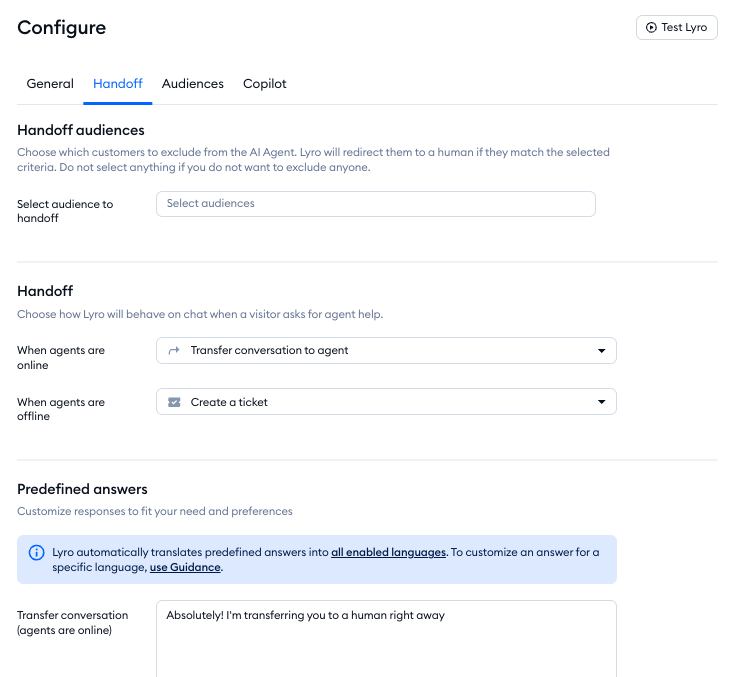
Then, decide what Lyro should do when it reaches its limits. Sometimes, a customer needs a human touch or a more detailed answer. That’s why you can set up fallback behaviors. This could mean routing the conversation to a live agent, displaying a custom message, or creating a support ticket. It’s a dignified Plan B for your AI agent instead of leaving customers at a dead end.
Once everything is ready, choose where Lyro should show up and deploy it.
Finally, after Lyro goes live, keep an eye on how it’s performing. Visit the Analytics dashboard to see all the metrics and ensure to make small refinements over time to improve the agent’s accuracy.
Support team tip for flows:
Lyro is a great way to complement Flows. Lyro is reactive which means that it answers questions based on what customers ask, while Flows can be proactive and reach out first. Using both together boosts engagement and ensures visitors always get the help they need.
Did you know that…
Axioma, a UK car repair company, achieved an 89% resolution rate using Tidio’s AI, Lyro. The business now answers the majority of inquiries automatically, which reduces the waiting times and increases conversions.
Step 4: Test your chatbot
Once your chatbot is built, don’t rush to hit “publish.” Testing is one of the most important steps in the entire process. This is where you make sure your bot behaves like a helpful assistant, not a confused robot that frustrates customers.
For your AI chatbot, go into the Lyro AI Agent tab and click on Playground. Here, you can step into your customers’ shoes and simulate real conversations. Ask the bot the kinds of questions people actually type. Not the polished versions you’d expect, but the messy, incomplete, typo-filled sentences real users send. This helps you see how well the chatbot handles natural language and unexpected phrasing.
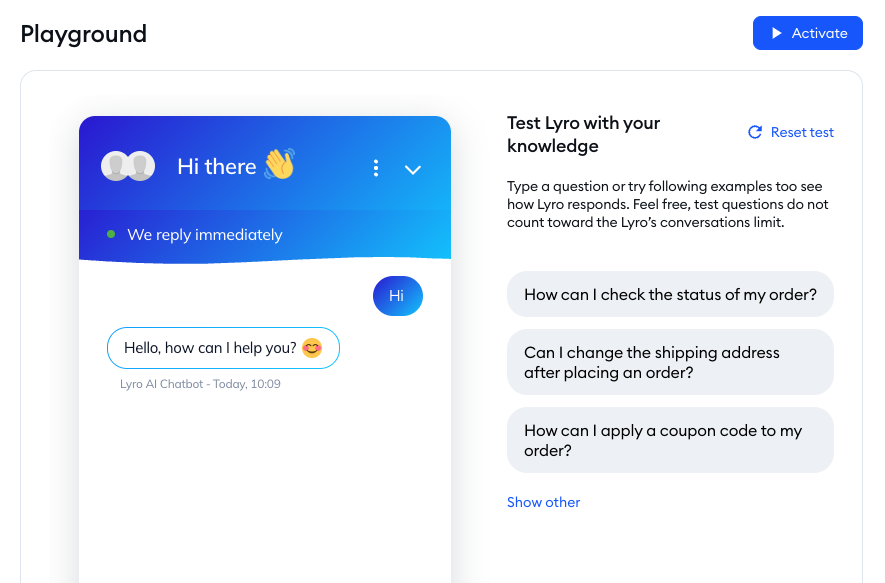
It’s also helpful to involve your team. Everyone communicates differently, so having multiple people test the bot adds variety and exposes gaps you might overlook on your own. This is especially important for support teams who know the real questions customers ask each day.
While testing, pay special attention to fallback behavior. Even the smartest bots occasionally get stuck, so you want to make sure yours handles uncertainty gracefully.
Tip: Connect the chatbot to ticket routing. When your chatbot can’t resolve the question in a specific timeframe, or queries match “escalation tags”, the agent will trigger a ticket in your help desk tool.
Support team tip for flows:
Once your Flow, or Lyro setup, is live, make sure to test it in an incognito window. This gives you a clean, non-cached view, like a first-time visitor would have, so you can confirm everything is working as expected. And while testing is key, you can rely on Lyro to only share information that you provide. The Suggestions tab is a great way to track what customers are asking and keep your knowledge base in good shape
Step 5: Track metrics and iterate
To understand whether your chatbot is actually helping your customers and your team, you need to track the right metrics. These numbers show what needs refining and where the chatbot is delivering real value.
One of the most important areas to watch is conversion rate improvements. Whether your goal is to capture more leads or guide shoppers toward a purchase, your chatbot plays a measurable role in influencing outcomes. Tracking how many users complete an action after interacting with the bot helps you see whether your or AI responses are doing their job or if they need a nudge.
Next, look at the reduction in live agent hand-offs. A well-trained chatbot should resolve a meaningful portion of customer questions on its own. If you see fewer conversations being escalated to your support team, that’s a strong indicator that your bot is effectively handling routine inquiries. And if hand-offs are still high, it may signal unclear answers or gaps in the bot’s understanding.
Average handle time (AHT) is another crucial metric. Chatbots should reduce the time customers spend waiting for an answer, especially during busy hours. If AHT drops after implementing your bot, it’s a sign that users are getting what they need more quickly. If it stays the same or increases, it’s worth exploring whether the bot is adding unnecessary steps or confusion.
Customer sentiment also matters. That’s where CSAT for bot interactions comes in. Treat your chatbot like any other agent on your team and collect satisfaction scores after conversations. These ratings show how customers feel about the interaction, not just how fast it happened. A high CSAT score means your bot is providing helpful, clear answers. Low scores point to issues you can fix with better content or smarter flows.
Finally, don’t overlook cost savings. One of the biggest benefits of using chatbots is their ability to reduce operational load. Fewer repetitive tickets, shorter wait times, and lower dependence on human agents all translate into real savings. Tracking how many conversations the bot handles independently and estimating the equivalent staffing hours helps you understand the financial impact of your chatbot over time.
Taken together, these chatbot metrics give you a complete picture of your bot’s performance. They help you identify blind spots, and make ongoing improvements that keep your bot aligned with customer needs and business goals. With the right tracking in place, your chatbot becomes not just a tool, but a constantly evolving part of your customer experience.
Support team tip for flows:
When it comes to usage, keep in mind that Flow limits aren’t based on interactions like Lyro’s are. If a Flow is consuming limits too quickly, it's helpful to change the trigger to reduce unnecessary usage and save costs. And for Lyro, think about whether you want it active only when agents are offline or also handling questions while your team is online. That choice has a big impact on cost efficiency.
Dos and don’ts of building a chatbot
Now you know what the workflow of building chatbots looks like. But before you open the bot builder, have a look at these handy tips.
Dos of chatbot building
Add a little bit of human touch. Our research study revealed that 53%[1] of consumers build positive associations around brands whose bots use quick-witted comebacks.
A unique tone of voice that fits your target audience will make you stand out from the crowd. Don’t be afraid to give your chatbot a name as well. It can work wonders for your brand voice and image. Our chatbot experts agree:
It’s all about engagement. Quality bots regularly see 80-90% response rates. Tailor your chatbot experience with graphic materials (e.g., GIFs, photos, illustrations), human touch (personalization, language), and targeting (e.g, based on geography or timeframe).
Also, route complex conversations to human agents. As many as 69%[1] of consumers admit that they prefer chatbots to resolve small issues and get quick responses.
However, you need to remember that there are people who will always prefer to talk to a human agent, and it’s in your interest to make it possible. Make sure that you include this option in your conversation flow, especially if your business conversations revolve around complex issues.
Read more: Check out our research to discover why you should give your chatbot a personality.
Don’ts of chatbot building
Design dead-end conversations. Picture this: you go to a shop and ask an assistant to help you with choosing a variant of a specific product. The assistant gives you 10% off a completely different product and just leaves without a word.
To avoid such situations, make sure that the answers you provide are actionable. Even after the conversation is over, the customer should always have an option to restart it or get help from the FAQ chatbot.
Another thing you shouldn’t do is to overcomplicate chatbot flows. Once you discover how easy it is to create a chatbot, you might be tempted to create complex conversation flows branching into many additional flows. It’s understandable, but bear in mind that the more interactive your chatbot becomes, the more difficult it is to manage it. After all, the number of messages grows exponentially with each additional scenario, so it’s more difficult to analyze them, too.
Instead, try to keep it simple. Allow for open-intent conversation. Yes, we do think that mimicking a human conversation is the best option, but a chatbot’s main job is to guide the users in a specific direction. This means that the user should never end up figuring out what they are supposed to do. Your intelligent chatbot can be witty, and the conversation can take a few directions, but the outcome has to be specific, too.
Common challenges when building a chatbot
One of the biggest hurdles is understanding the limitations of your chatbot. Rule-based bots, for example, struggle when a customer goes off-script or asks a question you haven’t planned for. Even AI-powered bots aren’t perfect. They depend heavily on the quality of your documentation. If your help center is outdated, vague, or missing key details, the AI may produce incomplete or unhelpful answers.
Another challenge lies in flow design mistakes. It’s surprisingly easy to create a chatbot that looks great in your editor, but feels confusing in real conversations. Some of the common issues include:
- Dreaded dead-end. This is the place where your bot runs out of messages and simply leaves the user hanging.
- Irrelevant or overly complicated prompts can cause similar frustration and force users to click through paths that don’t match their intentions.
- Flows that are designed with the business in mind (“Let’s get their email!”) rather than the customer’s needs, which leads to drop-offs and abandonment.
These issues are avoidable when you test every path end-to-end and look for spots where a user might get stuck or think, “Why is it asking me this?”
A good rule of thumb is to always ask: Would this make sense to me if I were the customer? If the answer is no, simplify the flow or add escape routes.
Then there are the classic “what can go wrong” scenarios that every chatbot builder encounters sooner or later.
During busy hours, for example, your bot might escalate too many conversations because it can’t interpret vague questions like “I need help” without context. In another scenario, users might repeatedly ask questions that the bot should know how to answer, but doesn’t, because the underlying content is missing or outdated. Or the bot might interrupt the user with prompts that feel pushy (“Want to sign up for a discount?”) when all they’re trying to do is track an order.
Sometimes, a conversation flow can even loop back on itself, causing the bot to ask the same question two or three times, which is a guaranteed way to annoy anyone.
The good news?
Most of these challenges are easy to fix once you know what to look for. Regular testing, clear goals, and well-organized content go a long way in preventing mishaps. And when mistakes do happen, treat them as feedback, not failure. Every weird answer or unexpected escalation is a clue that helps you refine your bot into something customers will actually appreciate.
Serving global audiences: things to consider
If your business reaches customers around the world, your chatbot needs to keep up. People from different regions expect support in their own language and at their own time of day. Designing for a global audience isn’t complicated, but it does require thoughtful planning to make sure every customer feels supported.
One of the most important considerations is building a multilingual chatbot. Customers naturally gravitate toward brands that speak their language. Therefore, a bot that can understand and respond in multiple languages instantly makes your support feel more personal and accessible. Many AI-powered bots can automatically detect the user’s language and switch on the fly, while rule-based bots may require separate flows or translations.
Time also plays a major role in global support. That’s where timezone-based triggers come in. A customer browsing your site at 3 a.m. in Tokyo shouldn’t receive the same greeting as someone visiting during business hours in New York. With timezone-aware rules, your chatbot can adjust its behavior. This will allow it to act as a first responder when your team is offline or let users know when an agent will be available.
Finally, think about escalation to local agents. Even the smartest chatbot will occasionally need to hand a conversation over to a human, and when it does, the handoff should feel seamless. For global audiences, this means routing users to agents who understand their language, cultural nuances, and regional policies.
Serving customers across borders comes down to empathy and adaptability. A chatbot that speaks multiple languages with respect to local time zones builds trust. And in a global marketplace, trust is what turns curious visitors into loyal customers.
How to build a chatbot: takeaways
Building an AI chatbot, or even a simple conversational bot, may seem like a complex process. But if you believe that your users will benefit from it, you should definitely give it a try.
You can create a prototype all by yourself with a bot builder and add it to your business website.
To create your own chatbot:
- Define its goals
- Decide which platforms to embed it on
- Train your AI on the company’s knowledge data
- Test your chat flows and AI chatbots
- Track metrics and iterate
Apart from being the most popular editor among visual chatbot builders, Tidio also offers a live chat widget and email marketing tools. You can seamlessly integrate your bots with customer support chats and digital newsletters.
Care to give it a try?
Boost customer satisfaction with a professional AI agent
FAQ: How to build a chatbot
To create an AI chatbot, you need a conversation database to train your conversational AI model. But you can also try using one of the chatbot development platforms powered by AI technology. Tidio is one of the most popular solutions that offers tools for building chatbots that recognize user intent for free. It also allows you to train your chatbots by uploading a list of conversations and text messages.
Creating chatbots is extremely easy and within everyone’s reach. There are tons of online bot development tools that you can use for free. However, creating a chatbot for a website may be a bit easier for beginners than making social media bots.
The best and easiest way to create your first chatbot is to use a chatbot-specific platform that offers AI. Simply upload your FAQs and other question-answer pairs to the software and it will learn from it to assist your customers. You’ll have to update the knowledge base and add to it frequently but your clients will receive human-like support 24/7.
Creating a sophisticated chatbot can take years for an entire team of developers. On the other hand, if you want a simple chatbot for your website or your school assignment, it can take half an hour. Just use a chatbot platform of your choice. Its users may not even notice the difference. A well-thought-out chatbot conversation can feel more interactive and interesting than the experiences offered by many high-tech solutions.
The easiest way to add a chatbot to your site is to install a WordPress chatbot plugin. If you don’t have a site powered by WordPress, many chatbot solutions can be integrated with sites on platforms like Shopify, Wix, Adobe Commerce (formerly Magento), or BigCommerce. Chatbots can also be integrated into your website by pasting a JavaScript snippet. But you may want some help from your programmers for that.
To make a free chatbot, create a Tidio account and use the visual editor included in the Free plan. You can build rule-based chatbots and serve up to 100 unique visitors per month. The Free plan also includes 50 live chat or support conversations per month, up to ten seats, and a one-time allowance of 50 AI agent (Lyro) conversations. No credit card is required to get started.
Start by considering ease of use, integrations, and the type of chatbot you need. No-code platforms are ideal for beginners and small businesses. If you need more advanced customization, look for platforms that also support NLP, AI training, and multichannel support.
You can use a plugin (for WordPress or Shopify) or add a JavaScript snippet to your site. Many platforms also support social media channels and third-party apps, so your chatbot can work across multiple touchpoints.
Chatbots can’t replace human judgment in complex cases. They also need regular updates to stay accurate and helpful. If not designed well, they can frustrate users or miss key questions, especially without proper training data.
Tidio is a customer service platform that combines live chat, chatbots, an AI agent, and help desk tools to help businesses automate support and communicate with website visitors in real time.
Yes, Tidio offers AI features, including Lyro, an AI support agent that automatically answers customer questions using your help center content.
Yes, Tidio includes a visual chatbot builder for creating rule-based bots, as well as AI-powered automation through Lyro.