



Key takeaways
- A tag is a label for one fact. Topic, product, or customer segment each get their own tag, so you can group tickets any way you need.
- Tags are not priority or status. Most help desks already have fields for those, so keep tags for what the fields don’t cover.
- A short, fixed list beats free text. Agree on 15 to 30 tags, write them down, and treat a new tag as a decision.
- Naming matters to machines. Exact spelling decides whether a rule or a report counts a ticket, so pick one format.
- Automation keeps tags complete. Rules handle the clear cases; AI can fill fields from the customer’s message.
Ticket tagging is the practice of attaching short labels, called tags, to customer support tickets so a team can sort, find, and route them. Each tag records one fact about the request, such as its topic or the product it concerns. Tags turn a pile of messages into groups that you can filter, assign, and count.
This guide explains how tagging works, which tags to use, and how to keep them useful for small support teams and online stores.
What is ticket tagging?
Ticket tagging means adding labels to a support ticket after it arrives, so the ticket carries its own context. A ticket that says “my parcel never came” might get the tags shipping-delay and order-status. Any agent who opens it can see at a glance what it is about, and any report can count it.
Picture an online store on a Monday morning with 40 new emails. Without tags, someone reads all 40 to find the 22 order-status questions, the nine refund requests, and the two that mention a damaged item. With tags, a saved filter shows each group in one click. The team answers the order-status batch in one sitting and sends the damaged-item tickets to whoever handles replacements.
Tags are free-form, which is what sets them apart from a ticket category. A category is a single choice from a fixed menu. A ticket can carry many tags. You also see the practice called ticket labeling or ticket classification. For tickets that need ordering by urgency, see ticket triage, which often uses tags as its input.
How does ticket tagging work?
Ticket tagging works in three steps: the ticket arrives, a tag is applied, and the tag drives what happens next. The person or system that applies the tag can be an agent, an automation rule, or an AI model.
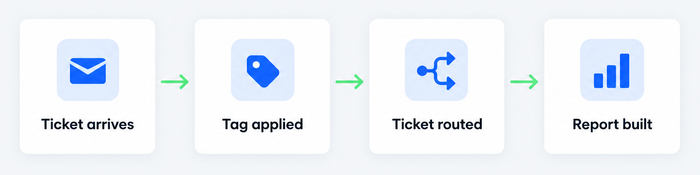
- The ticket arrives. It comes in by email, chat, a web form, or a social message, and it becomes a ticket with a status and an assignee.
- A tag is applied. An agent types it while reading the ticket, a rule adds it when the ticket matches a condition such as a keyword or a channel, or an AI model suggests it.
- The tag does its job. Filters and saved views group tickets by tag, routing sends tagged tickets to the right person or team, and reports count tickets per tag.
The third step is where tagging pays off. A tag that nobody filters, routes, or reports on is clutter. For the routing side, read how automated ticket routing works. For how tags fit into a full help desk workflow, see that guide.
Add tags and views to your tickets in Tidio
Ticket tags vs. customer tags vs. custom fields
A ticket tag describes one ticket, a customer tag describes a person, and a custom field stores a structured value on a ticket. Most help desks, Tidio included, treat all three as separate things, and mixing them up is the most common setup mistake.
| Ticket tag | Customer tag | Custom field | |
|---|---|---|---|
| Describes | One ticket thread | One customer, across all tickets | One ticket thread |
| Example | refund-request | vip, wholesale | Order number, product model |
| Format | Free-form label | Free-form label | Text or fixed dropdown |
| Can it be mandatory? | No | No | Yes, in Tidio (required before a ticket is solved) |
| Use it to | Group and filter tickets | Segment customers | Capture exact details |
Priority and status do not belong in this table because they are not tags. Most help desks give every ticket a built-in priority and status already. If you also tag a ticket urgent, you keep two sources of truth, and they drift apart. Use the built-in fields for those two and keep tags for topic, product, and anything else the fields don’t cover.
What should a ticket tag say? Examples
A good ticket tag names one thing: what the request is about, which product it involves, who is asking, or what the team should do next. Those four groups cover most small support teams. Here is how they look for a small online store.
| Group | Example tags | When to apply |
|---|---|---|
| Issue type | order-status, shipping-delay, refund-request, damaged-item | The customer’s main problem |
| Product | sneakers, gift-card, subscription-box | The ticket names a product line |
| Segment | wholesale, first-order, repeat-buyer | The reply differs by customer type |
| Next step | needs-warehouse, waiting-on-carrier, bug-report | Someone outside support must act |
Two or three tags per ticket is plenty: one for the issue, one for the product, and a next-step tag when it applies.
What are the benefits of tagging tickets?
Tagging tickets makes support faster to run and easier to measure. The gains come from sorting, routing, and counting, which are the three jobs a tag performs.
- Faster first answers. An agent who sees refund-request knows what the ticket needs before opening it, and can reach for the right reply. Speed matters to customers, but resolution matters more: 95% of US online adults say they would wait longer on hold if it guaranteed an agent who could resolve their issue on the first attempt, according to Forrester (2025).[1]
- The right person gets the ticket. Tags let you send billing questions to billing and bug reports to engineering. Gartner’s October 2025 research names resolution on first contact among the three “brilliant basics” customers want most.[2]
- Reports you can trust. A tag count answers questions such as how many refund requests came in last month, and whether a new product line is generating complaints.
- A record of what customers ask. A rising size-guide tag points to a missing page on your site, and a rising bug-report tag after a release points to the release.
Work every ticket from one shared inbox in Tidio
How do you build a ticket tagging system that lasts?
A ticket tagging system is the agreed list of tags, the naming rules, and the habits that keep it clean. Teams that skip this step end up with hundreds of one-off tags that nobody trusts. These practices keep a tag list useful.
Start with a short, fixed list
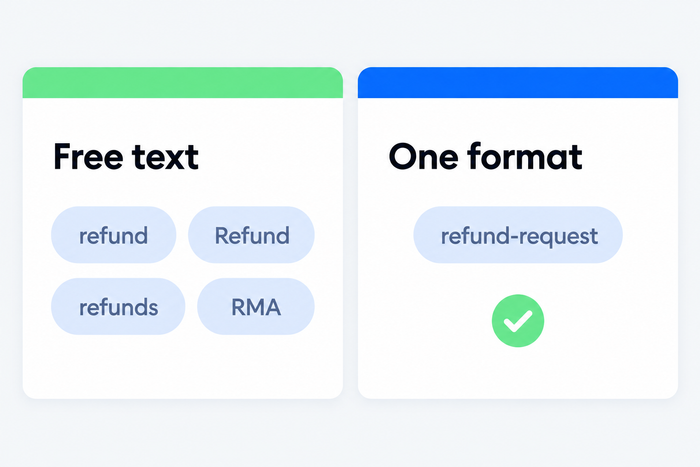
Write down 15 to 30 tags, grouped as in the table above, and treat that as the full list. Let agents propose a new tag, but have one person approve it. Free-text tagging with no list is how a team ends up with refund, Refund, refunds, and RMA meaning the same thing.
Pick one naming format and stick to it
Use lowercase, singular, and hyphens: shipping-delay, not Shipping Delays. The format matters because help desks match tags exactly. Zendesk’s help center notes that a trigger watching for customer_refund ignores a ticket tagged customer-refund, because the connecting character differs. Pick a format once, and every rule and report built on it keeps working.
Review the list every quarter
Check which tags nobody used in the last 90 days and retire them. Merge near-duplicates. A lean list is a list agents actually use.
Automate what is clear
For clear cases, add a rule. A message that mentions “refund” or comes from your wholesale form can get its tag automatically. Rules only catch the exact words you list, though. A customer who writes “I want my money back” slips past a rule watching for “refund”. AI models read the meaning of the message instead, so they can suggest a tag or fill a field from a message that uses none of your keywords. A person should still own the list. To see where this is heading, read about the AI ticketing system and automated ticketing systems.
Plan for volume
At high volume, a tagging system lives or dies on automation and ownership. Name one person who owns the tag list, automate the top five tags by volume, and review accuracy by sampling 20 tickets a month. If several departments tag tickets, agree on shared tags before each team invents its own.
Design tags around the reports you want
Start from the question, then design the tag. If you want to know why customers contact you about orders, order-status, shipping-delay, and damaged-item answer it, while a single order tag does not. For the numbers behind those questions, see customer service metrics.
What goes wrong with ticket tags?
Ticket tags fail in four predictable ways: inconsistent spelling, skipped tags on busy days, too many tags, and tags that nobody reads. Each has a cause and a fix.
| Problem | Why it happens | Fix |
|---|---|---|
| Inconsistent labels (refund, Refund, refunds) | Free-text tags, no naming rule | One format, one approved list |
| Tags skipped on busy days | Tagging is the first task dropped when the queue spikes | Rules for the common cases, tag-and-reply saved responses |
| Tag sprawl (hundreds of tags) | Anyone can create a tag mid-ticket | One owner, a quarterly audit |
| Tags nobody uses | Tags were never tied to a view or a report | Delete any tag with no view, rule, or report |
The biggest risk is quiet failure. A tag list can look healthy while the data is wrong, so spot-check a sample of tickets each month.
How to tag tickets in Tidio
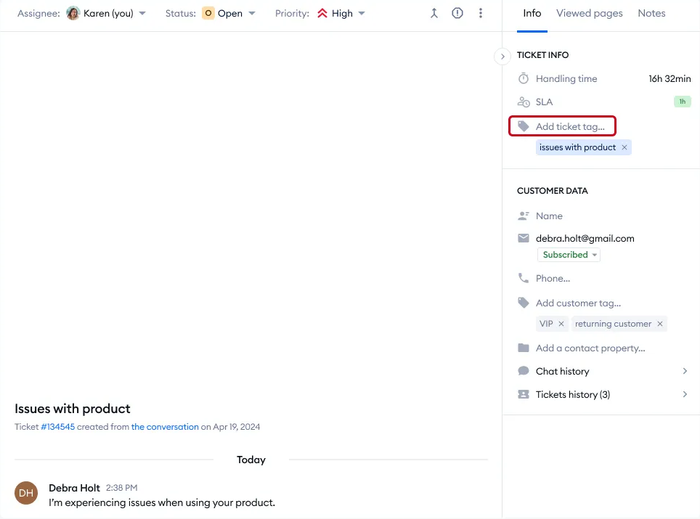
In Tidio’s help desk, you add a ticket tag from the Info tab of any open ticket and manage the full list in Settings.
- Add the tag. Open a ticket, go to the Info tab on the right, and click Add ticket tag. Type the tag and press Enter. It shows inside the ticket for every agent.
- Manage the list. Open Settings > Tags to see and edit your ticket tags. Ticket tags are separate from customer tags, which describe a person and show up in the contacts list.
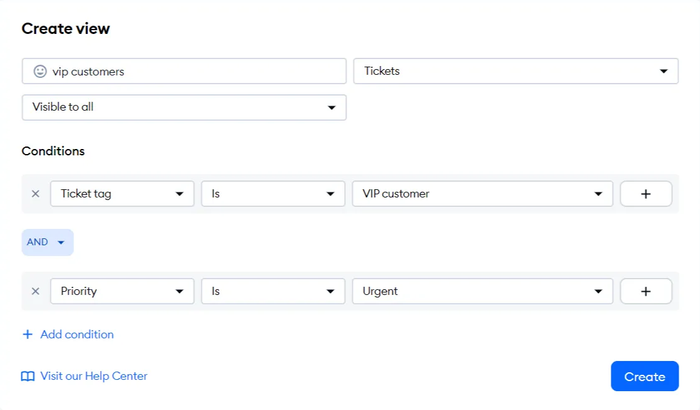
- Build a view. Create a custom view with Ticket tag as a condition, and combine it with another, such as priority, using AND or OR. Anyone you choose can see the view.
- Add a custom field when you need exact data. In Settings, Custom fields lets you create a text or dropdown field, and mark it required before a ticket can be solved. Tidio’s help desk page says AI can fill custom fields such as order number or request type from the customer’s message.
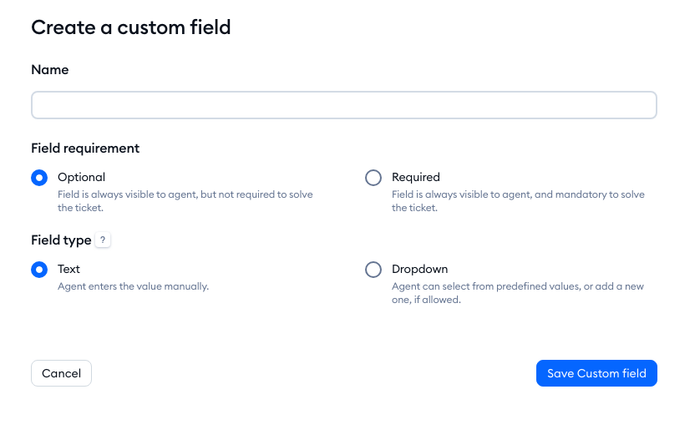
Tags work best here with a short list and a few views. A store might keep three: refunds, shipping problems, and wholesale. For more on how Tidio handles tickets, see ticketing in Tidio, or the guide to a help desk ticketing system.
Tag the tickets you already have
Open your last 50 tickets and write down the groups you see. That list is your first set of tags. Keep it short, name each tag in one format, and build one view for each group your team handles differently.
Frequently asked questions
A category is one choice from a fixed menu, such as Billing or Shipping. A tag is a free label, and a ticket can carry several. Categories give you a clean top-level split for reports. Tags add the detail underneath, such as the product or the next step. Many teams use both.
Two or three is enough for most tickets: one for the issue, one for the product, and one for the next step when it applies. More than that makes tickets harder to search and reports harder to read. If a ticket needs five tags, the tag list is probably too granular.
Yes. Most help desks let you add rules that tag a ticket when it matches a keyword, channel, or form. AI can go further by reading the customer’s message and filling in a tag or field. Automatic tags are only as good as the list behind them, so keep the list short and review a sample monthly.
Create a tag when a recurring issue, product, or segment cannot be described by an existing tag, and when you will use it in a view, rule, or report. If you cannot name the view or report that will use the tag, skip it. Check the existing list before you add anything.
No. A ticket tag belongs to one ticket thread. A customer tag belongs to a person and stays on them across every ticket. In Tidio, ticket tags do not appear in the contacts list, and customer tags do.
Organize your tickets with Tidio Helpdesk
