
As your business grows, your support team feels it first. More customers bring more conversations. This also means more edge cases and more moments where speed and consistency matter.
According to HubSpot, 90%[1] of customers rate an immediate response as important when they have a customer service question. And that expectation stays in place even when ticket volume rises quickly.
In this article, you’ll learn practical ways to handle growing support demand, including where tools like Lyro can reduce repetitive work for your team.
Scale customer support without increasing workload
What does “scaling customer support” mean?
Scaling customer support means increasing your team’s capacity to handle more conversations while maintaining consistent service quality. It usually involves improving workflows, adding the right automation, and making information easier to access for both customers and agents.
Many teams scale through a mix of people and systems. This includes self-service content, better routing, clear escalation paths, and tools that reduce repetitive work. When these foundations are set in place, support performance stays stable as volume changes.
The ultimate goal is sustainable growth. So, you want a support setup that stays reliable during busy periods and new product launches, all without constant backlog pressure.
13 strategies for scaling customer support
Once you know your current setup can’t handle the next stage of growth on its own, the question becomes practical: what should you fix first?
Below are 13 proven strategies that help support teams handle more conversations and grow while maintaining excellent service quality.
1. Use AI agents to handle repetitive conversations
As ticket volume grows, repetitive questions grow with it. Order status, password resets, pricing clarification – you name it. This is exactly where AI agents can come in handy.
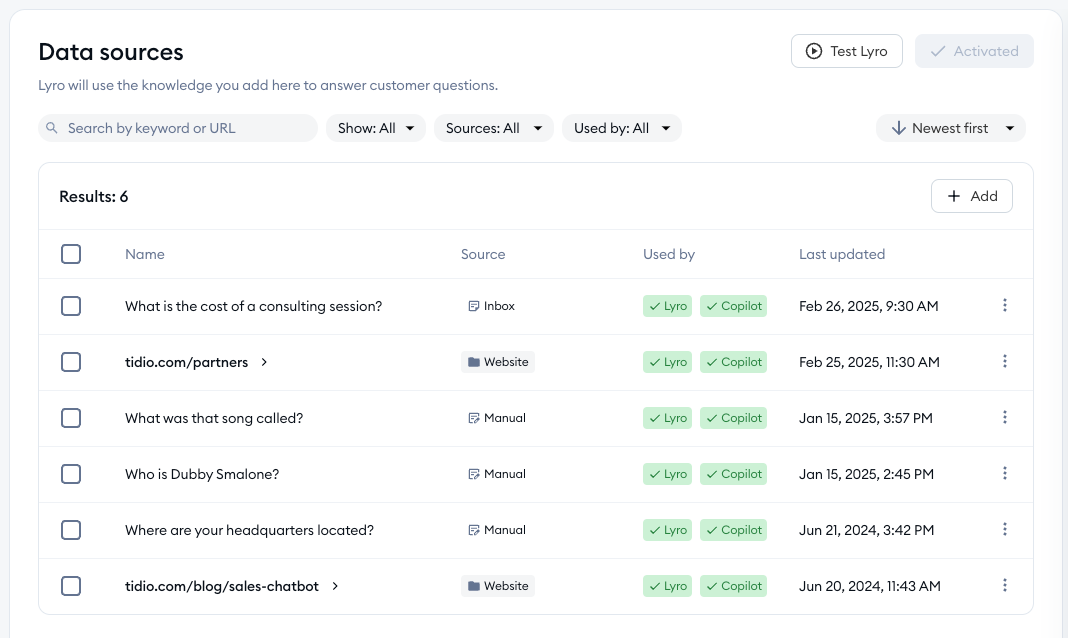
An AI agent like Tidio’s Lyro can automatically resolve common inquiries using your knowledge base and the data you provide. In practice, this usually starts with adding data sources, like specific URLs. This can include your whole website, a subdomain, or manual Q&A pairs. Once that content is available, Lyro can respond within milliseconds when the answer exists in your sources.
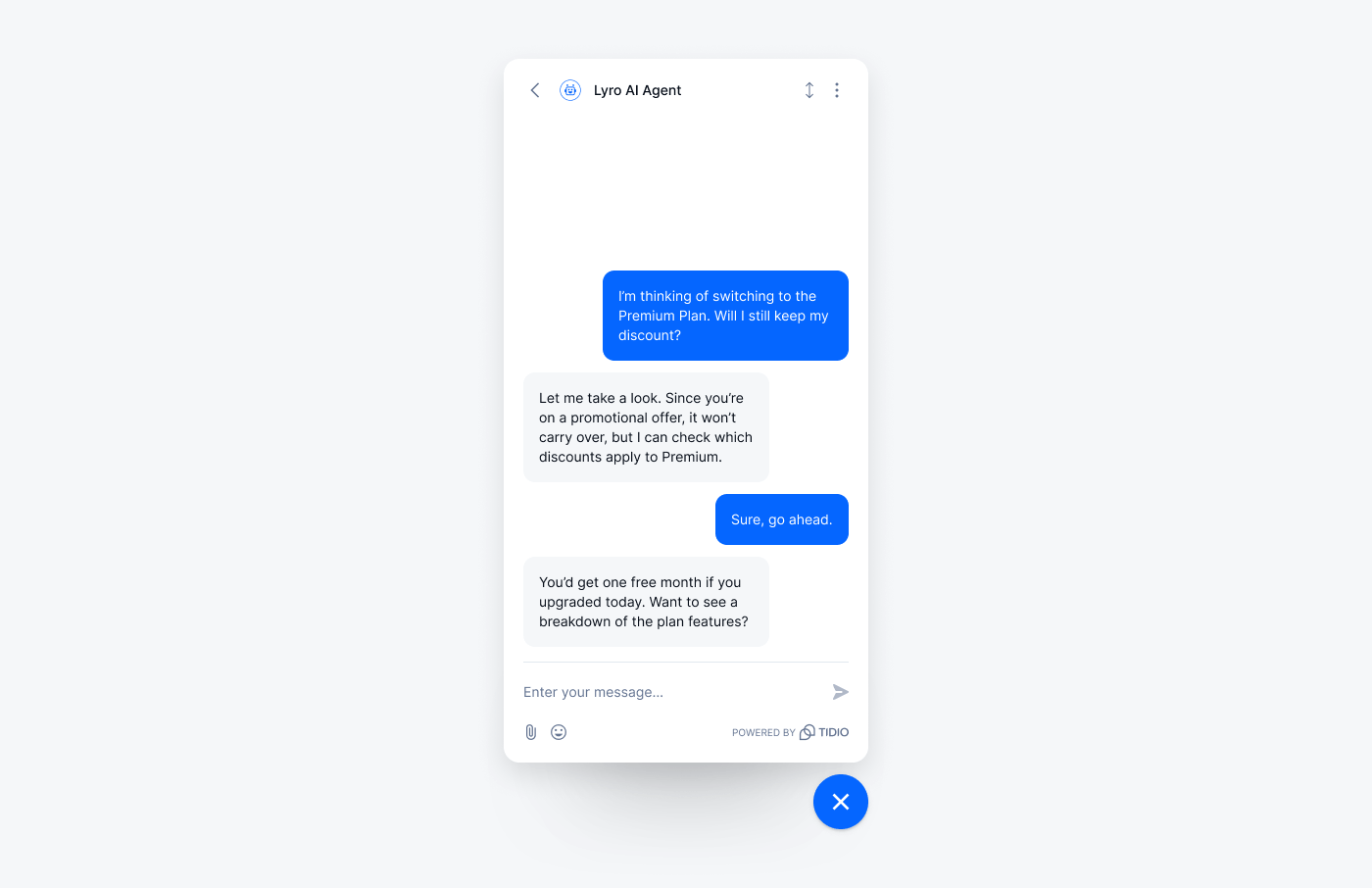
When Lyro does not have enough information, it can move the conversation to a human agent. That keeps customers from getting stuck and helps your team focus on cases that need further investigation.
Read more: Learn how to build a solid AI knowledge base. Also, here are the steps you should take to create a knowledge base chatbot.
2. Offer 24/7 live chat with automation
Customers do not only reach out during business hours. Live chat combined with customer service automation allows you to respond instantly, even when agents are offline, and it helps keep conversations structured when volume spikes.
With Tidio, you can automate welcome messages, route conversations by topic, and collect key information using flows before an agent joins. Lyro AI also gives you control over how it works during online and offline hours, since you can set whether it responds always or only when your team is offline.
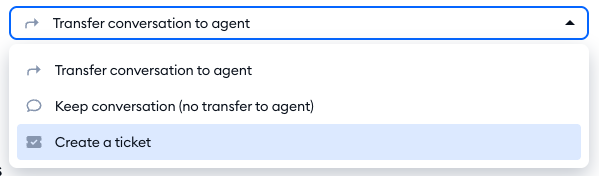
If a customer asks for a person or needs help beyond the available knowledge, Lyro can follow your handoff rules, which is useful when your team is unavailable, but you still want to capture the request cleanly.
3. Build a self-service knowledge base
Many customers prefer solving simple issues on their own, especially when they’re trying to get something done quickly.
A well-structured knowledge base reduces incoming tickets and shortens resolution time. The key is to create content based on real support data. Look at your most common tickets and turn them into clear, searchable articles that match how customers phrase questions.
Lyro’s knowledge can be completely based on your FAQ page and other sources you add, so stronger self-service content usually translates into more accurate automated answers.
4. Centralize all conversations in one inbox
As you expand conversations across multiple channels, things can quickly become chaotic. Conversations get split across tools, and context gets lost.
A shared inbox that centralizes all channels ensures agents see the full conversation history in one place. That reduces duplicated work and avoids asking customers to repeat themselves, especially when an issue starts in chat and continues over email.
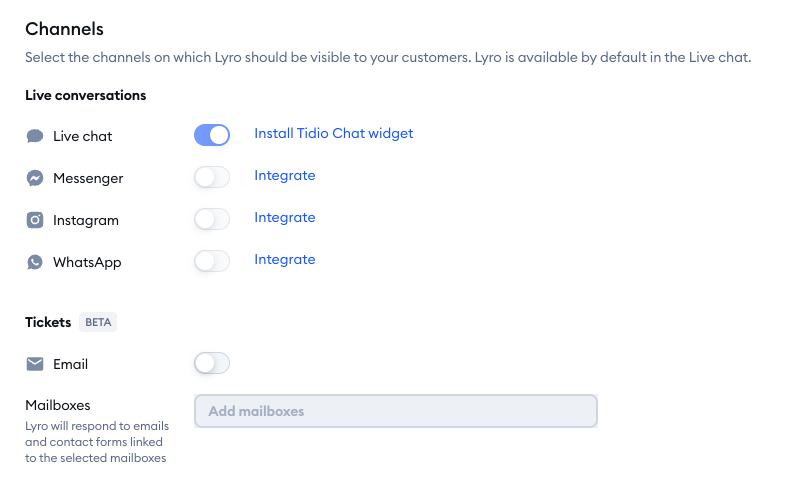
Tidio’s Lyro is a great example of this strategy put in action. It can be enabled on multiple channels, including Messenger, Instagram, WhatsApp, and tickets. This makes it easier to offer consistent automated help across places where customers already contact you.
Read more: Explore the topic of multichannel customer service.
5. Automate ticket routing and prioritization
Manual triage does not scale. As volume increases, manual ticket tagging and routing create delays that show up in first response time.
Automation rules can categorize conversations based on keywords, customer type, order value, or urgency. High-priority tickets can move to the front of the queue automatically, and certain topics can be assigned to specific teams.
Lyro can also support ticket triage by gathering missing details during the conversation. It can ask follow-up questions to understand the request better, then pass along the context when a handoff is needed.
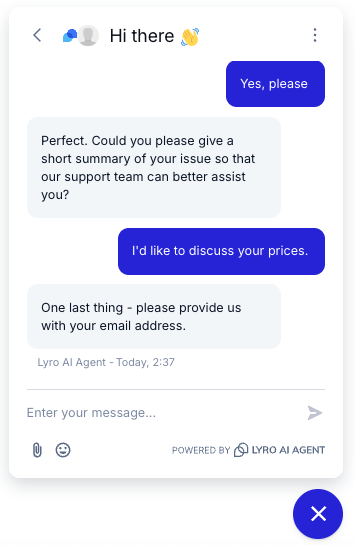
Read more: Learn all about automated ticket routing and how to set it up.
6. Use AI copilots to support agents in real time
As your team grows, maintaining answer quality becomes harder. New agents need time to learn your product, policies, and tone. Even more experienced agents still lose time searching for the right details mid-conversation.
AI copilots can help by suggesting responses and summarizing previous interactions during a live conversation. That helps agents reply faster while keeping messaging consistent.
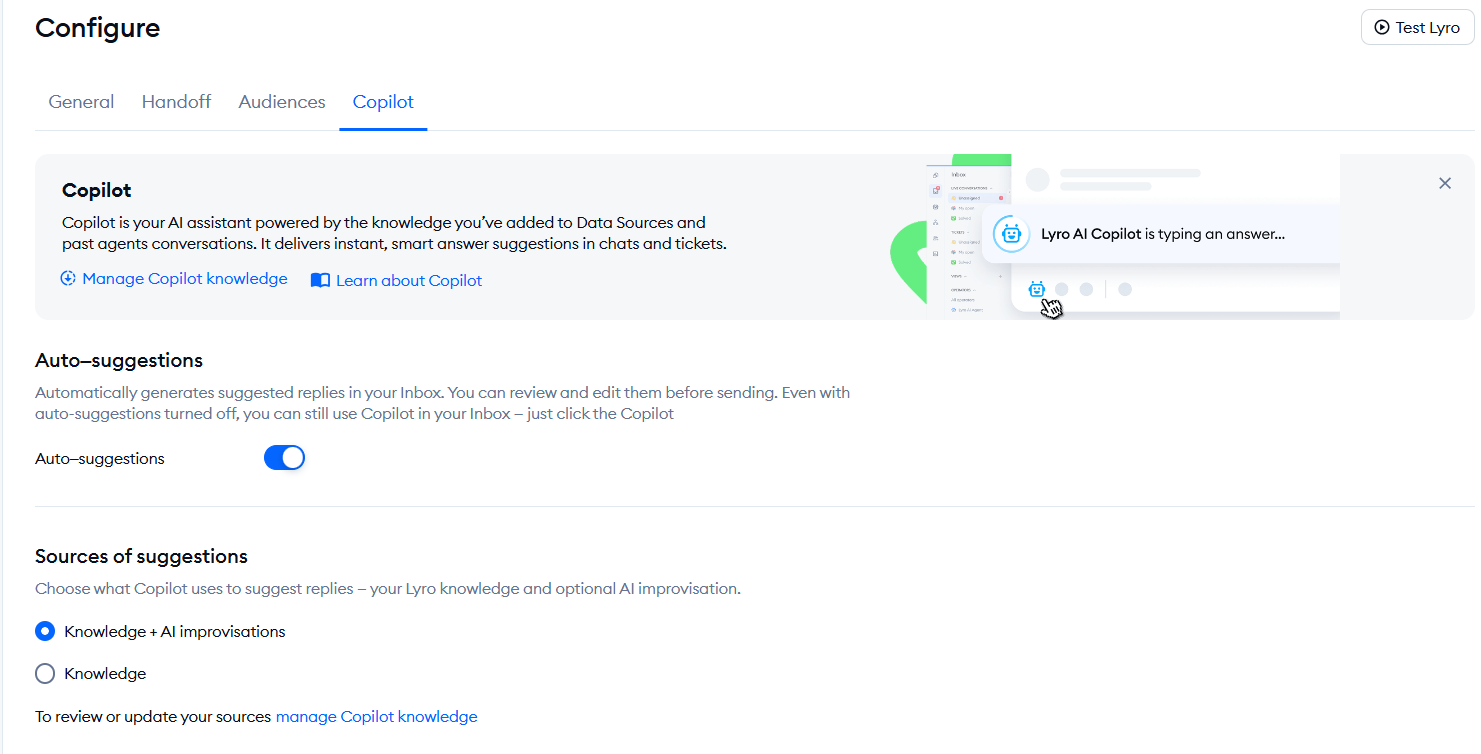
In Tidio, AI Copilot settings give you control over how suggestions are generated. For example, you can decide whether suggestions should stick to uploaded knowledge or allow improvisation when knowledge is missing, depending on how strict you want accuracy and wording to be.
7. Monitor the right support metrics
Scaling without measurement leads to blind spots. Volume can rise quietly until response times or CSAT start slipping.
It’s important to track metrics such as:
- First response time
- Resolution time
- Customer satisfaction score
- Ticket volume per agent
These numbers reveal when your team is reaching capacity and where bottlenecks appear. They also help you decide whether the right fix is staffing, better routing, improved content, or more automation.
Lyro analytics can help here, too. Once Lyro has handled enough conversations, you can review performance and see how automation is contributing to faster handling and where handoffs happen most often.
8. Invest in structured onboarding for new agents
Rapid hiring without proper training creates long-term inefficiencies. Agents may become active quickly but still struggle with tone and product context, which can increase escalations and slow resolution.
What you should do is document workflows clearly. Make sure to create response guidelines and record internal walkthroughs. The faster new agents understand your tools and tone of voice, the faster they become productive.
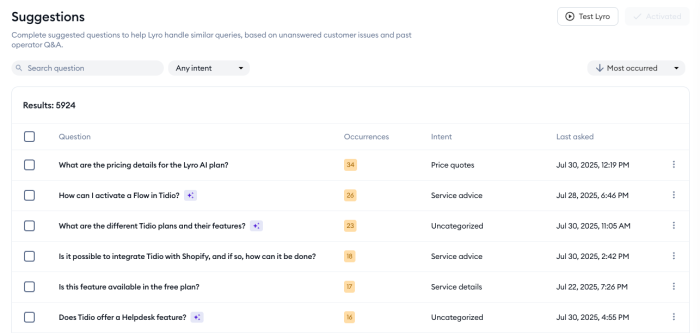
Lyro can reduce pressure during onboarding periods by handling common questions automatically. It also helps you identify knowledge gaps through the Suggestions list, which shows questions Lyro could not answer, so you can improve your content and align training.
9. Create clear escalation paths
Define escalation rules for billing issues, technical bugs, refunds, and enterprise accounts. Make ownership clear, and document what information should be collected before escalation so handoffs stay clean.
Lyro handoff settings can also support this. You can decide what Lyro does when a visitor asks for a live agent or when Lyro lacks an answer, and you can customize the predefined handoff messages to match your brand voice.
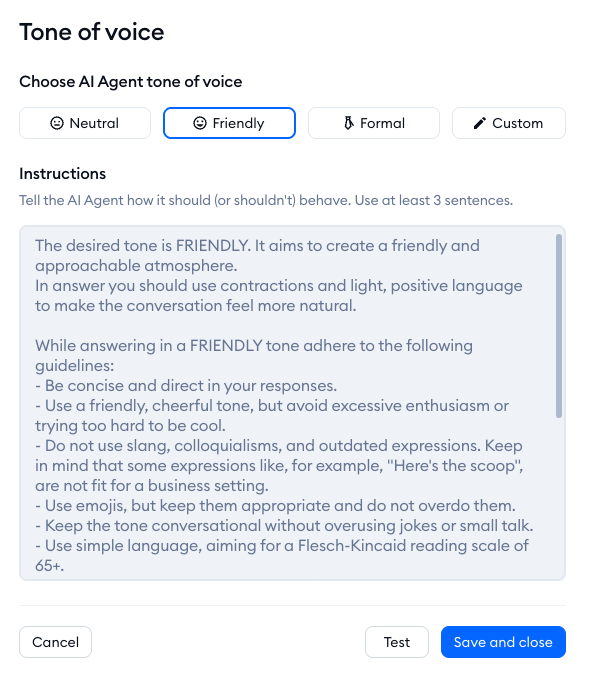
Read more: Find out how to create a solid chatbot persona for your customer service needs.
10. Support proactive communication
Many tickets can be prevented. Customers often reach out because they are missing a key update, not because they need a full troubleshooting flow.
Order updates, downtime notifications, subscription reminders, and feature announcements reduce inbound questions when communicated early. Automated messages triggered by customer behavior keep users informed without manual effort.
This is where Flows can help. In Tidio, Flows let you set up automated responses inside your chat widget, so you can proactively share key details and guide visitors through common questions right away. You can start from scratch in the visual editor, or use pre-made templates from the Support Flows library and customize the messages to match your tone.
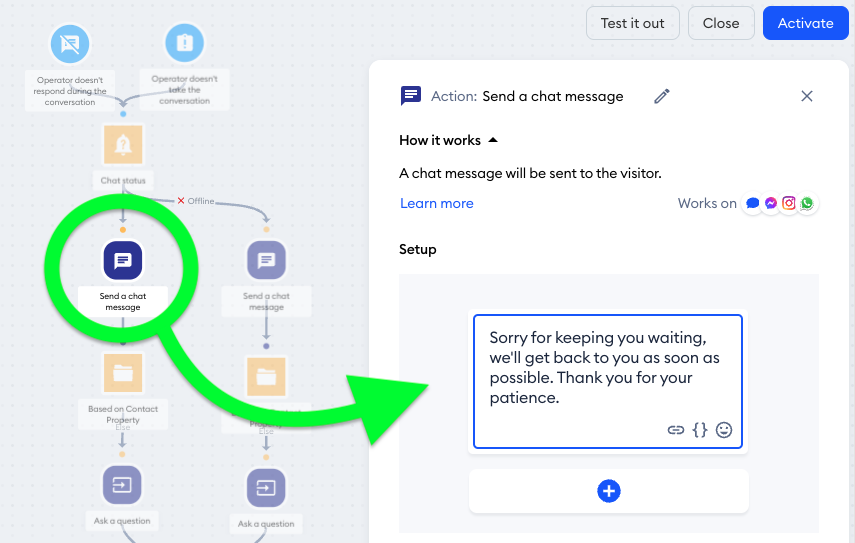
When customers still come in with follow-ups, Lyro can then take over by answering policy questions quickly, as long as the relevant information exists in your data sources and help content.
11. Segment customers by priority
Not all conversations require the same level of urgency. When volume grows, treating every inquiry the same can slow down high-impact requests.
You can create different workflows for free users, paying customers, and high-value accounts. For example, VIP customers can be routed directly to senior agents, while general questions are handled by automation first.
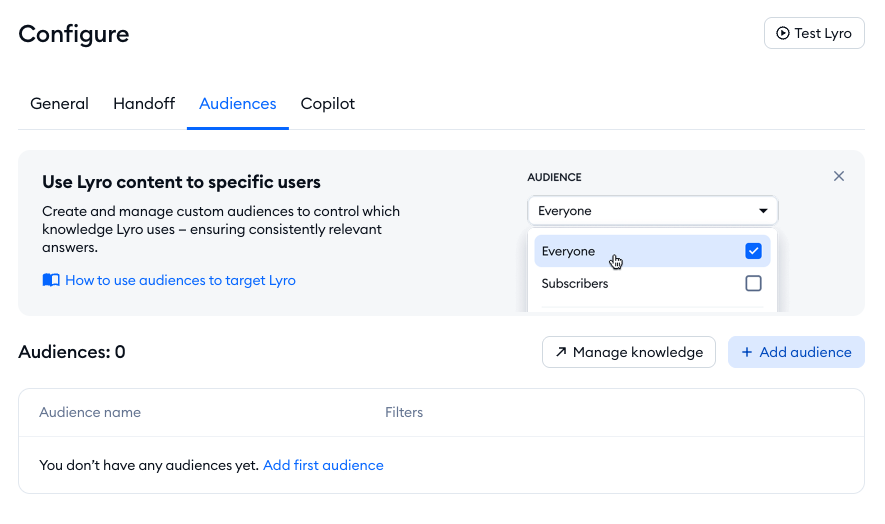
Lyro supports this kind of customer segmentation through Audiences. You can create custom audiences with conditions, then use them to control which knowledge Lyro uses, and which visitors should be transferred immediately to agents based on your criteria.
12. Review and optimize workflows regularly
What works when your business is small may stop working as your customer base grows. Even small issues in your workflows can slow down your team once ticket volume increases.
Set time to review your support processes regularly. Look at recurring customer complaints, slower response times, and tickets that keep getting escalated or passed between teams. These patterns often reveal where your workflow needs improvement.
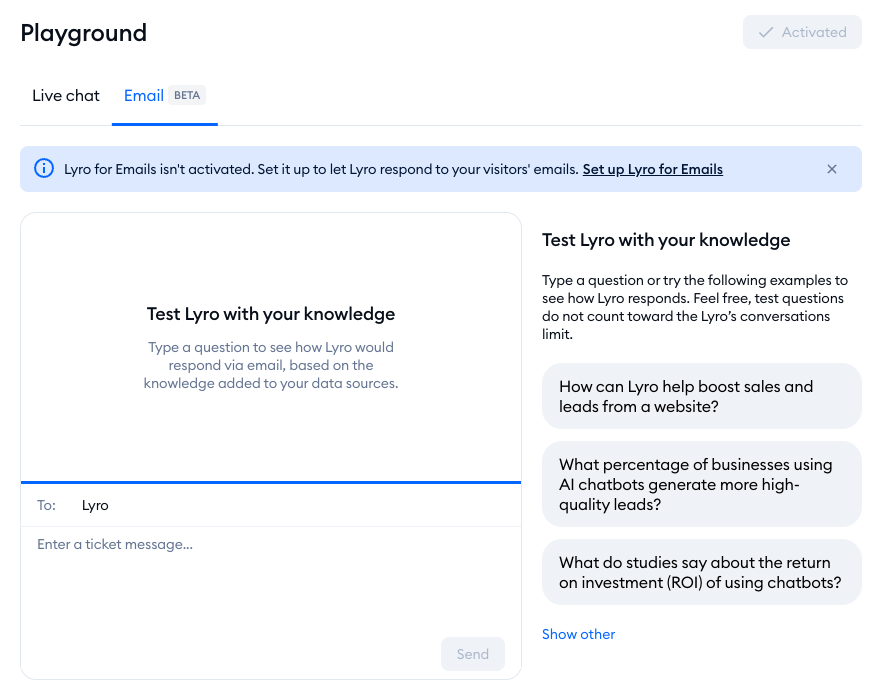
Lyro can help you spot these gaps. In the Suggestions section, you can see questions Lyro could not answer. This makes it easier to identify missing information and update your knowledge sources. You can also use the Playground to test responses and add new Q&A pairs when you find something that needs to be clarified.
Read more: Learn how to do chatbot testing using our comprehensive guide.
13. Scale with technology before scaling headcount
Hiring becomes easier when your workflows are solid. When systems are unclear, every new hire increases the amount of coordination required, and the team still feels overloaded.
With AI automation and smart routing in place, many teams handle more conversations without proportional hiring. That includes ticket deflection through self-service, automated routing, and AI support for both customers and agents.
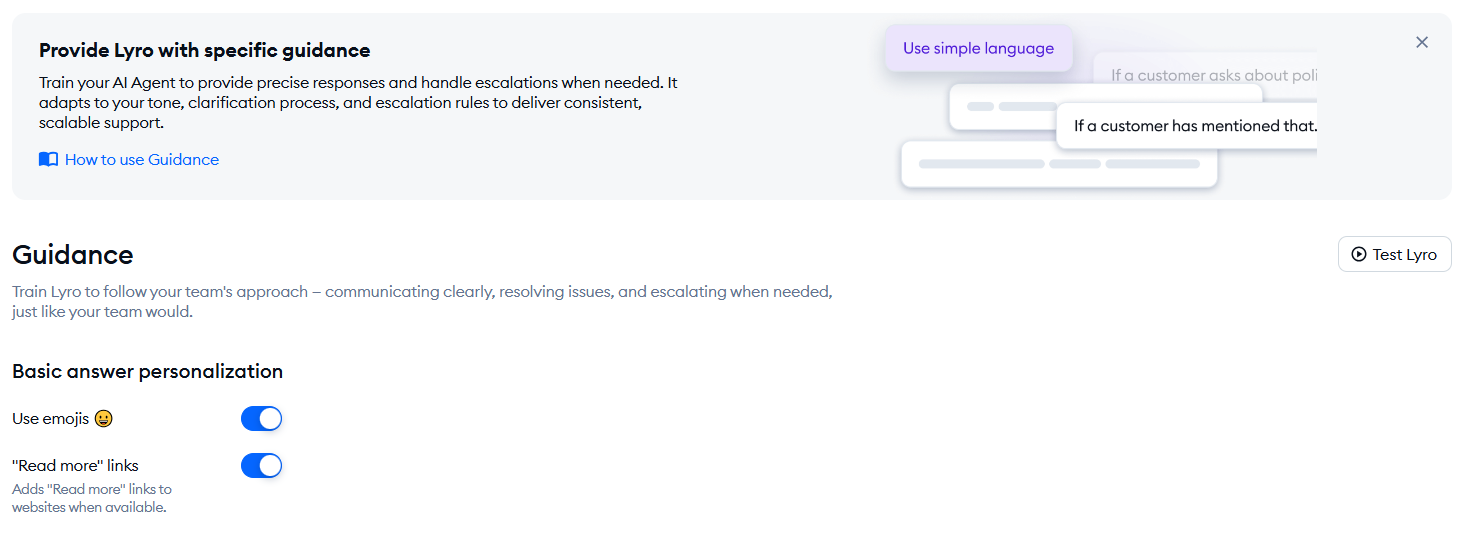
Lyro also supports scaling through channel coverage, handoff options, and knowledge maintenance. You can sync knowledge from your website, control how Lyro behaves via Guidance, and decide whether it should transfer a conversation or create a ticket when escalation is needed.
Read more: Learn how to choose the best customer service automation software.
How to know when it’s time to scale your support
Support teams usually notice the need to scale gradually rather than all at once. Small signals start appearing in daily operations.
You likely need to scale when:
- First response time consistently increases
- Agents are handling more tickets than the recommended benchmarks
- Customer satisfaction begins to decline
- Backlogs become frequent
These signals usually mean the team is operating at capacity, and the current setup can’t absorb more volume without changes. Scaling your support may involve improving workflows, adding automation, expanding self-service resources, or adjusting team structure so your support operations can handle higher demand without affecting the customer experience.
Scale your customer support with Tidio
Scaling customer support becomes much easier when the tools behind your team grow along with your business. As ticket volume increases, the systems you rely on every day start to matter more. Clear self-service resources help customers solve simple issues on their own, while good routing and smooth handoffs make sure conversations reach the right person without delays.
This is where a platform like Tidio can make a difference. Instead of juggling separate tools for chat, automation, and messaging channels, teams can manage everything in one place. Lyro can answer common questions using the information from your website or help center, and it can pass the conversation to a human agent when a situation needs more attention. Over time, the Suggestions feature highlights questions Lyro could not answer, so you can expand your knowledge base and make support even more efficient.
If your team is starting to feel the pressure of growing ticket volume, begin by looking at where time is being spent. Automation and better visibility into support performance often reveal opportunities to remove repetitive work. Once those improvements are in place, scaling your support operation becomes far more manageable.
Begin scaling customer support today with Lyro AI
FAQ
Scaling customer support means increasing your team’s ability to handle more customer conversations while maintaining fast response times and consistent service quality. As businesses grow, this usually involves improving workflows, adding automation, expanding self-service resources, and using tools that help teams manage higher ticket volumes efficiently.
Scaling a support team starts with improving systems and processes. Many companies introduce automation for repetitive questions, organize conversations in a shared inbox, and build a strong knowledge base. Platforms like Tidio help teams scale by combining live chat, automation, and AI support in one place, making it easier to handle growing customer demand.
AI can answer common questions, guide customers through basic troubleshooting, and assist agents with repetitive tasks. This reduces ticket volume and speeds up response times. For example, Lyro, Tidio’s AI agent, can respond to customer questions using your website or help center content and transfer conversations to a human agent when needed.
Tidio is a customer service platform that helps businesses communicate with customers through live chat, automation, and messaging channels in one place. It allows teams to manage conversations and improve response times while handling larger volumes of customer inquiries.
Lyro is Tidio’s AI customer service agent. It can answer common customer questions automatically using information from your website or help center. When a conversation requires human support, Lyro transfers the chat to an agent so the issue can be resolved quickly.
Yes, Tidio uses Lyro, an AI customer service agent that can answer common customer questions automatically. Lyro can assist support teams with tasks such as suggesting responses and identifying common customer issues.