



Key takeaways
- Conversational AI is the technology; an AI agent is the version that acts. A rule-based chatbot follows a script, conversational AI understands free text, and an AI agent also takes actions in your systems.
- It pays off first on repetitive questions. Order status, returns, shipping, and opening hours are where small teams see the biggest drop in tickets.
- The knowledge you feed it sets the ceiling. Accurate help articles and a clear handoff rule matter more than the model behind it.
- Start with one channel and one job. Run it for a few weeks, read the conversations, then widen it.
Conversational AI for customer service is software that understands customer messages written or spoken in everyday language, answers them from your company’s own content, and, in its newer AI agent form, takes actions such as checking an order or starting a return. It works in chat, email, messaging apps, and voice, and it hands the conversation to a person when it should.
Interest is moving from answering questions to resolving them. Gartner predicts that agentic AI will autonomously resolve 80% of common customer service issues without human intervention by 2029[1]. This guide is for small and mid-sized support teams and online stores deciding what to automate, what to keep human, and where to start.
What is conversational AI in customer service?
Conversational AI in customer service is the layer of technology that lets customers talk to a company the way they would talk to a person: type “where is my order?” or say it aloud, and get a relevant reply instead of a menu. It combines natural language processing, machine learning, and, today, large language models. It is the engine behind AI conversational support in chat widgets, messaging apps, help centers, and phone lines. The wider concept is covered in Tidio’s guide to what conversational AI is.
A few terms mean almost the same thing. “Conversational support”, “conversational AI support”, and “conversational AI for customer care” all describe this technology in a service setting. “Conversational customer service” is the broader practice of supporting customers in two-way conversations, with or without AI, which Tidio’s guide to conversational customer service covers separately. Contact centers use the same term for voice bots and agent assistants.
Here is what it looks like in practice. A shopper on a clothing store asks, “Can I return the jacket I bought last week?” The AI reads the question, finds the return policy in the store’s help content, checks that the order is inside the return window, and replies with the next step. If the shopper then asks for a refund to a different card, it passes the chat to a human agent with the conversation attached.
The newest generation is the AI agent: conversational AI that can also do things, such as look up an order, update an address, or start a return, instead of only describing how.
How conversational AI customer service works
A message goes through five steps, usually in a few seconds. Knowing them helps you spot where answers go wrong, and what to fix.
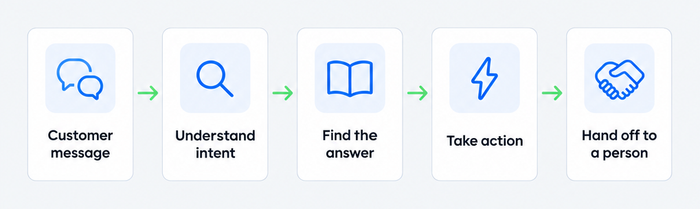
- The customer writes or speaks. The message arrives from a website chat, email, WhatsApp, Messenger, Instagram, or a phone call transcribed to text.
- The AI works out what the customer wants. Natural language processing (NLP), the branch of AI that reads human language, identifies the intent (“return an item”) and the details that matter, such as the order number and the product.
- It finds the answer. The AI searches the sources you connected: help articles, product pages, past answers, and an AI knowledge base. A large language model then writes a reply in your tone, using only that material.
- It acts, if it is allowed to. With connected tools, the AI can fetch an order status, change a delivery address, or book an appointment instead of linking to an article.
- It hands off when needed. When the question is sensitive, the customer is upset, or the AI is unsure, it passes the chat to a human with the full conversation so nobody has to repeat themselves.
Two layers sit behind these steps. The first is the knowledge layer: the content the AI is allowed to quote. The second is the action layer: the systems it can read from and write to, such as a store platform, a help desk, or a booking tool. Good answers depend on the first. Good resolutions depend on the second.
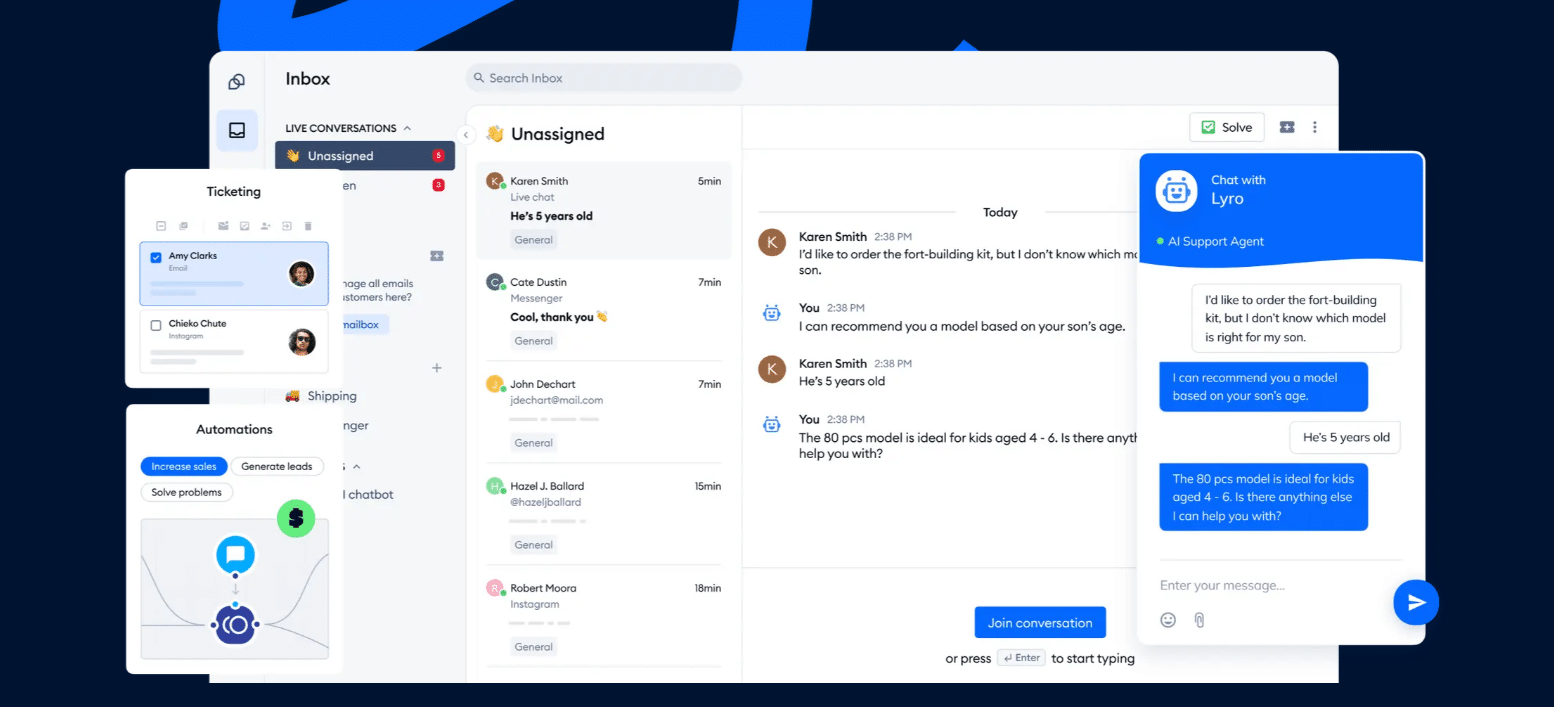
For example, Tidio’s AI agent, Lyro, answers from a store’s help articles and past conversations. With Lyro Actions it can also call outside systems, and it hands the chat to a human agent in the same inbox when a customer asks for one.
Conversational AI vs chatbots vs AI agents
The three terms overlap, which is why vendors use them loosely. The difference is how much the software understands and how much it can do. For the full comparison, see Tidio’s guide to chatbots vs conversational AI.
| Rule-based chatbot | Conversational AI | AI agent | |
|---|---|---|---|
| How it reads a message | Matches keywords and button clicks | Understands free text and intent | Understands free text and the goal behind it |
| How it answers | Fixed scripted replies | Generated from your content | Generated from your content, plus data from your systems |
| What it can do | Show a menu, collect an email | Answer questions, qualify leads | Check orders, update records, start returns, then confirm |
| What it needs from you | Every path built by hand | Help content and a few rules | Help content, rules, and connected tools with clear permissions |
| Typical risk | Dead ends when a question is off script | Wrong or outdated answers | A wrong action if permissions are too wide |
A scripted bot still has a place: a three-button menu for opening hours does the job. But customers rarely phrase questions the way a script expects, so teams that want to cut ticket volume usually need conversational AI or an AI agent. Tidio’s customer service chatbot guide shows how teams pick between the three.
Benefits of conversational AI for customer support
The benefits below are the ones that show up in support teams’ own numbers, not in vendor slogans.
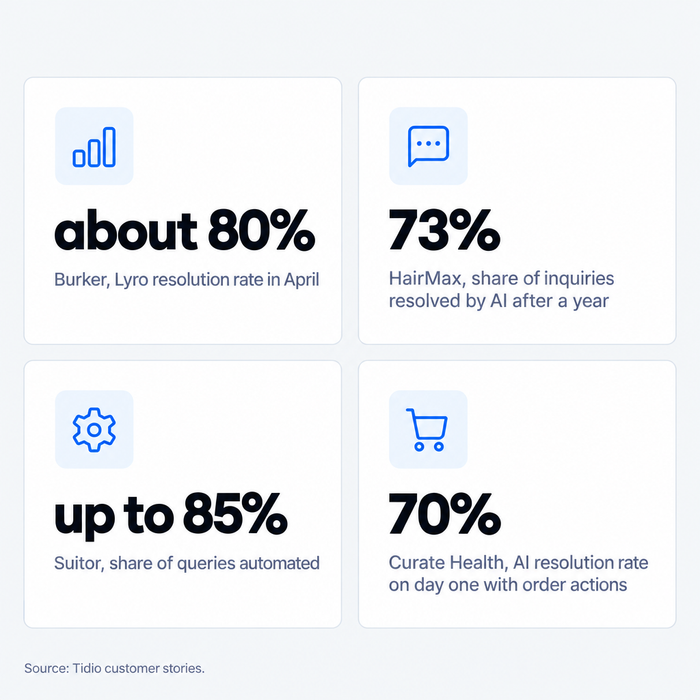
- Answers at any hour. The AI replies instantly at 3am, on weekends, and during a sale, when a human team is offline or swamped. Suitor, a five-person suit rental company in Australia, says Lyro automates up to 85% of its customer service queries, and average response time fell from about 3 minutes to 6 seconds.
- Fewer repetitive tickets. Order status, shipping, and returns are among the most common questions in a small store’s inbox. Tidio says Lyro can resolve up to 75% of support requests, and its customer stories report 73% at HairMax and about 80% at Burker.
- Lower cost per resolved question. The same team handles more volume without hiring for every peak. HairMax reports 7,800 support hours saved a year.
- Consistent answers. The AI quotes the same policy every time, in the same tone, in any language you connect. Burker answers customers in their own language, and in one sale month Lyro handled 10,000 of its conversations.
- More time for the hard conversations. When the AI takes the routine volume, your agents spend their day on refunds, complaints, and sales questions that need judgment.
- Data on what customers ask. Every conversation shows which questions confuse people and which help articles are missing. Teams use that to fix the website, not only the answers.
Try Lyro AI agent on your own help content
Use cases and examples
The strongest use cases are narrow, frequent, and answerable from content you already have. Tidio’s guide to conversational AI examples lists more, and companies using AI-generated customer support goes deeper into the stories below.
1. Answer order and delivery questions
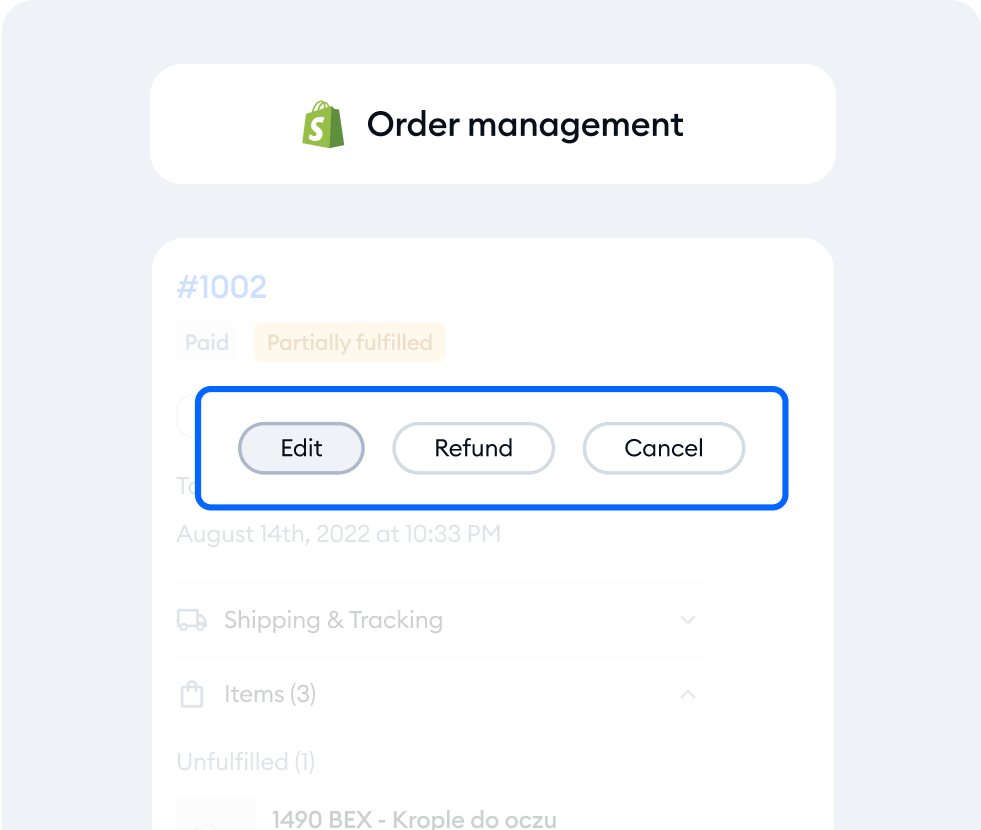
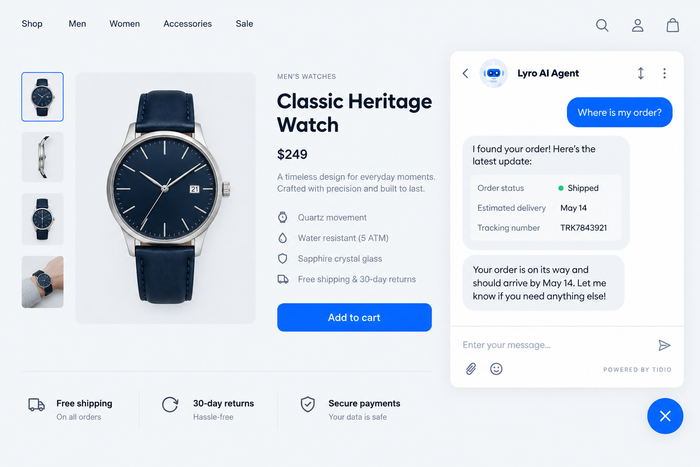
“Where is my order?” is one of the most common questions in e-commerce support, and the answer sits in a system the AI can read. Curate Health, a UK online pharmacy, connected Lyro to its order system through Lyro Actions. Its AI resolution rate rose from 41% to 70% on the first day, with the order-status action running more than 180 times.
2. Handle returns and policy questions
Return windows, shipping costs, and warranty terms rarely change, so they are safe to automate. The AI explains the policy, asks for the order number, and either completes the next step or passes the chat to an agent for exceptions.
3. Recommend products
A shopper who asks “which watch suits a small wrist?” gets a short list from the catalog instead of a link to the whole store. Burker, a watch and jewelry brand with about 20 employees, reached a Lyro resolution rate of about 80% in April, after 75% in its first month, with most questions about orders and products.
4. Cover after-hours support
Many customers write in the evening, after the support team has left. An AI agent answers the common questions on the spot and leaves a clean summary for the morning shift on anything that needs a person.
5. Triage and route complex requests
Not every message can be automated. The AI collects the order number, the issue, and the customer’s tone, then assigns the chat to the right team. That saves the first two minutes of every hard conversation. See Tidio’s guides to ticket escalation and omnichannel customer service.
6. Assist human agents
Not all conversational AI talks to customers. Bank of America’s EricaAssist, which the bank added generative AI to in 2026, cuts average call time by nearly one minute[2] by summarizing why a client is calling and suggesting next steps. The same pattern works at small-team scale: the AI drafts, the agent edits and sends.
Challenges and limits
Real deployments show where conversational AI fails, too. Four problems are worth planning for.
The AI states something wrong. In 2024, Air Canada’s website chatbot told a customer he could claim a bereavement fare after travel, which the airline’s policy did not allow. A tribunal in British Columbia made the airline pay C$812 and rejected the argument that the chatbot was responsible for its own words[3]. The fix is to limit the AI to your approved content, review the conversations it is unsure about, and update the source articles when they change.
The AI has no way out. Klarna’s assistant handled two-thirds of its customer service chats in its first month[4], and the company later said it wants customers to always have the option of speaking with a person[5]. Give the AI clear handoff rules: angry customers, payments, medical or legal questions, and any request it fails twice.
The AI behaves badly. In January 2024, a delivery company’s chatbot swore at a customer after a system update, and the company switched off its AI element[6]. Test after every change, keep guardrails on tone, and keep a person responsible for the live setup.
The knowledge goes stale. An AI that quotes last year’s shipping times is worse than no AI. Assign an owner for the help content, and add the questions the AI could not answer as new articles each week. HairMax committed to adding 100 new help articles a month for this reason.
There is also the customer’s side. In a 2024 survey, Gartner found that 64% of customers would prefer that companies did not use AI in customer service[7]. The way to meet that is to make the human route obvious in every conversation, not to hide it.
What to look for in conversational AI software
Most platforms can answer a question. The differences show up in what happens next. These are the criteria that separate them, in the order small teams usually feel them.
- Fit with your stack. Does it connect to your store platform, help desk, and CRM, or does it replace them? A Shopify store needs order data; a SaaS team needs account data.
- Channels. Website chat, email, WhatsApp, Messenger, Instagram, voice. Check which are included in the plan you will actually buy.
- Actions, not only answers. Can the AI check an order, change an address, or start a return, and can you set what it is allowed to do?
- Accuracy and guardrails. Can you restrict it to approved content, see what it answered, and correct it?
- Human handoff. Does the agent receive the full conversation, and can you set the rules for when it triggers?
- Pricing model. Per seat, per resolved conversation, or per conversation quota. Each charges for different behavior, so model your real volume before you compare list prices.
- Languages and security. Which languages it supports, where the data is stored, and which compliance claims the vendor can document.
A short comparison of five widely used options follows. It is a starting point, not a ranking. Tidio’s guides to the best conversational AI platforms and the best AI agents for customer service cover more tools in depth, with the limits of each.
| Platform | Best for | How AI is billed (as of October 2026) |
|---|---|---|
| Tidio | Small businesses and online stores, especially on Shopify | Lyro AI agent from $32.50 a month billed annually ($39 monthly) for 50 Lyro conversations; plans from $24.17 a month billed annually |
| Intercom | SaaS and digital-first support teams | $0.99 per Fin outcome, on top of seats from $29 per seat a month billed annually |
| Zendesk | Large teams that need ticketing depth | 5 to 10 resolutions per agent a month included, then $1.50 to $2.00 per automated resolution; seats from $19 per agent a month billed annually |
| Freshdesk | Growing teams on a per-agent budget | 500 free AI sessions once, then $49 per 100; seats from $19 per agent a month billed annually |
| HubSpot Service Hub | Teams whose customer data lives in HubSpot | $0.50 per resolution in messaging, paid in HubSpot Credits, on a Professional plan from $90 per seat a month billed annually |
Where Tidio fits: if you run a small support team or a Shopify store, Tidio puts live chat, the Lyro AI agent, and email tickets in one inbox, and its Shopify integration lets Lyro read order data. That makes it a practical first choice when you want one tool and a free plan to test it. Teams already deep in another help desk, or with enterprise contact center needs, are usually better served by that vendor’s own AI agent or a dedicated enterprise platform.
How to get started
You do not need a long project. A small team can have a first version running quickly, then improve it from real conversations.
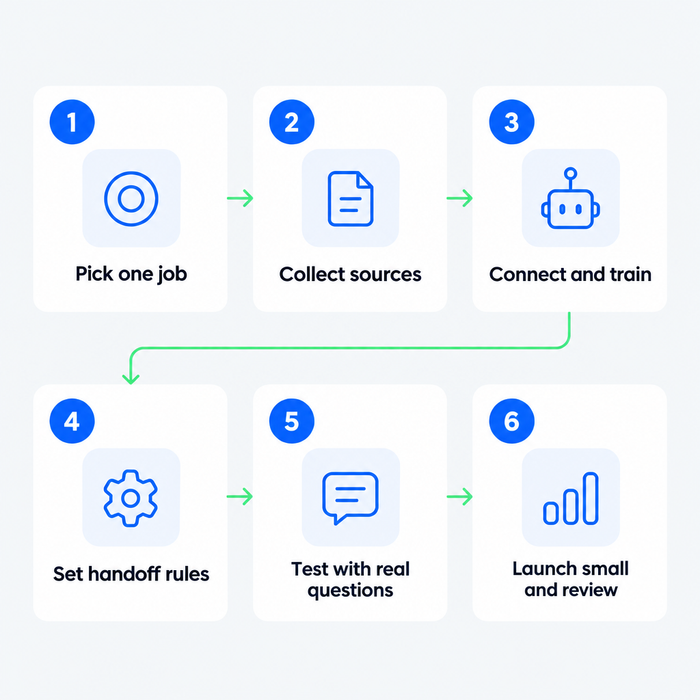
- Pick one job and one channel. Choose the most repetitive question, usually order status or returns, on the channel your customers use most. Set a number you can check, such as the share of those chats the AI resolves.
- Collect your sources. Gather the help articles, policy pages, and the best past agent replies. Remove outdated pages first, because the AI treats everything you give it as true.
- Connect and train it. Add the sources, set the tone, and connect the systems it needs, such as your store. Tidio’s guide to training a chatbot walks through the steps. In Tidio, Lyro learns from your help content and past conversations.
- Set the handoff rules. Decide which topics always go to a person, and test the handoff yourself. Ask the AI a question it cannot answer and confirm the chat reaches the right inbox with context.
- Test with real questions. Run 30 to 50 questions from your past tickets, read every answer, and fix the sources, not the symptoms.
- Launch small, then read the conversations. Switch it on for one channel, review the first weeks of chats, add missing articles, and then widen it. Track resolution rate, handoff rate, and customer satisfaction. Tidio’s guide to customer service metrics explains how to read them.
Start free and add Lyro AI agent to your store
Where conversational AI support is heading
Two shifts are worth watching. First, AI agents are moving from answering to doing, so requests that used to need a human agent, such as a refund or an address change, can become automated steps with approval rules. Second, some platforms already let one AI serve website chat, WhatsApp, and phone calls from the same knowledge base. For small teams, the practical consequence is the same: the setup you build now, clean content plus clear rules, carries over to whatever channel comes next.
Related guides
- AI customer service: what it is and how to use it
- Chatbots vs conversational AI
- Conversational AI examples
- Training a chatbot
Frequently asked questions
Conversational AI for customer service is software that understands customer messages in everyday language and replies from the company’s own content, in chat, email, messaging apps, or voice. Newer versions also act, for example by checking an order or starting a return, and pass the conversation to a human when needed.
A rule-based chatbot follows a script of keywords and buttons, so it fails when a customer words a question differently. Conversational AI understands free text and generates an answer from your content. An AI agent goes one step further and takes actions in connected systems.
It depends on your stack, size, and channels. Small teams and online stores often pick Tidio, SaaS teams look at Intercom, and larger teams with heavy ticketing look at Zendesk. Compare how each platform charges for AI, what it can do beyond answering, and how it hands off to people.
Choose the one that resolves your most common inquiries with your data. Test each candidate on 30 to 50 of your own past questions and compare accuracy, handoff behavior, and the cost per resolved conversation, not the demo.
Not entirely. It resolves repetitive questions, such as order status and returns, and frees agents for complaints, exceptions, and sales conversations. Klarna, whose assistant handled two-thirds of its chats in month one, started recruiting human agents again.
Small-business tools start at roughly $24 to $39 a month, and AI is usually billed separately: per conversation, per resolution, or in monthly packs. Enterprise platforms quote custom prices. Model your real chat volume before you compare list prices.
Yes, and they often see the biggest effect. Suitor, a five-person company, automates up to 85% of its customer service queries with Tidio’s Lyro, and tools with a free plan let you test on real conversations before you pay.
Tidio is AI customer service software that combines live chat, a Lyro AI agent, and email tickets in one inbox. It suits small businesses and online stores that want to automate repetitive questions without a large support team. Tidio says Lyro can resolve up to 75% of support requests.
See what Lyro can resolve in your own support inbox
