


Key takeaways:
- A chatbot template is a pre-built conversation flow you customize and launch without coding. Pick a use case, edit the messages and triggers, then connect your channels.
- “Chatbot template” means two things: a conversation-flow template (messages and logic) or a UI template (the widget’s colors, shape, and layout).
- The most common templates are welcome messages, FAQ bots, lead-gen forms, cart-recovery flows, order tracking, and appointment booking.
- Most are free and no-code, so non-technical teams can launch a working bot in minutes.
Search “chatbot template” and you get two different things. One group wants a conversation flow: the messages, questions, and logic the bot runs through. The other wants a UI design: the colors, layout, and look of the chat widget. This page covers both — the 20 flows are free, no-code, and come with the real script copy; the design templates cover the widget’s look.
You’ll also get channel options for Messenger, Instagram, and WhatsApp. Start at the top, or jump to the type you need.
For finished bots in the wild, see our AI chatbot examples.
Use live chat to support your customers in real-time
What is a chatbot template?
A chatbot template is a pre-built bot you customize and launch without coding. It comes in two forms: a conversation-flow template, which sets the bot’s messages and logic, and a UI or design template, which sets how the chat widget looks. Most teams start with a flow template, then style the widget after.
The two get mixed up constantly, so it’s worth keeping them straight. A flow template decides what the bot says and where each answer leads. A design template decides what the widget looks like on your page. You can use one without the other, but the best chatbots for business do both well.
A few terms you’ll see throughout this guide:
- Trigger—the event that opens the bot (a page visit, a click, an exit attempt).
- Flow—the full path of messages from greeting to goal.
- Node—a single step in that path: a message, a question, or a condition.
- Fallback—what the bot says when it doesn’t understand.
- Handoff—the moment the bot passes the chat to a human agent.
20 ready-to-use chatbot conversation templates
These 20 conversation-flow templates cover the jobs most websites need a bot for: support, sales, lead capture, and follow-up. Start with the comparison table, then read the entry for any flow you want to use.
| # | Template | Best for | Trigger |
|---|---|---|---|
| 1 | Welcome message | Greeting new visitors | Page load |
| 2 | FAQ bot | Answering repeated questions | Keyword or menu click |
| 3 | AI chatbot (Lyro) | Resolving questions in natural language | Any customer message |
| 4 | Order tracking | “Where’s my order?” | Order-status request |
| 5 | Product availability | Back-in-stock alerts | Out-of-stock item |
| 6 | Returns and RMA | Handling return requests | “Return” keyword |
| 7 | Shipping zones | Delivery checks | “Do you ship to…?” |
| 8 | Product recommendation | Upselling on product pages | Page visit |
| 9 | Cart saver | Recovering abandoned carts | Exit intent |
| 10 | Discount for new visitors | Converting first-timers | First visit |
| 11 | Spinning wheel | Collecting emails with a game | Click or timed |
| 12 | Free shipping upsell | Raising average order value | Cart threshold |
| 13 | Last items in stock | Scarcity and urgency | Low-stock product |
| 14 | Place an order | Custom orders and requests | Product-page click |
| 15 | Lead generation | Collecting emails | Landing-page visit |
| 16 | Order a phone call | Capturing phone leads | “Call me” click |
| 17 | Appointment booking | Scheduling calls or visits | “Book” click |
| 18 | Real estate lead capture | Qualifying property leads | Page visit |
| 19 | News and updates | Sharing company news | Subscriber visit |
| 20 | Instagram story autoresponder | Replying to story reactions | Story reply |
Learn more:
- How to Build a Chatbot for Customer Support
- How to Build a Product Recommendation Chatbot
- A Guide to AI Chatbot Integration
- The Ultimate Guide to Crafting a Chatbot Persona
Welcome message
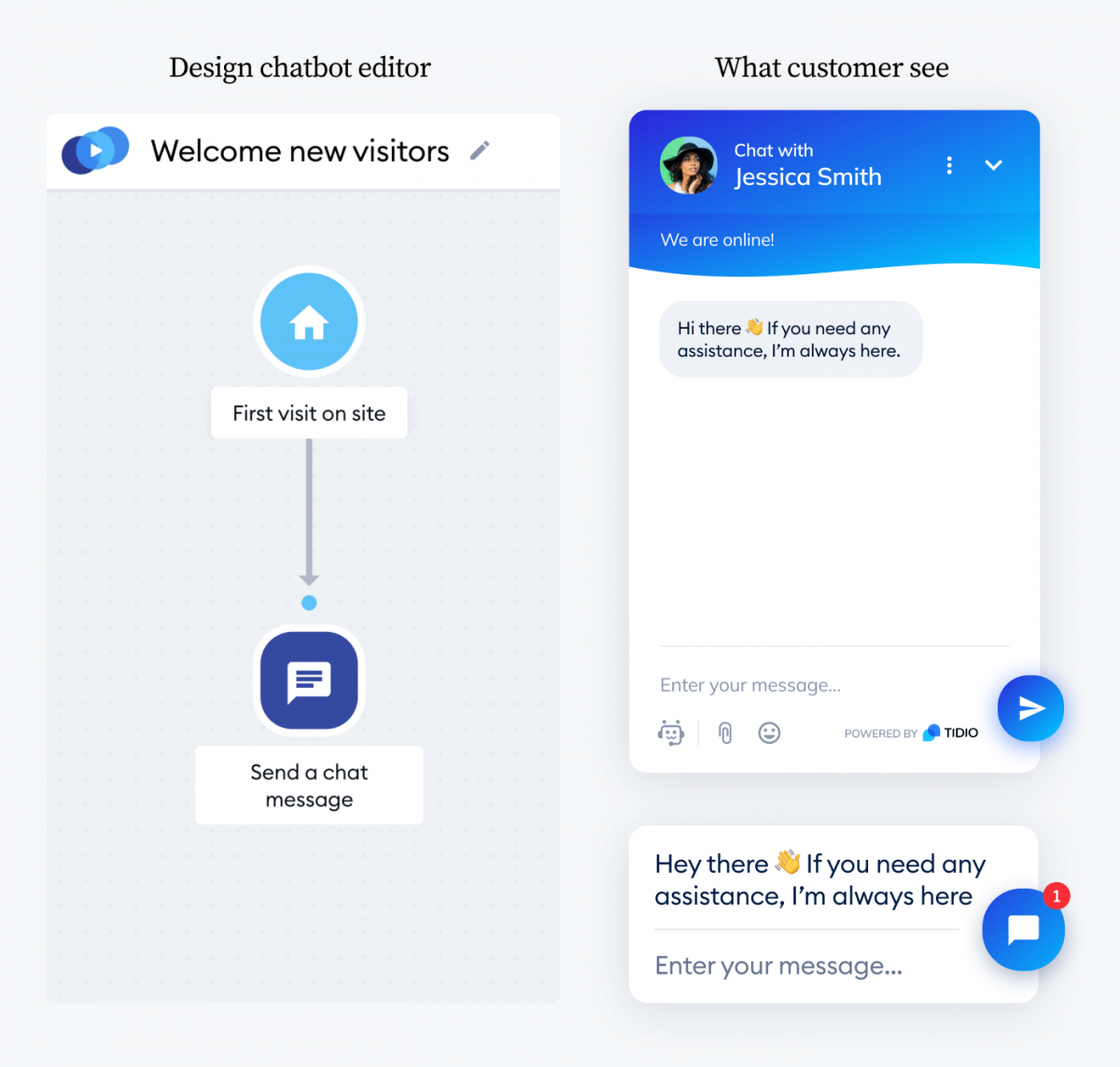
Greets visitors the moment they land and points them toward what they came for. A good opener sets your tone and cuts your bounce rate before a person has clicked anything.
Bot: Hi there 👋 Welcome to [Brand]. Looking for something specific, or just browsing?
[Shop bestsellers] [Track my order] [Talk to a human]
A warm greeting shapes the whole customer experience, so add a GIF, photo, or emoji to show some personality.
Tidio has proactive, reactive, and multilingual versions, so you can greet first-timers, fire on chat intent, or welcome visitors in their own language.
FAQ bot
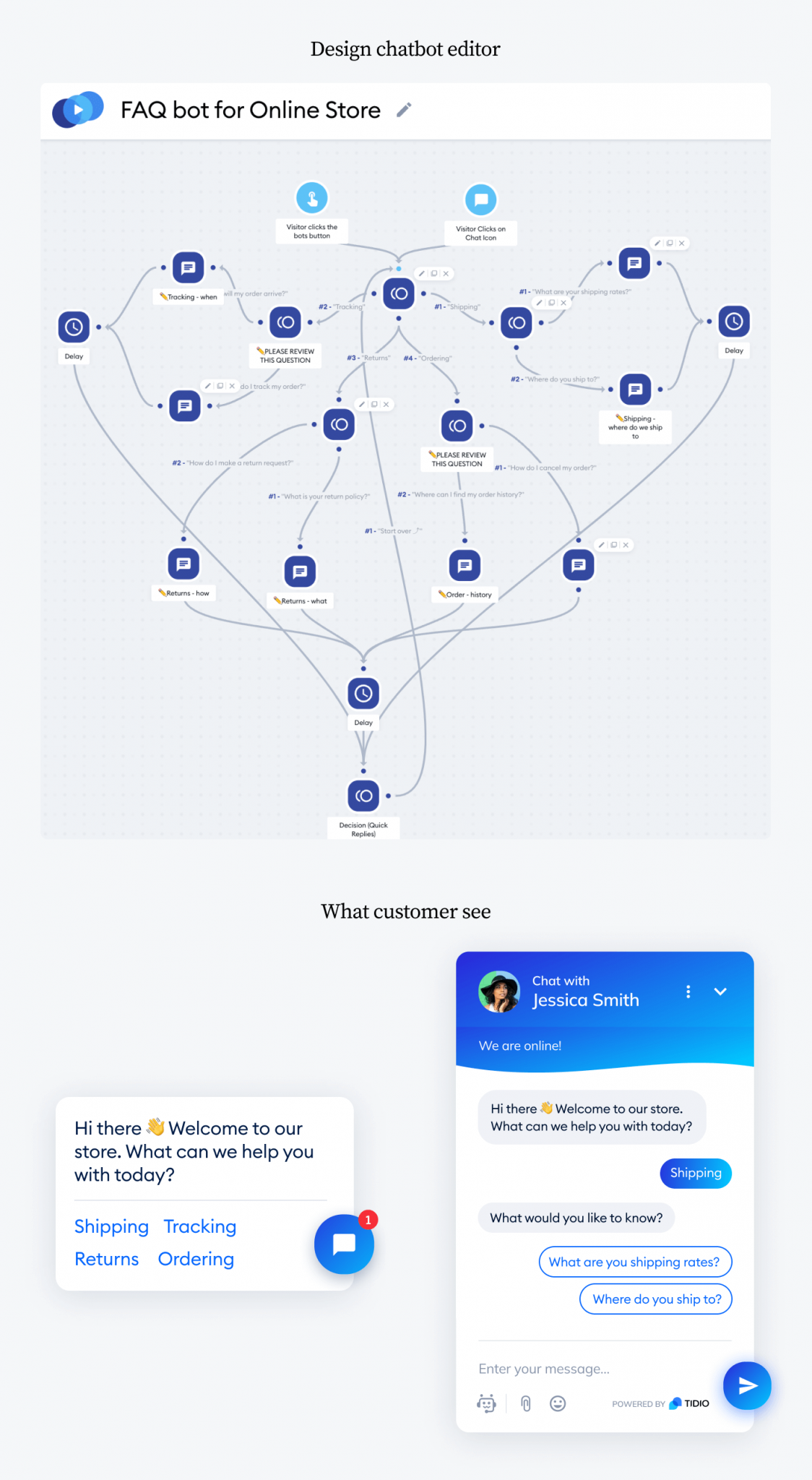
Answers your most common questions on the spot, so customers skip the queue and your agents skip the repetition. It looks complex to build but takes minutes from a template.
Bot: Happy to help. What do you need?
[Shipping & delivery] [Returns & refunds] [Payment options] [Something else]
Each button leads to a short answer and a follow-up. Pair it with Lyro to catch questions your buttons don’t cover, or read up on building a full customer service chatbot.
Suggested read: how to set up an FAQ chatbot and a Facebook Messenger bot.
AI chatbot (Lyro)
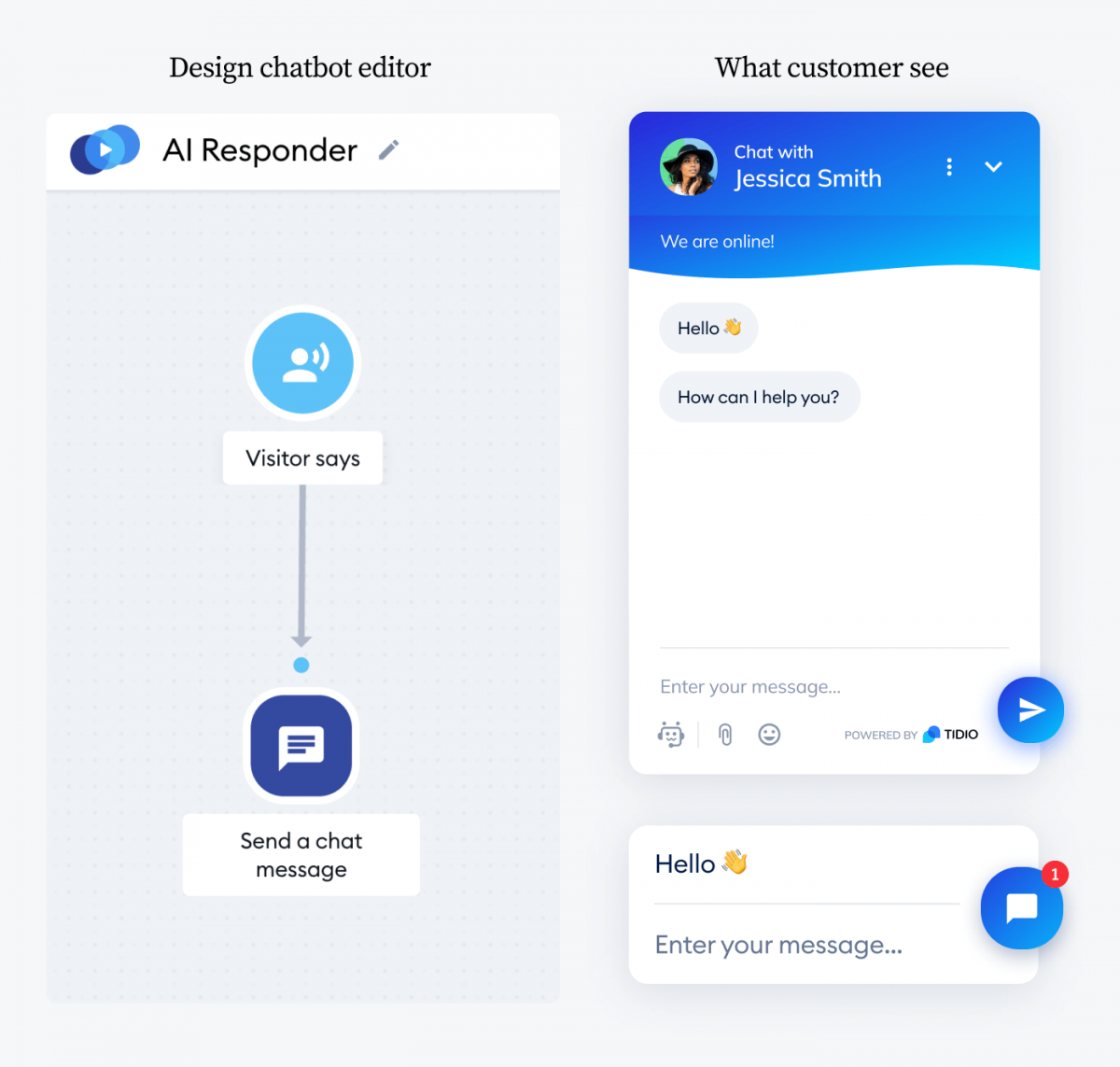
Reads a question in plain language and answers from your own support content, no rigid script required. Lyro resolves up to 67% of customer questions on its own and replies in under six seconds.
Customer: How much does shipping cost to Germany
Bot (Lyro): Standard shipping to Germany is €4.95 and arrives in 3–5 business days. Orders over €50 ship free. Want me to check delivery to a specific city?
People ask for the same thing a dozen ways. Lyro understands intent, so “what’s your pricing” and “how much does this cost” land on the same answer. Our chatbot statistics show most customers are fine talking to a bot when it actually helps. If you’d rather start simpler, Tidio’s rule-based AI Responder handles up to 75% of repetitive questions like “hi” or “where can I find…”.
Order tracking
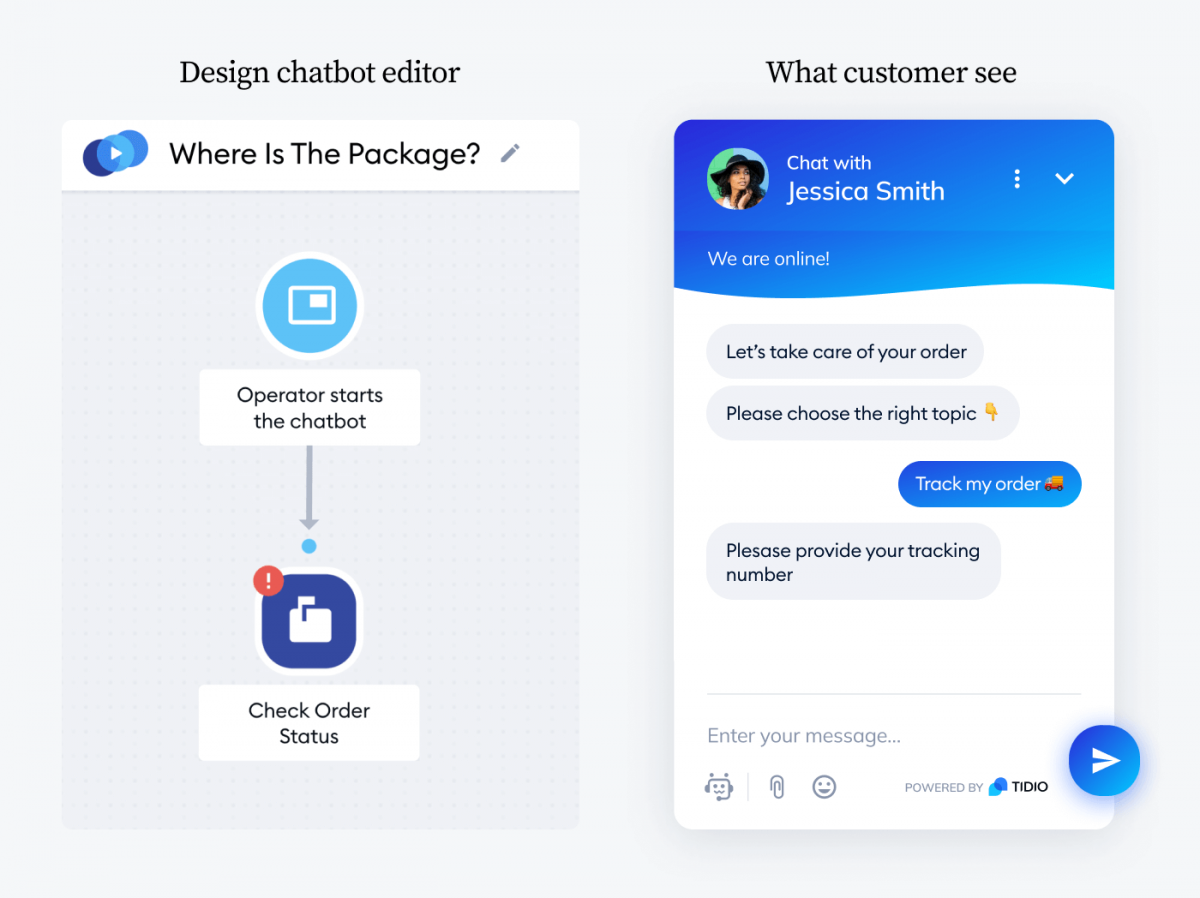
Let customers check their own order status instead of messaging an agent. They enter an order number or email, and the bot returns the status right in the chat. Available for Shopify stores once you connect your store.
Bot: Want to track your order? Share your order number and I’ll pull it up.
Visitor enters their order number or email.
Bot: Order #1042 shipped yesterday and arrives Thursday. Here’s your tracking link.
This one flow can clear a huge share of “where’s my order?” messages off your team’s plate. See more Shopify chatbot apps for ecommerce.
Product availability
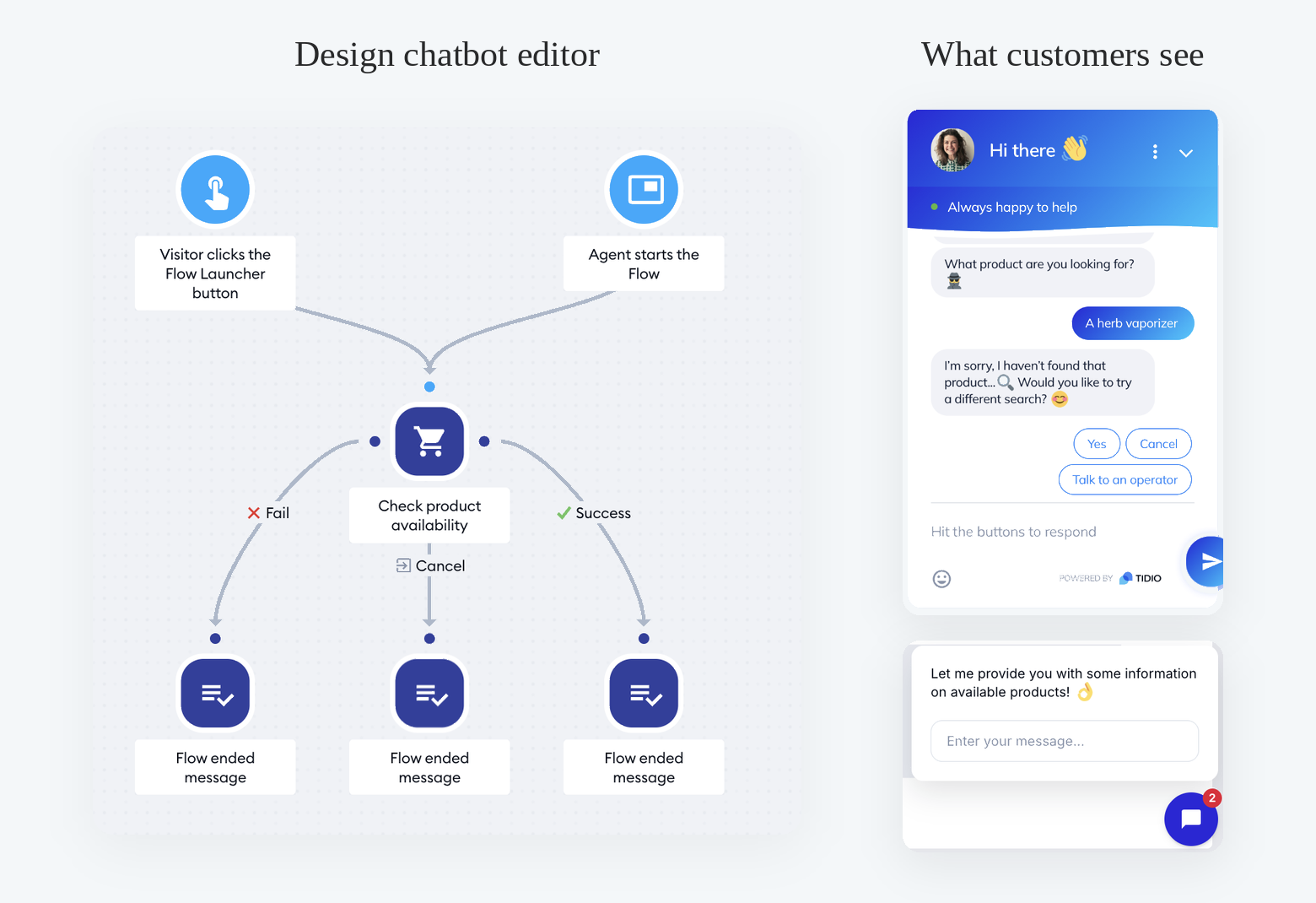
Tells shoppers when an item is out of stock, then captures their email so you can alert them the moment it returns. You recover a sale you’d otherwise lose at the worst possible moment.
Bot: That item’s out of stock right now. Want me to email you the second it’s back? Visitor enters their email address.
Bot: Done—you’ll be first to know. 📩
Returns and RMA
Handles return requests start to finish: order lookup, reason, and next steps. A high-intent support flow that keeps a frustrating moment smooth and off your agents’ plates.
Bot: Need to return something? Let’s sort it out. What’s your order number?
The visitor enters their order number. [Wrong size] [Damaged] [Changed my mind]
Bot: Thanks. Here’s your prepaid label and what happens next.
Shipping zones
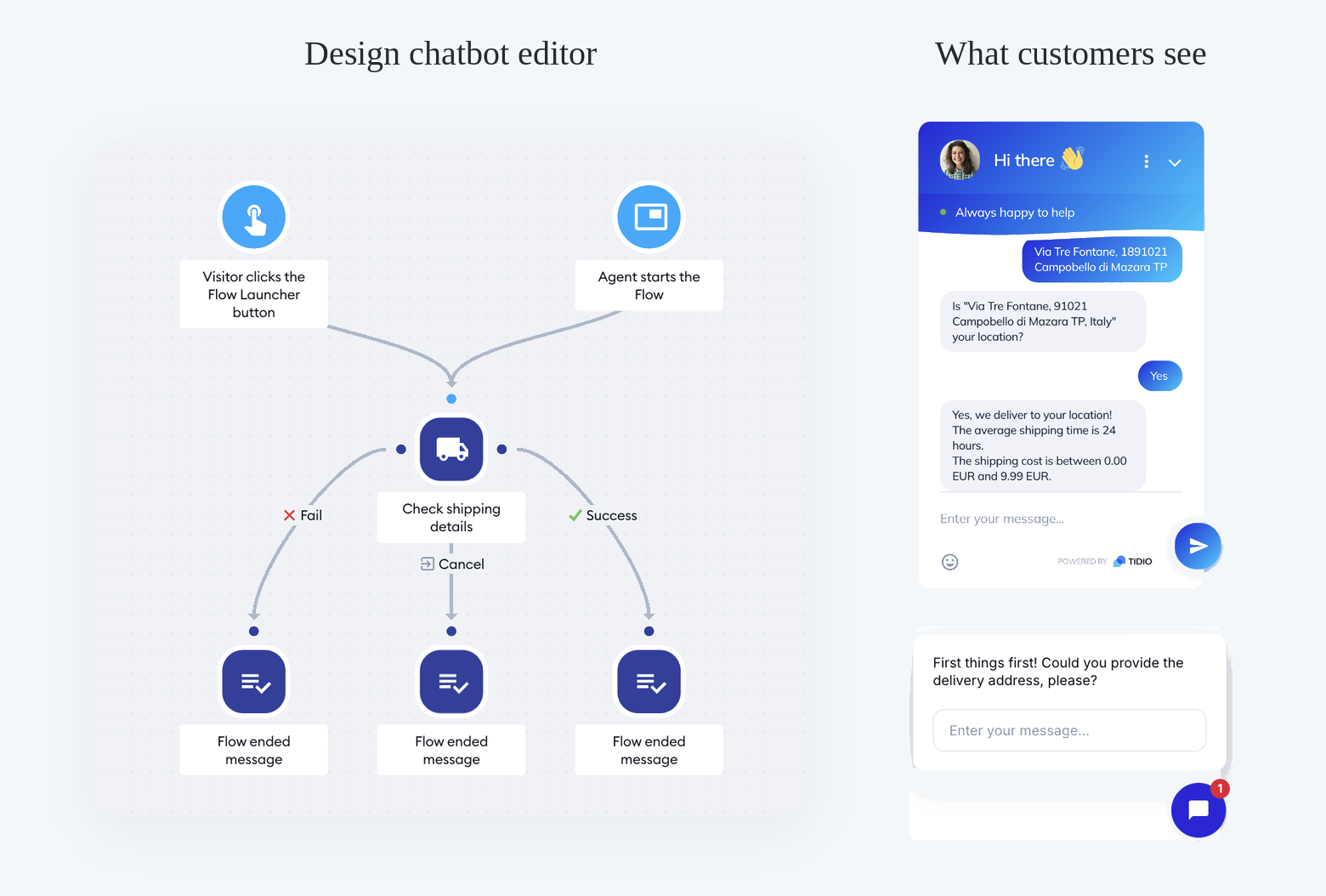
Answers “do you deliver to me?” before a shopper gets attached to a cart they can’t check out. If you don’t ship to them yet, the bot captures an email so you can tell them when you do.
Bot: Want to check if we deliver to you? Drop your country or zip code. The visitor enters their location.
Bot: Good news—we ship there in 3–5 days. Want to keep shopping?
Product recommendation
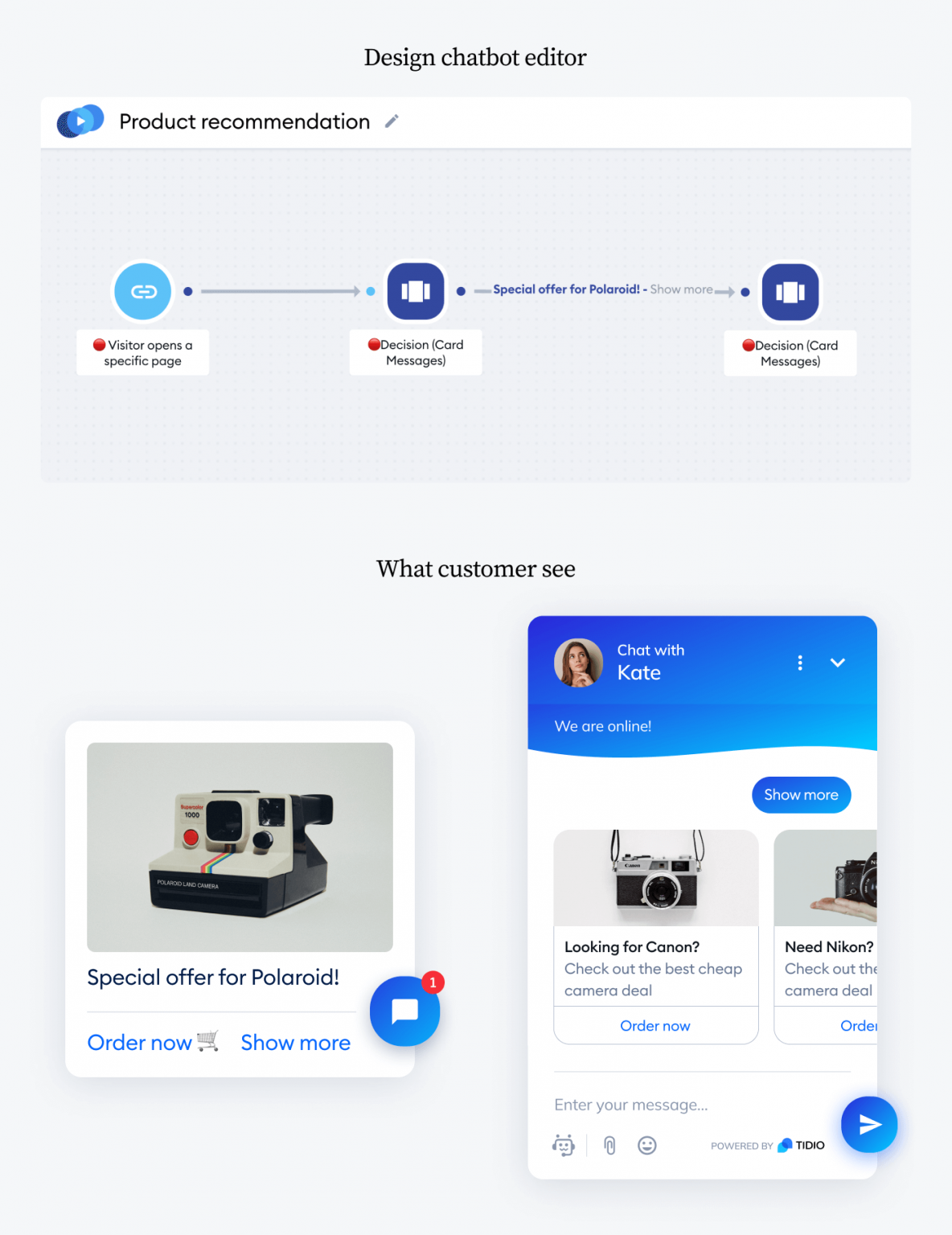
Suggests products based on the page a visitor is on or the pages they’ve browsed. A personalized nudge lifts average order value and keeps people moving toward checkout.
Bot: Picked these for you based on what you’re viewing 👇
Product carousel: [Product A] · [Product B] · [Product C]
Bot: Want me to filter by size or color?
Tidio also has a dynamic version that recommends items related to whatever a shopper just added to the cart. More tactics in our guide to ecommerce chatbots.
Cart saver
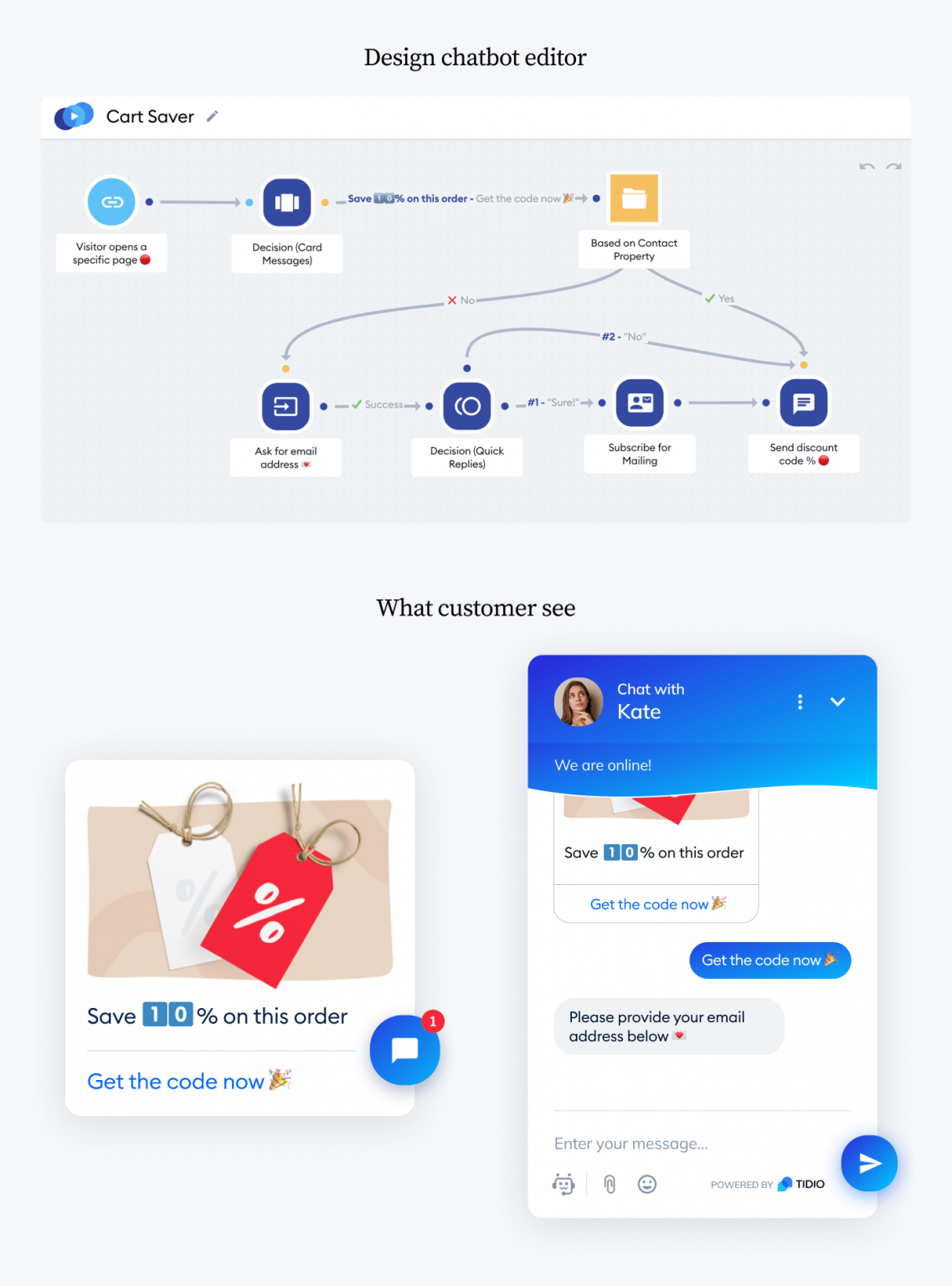
Catches shoppers about to leave with items still in the cart, then offers a reason to finish.
Bot: Wait—you’ve still got [Product] in your cart. Here’s 10% off if you check out in the next 15 minutes: SAVE10 [Apply code & checkout] [No thanks]
Set it to trigger on exit intent, and A/B test 10% against 15% to find your number.
Use this template · More on reducing cart abandonment.
Discount for new visitors
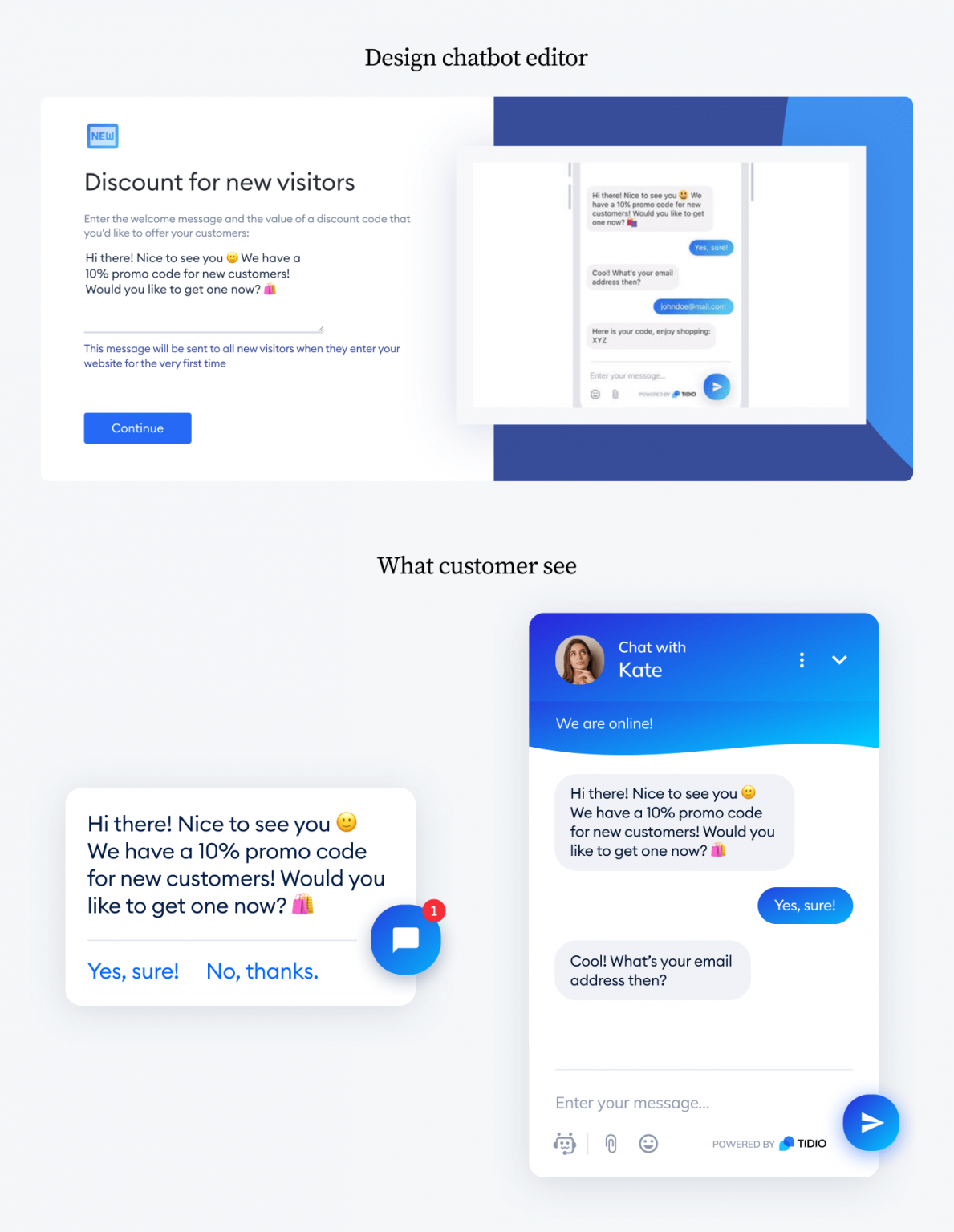
Gives first-time visitors a small offer in exchange for an email, or just to push a first purchase.
Bot: First time here? Take 15% off your first order 🎉
[Get my code] [Maybe later]
Research on pricing psychology[1] found people prefer percentage discounts on items under $100 and fixed-amount discounts above it. Test both with your own customers.
Pick a free template and launch your first chatbot in minutes
Spinning wheel
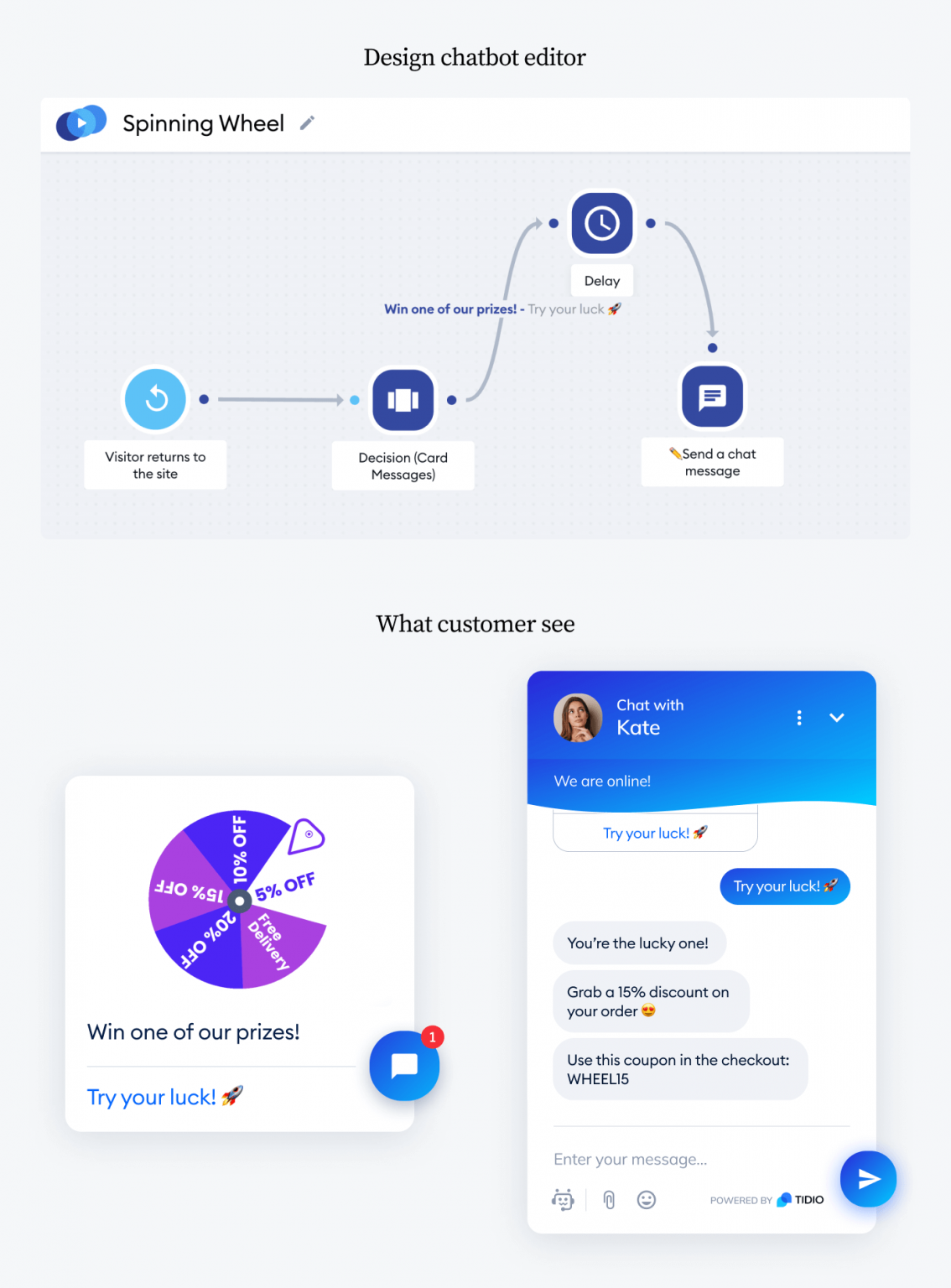
Turns a discount into a game. Visitors spin to “win” an offer, which feels better than handing it over flat and earns you more emails.
Bot: Spin to win! 🎡 Enter your email for a chance at up to 30% off.
Visitor enters their email, then spins the wheel.
Bot: You won 15% off! Code WHEEL15 is yours.
Trigger it for first-timers, on a specific page, or every 24 hours per visitor.
Free shipping upsell
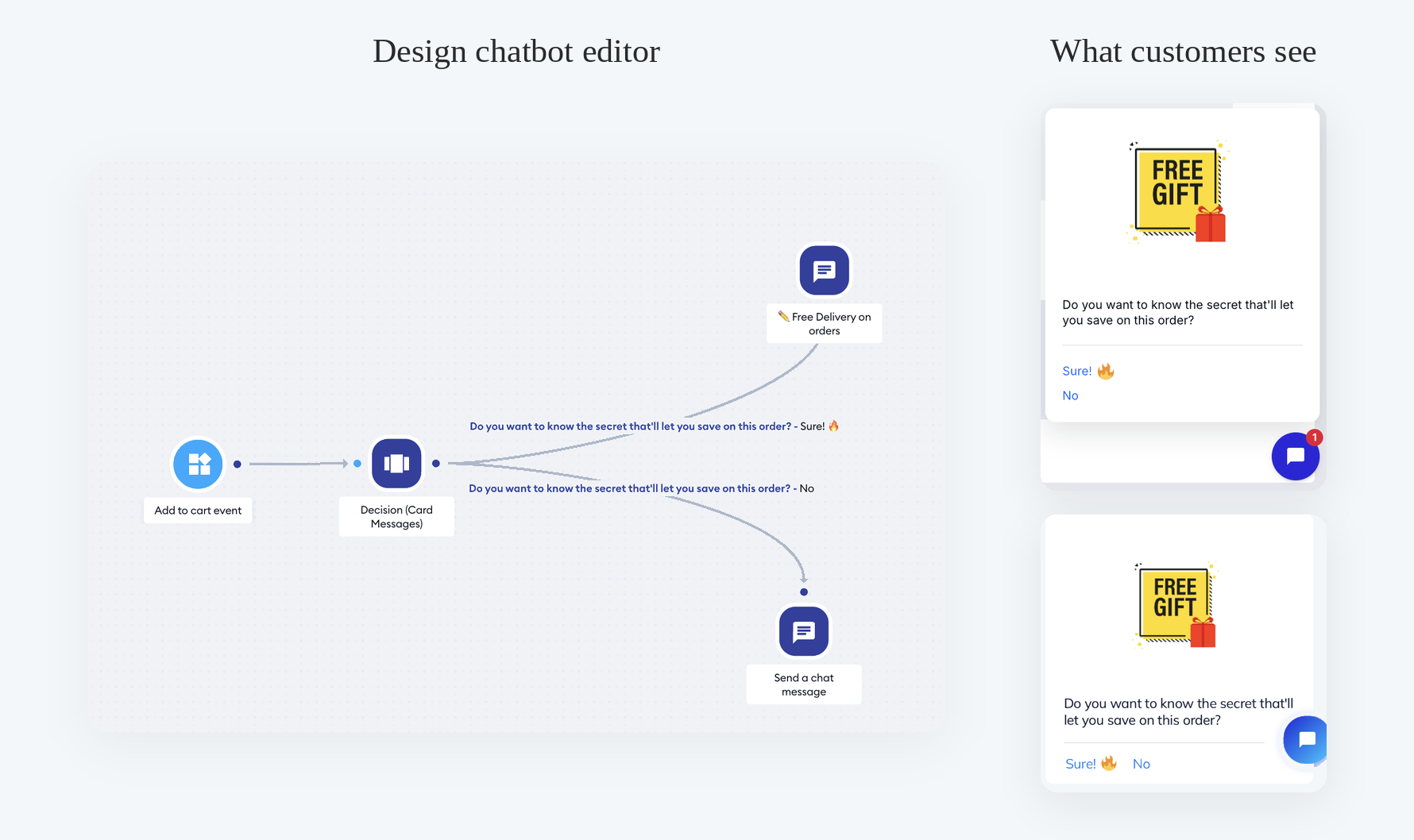
Nudges shoppers to add one more item by showing how close they are to free shipping. A simple way to lift average order value without discounting.
Bot: You’re $12 away from free shipping! Add one more item and delivery’s on us.
[Show me what to add] [Checkout anyway]
Tidio also has a “Free Shipping Unlocked” version that fires once a cart hits your threshold.
Last items in stock
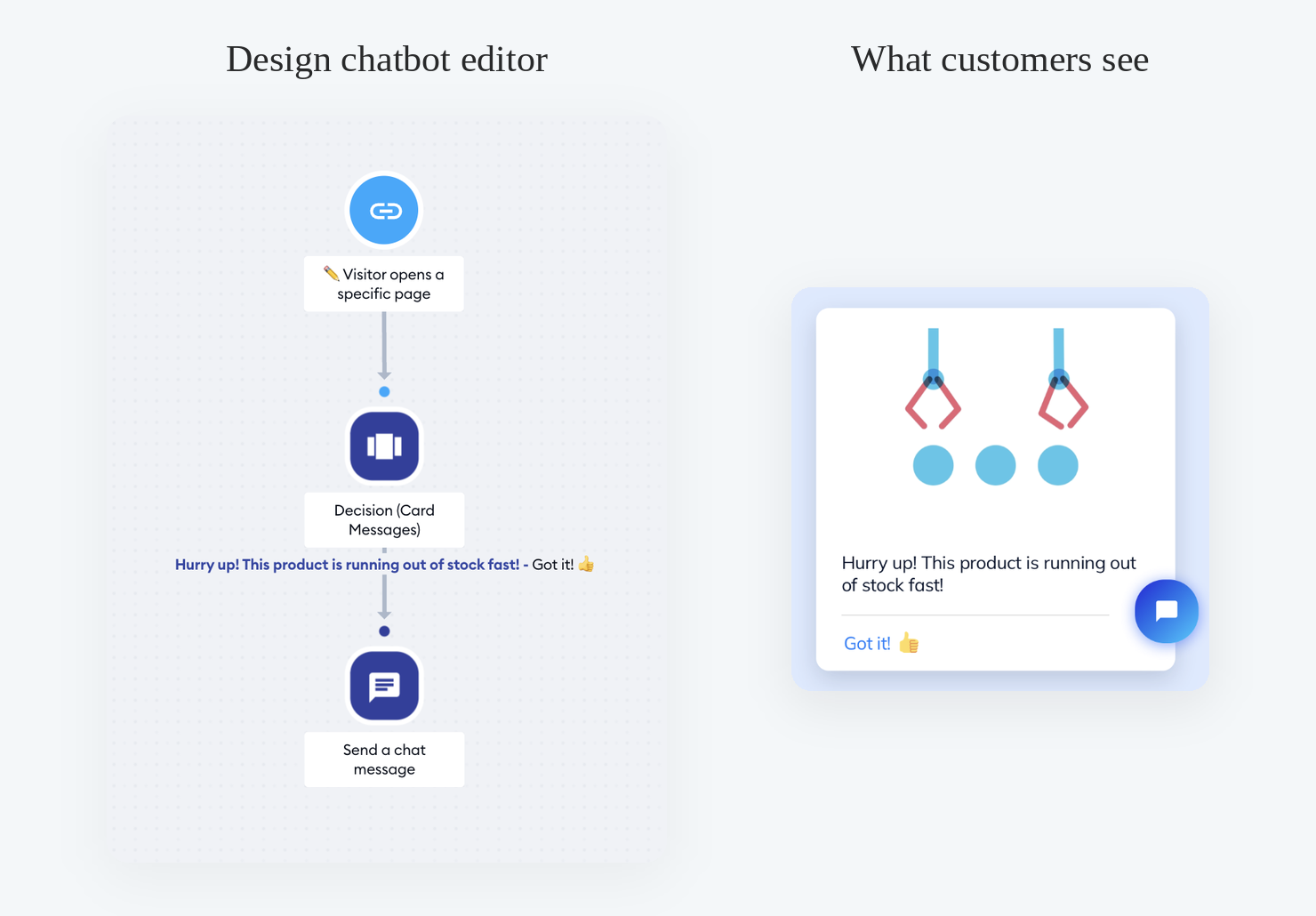
Uses scarcity to move slow or seasonal inventory. The bot flags low stock on a product and pushes the shopper to act.
Bot: Heads up—only 3 of [Product] left in stock. Want to grab yours before they’re gone?
[Add to cart] [Notify me if it restocks]
Place an order
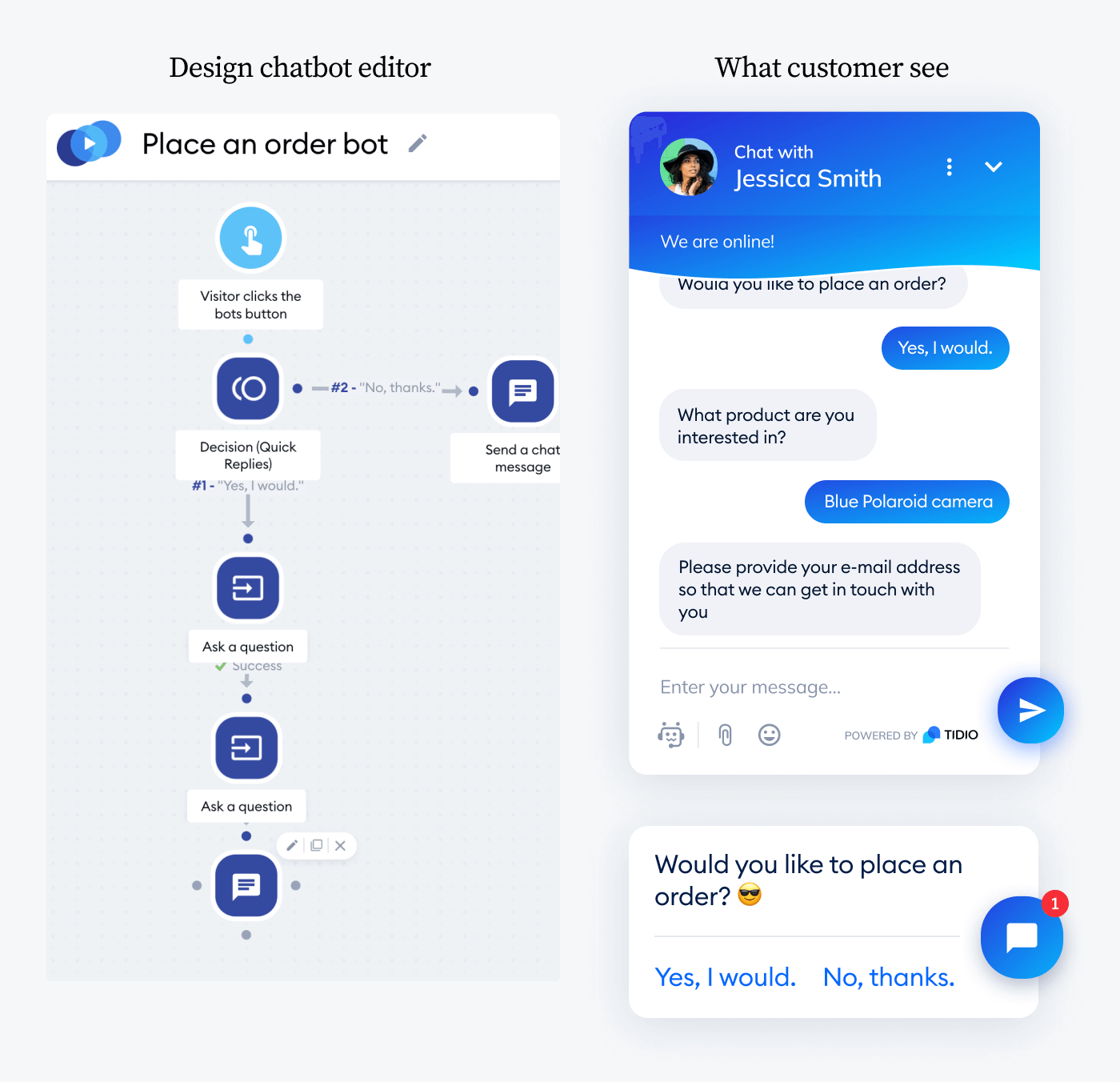
Captures custom requests when a shopper wants something you don’t list, like a different size or color. You collect their email and follow up with options.
Bot: Love it but want a tweak? Tell me what you’re after and I’ll send matches.
Visitor describes what they want and leaves an email.
Bot: Got it. We’ll email a few options within 24 hours.
It saves a sale you’d otherwise lose, and there’s no payment step, so it’s risk-free for the buyer.
Lead generation
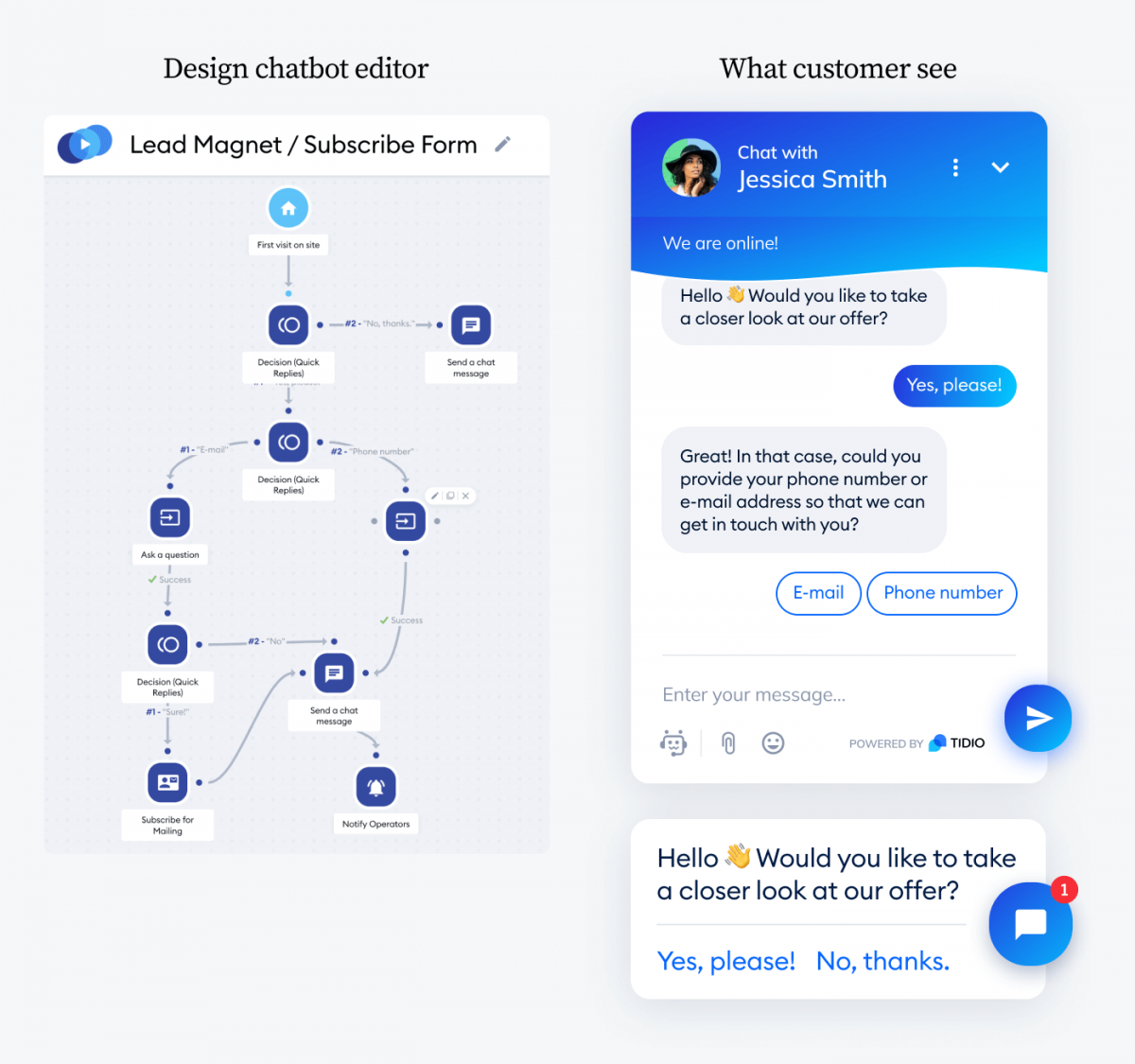
Collects a visitor’s email and details so you can follow up with newsletters, offers, or a sales call. Put it on your landing page for the highest-quality leads.
Bot: Want 10% off your first order? Drop your email and the code is yours.
Visitor enters their email address.
Bot: Done ✅ Check your inbox—your code is on the way.
Use it to feed your email campaigns, or pair it with the Lead Magnet / Subscribe Form template for gated content.
Order a phone call
Collects a phone number and a preferred time so your team can call back, instead of trapping a hot lead in a form.
Bot: Prefer to talk? Leave your number and a good time, and we’ll call you back.
Visitor enters their phone number and preferred time.
Bot: Got it—we’ll ring you then. 📞
Great for closing through conversation rather than a form. See more on sales chatbots.
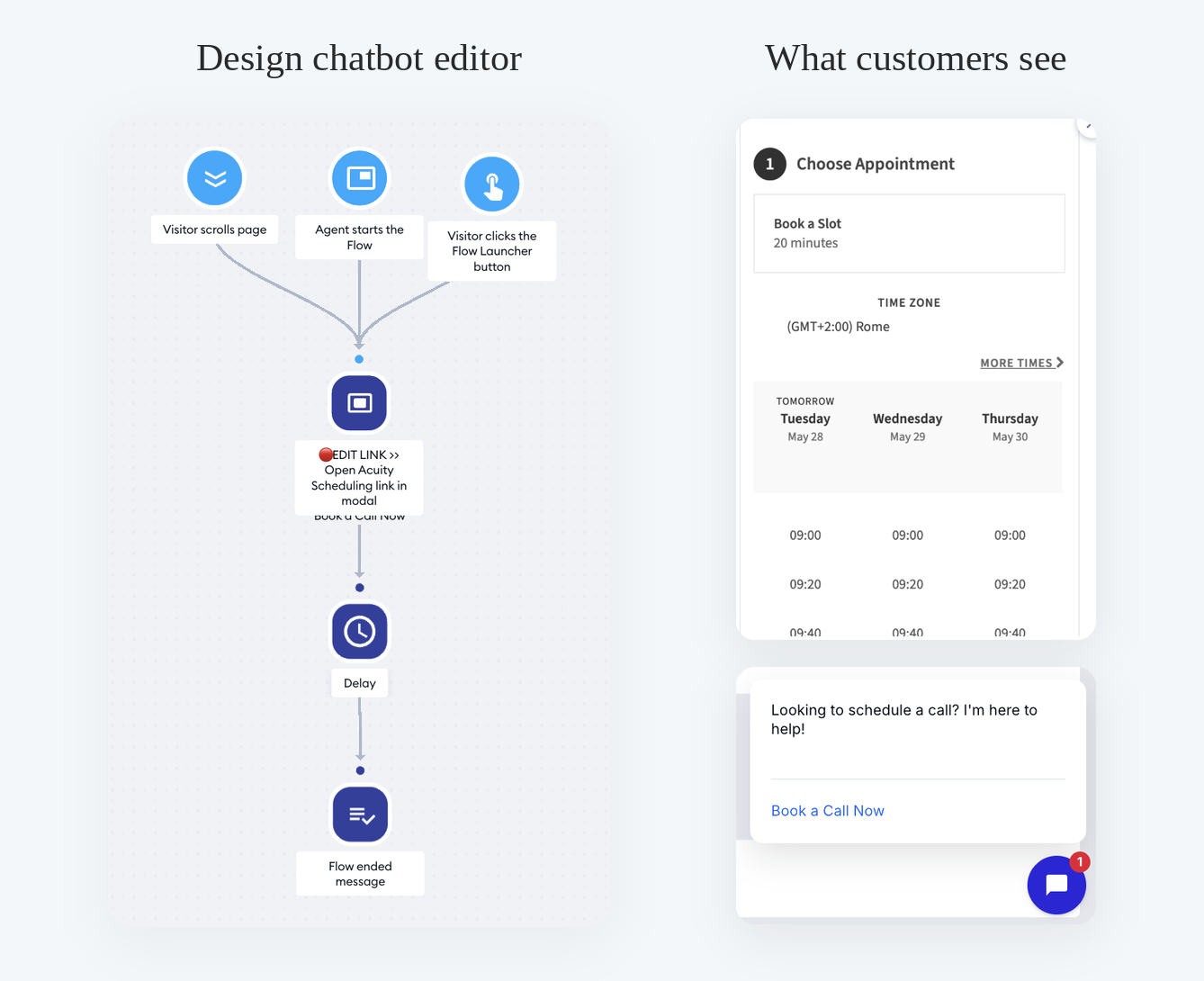
Appointment booking
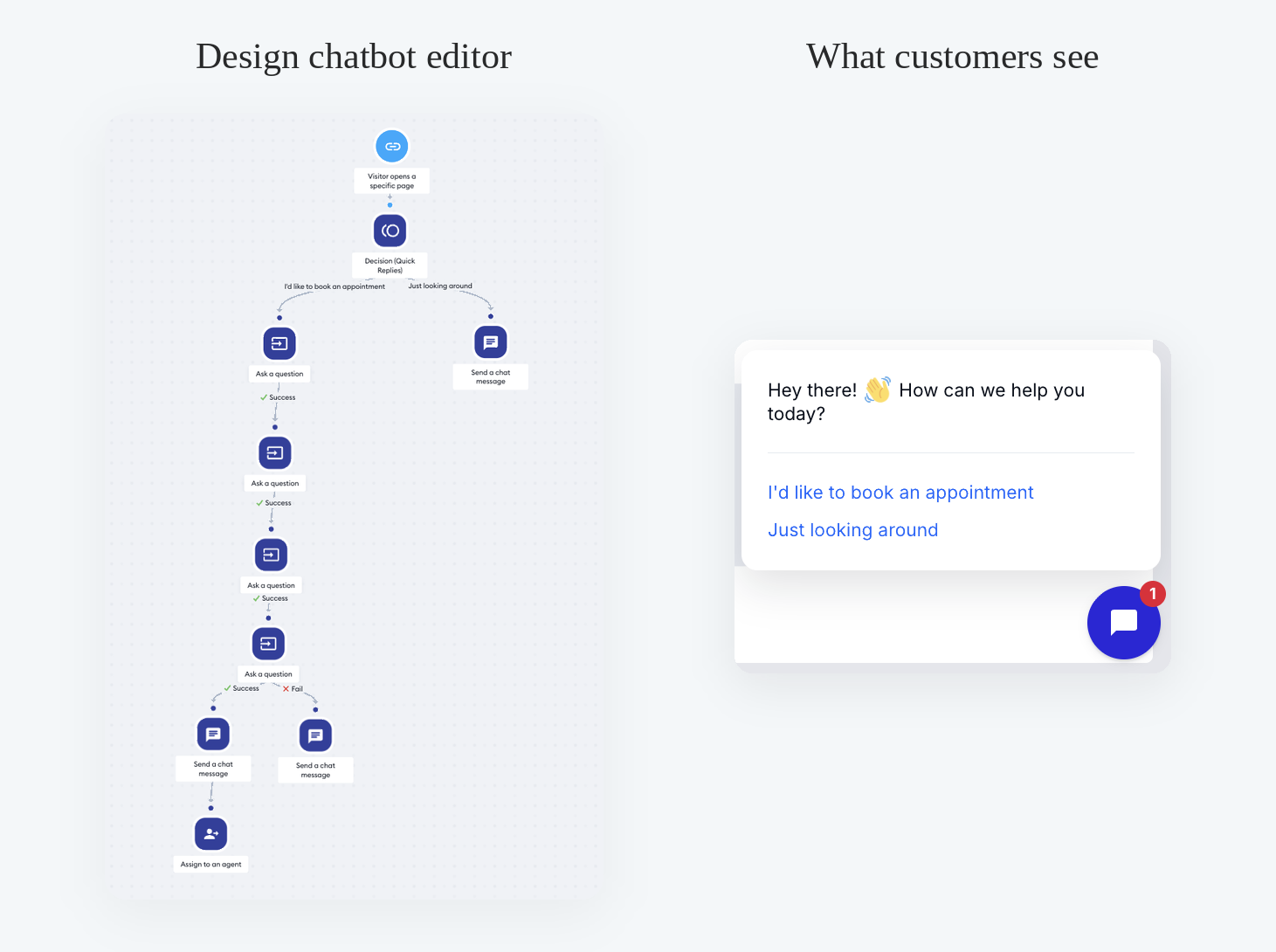
Books calls, demos, or in-person visits without the email back-and-forth. Best for services, clinics, salons, and sales teams.
Bot: Want to book a slot? Pick a day that works and I’ll handle the rest.
[This week] [Next week] Visitor enters name, email, and preferred time.
Bot: Booked ✅ You’ll get a confirmation by email.
Tidio also connects to Calendly, Acuity, and Appointlet if you already schedule there.
Real estate lead capture
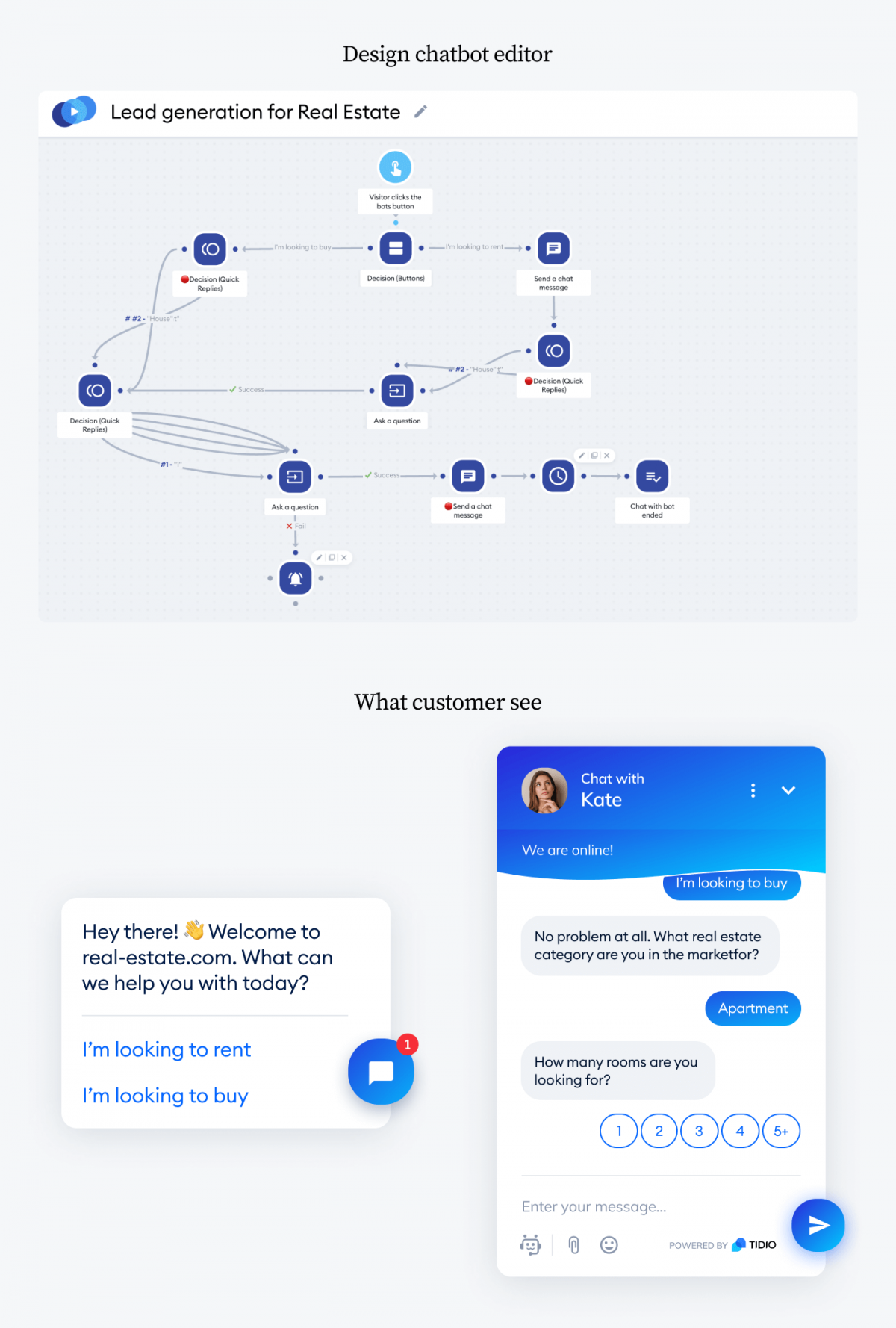
Asks what a visitor is looking for before requesting their email, so you qualify the lead and personalize your follow-up.
Bot: Looking to buy or rent?
[Buy] [Rent]
Bot: Great. House or apartment? How many bedrooms? Drop your email and I’ll send matching listings.
You learn the brief and the budget before you ever pick up the phone.
Use this template · More on real estate chatbots.
News and updates
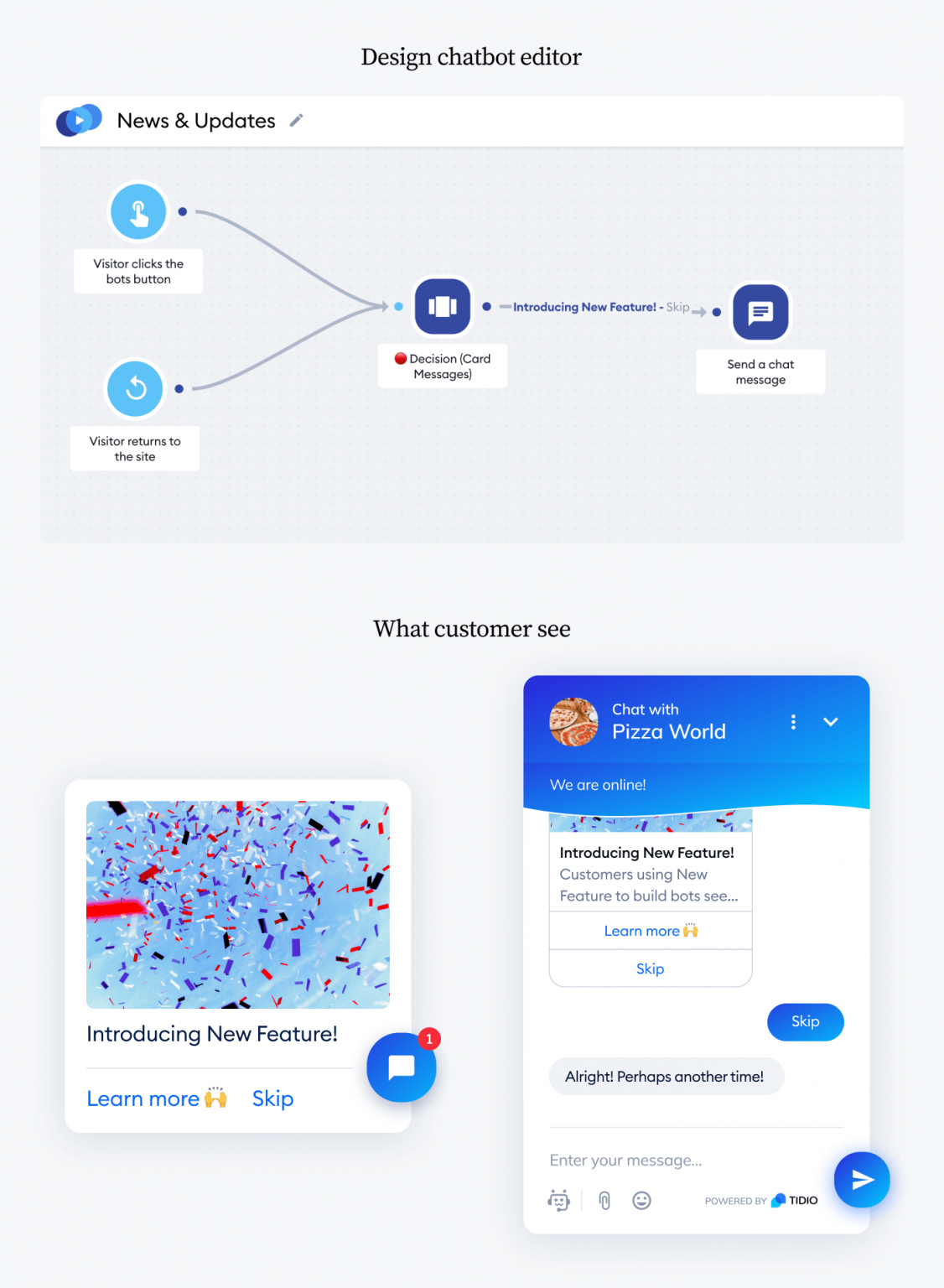
Keeps subscribers in the loop on launches, restocks, and announcements. A light way to build customer loyalty and bring people back.
Bot: New drop just landed 🎉 Want the first look?
[Show me] [Remind me later]
Redirect to the news page, or show the headline right in the widget to deepen your customer relationships.
Instagram story autoresponder
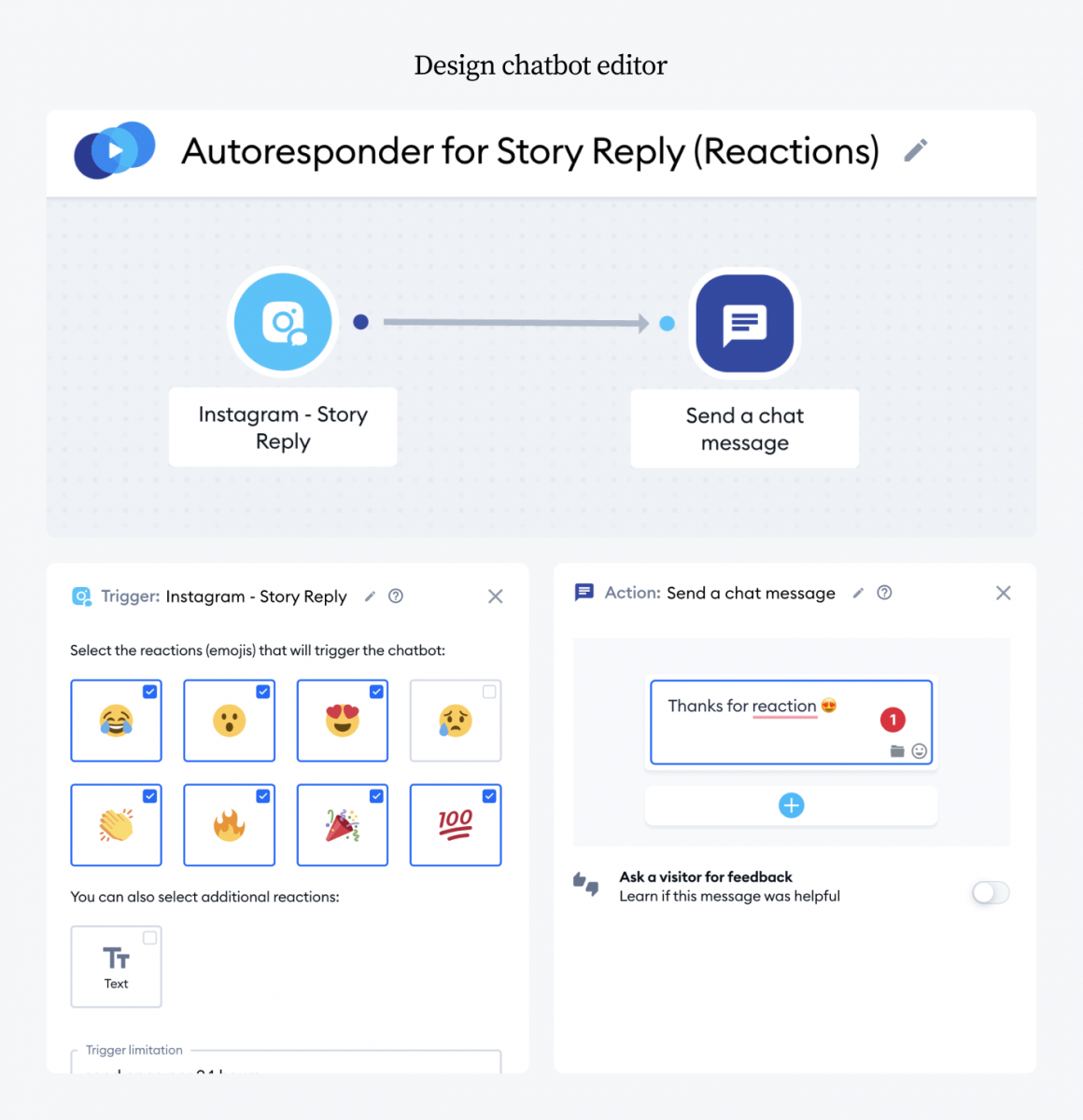
Replies to story reactions automatically, so followers always get a response even when you’re busy. The bot works behind the scenes while the chat happens in Instagram DMs.
Follower reacts to your story.
Bot: Thanks for the love! 💛 Want the link to that product?
[Yes, send it] [Just saying hi]
Connect your Instagram account first so the two talk to each other.
Use this template · See more social media chatbots.
Chatbot UI and design templates
A chatbot UI template controls how your chat widget looks: its colors, shape, position, fonts, and message-bubble style. A good design feels like part of your site instead of a bolted-on box, which makes people more likely to start a conversation.
5 widget design styles
Most chatbot platforms give you a blank widget by default. These five styles are the patterns that work—each a starting point you adapt to your brand in a few clicks.
- Minimal—white or light-grey background, small launcher icon, single-color bubbles with no avatar. Sits quietly on the page without drawing attention away from the content. Best for SaaS dashboards, professional services, and B2B sites where the widget should assist, not announce itself.
- Branded—widget header color matches your brand primary, logo or team photo as the avatar, button colors pulled from your palette. Feels like an extension of the site, not a third-party add-on. Best for ecommerce stores and agencies that want the chatbot to reinforce brand identity.
- Bold / dark—dark background in the widget header or full widget shell, light text bubbles, high-contrast launcher button. Stands out on dark-mode sites. Best for tech products, gaming, fintech, and any brand whose site already uses a dark palette.
- Conversational—large human avatar, rounded bubbles, visible typing indicator, informal opening line. Looks less like a bot and more like a chat with a real person. Best for consumer brands, support-heavy teams, and any flow where trust and warmth matter more than brevity.
- Compact popup—small floating card that expands on click, minimal header, tight button layout. Takes up less screen real estate than a full widget, so it works well on content-heavy pages or product pages where the design is already busy.
Screenshot placeholder: add side-by-side screenshots of each style from Tidio’s widget editor.
Widget customization options
Tidio’s widget editor lets you apply any of these styles with no code. The settings you’ll use most:
- Color and theme—set the widget and bubble colors to your brand palette.
- Position and shape—choose the corner, size, and rounded or square edges.
- Avatar and greeting—add a logo or photo and a custom opening line.
- Message styling—adjust bubble color, button style, and spacing.
- Mobile layout—control how the widget behaves on small screens.
Looking for raw Figma files, an HTML chat template, or front-end code to build a widget from scratch? That’s a different job. See our guide to chatbot design best practices, or build the interface yourself with our walkthrough on creating a chatbot for a website.
Chatbot templates by channel
Most templates run on your website, but several work on Messenger, Instagram, and WhatsApp too. Match the flow to where your customers already talk to you.
- Facebook Messenger—FAQ, welcome, and lead-gen flows work well here. See Facebook Messenger chatbots.
- Instagram—the story autoresponder and a “boost social presence” flow keep DMs moving. See Instagram chatbots.
- WhatsApp—order updates, booking confirmations, and support FAQs fit the channel. See WhatsApp chatbots.
You can also ask for reviews after a chat: Tidio’s Judge.me flows thank happy customers, share a discount code for a review, and even step in before someone posts a negative rating.
How chatbot template tools compare
Most chatbot platforms include a template library, but they differ in how many templates they offer, which channels they cover, and what the free tier includes. Here’s how the main options compare.
| Platform | Templates (free tier) | Channels | Best for |
|---|---|---|---|
| Tidio | 40+ ready-made templates, all free | Website, Messenger, Instagram, WhatsApp | Ecommerce and SMBs wanting a fast no-code setup with AI included |
| ManyChat | 60+ templates on free, but only 4 active automations | Instagram, Messenger, WhatsApp, SMS, email | Social-first brands running DM automation on Instagram and Messenger |
| HubSpot | Chatflows rule-based builder, free (lead capture + handoff only); branching, routing & the Breeze AI agent need a paid Service Hub plan | Website and Facebook Messenger (WhatsApp via Breeze AI on paid) | B2B teams already in HubSpot CRM who want a bot wired to their pipeline |
| Intercom | No free plan (14-day trial only); templates live in the Workflows builder, with the Fin AI Agent included on all paid plans | Website, email, mobile in-app, plus WhatsApp and SMS | Mid-market SaaS products with dedicated support teams and budget |
The short version: if you want the most templates for free across the most channels, Tidio is the broadest option. ManyChat is the strongest for social automation. HubSpot is the right call if your team lives in HubSpot CRM. Intercom is built for product-led SaaS with a support-team budget.
Why use a chatbot template?
A chatbot template saves you from building a flow from zero. You drop in your messages, edit the triggers, and launch in minutes instead of days. Beyond speed, templates are tested at scale, easy to A/B test, and a fast way to learn how good bots are built.
Here’s what you get:
- Speed to launch. No flow design from scratch. Insert your copy and go live the same day.
- Proven flows. These templates are deployed hundreds of thousands of times.
- A learning shortcut. Run a few templates, see what works, then design your own with that knowledge.
- Easy testing. Swap copy, discounts, and triggers to find what converts. Tidio’s Flows lift conversions by 26% when they fire at the right moment.
- Consistency. Every visitor gets the same on-brand answer, every time.
How to use a chatbot template
Using a template takes five steps and no code. Pick the flow that matches your goal, customize the copy, connect your channels and data, test it, and publish. Most teams have a working bot live within an hour.
- Pick a template that matches your goal: support, sales, lead capture, or follow-up.
- Customize the copy so the bot sounds like your brand, not the default text.
- Set the triggers. Decide when the bot appears: on page load, on a click, on exit, or for new visitors only.
- Connect channels and data. Link your store, help center, or social accounts so answers stay accurate.
- Test, then launch. Run the flow yourself, fix anything awkward, and save.
Looking for industry-specific templates? Tidio includes ready-made flows for beauty, travel, agencies, web services, printing, and real estate, plus an AI agent that learns from your own content. You can adapt any template to your field by editing the questions and the data it pulls from. Compare your options in our roundup of the best chatbot builders, then see how to use Tidio templates or build a bot from scratch.
For sales-specific scripts and wording, our live chat scripts guide goes deeper on the copy itself.
FAQ
A chatbot template is a pre-built bot you customize and launch without coding. It includes a ready-made conversation flow, so you only swap in your own messages and triggers. Templates cover common jobs like FAQs, lead capture, and order tracking, and let you go live in minutes.
Yes. Tidio’s chatbot templates are free to use on every plan, including the free plan. You can build and launch flows from any template at no cost, and only pay if you need higher conversation limits or the Lyro AI agent beyond your free allowance.
A conversation-flow template sets what the bot says and where each answer leads. A UI or design template sets how the chat widget looks: its colors, shape, and position. They’re independent. You can launch a flow with the default design, then style the widget separately.
Start with one goal, then map the path to reach it. Write a short greeting, offer two or three clear options, and keep each message under two lines. Add a fallback for unrecognized replies and a handoff to a human. Test it end to end before launch.
Yes. Many flows run on Facebook Messenger, Instagram, and WhatsApp as well as your website. FAQ, welcome, and lead-gen flows fit messaging channels well, while order updates and booking confirmations work nicely on WhatsApp. Connect each account first so the bot can respond there.
Tidio has templates for beauty, travel, agencies, web services, printing, real estate, and ecommerce, plus an AI agent that adapts to any industry by learning from your content. You can edit any template’s questions and data sources to fit your field, so a generic flow becomes industry-specific in minutes.
