



Key takeaways
- Choose Zendesk if you need phone support, SLAs, skills-based routing, or a large integration marketplace, and you have an admin to run it.
- Choose Help Scout if your team is small, email-first, and values a tool agents learn in a day.
- Zendesk costs more per agent. Suite Team is $55 per agent a month on annual billing. Help Scout Standard is $25 per user.
- Both bill their AI per result. Help Scout charges $0.75 per resolution. Zendesk includes 5 per agent each month, then charges $1.50 or $2.00.
- G2 ratings are close. Help Scout has 4.4 out of 5 from 431 reviews, and Zendesk has 4.3 from 7,091.
- Consider a third option if you run a small online store. See Tidio as a third option.
Zendesk is a ticketing suite that scales from a small team to a contact center. Help Scout is a shared inbox that feels like email and stays easy to run. The core difference is how much help desk you want to manage: Zendesk gives you more to configure, Help Scout gives you less to maintain. We compared the two on their public pricing and product pages and on their G2 profiles in October 2026, and we did not run a trial of either. Tidio appears once, as a third option for small e-commerce teams.
Use live chat to support your customers in real-time
Help Scout vs Zendesk at a glance
Both tools are help desks. Zendesk sells a tiered suite with tickets, messaging, voice, and AI. Help Scout sells a shared inbox with live chat, a knowledge base, and AI. Prices below are per agent or user per month on annual billing.
| Help Scout | Zendesk | |
|---|---|---|
| Best for | Small and mid-sized, email-first teams | Teams that need phone, SLAs, and many integrations |
| Entry price | $25 per user (Standard) | $19 per agent (Support Team, email only); $55 per agent for messaging and AI agents (Suite Team) |
| Free plan | Yes, up to 5 users | No, 14-day trial |
| Live chat | Standard and up | Suite Team and up |
| WhatsApp, Instagram, Messenger | On Standard | Through messaging channels, with extra fees on some |
| Phone | Through an integration | Native voice on Suite plans |
| AI agent | AI Answers, $0.75 per resolution | AI agents, 5 resolutions per agent a month included, then $1.50 or $2.00 |
| SLAs | 1 basic policy on Standard | Suite Professional and up |
| Integrations | 100+ tools | Marketplace lists 1,800+ apps and integrations |
| G2 rating | 4.4 out of 5 (431 reviews) | 4.3 out of 5 (7,091 reviews) |
How we compared them
We read both vendors’ current pricing and product pages, including Zendesk’s plan matrix, and each tool’s G2 profile. Prices are list prices in US dollars on annual billing unless a table says otherwise, and every figure is dated October 2026. We did not test either product, so where a section describes what a feature feels like, it relies on G2 reviewers and says so. Each section ends with a winner, and the rounds are strictly Help Scout against Zendesk.
Help Scout is easier to learn and set up
Help Scout’s pitch is that a support inbox should feel like email. Conversations look like regular messages to the customer, while your team gets assignments, notes, and history behind the scenes. Help Scout’s G2 listing says you can get started in 15 minutes, which is a vendor claim, but G2 reviewers point the same way: ease of use is the top item in Help Scout’s G2 pros panel.
Zendesk reviewers praise ease of use too. It tops Zendesk’s pros panel, with 526 mentions. The same panel also shows 179 mentions of a learning curve and 137 of complexity. That matches how Zendesk is built: more settings, more roles, more routing logic, and more to learn before it is tidy. A team without an admin can run it, but someone needs to own it.
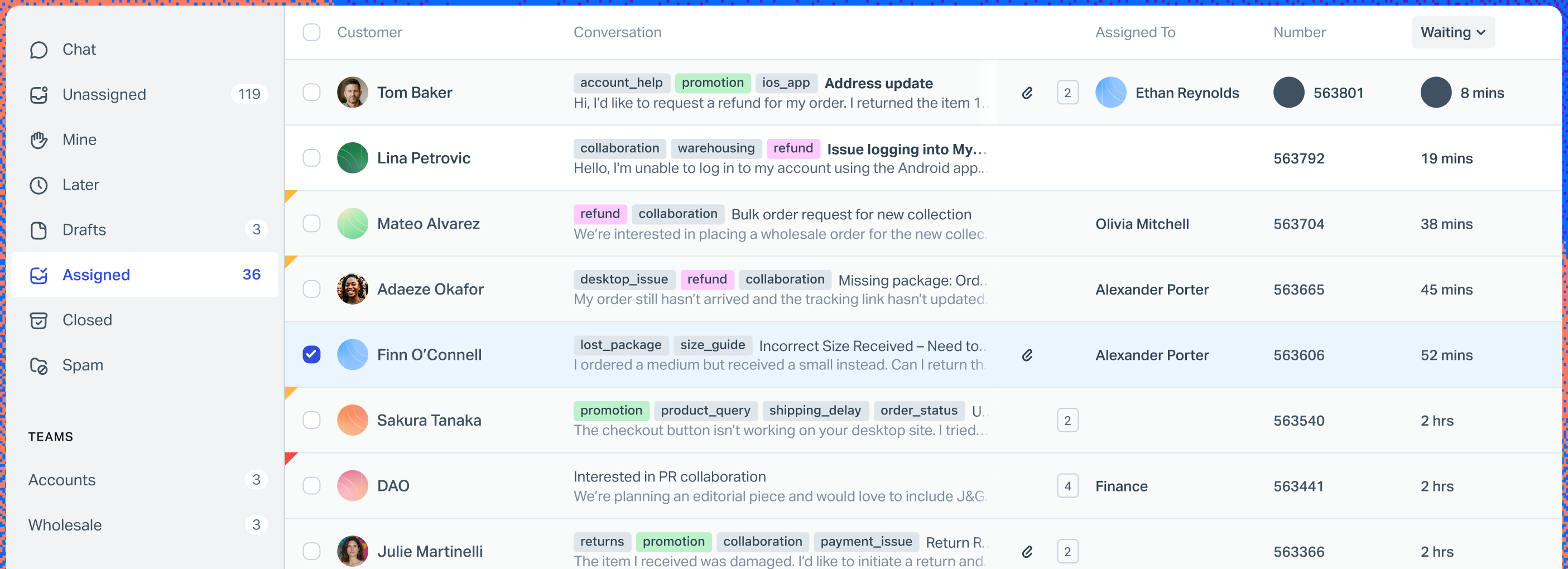
Winner: Help Scout. Teams with no dedicated admin get to a working setup faster.
Zendesk covers more channels natively
Both handle email and live chat. Help Scout’s Standard plan adds WhatsApp, Instagram, and Messenger, so the old complaint that it lacks social channels no longer holds. The gap is voice: Help Scout lists phone as an integration, while Zendesk’s Suite plans include native voice and telephony, with call usage billed separately.
Zendesk’s messaging channels also reach past those three. Its pricing page lists social channels such as Facebook, Instagram, and X, and messaging apps including WhatsApp, Slack, WeChat, and LINE, and it says additional fees apply to some of them. Check which channels you need before you assume they are in the base price.
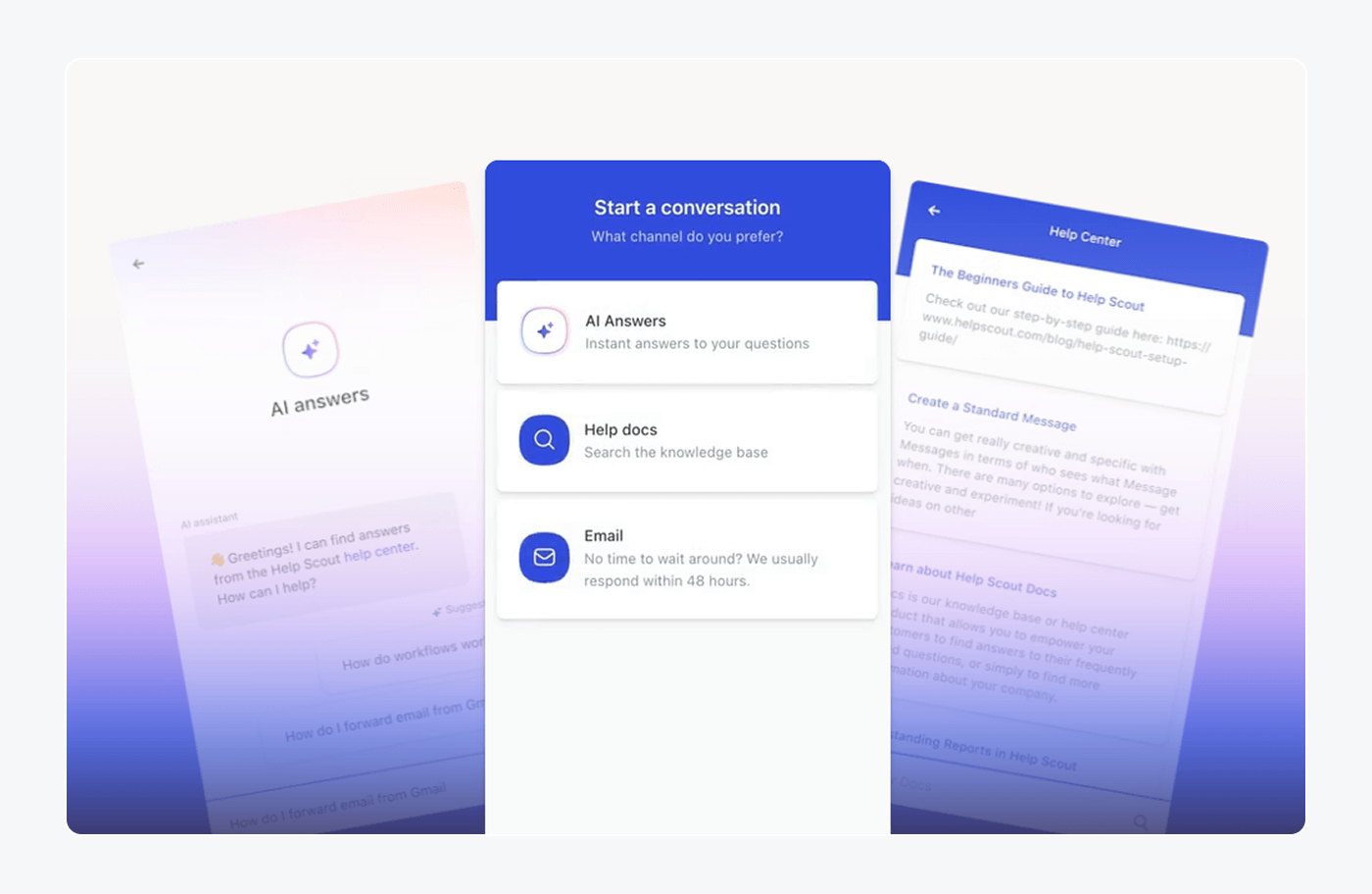
Winner: Zendesk. Native voice and a wider channel list matter if phone is part of your support.
Zendesk has deeper ticketing and automation
Zendesk is built around the ticket. Its plan matrix lists service level agreements and skills-based routing starting on Suite Professional, a sandbox for testing changes on Suite Enterprise, and workflow automation that can branch and call other systems. Help Scout covers the basics well: Standard includes 150 basic workflows and one SLA policy, Plus adds 500 advanced workflows and two SLA policies, and Pro removes the caps.
The practical difference shows up as volume and complexity grow. If tickets need to go to the agent with the right skills, or contracts promise response times, Zendesk has the controls. If your team of eight shares one queue, Help Scout’s limits probably never bite. G2 reviewers of Help Scout do name missing features and limited customization as a recurring complaint, which is where this gap shows.
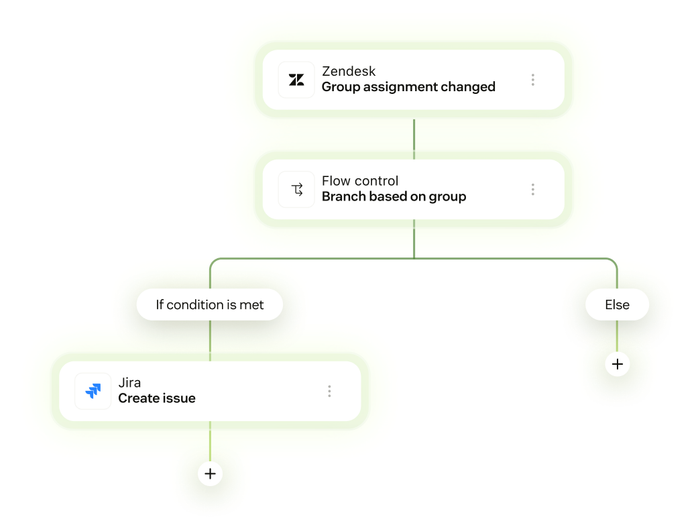
Winner: Zendesk. More control over routing, SLAs, and automation, at a higher price.
Zendesk has the more complete AI agent
Zendesk markets its AI agents as able to resolve most requests across channels and take actions in other systems; that “80%+” figure is Zendesk’s own claim, not a measured result. AI agents need messaging on, and the vendor lists an agent builder, 80+ languages, and an optional Copilot add-on at $50 per agent a month for agent assistance.
Help Scout’s AI Answers is simpler. It answers from your knowledge base and other sources you connect, it is an add-on, and it comes with a 3-month free trial. Plus and Pro add AI Drafts and AI Summarize for agents. Help Scout says its AI resolves 73% of requests on average, which is also a marketing figure.
The billing units differ. Help Scout charges $0.75 per resolved conversation. Zendesk bills an automated resolution: a request the AI agent resolved without a human, with 5 included per agent each month on Support Team and Suite Team (10 on Suite Professional). Extra resolutions cost $1.50 on a committed volume or $2.00 pay-as-you-go. A team of 5 agents on Suite Team gets 25 included resolutions a month. At 100 AI resolutions, Help Scout costs $75 and Zendesk costs about $112.50 to $150, before seat prices.
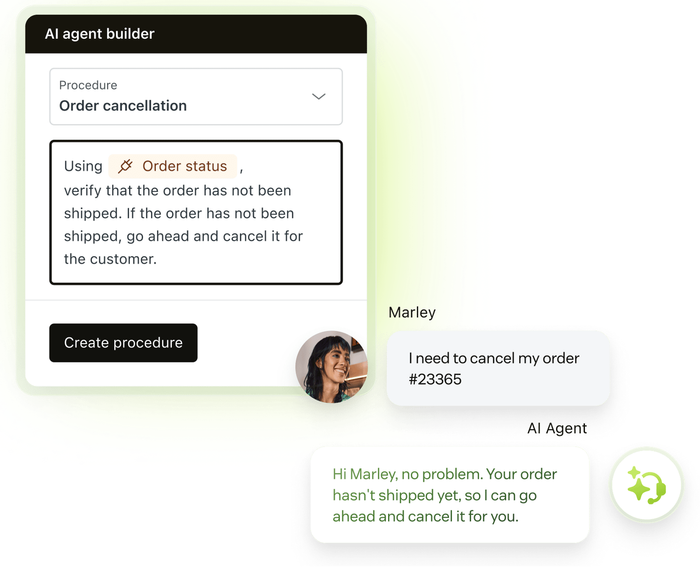
Winner: Zendesk on capability, and Help Scout on cost per resolution. For a team that wants an answer bot with no setup project, the cheaper unit matters more.
Knowledge bases are a draw
Help Scout’s Docs builds a branded, searchable help center. Standard includes 2 Docs sites, Plus 3, and Pro 5, with extra sites at $20 a month. Zendesk includes a help center on its Suite plans and lists an AI knowledge base on Suite Team and up, plus generative AI translation of articles.
For a single-language help center with a few dozen articles, both do the job. Zendesk adds options for multiple languages and AI help. Help Scout is quicker to publish.
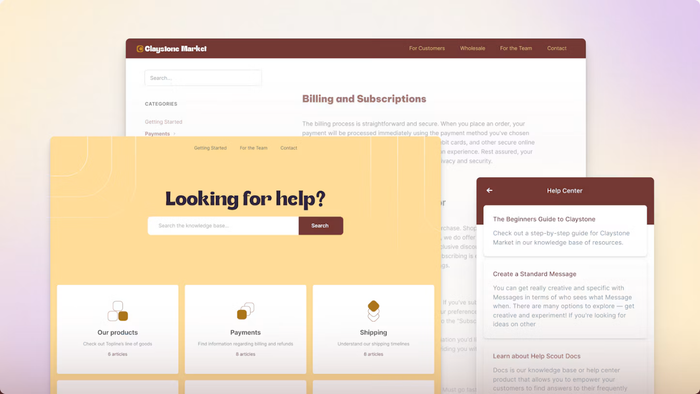
Winner: Tie.
Zendesk leads on integrations and reporting
Zendesk’s Marketplace lists 1,800+ apps, partners, and integrations, and its pricing page references 1,000+ prebuilt apps. Help Scout’s apps page talks about connecting to 100+ tools. Plus adds Salesforce, Jira, and HubSpot integrations. For most small teams, 100 integrations cover the tools they use, but a long tail of apps is where Zendesk pulls ahead.
On reporting, Zendesk ships prebuilt analytics dashboards on every plan and AI-powered report creation. Help Scout has pre-built reports and custom reports you can filter and export to CSV or Excel. G2’s summary of Help Scout reviews notes that advanced reporting can be limited, particularly for larger teams.
Winner: Zendesk. Both on breadth of integrations and on reporting depth.
Help Scout costs less for small teams
Both vendors charge per person, and both publish list prices. Compare plans with the same job: Help Scout Standard (shared inbox, live chat, WhatsApp, Instagram, Messenger) against Zendesk Suite Team (messaging, live chat, AI agents), and Help Scout Plus against Zendesk Suite Professional.
| Plan | Annual (per month) | Monthly billing | What you get |
|---|---|---|---|
| Help Scout Free | $0, up to 5 users | $0 | 1 Inbox, 1 Docs site, 100 contacts a month |
| Help Scout Standard | $25 per user | $30 per user | Live chat, WhatsApp, Instagram, Messenger, 150 basic workflows |
| Help Scout Plus | $45 per user | $54 per user | Advanced workflows, 2 SLA policies, AI Drafts |
| Help Scout Pro | $75 per user | $90 per user | Unlimited workflows and SLAs, SSO, HIPAA, minimum 10 users |
| Zendesk Support Team | $19 per agent | $25 per agent | Email ticketing, routing, prebuilt dashboards |
| Zendesk Suite Team | $55 per agent | $69 per agent | Messaging, live chat, voice, AI agents, AI knowledge base |
| Zendesk Suite Professional | $115 per agent | $149 per agent | SLAs, skills-based routing, Admin Copilot, IVR phone tree |
| Zendesk Suite Enterprise + Copilot | Talk to sales | Talk to sales | Sandbox, custom agent roles, approval workflows |
The same plans cost this much for three team sizes on annual billing. We assume every agent needs a seat and no add-ons. Help Scout Standard supports up to 25 users, so 25 agents is the most it covers.
| Agents | Help Scout Standard | Zendesk Suite Team | Help Scout Plus | Zendesk Suite Professional |
|---|---|---|---|---|
| 5 | $125 | $275 | $225 | $575 |
| 15 | $375 | $825 | $675 | $1,725 |
| 25 | $625 | $1,375 | $1,125 | $2,875 |
Monthly cost on annual billing, from the list prices above, checked October 2026.
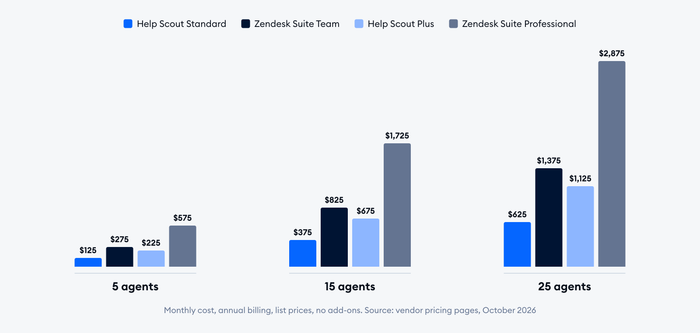
The gap is real: for the same job, Zendesk costs about twice as much per seat on Suite Team and about two and a half times as much on its upper plan. Zendesk Support Team at $19 is cheaper than Help Scout Standard, but it is email ticketing only, so it is not the same product. Help Scout’s Free plan is the cheapest start, and Zendesk has no free plan.
Two points that change the bill. Zendesk’s Copilot add-on is $50 per agent a month on annual billing, so adding it to Suite Team nearly doubles the seat price. Help Scout’s Pro plan has a minimum of 10 users, so a 5-person team never reaches it. Both vendors offer a trial: 14 days for Zendesk, 15 days for Help Scout’s paid plans.
Winner: Help Scout for teams under about 25 agents, on price. Past that size, or if you need phone and SLAs, price is no longer the deciding factor.
What G2 reviewers say
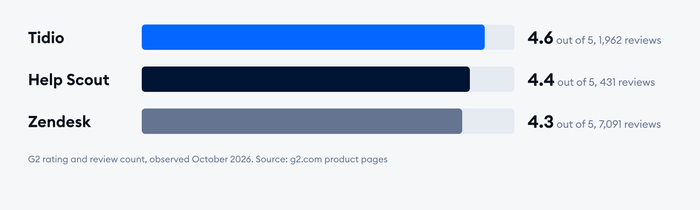
G2 gives Help Scout 4.4 out of 5 from 431 reviews and Zendesk 4.3 from 7,091 as of October 2026. Zendesk’s review base is 16 times larger, so its rating is the more stable of the two. Most Help Scout reviews come from small businesses, with 259 small-business, 144 mid-market, and 20 enterprise reviewers; Zendesk’s reviewers split 2,821 small business, 3,175 mid-market, and 961 enterprise.
Both have ease of use as their top-mentioned pro. The cons diverge. On Zendesk, G2’s cons panel lists missing features (216), limited features (180), a learning curve (179), limited customization (158), and complexity (137). On Help Scout, the cons are lack of features, missing features, and limited functionality, each with fewer than 10 mentions because the sample is small. A Zendesk reviewer who runs two brands from one queue praised the multibrand setup, but also said keeping automations consistent across brands took more care than expected.
Zendesk vs Help Scout vs Tidio: a third option for small teams
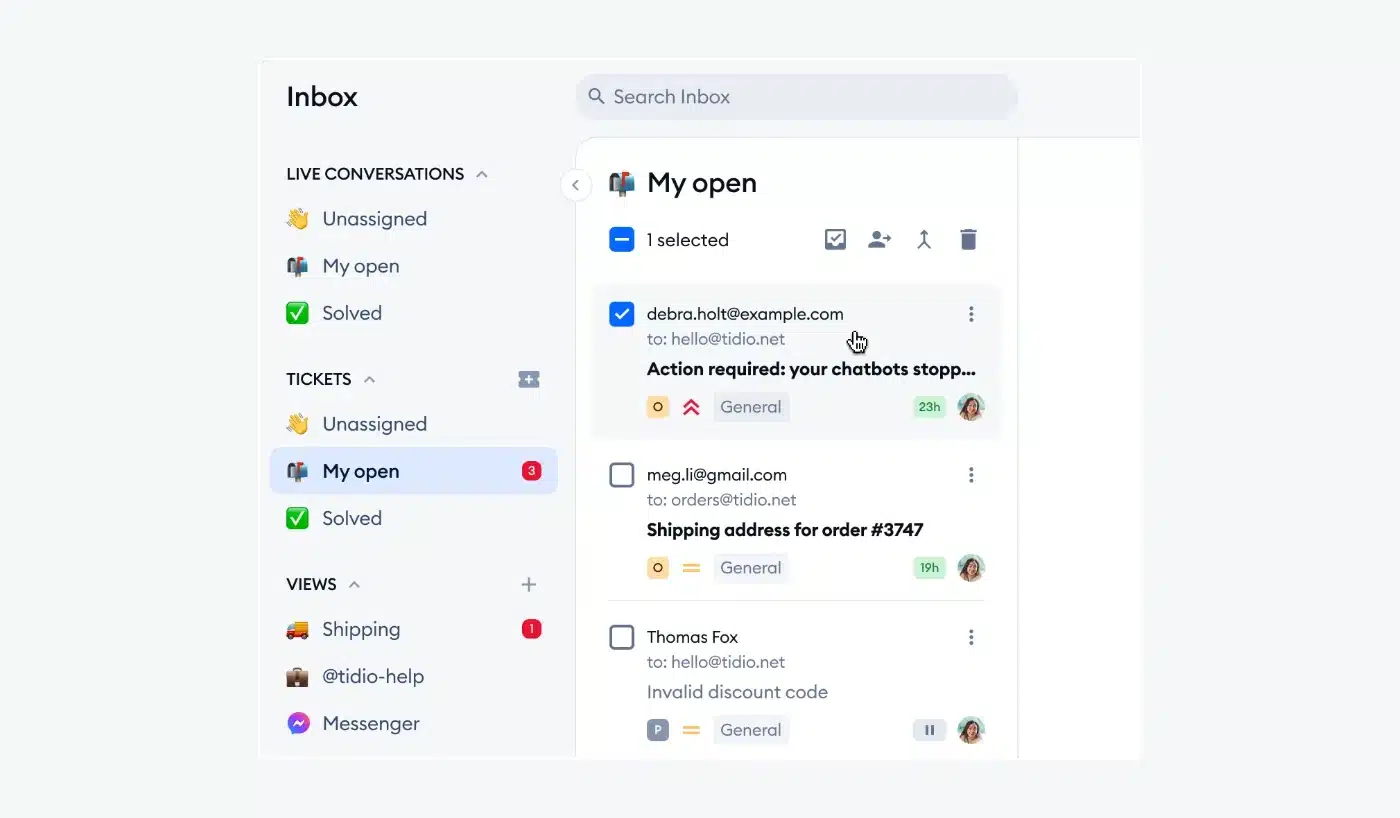
Tidio is AI customer service software with live chat, a shared inbox with ticketing, chatbot flows, and the Lyro AI agent. We place it here because a small online store often does not need either suite. It fits teams that sell on Shopify and want live cart previews and order history in the inbox, and teams that talk to website visitors on chat, email, Messenger, Instagram, and WhatsApp from one place.
Tidio does not use per-agent pricing the way the other two do. Plans are based on conversation quotas, and self-serve plans cover up to 10 agents. Growth starts at $49.17 a month on annual billing, and Lyro is sold separately from $32.50 a month for 50 Lyro conversations. Tidio says Lyro can resolve up to 75% of support requests, which is Tidio’s figure and depends on your content.
| Help Scout | Zendesk | Tidio | |
|---|---|---|---|
| Pricing model | Per user | Per agent | Conversation quotas, up to 10 agents on self-serve plans |
| Entry paid price | $25 per user | $19 per agent (email only), $55 for messaging | $24.17 a month (Starter), annual billing |
| Free plan | Up to 5 users | No | Yes |
| Shopify order data in the inbox | Through integrations | Through Marketplace apps | Native, on Growth and up |
| G2 rating | 4.4 (431) | 4.3 (7,091) | 4.6 (1,962) |
Tidio is the weakest of the three for large teams. Self-serve plans stop at 10 agents, so bigger teams talk to sales, and separate quotas for conversations, Lyro, and Flows need watching. It is the better fit for a store with a small team than for a large support operation.
See Tidio plans and Lyro pricing
Which should you choose?
Match the tool to the team you have now and the one you expect in 18 months.
- Two to ten agents, mostly email and chat, no admin: Help Scout.
- Support in several channels plus phone, and an admin who can run it: Zendesk.
- SLAs, skills-based routing, or many brands: Zendesk Suite Professional.
- Heavy AI automation at the lowest per-resolution price: Help Scout AI Answers, if its simpler agent meets your needs.
- A small e-commerce store that wants chat, tickets, and AI: read the e-commerce note below, then consider Tidio.
- More than 25 agents on a tight budget: price both, because Help Scout’s per-user bill grows as quickly as Zendesk’s does.
Help Scout vs Zendesk for e-commerce
Neither is built around a store. Both connect to Shopify through apps, so test order lookups and refunds on the plan you plan to buy. If most of your tickets are “where is my order”, the AI agent and the order data matter more than the ticketing depth.
Moving from Help Scout to Zendesk, or back
Searches for moving tickets between the two tools are common, and the steps are the same in either direction.
- Export conversations, customers, and tags from the old tool, and check what each vendor’s import documentation says it can bring over.
- List your automations and macros. They rarely carry over, so rebuild them by hand.
- Map fields. Decide how Help Scout custom fields and tags become Zendesk ticket fields, or the reverse.
- Run both tools in parallel for two weeks, with new tickets going to the new tool.
- Check your contract dates before you cancel, especially on annual plans.
Zendesk to Help Scout is the easier move. Help Scout to Zendesk takes a bigger setup project.
Related guides
- Help Scout review
- Zendesk review
- Help Scout alternatives
- Zendesk alternatives
- Freshdesk vs Zendesk
- Intercom vs Help Scout
- Tidio vs Help Scout
Frequently asked questions
Yes, for the same job. Help Scout Standard is $25 per user a month on annual billing, and Zendesk Suite Team is $55 per agent. Zendesk Support Team at $19 is cheaper but handles email tickets only. Prices checked October 2026.
For most small teams, Help Scout, because it is cheaper and quicker to set up. Zendesk is better if a small team needs phone support, SLAs, or a long list of integrations.
Help Scout has a Free plan for up to 5 users with 1 Inbox and 1 Docs site. Zendesk has no free plan, only a 14-day trial.
Zendesk has the more complete AI agent, with a builder, actions, and 80+ languages. Help Scout’s AI Answers is simpler and costs $0.75 per resolution. Zendesk includes 5 resolutions per agent a month, then charges $1.50 to $2.00.
Yes. Export your data, map custom fields and tags, rebuild automations by hand, and run both tools in parallel before you switch. Check each vendor’s import documentation for what moves over.
Yes. Live chat is on Help Scout’s Standard plan and up, through the Beacon widget. Zendesk includes messaging and live chat from Suite Team.
Zendesk is worth it when you need its depth: phone, SLAs, skills-based routing, and marketplace apps. For a small, email-first team, it adds cost and setup for features you may not use.
Use live chat to support your customers in real-time
