Key takeaways
- Give the bot one job and one audience before you build a single flow.
- Use rules for predictable questions, AI for the long tail, and a person for everything the bot can’t settle.
- Write the greeting, the fallback and the handoff message yourself; they are where customers decide to stay or leave.
- Test every path before launch, then review real transcripts every week.
A chatbot that misses the question, loops on “I didn’t get that” and hides the human option costs you the customer it was meant to help. In a Gartner survey of 5,728 customers, 64% said they would prefer that companies didn’t use AI for customer service.[1]
Those bots usually fail for ordinary reasons: no clear goal, no way out, no testing. This guide gives you 12 chatbot best practices, in the order you meet them: plan, build, launch, improve. Each one says what to do, why it matters and shows an example reply or a real customer result.
Use live chat to support your customers in real-time
Why chatbot best practices matter
Chatbot best practices are the working rules that make a bot answer the right questions, stay on brand and pass the conversation to a person at the right time. They matter because customers judge the whole brand by one bad exchange:
- Fewer abandoned chats. A clear goal, a short greeting and an easy exit keep visitors in the conversation instead of closing the widget.
- Lower support load. A bot trained on your own content handles repeat questions, so agents spend time on the hard ones. Lyro can resolve up to 75% of support requests.
- More leads and sales. Tidio customers such as ADT Security saw a 17% boost in lead-to-sale conversion after tuning their chat flows.
- Trust. A bot that says what it is, answers from your own content and is easy to leave earns more trust.
12 chatbot best practices
The list follows the order of a real project: plan the bot (1 to 3), design the conversation (4 to 8), connect and launch it (9 to 10), then test and improve it (11 and 12).
| # | Best practice | What to do first |
|---|---|---|
| 1 | Pick one goal and one audience | Write the goal as a number, such as “answer 50% of order-status questions” |
| 2 | Deploy where customers already are | Check which channel sends you the most conversations |
| 3 | Match the bot type to the job | Use rules for fixed paths and AI for open questions |
| 4 | Make the widget easy to find | Check contrast and placement on mobile |
| 5 | Open with a clear greeting and a brand voice | Name the bot’s job in the first message |
| 6 | Train the bot on your own content | Connect your help center and top FAQs |
| 7 | Plan for what the bot can’t answer | Write a fallback that offers two next steps |
| 8 | Hand off to a person with context | Pass the transcript and collected details to the agent |
| 9 | Connect the bot to your systems | Link store, CRM and help desk data |
| 10 | Be upfront that it’s a bot and protect data | Say “I’m a bot” in the greeting |
| 11 | Test every path before and after launch | Run 20 real questions and the edge cases |
| 12 | Review transcripts and optimize every week | Read 20 chats and fix the top three failures |
1. Pick one goal and one audience
Start with a single job for the bot and a single group of people it serves. A bot built to “help everyone with everything” ends up answering nothing well.
A clear goal also tells you what to measure later and which questions to leave to humans.
How to do it:
- Write the goal as a number you can check, such as “resolve order-status questions without an agent”.
- Name the audience: new visitors, existing customers or leads from an ad.
- List the 10 questions this audience asks most, using your inbox and search data.
- Leave anything outside that list to a human at first.
Example: A fashion store sets one goal for its first month: answer “Where is my order?” without an agent. The bot asks for the order number, looks up the status and replies “Your order #4821 shipped on Tuesday and arrives Friday.”
2. Deploy where customers already are
Put the bot on the channel your customers already use, not the one that is easiest to install. A website visitor, a WhatsApp customer and an Instagram follower expect different things.
How to do it:
- Count conversations by channel for the last 90 days.
- Start with the top channel and add a second only when the first runs well.
- Reuse the same answers across channels, and adjust length for each one.
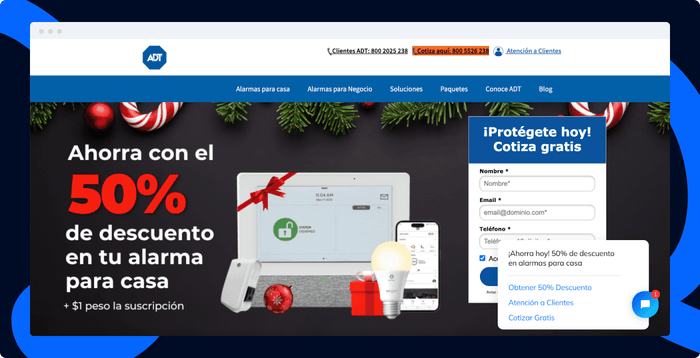
Example: ADT Security put its bot on its Mexican website, where its leads already arrived. ADT’s chatbot lifted lead-to-sale conversion by 17% and cut first response time by 22%.
3. Match the bot type to the job
Use the simplest bot that does the job. Rule-based chatbots follow fixed paths and suit predictable tasks like booking, order status and lead capture. AI chatbots read free text and suit open questions. Most businesses need both.
How to do it:
- Build a flow for each question that always has the same answer.
- Add an AI agent for everything else, trained on your content.
- Let the flow take over again once the AI has understood the request, for example to collect an email.
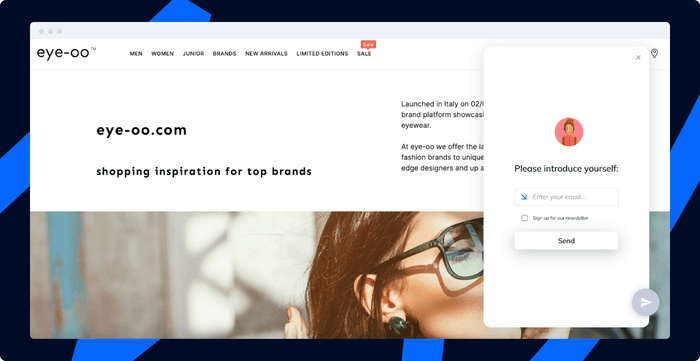
Example: The eyewear brand eye-oo uses a rule-based chatbot for lead generation and an AI bot to answer product questions in natural language.
4. Make the widget easy to find
A bot nobody opens does nothing, so place the widget where visitors look when they need help, and make it readable on a phone.
How to do it:
- Keep the widget in the bottom corner, visible without scrolling.
- Use a color that contrasts with your page. WCAG asks for a text contrast ratio of at least 4.5:1.[2]
- Show a short proactive message on pages where customers get stuck, such as pricing or checkout.
- Check the widget on mobile so it doesn’t cover the buy button.
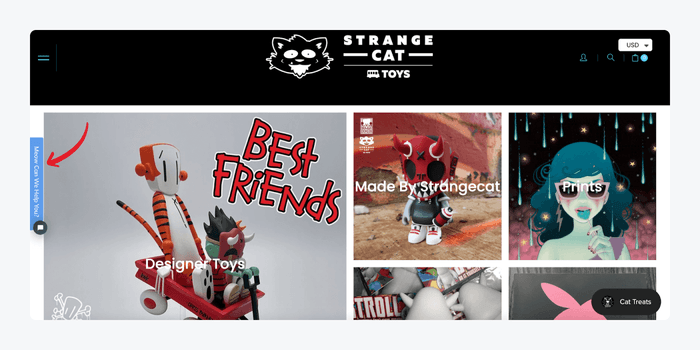
Example: The shop Strange Cat Toys restyled its chat icon to match its brand colors, so it looks like part of the store instead of a pasted-on tool.
5. Open with a clear greeting and a brand voice
The first message decides whether visitors engage. Tell them who they are talking to, what the bot can do and what to do next. Match the tone of your site: a legal firm and a toy store should not sound alike.
How to do it:
- Name the bot’s job in the first line and offer two or three quick replies.
- Keep every bot message under 30 words.
- Write in your brand voice and use emojis only if your brand does.
- Give the bot a name if it helps, and keep it clearly a bot.
Example:
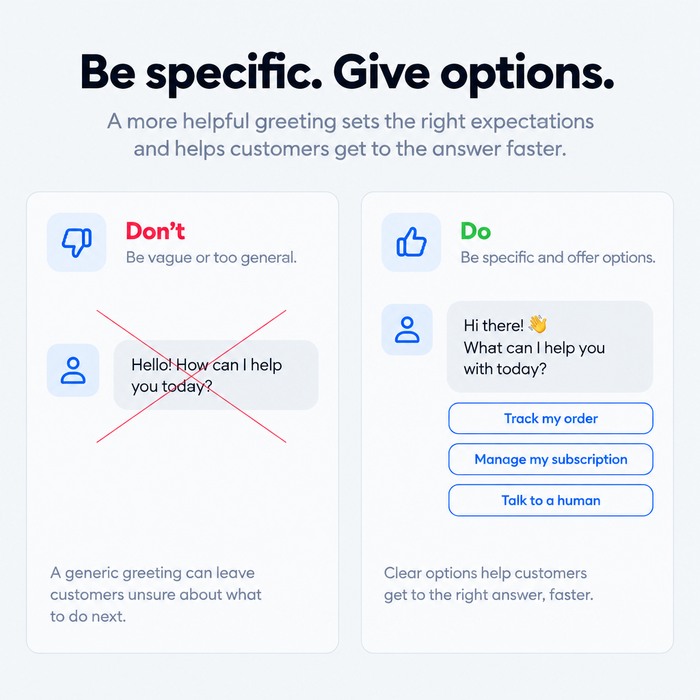
- Don’t say: “Hello, how can I help you today?”
- Say instead: “Hi, I’m Nova, the Fitwell shop bot. I can track an order, start a return or find your size. What do you need?”
See chatbot welcome messages and chatbot personality for more wording.
6. Train the bot on your own content
An AI bot is only as good as what it reads. Feed it your help center, return policy and product pages, and it answers in your terms. Leave it on general knowledge and it invents policies.
How to do it:
- Connect your help articles and top FAQs as the bot’s knowledge sources.
- Fill the gaps first: add an answer for every question in the top-10 list from practice 1.
- Remove outdated pages, such as last year’s shipping rules.
- Tell the bot to say so when the answer is not in your content.
Example: A store updates its return window from 14 to 30 days. If the help center still says 14, the bot repeats the old rule, so the team edits the article first and the bot follows. See how to train an AI chatbot.
7. Plan for what the bot can’t answer
Every bot hits questions it can’t handle. A dead-end reply such as “Sorry, I didn’t understand” is where customers leave. Managing exceptions means deciding what happens next before the bot fails.
How to do it:
- Write a fallback that restates what the bot can do and offers two options.
- Offer a person after the first failed answer, not the third.
- Collect the missed question so you can add it to the bot’s content.
Example: Instead of “I didn’t get that,” the bot says: “I can’t find that in our help content. Want me to bring in a teammate, or would you like to see delivery options?”
8. Hand off to a person with context
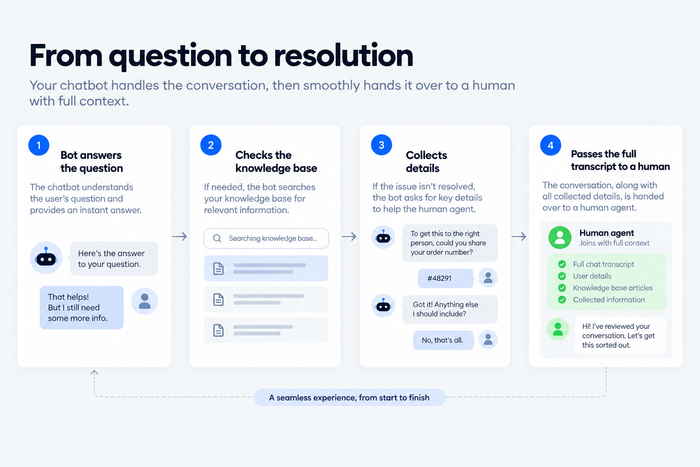
A handoff is the most important moment in the chat. If the agent asks the customer to repeat everything, the bot has made things worse. Pass the conversation along with the details already collected.
How to do it:
- Define when the bot escalates: a request for a person, an angry message, a payment problem or a second failed answer.
- Send the transcript and collected details (name, order number, issue) with the handoff.
- Say what happens next: “I’m connecting you with Sam. They can see this chat. Typical wait is two minutes.”
- Show the agent’s availability, and collect an email when nobody is online.
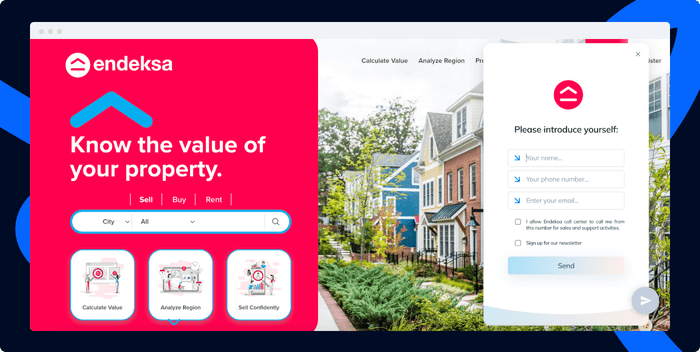
Example: Endeksa uses a pre-chat survey to route each visitor to the right agent. Waiting times fell by 59% and 88% of customers found the bots helpful.
9. Connect the bot to your systems
A bot that can’t see data can only give generic answers. Connect it to the systems that hold the answers, so it can show order status, create a ticket or update a lead.
How to do it:
- Connect your store, CRM and help desk first.
- Let the bot read data before you let it change anything.
- Keep a clear order of attempts: flow, then knowledge base, then agent.
Example: An online store connects Shopify, so when a customer asks “Where’s my order?”, the bot shows the cart and order history instead of sending a tracking link to a page the customer must open.
10. Be upfront that it’s a bot and protect customer data
Customers forgive a bot that admits it’s a bot. They don’t forgive one that pretends to be a person or collects data without saying why.
How to do it:
- Say “I’m a bot” in the greeting and keep the human option visible.
- Ask only for data the next step needs, such as an order number, and say why.
- Add a link to your privacy policy where the bot asks for personal details.
- Don’t let the bot take payment card numbers in the chat.
Example: “I’m a bot, and I’ll need your order number to check the status. A teammate can step in at any time.”
11. Test every path before and after launch
Test the bot the way customers use it: with typos, half-questions and angry messages. Do it before launch and again after every change to content or flows.
How to do it:
- Run your top 20 real customer questions and check each answer against the source.
- Test edge cases: off-topic questions, empty messages, a request for a human.
- Ask people outside the project to try to break it.
- Re-test the main paths after every content or flow change.
Example: A tester types “refund???” and “where is my stuff”, and finds the bot misses both. The team adds those phrasings to the order-status and returns flows before launch. See how to test a chatbot.
12. Review transcripts and optimize every week
A chatbot is never finished. Read real conversations on a fixed day, find where the bot failed and fix the top three problems.
How to do it:
- Review 20 conversations a week, prioritizing handoffs and low ratings.
- Turn each failure into a content update, a new flow or a changed greeting.
- Track the metrics in the table below and compare them month to month.
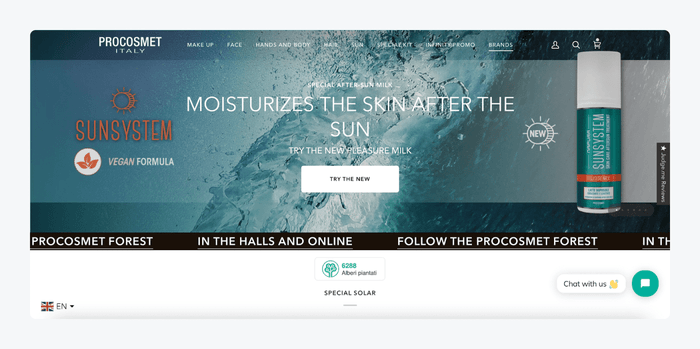
Example: Procosmet reports that its bots handle 68% of conversations and that it earns 5x more leads a month.
How to measure your chatbot
Pick a few numbers and track them against the goal from practice 1. See chatbot analytics for setup.
| Metric | What it tells you | What to do if it’s low |
|---|---|---|
| Resolution rate | Share of conversations the bot closes without an agent | Add missing content and flows |
| Handoff rate | Share of chats passed to a person | Check the fallback and escalation triggers |
| Fallback rate | How often the bot says it didn’t understand | Add the missed questions to the bot’s content |
| Customer satisfaction (CSAT) | How customers rate the chat | Read the low-rated transcripts |
| Conversion rate | Chats that lead to a sale or lead | Improve the greeting and the call to action |
How Tidio helps you apply these practices
Tidio puts these steps in one account. Flows let you build rule-based paths for greetings, order status and lead capture without code. Flows and Lyro run in the same account, so a flow can collect an order number and hand an open question to the AI agent. The Lyro AI agent answers from the help content you connect and hands the chat to your team with the conversation attached. Lyro can resolve up to 75% of support requests, and the Shopify integration shows the cart and order history inside the chat. You can start on the free plan and add Lyro and Flows as volume grows.
Build your first chatbot flow with Tidio
FAQ
Chatbot best practices are the rules that make a bot useful: one clear goal, content the bot can answer from, a greeting that says what it does, a fallback for unknown questions, a handoff to a person and regular testing. They apply to rule-based and AI bots.
Open with a message that names the bot’s job and offers quick replies, keep each message short and ask one question at a time. Write the fallback and handoff yourself, and test the conversation with real customer questions before launch.
Yes. Say it in the greeting and keep a person one click away. Customers accept automation when they know what they are talking to and can leave it.
Hand off when the customer asks for a person, after the first failed answer, for payment or account problems and when the customer sounds frustrated. Send the transcript and collected details with it.
Review transcripts weekly and update content whenever a policy, price or product changes. Check the metrics monthly against your goal.
Start with the free Tidio plan