
Adding a chatbot to your support or sales workflow naturally leads to the question of cost, and that’s where things get complicated. Pricing structures vary widely across the market: some tools start free, others scale with conversations or contacts, and many charge per agent. The same platform can jump from low monthly fees to enterprise-level pricing once automation or advanced controls enter the picture.
Comparisons aren’t straightforward either because total cost depends on things like your team’s conversation volume or how much automation you plan to use. A plan that looks affordable at first may rise quickly as usage grows, while a usage-based model can stay stable even as your team scales. With this in mind, the guide breaks down common pricing models, compares top platforms, and maps them to real-world personas so you can estimate both immediate and long-term costs more confidently.
Automate support without limits
Key takeaways
Before diving into the full breakdown, here are a few quick takeaways that give you a snapshot of how chatbot pricing typically scales:
- Most chatbot tools start between $0 and $30 per month for solo users.
- Small teams usually spend between $50 and $200 per month, depending on seats or usage.
- Growing companies typically move into the range between $300 and $1,000 per month.
- Enterprise teams often pay at least $3,000 per month, with many exceeding $6,000 when add-ons and AI usage are included.
- Tools that charge per seat can scale costs quickly as teams grow.
- Tools that charge by conversations or tickets can keep seat costs low but create more variable billing.
- Tidio stands out because it avoids per-seat billing on core plans and scales primarily by conversations, which simplifies growth budgeting.
Chatbot pricing comparison table
To make our guide easier to navigate, we’ve prepared a side-by-side look at how ten leading chatbot platforms price their plans. The table maps each tool to four real-world team sizes, so you can see how costs shift as your business grows. It also highlights the billing model each platform uses, which is often the biggest factor behind monthly spend.
| Tool | Pricing model | Solopreneur | Small team | Growing businesses | Enterprise | Implementation & hidden costs |
|---|---|---|---|---|---|---|
| Tidio | Conversation-based; no per-seat | Free or ~$24/mo | ~$180/mo | From ~$749/mo | Custom | Fast setup; AI & convo limits increase cost |
| Zendesk | Per-seat; AI extra | $19/seat | ~$110/mo | ~$920/mo | From ~$6,760/mo | AI add-ons ~$50+/seat; setup often required |
| Intercom | Per-seat + usage | ~$29/seat | ~$170+/mo | ~$680+/mo | From ~$5,280/mo | Fin AI per resolution; add-ons required |
| Freshchat | Per-seat + bot sessions | $19/seat | ~$38/mo | ~$392/mo | From ~$3,160/mo | Bot overages; channels gated by tier |
| LiveChat | Per-seat; bots separate | ~$19 | ~$49 | ~$400–500 | Custom | Automation via separate ChatBot plan |
| Gorgias | Ticket-based | $10 (50 tickets) | $60 | $360 | Custom | Ticket overages; AI resolutions billed |
| Crisp | Per workspace | Free or $45 | $95 | $295 | Custom | Automation & branding in higher plans |
| ManyChat | Contact-based | Free (1k contacts) | $15–45 | $95+ | Custom | WhatsApp fees; list growth raises cost |
| Chatfuel | Conversation-based | ~$24 | ~$108 | ~$216 | From ~$400/mo | WhatsApp fees; human support external |
| Zoho SalesIQ | Per-operator | Free / $7 | $25 | ~$102 | ~$800 | Advanced bots & branding cost extra |
How we collected this data
To build an accurate comparison, we reviewed the official pricing pages for all ten platforms and aligned their published tiers with four common support team sizes. These personas reflect real situations teams run into, which makes it easier to compare pricing models that don’t line up at first glance. All amounts are based on the latest publicly available pricing.
Tools that use usage-based billing may shift month to month depending on activity, so the figures shown represent typical starting points.
Now, let’s take a look at each platform, its features, and pricing tiers in more detail.
Tidio
Tidio brings live chat, AI, and multichannel messaging into one inbox, connecting website chat, email, Instagram, Messenger, and WhatsApp. Teams can build automations with the drag-and-drop Flows builder and use Lyro AI to handle recurring questions based on their own content. Many small businesses highlight how quickly they can launch Tidio and start chatting with customers.
Since the core support plan doesn’t charge per agent, teams can add operators without worrying about seat fees.
G2 reviewers rate Tidio around 4.7 out of 5 stars[1], often mentioning how easy it is to switch between chatbot automation and human takeover and how quickly Lyro reduces repetitive work.
Pricing model and what to watch
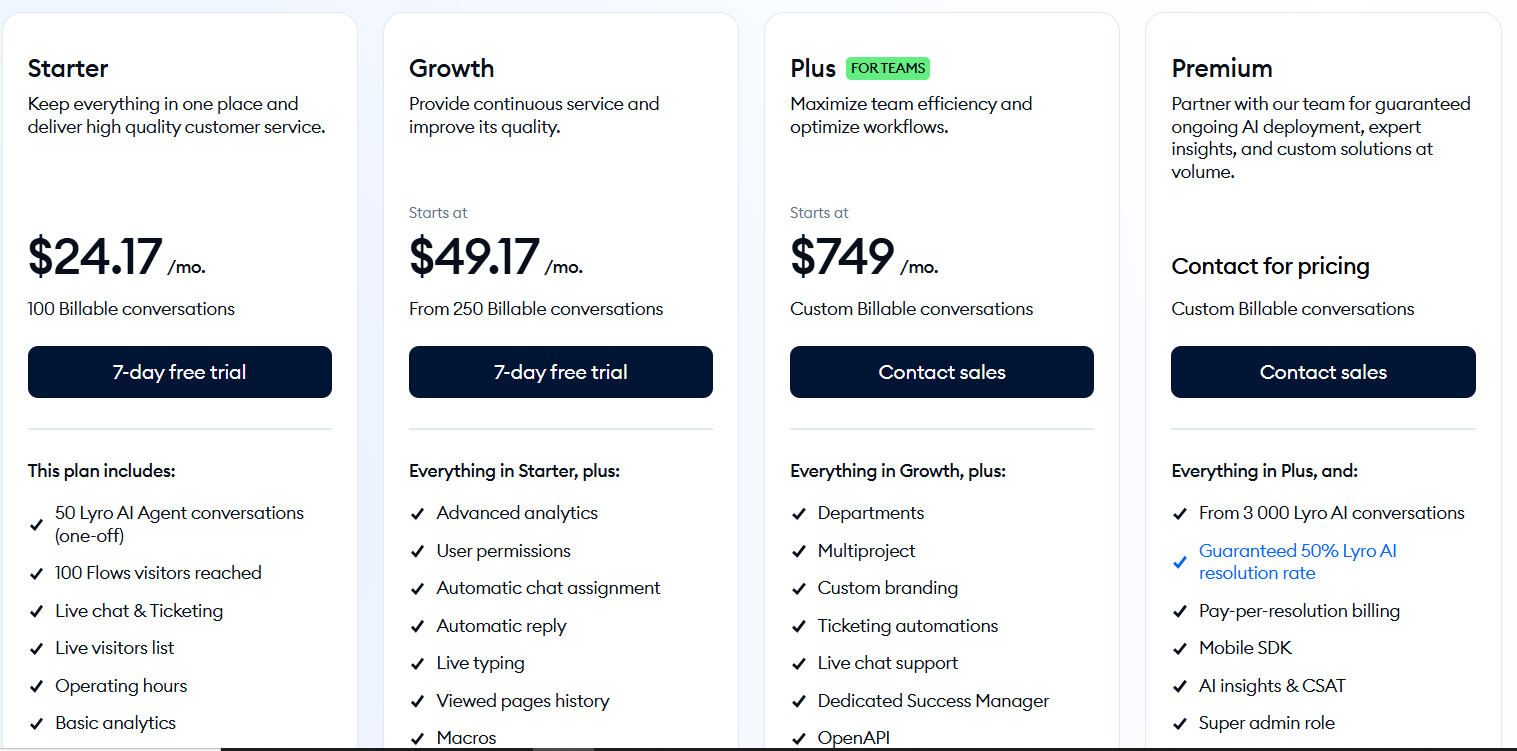
Tidio’s customer service plans scale by billable conversations rather than agent seats. Starter begins around $24 per month for 100 conversations (yearly billing), while AI and automation tools like Lyro and Flows have their own quotas. This structure keeps upfront costs low for small teams, but it’s important to monitor conversation volume and automation usage.
There’s also a path for companies that don’t need Tidio’s human support features. Teams already using another help desk or operating without live agents don’t have to subscribe to Starter, Growth, Plus, or Premium. In this case, Lyro can run independently, with quotas starting at $0.58 per AI conversation, and there’s no charge for help desk features they aren’t using.
Higher web traffic or increased bot engagement may require a larger quota or a higher plan. Lyro’s usage also grows with AI resolutions, so teams planning heavy automation should track AI conversation counts as they scale.
So, a team expecting very high human-agent volume from day one should map their conversation needs carefully. If the operation requires advanced enterprise routing, deep analytics across many agents, or full voice channels, a higher tier or additional tools may be necessary.
Best fit
Tidio suits small and mid-sized ecommerce teams that want to combine live chat, automation, and AI without paying per agent. It works well for brands planning to grow through automation instead of expanding their support team.
Pricing by persona
- Solopreneur: Free includes 50 billable conversations, 10 seats out of the box, ticketing, basic analytics, and one-time Lyro and Flows bundles. Starter at around $24 per month offers 100 conversations and core live chat features. Most founders spend between $0 and ~$30 per month before adding AI or automation limits.
- Small team (around 1,000 conversations): Growth starts at ~$49 for 250 conversations and scales with volume. At about 1,000 conversations, the plan is roughly $180 per month. Lyro adds $32.50 per month for 50 AI conversations.
- Growing company (around 5,000 conversations): Teams at this level typically move to Plus at ~$749 per month. Plus includes custom conversation quotas, expanded automation, more integrations, and premium support. Lyro and Flows’ quotas increase from this base.
- Enterprise: Large teams usually run expanded Plus limits or Premium. Premium removes public pricing and offers managed AI, guaranteed resolution rates, and Lyro starting at 3,000 AI conversations. High-volume deployments fall into the low-to-mid four-figure range depending on conversation load and automation usage.
Scale customer support with AI that never slows down
Read more: Check out our guide on AI chatbot integration.
Zendesk
Zendesk provides a full support suite with email, chat, voice, and social messaging in one place. It also includes routing rules, SLAs, multilingual knowledge bases, help centers, and community forums. Higher tiers also add features like live dashboards, advanced reporting, and more granular controls.
Zendesk is well established and integrates with a large ecosystem of tools. G2 reviewers rate it around 4.3 out of 5[1] across thousands of reviews, often highlighting strong automation and scalability.
Pricing model and what to watch
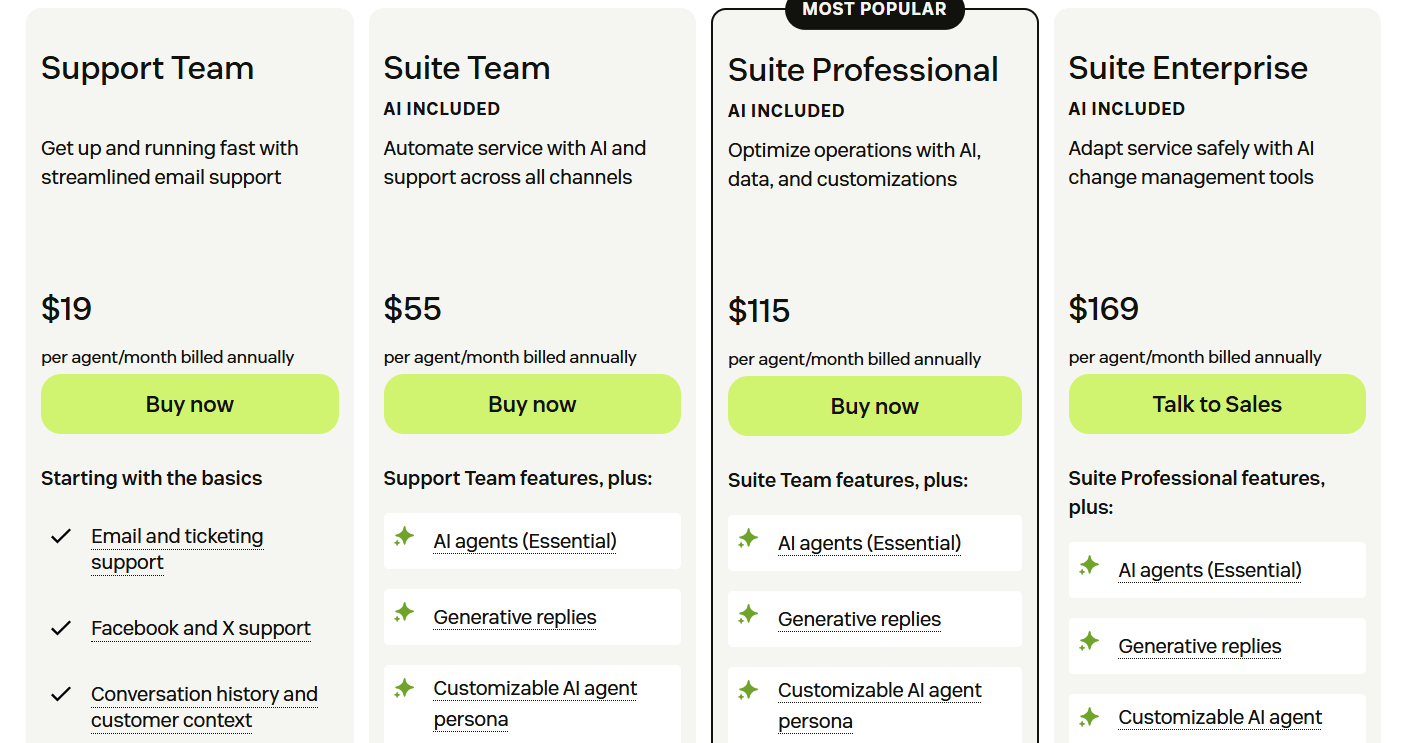
Zendesk uses per-agent billing. Entry plans start at about $19 per agent per month for ticketing. To unlock messaging, live chat, and multichannel workflows, teams move into the Suite plans.
Advanced workflows, AI, data controls, and workforce management often require add-ons, which meaningfully increase the total monthly cost. Teams that grow quickly will see costs rise with each additional seat, and larger setups often need consultants for configuration.
Very small teams may find the per-agent structure expensive compared to conversation-based tools. Companies relying heavily on bots or automated support may also find seat costs difficult to justify. Also, businesses without technical resources may need extra help to configure the platform effectively.
Best fit
Zendesk suits support operations with multiple agents, structured workflows, and established multichannel needs. It works well for organizations that rely on strong analytics, compliance, governance, and enterprise-grade controls.
Pricing by persona
- Solopreneur: A single agent can start on the Support Team at about $19 per month, but adding chat or messaging requires upgrading to a Suite plan, which increases the monthly cost. Zendesk is typically not the most budget-conscious option for very small teams.
- Small team: Two agents usually begin on the Suite Team at $55 per agent. Total seat cost is about $110 per month. Add-ons like AI agents, voice, or workforce management increase the overall spend.
- Growing company: Suite Professional at about $115 per agent becomes realistic for larger workflows and multilingual support. The cost for 8 seats is about $920 per month before any add-ons.
- Enterprise: Suite Enterprise starts at $169 per agent and reaches more than $6,700 per month for forty seats. Larger deployments add advanced analytics, AI, security controls, and workforce automation, which push total cost into custom-contract territory.
Read more: Here’s a full Zendesk vs. Intercom comparison.
Intercom
Intercom brings live chat, email, in-app messaging, and automation into one workspace. The platform includes workflow builders, routing rules, multilingual help centers, and multiple inboxes for larger teams. Fin, the built-in AI agent, resolves common questions, and Copilot helps human agents respond faster. Teams can add Proactive Support Plus for product tours, surveys, and in-app guidance.
Intercom’s Fin is also well rated on G2, with 4.5/5 stars[1], where users highlight ease of use and strong automation.
Pricing model and what to watch
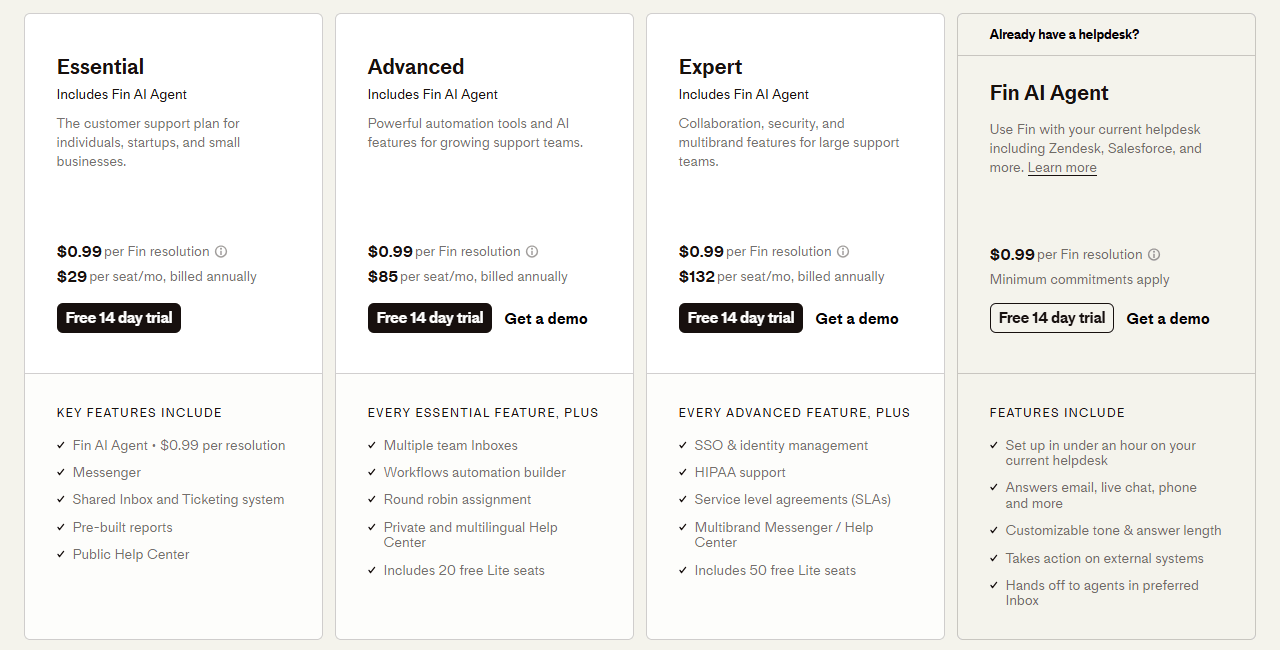
Intercom is fully seat-based, with Essential, Advanced, and Expert plans. AI usage is billed separately at $0.99 per Fin resolution. Add-ons like Proactive Support Plus and unlimited Copilot increase the monthly bill, especially for multi-seat teams. Outbound channels such as SMS and WhatsApp also carry usage costs. As AI resolves more conversations, usage fees climb, so it helps to model expected resolution volume before committing.
Brands that rely heavily on automation or expect high AI resolution counts need to plan for usage fees. Intercom also has a learning curve, so teams without time for onboarding might take longer to fully adopt it.
Best fit
Intercom suits teams that want a comprehensive platform combining live chat, automation, AI, and outbound engagement. It’s a strong choice for SaaS companies, product-led businesses, and support teams that value modern tools and structured workflows.
Pricing by persona
- Solopreneur: Most solo users start on Essential at $29 per seat. They get a unified inbox, live chat and AI tools with small free allowances. Adding Proactive Support Plus ($99) or unlimited Copilot ($29–$35) increases cost.
- Small team: Two-seat teams often upgrade to Advanced for more workflows and reporting, reaching around $170 per month. Adding Proactive Support Plus and unlimited Copilot for both agents puts the bill significantly higher than base pricing.
- Growing company: Eight-seat teams typically use Advanced, at about $680 per month. Proactive Support Plus adds $99, and unlimited Copilot can add $230–$280, depending on seat count. AI resolutions and outbound messaging add further usage-based cost.
- Enterprise: Large teams choose Expert at about $132 per seat, or roughly $5,280 per month for forty seats. Adding unlimited Copilot raises the cost by another $1,160–$1,400, and Proactive Support Plus adds $99. Heavy Fin usage or paid channels increases the total further.
Read more: Here’s a full comparison of Intercom vs. Freshdesk.
Freshchat
Freshchat provides modern, app-style live chat with support for web, mobile, and messaging channels. It integrates smoothly with the Freshworks ecosystem, especially Freshdesk and Freshsales. The platform includes canned responses, routing rules, chatbots, assignment automation, and asynchronous messaging so customers can pick up conversations later.
Users often mention its clean interface and lightweight feel compared to larger enterprise suites. Ratings on G2 typically sit around 4.4 stars[1].
Pricing model and what to watch
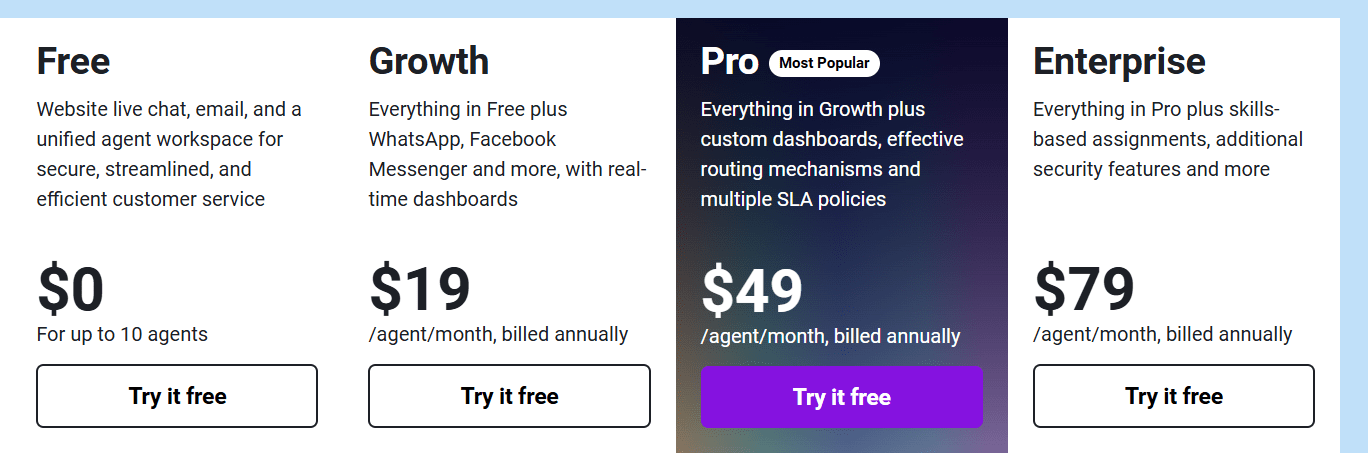
Freshchat uses per-seat pricing and includes Growth (starts around $19 per seat per month), Pro, and Enterprise. Each tier increases channel options, roles, API access, and bot-session limits. Most plans include the first 500 AI Agent interactions, and additional usage is billed at about $49 per extra 100 sessions, so teams relying on automation should keep an eye on volume.
Teams that rely heavily on automation should monitor bot usage because overages add cost. Social channels such as WhatsApp and SMS may also carry separate fees. Since pricing grows with every new agent, teams that scale quickly will see monthly totals rise accordingly.
Best fit
Freshchat works well for small and mid-sized teams that want a clean, modern chat interface and value straightforward seat-based billing. It’s especially suited to businesses already using other Freshworks products since integration is smooth and setup time is minimal.
Pricing by persona
- Solopreneur: Growth at about $19 per month provides live chat, a mobile SDK, basic automation, and up to 500 bot sessions. It’s an affordable starting point for one agent.
- Small team: Two Growth seats total $38 per month. If the team needs social channels or additional bot sessions, costs rise toward $50–$100 per month, depending on usage.
- Growing company: Eight agents on Pro cost roughly $392 per month. Extra bot sessions and messaging campaigns can push real spending into the $500–$700 range.
- Enterprise: Forty seats on Enterprise cost about $3,160 per month. Once campaigns, bot sessions, connectors, and advanced features are added, monthly spend typically reaches $4,000–$5,000.
LiveChat
LiveChat focuses on fast, efficient human-led chat. The interface is clean and responsive, with features like canned responses, typing previews, archives, CSAT surveys, and proactive chat prompts. It integrates with Shopify, WordPress, HubSpot, Salesforce, and many other platforms, making it a flexible choice across industries.
Automation comes from a separate product, ChatBot, which many teams combine with LiveChat for hybrid support. Users rate it highly on G2[1], often praising reliability, onboarding speed, and overall chat quality.
Pricing model and what to watch
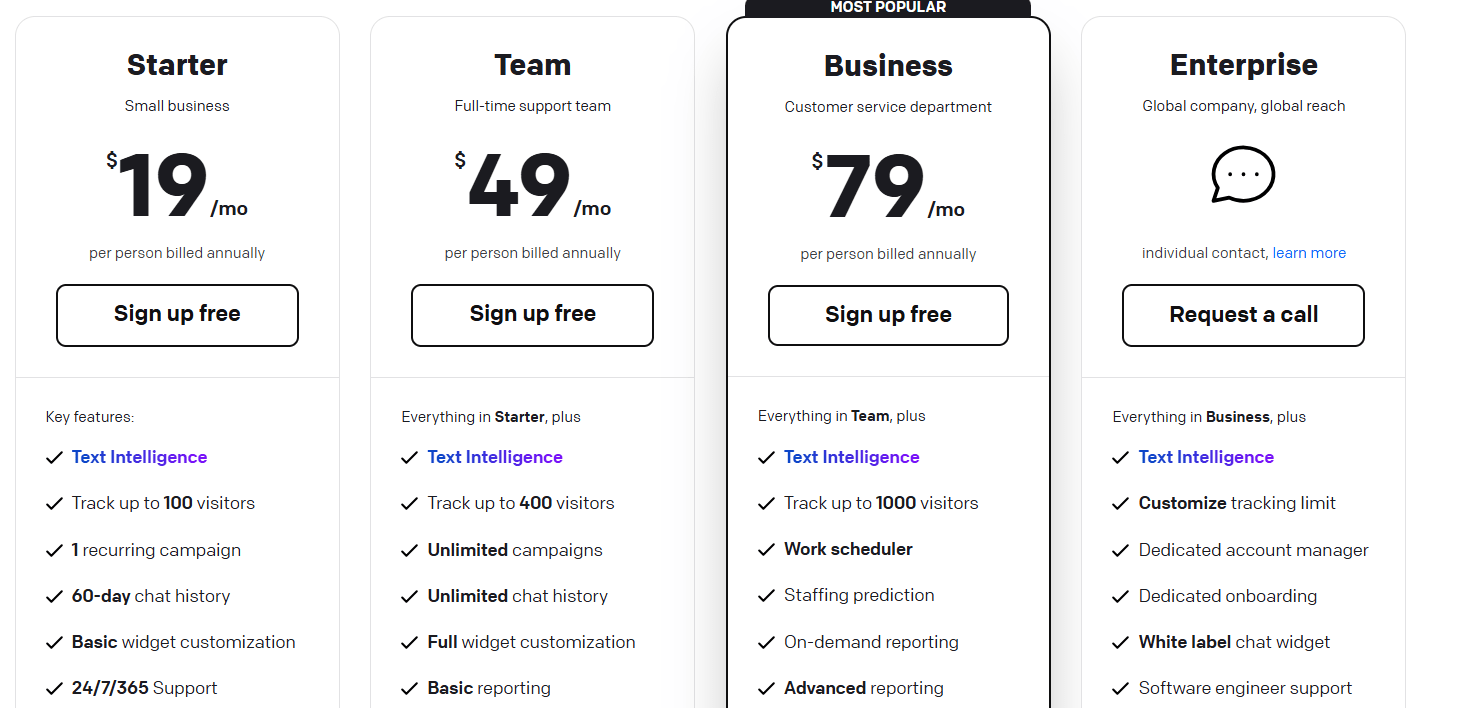
LiveChat uses per-seat pricing, including Starter, Team, Business, and Enterprise plans, the latter of which is custom.
Because automation is sold separately through ChatBot, any team planning to automate responses will need an additional subscription. Seat-based billing also means that as soon as the team expands, the total cost rises. Some advanced capabilities, social channels, and deeper analytics may require higher tiers.
Best fit
LiveChat fits businesses that want a straightforward, human-focused live chat tool. It works well for teams that depend on agent-led conversations, need reliable performance, and value integrations with existing systems.
Pricing by persona
- Solopreneur: One Starter seat for about $20–$29 per month provides core live chat, visitor tracking, and mobile apps. Automation requires a separate ChatBot subscription, which starts at ChatBot starts at $52/mo billed annually.
- Small team: Two seats cost about $50–$60 per month on the entry tier. If the team needs features like tagging, routing, or higher visitor limits, they usually upgrade to Team or Business, raising seat cost to roughly $41–$59 per month.
- Growing company: Eight seats on the Business tier cost roughly $400–$500 per month. Additional features such as automation or omnichannel messaging increase the total.
- Enterprise: Enterprise plans often start above $100 per seat with advanced features, dedicated support, and SLAs. Forty seats typically reach $4,000–$5,000+ per month before add-ons.
Read more: Check out the best LiveChat alternatives available.
Gorgias
Gorgias is built for ecommerce brands. It centralizes order questions, returns, shipping updates, and product inquiries while integrating directly with platforms like Shopify, Shopify Plus, BigCommerce, and Magento. Agents can view and modify orders without leaving the help desk.
The platform also brings together email, live chat, social comments, Facebook and Instagram DMs, and SMS, giving storefront teams a single workspace.
Reviews across G2 and the Shopify App Store rate Gorgias around 4.6 out of 5[1], often praising its ecommerce-native workflows.
Pricing model and what to watch
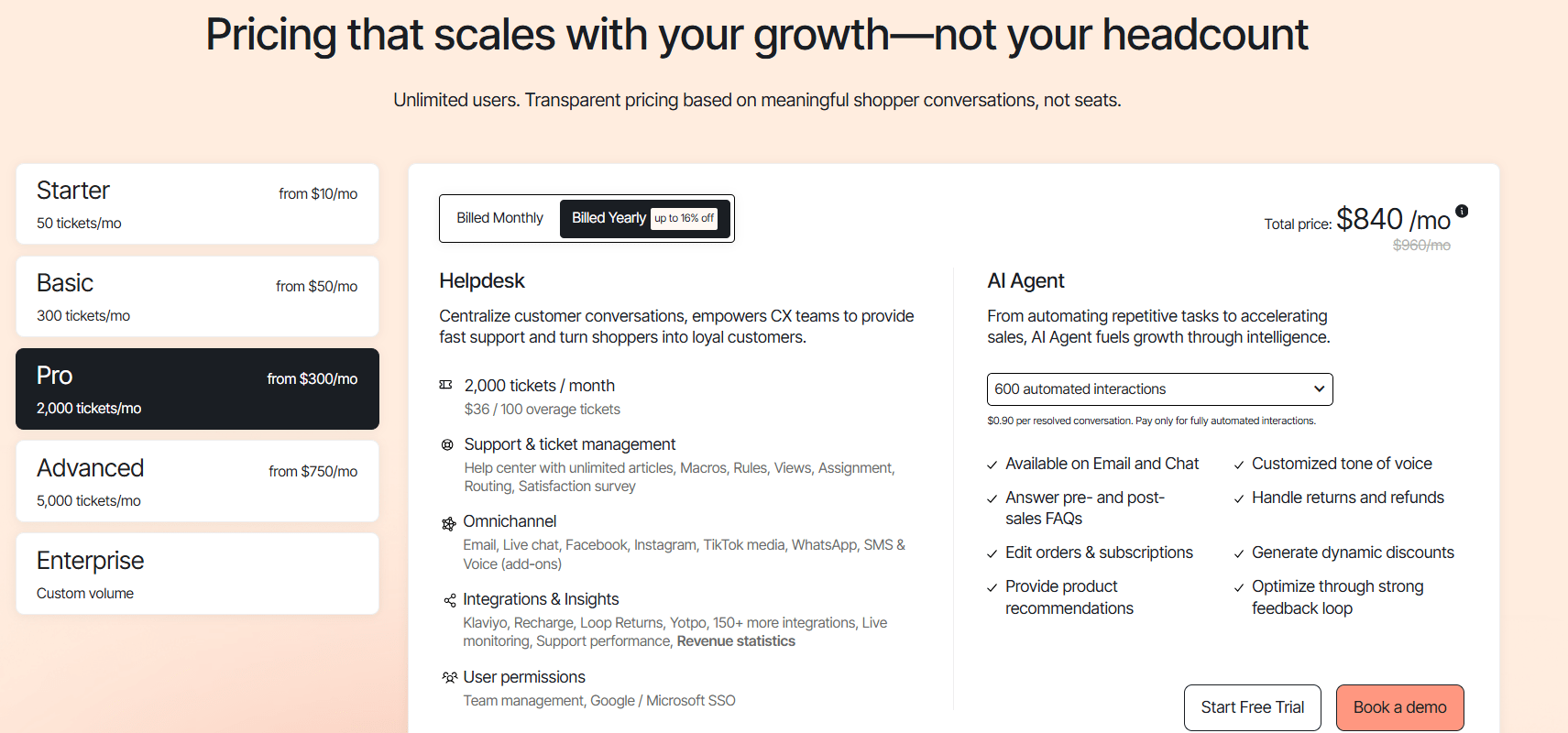
Gorgias charges by ticket volume rather than agent seats. Starter begins at $10 for about 50 tickets, then continues with Basic, Pro, and Advanced, with custom enterprise tiers above that.
Ticket-based pricing gives flexibility on team size, but volume spikes during holidays or marketing campaigns can trigger overages or force upgrades. Since all customer interactions across channels count as tickets, expanding into social DMs or comment moderation increases ticket totals. Automation can reduce repetitive steps, but does not eliminate ticket creation.
Also, you should be aware that there’s an additional charge for conversations resolved by AI, which is $1 per resolution.
Best fit
Gorgias works best for ecommerce stores with order-heavy support needs. Teams using Shopify or BigCommerce benefit from the native integrations. Brands with predictable month-to-month ticket patterns gain the most cost stability.
Pricing by persona
- Solopreneur: Starter at ~$10/month works for merchants handling a few dozen support tickets and wanting ecommerce integrations without high commitment.
- Small team: Basic at ~$60/month for around 300 tickets fits early-stage stores with moderate daily activity. Agents can be added without increasing seat cost, but rising ticket volume increases spend.
- Growing company: Pro at ~$360/month for about 2,000 tickets supports steady order flows and larger workloads. Spikes during sales or promotions can trigger overage fees.
- Enterprise: Advanced at ~$900/month for around 5,000 tickets or custom plans. Large stores with thousands of monthly inquiries, multiple channels, and automation add-ons often exceed published tiers and move into enterprise pricing.
Read more: Here are the best Gorgias alternatives on the web.
Crisp
Crisp brings multiple channels into one shared inbox, including chat, email, Instagram DMs, WhatsApp, and Messenger. This gives small teams an easy way to manage conversations across multiple channels. The platform also includes automation tools such as chat triggers, canned responses, routing rules, and a built-in chatbot builder in higher tiers.
The interface is simple and beginner-friendly, and the workspace-based pricing structure appeals to teams that want predictable monthly costs.
Crisp’s rating stands at a solid 4.5/5 stars[1], with users often describing it as affordable, easy to deploy, and well-suited for lean support operations.
Pricing model and what to watch
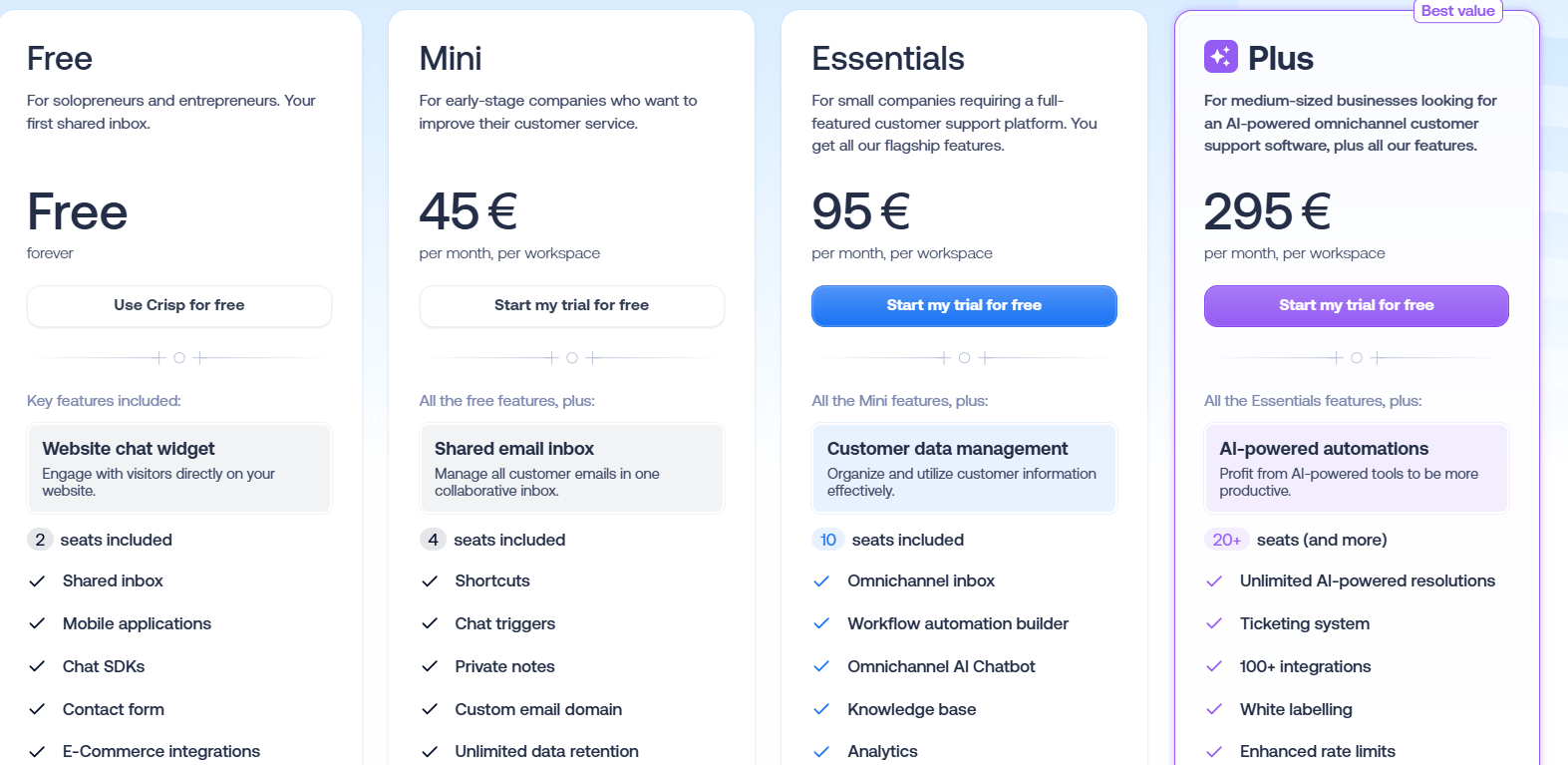
Crisp charges per workspace rather than per seat. Free plan includes two seats, followed by Mini for four seats, Essentials for ten seats, and Plus for twenty or more seats. Larger teams can move to a custom Enterprise plan. Because plans include bundled seats, upgrading is required once a team exceeds the seat limit for its tier.
You should note that AI usage, white labeling, knowledge base analytics, and priority support appear only in higher tiers (Essential and Plus). Teams with very high messaging volume across social channels should verify that their tier supports their expected load. Also, brands managing heavy WhatsApp or Instagram volume should confirm capacity before committing.
Best fit
Crisp suits startups and small teams that want a multichannel inbox without per-agent fees. It’s a good match for SMBs looking for predictable billing and easy setup, especially those handling conversations across web chat, email, and social messaging.
Pricing by persona
- Solopreneur / very small team: The Free tier with two seats or Mini at $45 per month with four seats offers live chat, a shared inbox, and basic automation. It’s a low-cost option for early-stage teams.
- Small team (2–4 seats): Mini at $45 or Essentials at $95 suits small teams that want predictable costs and more room to grow. Essentials adds more features and ten included seats.
- Growing company (~10 seats): Essentials at $95 supports omnichannel inboxes, chatbots, routing rules, and knowledge base tools. Moving toward twenty seats typically leads to the Plus plan at $295, which adds white labeling, ticketing, and higher automation capacity.
- Enterprise (20+ seats): Larger teams choose Plus at $295 or a custom Enterprise plan. Crisp’s workspace pricing offers many seats under a single fee, which keeps total cost manageable as the team expands.
ManyChat
ManyChat is a marketing automation platform built for Messenger, Instagram, WhatsApp, and SMS. Instead of support ticketing, it focuses on conversational funnels, lead capture, drip campaigns, and audience segmentation.
The visual builder makes it easy to design multi-step flows, while integrations with Shopify, HubSpot, Mailchimp, and ad platforms make it popular among ecommerce stores and creators.
Users highlight its strong templates and reliable multi-channel automation. Ratings on G2 align with positive reviews, hovering around 4.5 out of 5[1].
Pricing model and what to watch
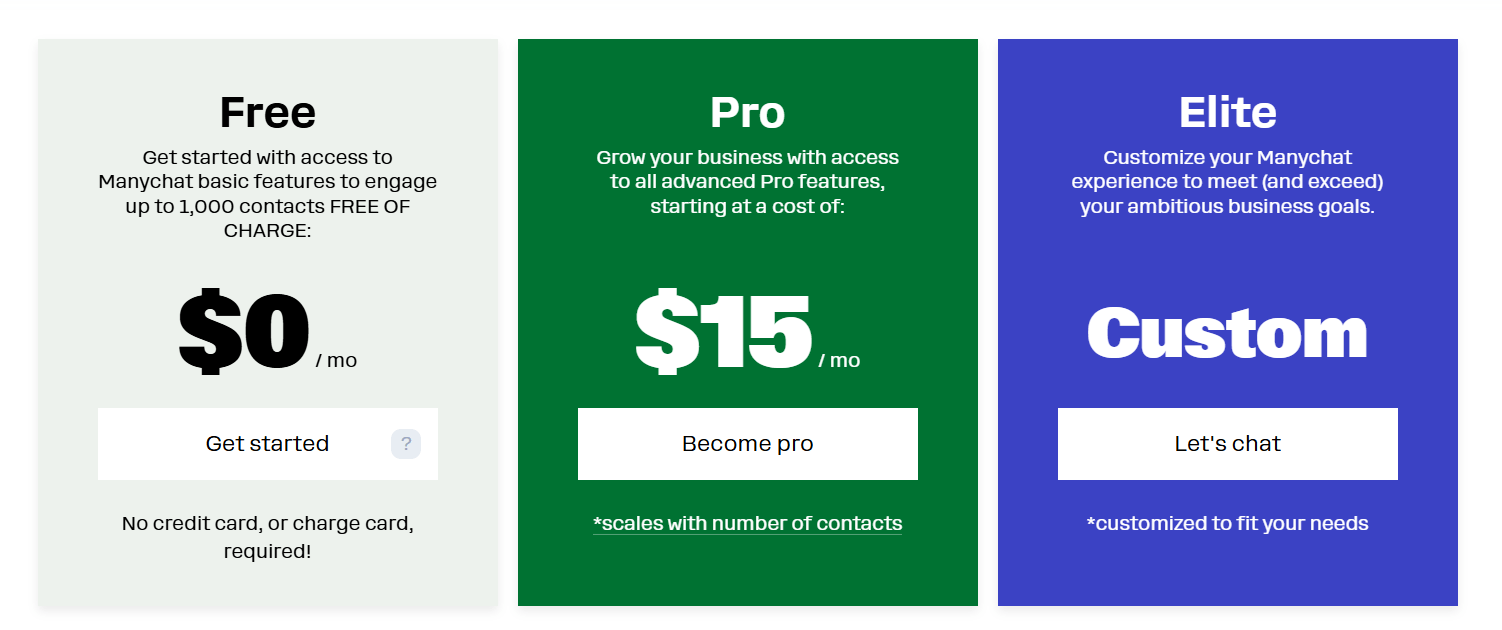
ManyChat uses contact-based pricing. The Free plan covers up to 1,000 contacts, while the Pro plan starts at about $15 per month and scales as your contact list grows. Elite is custom for large-scale lists and advanced needs.
Since pricing increases with stored contacts, even inactive subscribers contribute to higher costs. WhatsApp conversations incur separate fees from the WhatsApp Business API. Also, core features like advanced automation, custom fields, and multi-channel support require the Pro tier.
Best fit
ManyChat works best for social-first brands, creators, and ecommerce teams using chat funnels for marketing, product recommendations, and abandoned-cart recovery. It’s ideal for businesses that rely heavily on Messenger, Instagram, or WhatsApp and need a flexible, automation-focused tool.
Pricing by persona
- Solopreneur: Free plan allows about 1,000 contacts and basic automation across Messenger and Instagram.
- Small team: Pro starts around $15 per month for low-contact tiers. It unlocks unlimited flows, segmentation, and removes branding.
- Growing company: As contact lists expand into the thousands, Pro pricing increases accordingly. Multi-channel marketing flows and WhatsApp/SMS usage raise total monthly spend.
- Enterprise: ManyChat’s Elite plan supports very large databases with dedicated account management, white labeling, and advanced automations. Pricing is fully custom and based on scale.
Read more: Explore the top ManyChat alternatives and competitors.
Chatfuel
Chatfuel focuses on automating conversations across multiple channels. Its visual builder lets teams create conversational flows, automate FAQs, and run social messaging campaigns. Features of Chatfuel include audience segmentation, templates, quick replies, buttons, broadcasts, and ecommerce integrations.
The platform is widely used by social-first brands that want automated DMs and funnel-based messaging. Ratings hover around 4.4 out of 5[1], with many users praising the speed of deployment and marketer-friendly tools.
Pricing model and what to watch
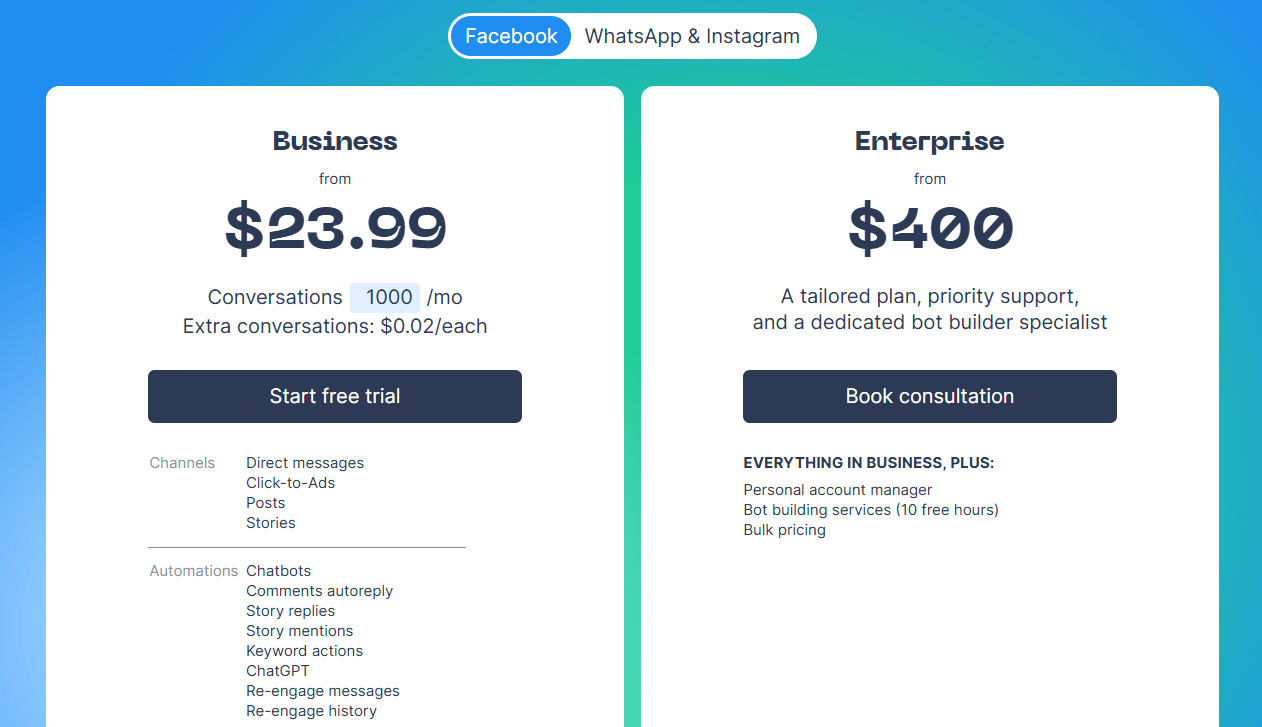
Chatfuel uses conversation-based pricing. Plans begin around $23.99 per month for roughly 1,000 conversations. Because pricing is tied to conversation volume, spikes from campaigns or promotions increase costs immediately.
WhatsApp messaging may also introduce extra fees through the WhatsApp Business API. Chatfuel is automation-focused, so teams that need robust human-agent chat or ticketing need an external support tool.
Best fit
Chatfuel suits social-first brands with strong activity on Instagram and Messenger. It’s a good match for marketers and ecommerce teams running high-engagement flows for product recommendations, FAQs, launches, and promotions. It also works well for businesses with predictable message volume and structured funnels.
Pricing by persona
- Solopreneur: Entry plan at about $23.99 per month includes around 1,000 conversations and offers automated flows, templates, and basic integrations.
- Small team: The 3,000-conversation tier at roughly $107.99 per month supports moderate-volume automation across Facebook and Instagram. Since pricing isn’t seat-based, adding teammates does not increase cost.
- Growing company: Brands handling high-volume DM engagement typically use the 10,000-conversation tier at about $215.99 per month. Costs rise with additional channels and heavier WhatsApp usage.
- Enterprise: Chatfuel’s Enterprise offering begins around $400 per month and scales with conversation volume. These plans include higher limits, dedicated support, and advanced bot-building services.
Zoho SalesIQ
Zoho SalesIQ combines live chat, visitor tracking, bot automation, and email messaging in one platform. It integrates deeply with the Zoho ecosystem, including Zoho CRM, Zoho Desk, Marketing Automation, and Campaigns. This makes it especially appealing to businesses already using Zoho.
Among the aforementioned features, the platform also provides routing rules, canned responses, event tracking, screen sharing, and a script-friendly bot builder.
Users often highlight its reliable visitor tracking and tight CRM integration. Ratings typically sit around 4.4 out of 5 stars[1].
Pricing model and what to watch
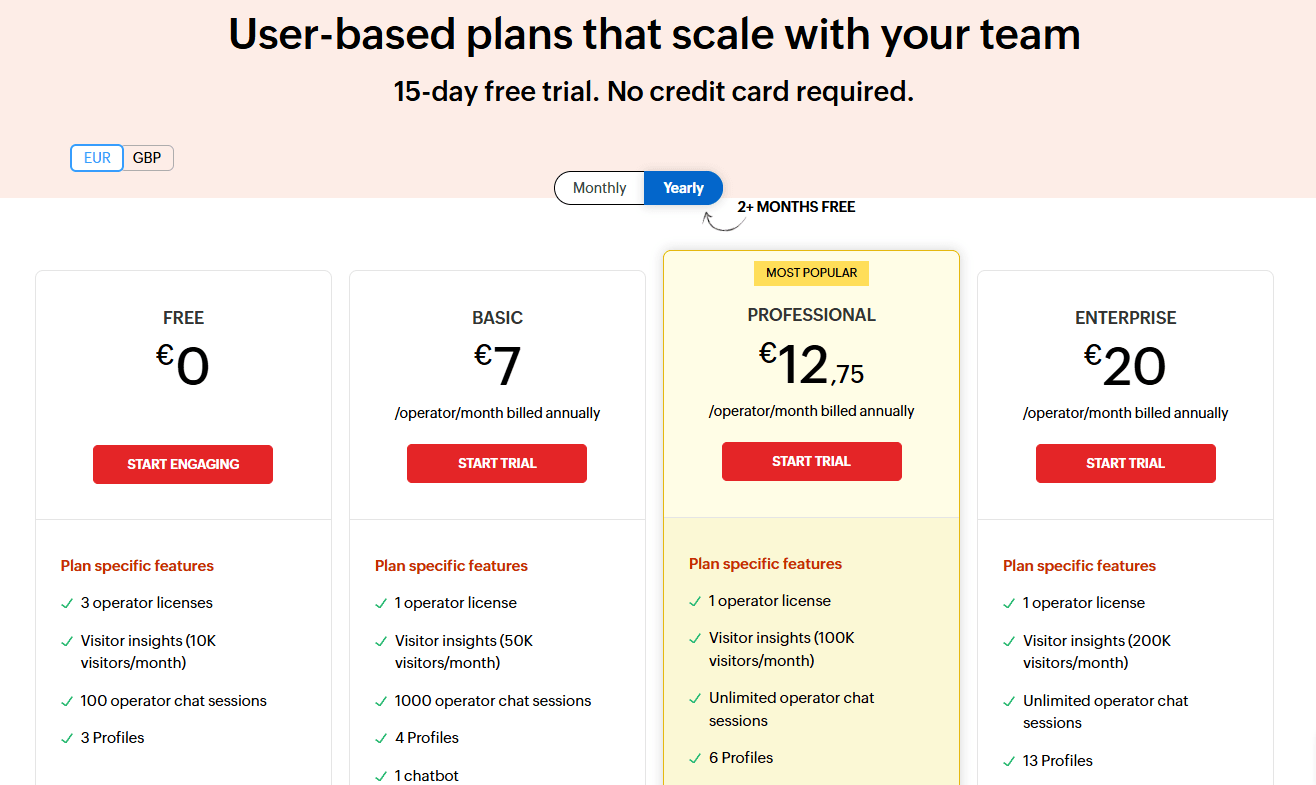
Zoho SalesIQ uses operator-based pricing. The Free tier includes three operators, Basic costs about $7 per operator per month. There are also Professional and Enterprise tiers.
Lower tiers limit monthly tracked visitors, and removing Zoho branding requires higher tiers. Advanced automation, multiple brands, and additional chatbot usage also sit behind the Professional or Enterprise plans. Because billing scales linearly with operator count, costs are predictable, but rise as your team grows.
SalesIQ is lighter on multichannel social messaging, so teams needing Instagram, Messenger, or WhatsApp should evaluate compatibility carefully. Automation-heavy teams may need higher tiers to unlock more complex bot functionality. Rapid growth in operator count will increase monthly spend.
Best fit
Zoho SalesIQ is ideal for small and mid-sized teams that want transparent pricing and strong analytics at a low cost. It’s particularly well-suited for businesses already using Zoho CRM or other Zoho tools and those prioritizing visitor tracking and lead qualification.
Pricing by persona
- Solopreneur: Free includes three operators, but Basic at $7 per operator is common for solo users who want more control and visitor tracking.
- Small team: Basic plan costs roughly $14 per month. Upgrading to Professional at around $25 total provides more automation and higher tracking limits.
- Growing company: Professional at about $12.75 per operator results in a little over $100 per month and supports higher visitor traffic, more bots, and multiple integrations.
- Enterprise: Enterprise at about $20 per operator, and 40 operators cost around $800 per month. This tier fits larger teams that need increased visitor capacity, multiple brands, and advanced automation.
Read more: Here are the leading alternatives to Zoho Desk.
Three real-world pricing scenarios
While pricing tables are helpful, most buyers want to know how these tools behave in situations that look like their own.
The three scenarios below reflect the patterns teams mention most often when choosing a chatbot or support platform. They also show how pricing models shape the total monthly cost long before a company reaches “enterprise” scale.
1. A solopreneur launching a new store
A solo founder usually wants something that’s quick to set up, fits within a lean budget, and doesn’t require extra hires to maintain. At this stage, the goal is to handle basic questions and automate a few simple replies.
Most tools in this bracket keep the monthly cost low:
- Tidio offers a Free or Starter plan that easily covers the first few hundred chats while keeping setup simple.
- Zoho SalesIQ stays under roughly $10 per operator on its Basic tier, which is ideal for early-stage sites needing visitor tracking and simple chat.
- ManyChat and Chatfuel give solopreneurs access to lightweight automation on social channels at an affordable entry point.
Solopreneurs often lean toward tools with usage- or conversation-based pricing because they pay only when their audience grows. This gives them room to experiment before committing to a higher tier.
2. A small team building consistent support
Small teams tend to handle chat coverage throughout the day, so reliability becomes more important than volume alone. These teams usually sit somewhere between “lean startup” and “scaling storefront,” where stable workflows matter as much as pricing.
For a two-person team, here’s where the monthly cost typically lands:
- Zendesk and Intercom fall in the $100–$200 range once both seats are active on their lower tiers.
- Freshchat and LiveChat land in similar territory because they charge per seat.
- Tidio remains competitive in higher conversation bands—its Growth plan sits around $180 when handling ~1,000 conversations and still includes up to 10 operators without extra seat fees.
This is the stage where teams begin to see the difference between paying per seat and paying per conversation. If headcount stays small but chat volume grows, conversation-based tools make budgeting easier. If the team expects to expand, per-seat pricing becomes more noticeable.
3. A growing operation with eight or more agents
Once a team reaches eight or more agents, most seat-based platforms see a noticeable jump in cost. This happens even if agents split the workload or chat volumes remain moderate, because the pricing scales with headcount.
Typical ranges for an eight-agent team look like this:
- Zendesk climbs past $900 per month for eight agents on its Professional tier.
- Intercom reaches about $680 in seat cost before counting AI usage fees or add-ons for outbound features.
- Freshchat costs $392 per month just for seats on its Pro tier.
- Tidio’s Plus plan becomes a predictable alternative for growing teams because the price is tied to conversation volume rather than the number of agents. Larger teams often appreciate this model since costs stay stable even as they expand coverage.
This scenario shows why many teams eventually move to usage-based or conversation-based pricing once their headcount grows. It gives a clearer sense of what they’ll spend each month and avoids seat-related jumps when they hire more agents.
Total Cost of Ownership (TCO)
Subscription pricing is only the starting point. The real cost of a chatbot or customer service platform appears once a team starts using it every day. That’s why it helps to think in terms of total cost of ownership rather than just the sticker price on a plan page.
A few factors influence long-term spending more than teams expect:
- Operator count: As teams grow from one or two people to eight or more, seat-based platforms scale upward quickly. Tools that don’t charge per operator tend to stay more predictable over time.
- AI usage: Many platforms price AI separately. If the bot resolves hundreds or thousands of conversations, the added usage fees show up each month.
- Channels supported: Expanding into Instagram, WhatsApp, SMS, or multiple brands often requires additional connectors or paid add-ons.
- Implementation time: Some platforms require setup work for custom flows, ticketing rules, or training AI. The time your team spends here also factors into the total cost.
- Automation savings: A well-built chatbot deflects repetitive questions and reduces workload. When estimating cost, teams often forget to account for the hours saved by automation.
These considerations shape the long-term budget far more than the initial plan price. Large teams often find conversation-based pricing helpful because it keeps costs stable even as they add more operators. Companies with steady support structures lean toward seat-based tools because they know exactly what each new team member will cost.
Read more: Here’s what to know about chatbot analytics.
Scale customer support with AI that never slows down
FAQs
Most AI chatbots range from free plans to several thousand dollars per month. The final price depends on how much automation you use and whether the platform charges per seat, per conversation, or per contact.
Zoho SalesIQ is one of the lowest-cost options at around seven dollars per operator. Tidio offers a generous free plan for early testing, and ManyChat gives you a free tier for up to a thousand contacts on social channels.
Solo users often start with Tidio Starter for early chat volume and simple automation, or Zoho SalesIQ Basic for low-cost chat and visitor tracking. ManyChat’s free plan works well for people whose audience is mainly on Instagram or Messenger.
Small teams with two or three agents usually do well with Tidio Growth if they want pricing tied to conversations, Freshchat Growth for a clean, seat-based inbox, or LiveChat Starter for straightforward live chat at a low monthly cost.
Teams with eight or more agents often choose Tidio Plus to avoid seat-based costs, Zendesk Professional when they already run structured multichannel support, or Intercom Advanced when they need in-app messaging and stronger automation.
Enterprise teams that need SLAs, governance, and advanced analytics typically look at Zendesk Enterprise, Intercom Expert, or Crisp Plus, depending on whether they prefer per-seat pricing or larger bundled workspaces.
Some tools, like Zendesk, Intercom, Freshchat, LiveChat, and Zoho SalesIQ, charge per operator. Others, such as Tidio, ManyChat, and Chatfuel, price plans around conversations or contacts, which suits teams that expect message volume to grow faster than headcount.
Yes. By handling routine questions and guiding customers to quick answers, AI chatbots reduce repetitive work for agents and help teams manage higher volumes without hiring at the same pace.
When a platform uses the WhatsApp Business API, each WhatsApp conversation has an additional fee. Tools like ManyChat and Chatfuel pass these charges through, so brands that rely heavily on WhatsApp should factor those costs into their budget.
Tidio is a customer service provider that offers chatbots, AI automation, live chat features, and a help desk ticketing system to streamline your company’s customer communications.
Yes, Tidio uses AI-powered agents to automate repetitive tasks and answer common customer questions.
Yes, Tidio has an AI agent, Lyro, as well as simple chat flows.