


Key takeaways
- Send the thank you within minutes of the order, and put the order number and delivery window in the same message. That answers “where is my order?” before anyone asks it.
- Name the product. “Enjoy your new [product]” reads as written by a person; “Thank you for your purchase” alone reads as a receipt.
- Give one next step, not five: a tracking link or a care tip. Ask for the review after delivery, never in the first message.
- Keep packaging notes under 30 words and handwrite the customer’s first name on them, even if the rest is printed.
- For B2B orders, confirm the purchase order number, quantities, price and ship date in writing. The thanks is one line.
A customer just paid you. The next message they get from you can make that order the first of many, yet it is often a flat “Your order is confirmed” and nothing else.
Below are 75 thank you for your order messages you can copy today: short thank you messages to customers for a purchase, full email templates with subject lines, notes for the box, SMS and live chat versions, booking confirmations, and B2B purchase order replies. Each one is its own block. Copy it, swap the words in [brackets], and send.
Automate thank you and order status replies with Tidio
What is a thank you for your order message?
A thank you for your order message is a short note a business sends after a purchase to thank the customer and confirm what happens next. It can arrive as an email, an SMS, a chat message, a card in the box, or a line on the order confirmation page.
It isn’t the same as an order confirmation email, though the two often travel together. A confirmation is a receipt: items, price, address, order number. A thank you is the human part on top of it. You can send both in one email, with the thanks first and the receipt underneath.
How to use these templates
Replace every placeholder before you send, and delete any sentence that doesn’t fit your store.
| Placeholder | What to put in |
|---|---|
| [Customer name] | The customer’s first name. Use the full name only in B2B emails |
| [Company] | Your store or business name |
| [product] | The item they bought, as they would say it (“the linen tote”, not “SKU 4471”) |
| [order number] | The order or purchase order number |
| [timeframe] | A real delivery or shipping window, e.g. “in 3 to 5 business days” |
| [link] | The tracking, review, account or booking link the sentence mentions |
| [discount code] | A code that exists and works, with its expiry date |
| [Your name] | A real person’s first name, even in automated messages |
Always change the product name, the delivery window and the sign-off. They make a template read as written for this customer.
When an order goes wrong, write the reply for that case. Start from the snag group below and see how to write an apology letter to customers.
Thank you for your order messages and templates by scenario
Short thank you messages to customers for a purchase
Use these on the order confirmation page, at the top of a receipt email, in a DM or on a packing slip.
Simple and warm
| Thank you for your order, [Customer name]. We hope you love your [product]. |
Thank you for your purchase
| Thank you for your purchase, [Customer name]. Your [product] is being packed and ships [timeframe]. |
Thank you for purchasing with us
| Thanks for purchasing with us, [Customer name]. If anything about your order isn’t right, reply to this message and we’ll fix it. |
Thank you for your recent purchase
| Thank you for your recent purchase from [Company]. We’d love to hear how you like your [product] once it arrives. |
Thank you for purchasing our product
| Thank you for purchasing [product]. Here’s one tip to get the most out of it: [one-sentence tip]. |
Short and personal
| [Customer name], thanks for choosing us. Your order is in good hands. |
For a first order
| Welcome to [Company], [Customer name]. Thanks for your first order. We’re packing it now. |
For a big order
| That’s quite an order, [Customer name]. Thank you. We’re giving it extra care and will send tracking as soon as it ships. |
For a digital purchase
| Thanks for buying [product], [Customer name]. Your download is ready here: [link]. |
For a gift order
| Thank you for your order. We’ll make sure your gift arrives looking the way you pictured it. |
Tip: add the order number and delivery window to the thanks. It saves your team a “where is my order?” chat later.
Thank you for your order email templates
Send these within minutes of checkout, usually as part of the order confirmation. Put the thanks first, then the order details and one next step. Put the key words first in the subject line, since phone inboxes cut long ones off.
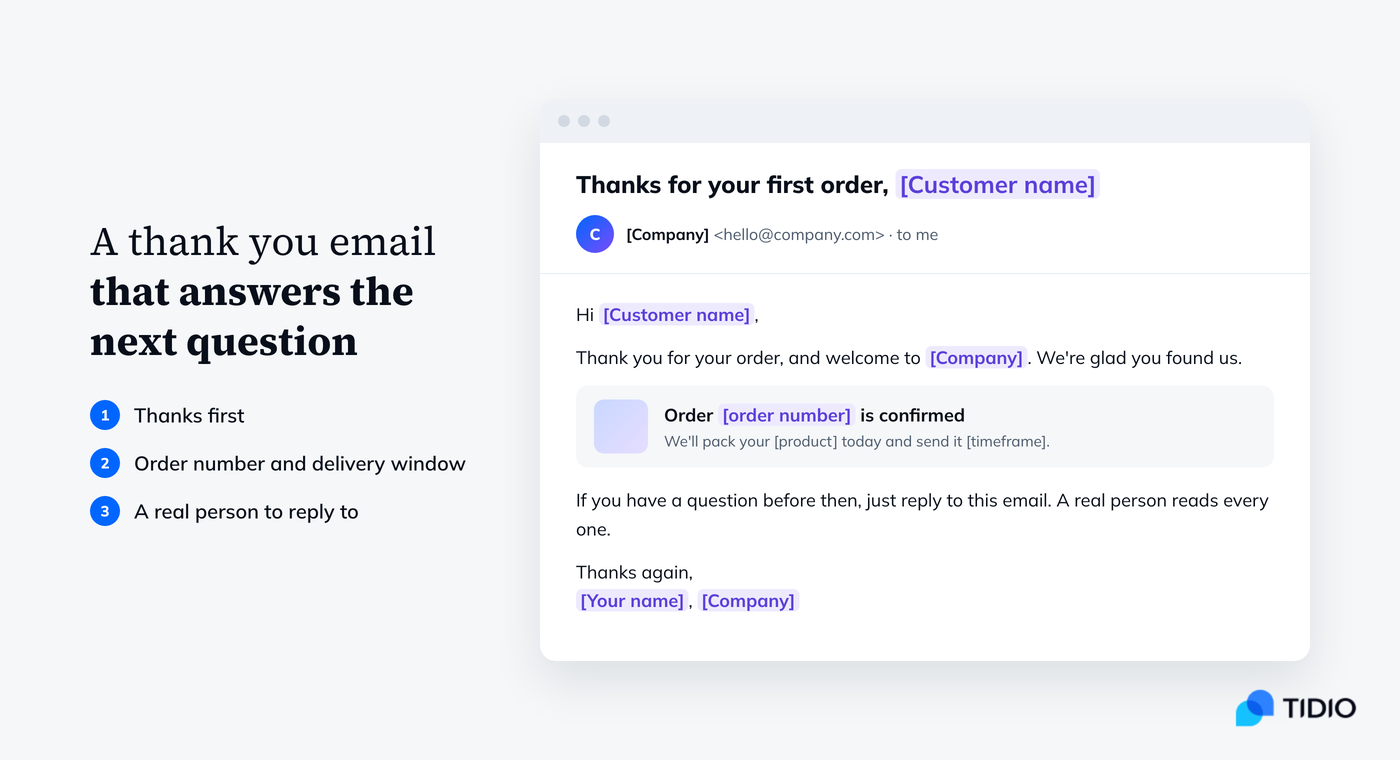
1. First-time customer
| Subject: Thanks for your first order, [Customer name] Hi [Customer name], Thank you for your order, and welcome to [Company]. We’re glad you found us. Your order [order number] is confirmed. We’ll pack your [product] today and send it [timeframe]. You’ll get a tracking link by email as soon as it leaves our warehouse. If you have a question before then, just reply to this email. A real person reads every one. Thanks again, [Your name], [Company] |
2. Thank you for your recent purchase (letter-style)
| Subject: Thank you for your recent purchase Dear [Customer name], Thank you for your recent purchase of [product]. Choosing a new supplier takes trust, and we don’t take that lightly. Your order [order number] ships [timeframe]. Your receipt and delivery details are below. If anything arrives in less than perfect condition, contact us at [email or phone] and we will put it right. Sincerely, [Your name] [Job title], [Company] |
3. Repeat customer
| Subject: Back again? Thank you, [Customer name] Hi [Customer name], It’s good to see you again. Thank you for your order. Your [product] is on its way to the same address as last time: [address]. If that has changed, reply within the next hour and we’ll update it before we ship. As a thank you for coming back, here’s [discount] off your next order: [discount code], valid until [date]. See you soon, [Your name] at [Company] |
4. High-value order
| Subject: Your [product] order is confirmed Hi [Customer name], Thank you for choosing [Company] for your [product]. We know it’s a big purchase, so here is exactly what happens next. ‚Ä¢ Today: we check and pack your order [order number]. ‚Ä¢ [Date]: it ships with [carrier]. You’ll get tracking by email. ‚Ä¢ [Date]: expected delivery. [Delivery or setup detail, e.g. “The driver will call 30 minutes before arrival.”] Your contact for this order is me. Reply to this email or call [phone] with any question. Thank you, [Your name], [Company] |
5. Pre-order or made-to-order
| Subject: Thanks for your pre-order, [Customer name] Hi [Customer name], Thank you for pre-ordering [product]. You’re one of the first to get it. Here’s the plan: we start shipping pre-orders on [date], and yours should arrive [timeframe] after that. We’ll email you the day it ships. You won’t be charged again, and you can cancel any time before it ships from your account: [link]. Thanks for waiting with us, [Your name], [Company] |
6. Digital product or course
| Subject: You’re in. Here’s your [product] Hi [Customer name], Thank you for purchasing [product]. Everything you need is ready now. Access it here: [link] Your login: [email address] Most people start with [first module, chapter or feature]. It takes about [time] and makes the rest easier. If the link doesn’t work, reply to this email and we’ll send you a new one. Enjoy, [Your name], [Company] |
7. Subscription sign-up
| Subject: Thanks for subscribing to [product] Hi [Customer name], Thank you for subscribing. Your first [box, delivery or month] ships [timeframe]. A few details so there are no surprises: you’ll be charged [amount] every [period], your next billing date is [date], and you can skip, pause or cancel any time here: [link]. We’re glad you’re here, [Your name], [Company] |
8. After delivery: thank you and a check-in
| Subject: How’s your [product], [Customer name]? Hi [Customer name], Your order arrived [day], so we wanted to say thank you again and check that everything is right. If something is damaged, missing or not what you expected, reply to this email and we’ll sort it out, no forms needed. If you love it, we’d be grateful for a short review: [link]. It helps other shoppers and it helps a small team like ours. Thanks, [Your name], [Company] |
Why it works: each email answers the customer’s next question (when it arrives, who to ask), so the thanks comes with something useful. For later messages, see these follow-up email templates.
Thank you for your purchase notes and cards
A note in the box is the one thank you a customer holds in their hand. Keep it under 30 words. These fit a 4×6 inch card.
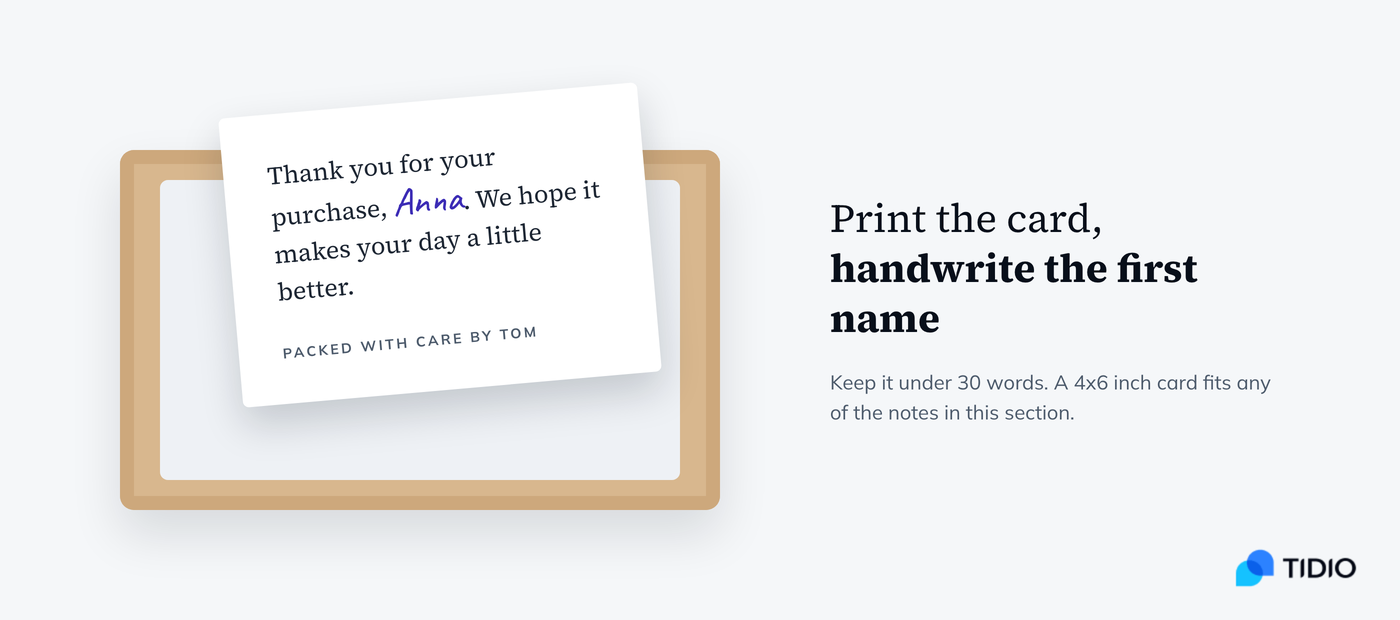
Classic purchase note
| Thank you for your purchase, [Customer name]. We hope it makes your day a little better. |
Packed by a person
| Packed with care by [Your name]. Thank you for your order. |
With a care tip
| Thanks for choosing [product]. For a long life: [care tip, e.g. “wash cold, dry flat”]. |
For a gift recipient
| Someone thought of you. This gift from [sender name] was packed by [Company] with care. |
With a small freebie
| Thank you for your order. We added a little something extra. Hope it makes you smile. |
With a QR code
| Thanks for shopping with us. Scan the code to see how to use your [product] in 60 seconds. |
Thank you note to a customer for a purchase from a studio or maker
| Every piece is made by hand in [city]. Thank you for giving this one a home, [Customer name]. |
For a return customer
| Nice to see you again, [Customer name]. Thank you for coming back. |
Tip: print the card but handwrite the first name. It takes seconds and it’s the part customers notice.
Thank you for shopping with me: small business messages
If you’re the business, say so. Use “I” if you work alone and “we” if you don’t.
Thank you for shopping with me
| Thank you for shopping with me, [Customer name]. Every order keeps my little shop going, and I’m grateful for yours. |
Thank you for supporting my small business
| Thank you for supporting my small business. I made your [product] myself, and I hope you love it as much as I enjoyed making it. |
Family business
| From our family to yours: thank you for your order. We’ve run [Company] since [year], and customers like you are why. |
Local store
| Thanks for shopping local, [Customer name]. Your order stays in [town], and so does our thanks. |
Etsy or marketplace seller
| Thanks for your order, [Customer name]. I’ll ship it [timeframe] and message you here with tracking. Any questions, just ask. |
First sale milestone (use once)
| You’re one of my first 100 customers, [Customer name]. Thank you for taking a chance on a new shop. |
For a custom order
| Thank you for trusting me with your custom [product]. I’ll send you a photo before it ships so you can check every detail. |
Thank you for shopping with us again: repeat and loyal customers
Repeat customers don’t need the welcome speech. Say you noticed they came back, and reward it if a customer loyalty program lets you.
Thank you for shopping with us
| Thank you for shopping with us again, [Customer name]. It means a lot that you came back. |
Second order
| Order number two. Thank you, [Customer name]. We’ve added [small extra] to this one as a thank you. |
Loyalty milestone
| This is your [number]th order with [Company]. Thank you. Your next one ships free with code [discount code]. |
Anniversary
| It’s been a year since your first order, [Customer name]. Thank you for sticking with us. Here’s [discount] for the next 12 months. |
Top customer, personal note
| [Customer name], you’re one of our most loyal customers, and I wanted to thank you personally. If there’s ever anything we can do better, reply and tell me directly. [Your name], founder |
Reorder of the same product
| Back for more [product]? Thank you, [Customer name]. Want us to remind you in [timeframe] when you’re likely to run low? Reply “yes” and we will. |
Tip: check order history first; thanking a first-time buyer for coming back is worse than no thanks. Tidio shows a Shopify customer’s order history in the inbox.
Thank you messages with a next step
A thank you can carry one request, such as a review after delivery or a referral. Offer a discount only if it’s real. Two asks turn it into a sales email. More wording for reviews and surveys is in our guide to customer feedback.
Review request, after delivery
| Thanks again for your order, [Customer name]. If your [product] is working out, would you leave a quick review? It takes a minute: [link]. |
Review request, photo
| Loving your [product]? Share a photo with your review and we’ll send you [discount code] for your next order. |
Referral
| Thank you for shopping with [Company]. Know someone who’d like [product]? Share your link and you both get [reward]: [link]. |
Next-order discount
| Thanks for your order. Here’s [discount] off your next one with code [discount code], valid until [date]. |
Follow on social
| Thanks for your purchase. We post styling ideas for [product] every week on [platform]: [link]. |
Join the loyalty program
| Thank you for your order, [Customer name]. You just earned [number] points. Join our rewards program to use them: [link]. |
Short survey
| Thanks for choosing [Company]. One quick question: how easy was it to order from us today? Reply with a number from 1 to 5. |
Thanks for your order: SMS and live chat messages
Put your business name first in an SMS, and only text customers who opted in. In live chat, the thanks comes at the end of a conversation that led to an order.
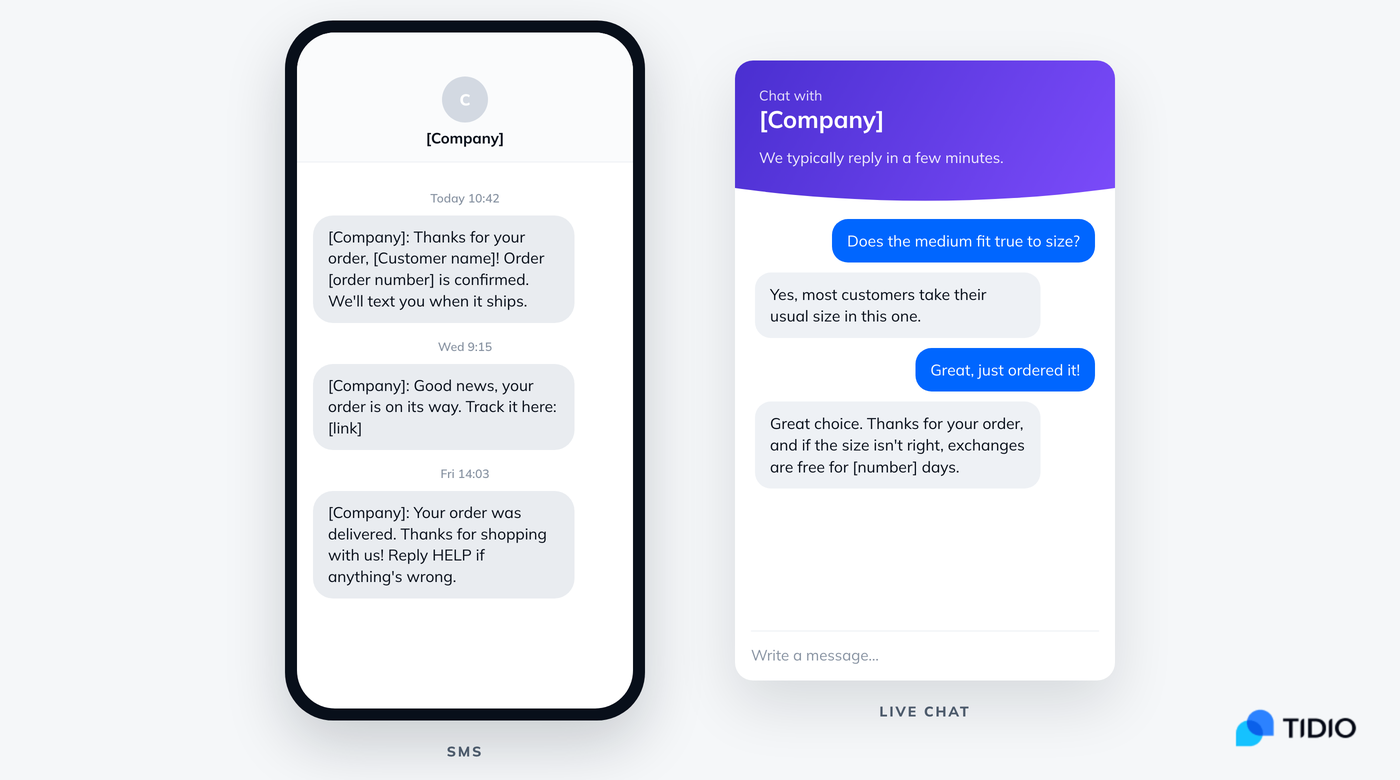
SMS: order confirmed
| [Company]: Thanks for your order, [Customer name]! Order [order number] is confirmed. We’ll text you when it ships. |
SMS: shipped
| [Company]: Good news, your order is on its way. Track it here: [link] |
SMS: delivered
| [Company]: Your order was delivered. Thanks for shopping with us! Reply HELP if anything’s wrong. |
SMS: thanks for purchasing, with a reply option
| [Company]: Thanks for purchasing [product]. Questions about setup? Just reply to this text. |
Live chat: after helping with an order
| Your order’s through, [Customer name]. Thanks for shopping with us. Your confirmation email is on its way, and I’m here if you need anything else. |
Live chat: after a size or product question
| Great choice. Thanks for your order, and if the size isn’t right, exchanges are free for [number] days. |
Live chat: closing the conversation
| Thanks for chatting with us and for your order, [Customer name]. Have a great rest of your day. |
Chatbot: returning visitor after an order
| Hi again, [Customer name]. Thanks for your recent order. Want to check its status? Type your order number and I’ll look it up. |
Tip: save the chat versions as macros in Tidio, so agents type / to insert one. More lines like these: canned responses.
Thanks for booking: appointments and reservations
A booking needs the same message as an order: the thanks and the details, plus what to do next. Always repeat the date, time and place, and give a way to reschedule.
Thanks for booking
| Thanks for booking with [Company], [Customer name]. See you on [date] at [time] at [address]. |
Appointment confirmation email
| Subject: You’re booked: [service] on [date] Hi [Customer name], Thanks for booking your [service] with us. Here are your details: Date and time: [date], [time] Where: [address or video link] With: [staff name] Need to change it? Reschedule here up to [number] hours before: [link]. See you soon, [Your name], [Company] |
Restaurant or table reservation
| Thanks for your reservation, [Customer name]. Your table for [number] is set for [date] at [time]. Running late? Text us at [phone]. |
Hotel or rental stay
| Thank you for booking your stay at [Company]. Check-in is from [time] on [date]. We’ll send door codes and directions [timeframe] before you arrive. |
Class or event ticket
| Thanks for booking, [Customer name]. Your spot at [event] on [date] is confirmed. Bring [what to bring] and arrive [number] minutes early. |
Consultation or call
| Thanks for booking a call, [Customer name]. I’ll call you on [date] at [time]. To help me prepare, reply with [what you need from them]. |
Thank you messages when an order hits a snag
Sometimes the thanks and the bad news share a message. State the problem plainly with a new date, and give a choice.
Delayed shipment
| Thank you for your order, [Customer name]. Your [product] is taking longer than expected and will now ship on [date]. If that doesn’t work for you, reply and we’ll refund you in full. |
Backordered item
| Thanks for ordering [product]. It’s back in stock on [date], and we’ll ship yours first. Prefer not to wait? Choose a refund or a swap here: [link]. |
Partial shipment
| Thanks for your order. [Item 1] shipped today; [item 2] follows on [date] at no extra shipping cost. Both tracking links will be in your email. |
Substitution
| Thanks for your order, [Customer name]. We ran out of [product] in [variant], so we’re holding your order. Would you like [alternative] instead, or a refund? Just reply. |
Payment problem
| Thank you for your order. Your payment didn’t go through, so we’ve saved your cart for [timeframe]. You can finish checking out here: [link]. |
Holiday and seasonal thank you messages
Seasonal orders carry a deadline, so confirm the one date the customer cares about: arrival before the holiday.
Holiday order, delivery before the date
| Thank you for your holiday order, [Customer name]. It ships [timeframe] and should arrive before [holiday date]. |
Black Friday or Cyber Monday
| Thanks for shopping our Black Friday sale. Your order [order number] is confirmed, and we’re shipping sale orders in the order they came in. |
Valentine’s Day or Mother’s Day gift
| Thank you for your order. Your gift for [holiday] is packed and on schedule to arrive by [date]. |
End of year thanks to all customers
| Thank you for shopping with [Company] this year, [Customer name]. Here’s [discount] to start next year: [discount code]. |
Thanksgiving
| This Thanksgiving, we’re thankful for customers like you. Thanks for your order, [Customer name]. |
Last order before the cutoff
| You made it. Thanks for your order, [Customer name]. It’s in before our [holiday] shipping cutoff and will arrive by [date]. |
Thank you for your purchase order: B2B acknowledgment emails
When a business customer sends a purchase order (PO), reply the same working day. The reply thanks them in one line and then confirms, in writing, the PO number, the items and quantities, the price, and the ship date. That confirmation is what their accounts team needs, and it catches mistakes before anything ships.
1. Purchase order received with thanks
| Subject: PO [order number] received, thank you Dear [Customer name], Thank you for your purchase order [order number], received on [date]. We’re processing it now. I’ll send a full order confirmation with pricing and a ship date by [time or date]. If you need anything in the meantime, reply to this email or call me at [phone]. Kind regards, [Your name] [Job title], [Company] |
2. Order confirmation with details
| Subject: Order confirmation for PO [order number] Dear [Customer name], Thank you for your order. Please find the confirmed details below: PO number: [order number] Items and quantities: [items] Total: [amount], [payment terms, e.g. “net 30”] Ship date: [date], via [carrier] Delivery address: [address] Please check these details and let us know by [date] if anything needs to change. Otherwise, we’ll ship as confirmed. Thank you for your business, [Your name], [Company] |
3. Partial availability
| Subject: PO [order number]: update on availability Dear [Customer name], Thank you for your purchase order [order number]. We can ship [items and quantities] on [date]. [Item] is available from [date]. Would you like us to ship what’s ready now and send the rest later, or hold the full order until [date]? There’s no extra freight charge either way. Best regards, [Your name], [Company] |
4. Thank you letter for a repeat purchase order
| Subject: Thank you for your continued orders Dear [Customer name], Thank you for your latest purchase order, [order number]. This is your [number]th order with us this year, and we appreciate the trust your team places in [Company]. Your order is confirmed for delivery on [date]. If it would help to set up a standing order or a quarterly price review, I’d be glad to arrange one. Kind regards, [Your name] [Job title], [Company] |
Customize it:
- Match the customer’s PO number and item descriptions exactly as they wrote them, so their system can match your reply.
- State payment terms and any price change in the confirmation, not in a later email.
- In B2B, “thank you for your business” is standard and fine. The rule against it applies to consumer messages.
Thank you email subject lines
The customer wants proof the order went through, so “confirmed” and the order number beat clever wording.
- Thanks for your order, [Customer name]
- Your order [order number] is confirmed
- Thank you for your purchase
- We’ve got your order. Here’s what’s next
- Thanks for shopping with [Company]
- Your [product] is on its way
- Welcome to [Company], and thank you
- You’re booked: [service] on [date]
- Thanks for coming back, [Customer name]
- PO [order number] received, thank you
- How’s your [product]?
- A small thank you for your order
Use live chat to support your customers in real-time
When and where to send a thank you message
You don’t need every channel for every order; two or three is plenty.
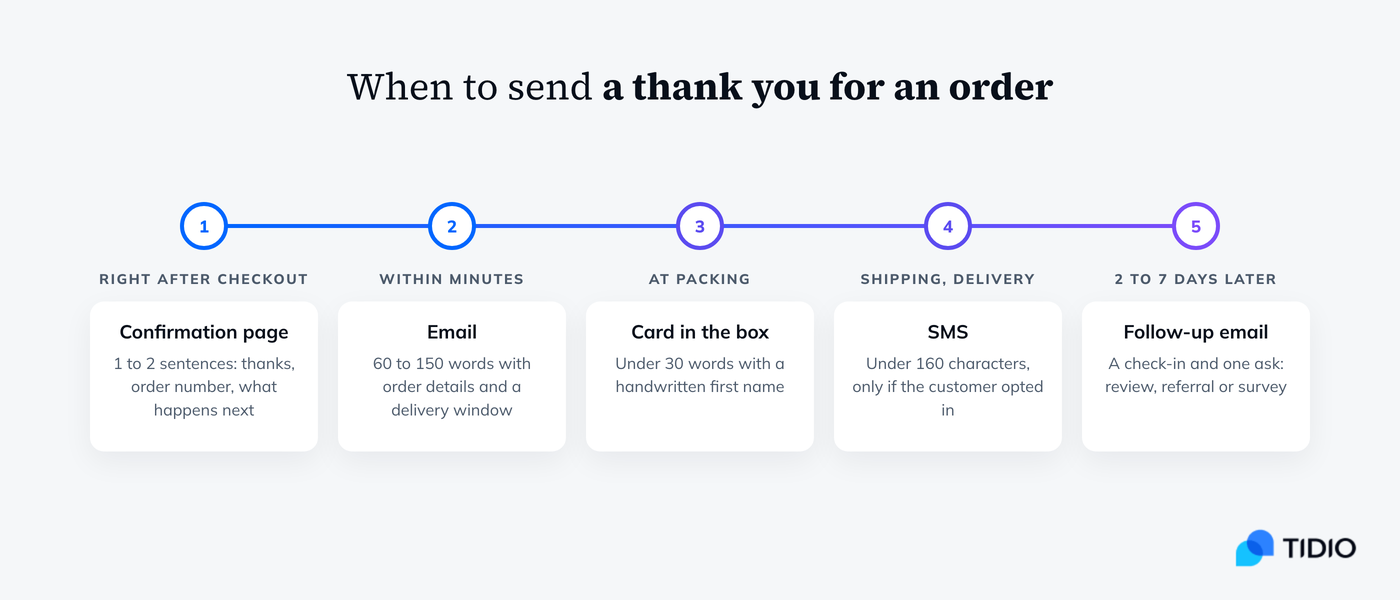
| Channel | When to send | Length | What it must include |
|---|---|---|---|
| Order confirmation page | Right after checkout | 1 to 2 sentences | Thanks, order number, what happens next |
| Within minutes of the order | 60 to 150 words | Thanks, order details, delivery window, a reply-to contact | |
| SMS | At order, shipping or delivery, if the customer opted in | Under 160 characters | Business name first, one link, a way to reply or opt out |
| Live chat | At the end of a conversation that led to an order | 1 to 3 sentences | Thanks, confirmation that the order went through |
| Card in the box | At packing | Under 30 words | A handwritten first name |
| Follow-up email | 2 to 7 days after delivery | 50 to 120 words | Check-in, one ask (review, referral or survey) |
| B2B email | Same working day as the PO | 80 to 150 words | PO number, items, price, ship date |
How to write a thank you message for a purchase
- Name the product. “Enjoy your new walking boots” shows a person looked at the order.
- Thank first, sell later. Discounts and review requests can wait for the delivery email.
- Answer the next question. Say when it arrives and who to ask.
- Skip “we appreciate your business” with consumers. It reads like an invoice footer; “Thanks for shopping with us” is warmer. In B2B it’s the normal sign-off.
- Sign with a name. Even an automated email can come from “[Your name] at [Company]” and go to a reply-to address someone reads.
- Keep it short. A card under 30 words, an SMS under 160 characters, an email you read in 20 seconds.
- Match your brand voice. A skate shop and a law firm shouldn’t send the same thanks. Positive scripting helps soften a policy line.
- Don’t overpromise. Only write a delivery window you can meet and a code that works.
More on keeping customers after the first order: our guide to customer retention.
How to automate thank you messages with Tidio
Keep your order emails in your store platform. Tidio covers what they don’t: live chat and the questions that come after an order.
- Save your chat thank yous as macros. In your Tidio panel, go to Settings > Macros and create one for each line you use, such as “order-thanks” or “booking-thanks”. While replying, type / in the reply box, pick the macro, fill in the brackets and send. Macros work in live chat and in ticket replies, and they’re included from the Growth plan up.
- Thank shoppers automatically when a chat ends. In Flows, the “Agent marks conversation as solved” trigger starts a Flow when an agent closes a conversation. Use it to send a short thank you and a one-question survey.
- Greet buyers on a specific page. The “Visitor opens a specific page” trigger starts a Flow on any URL you set, for example a post-purchase page where your chat widget is installed. Use it for a thank you and a link to your returns or FAQ page.
- Let Lyro answer “where is my order?” If you run on Shopify, Lyro AI Agent’s Get order status from Shopify action asks the shopper for their email and order ID and replies in chat with payment status, fulfillment, purchased items and tracking details from your store.
Connecting your store takes a few minutes with the Tidio Shopify integration, which also shows each customer’s order history next to the chat. For more ideas for the first message a new visitor sees, see these welcome message examples.
FAQ
Keep it to one or two sentences with the customer’s name and the product: “Thank you for your order, [Customer name]. Your [product] ships [timeframe].” Add the order number and a way to contact you, and you have a complete thank you message.
Thank the customer by first name and mention what they bought. Then add one personal touch, like who packed it or a care tip. Keep it under 30 words. For example: “Thanks for choosing the linen tote, [Customer name]. Packed with care by [Your name].”
No, but it sounds formal. In B2B emails and invoices it’s standard. In consumer messages, “Thanks for shopping with us” or “Thanks for choosing us” reads warmer and says the same thing.
Reply the same working day. Thank the customer in one line, then confirm the PO number, items and quantities, total price and payment terms, ship date and delivery address. Ask them to flag any change by a set date. The B2B templates above follow this structure.
Send the first one within minutes, as part of the order confirmation. Send a second, shorter one two to seven days after delivery to check that everything arrived well, and put any review or referral request in that one.
Set up thank you messages and order status replies in Tidio
