



Something went wrong and the customer noticed. Now you have to write to them. These are 30 sample apology letters you can send today, one for each situation a support team or business owner runs into: bad service, a mistake, a late or wrong order, a billing error, an outage, and letters to B2B clients. Each sample is a complete business apology letter to a customer with a subject line and sign-off. Copy one and replace the words in [brackets]. Read it once as the customer would, then send.
Key takeaways
- Apologize for the specific thing that happened. “We charged you twice on 3 September” beats “we’re sorry for any inconvenience.”
- Put the fix in the same message as the apology, with a date or a time.
- Skip “if” and “but.” “We’re sorry if you were upset” reads as blame.
- Offer compensation when the mistake cost the customer money or real time. A small slip only needs a fix.
- Send it the same day, from a named person, with a way to reply to that person.
Answer every complaint from one inbox with Tidio Help Desk
Jump to a scenario:
- Bad service and bad experiences (1 to 6)
- Mistakes and errors (7 to 12)
- Orders, delivery and billing (13 to 18)
- Sample apology letters to clients (19 to 23)
- Mass apology letters for outages and security incidents (24 to 27)
- Follow-up and escalation (28 to 30)
- Short apology messages for live chat and SMS
- Apology email subject lines
What is a customer apology letter?
A customer apology letter is a message from a business to a customer that names a specific failure, takes responsibility for it, says what has been done to fix it, and gives the customer a way to respond. It goes out by email in most cases, and as a printed or PDF letter when the situation is formal.
“Apology letter” and “apology email” mean the same thing in customer service. The difference is the wrapper. A letter adds a date, an address block and a formal greeting, which suits a B2B client, a legal or financial matter, or a customer who complained in writing. An email drops all of that and gets to the point. Every sample below is written as an email; sample 1 shows the full letter layout, and you can put that header on any of the others.
An apology is one step in handling a customer complaint. It works when the rest of the response (the fix, the follow-up) is already in motion.
How to use these samples
Each sample is a single block you can copy whole. The words in square brackets are the only parts you must change.
| Placeholder | What goes in it |
|---|---|
| [Customer name] | First name for email, full name and title for a formal letter |
| [Company] | Your business name as the customer knows it |
| [order number], [ticket number] | The reference the customer can look up |
| [issue] | What went wrong, in one plain phrase: “a double charge on your card” |
| [date], [timeframe] | A real date or window, e.g. “by Friday, 12 September” or “within 2 business days” |
| [fix] | What you’ve already done, in past tense where you can |
| [compensation] | Refund, credit, discount code, free shipping, a free month |
| [Your name], [Your role] | A real person the customer can reply to |
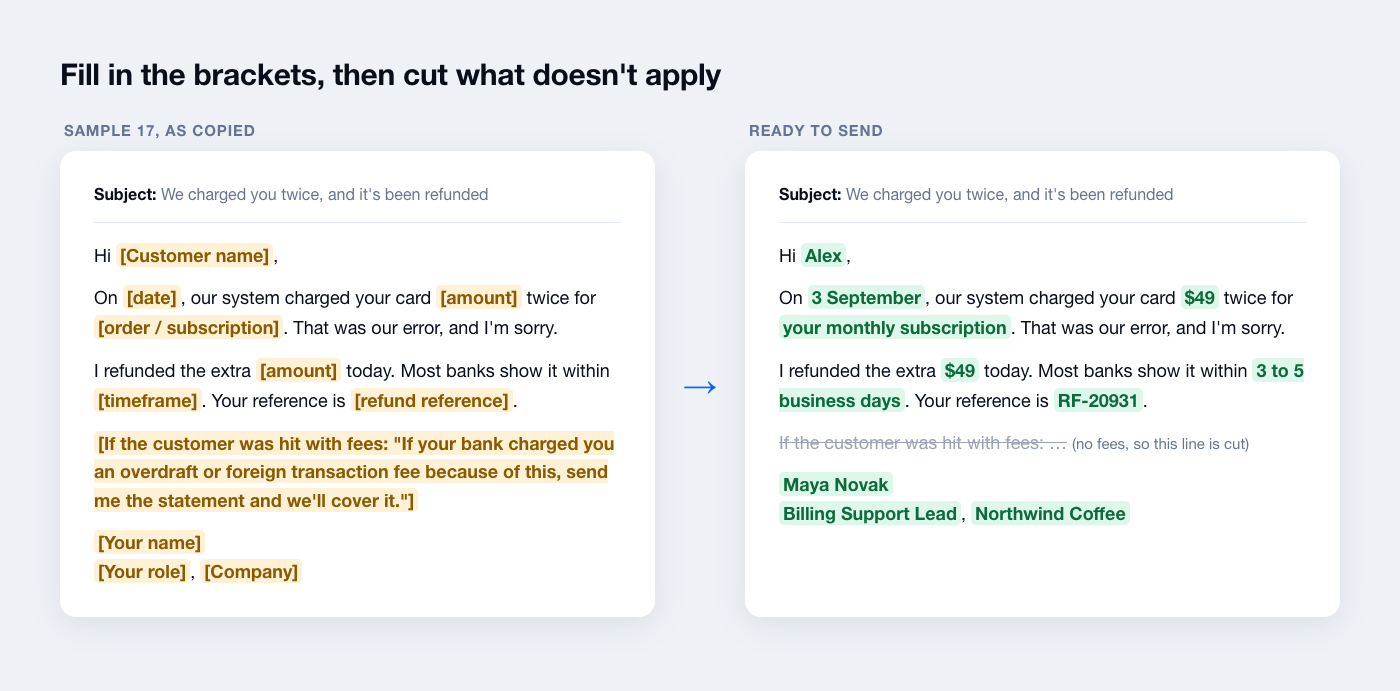
Before you send, look past the brackets too. Cut any sentence that doesn’t fit what happened. Make the fix concrete, with an amount, a date or a tracking link. And read the first line aloud; if it could open any apology from any company, rewrite it.
Don’t use a template when the customer is threatening legal action, when a regulator requires specific wording (data breaches, recalls), or when the same customer has already had one of these. Write those from scratch, with a manager or legal counsel reading it first.
Apology letters for bad service and bad experiences
Bad service is the hardest apology to write because nothing was shipped wrong or charged twice: a person let the customer down. Name the moment it went wrong and say what you’ve done about the person or the process. Then give the customer a direct line to someone senior. For live situations, pair these with the tactics in how to deal with angry customers.
1. Formal apology letter for bad customer service (printable)
Use this layout when the customer wrote a formal complaint, when the client is a business, or when you’ll send it as a signed PDF.
| [Company] [Company address] [Phone] ¬∑ [Email] [Date] [Customer full name] [Customer address] Re: Your complaint of [date], reference [ticket number] Dear [Customer name], Thank you for writing to us about your experience on [date]. You were [issue, e.g. “transferred four times and then disconnected”], and that is not the service you should get from us. I’m sorry. I’ve reviewed your case with the team involved. [Fix, e.g. “Your replacement has been approved and will ship on 14 September.”] We’ve also [process change, e.g. “changed how calls are transferred so a caller always stays with one agent”]. As an apology, [compensation]. You don’t need to do anything to receive it. If you’d like to talk this through, you can reach me directly at [direct phone] or [direct email]. Sincerely, [Signature] [Your name] [Your role], [Company] |
Customize it: keep the reference line.
2. Apology email to a customer for a bad experience
Send this when the customer’s whole experience went badly and no single mistake explains it: slow replies, a confusing process, being passed around.
Subject: I’m sorry your experience with us went this way
| Hi [Customer name], I read through your conversations with us from the past [timeframe]. You asked the same question three times, waited [time] for an answer, and still didn’t get what you needed. That’s a bad experience, and I’m sorry. Here’s what I’ve done: [fix]. From now on, your case stays with me, so you won’t have to explain it again. I’ve also added [compensation] to your account for the time this cost you. Reply to this email and it comes straight to me. [Your name] [Your role], [Company] |
Customize it: replace “three times” and “[time]” with the real numbers from the conversation history.
3. Apology letter to a customer for rude behavior by an agent
Use this after a customer complains about how they were treated, not about what went wrong with the product.
Subject: About your conversation with our team on [date]
| Hi [Customer name], I’ve read your chat with our team from [date]. The way you were spoken to was dismissive, and you deserved patience and a real answer. I’m sorry. I’ve talked with the team member and their manager, and we’re going through that conversation together as part of our training this week. Your original question was about [issue]. The answer is [answer or fix]. If anything is still unresolved, reply here and I’ll sort it out personally. [Your name] [Your role], [Company] |
Customize it: always answer the original question in this letter.
4. Apology for a slow response or late reply
Send this when a customer waited far longer than your usual reply time.
Subject: Your question about [issue], and an apology for the wait
| Hi [Customer name], You wrote to us on [date], and we’re only replying now. I’m sorry you had to wait [timeframe] for this. To your question: [answer]. [Next step, e.g. “I’ve already changed the delivery address on order [order number].”] The delay was on our side: [short reason, e.g. “a backlog after our holiday sale”]. We’ve [fix, e.g. “added weekend cover”] so replies go out within [timeframe] again. If there’s anything else, reply here and I’ll answer the same day. [Your name] [Your role], [Company] |
Customize it: only promise a reply time you can keep.
5. Apology to an angry customer after a complaint
Use this for a customer who is upset and has said so in strong terms.
Subject: You’re right to be frustrated, and here’s what happens next
| Hi [Customer name], Thank you for telling us plainly what went wrong. You [issue], and after that you had to chase us for an answer. I understand why you’re angry, and I’m sorry. Here’s where things stand: ‚Ä¢ [Action 1, e.g. “Your refund of $84.50 was issued today.”] ‚Ä¢ [Action 2, e.g. “Your account has been flagged so the next reply comes from me.”] ‚Ä¢ [Action 3, e.g. “I’ve asked our warehouse team to check every order packed that day.”] I’d like to make sure this is fully resolved for you. I’ll check in on [date], or you can reply any time before then. [Your name] [Your role], [Company] |
Customize it: a list works well here.
6. “Sorry for the inconvenience” email that doesn’t sound generic
“Sorry for the inconvenience” says nothing about what went wrong. When the problem really was minor, keep it short, but name the inconvenience instead of saying the word.
Subject: Sorry for the mix-up with [issue]
| Hi [Customer name], Sorry about [specific inconvenience, e.g. “the login link that expired before you could use it”]. That’s an annoying thing to hit when you’re in the middle of something. [Fix, e.g. “Here’s a new link that stays active for 24 hours: [link].”] If it gives you any more trouble, just reply and I’ll set it up for you. [Your name], [Company] |
Customize it: no compensation here.
Apology letters for mistakes and errors
A business apology letter for a mistake has one job the others don’t: correct the record. Say what was wrong and give the right information in the same message. Tell the customer whether they need to do anything. If a customer acted on the wrong information, fix what it cost them as well.
7. Apology letter to a customer for a mistake
This is the general-purpose version. Use it when your business made an error the customer noticed and it doesn’t fit any of the more specific samples below.
Subject: We made a mistake with [issue], and it’s fixed
| Hi [Customer name], On [date], we [mistake, e.g. “applied the wrong discount to your order”]. That was our error, and I’m sorry for the trouble it caused. We’ve already [fix, e.g. “refunded the $12 difference to your card”]. You’ll see it within [timeframe]. You don’t need to do anything else. To stop this happening again, we’ve [process change]. Thanks for your patience while we sorted it out. If anything still looks wrong, reply here. [Your name] [Your role], [Company] |
Customize it: write “we’ve already” only if it’s done.
8. Apology for giving a customer wrong information
Use this when an agent, a help article or your website told the customer something that wasn’t true.
Subject: A correction to what we told you about [topic]
| Hi [Customer name], When you asked about [topic] on [date], we told you [wrong information]. That was wrong, and I’m sorry. The correct answer is [right information]. If you’ve already [action they may have taken, e.g. “returned the item using the old label”], don’t worry. I’ve [fix, e.g. “made sure your return will still be processed”]. We’ve also updated [help article / page / internal note] so nobody else gets the same wrong answer. [Your name] [Your role], [Company] |
Customize it: if the wrong answer cost the customer money, add compensation for the full amount, not a token discount.
9. Apology for an email sent by mistake
Use this after a marketing email or notification went to the wrong list, went out twice, or had a broken link or wrong offer.
Subject: Please ignore our earlier email
| Hi [Customer name], Earlier today we sent you an email about [topic] that wasn’t meant for you. [If relevant: “The offer in it isn’t valid for your account.”] Sorry for the confusion. You don’t need to do anything. [If relevant: “If you already used the code, your order will go through at that price.”] [Your name], [Company] |
Customize it: decide before you send whether you’ll honor a wrong offer.
10. Apology for a technical issue
Use this when a bug, crash or broken feature affected one customer or a small group.
Subject: The problem with [feature] is fixed
| Hi [Customer name], Between [time] and [time] on [date], [feature] wasn’t working for your account: [what the customer saw, e.g. “saved changes weren’t being stored”]. I’m sorry for the lost time. The cause was [plain reason, e.g. “an update we released that morning”]. We’ve rolled it back, and everything is working again. [If data was affected: “We’ve restored your changes from [time]; please check [page] to confirm.”] If you still see the problem, reply with a screenshot and I’ll look at it right away. [Your name] [Your role], [Company] |
Customize it: if you can’t confirm the customer’s data is intact, say what you know and when you’ll know more.
11. Apology for a canceled or missed appointment
Use this when you canceled on a customer, didn’t show up, or double-booked their slot.
Subject: Sorry we missed your appointment on [date]
| Hi [Customer name], You had an appointment with us on [date] at [time], and we [missed it / canceled at the last minute]. I’m sorry. You made time for it, and we didn’t keep our side. I’ve held two new slots for you: [option 1] or [option 2]. Reply with the one that works, or pick any other time here: [booking link]. [Compensation, e.g. “Your next session is free.”] [Your name] [Your role], [Company] |
Customize it: holding specific slots works better than a generic “let us know when suits you.”
12. Apology for a pricing error on your website
Use this when a product was listed at the wrong price and you have to cancel or adjust orders.
Subject: About the price of [product] on your order [order number]
| Hi [Customer name], On [date], [product] was listed on our site at [wrong price] instead of [correct price]. That was our error, and I’m sorry for the confusion it’s caused. [Option A, honoring it: “Your order stands at the price you paid. It ships on [date].”] [Option B, not honoring it: “We’ve canceled the order and refunded the full [amount] to your card. If you’d still like it, here’s [discount] off the correct price: [code].”] [Your name] [Your role], [Company] |
Customize it: delete the option you don’t use.
Order, delivery and billing apology letters
These are the apologies an e-commerce store writes most often. The customer wants to know where the order or the money is and when it will arrive. Tell them that, and whether they need to do anything, before any apology language runs long. Clear rules in your e-commerce return policy make most of these letters shorter.
Tip: with Tidio’s Shopify integration, agents can see a customer’s order history without leaving the inbox, so they can check the order number and status before writing a single line of the apology.
13. Apology for a late or delayed delivery
Send this as soon as you know an order will be late, ideally before the customer asks.
Subject: Your order [order number] is running late
| Hi [Customer name], Your order was due to arrive on [original date], and it’s going to be late. I’m sorry. I know you may have planned around that date. The new delivery date is [new date]. You can follow it here: [tracking link]. The delay is [short reason, e.g. “a backlog at our shipping partner’s hub”]. To make up for the wait, [compensation, e.g. “we’ve refunded your shipping cost”]. If the new date doesn’t work for you, reply and I’ll cancel the order with a full refund. [Your name], [Company] |
Customize it: always offer the cancel option.
14. Apology for sending the wrong item
Use this when the customer received something other than what they ordered.
Subject: We sent you the wrong item, and the right one is on its way
| Hi [Customer name], You ordered [correct item] and we sent you [wrong item]. That’s our mistake, and I’m sorry. The right item shipped today by [shipping method] and should arrive by [date]. Tracking: [link]. [Option A: “Please keep the other item, no need to send it back.”] [Option B: “Here’s a prepaid return label for the other item: [link]. There’s no rush.”] [Your name], [Company] |
Customize it: for low-value items, “keep it” costs less than return shipping and ends the conversation on a good note.
15. Apology for a damaged or defective product
Use this when a product arrived broken or stopped working early. Don’t ask the customer to prove it at length; a photo is enough.
Subject: Sorry your [product] arrived damaged
| Hi [Customer name], Thank you for the photos. Your [product] clearly arrived [damaged / not working], and I’m sorry. That’s not what you paid for. You can choose what happens next: ‚Ä¢ A replacement, shipped today, arriving by [date] ‚Ä¢ A full refund of [amount] to your original payment method Just reply with “replacement” or “refund.” Either way, you don’t need to send the damaged one back. [Your name], [Company] |
Customize it: giving the customer the choice is part of the apology.
16. Apology for an out-of-stock item after the order was placed
Use this when a customer paid for something you can’t ship. Give them options and a default, so the order doesn’t sit in limbo.
Subject: An item in your order [order number] is out of stock
| Hi [Customer name], I’m sorry: [product] from your order sold out before we could ship it. Our stock count was wrong, and you should have seen that before you paid. Your options: ‚Ä¢ Wait for the restock on [date], and we’ll ship it the same day ‚Ä¢ Swap it for [similar product] at no extra cost ‚Ä¢ Get a full refund of [amount] for that item If I don’t hear from you by [date], we’ll refund it so your money isn’t held up. The rest of your order ships today. [Your name], [Company] |
Customize it: set the default to the refund.
17. Apology for a billing error or double charge
Use this for a duplicate charge, a charge after cancellation, or the wrong amount.
Subject: We charged you twice, and it’s been refunded
| Hi [Customer name], On [date], our system charged your card [amount] twice for [order / subscription]. That was our error, and I’m sorry. I refunded the extra [amount] today. Most banks show it within [timeframe, e.g. “3 to 5 business days”]. Your reference is [refund reference]. [If the customer was hit with fees: “If your bank charged you an overdraft or foreign transaction fee because of this, send me the statement and we’ll cover it.”] [Your name] [Your role], [Company] |
Customize it: covering bank fees caused by your error is rare, and customers remember it.
18. Apology for a delayed refund or return
Use this when a customer has been waiting for a refund longer than your policy says.
Subject: Your refund for order [order number]
| Hi [Customer name], Your return reached us on [date], and your refund should have gone out within [policy timeframe]. It didn’t, and I’m sorry you had to chase it. I’ve processed it now: [amount] back to your [payment method], reference [refund reference]. It usually appears within [timeframe]. [Compensation, e.g. “I’ve also added a [amount] credit to your account for the wait.”] [Your name], [Company] |
Customize it: if the refund is still not processed, don’t send this.
Sample apology letters to clients
A professional apology email to a client is different from one to a customer. The relationship is ongoing, often contractual, and the person reading it may have to explain the problem to their own boss. Write so they can forward it: clear on what happened, clear on the impact, and clear on what changes. Send it from the account owner.
19. Sample apology letter to a client for a missed deadline
Use this when you missed a delivery date you committed to. Give the new date, and say what you’re doing to protect it.
Subject: [Project name]: missed deadline and the new delivery date
| Hi [Client name], We committed to delivering [deliverable] by [original date], and we missed it. I’m sorry. I know your team planned [their dependent work] around that date. What happened: [short, honest reason, e.g. “we underestimated the data migration and caught it too late”]. The new delivery date is [new date]. To make sure we hit it, [safeguard, e.g. “two more people have joined the project, and I’ll send you a progress update every Tuesday and Thursday”]. [If appropriate: “We won’t bill the hours for this phase that went past the original estimate.”] I’m happy to get on a call with you or your team this week to talk through the impact. [Your name] [Your role], [Company] |
Customize it: don’t offer a new date you aren’t sure of.
20. Apology letter to a client for a mistake in their work
Use this when something you delivered contained an error: a report with wrong figures, a campaign sent with a typo, a configuration that broke something on their side.
Subject: An error in [deliverable], and how we’ve corrected it
| Hi [Client name], In the [deliverable] we sent on [date], [error, e.g. “the Q3 revenue figures were pulled from the wrong date range”]. That’s our mistake, and I’m sorry. The corrected version is attached. The changes are on [pages / sections], and they affect [what it changes for the client]. If you’ve already shared the original, I can write a short correction note for you to forward. We’ve added [check, e.g. “a second-person review on every figure before delivery”] so this doesn’t happen again. [Your name] [Your role], [Company] |
Customize it: offering to write the correction note for them saves the client an awkward email to their own stakeholders.
21. Apology email to a client for technical issues
Use this when an outage, bug or integration failure on your side affected a client’s operations.
Subject: [Date] service issue: what happened and what it meant for your account
| Hi [Client name], On [date], between [start time] and [end time], [service] was [down / degraded] for your account. I’m sorry for the disruption to your team. What your team would have seen: [e.g. “orders placed in that window weren’t syncing to your warehouse system”]. Cause: [plain explanation]. Impact on your data: [e.g. “all 214 orders have now synced; nothing was lost”]. Prevention: [what’s changed]. Under our agreement, this qualifies for [service credit]. It will appear on your next invoice. I’ll send the full incident report by [date]. If you’d like to go through it together, I’ll set up a call. [Your name] [Your role], [Company] |
Customize it: check the contract before you mention service credits.
22. Apology to a client for an invoicing error
Use this when you overbilled, underbilled or sent an invoice with the wrong details.
Subject: Corrected invoice [invoice number]
| Hi [Client name], The invoice we sent on [date] was wrong: [error, e.g. “it billed 40 hours instead of 32”]. I’m sorry for the extra work this puts on your finance team. The corrected invoice is attached, for [correct amount]. [If they already paid: “We’ve refunded the [amount] difference to your account today.”] Please discard the original. If your team needs a credit note for their records, I can send one. [Your name] [Your role], [Company] |
Customize it: if you underbilled, say so plainly and let the client know the new amount before the next payment cycle.
23. Apology to a client for poor communication
Use this when a client’s emails went unanswered, their account manager left without a handover, or they found out about a change from someone else.
Subject: Sorry for going quiet on you
| Hi [Client name], You’ve written to us [number] times since [date] without a proper answer. That’s not how we should treat a client, and I’m sorry. I’m taking over your account from today. Here are the answers to your open questions: From now on, you’ll hear from me every [frequency], even when there’s nothing new. My direct line is [phone]. [Your name] [Your role], [Company] |
Customize it: answer every open question in this email.
Mass apology letters for outages and security incidents
A mass apology goes to hundreds or thousands of customers at once, so it can’t be personal, but it can be specific. Say exactly when it happened and what customers would have seen. Then say whether anyone needs to act. Post the same message on your status page or site so the email isn’t the only place people can find it.
Tip: in Tidio, you can set up a Flow that sends a short outage message to visitors when they first visit your site or open a page you choose, so the chat queue doesn’t fill with the same question.
24. Mass apology email when your site or server goes down
Send this after the service is back, not during the outage (use your status page for live updates).
Subject: What happened with [service] on [date]
| Hi [Customer name], On [date], from [start time] to [end time] [time zone], [service] was unavailable. If you tried to [action] during that time, it would have [what they saw]. We’re sorry for the disruption. What happened: [plain cause]. What we’ve fixed: [fix]. What we’re changing: [prevention]. [If data or payments were affected: “No data was lost, and no payments were charged twice.”] [Compensation, if any, e.g. “We’ve added one day of service to your account automatically.”] The full incident report is at [status page link]. Questions? Reply to this email and our team will answer. [Your name] [Your role], [Company] |
Customize it: state what was not affected (data, payments, security).
25. Mass apology for a checkout or website outage during a sale
Use this for an e-commerce store whose site or checkout went down during a promotion.
Subject: Our sale checkout broke, so we’re extending the sale
| Hi [Customer name], On [date], our checkout stopped working for about [duration] in the middle of our [sale name]. If you tried to order and couldn’t, I’m sorry. That’s frustrating, especially with a deal on the line. Everything is working now, and we’ve extended the sale until [new end date]. Your [discount] still applies automatically at checkout. If you were charged for an order that didn’t go through, reply with your email address and we’ll find it and refund it today. [Your name], [Company] |
Customize it: mention the charge-without-order case even if you haven’t seen one.
26. Apology letter for a data breach or security incident
This one is a notification first and an apology second. The facts customers need come before anything else. All 50 US states have security breach notification laws that set who you must notify, what the notice says and how fast it goes out, so have legal counsel review it. The FTC’s data breach response guide for business lists what a notice should cover and includes a model letter.
Subject: Security notice: your [Company] account information
| Hi [Customer name], On [date], we learned that [what happened, e.g. “an unauthorized person accessed a database containing customer contact details”]. We’re writing to tell you what this means for you, and we’re sorry that it happened. What information was involved: [exact data types, e.g. “your name, email address and order history. Payment card details were not involved.”] What we’ve done: [e.g. “closed the access point, reset all account passwords, and reported the incident to law enforcement”]. What you should do: [specific steps, e.g. “set a new password at [link] and watch for emails pretending to be from us”]. What we’re offering: [e.g. “12 months of free credit monitoring; enroll at [link] with code [code]”]. We’ll update you at [page link] as we learn more. For questions, contact [dedicated email or phone line]. [Your name] [Your role], [Company] |
Customize it: say exactly which data was not involved as well as which was.
27. Mass apology for a shipping backlog
Use this when many orders are late at once: a carrier strike, a warehouse move, a sale that outran your packing capacity.
Subject: Your order is delayed, and here’s the new timeline
| Hi [Customer name], Orders placed between [date] and [date], including yours, are shipping later than we promised. I’m sorry. [Short reason, e.g. “We sold far more than we planned for, and our packing team can’t keep up yet.”] Your order [order number] will ship by [date]. You’ll get a tracking link the day it leaves. For the wait, [compensation, e.g. “we’ve refunded your shipping”]. If you’d rather not wait, reply “cancel” and we’ll refund the full order today. [Your name], [Company] |
Customize it: send a second, shorter email when the order actually ships.
Follow-up and escalation apology letters
Some apologies need a second voice or a second message: a manager stepping in, a founder writing when the failure was big, or a check-in a week later to make sure the fix held. A short follow-up email is often what turns an apology into a kept customer. For how cases reach this stage, see ticket escalation.
28. Apology from a manager for an escalated issue
Use this when a case has gone past the first agent and the customer asked for someone senior.
Subject: I’m taking over your case [ticket number]
| Hi [Customer name], I’m [Your name], and I manage the support team at [Company]. I’ve read your whole case, from your first message on [date] to today. You’ve had to explain [issue] [number] times, and you still don’t have a resolution. I’m sorry. I’m handling it myself from here. [Fix or next step with a date.] You can reach me directly at [direct email]. You won’t have to go through the general inbox again. [Your name] [Your role], [Company] |
Customize it: “I’ve read your whole case” only works if you have.
29. Apology letter from the CEO or founder
Save this for failures that hit many customers hard or went public.
Subject: A personal apology from [Founder name]
| Hi [Customer name], I’m [Founder name], and I [founded / run] [Company]. On [date], [what happened, in one plain sentence]. It affected [who and how], possibly including you. That’s on me, and I’m sorry. Here’s what we’ve done: [fix]. Here’s what we’re changing so it doesn’t happen again: [changes]. I’ll write to you again on [date] to report on those changes, whether the news is good or not. If you want to tell me how this affected you, reply to this email. I read these myself. [Founder name] [Role], [Company] |
Customize it: only write “I read these myself” if you will.
30. Follow-up email after an apology
Send this a few days to two weeks after the original apology to check the fix worked.
Subject: Checking in on [issue]
| Hi [Customer name], I wanted to check that everything is back to normal since [issue] on [date]. [Specific check, e.g. “Did the replacement arrive, and is it working?”] If anything still isn’t right, reply to this email and I’ll pick it up straight away. If it’s all good, no need to reply. Thanks for sticking with us. [Your name], [Company] |
Customize it: if you want feedback, add one question here, not a survey link.
Short apology messages for live chat and SMS
Many apologies never need an email. When the customer is still in the chat, a one- or two-line apology and an immediate fix is faster and lands better. Keep the same rule: say what happened, then what you’re doing. More chat-ready lines are in our live chat scripts.
For a wait in chat
| Sorry for the wait, [Customer name]. I’m looking at your order now and will have an answer in a minute. |
For a small mistake mid-conversation
| My mistake, the price I gave you was for the yearly plan. The monthly price is [price]. Sorry for the mix-up. |
For a misunderstanding
| Sorry, I misunderstood your question. You’re asking about [restated question], right? Here’s the answer: [answer]. |
For a transfer
| Sorry to pass you on. [Colleague name] handles [topic] and already has our conversation, so you won’t need to repeat anything. |
For a fix that didn’t hold
| I’m sorry the earlier fix didn’t work. Let me look at it again from the start. Give me two minutes. |
For a late order (SMS)
| [Company]: Sorry, order [order number] is running late. New delivery date: [date]. Track it: [link]. Reply STOP to opt out. |
For a missed callback (SMS)
| Hi [Customer name], it’s [Your name] from [Company]. Sorry I missed our call at [time]. Can I call you at [time] instead? |
When the customer is upset
| I’m sorry, [Customer name]. That shouldn’t have happened, and I understand why you’re frustrated. Here’s what I can do right now: [option]. |
Tip: save the lines you use every day as macros in Tidio, so agents can type / and drop one into a chat or a ticket reply instead of retyping it. Positive wording matters more in chat than in email; see positive scripting for the phrasing.
Apology email subject lines
The subject line decides whether the apology gets opened. Name the issue and, where you can, the outcome. Avoid “Important update” and “A message from [Company]”, which read like marketing.
- We charged you twice, and it’s been refunded
- Your order [order number] is running late
- We sent the wrong item, and the right one is on its way
- About your conversation with our team on [date]
- A correction to what we told you about [topic]
- Sorry we missed your appointment on [date]
- What happened with [service] on [date]
- Please ignore our earlier email
- Your refund for order [order number]
- [Project name]: missed deadline and the new delivery date
- Security notice: your [Company] account information
- Checking in on [issue]
How to write an apology letter to a customer
If none of the samples fits, write your own with the parts below, in this order. Every letter above follows them. For more on the underlying skill, see customer service skills.
- Apologize without conditions. “I’m sorry” or “We’re sorry.” Never “sorry if” or “sorry that you feel.” Conditions move the blame to the customer.
- Name the specific failure. “Your package went to the wrong address” proves you read the complaint. “Any inconvenience” proves you didn’t.
- Explain the cause in one sentence. Enough to show you understand it. More than that reads as an excuse. Don’t blame the courier, the system or the weather.
- Acknowledge the impact. Say what it cost the customer: time, money, a missed event. This is the line that makes an apology feel human.
- State the fix, with a date or amount. “We’ve refunded $42.10; you’ll see it within 5 business days.” Past tense where you can.
- Add compensation when the failure cost them. Money lost or real time wasted earns a refund, credit or discount. A small slip doesn’t; a coupon for a typo feels like a bribe.
- Give them a way to reach a person. A named sender with a direct reply address or phone number. Most customers won’t use it, but knowing it’s there changes how the letter reads.
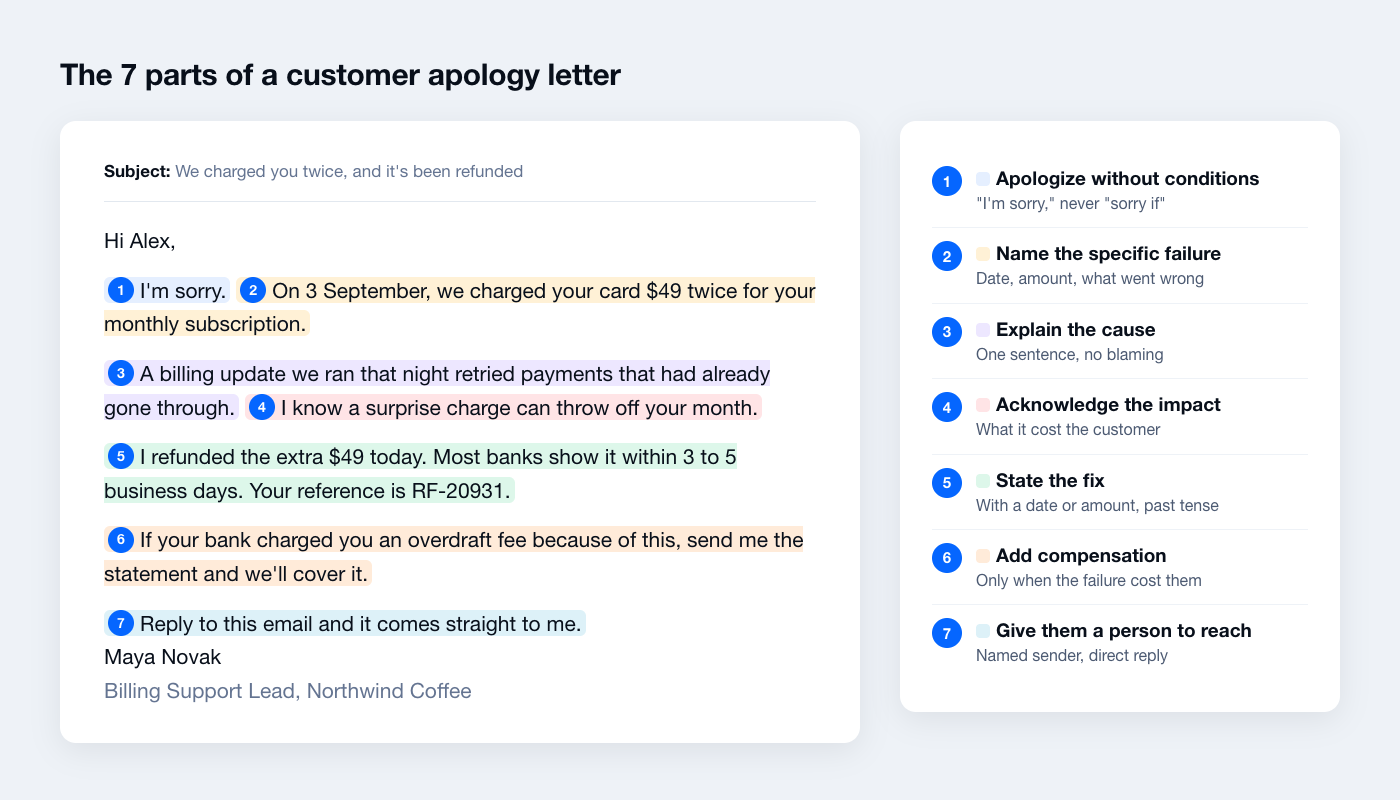
Keep it to 60 to 150 words for most emails; formal letters and B2B incidents can run longer. Send it the same day you confirm the problem. If the fix will take longer, send the apology now with the date the fix will land, rather than waiting until you can say it’s done.
Save these letters as macros in Tidio
If your team sends the same apologies every week, save them where agents reply. In Tidio, macros are ready-made replies that agents can use in live conversations and in Help Desk ticket replies, including email.
- Copy the samples you use most from this page, and replace your company details once so only the per-customer brackets are left.
- In your Tidio panel, go to Settings > Macros and click Create a new macro for each one. Give it a short name agents will search for, like “refund-issued” or “late-order”.
- While replying to a customer, click the Macros icon or type / in the reply box, pick the macro, fill in the brackets and send.
For the repetitive questions that often lead to an apology (where is my order, when is my refund), Lyro, Tidio’s AI agent can answer from your own help content and hand the conversation to a person when it can’t resolve the issue, so fewer customers wait long enough to need an apology at all.
FAQ
Use a letter layout: your company details, the date, the customer’s name and address, a reference line, and “Dear [Customer name].” Then apologize for the specific failure, explain the cause in one sentence, state the fix and any compensation, and give a direct contact. Sign with a name and role. Sample 1 above is a full formal letter you can copy.
Send it from the account owner, not a support inbox, and put the project or issue in the subject line so the client can find and forward it. State what happened, the impact on their work, the fix with a date, and what you’re changing. Offer a call. Samples 19 to 23 are written for clients.
Between 60 and 150 words for most situations. That’s enough for the apology, the cause, the fix and a way to reply. Formal letters, B2B incidents and security notices run longer because they carry more facts. Cut anything that doesn’t help the customer understand what happened or what happens next.
Yes, for the customer’s experience, without taking blame you don’t own. Try: “I’m sorry your delivery is late. The courier has had delays in your area this week. I’ve asked them to prioritize your parcel, and I’ll email you as soon as it moves.” You acknowledge the problem, explain it, and act.
When the mistake cost the customer money or real time: a double charge, a missed event, a broken product, a long outage. Match it to the harm: refund the shipping on a late order, cover bank fees on a double charge. For small slips like a typo or a short wait, a quick fix is the apology.
Only the format. A letter adds a header (company details, date, address block, reference line) and a formal greeting, and suits written complaints, B2B clients and legal or financial matters. An email skips the header and gets to the point. The content, meaning the apology, cause, fix and contact, is the same.
Apologize in real time, while the customer is still on your site, with Tidio Live Chat
